-
QML 如何显示文本?Text可以有多少功能?
1.如何显示文本?
Text {font.pixelSize: 20; text: "这是20普通文字"} //一行即可- 1
以上代码很简单,但有几个要点。
大小
默认width、height都为0。布局的时候,怎么知道Text的宽度。比如两个字和三个字的按钮,宽度是不一样的,不同字号高度不同。可以通过implicitWidth、implicitHeight获取隐含宽高。以此确定组件宽高。
剪切
默认clip是false。也就是说,文本显示可能会超出指定的宽高。下面有代码示例。2. Text有哪些主要功能?
在QML中,Text是最基础的文本显示组件。包含以下几块主要功能。
- 字体基本样式,粗体、斜体、大小、下划线、删除线…
- 字体颜色、剪切、对齐、缩略策略、换行策略
- 富文本支持
2.1 基本属性示例

Text {font.pixelSize: 20; text: "这是20普通文字"} Text {font.pixelSize: 24; color: "blue"; text: "这是24颜色文字"} Text {font.pixelSize: 24;font.italic: true; text: "这是斜体文字"} Text {font.pixelSize: 24;font.underline: true; text: "这是带下划线文字"} Text {font.pixelSize: 24;font.strikeout: true; text: "这是带删除线文字,hello world"} Text {font.pixelSize: 24;font.wordSpacing: 20; text: "词间距10的文字,hello world"}- 1
- 2
- 3
- 4
- 5
- 6
2.2 字重属性

//字重范围1~1000 Text {font.pixelSize: 24;font.family: "微软雅黑";font.weight: 100; text: "字重1000的文字"} Text {font.pixelSize: 24;font.family: "微软雅黑";font.weight: 500; text: "字重500的文字"} Text {font.pixelSize: 24;font.family: "微软雅黑";font.weight: 700; text: "字重700的文字"} Text {font.pixelSize: 24;font.family: "微软雅黑";font.weight: 1000; text: "字重1000的文字"}- 1
- 2
- 3
- 4
- 5
2.3 字体样式
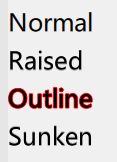
Text { font.pixelSize: 24; text: "Normal" } Text { font.pixelSize: 24; text: "Raised"; style: Text.Raised; styleColor: "#AAAAAA" } Text { font.pixelSize: 24; text: "Outline";style: Text.Outline; styleColor: "red" } Text { font.pixelSize: 24; text: "Sunken"; style: Text.Sunken; styleColor: "#AAAAAA" }- 1
- 2
- 3
- 4
2.4 字体上标下标支持

Text{ font.pixelSize: 24 textFormat: Text.RichText text: "log2x" //上标:sup 下标: sub }- 1
- 2
- 3
- 4
- 5
2.5 富文本

Item{height: 30;width: 30} Text {font.pixelSize: 24; text: "提示:Text可设置不同颜色!"} Text {font.pixelSize: 24; text: "Hello World!"} Text {font.pixelSize: 24; textFormat: Text.RichText; text: "Hello World!"} Text {font.pixelSize: 24; textFormat: Text.PlainText; text: "Hello World!"} Text {font.pixelSize: 24; textFormat: Text.MarkdownText; text: "**Hello** *World!*" }- 1
- 2
- 3
- 4
- 5
- 6
2.6 文字换行 缩略

Text {width: parent.width;text: "未剪切的文本会超出显示,Hello World"; elide: Text.ElideNone } Text {width: parent.width;text: "Hello World"; elide: Text.ElideNone; clip: true } Text {width: parent.width;text: "Hello World"; elide: Text.ElideLeft } Text {width: parent.width;text: "Hello World"; elide: Text.ElideMiddle } Text {width: parent.width;text: "Hello World"; elide: Text.ElideRight } Text {width: parent.width;text: "中文自动换行"; wrapMode: Text.WordWrap } Text {width: parent.width;text: "中文自动换行"; wrapMode: Text.WrapAnywhere } Text {width: parent.width;text: "中文自动换行"; wrapMode: Text.Wrap } Text {width: parent.width;text: "Hello Wrap text test"; wrapMode: Text.WordWrap } Text {width: parent.width;text: "Hello Wrap text test"; wrapMode: Text.WrapAnywhere } Text {width: parent.width;text: "Hello Wrap text test"; wrapMode: Text.Wrap }- 1
- 2
- 3
- 4
- 5
- 6
- 7
- 8
- 9
- 10
- 11
- 12
- 13
-
相关阅读:
c# 输出二进制字符串
nodejs+vue晨拾酒馆管理系统elementui
PHP幸运抽奖系统带后台源码
Wireshark TS | 访问网页失败
软考重点6 数据结构与算法
1.微信APP首页UI结构设计思想viewpager
ADE Explorer和Assembler的仿真技巧
Robust Lane Detection from Continuous Driving
cento常用命令
Cypress 前端 E2E 测试——手把手入门教程
- 原文地址:https://blog.csdn.net/qq_41673920/article/details/128145884