-
Spring Boot 集成 EasyExcel 3.x 优雅实现Excel导入导出
Spring Boot 集成 EasyExcel 3.x
本章节将介绍 Spring Boot 集成 EasyExcel(优雅实现Excel导入导出)。
介绍
EasyExcel 是一个基于 Java 的、快速、简洁、解决大文件内存溢出的 Excel 处理工具。它能让你在不用考虑性能、内存的等因素的情况下,快速完成 Excel 的读、写等功能。
EasyExcel文档地址:https://easyexcel.opensource.alibaba.com/
快速开始
引入依赖
<dependency> <groupId>com.alibabagroupId> <artifactId>easyexcelartifactId> <version>3.1.3version> dependency>- 1
- 2
- 3
- 4
- 5
简单导出
以导出用户信息为例,接下来手把手教大家如何使用EasyExcel实现导出功能!
定义实体类
在EasyExcel中,以面向对象思想来实现导入导出,无论是导入数据还是导出数据都可以想象成具体某个对象的集合,所以为了实现导出用户信息功能,首先创建一个用户对象
UserDO实体类,用于封装用户信息:/** * 用户信息 * * @author william@StarImmortal */ @Data public class UserDO { @ExcelProperty("用户编号") @ColumnWidth(20) private Long id; @ExcelProperty("用户名") @ColumnWidth(20) private String username; @ExcelIgnore private String password; @ExcelProperty("昵称") @ColumnWidth(20) private String nickname; @ExcelProperty("生日") @ColumnWidth(20) @DateTimeFormat("yyyy-MM-dd") private Date birthday; @ExcelProperty("手机号") @ColumnWidth(20) private String phone; @ExcelProperty("身高(米)") @NumberFormat("#.##") @ColumnWidth(20) private Double height; @ExcelProperty(value = "性别", converter = GenderConverter.class) @ColumnWidth(10) private Integer gender; }- 1
- 2
- 3
- 4
- 5
- 6
- 7
- 8
- 9
- 10
- 11
- 12
- 13
- 14
- 15
- 16
- 17
- 18
- 19
- 20
- 21
- 22
- 23
- 24
- 25
- 26
- 27
- 28
- 29
- 30
- 31
- 32
- 33
- 34
- 35
- 36
- 37
- 38
- 39
- 40
上面代码中类属性上使用了EasyExcel核心注解:
- @ExcelProperty:核心注解,
value属性可用来设置表头名称,converter属性可以用来设置类型转换器; - @ColumnWidth:用于设置表格列的宽度;
- @DateTimeFormat:用于设置日期转换格式;
- @NumberFormat:用于设置数字转换格式。
自定义转换器
在EasyExcel中,如果想实现枚举类型到字符串类型转换(例如
gender属性:1 -> 男,2 -> 女),需实现Converter接口来自定义转换器,下面为自定义GenderConverter性别转换器代码实现:/** * Excel 性别转换器 * * @author william@StarImmortal */ public class GenderConverter implements Converter<Integer> { @Override public Class<?> supportJavaTypeKey() { return Integer.class; } @Override public CellDataTypeEnum supportExcelTypeKey() { return CellDataTypeEnum.STRING; } @Override public Integer convertToJavaData(ReadConverterContext<?> context) { return GenderEnum.convert(context.getReadCellData().getStringValue()).getValue(); } @Override public WriteCellData<?> convertToExcelData(WriteConverterContext<Integer> context) { return new WriteCellData<>(GenderEnum.convert(context.getValue()).getDescription()); } }- 1
- 2
- 3
- 4
- 5
- 6
- 7
- 8
- 9
- 10
- 11
- 12
- 13
- 14
- 15
- 16
- 17
- 18
- 19
- 20
- 21
- 22
- 23
- 24
- 25
- 26
/** * 性别枚举 * * @author william@StarImmortal */ @Getter @AllArgsConstructor public enum GenderEnum { /** * 未知 */ UNKNOWN(0, "未知"), /** * 男性 */ MALE(1, "男性"), /** * 女性 */ FEMALE(2, "女性"); private final Integer value; @JsonFormat private final String description; public static GenderEnum convert(Integer value) { return Stream.of(values()) .filter(bean -> bean.value.equals(value)) .findAny() .orElse(UNKNOWN); } public static GenderEnum convert(String description) { return Stream.of(values()) .filter(bean -> bean.description.equals(description)) .findAny() .orElse(UNKNOWN); } }- 1
- 2
- 3
- 4
- 5
- 6
- 7
- 8
- 9
- 10
- 11
- 12
- 13
- 14
- 15
- 16
- 17
- 18
- 19
- 20
- 21
- 22
- 23
- 24
- 25
- 26
- 27
- 28
- 29
- 30
- 31
- 32
- 33
- 34
- 35
- 36
- 37
- 38
- 39
- 40
- 41
- 42
- 43
定义接口
/** * EasyExcel导入导出 * * @author william@StarImmortal */ @RestController @RequestMapping("/excel") public class ExcelController { @GetMapping("/export/user") public void exportUserExcel(HttpServletResponse response) { try { this.setExcelResponseProp(response, "用户列表"); List<UserDO> userList = this.getUserList(); EasyExcel.write(response.getOutputStream()) .head(UserDO.class) .excelType(ExcelTypeEnum.XLSX) .sheet("用户列表") .doWrite(userList); } catch (IOException e) { throw new RuntimeException(e); } } /** * 设置响应结果 * * @param response 响应结果对象 * @param rawFileName 文件名 * @throws UnsupportedEncodingException 不支持编码异常 */ private void setExcelResponseProp(HttpServletResponse response, String rawFileName) throws UnsupportedEncodingException { response.setContentType("application/vnd.openxmlformats-officedocument.spreadsheetml.sheet"); response.setCharacterEncoding("utf-8"); String fileName = URLEncoder.encode(rawFileName, "UTF-8").replaceAll("\+", "%20"); response.setHeader("Content-disposition", "attachment;filename*=utf-8''" + fileName + ".xlsx"); } /** * 读取用户列表数据 * * @return 用户列表数据 * @throws IOException IO异常 */ private List<UserDO> getUserList() throws IOException { ObjectMapper objectMapper = new ObjectMapper(); ClassPathResource classPathResource = new ClassPathResource("mock/users.json"); InputStream inputStream = classPathResource.getInputStream(); return objectMapper.readValue(inputStream, new TypeReference<List<UserDO>>() { }); } }- 1
- 2
- 3
- 4
- 5
- 6
- 7
- 8
- 9
- 10
- 11
- 12
- 13
- 14
- 15
- 16
- 17
- 18
- 19
- 20
- 21
- 22
- 23
- 24
- 25
- 26
- 27
- 28
- 29
- 30
- 31
- 32
- 33
- 34
- 35
- 36
- 37
- 38
- 39
- 40
- 41
- 42
- 43
- 44
- 45
- 46
- 47
- 48
- 49
- 50
- 51
- 52
测试接口
运行项目,通过
Postman或者Apifox工具来进行接口测试注意:在
Apifox中访问接口后无法直接下载,需要点击返回结果中的下载图标才行,点击之后方可对Excel文件进行保存。接口地址:http://localhost:8080/excel/export/user


复杂导出
由于 EasyPoi 支持嵌套对象导出,直接使用内置
@ExcelCollection注解即可实现,遗憾的是 EasyExcel 不支持一对多导出,只能自行实现,通过此issues了解到,项目维护者建议通过自定义合并策略方式来实现一对多导出。
解决思路:只需把
订单主键相同的列中需要合并的列给合并了,就可以实现这种一对多嵌套信息的导出自定义注解
创建一个自定义注解,用于标记哪些属性需要合并单元格,哪个属性是主键:
/** * 用于判断是否需要合并以及合并的主键 * * @author william@StarImmortal */ @Target({ElementType.FIELD}) @Retention(RetentionPolicy.RUNTIME) @Documented public @interface ExcelMerge { /** * 是否合并单元格 * * @return true || false */ boolean merge() default true; /** * 是否为主键(即该字段相同的行合并) * * @return true || false */ boolean isPrimaryKey() default false; }- 1
- 2
- 3
- 4
- 5
- 6
- 7
- 8
- 9
- 10
- 11
- 12
- 13
- 14
- 15
- 16
- 17
- 18
- 19
- 20
- 21
- 22
- 23
定义实体类
在需要合并单元格的属性上设置
@ExcelMerge注解,二级表头通过设置@ExcelProperty注解中 value 值为数组形式来实现该效果:/** * @author william@StarImmortal */ @Data public class OrderBO { @ExcelProperty(value = "订单主键") @ColumnWidth(16) @ExcelMerge(merge = true, isPrimaryKey = true) private String id; @ExcelProperty(value = "订单编号") @ColumnWidth(20) @ExcelMerge(merge = true) private String orderId; @ExcelProperty(value = "收货地址") @ExcelMerge(merge = true) @ColumnWidth(20) private String address; @ExcelProperty(value = "创建时间") @ColumnWidth(20) @DateTimeFormat("yyyy-MM-dd HH:mm:ss") @ExcelMerge(merge = true) private Date createTime; @ExcelProperty(value = {"商品信息", "商品编号"}) @ColumnWidth(20) private String productId; @ExcelProperty(value = {"商品信息", "商品名称"}) @ColumnWidth(20) private String name; @ExcelProperty(value = {"商品信息", "商品标题"}) @ColumnWidth(30) private String subtitle; @ExcelProperty(value = {"商品信息", "品牌名称"}) @ColumnWidth(20) private String brandName; @ExcelProperty(value = {"商品信息", "商品价格"}) @ColumnWidth(20) private BigDecimal price; @ExcelProperty(value = {"商品信息", "商品数量"}) @ColumnWidth(20) private Integer count; }- 1
- 2
- 3
- 4
- 5
- 6
- 7
- 8
- 9
- 10
- 11
- 12
- 13
- 14
- 15
- 16
- 17
- 18
- 19
- 20
- 21
- 22
- 23
- 24
- 25
- 26
- 27
- 28
- 29
- 30
- 31
- 32
- 33
- 34
- 35
- 36
- 37
- 38
- 39
- 40
- 41
- 42
- 43
- 44
- 45
- 46
- 47
- 48
- 49
- 50
数据映射与平铺
导出之前,需要对数据进行处理,将订单数据进行平铺,
orderList为平铺前格式,exportData为平铺后格式:
自定义单元格合并策略
当 Excel 中两列主键相同时,合并被标记需要合并的列:
/** * 自定义单元格合并策略 * * @author william@StarImmortal */ public class ExcelMergeStrategy implements RowWriteHandler { /** * 主键下标 */ private Integer primaryKeyIndex; /** * 需要合并的列的下标集合 */ private final List<Integer> mergeColumnIndexList = new ArrayList<>(); /** * 数据类型 */ private final Class<?> elementType; public ExcelMergeStrategy(Class<?> elementType) { this.elementType = elementType; } @Override public void afterRowDispose(WriteSheetHolder writeSheetHolder, WriteTableHolder writeTableHolder, Row row, Integer relativeRowIndex, Boolean isHead) { // 判断是否为标题 if (isHead) { return; } // 获取当前工作表 Sheet sheet = writeSheetHolder.getSheet(); // 初始化主键下标和需要合并字段的下标 if (primaryKeyIndex == null) { this.initPrimaryIndexAndMergeIndex(writeSheetHolder); } // 判断是否需要和上一行进行合并 // 不能和标题合并,只能数据行之间合并 if (row.getRowNum() <= 1) { return; } // 获取上一行数据 Row lastRow = sheet.getRow(row.getRowNum() - 1); // 将本行和上一行是同一类型的数据(通过主键字段进行判断),则需要合并 if (lastRow.getCell(primaryKeyIndex).getStringCellValue().equalsIgnoreCase(row.getCell(primaryKeyIndex).getStringCellValue())) { for (Integer mergeIndex : mergeColumnIndexList) { CellRangeAddress cellRangeAddress = new CellRangeAddress(row.getRowNum() - 1, row.getRowNum(), mergeIndex, mergeIndex); sheet.addMergedRegionUnsafe(cellRangeAddress); } } } /** * 初始化主键下标和需要合并字段的下标 * * @param writeSheetHolder WriteSheetHolder */ private void initPrimaryIndexAndMergeIndex(WriteSheetHolder writeSheetHolder) { // 获取当前工作表 Sheet sheet = writeSheetHolder.getSheet(); // 获取标题行 Row titleRow = sheet.getRow(0); // 获取所有属性字段 Field[] fields = this.elementType.getDeclaredFields(); // 遍历所有字段 for (Field field : fields) { // 获取@ExcelProperty注解,用于获取该字段对应列的下标 ExcelProperty excelProperty = field.getAnnotation(ExcelProperty.class); // 判断是否为空 if (null == excelProperty) { continue; } // 获取自定义注解,用于合并单元格 ExcelMerge excelMerge = field.getAnnotation(ExcelMerge.class); // 判断是否需要合并 if (null == excelMerge) { continue; } for (int i = 0; i < fields.length; i++) { Cell cell = titleRow.getCell(i); if (null == cell) { continue; } // 将字段和表头匹配上 if (excelProperty.value()[0].equalsIgnoreCase(cell.getStringCellValue())) { if (excelMerge.isPrimaryKey()) { primaryKeyIndex = i; } if (excelMerge.merge()) { mergeColumnIndexList.add(i); } } } } // 没有指定主键,则异常 if (null == this.primaryKeyIndex) { throw new IllegalStateException("使用@ExcelMerge注解必须指定主键"); } } }- 1
- 2
- 3
- 4
- 5
- 6
- 7
- 8
- 9
- 10
- 11
- 12
- 13
- 14
- 15
- 16
- 17
- 18
- 19
- 20
- 21
- 22
- 23
- 24
- 25
- 26
- 27
- 28
- 29
- 30
- 31
- 32
- 33
- 34
- 35
- 36
- 37
- 38
- 39
- 40
- 41
- 42
- 43
- 44
- 45
- 46
- 47
- 48
- 49
- 50
- 51
- 52
- 53
- 54
- 55
- 56
- 57
- 58
- 59
- 60
- 61
- 62
- 63
- 64
- 65
- 66
- 67
- 68
- 69
- 70
- 71
- 72
- 73
- 74
- 75
- 76
- 77
- 78
- 79
- 80
- 81
- 82
- 83
- 84
- 85
- 86
- 87
- 88
- 89
- 90
- 91
- 92
- 93
- 94
- 95
- 96
- 97
- 98
- 99
- 100
- 101
- 102
- 103
定义接口
将自定义合并策略
ExcelMergeStrategy通过registerWriteHandler注册上去:/** * EasyExcel导入导出 * * @author william@StarImmortal */ @RestController @RequestMapping("/excel") public class ExcelController { @GetMapping("/export/order") public void exportOrderExcel(HttpServletResponse response) { try { this.setExcelResponseProp(response, "订单列表"); List<OrderDO> orderList = this.getOrderList(); List<OrderBO> exportData = this.convert(orderList); EasyExcel.write(response.getOutputStream()) .head(OrderBO.class) .registerWriteHandler(new ExcelMergeStrategy(OrderBO.class)) .excelType(ExcelTypeEnum.XLSX) .sheet("订单列表") .doWrite(exportData); } catch (IOException e) { throw new RuntimeException(e); } } /** * 设置响应结果 * * @param response 响应结果对象 * @param rawFileName 文件名 * @throws UnsupportedEncodingException 不支持编码异常 */ private void setExcelResponseProp(HttpServletResponse response, String rawFileName) throws UnsupportedEncodingException { response.setContentType("application/vnd.openxmlformats-officedocument.spreadsheetml.sheet"); response.setCharacterEncoding("utf-8"); String fileName = URLEncoder.encode(rawFileName, "UTF-8").replaceAll("\+", "%20"); response.setHeader("Content-disposition", "attachment;filename*=utf-8''" + fileName + ".xlsx"); } }- 1
- 2
- 3
- 4
- 5
- 6
- 7
- 8
- 9
- 10
- 11
- 12
- 13
- 14
- 15
- 16
- 17
- 18
- 19
- 20
- 21
- 22
- 23
- 24
- 25
- 26
- 27
- 28
- 29
- 30
- 31
- 32
- 33
- 34
- 35
- 36
- 37
- 38
- 39
- 40
测试接口
运行项目,通过
Postman或者Apifox工具来进行接口测试注意:在
Apifox中访问接口后无法直接下载,需要点击返回结果中的下载图标才行,点击之后方可对Excel文件进行保存。接口地址:http://localhost:8080/excel/export/order


简单导入
以导入用户信息为例,接下来手把手教大家如何使用EasyExcel实现导入功能!
/** * EasyExcel导入导出 * * @author william@StarImmortal */ @RestController @RequestMapping("/excel") @Api(tags = "EasyExcel") public class ExcelController { @PostMapping("/import/user") public ResponseVO importUserExcel(@RequestPart(value = "file") MultipartFile file) { try { List<UserDO> userList = EasyExcel.read(file.getInputStream()) .head(UserDO.class) .sheet() .doReadSync(); return ResponseVO.success(userList); } catch (IOException e) { return ResponseVO.error(); } } }- 1
- 2
- 3
- 4
- 5
- 6
- 7
- 8
- 9
- 10
- 11
- 12
- 13
- 14
- 15
- 16
- 17
- 18
- 19
- 20
- 21
- 22
- 23
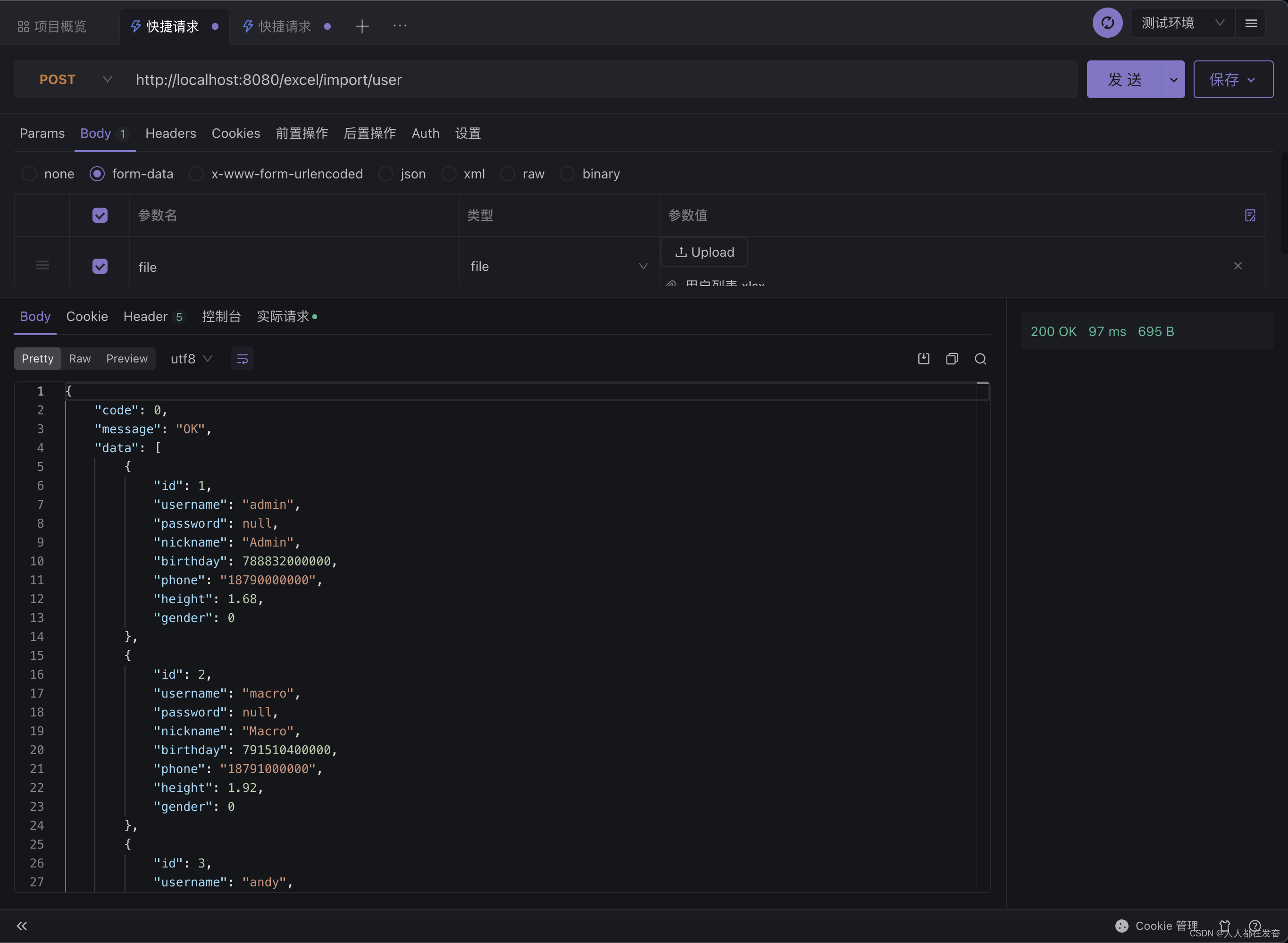
参考资料
- 项目地址:https://github.com/alibaba/easyexcel
- 官方文档:https://www.yuque.com/easyexcel/doc/easyexcel
- 一对多导出优雅方案:https://github.com/alibaba/easyexcel/issues/1780
-
相关阅读:
mysql在ubuntu上命令行登陆密码不正确
Django DetailView视图
利用maven的dependency插件分析工程的依赖
梳理一名Go后端程序员日常用的软件~
有意思的水平横向溢出滚动
vscode类似GitHub Copilot的插件推荐
高效解决香港服务器负载过高的方法
Java IO 之 BIO、NIO 和 AIO
2024全新版视频短剧SAAS系统/影视短剧小程序/短剧APP小程序源码
非煤矿山生产安全事故应急预案
- 原文地址:https://blog.csdn.net/qq991658923/article/details/128153012
