-
Arduino UNO通过SPI串行方式驱动LCD12864液晶屏
LCD12864液晶屏简介
LCD12864带中文字库图形点阵式液晶显示器,可配合各种单片机可完成中文汉字、英文字符和图形显示,可构成全中文人机交互图形界面,模块具有功耗低、显示内容丰富等特点而应用广泛。它是利用液晶经过处理后能改变光线的传播方向,以电流刺激液晶分子产生点、线、面并配合背光灯构成画面。其显示分辨率为128×64, 内置2M位中文字型ROM(CGROM)8192个(1616点阵)汉字,和16K位半宽字型ROM(HCGROM)128个(168点阵)ASCII字符集,可以显示8×4行16×16点阵的汉字。ST7920的字型产生RAM(CGRAM)提供用户自定义字符生成(造字)功能,可提供4组1616点阵的空间。将要显示的字符的编码写到显示RAM(DDRAM)上,硬件自动从CGROM中选择将要显示的字型显示在屏幕上。绘图RAM提供6432个字节的空间,最多可以控制256*64点阵的二维绘图缓冲空间。具有4位/8位并行(适配M6800时序)、2线或3线串行多种接口方式。各种液晶厂家均有提供几乎都是同样规格的LCD12864模块或兼容模块,基本上也都采用了兼容的IC,所以从特性上基本上是一样的;当然,很多厂商提供了不同的字符颜色、背光色之类的显示模块。
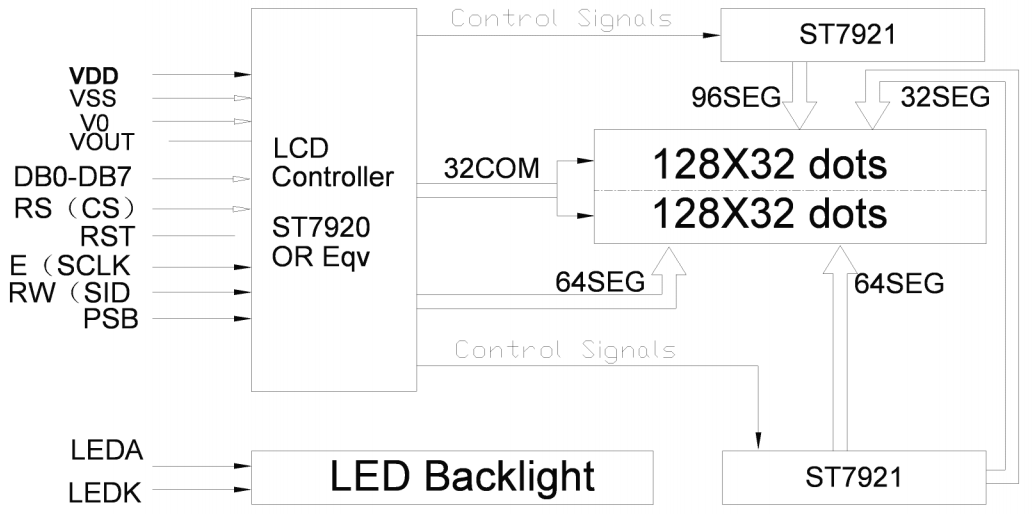
LCD12864内部主要由LCD 显示屏(LCD PANEL)、控制器(controller)、驱动器(driver)和偏压产生电路构成。
模块引脚定义
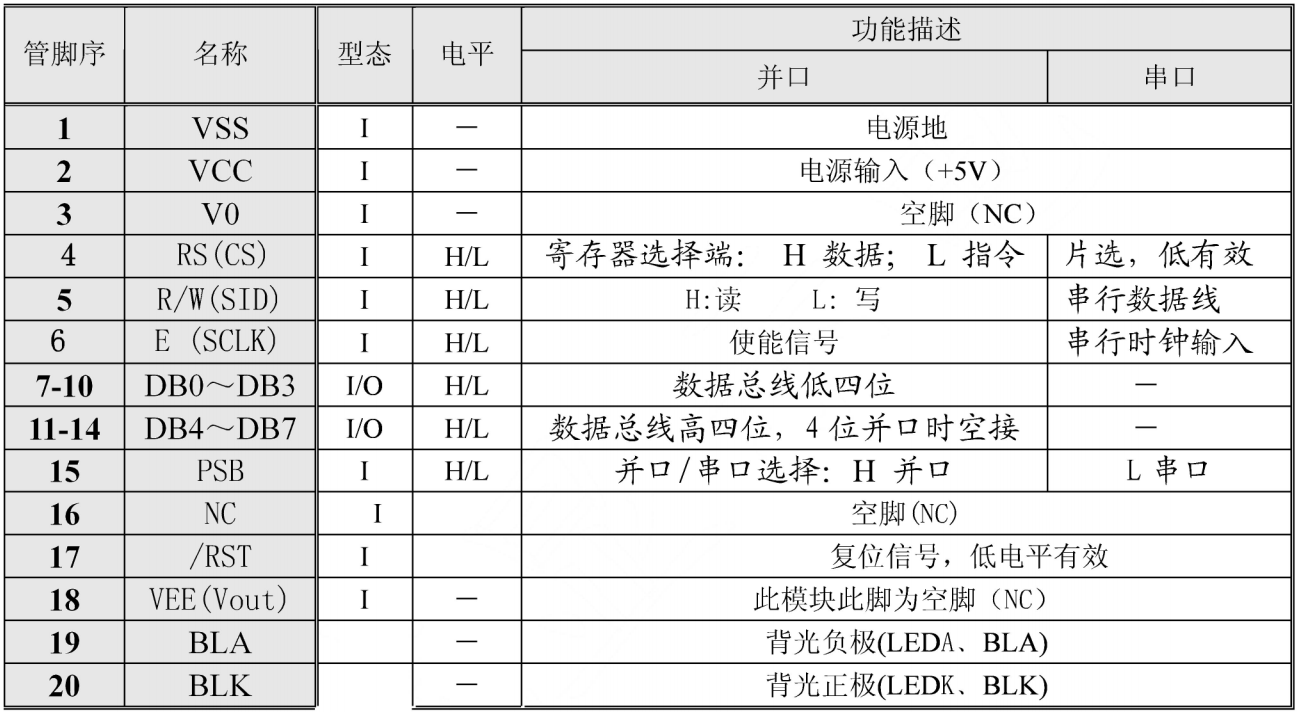
Vout为LCD驱动电压输出端,可不接
RST使用时不需复位LCD,可不接
VO一般LCD背面有电位器调节对比度,电压越高对比度也越高,可不接Arduino UNO与LCD12864模块SPI串行接线方式
Arduino UNO LCD12864 A2 R/W A3 RS A4 E GND VSS 5V VCC GND PSB GND BLK 5V BLA 
测试代码
在Arduino IDE库管理器搜索u8glib,并安装如图示所例程库

打开PCtoLCD2002软件,设置参数为C5I,选择模式为字符模式,输入要转换的汉字,然后点击生成字模,最后把生成的字模放入一个字符数组里面。


打开HelloWorld.ino例程,多个汉字显示代码演示#include "U8glib.h" U8GLIB_ST7920_128X64_4X u8g(18, 16, 17);// SPI Com: SCK = en = 18, MOSI = rw = 16, CS = di = 17 const uint8_t rook_bitmap1[] PROGMEM = { 0x00,0x00,0x27,0xFC,0x14,0x04,0x14,0xA4, 0x81,0x10,0x42,0x08,0x40,0x40,0x10,0x40, 0x17,0xFC,0x20,0x40,0xE0,0xE0,0x21,0x50, 0x22,0x48,0x2C,0x46,0x20,0x40,0x00,0x40,/*"深",0*/ }; const uint8_t rook_bitmap2[] PROGMEM = { 0x11,0x04,0x11,0x24,0x11,0x24,0x11,0x24, 0x11,0x24,0xFD,0x24,0x11,0x24,0x11,0x24, 0x11,0x24,0x11,0x24,0x11,0x24,0x1D,0x24, 0xE1,0x24,0x42,0x24,0x02,0x04,0x04,0x04,/*"圳",1*/ }; const uint8_t rook_bitmap3[] PROGMEM = { 0x02,0x00,0x01,0x00,0x00,0x00,0x7F,0xFC, 0x01,0x00,0x01,0x00,0x01,0x00,0x3F,0xF8, 0x21,0x08,0x21,0x08,0x21,0x08,0x21,0x08, 0x21,0x28,0x21,0x10,0x01,0x00,0x01,0x00,/*"市",2*/ }; const uint8_t rook_bitmap4[] PROGMEM = { 0x08,0x90,0x08,0x88,0x08,0x88,0x10,0x80, 0x17,0xFE,0x30,0xA0,0x30,0xA0,0x50,0xA0, 0x90,0xA0,0x10,0xA0,0x11,0x20,0x11,0x22, 0x11,0x22,0x12,0x22,0x12,0x1E,0x14,0x00,/*"优",0*/ }; const uint8_t rook_bitmap5[] PROGMEM = { 0x08,0x40,0x08,0x20,0x0B,0xFE,0x10,0x00, 0x10,0x00,0x31,0xFC,0x30,0x00,0x50,0x00, 0x91,0xFC,0x10,0x00,0x10,0x00,0x11,0xFC, 0x11,0x04,0x11,0x04,0x11,0xFC,0x11,0x04,/*"信",1*/ }; const uint8_t rook_bitmap6[] PROGMEM = { 0x01,0x00,0x01,0x00,0x01,0x00,0x3F,0xF8, 0x21,0x08,0x21,0x08,0x21,0x08,0x3F,0xF8, 0x21,0x08,0x21,0x08,0x21,0x08,0x3F,0xF8, 0x21,0x0A,0x01,0x02,0x01,0x02,0x00,0xFE,/*"电",2*/ }; const uint8_t rook_bitmap7[] PROGMEM = { 0x00,0x00,0x7F,0xF8,0x00,0x10,0x00,0x20, 0x00,0x40,0x01,0x80,0x01,0x00,0xFF,0xFE, 0x01,0x00,0x01,0x00,0x01,0x00,0x01,0x00, 0x01,0x00,0x01,0x00,0x05,0x00,0x02,0x00,/*"子",3*/ }; const uint8_t rook_bitmap8[] PROGMEM = { 0x08,0x10,0x1D,0x10,0xF0,0x90,0x10,0x90, 0x10,0x10,0xFD,0x10,0x10,0x90,0x38,0x90, 0x34,0x10,0x50,0x1E,0x53,0xF0,0x90,0x10, 0x10,0x10,0x10,0x10,0x10,0x10,0x10,0x10,/*"科",0*/ }; const uint8_t rook_bitmap9[] PROGMEM = { 0x10,0x20,0x10,0x20,0x10,0x20,0x13,0xFE, 0xFC,0x20,0x10,0x20,0x10,0x20,0x15,0xFC, 0x18,0x84,0x30,0x88,0xD0,0x48,0x10,0x50, 0x10,0x20,0x10,0x50,0x51,0x88,0x26,0x06,/*"技",1*/ }; const uint8_t rook_bitmap10[] PROGMEM = { 0x02,0x00,0x02,0x00,0xFF,0xFE,0x04,0x00, 0x04,0x00,0x0F,0xF0,0x08,0x10,0x18,0x10, 0x2F,0xF0,0x48,0x10,0x88,0x10,0x0F,0xF0, 0x08,0x10,0x08,0x10,0x08,0x50,0x08,0x20,/*"有",2*/ }; const uint8_t rook_bitmap11[] PROGMEM = { 0x00,0x00,0x7B,0xF8,0x4A,0x08,0x52,0x08, 0x53,0xF8,0x62,0x08,0x52,0x08,0x4B,0xF8, 0x4A,0x44,0x4A,0x48,0x6A,0x30,0x52,0x20, 0x42,0x10,0x42,0x88,0x43,0x06,0x42,0x00,/*"限",3*/ }; const uint8_t rook_bitmap12[] PROGMEM = { 0x00,0x80,0x04,0x80,0x04,0x80,0x08,0x40, 0x08,0x40,0x10,0x20,0x20,0x10,0x42,0x08, 0x82,0x06,0x04,0x00,0x04,0x40,0x08,0x20, 0x10,0x20,0x3F,0xF0,0x10,0x10,0x00,0x00,/*"公",4*/ }; const uint8_t rook_bitmap13[] PROGMEM = { 0x00,0x00,0x3F,0xF8,0x00,0x08,0x00,0x08, 0x7F,0xE8,0x00,0x08,0x00,0x08,0x1F,0x88, 0x10,0x88,0x10,0x88,0x10,0x88,0x10,0x88, 0x1F,0x88,0x10,0x88,0x00,0x28,0x00,0x10,/*"司",5*/ }; void draw(void) { // graphic commands to redraw the complete screen should be placed here //u8g.setFont(u8g_font_unifont); //u8g.setFont(u8g_font_osb21); //u8g.drawStr( 0, 22, "Hello World!"); u8g.drawBitmapP( 32, 0, 2, 16, rook_bitmap1);//0行0列显示“深” u8g.drawBitmapP( 48, 0, 2, 16, rook_bitmap2);//0行16列显示“圳” u8g.drawBitmapP( 64, 0, 2, 16, rook_bitmap3);//0行32列显示“市” u8g.drawBitmapP( 16, 16, 2, 16, rook_bitmap4);//16行32列显示“优” u8g.drawBitmapP( 32, 16, 2, 16, rook_bitmap5);//16行32列显示“信” u8g.drawBitmapP( 48, 16, 2, 16, rook_bitmap6);//16行32列显示“电” u8g.drawBitmapP( 64, 16, 2, 16, rook_bitmap7);//16行32列显示“子” u8g.drawBitmapP( 80, 16, 2, 16, rook_bitmap8);//16行32列显示“科” u8g.drawBitmapP( 96, 16, 2, 16, rook_bitmap9);//16行32列显示“技” u8g.drawBitmapP( 32, 32, 2, 16, rook_bitmap10);//32行32列显示“有” u8g.drawBitmapP( 48, 32, 2, 16, rook_bitmap11);//32行32列显示“限” u8g.drawBitmapP( 64, 32, 2, 16, rook_bitmap12);//32行32列显示“公” u8g.drawBitmapP( 80, 32, 2, 16, rook_bitmap13);//32行32列显示“司” } void setup(void) { } void loop(void) { // picture loop u8g.firstPage(); do { draw(); } while( u8g.nextPage() ); // rebuild the picture after some delay delay(500); }- 1
- 2
- 3
- 4
- 5
- 6
- 7
- 8
- 9
- 10
- 11
- 12
- 13
- 14
- 15
- 16
- 17
- 18
- 19
- 20
- 21
- 22
- 23
- 24
- 25
- 26
- 27
- 28
- 29
- 30
- 31
- 32
- 33
- 34
- 35
- 36
- 37
- 38
- 39
- 40
- 41
- 42
- 43
- 44
- 45
- 46
- 47
- 48
- 49
- 50
- 51
- 52
- 53
- 54
- 55
- 56
- 57
- 58
- 59
- 60
- 61
- 62
- 63
- 64
- 65
- 66
- 67
- 68
- 69
- 70
- 71
- 72
- 73
- 74
- 75
- 76
- 77
- 78
- 79
- 80
- 81
- 82
- 83
- 84
- 85
- 86
- 87
- 88
- 89
- 90
- 91
- 92
- 93
- 94
- 95
- 96
- 97
- 98
- 99
- 100
- 101
- 102
- 103
- 104
- 105
- 106
- 107
- 108
- 109
- 110
- 111
u8g.drawStr( m, n, str);//m代表的是第m列,n代表的是第n行,str是要显示的字符串
u8g.drawBitmapP( m, n, x, y, str);//m代表的是第m列,n代表的是第n行,x代表的是生成字。模点阵时的列数除以8,y代表的是点阵行数,str是要显示的字符串。实验结果
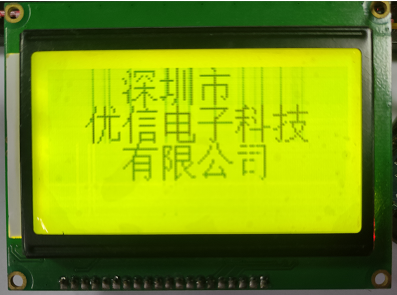
接好线,编译上传代码到Arduino UNO后,可在LCD12864上程序对应位置显示出汉字。
-
相关阅读:
在Telegram营销后该如何进行客户管理
IDEA的使用
合并两个有序数组(c#)
教师生成教案的提示词
运动控制:分辨率、定位精度、重复定位精度
【MySQL】数据库中表的增删查改操作详解
带有流光的折线图
BC35&BC95 ONENET MQTT(旧)
netty系列之:channel和channelGroup
2023年三大网络安全威胁不容忽视
- 原文地址:https://blog.csdn.net/qq_42250136/article/details/128144351
