-
GIS工具maptalks开发手册(二)03-02——示例之json格式添加绘制工具、渲染点、文字和多个面
GIS工具maptalks开发手册(二)03-02——示例之json格式添加绘制工具、渲染点、文字和多个面
layer参数——https://maptalks.org/maptalks.js/api/0.x/Layer.html
1、json格式渲染点和面
效果-json格式渲染点和面
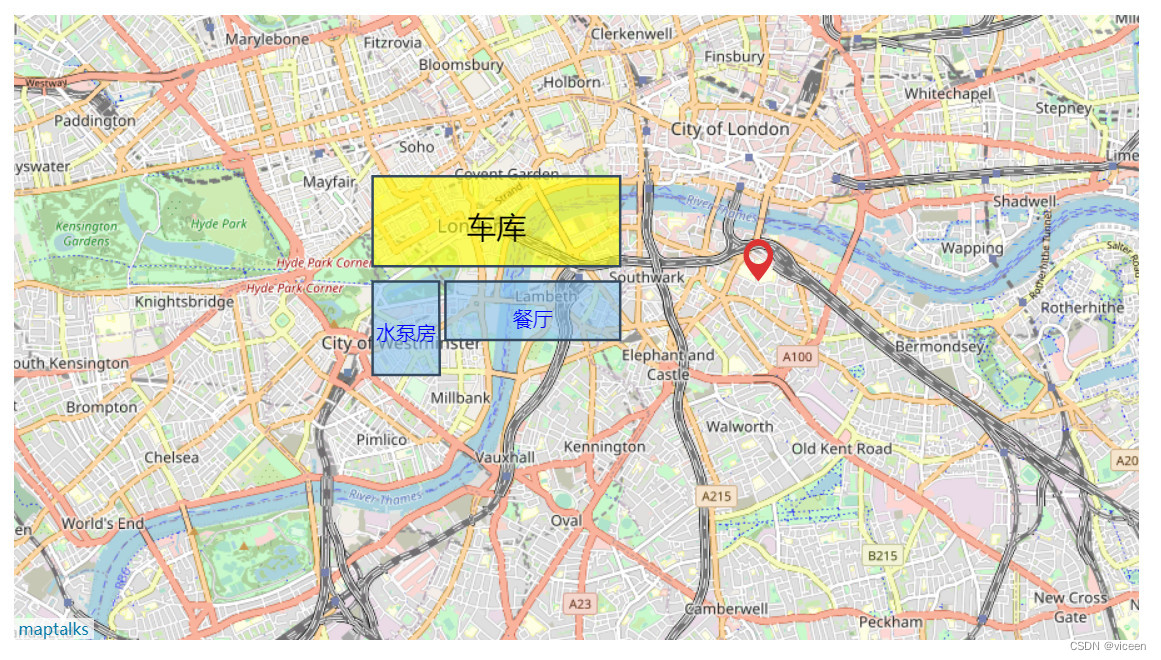
代码
index.html
DOCTYPE html> <html> <meta charset="UTF-8"> <meta name="viewport" content="width=device-width, initial-scale=1"> <title>JSON序列化 - 用JSON载入地图title> <style type="text/css"> html, body { margin: 0px; height: 100%; width: 100%; } .container { width: 900px; height: 500px; margin: 50px; } #json { position: fixed; background-color: rgba(13, 13, 13, 0.5); padding: 10px 10px 10px 10px; font: 13px bold sans-serif; color: #fff; left: 0px; top: 0px; width: 100%; height: 85px; overflow: hidden } style> <link rel="stylesheet" href="https://unpkg.com/maptalks/dist/maptalks.css"> <script type="text/javascript" src="https://unpkg.com/maptalks/dist/maptalks.min.js">script> <body> <div id="map" class="container">div> <script> var mapJSON = { "version": "1.0", "options": { "center": { "x": -0.113049, "y": 51.49856800000001 }, "zoom": 13 }, "baseLayer": { "type": "TileLayer", "id": "base", "options": { "urlTemplate": "http://{s}.tile.osm.org/{z}/{x}/{y}.png", "subdomains": ["a", "b", "c"] } }, "layers": [ { "type": "VectorLayer", "id": "v", "geometries": [{ "feature": { "type": "Feature", "geometry": { "type": "Point", "coordinates": [-0.088080, 51.502500] } } }, { "feature": { "type": "Feature", "geometry": { "type": "Polygon", "coordinates": [ [-0.131049, 51.502500], [-0.107049, 51.502500], [-0.107049, 51.497500], [-0.131049, 51.497500], [-0.131049, 51.502500] ] } }, symbol: [{ lineColor: '#34495e', lineWidth: 2, polygonFill: 'rgb(135,196,240)', polygonOpacity: 0.6 }, { 'markerDy': 20, 'textFaceName': 'sans-serif', 'textName': '餐厅', 'textFill': 'blue', 'textHorizontalAlignment': 'center', 'textSize': 16, 'textDx': 0, 'textDy': 7, }] }, { "feature": { "type": "Feature", "geometry": { "type": "Polygon", "coordinates": [ [ [-0.141049, 51.502500], [-0.131920, 51.502500], [-0.131820, 51.494500], [-0.141049, 51.494500], [-0.141049, 51.502500] ] ] } }, symbol: [{ lineColor: '#34495e', lineWidth: 2, polygonFill: 'rgb(135,196,240)', polygonOpacity: 0.6 }, { 'markerDy': 20, 'textFaceName': 'sans-serif', 'textName': '水泵房', 'textFill': 'blue', 'textHorizontalAlignment': 'center', 'textSize': 16, 'textDx': 0, 'textDy': 4, } ] }, { "feature": { "type": "Feature", "geometry": { "type": "Polygon", "coordinates": [ [-0.141049, 51.511500], [-0.107049, 51.511500], [-0.107049, 51.503800], [-0.141049, 51.503800], [-0.141049, 51.511500] ] } }, symbol: [{ lineColor: '#34495e', lineWidth: 2, polygonFill: 'yellow', polygonOpacity: 0.6 }, { 'markerDy': 20, 'textFaceName': 'sans-serif', 'textName': '车库', 'textFill': '#000', 'textHorizontalAlignment': 'center', 'textSize': 24, 'textDx': 0, 'textDy': 6, } ] }] }] }; maptalks.Map.fromJSON('map', mapJSON); // document.getElementById('json').innerHTML = JSON.stringify(mapJSON); script> body> html>- 1
- 2
- 3
- 4
- 5
- 6
- 7
- 8
- 9
- 10
- 11
- 12
- 13
- 14
- 15
- 16
- 17
- 18
- 19
- 20
- 21
- 22
- 23
- 24
- 25
- 26
- 27
- 28
- 29
- 30
- 31
- 32
- 33
- 34
- 35
- 36
- 37
- 38
- 39
- 40
- 41
- 42
- 43
- 44
- 45
- 46
- 47
- 48
- 49
- 50
- 51
- 52
- 53
- 54
- 55
- 56
- 57
- 58
- 59
- 60
- 61
- 62
- 63
- 64
- 65
- 66
- 67
- 68
- 69
- 70
- 71
- 72
- 73
- 74
- 75
- 76
- 77
- 78
- 79
- 80
- 81
- 82
- 83
- 84
- 85
- 86
- 87
- 88
- 89
- 90
- 91
- 92
- 93
- 94
- 95
- 96
- 97
- 98
- 99
- 100
- 101
- 102
- 103
- 104
- 105
- 106
- 107
- 108
- 109
- 110
- 111
- 112
- 113
- 114
- 115
- 116
- 117
- 118
- 119
- 120
- 121
- 122
- 123
- 124
- 125
- 126
- 127
- 128
- 129
- 130
- 131
- 132
- 133
- 134
- 135
- 136
- 137
- 138
- 139
- 140
- 141
- 142
- 143
- 144
- 145
- 146
- 147
- 148
- 149
- 150
- 151
- 152
- 153
- 154
- 155
- 156
- 157
- 158
- 159
- 160
- 161
- 162
- 163
- 164
- 165
- 166
- 167
- 168
- 169
- 170
- 171
- 172
- 173
- 174
- 175
- 176
- 177
- 178
- 179
- 180
- 181
2、json格式添加工具和渲染多个面
效果

代码
index.html
DOCTYPE html> <html> <meta charset="UTF-8"> <meta name="viewport" content="width=device-width, initial-scale=1"> <title>JSON序列化 - 用JSON载入地图title> <style type="text/css"> html, body { margin: 0px; height: 100%; width: 100%; } .container { width: 900px; height: 500px; margin: 50px; } #json { position: fixed; background-color: rgba(13, 13, 13, 0.5); padding: 10px 10px 10px 10px; font: 13px bold sans-serif; color: #fff; left: 0px; top: 0px; width: 100%; height: 85px; overflow: hidden } style> <link rel="stylesheet" href="https://unpkg.com/maptalks/dist/maptalks.css"> <script type="text/javascript" src="https://unpkg.com/maptalks/dist/maptalks.min.js">script> <body> <div id="map" class="container">div> <script> var mapJSON = { "version": "1.0", "options": { "center": { "x": -0.113049, "y": 51.49856800000001 }, "zoom": 13 }, "baseLayer": { "type": "TileLayer", "id": "base", "options": { "urlTemplate": "http://{s}.tile.osm.org/{z}/{x}/{y}.png", "subdomains": ["a", "b", "c"] } }, "layers": [{ "type": "VectorLayer", "id": "v", "geometries": [{ "feature": { "type": "Feature", "geometry": { "type": "Polygon", "coordinates": [ [-0.131049, 51.502500], [-0.107049, 51.502500], [-0.107049, 51.497500], [-0.131049, 51.497500], [-0.131049, 51.502500] ] } }, symbol: [{ lineColor: '#34495e', lineWidth: 2, polygonFill: 'rgb(135,196,240)', polygonOpacity: 0.6 }, { 'markerDy': 20, 'textFaceName': 'sans-serif', 'textName': '餐厅', 'textFill': 'blue', 'textHorizontalAlignment': 'center', 'textSize': 16, 'textDx': 0, 'textDy': 7, }] }, { "feature": { "type": "Feature", "geometry": { "type": "Polygon", "coordinates": [ [ [-0.141049, 51.502500], [-0.131920, 51.502500], [-0.131820, 51.494500], [-0.141049, 51.494500], [-0.141049, 51.502500] ] ] } }, symbol: [{ lineColor: '#34495e', lineWidth: 2, polygonFill: 'rgb(135,196,240)', polygonOpacity: 0.6 }, { 'markerDy': 20, 'textFaceName': 'sans-serif', 'textName': '水泵房', 'textFill': 'blue', 'textHorizontalAlignment': 'center', 'textSize': 16, 'textDx': 0, 'textDy': 4, } ] }, { "feature": { "type": "Feature", "geometry": { "type": "Polygon", "coordinates": [ [-0.141049, 51.511500], [-0.107049, 51.511500], [-0.107049, 51.503800], [-0.141049, 51.503800], [-0.141049, 51.511500] ] } }, symbol: [{ lineColor: '#34495e', lineWidth: 2, polygonFill: 'yellow', polygonOpacity: 0.6 }, { 'markerDy': 20, 'textFaceName': 'sans-serif', 'textName': '车库', 'textFill': '#000', 'textHorizontalAlignment': 'center', 'textSize': 24, 'textDx': 0, 'textDy': 6, } ] }] }] }; var map = maptalks.Map.fromJSON('map', mapJSON); var layer = map.getLayer('v'); var drawTool = new maptalks.DrawTool({ mode: 'Point' }).addTo(map).disable(); drawTool.on('drawend', function (param) { // console.log(param.geometry); console.log('面的坐标', param.geometry._coordinates); layer.addGeometry(param.geometry); }); var items = ['Point', 'LineString', 'Polygon'].map(function (value) { return { item: value, click: function () { drawTool.setMode(value).enable(); } }; }); var toolbar = new maptalks.control.Toolbar({ items: [ { item: 'Shape/绘制', children: items }, { item: 'Disable关闭', click: function () { drawTool.disable(); } }, { item: 'Clear清空', click: function () { layer.clear(); } } ] }).addTo(map); // document.getElementById('json').innerHTML = JSON.stringify(mapJSON); script> body> html>- 1
- 2
- 3
- 4
- 5
- 6
- 7
- 8
- 9
- 10
- 11
- 12
- 13
- 14
- 15
- 16
- 17
- 18
- 19
- 20
- 21
- 22
- 23
- 24
- 25
- 26
- 27
- 28
- 29
- 30
- 31
- 32
- 33
- 34
- 35
- 36
- 37
- 38
- 39
- 40
- 41
- 42
- 43
- 44
- 45
- 46
- 47
- 48
- 49
- 50
- 51
- 52
- 53
- 54
- 55
- 56
- 57
- 58
- 59
- 60
- 61
- 62
- 63
- 64
- 65
- 66
- 67
- 68
- 69
- 70
- 71
- 72
- 73
- 74
- 75
- 76
- 77
- 78
- 79
- 80
- 81
- 82
- 83
- 84
- 85
- 86
- 87
- 88
- 89
- 90
- 91
- 92
- 93
- 94
- 95
- 96
- 97
- 98
- 99
- 100
- 101
- 102
- 103
- 104
- 105
- 106
- 107
- 108
- 109
- 110
- 111
- 112
- 113
- 114
- 115
- 116
- 117
- 118
- 119
- 120
- 121
- 122
- 123
- 124
- 125
- 126
- 127
- 128
- 129
- 130
- 131
- 132
- 133
- 134
- 135
- 136
- 137
- 138
- 139
- 140
- 141
- 142
- 143
- 144
- 145
- 146
- 147
- 148
- 149
- 150
- 151
- 152
- 153
- 154
- 155
- 156
- 157
- 158
- 159
- 160
- 161
- 162
- 163
- 164
- 165
- 166
- 167
- 168
- 169
- 170
- 171
- 172
- 173
- 174
- 175
- 176
- 177
- 178
- 179
- 180
- 181
- 182
- 183
- 184
- 185
- 186
- 187
- 188
- 189
- 190
- 191
- 192
- 193
- 194
- 195
- 196
- 197
- 198
- 199
- 200
- 201
- 202
- 203
- 204
- 205
- 206
-
相关阅读:
Linux系统man帮助一文通-尚文网络xUP楠哥
云计算考试题
PyTorch 2.0 重磅发布:一行代码提速 30%
Windows平台Fortran编程入门
matplotlib绘图
农夫山泉2面面试经历
聊聊 ASP.NET 6 整洁架构开发模板
掌握Java中的volatile关键字
17:00面试,17:04就出来了 ,问的实在是太...
在uniapp中,如何去掉一些不想要的权限,
- 原文地址:https://blog.csdn.net/weixin_44867717/article/details/128140509
