-
JUC系列(五) 读写锁与阻塞队列
📣 📣 📣 📢📢📢
☀️☀️你好啊!小伙伴,我是小冷。是一个兴趣驱动自学练习两年半的的Java工程师。
📒 一位十分喜欢将知识分享出来的Java博主⭐️⭐️⭐️,擅长使用Java技术开发web项目和工具
📒 文章内容丰富:覆盖大部分java必学技术栈,前端,计算机基础,容器等方面的文章
📒 如果你也对Java感兴趣,关注小冷吧,一起探索Java技术的生态与进步,一起讨论Java技术的使用与学习
✏️高质量技术专栏专栏链接: 微服务,数据结构,netty,单点登录,SSM ,SpringCloudAlibaba等
😝公众号😝 : 想全栈的小冷,分享一些技术上的文章,以及解决问题的经验
⏩当前专栏:JUC系列读写锁
Synchronized存在一个性能问题就是不同读取之间互斥,我们想要实现的最好效果是可以做到读和读互不影响,写的时候只有一个线程能写
解决方案 : ReadWriteLock。
案例代码
package rwLock; import java.util.HashMap; import java.util.Map; import java.util.concurrent.locks.ReadWriteLock; import java.util.concurrent.locks.ReentrantReadWriteLock; /** * @projectName: JUC * @package: rwLock * @className: rwLockDemo * @author: 冷环渊 doomwatcher * @description: TODO * @date: 2022/3/2 16:29 * @version: 1.0 */ public class rwLockDemo { public static void main(String[] args) { MyCache myCache = new MyCache(); for (int i = 1; i <= 5; i++) { final int temp = i; new Thread(() -> { myCache.put(temp + "", temp + ""); }, String.valueOf(i)).start(); } for (int i = 1; i <= 5; i++) { final int temp = i; new Thread(() -> { myCache.get(temp + ""); }, String.valueOf(i)).start(); } } } /** * 自定义缓存类 * 加锁 * */ class MyCache { //存放数据的集合 private volatile Map<String, Object> map = new HashMap<>(); // 存 写 public void put(String key, Object value) { System.out.println(Thread.currentThread().getName() + "写入" + key); map.put(key, value); System.out.println(Thread.currentThread().getName() + "写入完毕"); } // 取 读 public void get(String key) { System.out.println(Thread.currentThread().getName() + "读取" + key); Object o = map.get(key); System.out.println(Thread.currentThread().getName() + "读取" + ""); } }- 1
- 2
- 3
- 4
- 5
- 6
- 7
- 8
- 9
- 10
- 11
- 12
- 13
- 14
- 15
- 16
- 17
- 18
- 19
- 20
- 21
- 22
- 23
- 24
- 25
- 26
- 27
- 28
- 29
- 30
- 31
- 32
- 33
- 34
- 35
- 36
- 37
- 38
- 39
- 40
- 41
- 42
- 43
- 44
- 45
- 46
- 47
- 48
- 49
- 50
- 51
- 52
- 53
- 54
- 55
- 56
- 57
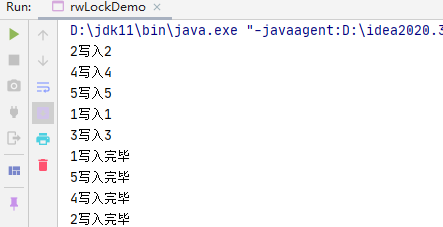
可以看到这并不是我们想要的效果,这个时候我们需要加锁
ReadWriteLock读写锁 分别有
readLock()读锁writeLock()写锁使用方式除了相比lock细化的一些其他没有变化
读写锁代码实例
思路理解 :
独占锁(写锁)
共享锁(读锁)
public class rwLockDemo { public static void main(String[] args) { //MyCache myCache = new MyCache(); MyCacheLock myCache = new MyCacheLock(); for (int i = 1; i <= 5; i++) { final int temp = i; new Thread(() -> { myCache.put(temp + "", temp + ""); }, String.valueOf(i)).start(); } for (int i = 1; i <= 5; i++) { final int temp = i; new Thread(() -> { myCache.get(temp + ""); }, String.valueOf(i)).start(); } } } class MyCacheLock { //存放数据的集合 private volatile Map<String, Object> map = new HashMap<>(); //读写锁的区别, 更加细粒度的控制 ReadWriteLock readWriteLock = new ReentrantReadWriteLock(); // 存 写 public void put(String key, Object value) { //加入写锁 readWriteLock.writeLock().lock(); try { System.out.println(Thread.currentThread().getName() + "写入" + key); map.put(key, value); System.out.println(Thread.currentThread().getName() + "写入完毕"); } catch (Exception e) { e.printStackTrace(); } finally { //释放写锁 readWriteLock.writeLock().unlock(); } } // 取 读 public void get(String key) { readWriteLock.readLock().lock(); try { System.out.println(Thread.currentThread().getName() + "读取" + key); Object o = map.get(key); System.out.println(Thread.currentThread().getName() + "读取" + ""); } catch (Exception e) { e.printStackTrace(); } finally { readWriteLock.readLock().unlock(); } } }- 1
- 2
- 3
- 4
- 5
- 6
- 7
- 8
- 9
- 10
- 11
- 12
- 13
- 14
- 15
- 16
- 17
- 18
- 19
- 20
- 21
- 22
- 23
- 24
- 25
- 26
- 27
- 28
- 29
- 30
- 31
- 32
- 33
- 34
- 35
- 36
- 37
- 38
- 39
- 40
- 41
- 42
- 43
- 44
- 45
- 46
- 47
- 48
- 49
- 50
- 51
- 52
- 53
- 54
- 55
- 56
输出效果就达到了,先写且只有一个写,之后随意读

阻塞队列
阻塞队列简介
什么是阻塞队列,我们要分开来理解
阻塞: 等待前面的走了才能加入新的
队列: 先进来的,先出去

阻塞队列 在jdk文档中的 解释

队列接口
我们学习的BlockingQueue也是实现类之一
什么时候我们会使用 阻塞队列
多线程 , 线程池 用的相对的多一点

队列的类关系图

阻塞队列相对的四组api
-
抛出异常api
/** 会抛出异常的 * java.lang.IllegalStateException: Queue full 会抛出队列已经满了的异常 * java.util.NoSuchElementException 过多移除异常 * */ public static void test1() { ArrayBlockingQueue blockingQueue = new ArrayBlockingQueue<>(3); System.out.println("===============多过加入================"); System.out.println(blockingQueue.add("a")); System.out.println(blockingQueue.add("b")); System.out.println(blockingQueue.add("c")); 此时的队列长度为 3 如果我们此时加入 第四个会怎么样,抛出队列已经满了的异常 //System.out.println(blockingQueue.add("b")); System.out.println("===============过多移除================"); System.out.println(blockingQueue.remove()); System.out.println(blockingQueue.remove()); System.out.println(blockingQueue.remove()); System.out.println(blockingQueue.remove()); }- 1
- 2
- 3
- 4
- 5
- 6
- 7
- 8
- 9
- 10
- 11
- 12
- 13
- 14
- 15
- 16
- 17
- 18
- 19
-
不会抛出异常api
public static void test2() { ArrayBlockingQueue blockingQueue = new ArrayBlockingQueue<>(3); System.out.println("===============多过加入================"); System.out.println(blockingQueue.offer("a")); System.out.println(blockingQueue.offer("b")); System.out.println(blockingQueue.offer("c")); //返回false System.out.println(blockingQueue.offer("d")); System.out.println("===============过多移除================"); System.out.println(blockingQueue.poll()); System.out.println(blockingQueue.poll()); System.out.println(blockingQueue.poll()); //返回null System.out.println(blockingQueue.poll()); }- 1
- 2
- 3
- 4
- 5
- 6
- 7
- 8
- 9
- 10
- 11
- 12
- 13
- 14
- 15
- 16
-
阻塞等待 api
/* 一直等待 阻塞 * */ public static void test3() throws InterruptedException { ArrayBlockingQueue blockingQueue = new ArrayBlockingQueue<>(3); blockingQueue.put("a"); blockingQueue.put("b"); blockingQueue.put("c"); //blockingQueue.put 队列没有位置了 一支阻塞 //blockingQueue.put("d"); System.out.println(blockingQueue.take()); System.out.println(blockingQueue.take()); System.out.println(blockingQueue.take()); //m没有这个元素一直等待 System.out.println(blockingQueue.take()); }- 1
- 2
- 3
- 4
- 5
- 6
- 7
- 8
- 9
- 10
- 11
- 12
- 13
- 14
- 15
-
超时等待 api
/*等待 等待超时*/ public static void test4() throws InterruptedException { //队列的大小 ArrayBlockingQueue blockingQueue = new ArrayBlockingQueue<>(3); blockingQueue.offer("a"); blockingQueue.offer("b"); blockingQueue.offer("c"); //等待,如果设置时间还没有空位置。否则结束 blockingQueue.offer("d", 2, TimeUnit.SECONDS); System.out.println("======================"); blockingQueue.poll(); blockingQueue.poll(); blockingQueue.poll(); //等待,如果设置时间还没有找到。否则结束 blockingQueue.poll(2, TimeUnit.SECONDS); }- 1
- 2
- 3
- 4
- 5
- 6
- 7
- 8
- 9
- 10
- 11
- 12
- 13
- 14
- 15
- 16
- 17
- 18
方式 抛出异常 有返回值 阻塞等待 超时等待 添加操作 add offer put() offer() 移除操作 remove poll take() poll() 判断队列首元素 element peek 同步队列
特性
同步队列,SynchronusQueue 同步队列 和其他的 BlockingQueue不一样 SynchronusQueue不存储元素
put了 一个元素 必须先从里面拿出来,否则是不能再put进去值
代码实例
public class synchronusQueueDemo { public static void main(String[] args) { BlockingQueue<String> blockingQueue = new SynchronousQueue<>(); new Thread(() -> { try { System.out.println(Thread.currentThread().getName() + "put 1"); blockingQueue.put("1"); System.out.println(Thread.currentThread().getName() + "put 2"); blockingQueue.put("2"); System.out.println(Thread.currentThread().getName() + "put 3"); blockingQueue.put("3"); } catch (InterruptedException e) { e.printStackTrace(); } }, "T1").start(); new Thread(() -> { try { TimeUnit.SECONDS.sleep(2); System.out.println(Thread.currentThread().getName() + "=>" + blockingQueue.take()); TimeUnit.SECONDS.sleep(2); System.out.println(Thread.currentThread().getName() + "=>" + blockingQueue.take()); TimeUnit.SECONDS.sleep(2); System.out.println(Thread.currentThread().getName() + "=>" + blockingQueue.take()); } catch (InterruptedException e) { e.printStackTrace(); } }, "T2").start(); } }- 1
- 2
- 3
- 4
- 5
- 6
- 7
- 8
- 9
- 10
- 11
- 12
- 13
- 14
- 15
- 16
- 17
- 18
- 19
- 20
- 21
- 22
- 23
- 24
- 25
- 26
- 27
- 28
- 29
- 30
- 31
- 32
-
相关阅读:
C++string的使用
SAP ABAP 报表输出成 excel 统计图形 (RFC : GFW_PRES_SHOW_MULT)
19.spring beanfactory与applicationcontext
Prompt进阶系列1:LangGPT(从编程语言反思LLM的结构化可复用提示设计框架)
【论文复现|智能算法改进】融合正余弦策略的算术优化算法
LVS集群-DR模式
Go Web 开发之 Revel 框架搭建
会议管理系统SSM记录(一)
【JavaWeb开发-Servlet】day02-使用eclipse实现Servlet开发
环境感知——自动驾驶模型训练(菜鸟版本)
- 原文地址:https://blog.csdn.net/doomwatcher/article/details/128121052
