-
RepGhost实战:使用RepGhost实现图像分类任务(一)
摘要
论文地址:https://arxiv.org/abs/2211.06088
代码地址:https://github.com/ChengpengChen/RepGhost
特征重用一直是轻量级卷积神经网络设计的关键技术。RepGhostNet在移动设备上比GhostNet和MobileNetV3更有效。在ImageNet数据集上,RepGhostNet和GhostNet 0.5X在相同的延时下,参数更少,成绩更高,Top-1精度相比GhostNet 0.5X模型 提高了2.5%。

上图,展示了原始的Ghost Bottleneck、RG-bneck train和RG-bneck inference的结构。我通过上图可以清楚的看到Ghos Bottleneck和RG-bneck的结构。
RepGhostNet Params(M) FLOPs(M) Latency(ms) Top-1 Acc.(%) Top-5 Acc.(%) checkpoints logs 0.5x 2.3 43 25.1 66.9 86.9 googledrive log 0.58x 2.5 60 31.9 68.9 88.4 googledrive log 0.8x 3.3 96 44.5 72.2 90.5 googledrive log 1.0x 4.1 142 62.2 74.2 91.5 googledrive log 1.11x 4.5 170 71.5 75.1 92.2 googledrive log 1.3x 5.5 231 92.9 76.4 92.9 googledrive log 1.5x 6.6 301 116.9 77.5 93.5 googledrive log 2.0x 9.8 516 190.0 78.8 94.3 googledrive log RepGhost包含多个模型,这篇文章选择用的是 1.0x的模型。预训练模型放在的Google网盘上,没有办法科学上网,所以就不能用预训练模型了,所以在验证集上得分只有84%。

通过这篇文章能让你学到:
- 如何使用数据增强,包括transforms的增强、CutOut、MixUp、CutMix等增强手段?
- 如何实现RepGhost模型实现训练?
- 如何使用pytorch自带混合精度?
- 如何使用梯度裁剪防止梯度爆炸?
- 如何使用DP多显卡训练?
- 如何绘制loss和acc曲线?
- 如何生成val的测评报告?
- 如何编写测试脚本测试测试集?
- 如何使用余弦退火策略调整学习率?
- 如何使用AverageMeter类统计ACC和loss等自定义变量?
- 如何理解和统计ACC1和ACC5?
- 如何使用EMA?
安装包
安装timm
使用pip就行,命令:
pip install timm- 1
数据增强Cutout和Mixup
为了提高成绩我在代码中加入Cutout和Mixup这两种增强方式。实现这两种增强需要安装torchtoolbox。安装命令:
pip install torchtoolbox- 1
Cutout实现,在transforms中。
from torchtoolbox.transform import Cutout # 数据预处理 transform = transforms.Compose([ transforms.Resize((224, 224)), Cutout(), transforms.ToTensor(), transforms.Normalize([0.5, 0.5, 0.5], [0.5, 0.5, 0.5]) ])- 1
- 2
- 3
- 4
- 5
- 6
- 7
- 8
- 9
需要导入包:from timm.data.mixup import Mixup,
定义Mixup,和SoftTargetCrossEntropy
mixup_fn = Mixup( mixup_alpha=0.8, cutmix_alpha=1.0, cutmix_minmax=None, prob=0.1, switch_prob=0.5, mode='batch', label_smoothing=0.1, num_classes=12) criterion_train = SoftTargetCrossEntropy()- 1
- 2
- 3
- 4
- 5
参数详解:
mixup_alpha (float): mixup alpha 值,如果 > 0,则 mixup 处于活动状态。
cutmix_alpha (float):cutmix alpha 值,如果 > 0,cutmix 处于活动状态。
cutmix_minmax (List[float]):cutmix 最小/最大图像比率,cutmix 处于活动状态,如果不是 None,则使用这个 vs alpha。
如果设置了 cutmix_minmax 则cutmix_alpha 默认为1.0
prob (float): 每批次或元素应用 mixup 或 cutmix 的概率。
switch_prob (float): 当两者都处于活动状态时切换cutmix 和mixup 的概率 。
mode (str): 如何应用 mixup/cutmix 参数(每个’batch’,‘pair’(元素对),‘elem’(元素)。
correct_lam (bool): 当 cutmix bbox 被图像边框剪裁时应用。 lambda 校正
label_smoothing (float):将标签平滑应用于混合目标张量。
num_classes (int): 目标的类数。
EMA
EMA(Exponential Moving Average)是指数移动平均值。在深度学习中的做法是保存历史的一份参数,在一定训练阶段后,拿历史的参数给目前学习的参数做一次平滑。具体实现如下:
""" Exponential Moving Average (EMA) of model updates Hacked together by / Copyright 2020 Ross Wightman """ import logging from collections import OrderedDict from copy import deepcopy import torch import torch.nn as nn _logger = logging.getLogger(__name__) class ModelEma: def __init__(self, model, decay=0.9999, device='', resume=''): # make a copy of the model for accumulating moving average of weights self.ema = deepcopy(model) self.ema.eval() self.decay = decay self.device = device # perform ema on different device from model if set if device: self.ema.to(device=device) self.ema_has_module = hasattr(self.ema, 'module') if resume: self._load_checkpoint(resume) for p in self.ema.parameters(): p.requires_grad_(False) def _load_checkpoint(self, checkpoint_path): checkpoint = torch.load(checkpoint_path, map_location='cpu') assert isinstance(checkpoint, dict) if 'state_dict_ema' in checkpoint: new_state_dict = OrderedDict() for k, v in checkpoint['state_dict_ema'].items(): # ema model may have been wrapped by DataParallel, and need module prefix if self.ema_has_module: name = 'module.' + k if not k.startswith('module') else k else: name = k new_state_dict[name] = v self.ema.load_state_dict(new_state_dict) _logger.info("Loaded state_dict_ema") else: _logger.warning("Failed to find state_dict_ema, starting from loaded model weights") def update(self, model): # correct a mismatch in state dict keys needs_module = hasattr(model, 'module') and not self.ema_has_module with torch.no_grad(): msd = model.state_dict() for k, ema_v in self.ema.state_dict().items(): if needs_module: k = 'module.' + k model_v = msd[k].detach() if self.device: model_v = model_v.to(device=self.device) ema_v.copy_(ema_v * self.decay + (1. - self.decay) * model_v)- 1
- 2
- 3
- 4
- 5
- 6
- 7
- 8
- 9
- 10
- 11
- 12
- 13
- 14
- 15
- 16
- 17
- 18
- 19
- 20
- 21
- 22
- 23
- 24
- 25
- 26
- 27
- 28
- 29
- 30
- 31
- 32
- 33
- 34
- 35
- 36
- 37
- 38
- 39
- 40
- 41
- 42
- 43
- 44
- 45
- 46
- 47
- 48
- 49
- 50
- 51
- 52
- 53
- 54
- 55
- 56
加入到模型中。
#初始化 if use_ema: model_ema = ModelEma( model_ft, decay=model_ema_decay, device='cpu', resume=resume) # 训练过程中,更新完参数后,同步update shadow weights def train(): optimizer.step() if model_ema is not None: model_ema.update(model) # 将model_ema传入验证函数中 val(model_ema.ema, DEVICE, test_loader)- 1
- 2
- 3
- 4
- 5
- 6
- 7
- 8
- 9
- 10
- 11
- 12
- 13
- 14
- 15
- 16
- 17
导入模型文件
文件的路径:https://github.com/ChengpengChen/RepGhost
将model文件夹复制到项目的根目录。项目结构
RepGhost_demo ├─data1 │ ├─Black-grass │ ├─Charlock │ ├─Cleavers │ ├─Common Chickweed │ ├─Common wheat │ ├─Fat Hen │ ├─Loose Silky-bent │ ├─Maize │ ├─Scentless Mayweed │ ├─Shepherds Purse │ ├─Small-flowered Cranesbill │ └─Sugar beet ├─model │ ├─__init__.py │ └─repghost.py ├─mean_std.py ├─makedata.py ├─train.py └─test.py- 1
- 2
- 3
- 4
- 5
- 6
- 7
- 8
- 9
- 10
- 11
- 12
- 13
- 14
- 15
- 16
- 17
- 18
- 19
- 20
- 21
mean_std.py:计算mean和std的值。
makedata.py:生成数据集。为了能在DP方式中使用混合精度,还需要在模型的forward函数前增加@autocast(),如果使用GPU训练导入包from torch.cuda.amp import autocast,如果使用CPU,则导入from torch.cpu.amp import autocast。

计算mean和std
为了使模型更加快速的收敛,我们需要计算出mean和std的值,新建mean_std.py,插入代码:
from torchvision.datasets import ImageFolder import torch from torchvision import transforms def get_mean_and_std(train_data): train_loader = torch.utils.data.DataLoader( train_data, batch_size=1, shuffle=False, num_workers=0, pin_memory=True) mean = torch.zeros(3) std = torch.zeros(3) for X, _ in train_loader: for d in range(3): mean[d] += X[:, d, :, :].mean() std[d] += X[:, d, :, :].std() mean.div_(len(train_data)) std.div_(len(train_data)) return list(mean.numpy()), list(std.numpy()) if __name__ == '__main__': train_dataset = ImageFolder(root=r'data1', transform=transforms.ToTensor()) print(get_mean_and_std(train_dataset))- 1
- 2
- 3
- 4
- 5
- 6
- 7
- 8
- 9
- 10
- 11
- 12
- 13
- 14
- 15
- 16
- 17
- 18
- 19
- 20
- 21
数据集结构:
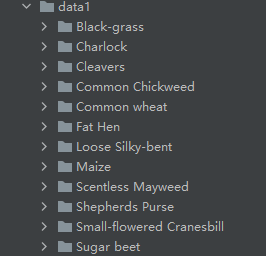
运行结果:
([0.3281186, 0.28937867, 0.20702125], [0.09407319, 0.09732835, 0.106712654])- 1
把这个结果记录下来,后面要用!
生成数据集
我们整理还的图像分类的数据集结构是这样的
data ├─Black-grass ├─Charlock ├─Cleavers ├─Common Chickweed ├─Common wheat ├─Fat Hen ├─Loose Silky-bent ├─Maize ├─Scentless Mayweed ├─Shepherds Purse ├─Small-flowered Cranesbill └─Sugar beet- 1
- 2
- 3
- 4
- 5
- 6
- 7
- 8
- 9
- 10
- 11
- 12
- 13
pytorch和keras默认加载方式是ImageNet数据集格式,格式是
├─data │ ├─val │ │ ├─Black-grass │ │ ├─Charlock │ │ ├─Cleavers │ │ ├─Common Chickweed │ │ ├─Common wheat │ │ ├─Fat Hen │ │ ├─Loose Silky-bent │ │ ├─Maize │ │ ├─Scentless Mayweed │ │ ├─Shepherds Purse │ │ ├─Small-flowered Cranesbill │ │ └─Sugar beet │ └─train │ ├─Black-grass │ ├─Charlock │ ├─Cleavers │ ├─Common Chickweed │ ├─Common wheat │ ├─Fat Hen │ ├─Loose Silky-bent │ ├─Maize │ ├─Scentless Mayweed │ ├─Shepherds Purse │ ├─Small-flowered Cranesbill │ └─Sugar beet- 1
- 2
- 3
- 4
- 5
- 6
- 7
- 8
- 9
- 10
- 11
- 12
- 13
- 14
- 15
- 16
- 17
- 18
- 19
- 20
- 21
- 22
- 23
- 24
- 25
- 26
- 27
新增格式转化脚本makedata.py,插入代码:
import glob import os import shutil image_list=glob.glob('data1/*/*.png') print(image_list) file_dir='data' if os.path.exists(file_dir): print('true') #os.rmdir(file_dir) shutil.rmtree(file_dir)#删除再建立 os.makedirs(file_dir) else: os.makedirs(file_dir) from sklearn.model_selection import train_test_split trainval_files, val_files = train_test_split(image_list, test_size=0.3, random_state=42) train_dir='train' val_dir='val' train_root=os.path.join(file_dir,train_dir) val_root=os.path.join(file_dir,val_dir) for file in trainval_files: file_class=file.replace("\\","/").split('/')[-2] file_name=file.replace("\\","/").split('/')[-1] file_class=os.path.join(train_root,file_class) if not os.path.isdir(file_class): os.makedirs(file_class) shutil.copy(file, file_class + '/' + file_name) for file in val_files: file_class=file.replace("\\","/").split('/')[-2] file_name=file.replace("\\","/").split('/')[-1] file_class=os.path.join(val_root,file_class) if not os.path.isdir(file_class): os.makedirs(file_class) shutil.copy(file, file_class + '/' + file_name)- 1
- 2
- 3
- 4
- 5
- 6
- 7
- 8
- 9
- 10
- 11
- 12
- 13
- 14
- 15
- 16
- 17
- 18
- 19
- 20
- 21
- 22
- 23
- 24
- 25
- 26
- 27
- 28
- 29
- 30
- 31
- 32
- 33
- 34
- 35
- 36
完成上面的内容就可以开启训练和测试了。
-
相关阅读:
王洪伟:流体力学与微积分方法求解水池进排水问题
【拿完年终奖后】想要转行网络安全,一定不要错过这个时间段。
SpringBoot 工程打包并运行
history对象
(二十) 共享模型之工具【JUC】【线程安全集合类】
会做梦的人,个个都是天才!(深度)
Linux多线程(线程池与单例模式)
一次Python爬虫实战,解决反爬问题!
智能终端界面自动化测试操作工具 - Appium常见用法
Stream流中的Map与flatMap的区别
- 原文地址:https://blog.csdn.net/hhhhhhhhhhwwwwwwwwww/article/details/128100230
