-
Netty进阶——粘包与半包(代码示例)
一、消息粘包和消息半包的概述
1.1、消息粘包
- 当缓冲区足够大,由于网络不稳定种种原因,可能会有多条消息从通道读入缓冲区,此时如果无法分清数据包之间的界限,就会导致粘包问题。
1.2、消息半包
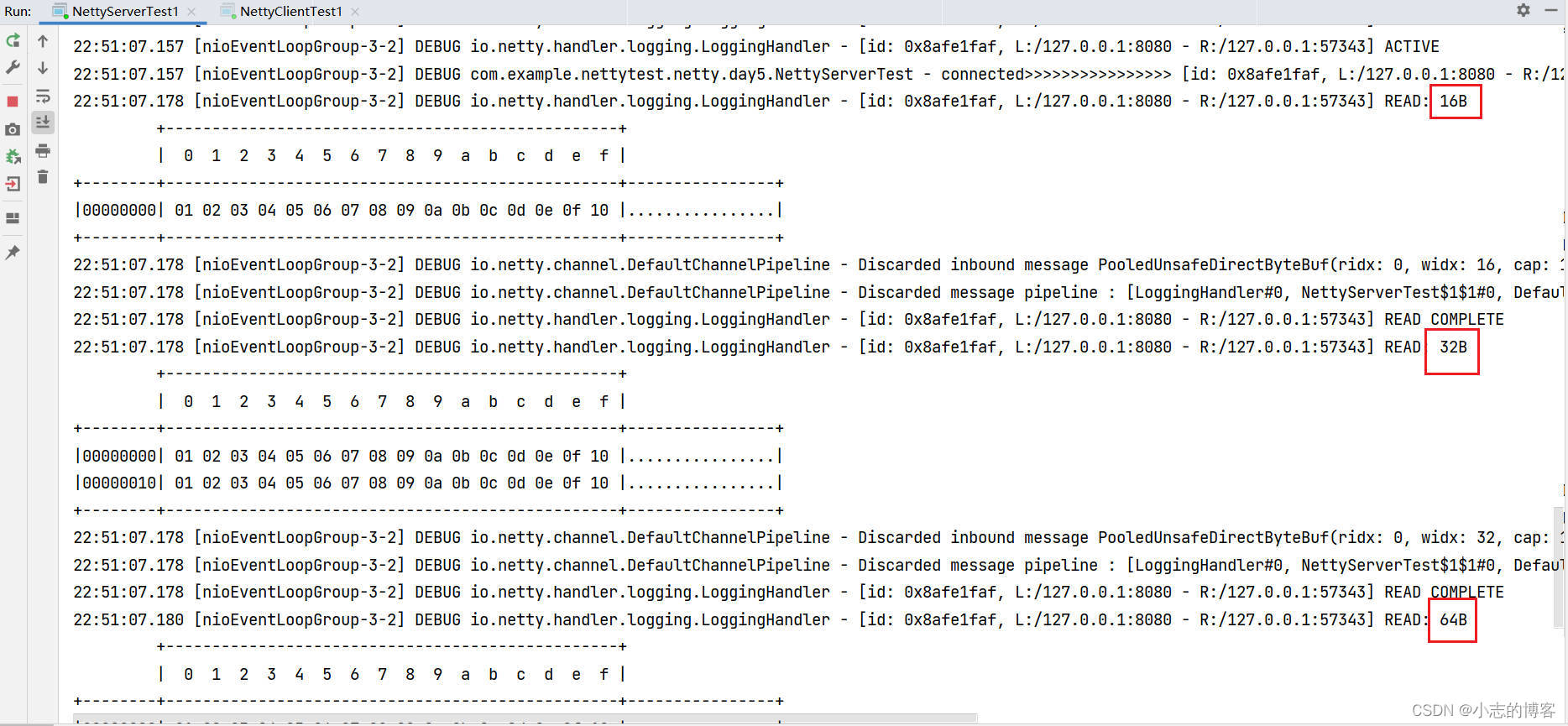
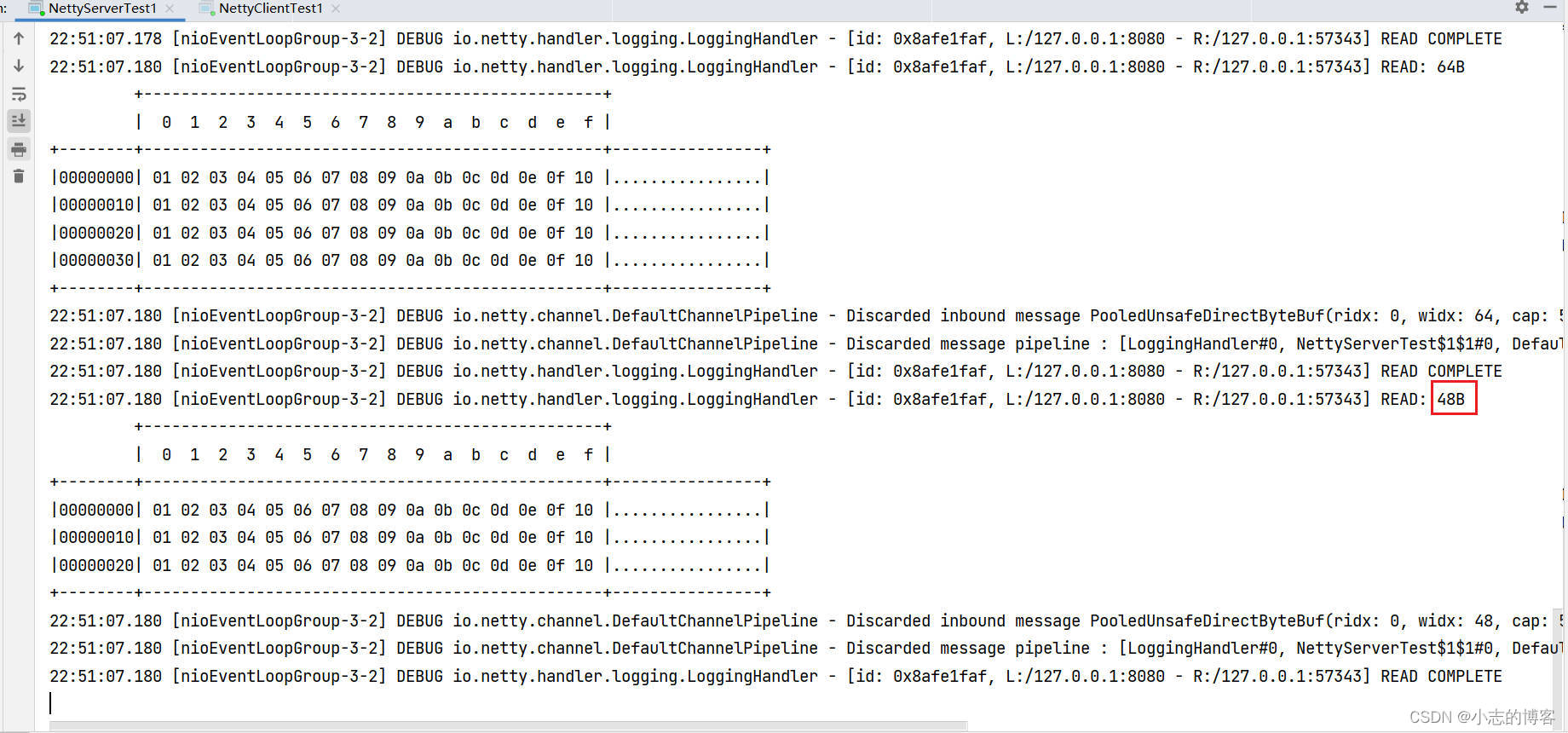
- 若消息没有接收完,缓冲区就被填满了,会导致从缓冲区取出的消息不完整,即半包的现象。
二、粘包现象代码示例
2.1、粘包现象服务端示例代码
-
服务端代码
package com.example.nettytest.netty.day5; import io.netty.bootstrap.ServerBootstrap; import io.netty.channel.ChannelFuture; import io.netty.channel.ChannelHandlerContext; import io.netty.channel.ChannelInboundHandlerAdapter; import io.netty.channel.ChannelInitializer; import io.netty.channel.nio.NioEventLoopGroup; import io.netty.channel.socket.SocketChannel; import io.netty.channel.socket.nio.NioServerSocketChannel; import io.netty.handler.logging.LogLevel; import io.netty.handler.logging.LoggingHandler; import lombok.extern.slf4j.Slf4j; /** * @description: Netty粘包现象演示服务端 * 消息粘包:当缓冲区足够大,由于网络不稳定种种原因,可能会有多条消息从通道读入缓冲区, * 此时如果无法分清数据包之间的界限,就会导致粘包问题; * @author: xz */ @Slf4j public class NettyServerTest { public static void main(String[] args) { new NettyServerTest().start(); } void start() { NioEventLoopGroup boss = new NioEventLoopGroup(1); NioEventLoopGroup worker = new NioEventLoopGroup(); try { ServerBootstrap serverBootstrap = new ServerBootstrap() .channel(NioServerSocketChannel.class) .group(boss, worker) .childHandler(new ChannelInitializer<SocketChannel>() { @Override protected void initChannel(SocketChannel ch) throws Exception { ch.pipeline().addLast(new LoggingHandler(LogLevel.DEBUG)); ch.pipeline().addLast(new ChannelInboundHandlerAdapter() { //会在连接channel建立成功后,触发active事件 @Override public void channelActive(ChannelHandlerContext ctx) throws Exception { log.debug("connected>>>>>>>>>>>>>>>> {}", ctx.channel()); super.channelActive(ctx); } @Override public void channelInactive(ChannelHandlerContext ctx) throws Exception { log.debug("disconnect>>>>>>>>>>>>>>>> {}", ctx.channel()); super.channelInactive(ctx); } }); } }); ChannelFuture channelFuture = serverBootstrap.bind(8080); log.debug("{}>>>>>>>>>>>>>>>> binding...", channelFuture.channel()); channelFuture.sync(); log.debug("{}>>>>>>>>>>>>>>>> bound...", channelFuture.channel()); channelFuture.channel().closeFuture().sync(); } catch (InterruptedException e) { log.error("server error", e); } finally { boss.shutdownGracefully(); worker.shutdownGracefully(); log.debug(">>>>>>>>>>>>>>>>stoped"); } } }- 1
- 2
- 3
- 4
- 5
- 6
- 7
- 8
- 9
- 10
- 11
- 12
- 13
- 14
- 15
- 16
- 17
- 18
- 19
- 20
- 21
- 22
- 23
- 24
- 25
- 26
- 27
- 28
- 29
- 30
- 31
- 32
- 33
- 34
- 35
- 36
- 37
- 38
- 39
- 40
- 41
- 42
- 43
- 44
- 45
- 46
- 47
- 48
- 49
- 50
- 51
- 52
- 53
- 54
- 55
- 56
- 57
- 58
- 59
- 60
- 61
- 62
- 63
- 64
- 65
- 66
- 67
2.2、粘包现象客户端示例代码
-
客户端代码示例
package com.example.nettytest.netty.day5; import io.netty.bootstrap.Bootstrap; import io.netty.buffer.ByteBuf; import io.netty.channel.ChannelFuture; import io.netty.channel.ChannelHandlerContext; import io.netty.channel.ChannelInboundHandlerAdapter; import io.netty.channel.ChannelInitializer; import io.netty.channel.nio.NioEventLoopGroup; import io.netty.channel.socket.SocketChannel; import io.netty.channel.socket.nio.NioSocketChannel; import lombok.extern.slf4j.Slf4j; /** * @description: Netty粘包现象演示客户端 * @author: xz */ @Slf4j public class NettyClientTest { public static void main(String[] args) { new NettyClientTest().start(); } void start() { NioEventLoopGroup worker = new NioEventLoopGroup(); try { Bootstrap bootstrap = new Bootstrap() .channel(NioSocketChannel.class) .group(worker) .handler(new ChannelInitializer<SocketChannel>() { @Override protected void initChannel(SocketChannel ch) throws Exception { log.debug("connetted》》》》》》》》》》》》》》》"); ch.pipeline().addLast(new ChannelInboundHandlerAdapter() { //会在连接channel建立成功后,触发active事件 @Override public void channelActive(ChannelHandlerContext ctx) throws Exception { log.debug("遍历 sending 每次发送16个字节》》》》》》》》》》》》》》》"); for (int i = 0; i < 10; i++) { //设置缓冲区大小16个字节 ByteBuf buffer = ctx.alloc().buffer(16); buffer.writeBytes(new byte[]{1, 2, 3, 4, 5, 6, 7, 8, 9, 10, 11, 12, 13, 14, 15, 16}); ctx.writeAndFlush(buffer); } } }); } }); ChannelFuture channelFuture = bootstrap.connect("127.0.0.1", 8080).sync(); channelFuture.channel().closeFuture().sync(); } catch (InterruptedException e) { log.error("client error", e); } finally { worker.shutdownGracefully(); } } }- 1
- 2
- 3
- 4
- 5
- 6
- 7
- 8
- 9
- 10
- 11
- 12
- 13
- 14
- 15
- 16
- 17
- 18
- 19
- 20
- 21
- 22
- 23
- 24
- 25
- 26
- 27
- 28
- 29
- 30
- 31
- 32
- 33
- 34
- 35
- 36
- 37
- 38
- 39
- 40
- 41
- 42
- 43
- 44
- 45
- 46
- 47
- 48
- 49
- 50
- 51
- 52
- 53
- 54
- 55
- 56
- 57
2.3、分别启动服务端,客户端,查看服务端结果输出
- 先启动服务端

- 再启动客户端

- 再次查看服务端
注:可下图输出结果可知:服务器端的某次输出,可以看到一次就接收了 160 个字节,而非分 10 次接收。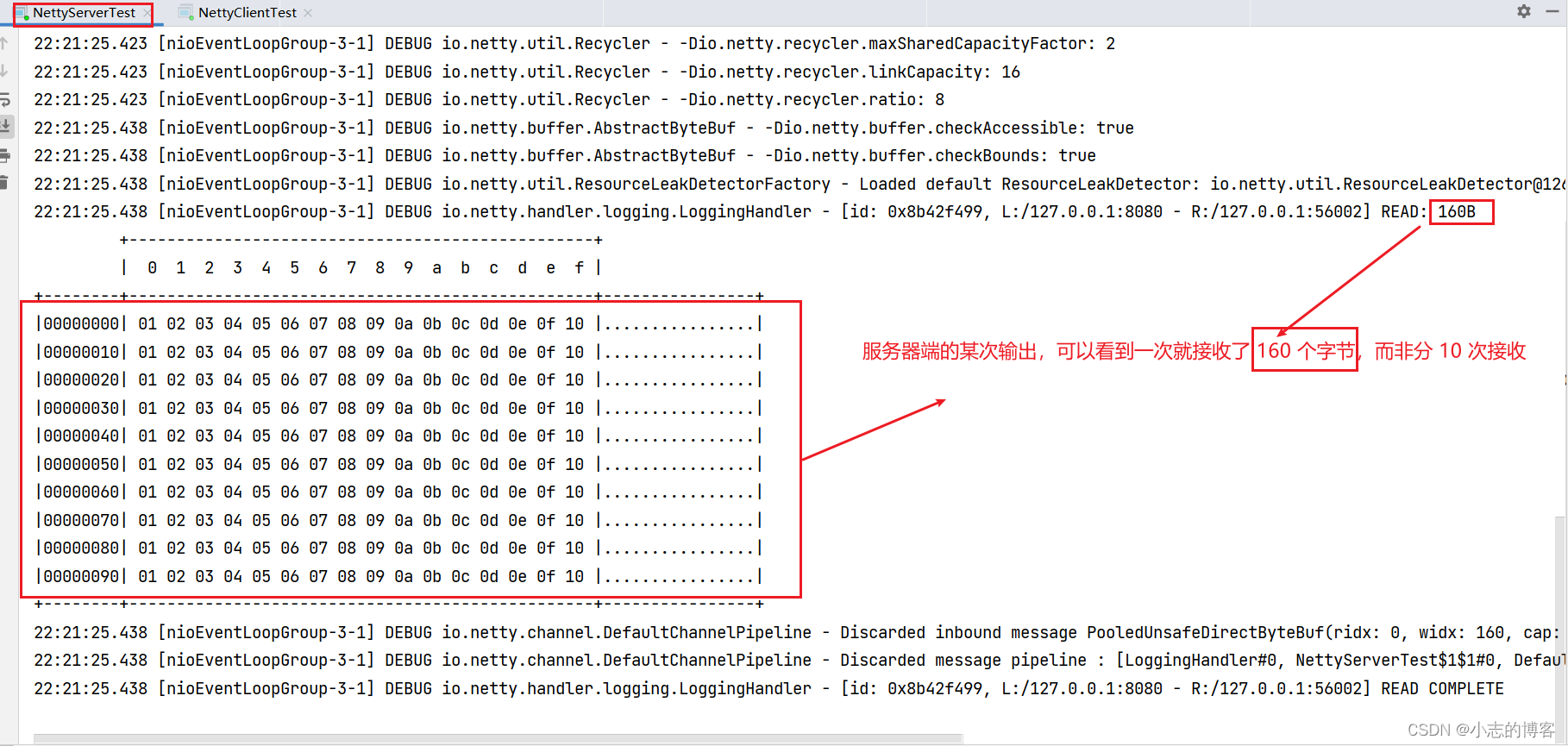
三、半包现象代码示例
3.1、半包现象服务端示例代码
-
为现象明显,服务端添加一下接收缓冲区,其它代码不变
serverBootstrap.option(ChannelOption.SO_RCVBUF, 10);- 1
-
服务端完整示例代码
package com.example.nettytest.netty.day5; import io.netty.bootstrap.ServerBootstrap; import io.netty.channel.*; import io.netty.channel.nio.NioEventLoopGroup; import io.netty.channel.socket.SocketChannel; import io.netty.channel.socket.nio.NioServerSocketChannel; import io.netty.handler.logging.LogLevel; import io.netty.handler.logging.LoggingHandler; import lombok.extern.slf4j.Slf4j; /** * @description: Netty半包现象演示服务端 * 消息半包:若消息没有接收完,缓冲区就被填满了,会导致从缓冲区取出的消息不完整,即半包的现象。 * @author: xz */ @Slf4j public class NettyServerTest1 { public static void main(String[] args) { new NettyServerTest().start(); } void start() { NioEventLoopGroup boss = new NioEventLoopGroup(1); NioEventLoopGroup worker = new NioEventLoopGroup(); try { ServerBootstrap serverBootstrap = new ServerBootstrap() .channel(NioServerSocketChannel.class) //调整系统的接受缓冲区(滑动窗口) .option(ChannelOption.SO_RCVBUF, 10) .group(boss, worker) .childHandler(new ChannelInitializer<SocketChannel>() { @Override protected void initChannel(SocketChannel ch) throws Exception { ch.pipeline().addLast(new LoggingHandler(LogLevel.DEBUG)); ch.pipeline().addLast(new ChannelInboundHandlerAdapter() { @Override public void channelActive(ChannelHandlerContext ctx) throws Exception { log.debug("connected================== {}", ctx.channel()); super.channelActive(ctx); } @Override public void channelInactive(ChannelHandlerContext ctx) throws Exception { log.debug("disconnect================== {}", ctx.channel()); super.channelInactive(ctx); } }); } }); ChannelFuture channelFuture = serverBootstrap.bind(8080); log.debug("{} binding====================", channelFuture.channel()); channelFuture.sync(); log.debug("{} bound====================", channelFuture.channel()); channelFuture.channel().closeFuture().sync(); } catch (InterruptedException e) { log.error("server error", e); } finally { boss.shutdownGracefully(); worker.shutdownGracefully(); log.debug("stoped======================"); } } }- 1
- 2
- 3
- 4
- 5
- 6
- 7
- 8
- 9
- 10
- 11
- 12
- 13
- 14
- 15
- 16
- 17
- 18
- 19
- 20
- 21
- 22
- 23
- 24
- 25
- 26
- 27
- 28
- 29
- 30
- 31
- 32
- 33
- 34
- 35
- 36
- 37
- 38
- 39
- 40
- 41
- 42
- 43
- 44
- 45
- 46
- 47
- 48
- 49
- 50
- 51
- 52
- 53
- 54
- 55
- 56
- 57
- 58
- 59
- 60
- 61
- 62
3.2、半包现象客户端示例代码
-
客户端代码示例无变化,完整代码如下
package com.example.nettytest.netty.day5; import io.netty.bootstrap.Bootstrap; import io.netty.buffer.ByteBuf; import io.netty.channel.ChannelFuture; import io.netty.channel.ChannelHandlerContext; import io.netty.channel.ChannelInboundHandlerAdapter; import io.netty.channel.ChannelInitializer; import io.netty.channel.nio.NioEventLoopGroup; import io.netty.channel.socket.SocketChannel; import io.netty.channel.socket.nio.NioSocketChannel; import lombok.extern.slf4j.Slf4j; /** * @description: Netty半包现象演示客户端 * @author: xz */ @Slf4j public class NettyClientTest1 { public static void main(String[] args) { new NettyClientTest1().start(); } void start() { NioEventLoopGroup worker = new NioEventLoopGroup(); try { Bootstrap bootstrap = new Bootstrap() .channel(NioSocketChannel.class) .group(worker) .handler(new ChannelInitializer<SocketChannel>() { @Override protected void initChannel(SocketChannel ch) throws Exception { log.debug("connetted----------------"); ch.pipeline().addLast(new ChannelInboundHandlerAdapter() { //会在连接channel建立成功后,触发active事件 @Override public void channelActive(ChannelHandlerContext ctx) throws Exception { log.debug("sending----------------"); for (int i = 0; i < 10; i++) { ByteBuf buffer = ctx.alloc().buffer(16); buffer.writeBytes(new byte[]{1, 2, 3, 4, 5, 6, 7, 8, 9, 10, 11, 12, 13, 14, 15, 16}); ctx.writeAndFlush(buffer); } } }); } }); ChannelFuture channelFuture = bootstrap.connect("127.0.0.1", 8080).sync(); channelFuture.channel().closeFuture().sync(); } catch (InterruptedException e) { log.error("client error", e); } finally { worker.shutdownGracefully(); } } }- 1
- 2
- 3
- 4
- 5
- 6
- 7
- 8
- 9
- 10
- 11
- 12
- 13
- 14
- 15
- 16
- 17
- 18
- 19
- 20
- 21
- 22
- 23
- 24
- 25
- 26
- 27
- 28
- 29
- 30
- 31
- 32
- 33
- 34
- 35
- 36
- 37
- 38
- 39
- 40
- 41
- 42
- 43
- 44
- 45
- 46
- 47
- 48
- 49
- 50
- 51
- 52
- 53
- 54
- 55
3.3、分别启动服务端,客户端,查看服务端结果输出
- 先启动服务端

- 再启动客户端

- 再次查看服务端
注:可下图输出结果可知:服务器端的某次输出,可以看到接收的消息被分为两节,第一次 16 字节,第二次 32 字节,第三次 64 字节,第四次 48 字节
-
相关阅读:
MySQL基础-----可视化工具DataGrip安装与使用
2022年最新宁夏水利水电施工安全员考试题库及答案
sklearn快速入门教程:(三)机器学习的通用模式及实现方法 学习笔记
2023秋招上岸必备软件测试面试题
【Helm三部曲】安装 chartmuseum 可视化界面 chartmuseumUi 【官方推荐安装方法】
vue 概述
Shiro入门基础知识&&案例实现&&与Web的集成
Qt day04
【自动化测试】Appium环境搭建与配置-详细步骤,一篇带你打通...
作为前端工程师如何SEO优化
- 原文地址:https://blog.csdn.net/li1325169021/article/details/128106437