-
Hadoop(HDFS)
一、HDFS 概述
1.1 HDFS 产出背景及定义
1 ) HDFS 产生背景随着数据量越来越大,在一个操作系统存不下所有的数据,那么就分配到更多的操作系统管理的磁盘中,但是不方便管理和维护,迫切 需要一种系统来管理多台机器上的文件 ,这就是分布式文件管理系统。 HDFS 只是分布式文件管理系统中的一种。2 ) HDFS 定义HDFS ( Hadoop Distributed File System ),它是一个文件系统 ,用于存储文件,通过目录树来定位文件; 其次,它是分布式的 ,由很多服务器联合起来实现其功能,集群中的服务器有各自的角色。HDFS 的使用场景:适合一次写入,多次读出的场景。 一个文件经过创建、写入和关闭之后就不需要改变。1.2 HDFS 优缺点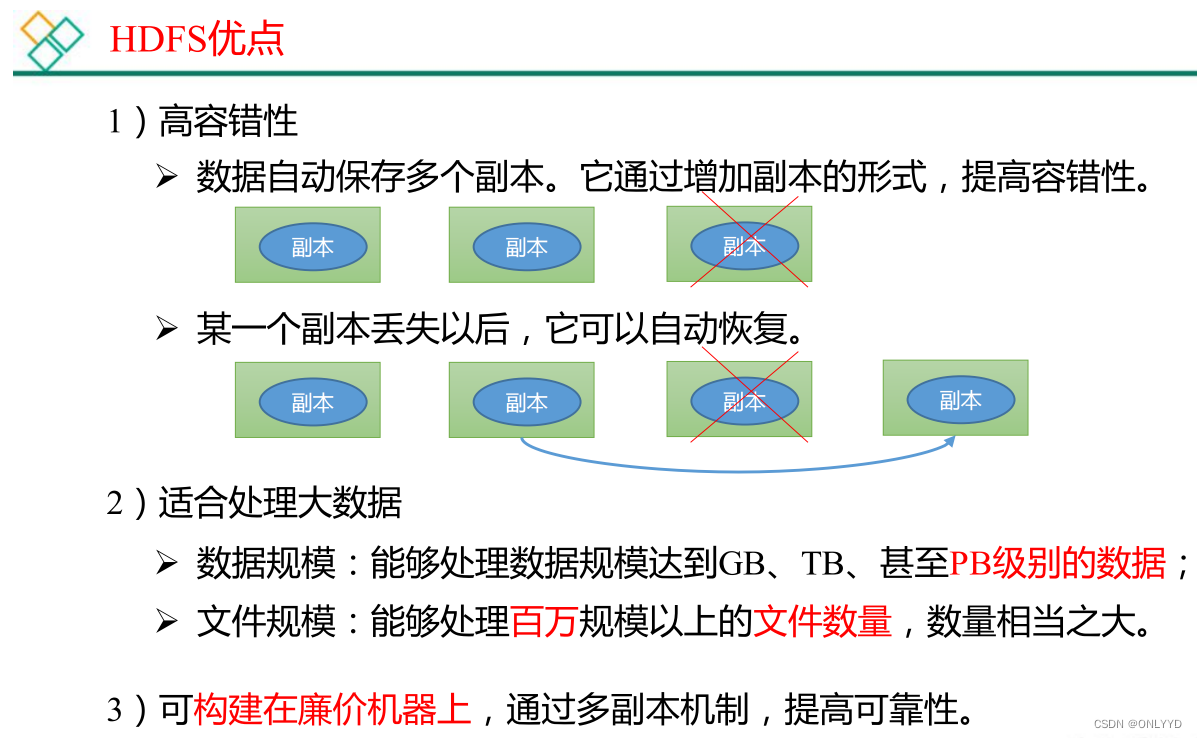
 1.3 HDFS 组成架构
 1.4 HDFS 文件块大小(面试重点)

二、HDFS 的 Shell 操作
Version:0.9 StartHTML:0000000105 EndHTML:0000000445 StartFragment:0000000141 EndFragment:0000000405
2.3.1 下载1 ) -moveFromLocal :从本地 剪切 粘贴到 HDFS- cd /opt/module/hadoop-3.1.3/
- hadoop fs -mkdir /sanguo
- vim shuguo.txt
- 输入:
- shuguo
- hadoop fs -moveFromLocal ./shuguo.txt /sanguo

2)-copyFromLocal:从本地文件系统中拷贝文件到 HDFS 路径去
- vim weiguo.txt
- 输入:
- weiguo
- hadoop fs -copyFromLocal weiguo.txt /sanguo
3 ) -put :等同于 copyFromLocal ,生产环境更习惯用 put- vim wuguo.txt
- 输入:
- wuguo
- hadoop fs -put ./wuguo.txt /sanguo
4)-appendToFile:追加一个文件到已经存在的文件末尾
- vim liubei.txt
- 输入:
- liubei
- hadoop fs -appendToFile liubei.txt /sanguo/shuguo.txt

2.3.2下载
1 ) -copyToLocal :从 HDFS 拷贝到本地hadoop fs -copyToLocal /sanguo/shuguo.txt ./
2)-get:等同于 copyToLocal,生产环境更习惯用 get
hadoop fs -get /sanguo/shuguo.txt ./shuguo2.txt
2.3.3 HDFS 直接操作
1)-ls: 显示目录信息
hadoop fs -ls /sanguo
2)-cat:显示文件内容
hadoop fs -cat /sanguo/shuguo.txt
3)-chgrp、-chmod、-chown:Linux 文件系统中的用法一样,修改文件所属权限
hadoop fs -chmod 666 /sanguo/shuguo.txt
hadoop fs -chown atguigu:atguigu /sanguo/shuguo.txt
4)-mkdir:创建路径
hadoop fs -mkdir /jinguo
5)-cp:从 HDFS 的一个路径拷贝到 HDFS 的另一个路径
hadoop fs -cp /sanguo/shuguo.txt /jinguo
6)-mv:在 HDFS 目录中移动文件
hadoop fs -mv /sanguo/wuguo.txt /jinguo
hadoop fs -mv /sanguo/weiguo.txt /jinguo
7)-tail:显示一个文件的末尾 1kb 的数据
hadoop fs -tail /jinguo/shuguo.txt
8)-rm:删除文件或文件夹
hadoop fs -rm /sanguo/shuguo.txt
9)-rm -r:递归删除目录及目录里面内容
hadoop fs -rm -r /sanguo
10)-du 统计文件夹的大小信息
hadoop fs -du -s -h /jinguo
输出
27 81 /jinguo
hadoop fs -du -h /jinguo
输出
14 42 /jinguo/shuguo.txt
7 21 /jinguo/weiguo.txt
6 18 /jinguo/wuguo.tx
11)setrep 设置副本
hadoop fs -setrep 10 /jinguo/shuguo.txt


三、HDFS 的 API 操作
1、在idea新建maven项目


项目建立后,引入依赖
- <dependencies>
- <dependency>
- <groupId>org.apache.hadoop</groupId>
- <artifactId>hadoop-client</artifactId>
- <version>3.1.3</version>
- </dependency>
- <dependency>
- <groupId>junit</groupId>
- <artifactId>junit</artifactId>
- <version>4.12</version>
- </dependency>
- <dependency>
- <groupId>org.slf4j</groupId>
- <artifactId>slf4j-log4j12</artifactId>
- <version>1.7.30</version>
- </dependency>
- </dependencies>
创建工具类HdfsClienty
1、创建文件夹
- import org.apache.hadoop.conf.Configuration;
- import org.apache.hadoop.fs.FileSystem;
- import org.apache.hadoop.fs.Path;
- import org.junit.After;
- import org.junit.Before;
- import org.junit.Test;
- import java.io.IOException;
- import java.net.URI;
- import java.net.URISyntaxException;
- /**
- * @Author sxd
- * @create 2022/11/28 23:45
- */
- public class HdfsClient {
- private FileSystem fileSystem;
- @Before
- public void init() throws URISyntaxException, IOException, InterruptedException {
- // 链接集群地址
- URI uri = new URI("hdfs://hadoop102:8020");
- // 创建配置文件
- Configuration configuration = new Configuration();
- //用户
- String user = "root";
- // 获取客户端对象
- fileSystem = FileSystem.get(uri, configuration, user);
- }
- @After
- public void close() throws IOException {
- //关闭资源
- fileSystem.close();
- }
- @Test
- public void testMkdirs() throws IOException, URISyntaxException,
- InterruptedException {
- //创建文件夹
- fileSystem.mkdirs(new Path("/xiyou/huaguoshan1"));
- }
- // 上传操作
- @Test
- public void testPut() throws IOException {
- /*
- 参数解读:
- 参数一:标识删除原数据
- 参数二:是否允许覆盖
- 参数三:原数据路径
- 参数四:目的地路径
- */
- fileSystem.copyFromLocalFile(true,true,new Path("/Users/sunxiangdao/java/study/folder/hadoop/sunwukong"),new Path("hdfs://hadoop102/xiyou/huaguoshan"));
- }
- }
运行testMkdirs后看到后台加入文件夹

2、上传
①本地创建文件sunwukong.txt,
运行testPut后,实现本地上传到服务器

②在resource文件夹下新建hdfs-site.xml文件
- "1.0" encoding="UTF-8"?>
- "text/xsl" href="configuration.xsl"?>
dfs.replication 1
启动上传功能发现上传的文件副本为1
③代码里设置副本后,启动上传功能发现上传的文件副本为2


④参数优先级为
 hdfs-default.xml => hdfs-site.xml =>在项目资源目录下的配置 文件 =》代码里面的配置文件
3、下载
- @Test
- public void testGet() throws IOException {
- /*
- 参数解读:
- 参数一:标识删除原数据
- 参数二:原数据路径
- 参数三:目的地路径
- 参数四:
- */
- fileSystem.copyToLocalFile(false,new Path("hdfs://hadoop102/xiyou/huaguoshan"),new Path("/Users/sunxiangdao/java/study/folder/hadoop/"),false);
- }
启动后发现多出crc文件,是用作hdfs与本地校验,校验后正确才能解析文件,当校验改为true就不校验

删除
- @Test
- public void testRm() throws IOException {
- /*
- 参数解读:
- 参数一:要删除的路径
- 参数二:是否递归删除
- 删除文件
- */
- // fileSystem.delete(new Path("/正面.JPG"),false);
- //删除空文件
- // fileSystem.delete(new Path("/xiyou"),false);
- // 删除非空目录
- fileSystem.delete(new Path("/jinguo"), true);
- }
移动和更名
- // 移动和更名文件
- @Test
- public void testMv() throws IOException {
- /*
- 参数解读:
- 参数一:原文件路径
- 参数二:目标文件路径
- */
- // fileSystem.rename(new Path("/input/word.txt"),new Path("/input/ss.txt"));
- // 文件更名和移动
- // fileSystem.rename(new Path("/input/ss.txt"),new Path("/cls.txt"));
- // 目录更名
- fileSystem.rename(new Path("/input"), new Path("/output"));
- }
获取文件详细信息
- // 获取文件详细信息
- @Test
- public void fileDetail() throws IOException {
- // 获取所有文件信息
- RemoteIterator<LocatedFileStatus> listFiles = fileSystem.listFiles(new Path("/"), true);
- // 遍历文件
- while (listFiles.hasNext()){
- LocatedFileStatus fileStatus = listFiles.next();
- System.out.println("0----地址"+fileStatus.getPath()+"---0");
- System.out.println("0----权限"+fileStatus.getPermission());
- System.out.println("0----用户"+fileStatus.getOwner());
- System.out.println("0----分组"+fileStatus.getGroup());
- System.out.println("0----大小"+fileStatus.getLen());
- System.out.println("0----上次修改时间"+fileStatus.getModificationTime());
- System.out.println("0----副本"+fileStatus.getReplication());
- System.out.println("0----块大小"+fileStatus.getBlockSize());
- System.out.println("0----名称"+fileStatus.getPath().getName());
- // 获取块信息
- BlockLocation[] blockLocations = fileStatus.getBlockLocations();
- System.out.println("0----块服务器地址"+Arrays.toString(blockLocations));
- }
- }
判断文件和文件夹
- @Test
- public void testFile() throws IOException {
- FileStatus[] listStatus = fileSystem.listStatus(new Path("/"));
- for (FileStatus status : listStatus) {
- if(status.isFile()){
- System.out.println("文件:"+status.getPath().getName());
- }else {
- System.out.println("目录:"+status.getPath().getName());
- }
- }
- }
hdfs读写流程
-
相关阅读:
Dockerfile使用介绍(入门教程)
Linux学习第19天:Linux并发与竞争实例: 没有规矩不成方圆
树莓派通过网线连接电脑(校园网也能连接),实现SSH连接
ROS2进阶第三章 -- 机器人语音交互之ros集成科大讯飞中文语音库,实现语音控制机器人小车
Linux学习第34天:Linux LCD 驱动实验(一):星星之火可以燎原
go入门快速学习笔记(有java基础)
Spring-FactoryBean的源码——简略解析(下)
controller-informer
【Unity2D】关卡编辑好帮手——TileMap
vue3.4的更新,保证你看的明明白白
- 原文地址:https://blog.csdn.net/ONLYYD/article/details/128087228
