-
Unity-2D游戏-打击感与敌人AI
前言
最近快搞毕设了,学一些Unity2D游戏开发的知识,发现b站宝藏up主奥飒姆Awesome的两个蛮不错的教程,我想简单记录一下它这个游戏设计的方法。
我不一点点实现了,就是分析一下大致框架(方便以后套用)
资源
打击感
Red hood pixel character by Legnops
Pixel Fantasy Caves by Szadi art.
Pixelated Attack/Hit Animations by Viktor
成品项目链接:
GitHub - RedFF0000/AttackSense
敌人AI
Animated Pixel Adventurer by rvros
Skeleton Sprite Pack by Jesse Munguia
成品项目链接:
GitHub - RedFF0000/Finite-state-machine
动作游戏打击感
玩家配置
我们来看主角的动画状态:

其中,对于标准运动定义了很多,比如idle进入run,通过分析浮点型变量Horizontal来设置,因为左右都要有动画,故设置了两个Transition:

可以看到,除了基本的idle跑跳动作,还有一个Any State,监听了任意时刻的动作,例如我选中的any state到Light Attack1,就是当触发变量LightAttack触发时,ComboStep为1时则进入,应该就是进行轻攻击的第一下:
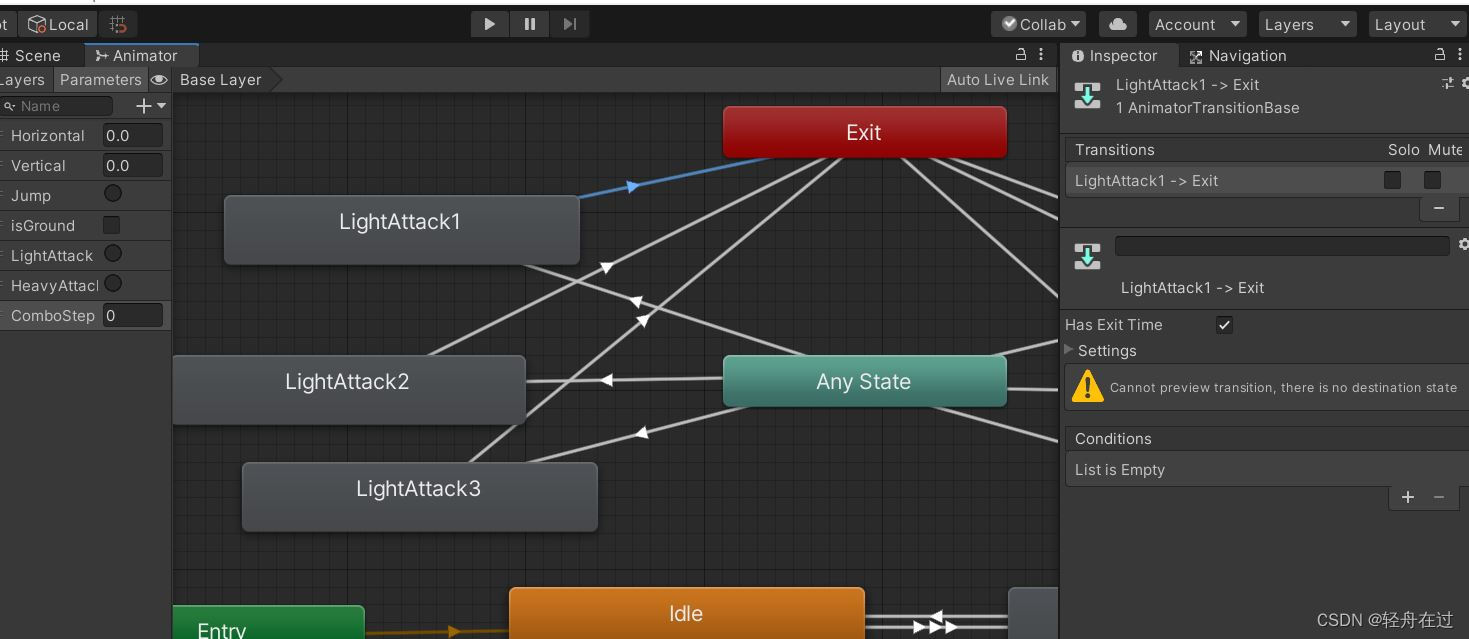
这些内容的控制,主要都在代码里,我们看一下人物面板配置:

截图中的speed调大,参考数据为 moveSpeed:180、lightSpeed:25、heavySpeed:35
来看一下PlayerController脚本,我已经把大概的注释写好了:
- using System.Collections;
- using System.Collections.Generic;
- using UnityEngine;
- public class PlayerController : MonoBehaviour
- {
- [Header("补偿速度")]
- public float lightSpeed;
- public float heavySpeed;
- [Header("打击感")]
- public float shakeTime;
- public int lightPause;
- public float lightStrength;
- public int heavyPause;
- public float heavyStrength;
- [Space]
- public float interval = 2f;
- private float timer;
- private bool isAttack;
- private string attackType; //攻击类型
- private int comboStep; //第几段攻击
- public float moveSpeed;
- public float jumpForce;
- new private Rigidbody2D rigidbody;
- private Animator animator;
- private float input;
- private bool isGround;
- [SerializeField] private LayerMask layer;
- [SerializeField] private Vector3 check;
- void Start()
- {
- //得到刚体
- rigidbody = GetComponent<Rigidbody2D>();
- //得到动画状态机
- animator = GetComponent<Animator>();
- }
- /*
- * 按帧执行,适合来处理GetKeyDown
- */
- void Update()
- {
- //得到水平输入
- input = Input.GetAxisRaw("Horizontal");
- //得到地面检测(layer)
- isGround = Physics2D.OverlapCircle(transform.position + new Vector3(check.x, check.y, 0), check.z, layer);
- //将刚体水平方向速度传给动画机
- animator.SetFloat("Horizontal", rigidbody.velocity.x);
- //将刚体竖直方向速度传给动画机
- animator.SetFloat("Vertical", rigidbody.velocity.y);
- //将是否触碰地面状态传给动画机
- animator.SetBool("isGround", isGround);
- //攻击处理
- Attack();
- Jump();
- }
- void Jump(){
- //进行跳跃
- if (Input.GetButtonDown("Jump") && isGround)
- {
- //给刚体一个y方向的力
- rigidbody.velocity = new Vector2(0, jumpForce);
- //同步动画机
- animator.SetTrigger("Jump");
- }
- }
- /*
- * 按固定时间间隔执行,适合来处理刚体效果
- */
- private void FixedUpdate()
- {
- //移动处理
- Move();
- }
- /*
- * 攻击处理函数
- */
- void Attack()
- {
- if (Input.GetKeyDown(KeyCode.J) && !isAttack) //轻击
- {
- //进入攻击状态
- isAttack = true;
- //设置攻击类型
- attackType = "Light";
- //攻击段数加一
- comboStep++;
- //还原攻击段数
- if (comboStep > 3)
- comboStep = 1;
- //设置攻击冷却间隔(负责自动还原攻击段数)
- timer = interval;
- //通知动画机
- animator.SetTrigger("LightAttack");
- animator.SetInteger("ComboStep", comboStep);
- }
- if (Input.GetKeyDown(KeyCode.K) && !isAttack) //重击
- {
- //重击
- isAttack = true;
- attackType = "Heavy";
- comboStep++;
- if (comboStep > 3)
- comboStep = 1;
- timer = interval;
- animator.SetTrigger("HeavyAttack");
- animator.SetInteger("ComboStep", comboStep);
- }
- if (timer != 0)
- {
- timer -= Time.deltaTime;
- if (timer <= 0)
- {
- timer = 0;
- comboStep = 0;
- }
- }
- }
- //攻击结束(此函数被每个攻击动画的快结束处调用)
- public void AttackOver()
- {
- isAttack = false;
- }
- /*
- * 移动处理函数
- */
- void Move()
- {
- if (!isAttack)
- //如果不在攻击中,则根据水平输入进行移动
- rigidbody.velocity = new Vector2(input * moveSpeed * Time.fixedDeltaTime, rigidbody.velocity.y);
- else
- {
- //根据攻击类型进行适量的移动(补偿速度)
- if (attackType == "Light")
- rigidbody.velocity = new Vector2(transform.localScale.x * lightSpeed * Time.fixedDeltaTime, rigidbody.velocity.y);
- else if (attackType == "Heavy")
- rigidbody.velocity = new Vector2(transform.localScale.x * heavySpeed * Time.fixedDeltaTime, rigidbody.velocity.y);
- }
- //根据速度方向调整本地缩放方向(实现转向)
- if (rigidbody.velocity.x < 0)
- transform.localScale = new Vector3(-1, 1, 1);
- else if (rigidbody.velocity.x > 0)
- transform.localScale = new Vector3(1, 1, 1);
- }
- /*
- * 触发检测
- * 玩家物体的子物体身上挂载有触发盒子
- * 玩家的攻击动画会动态激活子物体并调整其子物体的区域大小
- * 这里触发检测的就是子物体所触发区域
- */
- private void OnTriggerEnter2D(Collider2D other)
- {
- //触碰敌人
- if (other.CompareTag("Enemy"))
- {
- if (attackType == "Light") //轻击中
- {
- //通知攻击管理进行轻击中暂停
- AttackSense.Instance.HitPause(lightPause);
- //通知攻击管理进行轻击中镜头摇晃
- AttackSense.Instance.CameraShake(shakeTime, lightStrength);
- }
- else if (attackType == "Heavy") //重击中
- {
- AttackSense.Instance.HitPause(heavyPause);
- AttackSense.Instance.CameraShake(shakeTime, heavyStrength);
- }
- //根据自身方向调整敌人的转向
- if (transform.localScale.x > 0)
- other.GetComponent<Enemy>().GetHit(Vector2.right);
- else if (transform.localScale.x < 0)
- other.GetComponent<Enemy>().GetHit(Vector2.left);
- }
- }
- }
将移动放在fixedupdate中,跳跃放在update中。
移动和跳跃都是通过施加力实现的。跳跃有isGround变量限制,必须触地才能跳一次,故按帧执行或者按时间执行都不影响,而按时间执行还可能导致“按键失效”,所以我们放入按帧执行中,即update中;而移动是去持续施加力,在不同帧率的主机上效果不同,所以我们应该放入fixedupdate中,按时间执行细看代码不难理解,其中,对攻击的触发检测,触发盒挂在在子物体上,我么可以看一下大概思路:

可以看到,打击感的核心交给了AttackSense这个单例的类,算是个攻击管理类(攻击意识);而敌人接收到攻击的响应,则是通过触发器获取敌人对象来设置,这样很好的对Enemy进行了封装,不管什么敌人,统统调用GetHit即可。
攻击意识
下面我们来看看攻击管理的单例类,这是一个挂载到相机上的类:
- using System.Collections;
- using System.Collections.Generic;
- using UnityEngine;
- public class AttackSense : MonoBehaviour
- {
- private static AttackSense instance;
- public static AttackSense Instance
- {
- get
- {
- if (instance == null)
- instance = Transform.FindObjectOfType<AttackSense>();
- return instance;
- }
- }
- private bool isShake;
- public void HitPause(int duration)
- {
- StartCoroutine(Pause(duration));
- }
- IEnumerator Pause(int duration)
- {
- float pauseTime = duration / 60f;
- Time.timeScale = 0;
- yield return new WaitForSecondsRealtime(pauseTime);
- Time.timeScale = 1;
- }
- public void CameraShake(float duration, float strength)
- {
- if (!isShake)
- StartCoroutine(Shake(duration, strength));
- }
- IEnumerator Shake(float duration, float strength)
- {
- isShake = true;
- Transform camera = Camera.main.transform;
- Vector3 startPosition = camera.position;
- while (duration > 0)
- {
- camera.position = Random.insideUnitSphere * strength + startPosition;
- duration -= Time.deltaTime;
- yield return null;
- }
- camera.position = startPosition;
- isShake = false;
- }
- }
很简单
敌人配置
最后我们来看一下Enemy的配置,这里敌人的动画很简单:

代码如下:
- using System.Collections;
- using System.Collections.Generic;
- using UnityEngine;
- public class Enemy : MonoBehaviour
- {
- public float speed;
- private Vector2 direction;
- private bool isHit;
- new private Rigidbody2D rigidbody;
- private AnimatorStateInfo info;
- private Animator animator;
- void Start()
- {
- //得到自身动画机
- animator = transform.GetComponent<Animator>();
- //得到刚体
- rigidbody = transform.GetComponent<Rigidbody2D>();
- }
- void Update()
- {
- //得到自身动画机动画状态信息
- info = animator.GetCurrentAnimatorStateInfo(0);
- if (isHit)
- {
- //受到攻击回退
- rigidbody.velocity = direction * speed;
- if (info.normalizedTime >= .6f)
- isHit = false;
- }
- }
- public void GetHit(Vector2 direction)
- {
- //与受攻击方向同步方向
- transform.localScale = new Vector3(-direction.x, 1, 1);
- isHit = true;
- //重置方向,便于回退Update中
- this.direction = direction;
- //同步动画状态
- animator.SetTrigger("Hit");
- }
- }
结语
基本配置完成,打击感满满

敌方AI
玩家配置
玩家的配置很简单,就是正常的移动跳跃,需要更高级的配置在后面可以自己添加:

敌人配置
我们重点来看敌人配置:
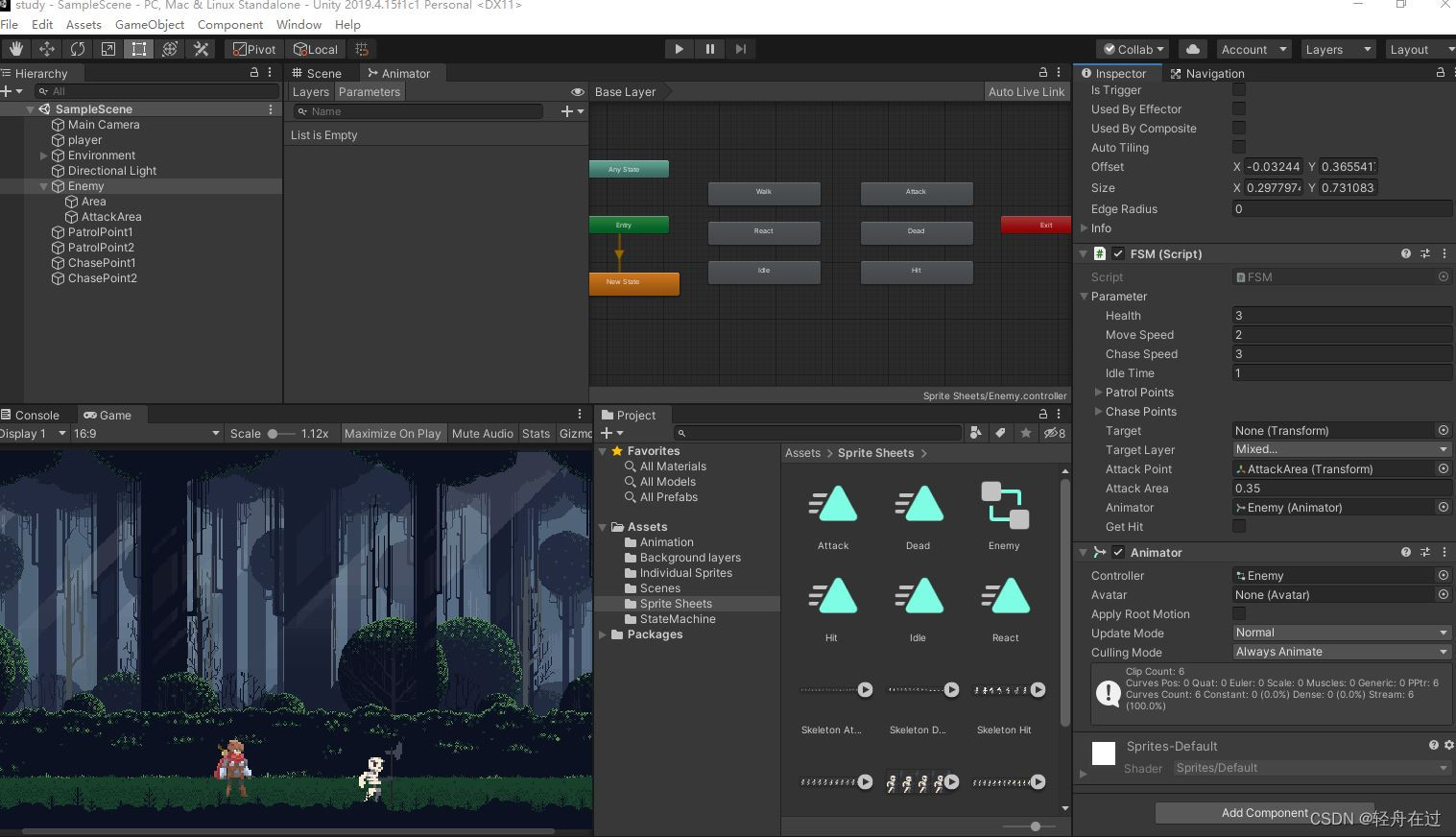
在Enemy下有两个子物体:
- Area:一个长条的空物体。触发器,模拟敌人的检测视野
- AttackArea:一个空物体(一个点)。将在脚本中搭配一个半径值来构成一个圆形区域,作为敌人施展攻击的触发区域
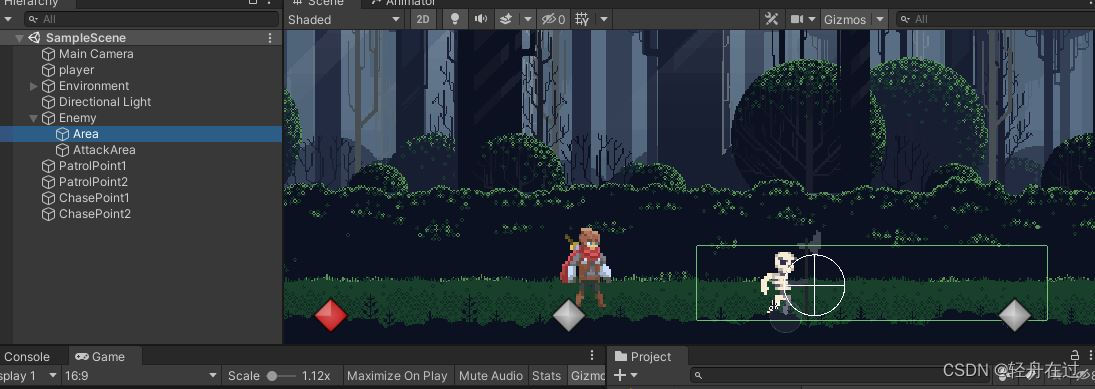
在Enemy上,绑定着脚本FSM(有限状态机),其内容我已注释:
- using System;
- using System.Collections;
- using System.Collections.Generic;
- using UnityEngine;
- //定义枚举类型
- public enum StateType
- {
- //待机、巡逻、追逐、反应、攻击、被攻击、死亡
- Idle, Patrol, Chase, React, Attack, Hit, Death
- }
- [Serializable] //可序列化-在检视面板可以设置
- public class Parameter
- {
- //生命值
- public int health;
- //巡逻速度
- public float moveSpeed;
- //追逐速度
- public float chaseSpeed;
- //待机时长(巡逻到头后待机)
- public float idleTime;
- //巡逻范围
- public Transform[] patrolPoints;
- //追逐范围
- public Transform[] chasePoints;
- //目标
- public Transform target;
- //目标所在层
- public LayerMask targetLayer;
- //攻击位置点
- public Transform attackPoint;
- //攻击位置点的半径(结合攻击位置点规划出一个攻击触发区)
- public float attackArea;
- //动画机
- public Animator animator;
- //是否受攻击
- public bool getHit;
- }
- //定义有限状态机类
- public class FSM : MonoBehaviour
- {
- //当前状态
- private IState currentState;
- //状态字典
- private Dictionary<StateType, IState> states = new Dictionary<StateType, IState>();
- //实例化一个parameter对象
- public Parameter parameter;
- void Start()
- {
- //给字典添加各个枚举类型对应的各个对象
- states.Add(StateType.Idle, new IdleState(this));
- states.Add(StateType.Patrol, new PatrolState(this));
- states.Add(StateType.Chase, new ChaseState(this));
- states.Add(StateType.React, new ReactState(this));
- states.Add(StateType.Attack, new AttackState(this));
- states.Add(StateType.Hit, new HitState(this));
- states.Add(StateType.Death, new DeathState(this));
- //初始化状态为Idle状态(转换为Idle状态)
- TransitionState(StateType.Idle);
- //初始化参数中的动画机
- parameter.animator = transform.GetComponent<Animator>();
- }
- void Update()
- {
- //当前状态更新
- currentState.OnUpdate();
- //模拟受到攻击(按下回车)
- if (Input.GetKeyDown(KeyCode.Return))
- {
- //参数对象设置受到攻击
- parameter.getHit = true;
- }
- }
- /* 状态转换
- *
- */
- public void TransitionState(StateType type)
- {
- //当前已有状态,做退出工作
- if (currentState != null)
- currentState.OnExit();
- //更改当前状态
- currentState = states[type];
- //做进入状态工作
- currentState.OnEnter();
- }
- /* 翻转
- * 根据目标位置转向
- */
- public void FlipTo(Transform target)
- {
- if (target != null)
- {
- if (transform.position.x > target.position.x)
- {
- transform.localScale = new Vector3(-1, 1, 1);
- }
- else if (transform.position.x < target.position.x)
- {
- transform.localScale = new Vector3(1, 1, 1);
- }
- }
- }
- //碰到玩家触发(触发器是子物体Area)
- private void OnTriggerEnter2D(Collider2D other)
- {
- if (other.CompareTag("Player"))
- {
- parameter.target = other.transform;
- }
- }
- //退出触发
- private void OnTriggerExit2D(Collider2D other)
- {
- if (other.CompareTag("Player"))
- {
- parameter.target = null;
- }
- }
- private void OnDrawGizmos()
- {
- Gizmos.DrawWireSphere(parameter.attackPoint.position, parameter.attackArea);
- }
- }
可以看到,原作者是通过状态机来实现AI的,将各个状态封装成对象,全部继承自接口:
- public interface IState
- {
- void OnEnter();
- void OnUpdate();
- void OnExit();
- }
下面我们来一个个看,代码上我就省略头文件的引用了:
- using System.Collections;
- using System.Collections.Generic;
- using UnityEngine;
待机状态:
- /*
- * 待机状态
- */
- public class IdleState : IState
- {
- //一个有限状态机
- private FSM manager;
- //一个参数汇总对象
- private Parameter parameter;
- private float timer;
- //初始化
- public IdleState(FSM manager)
- {
- this.manager = manager;
- this.parameter = manager.parameter;
- }
- public void OnEnter()
- {
- //参数对象的动画机播放待机动画(待机动画是循环的)
- parameter.animator.Play("Idle");
- }
- public void OnUpdate()
- {
- //计时器累积(单位秒)
- timer += Time.deltaTime;
- //待机状态被打
- if (parameter.getHit)
- {
- //转换状态到Hit
- manager.TransitionState(StateType.Hit);
- }
- //发现目标且目标距离在追捕范围内
- if (parameter.target != null &&
- parameter.target.position.x >= parameter.chasePoints[0].position.x &&
- parameter.target.position.x <= parameter.chasePoints[1].position.x)
- {
- //进入反应状态
- manager.TransitionState(StateType.React);
- }
- //计时器超过待机时间
- if (timer >= parameter.idleTime)
- {
- //转换回巡逻状态
- manager.TransitionState(StateType.Patrol);
- }
- }
- public void OnExit()
- {
- //计时器归零
- timer = 0;
- }
- }
巡逻状态:
- /*
- * 巡逻状态
- */
- public class PatrolState : IState
- {
- private FSM manager;
- private Parameter parameter;
- private int patrolPosition;
- //初始化
- public PatrolState(FSM manager)
- {
- this.manager = manager;
- this.parameter = manager.parameter;
- }
- public void OnEnter()
- {
- //播放走路动画
- parameter.animator.Play("Walk");
- }
- public void OnUpdate()
- {
- //根据巡逻位置转向
- manager.FlipTo(parameter.patrolPoints[patrolPosition]);
- //位移
- manager.transform.position = Vector2.MoveTowards(manager.transform.position,
- parameter.patrolPoints[patrolPosition].position, parameter.moveSpeed * Time.deltaTime);
- if (parameter.getHit)
- {
- manager.TransitionState(StateType.Hit);
- }
- if (parameter.target != null &&
- parameter.target.position.x >= parameter.chasePoints[0].position.x &&
- parameter.target.position.x <= parameter.chasePoints[1].position.x)
- {
- manager.TransitionState(StateType.React);
- }
- if (Vector2.Distance(manager.transform.position, parameter.patrolPoints[patrolPosition].position) < .1f)
- {
- manager.TransitionState(StateType.Idle);
- }
- }
- public void OnExit()
- {
- //巡逻点下标更新
- patrolPosition++;
- if (patrolPosition >= parameter.patrolPoints.Length)
- {
- patrolPosition = 0;
- }
- }
- }
追捕状态:
- /*
- * 追捕状态
- */
- public class ChaseState : IState
- {
- private FSM manager;
- private Parameter parameter;
- public ChaseState(FSM manager)
- {
- this.manager = manager;
- this.parameter = manager.parameter;
- }
- public void OnEnter()
- {
- //播放走路动画(Walk动画循环)
- parameter.animator.Play("Walk");
- }
- public void OnUpdate()
- {
- //根据目标位置转向
- manager.FlipTo(parameter.target);
- //有目标则一直走
- if (parameter.target)
- manager.transform.position = Vector2.MoveTowards(manager.transform.position,
- parameter.target.position, parameter.chaseSpeed * Time.deltaTime);
- if (parameter.getHit)
- {
- manager.TransitionState(StateType.Hit);
- }
- if (parameter.target == null ||
- manager.transform.position.x < parameter.chasePoints[0].position.x ||
- manager.transform.position.x > parameter.chasePoints[1].position.x)
- {
- manager.TransitionState(StateType.Idle);
- }
- if (Physics2D.OverlapCircle(parameter.attackPoint.position, parameter.attackArea, parameter.targetLayer))
- {
- manager.TransitionState(StateType.Attack);
- }
- }
- public void OnExit()
- {
- }
- }
反应状态:
- /*
- * 反应状态
- */
- public class ReactState : IState
- {
- private FSM manager;
- private Parameter parameter;
- //得到动画状态
- private AnimatorStateInfo info;
- public ReactState(FSM manager)
- {
- this.manager = manager;
- this.parameter = manager.parameter;
- }
- public void OnEnter()
- {
- parameter.animator.Play("React");
- }
- public void OnUpdate()
- {
- //得到当前动画状态
- info = parameter.animator.GetCurrentAnimatorStateInfo(0);
- if (parameter.getHit)
- {
- manager.TransitionState(StateType.Hit);
- }
- //播放动画快结束,则进入追捕状态
- if (info.normalizedTime >= .95f)
- {
- manager.TransitionState(StateType.Chase);
- }
- }
- public void OnExit()
- {
- }
- }
攻击状态
- /*
- * 攻击状态
- */
- public class AttackState : IState
- {
- private FSM manager;
- private Parameter parameter;
- private AnimatorStateInfo info;
- public AttackState(FSM manager)
- {
- this.manager = manager;
- this.parameter = manager.parameter;
- }
- public void OnEnter()
- {
- //进入攻击动画
- parameter.animator.Play("Attack");
- }
- public void OnUpdate()
- {
- info = parameter.animator.GetCurrentAnimatorStateInfo(0);
- if (parameter.getHit)
- {
- manager.TransitionState(StateType.Hit);
- }
- if (info.normalizedTime >= .95f)
- {
- manager.TransitionState(StateType.Chase);
- }
- }
- public void OnExit()
- {
- }
- }
受攻击状态:
- /*
- * 受攻击状态
- */
- public class HitState : IState
- {
- private FSM manager;
- private Parameter parameter;
- private AnimatorStateInfo info;
- public HitState(FSM manager)
- {
- this.manager = manager;
- this.parameter = manager.parameter;
- }
- public void OnEnter()
- {
- //播放动画,
- parameter.animator.Play("Hit");
- //掉血
- parameter.health--;
- }
- public void OnUpdate()
- {
- info = parameter.animator.GetCurrentAnimatorStateInfo(0);
- if (parameter.health <= 0)
- {
- //死亡
- manager.TransitionState(StateType.Death);
- }
- if (info.normalizedTime >= .95f)
- {
- parameter.target = GameObject.FindWithTag("Player").transform;
- manager.TransitionState(StateType.Chase);
- }
- }
- public void OnExit()
- {
- parameter.getHit = false;
- }
- }
死亡状态:
- /*
- * 死亡状态
- */
- public class DeathState : IState
- {
- private FSM manager;
- private Parameter parameter;
- public DeathState(FSM manager)
- {
- this.manager = manager;
- this.parameter = manager.parameter;
- }
- public void OnEnter()
- {
- parameter.animator.Play("Dead");
- }
- public void OnExit()
- {
- throw new System.NotImplementedException();
- }
- public void OnUpdate()
- {
- throw new System.NotImplementedException();
- }
- }
结语
功能基本完成。
-
相关阅读:
利用Python爬虫 爬取金融期货数据
释放WebKit潜能:硬件加速的秘诀与实战
C语言:static,volatile,const,extern,register,auto, 栈stack结构
一篇让你使用vue-cli搭建SPA项目
【机器学习5】无监督学习聚类
Java 加载、编辑和保存WPS表格文件(.et/.ett)
C语言-数组指针与指针数组
《吐血整理》高级系列教程-吃透Fiddler抓包教程(29)-Fiddler如何抓取Android7.0以上的Https包-终篇
vue3 父子组件之间的方法调用
C++入门
- 原文地址:https://blog.csdn.net/m0_46378049/article/details/128078913
