-
表单与列表在HTML与CSS中是这么玩的
表单应用场景实例讲解
<form action="1.php" method="post"> <fieldset> <legend>表单legend> <input type="text" name="title" /> <input type="text" name="content" /> fieldset> <button>提交button> form>- 1
- 2
- 3
- 4
- 5
- 6
- 7
- 8
- 9
表单描述标签的使用 label
<form action="1.php" method="post"> <fieldset> <legend>表单legend> <label for="title">标题label> <input type="text" name="title" id="title" /> <hr /> <label> 介绍 <input type="text" name="content" /> label> fieldset> <button>提交button> form>- 1
- 2
- 3
- 4
- 5
- 6
- 7
- 8
- 9
- 10
- 11
- 12
- 13
- 14
表单约束属性详解
required size placeholder value<form action="1.php" method="post"> <fieldset> <legend>表单legend> <label for="title">标题label> <input type="text" name="title" id="title" required size="50" /> <hr /> <label> 网址 <input type="text" name="url" placeholder="必须有协议如http" /> label> <label> 来源 <input type="text" name="source" value="后盾人" /> label> fieldset> <button>提交button> form>- 1
- 2
- 3
- 4
- 5
- 6
- 7
- 8
- 9
- 10
- 11
- 12
- 13
- 14
- 15
- 16
- 17
- 18
表单访问限制技巧
readonlydisabled<input readonly disabled value="后盾人" type="text" name="title" id="title" required size="50" />- 1
- 2
- 3
- 4
- 5
- 6
- 7
- 8
- 9
- 10
常用字段类型扩展
<form action="1.php" method="post"> <fieldset> <legend>表单legend> <label> 电话 <input type="tel" /> label> <hr /> <label> 密码 <input type="password" /> label> <hr /> <label> 邮箱 <input type="email" /> label> <hr /> <label> 数值 <input type="number" /> label> fieldset> form>- 1
- 2
- 3
- 4
- 5
- 6
- 7
- 8
- 9
- 10
- 11
- 12
- 13
- 14
- 15
- 16
- 17
- 18
- 19
- 20
- 21
- 22
- 23
- 24
隐藏与表单提交技巧
<form action="1.php" method="post"> <fieldset> <legend>表单legend> <label>标题 <input type="hidden" name="token" value="ssdsfdssf" /> label> fieldset> <input type="submit" value="保存提交" name="put" /> <input type="submit" value="save" name="save" /> <button>提交button> form>- 1
- 2
- 3
- 4
- 5
- 6
- 7
- 8
- 9
- 10
- 11
- 12
表单验证使用总结
<body> <form action="1.php" method="post"> <fieldset> <legend>表单legend> <label>用户名 <input type="text" pattern="[A-z]{5}" name="username" oninvalid="valid('用户名不能小于5位')" /> label> fieldset> <button>提交button> form> <script> function valid(message) { alert(message); } script> body>- 1
- 2
- 3
- 4
- 5
- 6
- 7
- 8
- 9
- 10
- 11
- 12
- 13
- 14
- 15
- 16
- 17
- 18
- 19
- 20
- 21
- 22
大文本与列表框技巧详解

<form action="1.php" method="post"> <fieldset> <legend>表单legend> <label> 介绍 <textarea name="info" cols="30" rows="10" placeholder="请输入介绍信息" > 这是默认值 textarea> label> <label> 栏目 <select name="category[]"> <optgroup label="游戏"> <option value="1">原神option> <option value="2">纸嫁衣option> optgroup> <optgroup label="开发"> <option value="1" selected>MYSQLoption> <option value="2">LINUXoption> optgroup> select> label> fieldset> <button>提交button> form>- 1
- 2
- 3
- 4
- 5
- 6
- 7
- 8
- 9
- 10
- 11
- 12
- 13
- 14
- 15
- 16
- 17
- 18
- 19
- 20
- 21
- 22
- 23
- 24
- 25
- 26
- 27
- 28
- 29
- 30
- 31
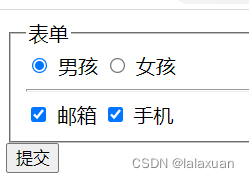
选项框标准打开方式
<form action="1.php" method="post"> <fieldset> <legend>表单legend> <input type="radio" checked name="sex" id="boy" value="boy" /> <label for="boy">男孩label> <input type="radio" name="sex" id="girl" value="girl" /> <label for="girl">女孩label> <hr /> <input type="checkbox" name="register[]" id="email" value="email" /> <label for="email">邮箱label> <input type="checkbox" name="register[]" id="mobile" value="mobile" /> <label for="mobile">手机label> fieldset> <button>提交button> form>- 1
- 2
- 3
- 4
- 5
- 6
- 7
- 8
- 9
- 10
- 11
- 12
- 13
- 14
- 15
文件上传的正确打开方式
<form action="1.php" method="post" enctype="multipart/form-data"> <fieldset> <legend>表单legend> <input type="file" name="image[]" accept=".png,.jpg" multiple /> fieldset> <button>提交button> form>- 1
- 2
- 3
- 4
- 5
- 6
- 7

时期与时间表单项使用详解
实际开发中当然是使用第三方组件了!
<input type="date" name="date" min="2020-02-12" max=""/> <input type="time" name = "time" /> <input type="week" name = "week"/> <input type="datetime-local"/>- 1
- 2
- 3
- 4
搜索表单与DATALIST数据列表
<input type="search" name="search" list="lesson"/> <datalist id="lesson"> <option value="MYSQL">数据库管理option> <option value="PHP">PHPoption> <option value="XXX">XXXoption> datalist>- 1
- 2
- 3
- 4
- 5
- 6
- 7
表单历史数据自动提示 autocomplete
<input type="text" autocomplete="off"/> <input type="text" autocomplete="on"/>- 1
- 2
三种列表项使用详解

<body> <style> .style1 { list-style-type: lower-roman; } style> <ol start="1" class="style1"> <li>phpli> <li>cssli> ol> <ul class="style1"> <li>phpli> <li>cssli> ul> <dl> <dt>公司产品dt> <dd>vivodd> <dd>oppodd> <dd>meizudd> <dt>公司位置dt> <dd>上海dd> <dd>天津dd> <dd>广州dd> dl> body>- 1
- 2
- 3
- 4
- 5
- 6
- 7
- 8
- 9
- 10
- 11
- 12
- 13
- 14
- 15
- 16
- 17
- 18
- 19
- 20
- 21
- 22
- 23
- 24
- 25
- 26
- 27
- 28
-
相关阅读:
服务运营 |文章精选:运筹学视角下的众包竞赛
AI框架之Spring AI与Spring Cloud Alibaba AI使用讲解
SpringBoot学习04-[定制SpringMVC]
什么是单域名SSL安全证书?
这13个不经意却很不卫生的行为,很多人都没意识到
Java 网络教程ServerSocket的简介说明
ffmpeg 滤镜实现不同采样率多音频混音
线性代数(七) 矩阵分析
[力扣 Hot100]Day38 翻转二叉树
七、函数-存储过程-触发器
- 原文地址:https://blog.csdn.net/weixin_45732235/article/details/128067404
