-
使用D435i+Avia跑Fast-LIVO
前言
最近Fast-LIVO开源了,之前看它的论文的时候发现效果很优秀,于是用实验室现有的设备尝试一下。这里主要记录一下使用不带外触发功能的D435i + Avia跑Fast-LIVO的过程,为了适配代码,主要修改了雷达的驱动、相机的launch文件、以及使用了一个外部的rospkg对相机的IMU坐标系做了转换。
Fast-LIVO源码仓库:https://github.com/hku-mars/FAST-LIVO
自己搭建的设备如下:

编译Fast-LIVO
安装Sophus库
git clone https://github.com/strasdat/Sophus.git cd Sophus git checkout a621ff- 1
- 2
- 3
在make之前,先修改一个东西,因为这个版本的Sophus是有bug的,解决方法如下:
打开Sophus/sophus/so2.cpp文件,将代码修改如下
// SO2::SO2() // { // unit_complex_.real() = 1.; // unit_complex_.imag() = 0.; // } SO2::SO2() { unit_complex_.real(1.); unit_complex_.imag(0.); }- 1
- 2
- 3
- 4
- 5
- 6
- 7
- 8
- 9
- 10
修改好之后再make
mkdir build && cd build && cmake .. make sudo make install- 1
- 2
- 3
安装fmt库
git clone https://github.com/fmtlib/fmt.git cd fmt mkdir build cd build cmake .. sudo make install- 1
- 2
- 3
- 4
- 5
- 6
安装Vikit库
mkdir fast-livo_ws cd fast-livo_ws & mkdir src & cd src git clone https://github.com/uzh-rpg/rpg_vikit.git- 1
- 2
- 3
在
/src/rpg_vikit/vikit_common/CMakeLists.txt中添加SET(Sophus_LIBRARIES libSophus.so)- 1
否则待会编译的时候会报找不到一些库的错误
下载Fast-LIVO源码
git clone https://github.com/hku-mars/FAST-LIVO cd ../ catkin_make- 1
- 2
- 3
到这里就可以跑作者提供的数据集了,数据集下载可以在这里找到FAST-LIVO-Datasets
连接实物
这里我们使用自己的设备跑Fast-LIVO,我们的设备是
realsense D435i+Livox Avia,因为Fast-LIVO要求相机和IMU时钟同步,所以针对我们自己的设备需要做一些调整
可以看到作者提供的数据集里面的各个传感器是严格时钟同步的

livox驱动修改
livox原驱动中设置lidar、imu数据的时间戳均为基于雷达启动的时间开始的,而非基于系统的时间,而摄像头(包括本例中的RealSense)数据的时间戳通常是基于系统时间的。如果只是跑作者的数据集,便不需要改livox的ROS驱动;如果要跑自己的数据,就需要参考作者提供的修改方式进行处理。
- livox官方驱动: https://github.com/Livox-SDK/livox_ros_driver
- r3live作者提供的修改方案:https://github.com/ziv-lin/livox_ros_driver_for_R2LIVE
实际上我们可以直接使用r3live作者提供的修改方案,但是为了学习,我这里参考作者的方法自己下载了官方的驱动进行修改,我这里修改的这个版本和r3live作者提供的主要有如下区别:
- 设置了宏定义编译,在CMakeLists.txt中通过应该宏定义开关可以选择编译官方原生的,还是我们自己修改过后的版本的
- 仅修改雷达点云的时间戳。因为r3live作者他使用的是雷达内置的IMU,所以他把雷达的时间戳也改了,我这里没有使用雷达自带的IMU,所以没有改雷达IMU的时间戳以及它的重力尺度
其实主要是修改了
livox_ros_driver中的lddc.cpp文件,修改方法如下:1、在
lddc.cpp文件开头,加入用于记录起始时间的相关变量
2、在点云消息发布之前把时间戳修改
- livox自定义消息类型
修改
lddc.cpp中的PublishCustomPointcloud函数,在消息Publish之前加入如下片段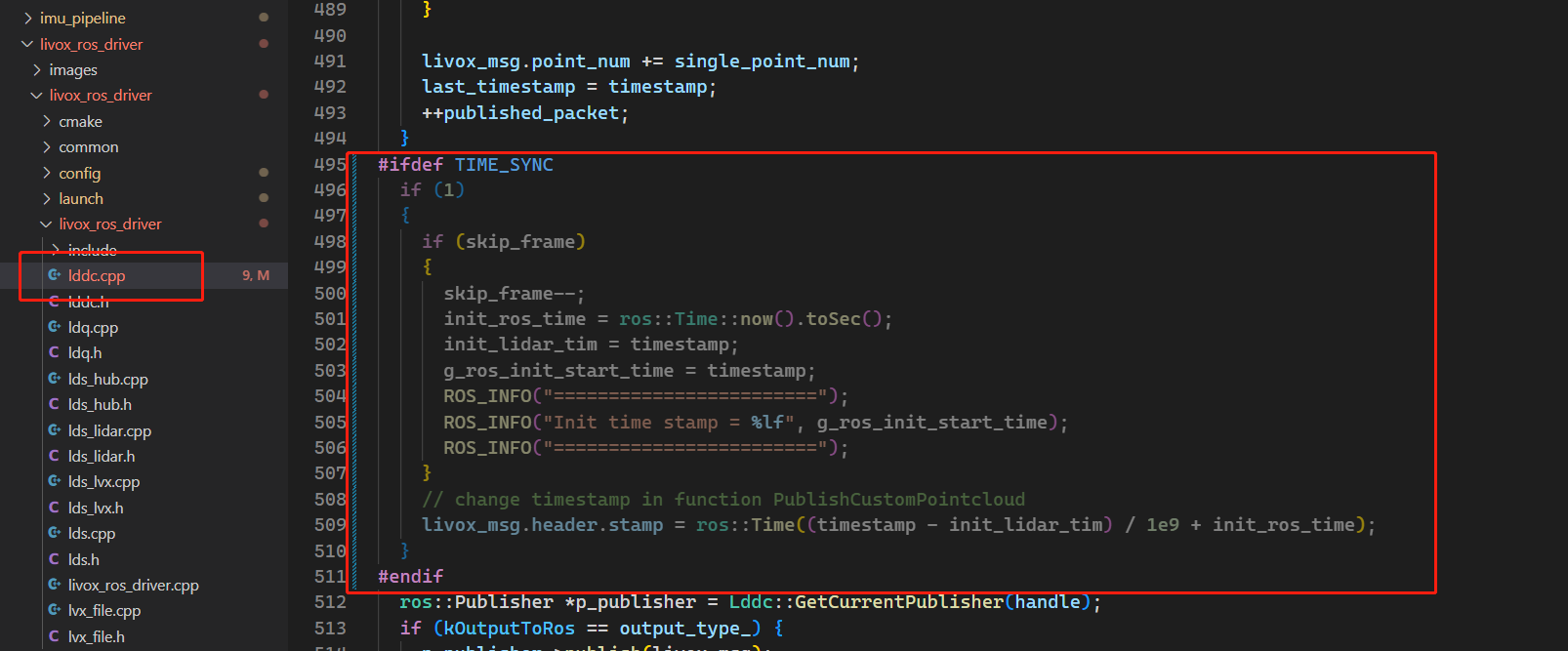
- PointCloud2消息类型
修改
lddc.cpp中的PublishPointcloud2函数,在消息Publish之前加入如下片段
- CMakeLists.txt设置宏定义
添加宏定义变量如下:

修改完成之后重新编译,之后启动我们自己修改的
livox_ros_driver即可IMU坐标系转换
由于
Avia雷达内置IMU,如果使用它自带的IMU,那么就不需要进行坐标调整,因为雷达内置的IMU的坐标系和雷达坐标系是一致的。因为我们这里没有使用外部的时钟触发设备,所以我们这里选择使用相机内置的IMU,在相机的ros_warp中我们可以设置图像和IMU时钟同步,这样就可以免去使用一个外部时钟触发设备。但是,如果我们使用外部的IMU(如:D435i内置的IMU),相机中内置的IMU的坐标系是在相机坐标系下的,和雷达坐标系不一样,我们需要把IMU的坐标系转换到雷达坐标系下。
这里我们通过ROS中的
imu_transformer功能包进行修改,这个包需要自行下载编译imu_pipeline功能包集:https://github.com/ros-perception/imu_pipeline
对于
imu_transformer功能包,注意修改启动文件ned_to_enu.launch中的静态变换与target_frame字段。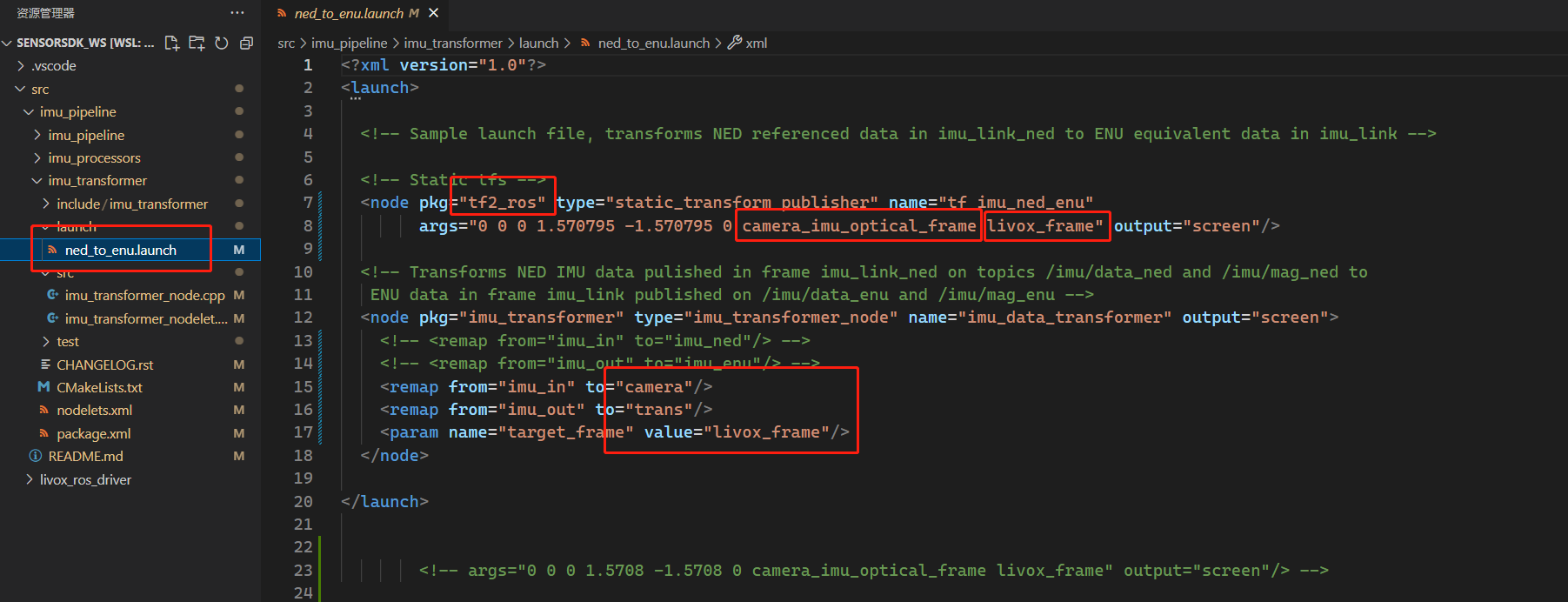
修改完成之后,重新编译即可。使用时,先启动
imu_transformer的转换程序,再启动相机的ros_warp。
可以看到它把相机的IMU话题订阅了并重新转发了一次,转成了
/trans/data,这个话题下的IMU数据和雷达坐标系是一致的
后面在我们程序中可以直接订阅这个
/trans/data话题即可D435i launch文件修改
这里我自定义了一个launch文件如下:
<launch> <rosparam> /camera/motion_module/global_time_enabled: true /camera/rgb_camera/global_time_enabled: true rosparam> <arg name="serial_no" default=""/> <arg name="usb_port_id" default=""/> <arg name="device_type" default=""/> <arg name="json_file_path" default=""/> <arg name="camera" default="camera"/> <arg name="tf_prefix" default="$(arg camera)"/> <arg name="external_manager" default="false"/> <arg name="manager" default="realsense2_camera_manager"/> <arg name="output" default="screen"/> <arg name="respawn" default="false"/> <arg name="fisheye_width" default="-1"/> <arg name="fisheye_height" default="-1"/> <arg name="enable_fisheye" default="false"/> <arg name="depth_width" default="640"/> <arg name="depth_height" default="480"/> <arg name="enable_depth" default="false"/> <arg name="confidence_width" default="-1"/> <arg name="confidence_height" default="-1"/> <arg name="enable_confidence" default="false"/> <arg name="confidence_fps" default="-1"/> <arg name="infra_width" default="640"/> <arg name="infra_height" default="480"/> <arg name="enable_infra" default="false"/> <arg name="enable_infra1" default="false"/> <arg name="enable_infra2" default="false"/> <arg name="infra_rgb" default="false"/> <arg name="color_width" default="640"/> <arg name="color_height" default="480"/> <arg name="enable_color" default="true"/> <arg name="fisheye_fps" default="-1"/> <arg name="depth_fps" default="30"/> <arg name="infra_fps" default="30"/> <arg name="color_fps" default="30"/> <arg name="gyro_fps" default="200"/> <arg name="accel_fps" default="200"/> <arg name="enable_gyro" default="true"/> <arg name="enable_accel" default="true"/> <arg name="enable_pointcloud" default="false"/> <arg name="pointcloud_texture_stream" default="RS2_STREAM_COLOR"/> <arg name="pointcloud_texture_index" default="0"/> <arg name="allow_no_texture_points" default="false"/> <arg name="ordered_pc" default="false"/> <arg name="enable_sync" default="true"/> <arg name="align_depth" default="false"/> <arg name="publish_tf" default="true"/> <arg name="tf_publish_rate" default="0"/> <arg name="filters" default=""/> <arg name="clip_distance" default="-2"/> <arg name="linear_accel_cov" default="0.01"/> <arg name="initial_reset" default="false"/> <arg name="reconnect_timeout" default="6.0"/> <arg name="wait_for_device_timeout" default="-1.0"/> <arg name="unite_imu_method" default="linear_interpolation"/> <arg name="topic_odom_in" default="odom_in"/> <arg name="calib_odom_file" default=""/> <arg name="publish_odom_tf" default="true"/> <arg name="stereo_module/exposure/1" default="7500"/> <arg name="stereo_module/gain/1" default="16"/> <arg name="stereo_module/exposure/2" default="1"/> <arg name="stereo_module/gain/2" default="16"/> <include file="$(find imu_transformer)/launch/ned_to_enu.launch"/> <group ns="$(arg camera)"> <include file="$(find realsense2_camera)/launch/includes/nodelet.launch.xml"> <arg name="tf_prefix" value="$(arg tf_prefix)"/> <arg name="external_manager" value="$(arg external_manager)"/> <arg name="manager" value="$(arg manager)"/> <arg name="output" value="$(arg output)"/> <arg name="respawn" value="$(arg respawn)"/> <arg name="serial_no" value="$(arg serial_no)"/> <arg name="usb_port_id" value="$(arg usb_port_id)"/> <arg name="device_type" value="$(arg device_type)"/> <arg name="json_file_path" value="$(arg json_file_path)"/> <arg name="enable_pointcloud" value="$(arg enable_pointcloud)"/> <arg name="pointcloud_texture_stream" value="$(arg pointcloud_texture_stream)"/> <arg name="pointcloud_texture_index" value="$(arg pointcloud_texture_index)"/> <arg name="enable_sync" value="$(arg enable_sync)"/> <arg name="align_depth" value="$(arg align_depth)"/> <arg name="fisheye_width" value="$(arg fisheye_width)"/> <arg name="fisheye_height" value="$(arg fisheye_height)"/> <arg name="enable_fisheye" value="$(arg enable_fisheye)"/> <arg name="depth_width" value="$(arg depth_width)"/> <arg name="depth_height" value="$(arg depth_height)"/> <arg name="enable_depth" value="$(arg enable_depth)"/> <arg name="confidence_width" value="$(arg confidence_width)"/> <arg name="confidence_height" value="$(arg confidence_height)"/> <arg name="enable_confidence" value="$(arg enable_confidence)"/> <arg name="confidence_fps" value="$(arg confidence_fps)"/> <arg name="color_width" value="$(arg color_width)"/> <arg name="color_height" value="$(arg color_height)"/> <arg name="enable_color" value="$(arg enable_color)"/> <arg name="infra_width" value="$(arg infra_width)"/> <arg name="infra_height" value="$(arg infra_height)"/> <arg name="enable_infra" value="$(arg enable_infra)"/> <arg name="enable_infra1" value="$(arg enable_infra1)"/> <arg name="enable_infra2" value="$(arg enable_infra2)"/> <arg name="infra_rgb" value="$(arg infra_rgb)"/> <arg name="fisheye_fps" value="$(arg fisheye_fps)"/> <arg name="depth_fps" value="$(arg depth_fps)"/> <arg name="infra_fps" value="$(arg infra_fps)"/> <arg name="color_fps" value="$(arg color_fps)"/> <arg name="gyro_fps" value="$(arg gyro_fps)"/> <arg name="accel_fps" value="$(arg accel_fps)"/> <arg name="enable_gyro" value="$(arg enable_gyro)"/> <arg name="enable_accel" value="$(arg enable_accel)"/> <arg name="publish_tf" value="$(arg publish_tf)"/> <arg name="tf_publish_rate" value="$(arg tf_publish_rate)"/> <arg name="filters" value="$(arg filters)"/> <arg name="clip_distance" value="$(arg clip_distance)"/> <arg name="linear_accel_cov" value="$(arg linear_accel_cov)"/> <arg name="initial_reset" value="$(arg initial_reset)"/> <arg name="reconnect_timeout" value="$(arg reconnect_timeout)"/> <arg name="wait_for_device_timeout" value="$(arg wait_for_device_timeout)"/> <arg name="unite_imu_method" value="$(arg unite_imu_method)"/> <arg name="topic_odom_in" value="$(arg topic_odom_in)"/> <arg name="calib_odom_file" value="$(arg calib_odom_file)"/> <arg name="publish_odom_tf" value="$(arg publish_odom_tf)"/> <arg name="stereo_module/exposure/1" value="$(arg stereo_module/exposure/1)"/> <arg name="stereo_module/gain/1" value="$(arg stereo_module/gain/1)"/> <arg name="stereo_module/exposure/2" value="$(arg stereo_module/exposure/2)"/> <arg name="stereo_module/gain/2" value="$(arg stereo_module/gain/2)"/> <arg name="allow_no_texture_points" value="$(arg allow_no_texture_points)"/> <arg name="ordered_pc" value="$(arg ordered_pc)"/> include> group> launch>- 1
- 2
- 3
- 4
- 5
- 6
- 7
- 8
- 9
- 10
- 11
- 12
- 13
- 14
- 15
- 16
- 17
- 18
- 19
- 20
- 21
- 22
- 23
- 24
- 25
- 26
- 27
- 28
- 29
- 30
- 31
- 32
- 33
- 34
- 35
- 36
- 37
- 38
- 39
- 40
- 41
- 42
- 43
- 44
- 45
- 46
- 47
- 48
- 49
- 50
- 51
- 52
- 53
- 54
- 55
- 56
- 57
- 58
- 59
- 60
- 61
- 62
- 63
- 64
- 65
- 66
- 67
- 68
- 69
- 70
- 71
- 72
- 73
- 74
- 75
- 76
- 77
- 78
- 79
- 80
- 81
- 82
- 83
- 84
- 85
- 86
- 87
- 88
- 89
- 90
- 91
- 92
- 93
- 94
- 95
- 96
- 97
- 98
- 99
- 100
- 101
- 102
- 103
- 104
- 105
- 106
- 107
- 108
- 109
- 110
- 111
- 112
- 113
- 114
- 115
- 116
- 117
- 118
- 119
- 120
- 121
- 122
- 123
- 124
- 125
- 126
- 127
- 128
- 129
- 130
- 131
- 132
- 133
- 134
- 135
- 136
- 137
- 138
- 139
- 140
- 141
- 142
- 143
- 144
- 145
- 146
- 147
- 148
- 149
- 150
- 151
- 152
- 153
- 154
- 155
- 156
- 157
- 158
- 159
- 160
- 161
- 162
- 163
- 164
主要注意以下几个地方:
1、为了保证image和IMU的时钟同步需要添加下面几个参数

2、开启IMU中的角速度和加速度联合发布,以及时间戳同步

3、设置陀螺仪与加速度联合发布的时候的对齐方式
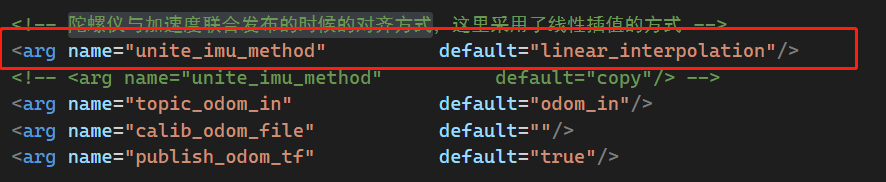
运行
roslaunch realsense2_camera rs_livox.launch # 启动相机,这里我把imu_transform包也放到这个launch文件中启动了 roslaunch livox_ros_driver livox_lidar_msg.launch # 启动雷达 roslaunch fast_livo mapping_avi_we.launch # 启动fast_livo- 1
- 2
- 3
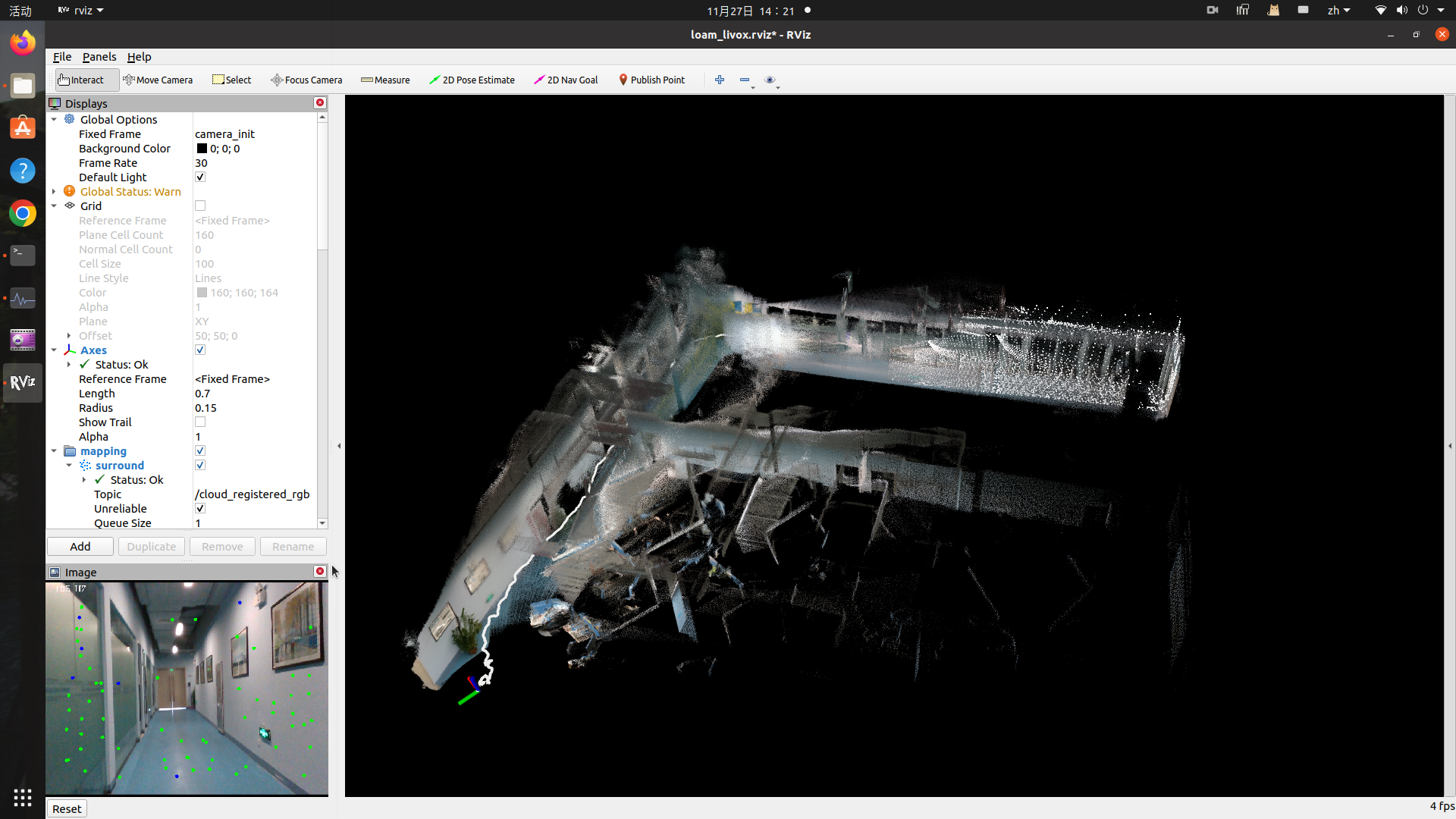
建图效果如下,发现这个Fast-LIVO建图的时候比较卡,可能是作者还没优化好,针对低性能设备做优化也是一个重要的需求!
-
相关阅读:
css文字单行/多行超出显示省略号...
ElastaticSearch -- es客户端RestHighLevelClient
正则表达式小计
c++模板
SpringSecurity 配置与使用(含新 API 替换过时的 WebSecurityConfigurerAdapter)
[JAVA毕业设计源代码]精品微信小程序英语四六级小助手小程序系统|前后分离VUE[包运行成功]
Python 查询 IP 地址段,并获取 Hostname
Docker镜像拉取以及构建自己的镜像
Oracle中查询表结构的六种方法
代码随想录二刷day35
- 原文地址:https://blog.csdn.net/weixin_40599145/article/details/128064323
