-
【Kotlin 协程】协程底层实现 ④ ( 结构化并发 | viewModelScope 作用域示例 )
常见的 CoroutineScope 协程作用域 :
- GlobalScope : 该作用域是 进程级别的 , 与应用进程同级 , 即使 Activity 被销毁 , 协程任务也可以继续执行 ;
- MainScope : 该 作用域仅在 Activty 中 , 如果 Activity 被销毁 , 则 在 onDestory 生命周期函数中取消协程任务 ;
- viewModelScope : 该作用与仅在 ViewModel 中使用 , 与 ViewModel 生命周期绑定 ;
- lifecycleScope : 该作用与仅在 Activity 中使用 , 与 Activity 生命周期绑定 ;
一、viewModelScope 作用域作用
viewModelScope 协程作用域 需要绑定 ViewModel 生命周期 , 在特定界面中 , 如可旋转屏幕的 Activity 界面中 , 如果使用 MainScope 协程作用域 , 当屏幕旋转时 , 就会在 onDestory 生命周期函数中 取消协程作用域 , 此时协程相关的临时数据都被取消了 ;
当旋转 Activity 界面时 , 会调用当前 Activity 的 onDestory 生命周期函数 , 自然对应的协程作用域也会被取消 , 因此引入 viewModelScope 作用域 , 避免协程临时数据被销毁 ;
二、viewModelScope 作用域示例
项目地址 :
在 Module 模块下的 build.gradle 中
- 导入 kotlin-kapt 插件 ;
- 启用 DataBinding , 在 build.gradle # android 层级下配置
dataBinding { enabled = true }即可 , 配置效果如下 :
plugins { id 'com.android.application' id 'kotlin-android' id 'kotlin-kapt' } android { defaultConfig { applicationId "kim.hsl.coroutine" } dataBinding { enabled = true } }- 1
- 2
- 3
- 4
- 5
- 6
- 7
- 8
- 9
- 10
- 11
- 12
- 13
- 14
- 15
在 布局文件 中 , 选中根组件 , 一般是
androidx.constraintlayout.widget.ConstraintLayout组件 , 如 :<androidx.constraintlayout.widget.ConstraintLayout xmlns:android="http://schemas.android.com/apk/res/android" xmlns:app="http://schemas.android.com/apk/res-auto" xmlns:tools="http://schemas.android.com/tools" android:layout_width="match_parent" android:layout_height="match_parent" tools:context=".MainActivity"> androidx.constraintlayout.widget.ConstraintLayout>- 1
- 2
- 3
- 4
- 5
- 6
- 7
- 8
- 9
- 10
- 11
使用 " Alt + 回车 " 快捷键 , 弹出如下下拉菜单 ,
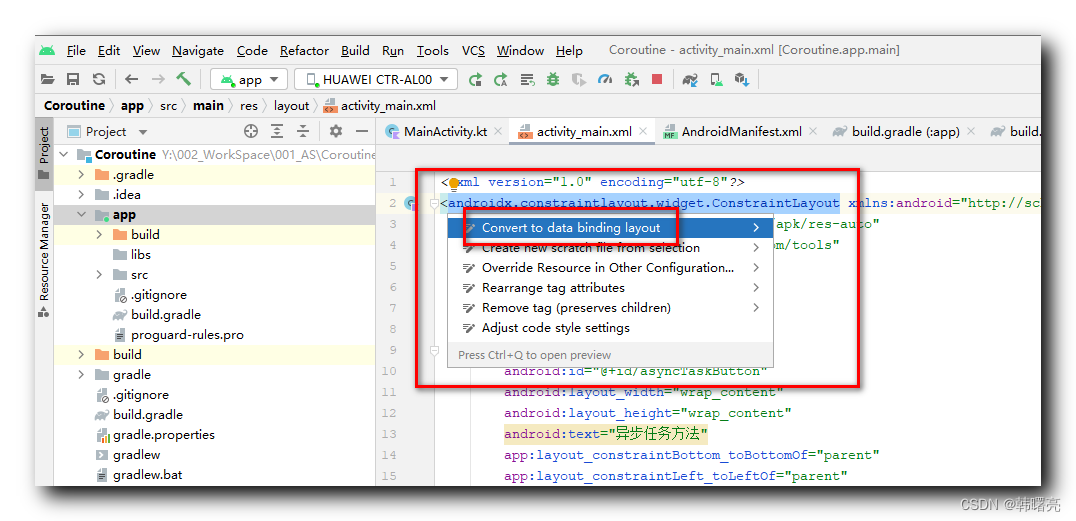
选择菜单中的 " Convert to data binding layout " 选项 , UI 布局会变成如下格式 :<layout xmlns:android="http://schemas.android.com/apk/res/android" xmlns:app="http://schemas.android.com/apk/res-auto" xmlns:tools="http://schemas.android.com/tools"> <data> data> <androidx.constraintlayout.widget.ConstraintLayout android:layout_width="match_parent" android:layout_height="match_parent" tools:context=".MainActivity"> androidx.constraintlayout.widget.ConstraintLayout> layout>- 1
- 2
- 3
- 4
- 5
- 6
- 7
- 8
- 9
- 10
- 11
- 12
- 13
- 14
- 15
- 16
- 17
设置完毕后 , 先构建应用 , Android Studio 中选择 " 菜单栏 | Build | Make Project " 选项 , 或者使用 " Ctrl + F9 " 快捷键 , 首先要编译生成相关数据绑定类 ;
MainActivity 代码 :
package kim.hsl.coroutine import android.os.Bundle import androidx.activity.viewModels import androidx.appcompat.app.AppCompatActivity import androidx.databinding.DataBindingUtil import kim.hsl.coroutine.databinding.ActivityMainBinding class MainActivity : AppCompatActivity(){ private val mainViewModel: MainViewModel by viewModels() override fun onCreate(savedInstanceState: Bundle?) { super.onCreate(savedInstanceState) // 设置布局文件 val binding = DataBindingUtil.setContentView<ActivityMainBinding>(this,R.layout.activity_main) // 设置数据源 binding.viewmodel = mainViewModel // 设置声明周期管理器 binding.lifecycleOwner = this // 设置点击事件 binding.button.setOnClickListener { // 更新 mainViewModel 数据 mainViewModel.setStudentData() } } }- 1
- 2
- 3
- 4
- 5
- 6
- 7
- 8
- 9
- 10
- 11
- 12
- 13
- 14
- 15
- 16
- 17
- 18
- 19
- 20
- 21
- 22
- 23
- 24
- 25
- 26
- 27
- 28
- 29
- 30
- 31
- 32
ViewModel 代码 :
package kim.hsl.coroutine import androidx.lifecycle.MutableLiveData import androidx.lifecycle.ViewModel import androidx.lifecycle.viewModelScope import kotlinx.coroutines.launch class MainViewModel() : ViewModel() { // 在布局文件中配置的属性 val student = MutableLiveData<Student>() // 该方法用于刷新数据 fun setStudentData() { viewModelScope.launch { student.value = Student("Tom", 18) } } } data class Student(val name: String, val age: Int)- 1
- 2
- 3
- 4
- 5
- 6
- 7
- 8
- 9
- 10
- 11
- 12
- 13
- 14
- 15
- 16
- 17
- 18
- 19
- 20
布局文件代码 :
<layout xmlns:android="http://schemas.android.com/apk/res/android" xmlns:app="http://schemas.android.com/apk/res-auto" xmlns:tools="http://schemas.android.com/tools"> <data> <variable name="viewmodel" type="kim.hsl.coroutine.MainViewModel" /> data> <androidx.constraintlayout.widget.ConstraintLayout android:layout_width="match_parent" android:layout_height="match_parent" tools:context=".MainActivity"> <Button android:id="@+id/button" android:layout_width="wrap_content" android:layout_height="wrap_content" android:text="@{viewmodel.student.name}" app:layout_constraintBottom_toBottomOf="parent" app:layout_constraintLeft_toLeftOf="parent" app:layout_constraintRight_toRightOf="parent" app:layout_constraintTop_toTopOf="parent" app:layout_constraintVertical_bias="0.2" app:layout_constraintHorizontal_bias="0.5" /> androidx.constraintlayout.widget.ConstraintLayout> layout>- 1
- 2
- 3
- 4
- 5
- 6
- 7
- 8
- 9
- 10
- 11
- 12
- 13
- 14
- 15
- 16
- 17
- 18
- 19
- 20
- 21
- 22
- 23
- 24
- 25
- 26
- 27
- 28
- 29
- 30
- 31
项目地址 :
-
相关阅读:
Blazor 发布WebAssembly使用Brotli 压缩提升初次加载速度
电脑如何在网页上下载视频 浏览器如何下载网页视频
javascript 原生操作子 cookie 的工具类
解决docker警告WARNING: No swap limit support
[msg_msg] corCTF2021 -- fire_of_salvation
virtualbox 菜单栏控制
黑马React18: 基础Part 1
Linux 高级网络设置
mac之 iTerm2 + Oh My Zsh 终端安装教程
PromQL 查询监控数据
- 原文地址:https://blog.csdn.net/han1202012/article/details/128055880
