-
jeecg-boot中上传图片到华为云obs云存储中
大家好,我是雄雄,欢迎关注微信公众号:雄雄的小课堂。

前言
jeecg-boot框架中,其实对接的功能还是挺多的,其中就有文件云存储服务器,不过是阿里云oss的,那如果我们使用的是七牛云,或者华为云obs呢?我们需要改哪些内容才能实现上传obs的目的呢,今天我们就来看看如何使用jeecg-boot来实现将文件(图片)上传到华为云obs中。配置nacos
因为我们用的是微服务版本,所以配置都在
nacos中,如果是普通的boot版本的话,直接在yml文件中写配置就行。
nacos的配置如下:- 找到
jeecg节点,修改uploadType的值:
uploadType: hwobs- 1
记住这个hwobs的值,我们需要在代码中声明一下它,相当于一个变量,这个值必须和代码中声明的那个变量的值一样,不然就找不到了。
- 添加obs节点:
#华为云oss存储配置 obs: endpoint: obs.cn-xxxxx-9.myhuaweicloud.com accessKey: KD6BYxxxxxx secretKey: Zv83xxxxxx bucketName: xxxxx staticDomain: xxxxx.obs.cn-xxxxxx-9.myhuaweicloud.com- 1
- 2
- 3
- 4
- 5
- 6
- 7
注意:对应的值需要改成你自己的ak、sk等。
修改POM文件,添加华为云obs的依赖
添加代码如下:
<dependency> <groupId>com.huaweicloudgroupId> <artifactId>esdk-obs-javaartifactId> <version>3.21.8version> <exclusions> <exclusion> <groupId>com.squareup.okhttp3groupId> <artifactId>okhttpartifactId> exclusion> exclusions> dependency>- 1
- 2
- 3
- 4
- 5
- 6
- 7
- 8
- 9
- 10
- 11
- 12
新建OBS工具类ObsBootUtil
package org.jeecg.common.util.oss; import com.obs.services.ObsClient; import com.obs.services.model.ObsObject; import com.obs.services.model.PutObjectResult; import lombok.extern.slf4j.Slf4j; import org.apache.tomcat.util.http.fileupload.FileItemStream; import org.jeecg.common.constant.SymbolConstant; import org.jeecg.common.util.CommonUtils; import org.jeecg.common.util.filter.FileTypeFilter; import org.jeecg.common.util.filter.StrAttackFilter; import org.jeecg.common.util.oConvertUtils; import org.springframework.web.multipart.MultipartFile; import java.io.BufferedInputStream; import java.io.IOException; import java.io.InputStream; import java.util.Date; import java.util.UUID; /** * @Description: 华为云 oss 上传工具类(高依赖版) * @Date: 2019/5/10 * @author: jeecg-boot */ @Slf4j public class ObsBootUtil { private static String endPoint; private static String accessKeyId; private static String accessKeySecret; private static String bucketName; /** * oss 工具客户端 */ private static ObsClient ossClient = null; public static String getEndPoint() { return endPoint; } public static void setEndPoint(String endPoint) { ObsBootUtil.endPoint = endPoint; } public static String getAccessKeyId() { return accessKeyId; } public static void setAccessKeyId(String accessKeyId) { ObsBootUtil.accessKeyId = accessKeyId; } public static String getAccessKeySecret() { return accessKeySecret; } public static void setAccessKeySecret(String accessKeySecret) { ObsBootUtil.accessKeySecret = accessKeySecret; } public static String getBucketName() { return bucketName; } public static void setBucketName(String bucketName) { ObsBootUtil.bucketName = bucketName; } public static ObsClient getOssClient() { return ossClient; } /** * 上传文件至华为云 OBS * 文件上传成功,返回文件完整访问路径 * 文件上传失败,返回 null * * @param file 待上传文件 * @param fileDir 文件保存目录 * @return oss 中的相对文件路径 */ public static String upload(MultipartFile file, String fileDir, String customBucket) throws Exception { //update-begin-author:liusq date:20210809 for: 过滤上传文件类型 FileTypeFilter.fileTypeFilter(file); //update-end-author:liusq date:20210809 for: 过滤上传文件类型 String filePath; initOss(endPoint, accessKeyId, accessKeySecret); StringBuilder fileUrl = new StringBuilder(); String newBucket = bucketName; if (oConvertUtils.isNotEmpty(customBucket)) { newBucket = customBucket; } try { //判断桶是否存在,不存在则创建桶 if (!ossClient.headBucket(newBucket)) { ossClient.createBucket(newBucket); } // 获取文件名 String orgName = file.getOriginalFilename(); if ("".equals(orgName) || orgName == null) { orgName = file.getName(); } orgName = CommonUtils.getFileName(orgName); String fileName = !orgName.contains(".") ? orgName + "_" + System.currentTimeMillis() : orgName.substring(0, orgName.lastIndexOf(".")) + "_" + System.currentTimeMillis() + orgName.substring(orgName.lastIndexOf(".")); if (!fileDir.endsWith(SymbolConstant.SINGLE_SLASH)) { fileDir = fileDir.concat(SymbolConstant.SINGLE_SLASH); } //update-begin-author:wangshuai date:20201012 for: 过滤上传文件夹名特殊字符,防止攻击 fileDir = StrAttackFilter.filter(fileDir); //update-end-author:wangshuai date:20201012 for: 过滤上传文件夹名特殊字符,防止攻击 fileUrl.append(fileDir).append(fileName); filePath = "https://" + newBucket + "." + endPoint + SymbolConstant.SINGLE_SLASH + fileUrl; PutObjectResult result = ossClient.putObject(newBucket, fileUrl.toString(), file.getInputStream()); // 设置权限(公开读) // ossClient.setBucketAcl(newBucket, CannedAccessControlList.PublicRead); if (result != null) { log.info("------OSS文件上传成功------" + fileUrl); } } catch (Exception e) { e.printStackTrace(); return null; } return filePath; } /** * 文件上传 * * @param file 文件 * @param fileDir fileDir * @return 路径 */ public static String upload(MultipartFile file, String fileDir) throws Exception { return upload(file, fileDir, null); } /** * 上传文件至华为云 OBS * 文件上传成功,返回文件完整访问路径 * 文件上传失败,返回 null * * @param file 待上传文件 * @param fileDir 文件保存目录 * @return oss 中的相对文件路径 */ public static String upload(FileItemStream file, String fileDir) { String filePath; initOss(endPoint, accessKeyId, accessKeySecret); StringBuilder fileUrl = new StringBuilder(); try { String suffix = file.getName().substring(file.getName().lastIndexOf('.')); String fileName = UUID.randomUUID().toString().replace("-", "") + suffix; if (!fileDir.endsWith(SymbolConstant.SINGLE_SLASH)) { fileDir = fileDir.concat(SymbolConstant.SINGLE_SLASH); } fileDir = StrAttackFilter.filter(fileDir); fileUrl.append(fileDir).append(fileName); filePath = "https://" + bucketName + "." + endPoint + SymbolConstant.SINGLE_SLASH + fileUrl; PutObjectResult result = ossClient.putObject(bucketName, fileUrl.toString(), file.openStream()); // 设置权限(公开读) //ossClient.setBucketAcl(bucketName, CannedAccessControlList.PublicRead); if (result != null) { log.info("------OSS文件上传成功------" + fileUrl); } } catch (IOException e) { e.printStackTrace(); return null; } return filePath; } /** * 删除文件 * * @param url 路径 */ public static void deleteUrl(String url) { deleteUrl(url, null); } /** * 删除文件 * * @param url 路径 */ public static void deleteUrl(String url, String bucket) { String newBucket = bucketName; if (oConvertUtils.isNotEmpty(bucket)) { newBucket = bucket; } String bucketUrl = "https://" + newBucket + "." + endPoint + SymbolConstant.SINGLE_SLASH; //TODO 暂时不允许删除云存储的文件 //initOss(endPoint, accessKeyId, accessKeySecret); url = url.replace(bucketUrl, ""); ossClient.deleteObject(newBucket, url); } /** * 删除文件 * * @param fileName 文件名称 */ public static void delete(String fileName) { ossClient.deleteObject(bucketName, fileName); } /** * 获取文件流 * * @param objectName 对象名 * @param bucket 桶 * @return 文件流 */ public static InputStream getOssFile(String objectName, String bucket) { InputStream inputStream = null; try { String newBucket = bucketName; if (oConvertUtils.isNotEmpty(bucket)) { newBucket = bucket; } initOss(endPoint, accessKeyId, accessKeySecret); //update-begin---author:liusq Date:20220120 for:替换objectName前缀,防止key不一致导致获取不到文件---- objectName = ObsBootUtil.replacePrefix(objectName, bucket); //update-end---author:liusq Date:20220120 for:替换objectName前缀,防止key不一致导致获取不到文件---- ObsObject ossObject = ossClient.getObject(newBucket, objectName); inputStream = new BufferedInputStream(ossObject.getObjectContent()); } catch (Exception e) { log.info("文件获取失败" + e.getMessage()); } return inputStream; } /** * 获取文件外链 * * @param bucketName 桶名称 * @param objectName 对项名 * @param expires 日期 * @return 外链 */ public static String getObjectUrl(String bucketName, String objectName, Date expires) { initOss(endPoint, accessKeyId, accessKeySecret); try { //update-begin---author:liusq Date:20220120 for:替换objectName前缀,防止key不一致导致获取不到文件---- objectName = ObsBootUtil.replacePrefix(objectName, bucketName); //update-end---author:liusq Date:20220120 for:替换objectName前缀,防止key不一致导致获取不到文件---- if (ossClient.doesObjectExist(bucketName, objectName)) { //URL url = ossClient.generatePresignedUrl(bucketName, objectName, expires); //log.info("原始url : {}", url.toString()); //log.info("decode url : {}", URLDecoder.decode(url.toString(), "UTF-8")); //【issues/4023】问题 oss外链经过转编码后,部分无效,大概在三分一;无需转编码直接返回即可 #4023 //return url.toString(); return ""; } } catch (Exception e) { log.info("文件路径获取失败" + e.getMessage()); } return null; } /** * 初始化 oss 客户端 */ private static void initOss(String endpoint, String accessKeyId, String accessKeySecret) { if (ossClient == null) { ossClient = new ObsClient(accessKeyId, accessKeySecret, endpoint); } } /** * 上传文件到oss * * @param stream 文件流 * @param relativePath 相对路径 * @return 文件路径 */ public static String upload(InputStream stream, String relativePath) { String filePath = "https://" + bucketName + "." + endPoint + SymbolConstant.SINGLE_SLASH + relativePath; initOss(endPoint, accessKeyId, accessKeySecret); PutObjectResult result = ossClient.putObject(bucketName, relativePath, stream); // 设置权限(公开读) //ossClient.setBucketAcl(bucketName, CannedAccessControlList.PublicRead); if (result != null) { log.info("------OSS文件上传成功------" + relativePath); } return filePath; } /** * 替换前缀,防止key不一致导致获取不到文件 * * @param objectName 文件上传路径 key * @param customBucket 自定义桶 * @return 对象名 * @date 2022-01-20 * @author lsq */ private static String replacePrefix(String objectName, String customBucket) { log.info("------replacePrefix---替换前---objectName:{}", objectName); String newBucket = bucketName; if (oConvertUtils.isNotEmpty(customBucket)) { newBucket = customBucket; } String path = "https://" + newBucket + "." + endPoint + SymbolConstant.SINGLE_SLASH; objectName = objectName.replace(path, ""); log.info("------replacePrefix---替换后---objectName:{}", objectName); return objectName; } public static String getOriginalUrl(String url) { return url; } }- 1
- 2
- 3
- 4
- 5
- 6
- 7
- 8
- 9
- 10
- 11
- 12
- 13
- 14
- 15
- 16
- 17
- 18
- 19
- 20
- 21
- 22
- 23
- 24
- 25
- 26
- 27
- 28
- 29
- 30
- 31
- 32
- 33
- 34
- 35
- 36
- 37
- 38
- 39
- 40
- 41
- 42
- 43
- 44
- 45
- 46
- 47
- 48
- 49
- 50
- 51
- 52
- 53
- 54
- 55
- 56
- 57
- 58
- 59
- 60
- 61
- 62
- 63
- 64
- 65
- 66
- 67
- 68
- 69
- 70
- 71
- 72
- 73
- 74
- 75
- 76
- 77
- 78
- 79
- 80
- 81
- 82
- 83
- 84
- 85
- 86
- 87
- 88
- 89
- 90
- 91
- 92
- 93
- 94
- 95
- 96
- 97
- 98
- 99
- 100
- 101
- 102
- 103
- 104
- 105
- 106
- 107
- 108
- 109
- 110
- 111
- 112
- 113
- 114
- 115
- 116
- 117
- 118
- 119
- 120
- 121
- 122
- 123
- 124
- 125
- 126
- 127
- 128
- 129
- 130
- 131
- 132
- 133
- 134
- 135
- 136
- 137
- 138
- 139
- 140
- 141
- 142
- 143
- 144
- 145
- 146
- 147
- 148
- 149
- 150
- 151
- 152
- 153
- 154
- 155
- 156
- 157
- 158
- 159
- 160
- 161
- 162
- 163
- 164
- 165
- 166
- 167
- 168
- 169
- 170
- 171
- 172
- 173
- 174
- 175
- 176
- 177
- 178
- 179
- 180
- 181
- 182
- 183
- 184
- 185
- 186
- 187
- 188
- 189
- 190
- 191
- 192
- 193
- 194
- 195
- 196
- 197
- 198
- 199
- 200
- 201
- 202
- 203
- 204
- 205
- 206
- 207
- 208
- 209
- 210
- 211
- 212
- 213
- 214
- 215
- 216
- 217
- 218
- 219
- 220
- 221
- 222
- 223
- 224
- 225
- 226
- 227
- 228
- 229
- 230
- 231
- 232
- 233
- 234
- 235
- 236
- 237
- 238
- 239
- 240
- 241
- 242
- 243
- 244
- 245
- 246
- 247
- 248
- 249
- 250
- 251
- 252
- 253
- 254
- 255
- 256
- 257
- 258
- 259
- 260
- 261
- 262
- 263
- 264
- 265
- 266
- 267
- 268
- 269
- 270
- 271
- 272
- 273
- 274
- 275
- 276
- 277
- 278
- 279
- 280
- 281
- 282
- 283
- 284
- 285
- 286
- 287
- 288
- 289
- 290
- 291
- 292
- 293
- 294
- 295
- 296
- 297
- 298
- 299
- 300
- 301
- 302
- 303
- 304
- 305
- 306
- 307
- 308
- 309
- 310
- 311
- 312
- 313
- 314
- 315
- 316
- 317
- 318
- 319
- 320
- 321
- 322
- 323
- 324
- 325
- 326
- 327
- 328
- 329
新建OBS配置类
代码如下:
package org.jeecg.config.oss; import org.jeecg.common.util.oss.ObsBootUtil; import org.springframework.beans.factory.annotation.Value; import org.springframework.context.annotation.Bean; import org.springframework.context.annotation.Configuration; /** * 华为云存储 配置 * * @author: jeecg-boot */ @Configuration public class ObsConfig { @Value("${jeecg.obs.endpoint}") private String endpoint; @Value("${jeecg.obs.accessKey}") private String accessKeyId; @Value("${jeecg.obs.secretKey}") private String accessKeySecret; @Value("${jeecg.obs.bucketName}") private String bucketName; @Bean public void initObsBootConfig() { ObsBootUtil.setEndPoint(endpoint); ObsBootUtil.setAccessKeyId(accessKeyId); ObsBootUtil.setAccessKeySecret(accessKeySecret); ObsBootUtil.setBucketName(bucketName); } }- 1
- 2
- 3
- 4
- 5
- 6
- 7
- 8
- 9
- 10
- 11
- 12
- 13
- 14
- 15
- 16
- 17
- 18
- 19
- 20
- 21
- 22
- 23
- 24
- 25
- 26
- 27
- 28
- 29
- 30
- 31
- 32
- 33
- 34
声明配置变量
在
CommonConstant接口中声明在nacos中配置的变量:String UPLOAD_TYPE_OBS = "hwobs";- 1

修改原来文件上传的方法
首先找到类
CommonUtils,的uploadOnlineImage方法,修改成如下:

public static String uploadOnlineImage(byte[] data, String basePath, String bizPath, String uploadType) { String dbPath = null; String fileName = "image" + Math.round(Math.random() * 100000000000L); fileName += "." + PoiPublicUtil.getFileExtendName(data); try { if (CommonConstant.UPLOAD_TYPE_LOCAL.equals(uploadType)) { File file = new File(basePath + File.separator + bizPath + File.separator); if (!file.exists()) { file.mkdirs();// 创建文件根目录 } String savePath = file.getPath() + File.separator + fileName; File savefile = new File(savePath); FileCopyUtils.copy(data, savefile); dbPath = bizPath + File.separator + fileName; } else { InputStream in = new ByteArrayInputStream(data); String relativePath = bizPath + "/" + fileName; if (CommonConstant.UPLOAD_TYPE_MINIO.equals(uploadType)) { dbPath = MinioUtil.upload(in, relativePath); } else if (CommonConstant.UPLOAD_TYPE_OSS.equals(uploadType)) { dbPath = OssBootUtil.upload(in, relativePath); } else { dbPath = ObsBootUtil.upload(in, relativePath); } } } catch (Exception e) { e.printStackTrace(); } return dbPath; }- 1
- 2
- 3
- 4
- 5
- 6
- 7
- 8
- 9
- 10
- 11
- 12
- 13
- 14
- 15
- 16
- 17
- 18
- 19
- 20
- 21
- 22
- 23
- 24
- 25
- 26
- 27
- 28
- 29
- 30
修改
upload方法:

/** * 统一全局上传 * * @Return: java.lang.String */ public static String upload(MultipartFile file, String bizPath, String uploadType) { String url = ""; try { if (CommonConstant.UPLOAD_TYPE_MINIO.equals(uploadType)) { url = MinioUtil.upload(file, bizPath); } else if (CommonConstant.UPLOAD_TYPE_OSS.equals(uploadType)) { url = OssBootUtil.upload(file, bizPath); }else{ url = ObsBootUtil.upload(file, bizPath); } } catch (Exception exception) { exception.printStackTrace(); } return url; }- 1
- 2
- 3
- 4
- 5
- 6
- 7
- 8
- 9
- 10
- 11
- 12
- 13
- 14
- 15
- 16
- 17
- 18
- 19
- 20
修改
OssFileServiceImpl实现类的upload方法(当然你新写一个也行):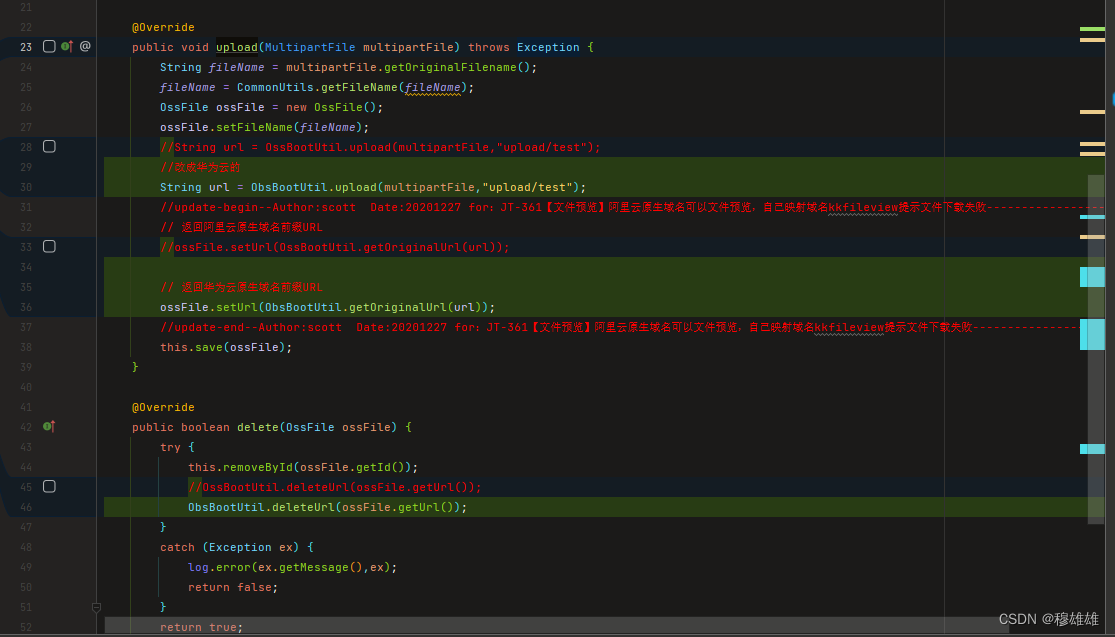
/** * @Description: OSS云存储实现类 * @author: jeecg-boot */ @Service("ossFileService") public class OssFileServiceImpl extends ServiceImpl<OssFileMapper, OssFile> implements IOssFileService { @Override public void upload(MultipartFile multipartFile) throws Exception { String fileName = multipartFile.getOriginalFilename(); fileName = CommonUtils.getFileName(fileName); OssFile ossFile = new OssFile(); ossFile.setFileName(fileName); //String url = OssBootUtil.upload(multipartFile,"upload/test"); //改成华为云的 String url = ObsBootUtil.upload(multipartFile,"upload/test"); //update-begin--Author:scott Date:20201227 for:JT-361【文件预览】阿里云原生域名可以文件预览,自己映射域名kkfileview提示文件下载失败------------------- // 返回阿里云原生域名前缀URL //ossFile.setUrl(OssBootUtil.getOriginalUrl(url)); // 返回华为云原生域名前缀URL ossFile.setUrl(ObsBootUtil.getOriginalUrl(url)); //update-end--Author:scott Date:20201227 for:JT-361【文件预览】阿里云原生域名可以文件预览,自己映射域名kkfileview提示文件下载失败------------------- this.save(ossFile); } @Override public boolean delete(OssFile ossFile) { try { this.removeById(ossFile.getId()); //OssBootUtil.deleteUrl(ossFile.getUrl()); ObsBootUtil.deleteUrl(ossFile.getUrl()); } catch (Exception ex) { log.error(ex.getMessage(),ex); return false; } return true; } }- 1
- 2
- 3
- 4
- 5
- 6
- 7
- 8
- 9
- 10
- 11
- 12
- 13
- 14
- 15
- 16
- 17
- 18
- 19
- 20
- 21
- 22
- 23
- 24
- 25
- 26
- 27
- 28
- 29
- 30
- 31
- 32
- 33
- 34
- 35
- 36
- 37
- 38
- 39
- 40
- 41
然后就大功告成了!!!
- 找到
-
相关阅读:
【软件工具】百度搜索技巧
SpringMvc执行流程
C#上位机开发目录
python之格式化输出format()函数使用总结
Shell脚本批量对157台服务器打通网络、配置免密、重置root密码
Linux 环境搭建
LeetCode--230. 二叉搜索树中第K小的元素(C++描述)
初学者都能学会的ElasticSearch入门实战
【前端】场景题:如何在ul标签中插入多个节点 使用文档片段
第61章 Jquery JSON Table EntityFrameworkCore自动生成数据库
- 原文地址:https://blog.csdn.net/qq_34137397/article/details/128045207