-
【学习笔记21】JavaScript数组的基本方法
笔记首发
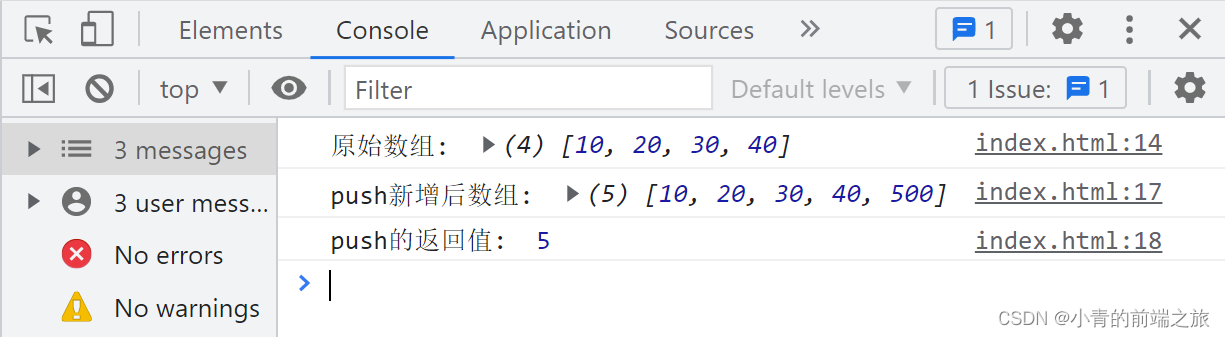
一、push:末位新增
- 语法:
数组.push(数据) - 作用: 向数组
末尾添加数据 - 返回值: 追加数据后, 数组最新的
长度
var arr = [10, 20, 30, 40]; console.log('原始数组: ', arr); var num = arr.push(500); console.log('push新增后数组: ', arr); console.log('push的返回值: ', num);- 1
- 2
- 3
- 4
- 5
- 6
二、pop:末位删除
- 语法:
数组.pop( ) - 作用: 删除数组的
最后一项 - 返回值: 返回末位
删除的数据
var arr = [10, 20, 30, 40]; console.log('原始数组: ', arr); var num = arr.pop(); console.log('pop删除后数组: ', arr); console.log('pop的返回值: ', num);- 1
- 2
- 3
- 4
- 5
- 6

三、unshift:首位新增
- 语法:
数组.unshift(数据) - 作用: 向数组
头部添加数据 - 返回值: 追加数据后, 数组
最新的长度
var arr = [10, 20, 30, 40]; console.log('原始数组: ', arr); var num = arr.unshift(500); console.log('unshift新增后的数组: ', arr); console.log('unshift的返回值: ', num);- 1
- 2
- 3
- 4
- 5
- 6

四、shift:首位删除
- 语法:
数组.shift( ) - 作用: 删除数组
首位(第一项)的数据 - 返回值: 返回
删除的数据
var arr = [10, 20, 30, 40]; console.log('原始数组: ', arr); var num = arr.shift(500); console.log('shift删除后的数组: ', arr); console.log('shift的返回值: ', num);- 1
- 2
- 3
- 4
- 5
- 6

五、reverse:反转数组
- 语法:
数组.reverse( ) - 作用: 反转数组
- 返回值: 反转后的
数组
var arr = [10, 20, 45, 30, 40]; console.log('原始数组: ', arr); var num = arr.reverse(); console.log('reverse反转后的数组: ', arr); console.log('reverse的返回值: ', num);- 1
- 2
- 3
- 4
- 5
- 6

六、sort:排序
1、语法
数组.sort();数组.sort(function (a, b) {retrun a - b});数组.sort(function (a, b) {retrun b - a})
2、作用
- 不传参数
- 会将数组内所有值,
转换为字符串, 然后一位一位的对比(第一位相同,对比第二位,…)
- 会将数组内所有值,
- 传参—函数 return a - b
- 会将数组内所有的值, 按照数字的
从小到大排列
- 会将数组内所有的值, 按照数字的
- 传参—函数 return b - a
- 会将数组内所有的值, 按照数字的
从大到小排列
- 会将数组内所有的值, 按照数字的
3、返回值
- 不传参数:将排序后的数组返回
- 传递参数:将排序后的数组返回
4、不传参数
var arr = [100, 1, 101, 3, 2, 102] // 下标 0 1 2 3 4 5 console.log('原始数组: ', arr); /* 不传参数 */ var num = arr.sort( ); console.log('sort后的数组: ', arr); console.log('sort的返回值: ', num);- 1
- 2
- 3
- 4
- 5
- 6
- 7
- 8

5、函数 return a - b
var arr = [100, 1, 101, 3, 2, 102] // 下标 0 1 2 3 4 5 console.log('原始数组: ', arr); /* return a - b */ var num = arr.sort(function (a, b) { return a - b }) console.log('sort后的数组: ', arr) console.log('sort的返回值: ', num)- 1
- 2
- 3
- 4
- 5
- 6
- 7
- 8

6、函数 return b - a
var arr = [100, 1, 101, 3, 2, 102] // 下标 0 1 2 3 4 5 console.log('原始数组: ', arr); /* return b - a */ var num = arr.sort(function (a, b) { return b - a }) console.log('sort后的数组: ', arr) console.log('sort的返回值: ', num)- 1
- 2
- 3
- 4
- 5
- 6
- 7
- 8

七、splice:添加或删除数组中的元素(相对于剪切)
1、语法
数组.splice(开始索引, 多少个);数组.splice(开始索引, 多少个, 数据1, 数据2, 数据3...)
2、作用
- 不传参数:
剪切数组中的某一段数据 - 传递参数:
剪切数组中的某一段数据, 将第三个参数开始, 当成新数据插入到数组内
3、返回值
- 返回值: 截切后的数据(
数组形式)
4、不传参数
var arr = [100, 1, 101, 3, 2, 102]; // 下标 0 1 2 3 4 5 console.log('原始数组: ', arr); /* 不传参数 */ var num = arr.splice(1, 3); console.log('splice后的数组: ', arr); console.log('splice的返回值: ', num);- 1
- 2
- 3
- 4
- 5
- 6
- 7
- 8

5、传递参数
var arr = [100, 1, 101, 3, 2, 102]; // 下标 0 1 2 3 4 5 console.log('原始数组: ', arr); /* 传递参数 */ var num = arr.splice(1, 3, '数据1', '数据2', '数据3', '数据4'); console.log('splice后的数组: ', arr); console.log('splice的返回值: ', num);- 1
- 2
- 3
- 4
- 5
- 6
- 7
- 8

注意:数组的方法 1~7 是能够改变原数组的方法
八、slice:不会改变原数组
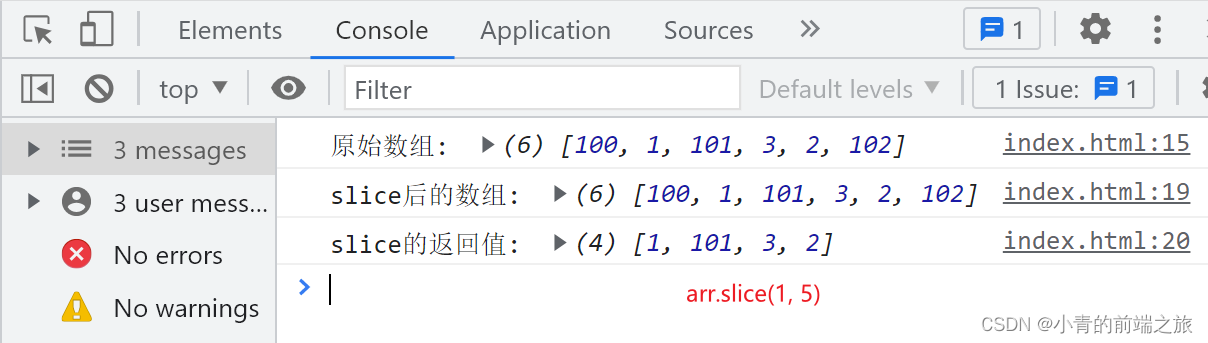
- 语法:
数组.slice(开始索引, 结束索引) - 作用:
复制数组中的某一段数据 - 返回值:
复制出来的内容
1、参数特点
- 包含开始索引, 不包含结束索引(
到结束索引前一位) - 参数接受负数(相当于
数组.length + 负数) - 不传结束索引,相当于写了
数组.length - 一个参数都不传,
相当于复制整个数组, 或者只传递第一个参数为0
2、正常传参
var arr = [100, 1, 101, 3, 2, 102]; // 下标 0 1 2 3 4 5 console.log('原始数组: ', arr); /* 正常传参 */ var num = arr.slice(1, 5); console.log('slice后的数组: ', arr); console.log('slice的返回值: ', num);- 1
- 2
- 3
- 4
- 5
- 6
- 7
- 8
3、传递
负数var arr = [100, 1, 101, 3, 2, 102]; // 下标 0 1 2 3 4 5 console.log('原始数组: ', arr); /* 传递负数 */ // arr.length + (-1) --> 6 + (-1) --> 6 - 1 ---> 5 var num = arr.slice(1, -1); console.log('slice后的数组: ', arr); console.log('slice的返回值: ', num);- 1
- 2
- 3
- 4
- 5
- 6
- 7
- 8
- 9

4、不传结束索引
var arr = [100, 1, 101, 3, 2, 102]; // 下标 0 1 2 3 4 5 console.log('原始数组: ', arr); /* 不传结束索引 相当于写了 数组.length */ var num = arr.slice(2) console.log('slice后的数组: ', arr); console.log('slice的返回值: ', num);- 1
- 2
- 3
- 4
- 5
- 6
- 7
- 8

5、一个参数都不传
var arr = [100, 1, 101, 3, 2, 102]; // 下标 0 1 2 3 4 5 console.log('原始数组: ', arr); /* 一个参数都不传 相当于复制整个数组, 或者只传递第一个参数为0 */ var num = arr.slice(); console.log('slice后的数组: ', arr); console.log('slice的返回值: ', num);- 1
- 2
- 3
- 4
- 5
- 6
- 7
- 8

九、concat:合并数组
- 语法:
数组.concat(数据1, 数据2) - 作用: 将参数, 合并到指定数组内(
如果参数写了数组, 那么会将数组的每一个值合并到指定数组) - 返回值: 合并后的数组
var arr = [1, 2, 300, 4, 5, 4, 4, 4, 4]; // 下标 0 1 2 3 4 5 6 7 8 console.log('原始数组: ', arr); var num = arr.concat(100, 200, 'QF', 'haha', [600, 700, 800]); console.log('concat后的数组: ', arr); console.log('concat的返回值: ', num);- 1
- 2
- 3
- 4
- 5
- 6
- 7

十、join:把数组中的所有元素转换一个字符串
- 语法:
数组.join(连接符),参数可以不传, 不传递默认逗号 - 作用: 通过连接符连接数组的每一个
- 返回值: 连接好的
字符串
1、传递参数
var arr = [1, 2, 300, 4, 5, 4, 4, 4, 4]; // 下标 0 1 2 3 4 5 6 7 8 console.log('原始数组: ', arr); /* 传递参数 */ var num = arr.join('|'); console.log('join后的数组: ', arr); console.log('join的返回值: ', num);- 1
- 2
- 3
- 4
- 5
- 6
- 7
- 8

var arr = [1, 2, 300, 4, 5, 4, 4, 4, 4]; // 下标 0 1 2 3 4 5 6 7 8 console.log('原始数组: ', arr); /* 传递参数 */ var num = arr.join(''); console.log('join后的数组: ', arr); console.log('join的返回值: ', num);- 1
- 2
- 3
- 4
- 5
- 6
- 7
- 8

2、不传参数
var arr = [1, 2, 300, 4, 5, 4, 4, 4, 4]; // 下标 0 1 2 3 4 5 6 7 8 console.log('原始数组: ', arr); /* 传递参数 */ var num = arr.join( ); console.log('join后的数组: ', arr); console.log('join的返回值: ', num);- 1
- 2
- 3
- 4
- 5
- 6
- 7
- 8

十一、indexOf:查找数据
- 语法:
数组.indexOf(数据);数组.indexOf(数据, 开始索引) - 作用:
在数组内寻找指定数据 - 返回值:
- 找到数据的时候, 返回数据第一次出现的
下标 - 找不到的时候,
返回 -1
- 找到数据的时候, 返回数据第一次出现的
1、数组中找到数据返回值
var arr = [1, 2, 300, 4, 5, 4, 4, 4, 4]; // 下标 0 1 2 3 4 5 6 7 8 console.log('原始数组: ', arr); /* 传递参数 */ var num = arr.indexOf(4, 5); console.log('indexOf后的数组: ', arr); console.log('indexOf的返回值: ', num);- 1
- 2
- 3
- 4
- 5
- 6
- 7
- 8

2、数组中没有找到数据返回值js
var arr = [1, 2, 300, 4, 5, 4, 4, 4, 4]; // 下标 0 1 2 3 4 5 6 7 8 console.log('原始数组: ', arr); /* 传递参数 */ var num = arr.indexOf(105); console.log('indexOf后的数组: ', arr); console.log('indexOf的返回值: ', num);- 1
- 2
- 3
- 4
- 5
- 6
- 7
- 8

十二、lastIndexOf:查找数据
- 语法:
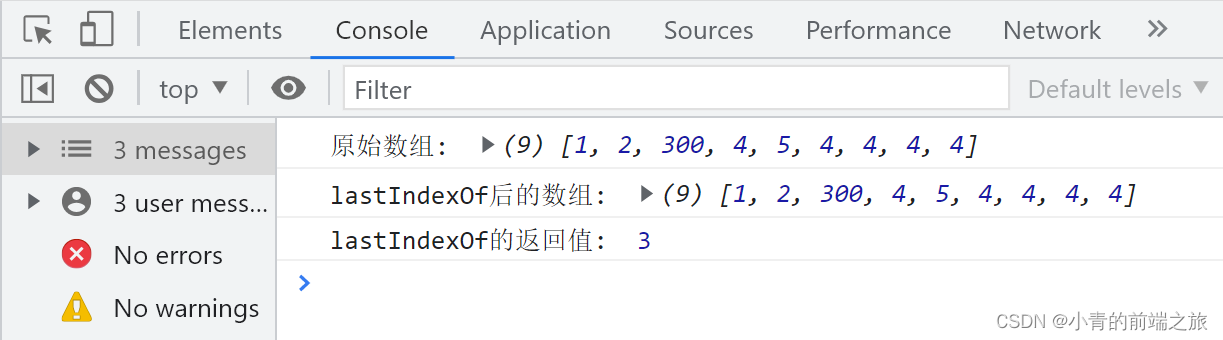
数组.lastIndexOf(数据);数组.lastIndexOf(数据, 开始索引) - 作用: 在数组内寻找指定数据(
倒叙寻找) - 返回值:
- 找到数据的时候, 返回数据第一次出现的
下标 - 找不到的时候,
返回 -1
- 找到数据的时候, 返回数据第一次出现的
var arr = [1, 2, 300, 4, 5, 4, 4, 4, 4]; // 下标 0 1 2 3 4 5 6 7 8 console.log('原始数组: ', arr); /* 传递参数 */ var num = arr.lastIndexOf(4, 4) console.log('lastIndexOf后的数组: ', arr); console.log('lastIndexOf的返回值: ', num);- 1
- 2
- 3
- 4
- 5
- 6
- 7
- 8
- 语法:
-
相关阅读:
城市综合管廊运维的系统集成方案
jwt对token的生成以及验证机制
Linux压缩与解压缩命令
yum install net-tools安装报错could not resolve host: mirrorlist.centos.org
ElasticSearch如何在前后台启动
Latex常用宏包\usepackage
STM32按键状态机2——状态简化与增加长按功能
模糊PID之matlab模糊控制器配置
接口的触发形式类型有哪些?
数据湖的概念、发展背景和价值
- 原文地址:https://blog.csdn.net/m0_58190023/article/details/128035575