-
使用HuggingFace实现 DiffEdit论文的掩码引导语义图像编辑
在本文中,我们将实现Meta AI和Sorbonne Universite的研究人员最近发表的一篇名为DIFFEDIT的论文。对于那些熟悉稳定扩散过程或者想了解DiffEdit是如何工作的人来说,这篇文章将对你有所帮助。
什么是DiffEdit?
简单地说,可以将DiffEdit方法看作图像到图像的一个更受控制的版本。DiffEdit接受三个输入-
- 输入图像
- 标题-描述输入图像
- 目标查询文本-描述想要生成的新图像的文本
模型会根据查询文本生成原始图像的修改版本。如果您想对实际图像进行轻微调整而不需要完全修改它,那么使用DiffEdit是非常有效的。

从上图中可以看到,只有水果部分被梨代替了。这是一个非常惊人的结果!
论文作者解释说,他们实现这一目标的方法是引入一个遮蔽生成模块,该模块确定图像的哪一部分应该被编辑,然后只对遮罩部分执行基于文本的扩散。
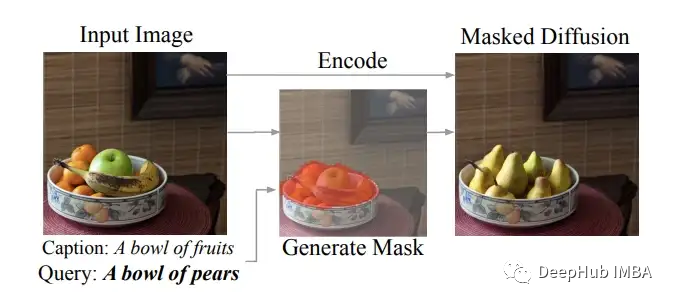
从上面这张论文中截取的图片中可以看到,作者从输入的图像中创建了一个掩码,确定了图像中出现水果的部分(如橙色所示),然后进行掩码扩散,将水果替换为梨。作者提供了整个DiffEdit过程的良好可视化表示。

这篇论文中,生成遮蔽掩码似乎是最重要的步骤,其他的部分是使用文本条件进行扩散过程的调节。使用掩码对图像进行调节的方法与在“Hugging face”的In-Paint 实现的想法类似。正如作者所建议的,“DiffEdit过程有三个步骤:
步骤1:为输入图像添加噪声,并去噪:一次参考提示文本,一次参考查询文本(或无条件,也就是不参考任何文本),并根据去噪结果的差异推导出一个掩码。
步骤2:对输入图像进行DDIM编码,估计与输入图像相对应的潜在值
步骤3:在文本查询条件下执行DDIM解码,使用推断的掩码将背景替换为来自编码过程中相应时间步" 1 "的像素值
下面我们将这些思想实现到实际的代码中。
让我们从导入所需的库和一些辅助函数开始。
import torch, logging ## disable warnings logging.disable(logging.WARNING) ## Imaging library from PIL import Image from torchvision import transforms as tfms ## Basic libraries from fastdownload import FastDownload import numpy as np from tqdm.auto import tqdm import matplotlib.pyplot as plt %matplotlib inline from IPython.display import display import shutil import os ## For video display from IPython.display import HTML from base64 import b64encode ## Import the CLIP artifacts from transformers import CLIPTextModel, CLIPTokenizer from diffusers import AutoencoderKL, UNet2DConditionModel, DDIMScheduler ## Helper functions def load_artifacts(): ''' A function to load all diffusion artifacts ''' vae = AutoencoderKL.from_pretrained("CompVis/stable-diffusion-v1-4", subfolder="vae", torch_dtype=torch.float16).to("cuda") unet = UNet2DConditionModel.from_pretrained("CompVis/stable-diffusion-v1-4", subfolder="unet", torch_dtype=torch.float16).to("cuda") tokenizer = CLIPTokenizer.from_pretrained("openai/clip-vit-large-patch14", torch_dtype=torch.float16) text_encoder = CLIPTextModel.from_pretrained("openai/clip-vit-large-patch14", torch_dtype=torch.float16).to("cuda") scheduler = DDIMScheduler(beta_start=0.00085, beta_end=0.012, beta_schedule="scaled_linear", clip_sample=False, set_alpha_to_one=False) return vae, unet, tokenizer, text_encoder, scheduler def load_image(p): ''' Function to load images from a defined path ''' return Image.open(p).convert('RGB').resize((512,512)) def pil_to_latents(image): ''' Function to convert image to latents ''' init_image = tfms.ToTensor()(image).unsqueeze(0) * 2.0 - 1.0 init_image = init_image.to(device="cuda", dtype=torch.float16) init_latent_dist = vae.encode(init_image).latent_dist.sample() * 0.18215 return init_latent_dist def latents_to_pil(latents): ''' Function to convert latents to images ''' latents = (1 / 0.18215) * latents with torch.no_grad(): image = vae.decode(latents).sample image = (image / 2 + 0.5).clamp(0, 1) image = image.detach().cpu().permute(0, 2, 3, 1).numpy() images = (image * 255).round().astype("uint8") pil_images = [Image.fromarray(image) for image in images] return pil_images def text_enc(prompts, maxlen=None): ''' A function to take a texual promt and convert it into embeddings ''' if maxlen is None: maxlen = tokenizer.model_max_length inp = tokenizer(prompts, padding="max_length", max_length=maxlen, truncation=True, return_tensors="pt") return text_encoder(inp.input_ids.to("cuda"))[0].half() vae, unet, tokenizer, text_encoder, scheduler = load_artifacts()- 1
- 2
- 3
- 4
- 5
- 6
- 7
- 8
- 9
- 10
- 11
- 12
- 13
- 14
- 15
- 16
- 17
- 18
- 19
- 20
- 21
- 22
- 23
- 24
- 25
- 26
- 27
- 28
- 29
- 30
- 31
- 32
- 33
- 34
- 35
- 36
- 37
- 38
- 39
- 40
- 41
- 42
- 43
- 44
- 45
- 46
- 47
- 48
- 49
- 50
- 51
- 52
- 53
- 54
- 55
- 56
- 57
- 58
- 59
- 60
- 61
- 62
- 63
- 64
- 65
- 66
- 67
- 68
- 69
- 70
- 71
- 72
- 73
- 74
- 75
- 76
- 77
- 78
- 79
让我们还选择了一个图像,将在代码实现过程中使用它。
p = FastDownload().download('https://images.pexels.com/photos/1996333/pexels-photo-1996333.jpeg?cs=srgb&dl=pexels-helena-lopes-1996333.jpg&fm=jpg&_gl=1*1pc0nw8*_ga*OTk4MTI0MzE4LjE2NjY1NDQwMjE.*_ga_8JE65Q40S6*MTY2Njc1MjIwMC4yLjEuMTY2Njc1MjIwMS4wLjAuMA..') init_img = load_image(p) init_img- 1
- 2
- 3

DiffEdit的代码实现
下面我们开始按照作者建议的那样实现这篇论文。
1、掩码创建:这是DiffEdit过程的第一步

对于第一步,论文中有更详细的解释,我们这里只看重点提到的部分-
- 使用不同的文本条件(参考文本和查询文本)对图像去噪,并从结果中取差异。这个想法的理论是在不同的部分有更多的变化,而不是在图像的背景不会做过多的改变。
- 重复这个差分过程10次
- 求出这些差异的平均值并将其二值化
这里需要注意的是掩码创建的第三步(平均和二值化)在论文中没有解释清楚,这使得我花了很多实验时间才做对。
下面的prompt_2_img_i2i函数,可以返回图像的潜在空间,而不是重新缩放和解码后的去噪图像。
def prompt_2_img_i2i(prompts, init_img, neg_prompts=None, g=7.5, seed=100, strength =0.8, steps=50, dim=512): """ Diffusion process to convert prompt to image """ # Converting textual prompts to embedding text = text_enc(prompts) # Adding an unconditional prompt , helps in the generation process if not neg_prompts: uncond = text_enc([""], text.shape[1]) else: uncond = text_enc(neg_prompt, text.shape[1]) emb = torch.cat([uncond, text]) # Setting the seed if seed: torch.manual_seed(seed) # Setting number of steps in scheduler scheduler.set_timesteps(steps) # Convert the seed image to latent init_latents = pil_to_latents(init_img) # Figuring initial time step based on strength init_timestep = int(steps * strength) timesteps = scheduler.timesteps[-init_timestep] timesteps = torch.tensor([timesteps], device="cuda") # Adding noise to the latents noise = torch.randn(init_latents.shape, generator=None, device="cuda", dtype=init_latents.dtype) init_latents = scheduler.add_noise(init_latents, noise, timesteps) latents = init_latents # Computing the timestep to start the diffusion loop t_start = max(steps - init_timestep, 0) timesteps = scheduler.timesteps[t_start:].to("cuda") # Iterating through defined steps for i,ts in enumerate(tqdm(timesteps)): # We need to scale the i/p latents to match the variance inp = scheduler.scale_model_input(torch.cat([latents] * 2), ts) # Predicting noise residual using U-Net with torch.no_grad(): u,t = unet(inp, ts, encoder_hidden_states=emb).sample.chunk(2) # Performing Guidance pred = u + g*(t-u) # Conditioning the latents #latents = scheduler.step(pred, ts, latents).pred_original_sample latents = scheduler.step(pred, ts, latents).prev_sample # Returning the latent representation to output an array of 4x64x64 return latents.detach().cpu()- 1
- 2
- 3
- 4
- 5
- 6
- 7
- 8
- 9
- 10
- 11
- 12
- 13
- 14
- 15
- 16
- 17
- 18
- 19
- 20
- 21
- 22
- 23
- 24
- 25
- 26
- 27
- 28
- 29
- 30
- 31
- 32
- 33
- 34
- 35
- 36
- 37
- 38
- 39
- 40
- 41
- 42
- 43
- 44
- 45
- 46
- 47
- 48
- 49
- 50
- 51
- 52
下一步是创建create_mask函数,它的参数是使用的初始图像、引导提示和查询提示,以及我们需要重复这些步骤的次数。论文中作者认为在他们的实验中,n=10和强度为0.5是可行的。因此函数的默认值被调整为该值。Create_mask函数执行以下步骤-
- 创建两个去噪的潜在空间,一个条件是参考文本,另一个条件是查询文本,并取这些潜在空间的差值
- 重复此步骤n次
- 取这些差异的平均值并进行标准化
- 选择0.5的阈值进行二值化并创建掩码
def create_mask(init_img, rp, qp, n=10, s=0.5): ## Initialize a dictionary to save n iterations diff = {} ## Repeating the difference process n times for idx in range(n): ## Creating denoised sample using reference / original text orig_noise = prompt_2_img_i2i(prompts=rp, init_img=init_img, strength=s, seed = 100*idx)[0] ## Creating denoised sample using query / target text query_noise = prompt_2_img_i2i(prompts=qp, init_img=init_img, strength=s, seed = 100*idx)[0] ## Taking the difference diff[idx] = (np.array(orig_noise)-np.array(query_noise)) ## Creating a mask placeholder mask = np.zeros_like(diff[0]) ## Taking an average of 10 iterations for idx in range(n): ## Note np.abs is a key step mask += np.abs(diff[idx]) ## Averaging multiple channels mask = mask.mean(0) ## Normalizing mask = (mask - mask.mean()) / np.std(mask) ## Binarizing and returning the mask object return (mask > 0).astype("uint8") mask = create_mask(init_img=init_img, rp=["a horse image"], qp=["a zebra image"], n=10)- 1
- 2
- 3
- 4
- 5
- 6
- 7
- 8
- 9
- 10
- 11
- 12
- 13
- 14
- 15
- 16
- 17
- 18
- 19
- 20
- 21
- 22
- 23
- 24
- 25
- 26
- 27
- 28
- 29
- 30
- 31
让我们在图像上可视化生成的掩码。
plt.imshow(np.array(init_img), cmap='gray') # I would add interpolation='none' plt.imshow( Image.fromarray(mask).resize((512,512)), ## Scaling the mask to original size cmap='cividis', alpha=0.5*(np.array(Image.fromarray(mask*255).resize((512,512))) > 0) )- 1
- 2
- 3
- 4
- 5
- 6

正如我们在上面看到的,制作的掩码覆盖了马的部分,这的确是我们想要的结果。
2、掩码扩散:DiffEdit论文的步骤2和步骤3

步骤2和3需要在同一个循环中实现,因为作者是说基于参考文本对非掩码部分和查询文本对掩码部分进行条件处理。使用这个简单的公式将这两个部分结合起来,创建组合的潜在空间

def prompt_2_img_diffedit(rp, qp, init_img, mask, g=7.5, seed=100, strength =0.7, steps=70, dim=512): """ Diffusion process to convert prompt to image """ # Converting textual prompts to embedding rtext = text_enc(rp) qtext = text_enc(qp) # Adding an unconditional prompt , helps in the generation process uncond = text_enc([""], rtext.shape[1]) emb = torch.cat([uncond, rtext, qtext]) # Setting the seed if seed: torch.manual_seed(seed) # Setting number of steps in scheduler scheduler.set_timesteps(steps) # Convert the seed image to latent init_latents = pil_to_latents(init_img) # Figuring initial time step based on strength init_timestep = int(steps * strength) timesteps = scheduler.timesteps[-init_timestep] timesteps = torch.tensor([timesteps], device="cuda") # Adding noise to the latents noise = torch.randn(init_latents.shape, generator=None, device="cuda", dtype=init_latents.dtype) init_latents = scheduler.add_noise(init_latents, noise, timesteps) latents = init_latents # Computing the timestep to start the diffusion loop t_start = max(steps - init_timestep, 0) timesteps = scheduler.timesteps[t_start:].to("cuda") # Converting mask to torch tensor mask = torch.tensor(mask, dtype=unet.dtype).unsqueeze(0).unsqueeze(0).to("cuda") # Iterating through defined steps for i,ts in enumerate(tqdm(timesteps)): # We need to scale the i/p latents to match the variance inp = scheduler.scale_model_input(torch.cat([latents] * 3), ts) # Predicting noise residual using U-Net with torch.no_grad(): u, rt, qt = unet(inp, ts, encoder_hidden_states=emb).sample.chunk(3) # Performing Guidance rpred = u + g*(rt-u) qpred = u + g*(qt-u) # Conditioning the latents rlatents = scheduler.step(rpred, ts, latents).prev_sample qlatents = scheduler.step(qpred, ts, latents).prev_sample latents = mask*qlatents + (1-mask)*rlatents # Returning the latent representation to output an array of 4x64x64 return latents_to_pil(latents)- 1
- 2
- 3
- 4
- 5
- 6
- 7
- 8
- 9
- 10
- 11
- 12
- 13
- 14
- 15
- 16
- 17
- 18
- 19
- 20
- 21
- 22
- 23
- 24
- 25
- 26
- 27
- 28
- 29
- 30
- 31
- 32
- 33
- 34
- 35
- 36
- 37
- 38
- 39
- 40
- 41
- 42
- 43
- 44
- 45
- 46
- 47
- 48
- 49
- 50
- 51
- 52
- 53
- 54
- 55
- 56
- 57
让我们可视化生成的图像
output = prompt_2_img_diffedit( rp = ["a horse image"], qp=["a zebra image"], init_img=init_img, mask = mask, g=7.5, seed=100, strength =0.5, steps=70, dim=512) ## Plotting side by side fig, axs = plt.subplots(1, 2, figsize=(12, 6)) for c, img in enumerate([init_img, output[0]]): axs[c].imshow(img) if c == 0 : axs[c].set_title(f"Initial image ") else: axs[c].set_title(f"DiffEdit output")- 1
- 2
- 3
- 4
- 5
- 6
- 7
- 8
- 9
- 10
- 11
- 12
- 13
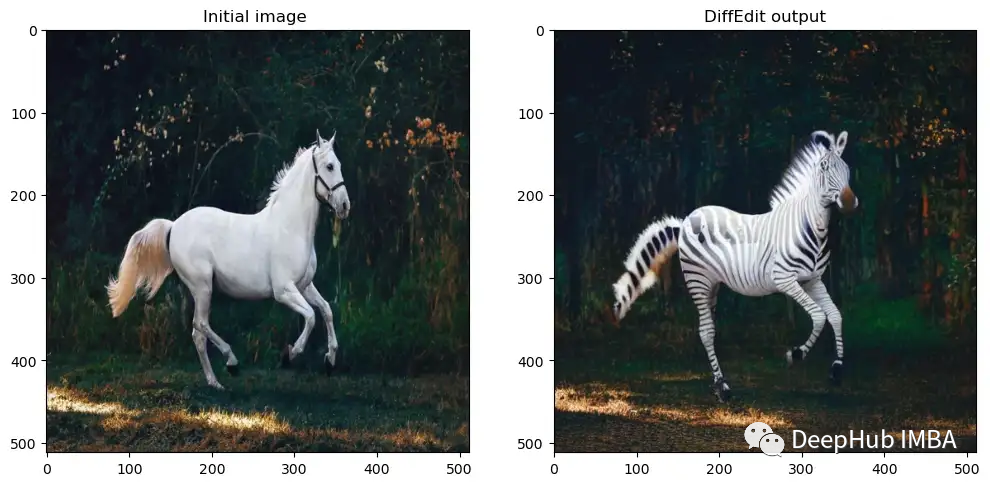
将掩码和扩散过程整合成一个简单的函数。
def diffEdit(init_img, rp , qp, g=7.5, seed=100, strength =0.7, steps=70, dim=512): ## Step 1: Create mask mask = create_mask(init_img=init_img, rp=rp, qp=qp) ## Step 2 and 3: Diffusion process using mask output = prompt_2_img_diffedit( rp = rp, qp=qp, init_img=init_img, mask = mask, g=g, seed=seed, strength =strength, steps=steps, dim=dim) return mask , output- 1
- 2
- 3
- 4
- 5
- 6
- 7
- 8
- 9
- 10
- 11
- 12
- 13
- 14
- 15
- 16
- 17
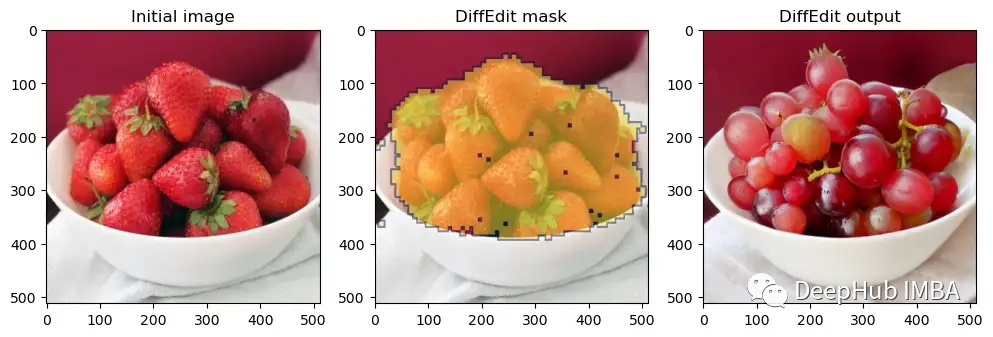
我们还可以为DiffEdit创建一个可视化函数,显示原始输入图像、掩码图像和最终输出图像。
def plot_diffEdit(init_img, output, mask): ## Plotting side by side fig, axs = plt.subplots(1, 3, figsize=(12, 6)) ## Visualizing initial image axs[0].imshow(init_img) axs[0].set_title(f"Initial image") ## Visualizing initial image axs[2].imshow(output[0]) axs[2].set_title(f"DiffEdit output") ## Visualizing the mask axs[1].imshow(np.array(init_img), cmap='gray') axs[1].imshow( Image.fromarray(mask).resize((512,512)), ## Scaling the mask to original size cmap='cividis', alpha=0.5*(np.array(Image.fromarray(mask*255).resize((512,512))) > 0) ) axs[1].set_title(f"DiffEdit mask")- 1
- 2
- 3
- 4
- 5
- 6
- 7
- 8
- 9
- 10
- 11
- 12
- 13
- 14
- 15
- 16
- 17
- 18
- 19
- 20
下面可以在一些其他的图像上测试这个函数。
p = FastDownload().download('https://images.pexels.com/photos/1996333/pexels-photo-1996333.jpeg?cs=srgb&dl=pexels-helena-lopes-1996333.jpg&fm=jpg&_gl=1*1pc0nw8*_ga*OTk4MTI0MzE4LjE2NjY1NDQwMjE.*_ga_8JE65Q40S6*MTY2Njc1MjIwMC4yLjEuMTY2Njc1MjIwMS4wLjAuMA..') init_img = load_image(p) mask, output = diffEdit( init_img, rp = ["a horse image"], qp=["a zebra image"] ) plot_diffEdit(init_img, output, mask)- 1
- 2
- 3
- 4
- 5
- 6
- 7
- 8

效果还不错太,再试一个。
p = FastDownload().download('https://raw.githubusercontent.com/johnrobinsn/diffusion_experiments/main/images/bowloberries_scaled.jpg') init_img = load_image(p) mask, output = diffEdit( init_img, rp = ['Bowl of Strawberries'], qp=['Bowl of Grapes'] ) plot_diffEdit(init_img, output, mask)- 1
- 2
- 3
- 4
- 5
- 6
- 7
- 8
FastDiffEdit:一个更快的DiffEdit实现
现在我们已经看到了我们自己手写代码的实现,但是我们这个实现没有经过任何的优化。为了在速度结果方面表现的更好,可以对原来的DiffEdit过程进行一些改进。我们称这些改进为FastDiffEdit。
1、掩码创建:FastDiffEdit掩码过程
掩码创建的最大的问题是它花费太多的时间(在A4500 GPU上大约50秒)。我们可能不需要运行一个完整的扩散循环来去噪图像,只需要在一个观察中使用原始样本的U-net预测,并将重复增加到20次。在这种情况下,可以将计算从10*25 = 250步改进到20步(少了12次循环)。让我们看看这在实践中是否有效。
def prompt_2_img_i2i_fast(prompts, init_img, g=7.5, seed=100, strength =0.5, steps=50, dim=512): """ Diffusion process to convert prompt to image """ # Converting textual prompts to embedding text = text_enc(prompts) # Adding an unconditional prompt , helps in the generation process uncond = text_enc([""], text.shape[1]) emb = torch.cat([uncond, text]) # Setting the seed if seed: torch.manual_seed(seed) # Setting number of steps in scheduler scheduler.set_timesteps(steps) # Convert the seed image to latent init_latents = pil_to_latents(init_img) # Figuring initial time step based on strength init_timestep = int(steps * strength) timesteps = scheduler.timesteps[-init_timestep] timesteps = torch.tensor([timesteps], device="cuda") # Adding noise to the latents noise = torch.randn(init_latents.shape, generator=None, device="cuda", dtype=init_latents.dtype) init_latents = scheduler.add_noise(init_latents, noise, timesteps) latents = init_latents # We need to scale the i/p latents to match the variance inp = scheduler.scale_model_input(torch.cat([latents] * 2), timesteps) # Predicting noise residual using U-Net with torch.no_grad(): u,t = unet(inp, timesteps, encoder_hidden_states=emb).sample.chunk(2) # Performing Guidance pred = u + g*(t-u) # Zero shot prediction latents = scheduler.step(pred, timesteps, latents).pred_original_sample # Returning the latent representation to output an array of 4x64x64 return latents.detach().cpu()- 1
- 2
- 3
- 4
- 5
- 6
- 7
- 8
- 9
- 10
- 11
- 12
- 13
- 14
- 15
- 16
- 17
- 18
- 19
- 20
- 21
- 22
- 23
- 24
- 25
- 26
- 27
- 28
- 29
- 30
- 31
- 32
- 33
- 34
- 35
- 36
- 37
- 38
- 39
- 40
- 41
- 42
- 43
创建一个新的掩码函数,它使用prompt_2_img_i2i_fast函数。
def create_mask_fast(init_img, rp, qp, n=20, s=0.5): ## Initialize a dictionary to save n iterations diff = {} ## Repeating the difference process n times for idx in range(n): ## Creating denoised sample using reference / original text orig_noise = prompt_2_img_i2i_fast(prompts=rp, init_img=init_img, strength=s, seed = 100*idx)[0] ## Creating denoised sample using query / target text query_noise = prompt_2_img_i2i_fast(prompts=qp, init_img=init_img, strength=s, seed = 100*idx)[0] ## Taking the difference diff[idx] = (np.array(orig_noise)-np.array(query_noise)) ## Creating a mask placeholder mask = np.zeros_like(diff[0]) ## Taking an average of 10 iterations for idx in range(n): ## Note np.abs is a key step mask += np.abs(diff[idx]) ## Averaging multiple channels mask = mask.mean(0) ## Normalizing mask = (mask - mask.mean()) / np.std(mask) ## Binarizing and returning the mask object return (mask > 0).astype("uint8")- 1
- 2
- 3
- 4
- 5
- 6
- 7
- 8
- 9
- 10
- 11
- 12
- 13
- 14
- 15
- 16
- 17
- 18
- 19
- 20
- 21
- 22
- 23
- 24
- 25
- 26
- 27
- 28
- 29
看看这个新的函数是否能产生好的蔽效果。
p = FastDownload().download('https://images.pexels.com/photos/1996333/pexels-photo-1996333.jpeg?cs=srgb&dl=pexels-helena-lopes-1996333.jpg&fm=jpg&_gl=1*1pc0nw8*_ga*OTk4MTI0MzE4LjE2NjY1NDQwMjE.*_ga_8JE65Q40S6*MTY2Njc1MjIwMC4yLjEuMTY2Njc1MjIwMS4wLjAuMA..') init_img = load_image(p) mask = create_mask_fast(init_img=init_img, rp=["a horse image"], qp=["a zebra image"], n=20) plt.imshow(np.array(init_img), cmap='gray') # I would add interpolation='none' plt.imshow( Image.fromarray(mask).resize((512,512)), ## Scaling the mask to original size cmap='cividis', alpha=0.5*(np.array(Image.fromarray(mask*255).resize((512,512))) > 0) )- 1
- 2
- 3
- 4
- 5
- 6
- 7
- 8
- 9

效果还是可以的虽然没有完整的函数来的准确,但计算时间在我的机器上从50秒减少到10秒(提高了5倍!),我们可以通过添加cv2的处理来改进效果。这将使掩码更平滑一点。
import cv2 def improve_mask(mask): mask = cv2.GaussianBlur(mask*255,(3,3),1) > 0 return mask.astype('uint8') mask = improve_mask(mask) plt.imshow(np.array(init_img), cmap='gray') # I would add interpolation='none' plt.imshow( Image.fromarray(mask).resize((512,512)), ## Scaling the mask to original size cmap='cividis', alpha=0.5*(np.array(Image.fromarray(mask*255).resize((512,512))) > 0) )- 1
- 2
- 3
- 4
- 5
- 6
- 7
- 8
- 9
- 10
- 11
- 12
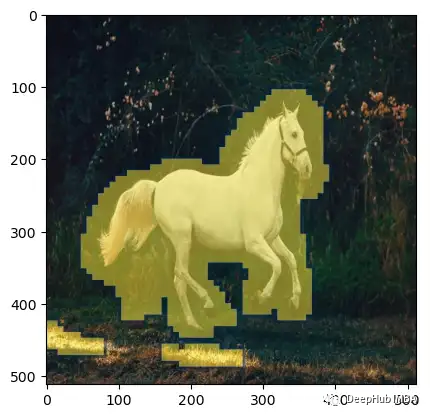
掩码变得更加平滑,覆盖了更多的区域。
2、将掩码扩散的流程替换为🤗inpaint的流程
在🤗diffusers库中有一个叫做inpaint pipeline的特殊管道,所以我们可以使用它来执行掩码扩散。它接受查询提示、初始图像和生成的掩码返回生成的图像。
from diffusers import StableDiffusionInpaintPipeline pipe = StableDiffusionInpaintPipeline.from_pretrained( "runwayml/stable-diffusion-inpainting", revision="fp16", torch_dtype=torch.float16, ).to("cuda")- 1
- 2
- 3
- 4
- 5
- 6
让我们使用inpaint来进行改进
pipe( prompt=["a zebra image"], image=init_img, mask_image=Image.fromarray(mask*255).resize((512,512)), generator=torch.Generator("cuda").manual_seed(100), num_inference_steps = 20 ).images[0] image- 1
- 2
- 3
- 4
- 5
- 6
- 7
- 8

inpaint管道创建了一个更真实的斑马图像。让我们为掩码和扩散过程创建一个简单的函数。
def fastDiffEdit(init_img, rp , qp, g=7.5, seed=100, strength =0.7, steps=20, dim=512): ## Step 1: Create mask mask = create_mask_fast(init_img=init_img, rp=rp, qp=qp, n=20) ## Improve masking using CV trick mask = improve_mask(mask) ## Step 2 and 3: Diffusion process using mask output = pipe( prompt=qp, image=init_img, mask_image=Image.fromarray(mask*255).resize((512,512)), generator=torch.Generator("cuda").manual_seed(100), num_inference_steps = steps ).images return mask , output- 1
- 2
- 3
- 4
- 5
- 6
- 7
- 8
- 9
- 10
- 11
- 12
- 13
- 14
- 15
- 16
- 17
还是在上面的图像上测试这个函数。
p = FastDownload().download('https://raw.githubusercontent.com/johnrobinsn/diffusion_experiments/main/images/bowloberries_scaled.jpg') init_img = load_image(p) mask, output = fastDiffEdit(init_img, rp = ['Bowl of Strawberries'], qp=['Bowl of Grapes']) plot_diffEdit(init_img, output, mask)- 1
- 2
- 3
- 4

效果比我们自己写的好多了
总结
在这篇文章中,我们实现了DiffEdit论文,然后还提出了创建FastDiffEdit的改进方法,这样不仅计算速度提高了5倍,效果也变得更好了,而且代码还变少了。
https://avoid.overfit.cn/post/f0a8a7b6981a4962aae21e97d535ee41
作者:Aayush Agrawal
-
相关阅读:
安全好用性价比高的远程协同运维软件有吗?
【pytest】 标记冒烟用例 @pytest.mark.smoke
unity OnMouse生命周期
从零开始学习软件测试-第47天笔记
Babel 插件通关秘籍
优思学院|八大浪费深度剖析
上架即封神!3.6k Star 的开源游戏模拟器,Delta 冲上 App Store 免费榜
git使用.md
知识点小记:echarts折线图负数展示不一样的颜色
IDEA显示val,var的推断类型的设置
- 原文地址:https://blog.csdn.net/m0_46510245/article/details/128034948
