-
【Spring Cloud实战】Spring Cloud Alibaba Sentinel熔断与限流 (最全讲解,附源码)
gitee地址:https://gitee.com/javaxiaobear/spring-cloud_study.git
在线阅读地址:https://javaxiaobear.gitee.io/1、简介
Sentinel 是面向分布式服务架构的流量控制组件,主要以流量为切入点,从流量控制、熔断降级、系统自适应保护等多个维度来帮助您保障微服务的稳定性。
官网:https://github.com/alibaba/Sentinel
中文文档:https://github.com/alibaba/Sentinel/wiki/%E4%BB%8B%E7%BB%8D https://sentinelguard.io/zh-cn/docs/introduction.html
下载地址:https://github.com/alibaba/Sentinel/releases/tag/1.8.1
1、Sentinel 基本概念
资源
资源是 Sentinel 的关键概念。它可以是 Java 应用程序中的任何内容,例如,由应用程序提供的服务,或由应用程序调用的其它应用提供的服务,甚至可以是一段代码。在接下来的文档中,我们都会用资源来描述代码块。
只要通过 Sentinel API 定义的代码,就是资源,能够被 Sentinel 保护起来。大部分情况下,可以使用方法签名,URL,甚至服务名称作为资源名来标示资源。
规则
围绕资源的实时状态设定的规则,可以包括流量控制规则、熔断降级规则以及系统保护规则。所有规则可以动态实时调整。
2、特点
- 丰富的适用场景:哨兵在阿里巴巴得到了广泛的应用,几乎覆盖了近10年双11(11.11)购物节的所有核心场景,比如需要限制突发流量的“秒杀”满足系统能力、消息削峰填谷、不依靠业务断路、流量控制等。
- 实时监控:Sentinel 还提供实时监控能力。可以实时查看单台机器的运行时信息,以及以下 500 个节点的集群运行时信息。
- 广泛的开源生态:Sentinel 提供与 Spring、Dubbo 和 gRPC 等常用框架和库的开箱即用集成。
- 多语言支持:Sentinel 为 Java、Go和C++提供了本机支持。
- 丰富的 SPI 扩展:Sentinel 提供简单易用的 SPI 扩展接口,可以让您快速自定义逻辑,例如自定义规则管理、适配数据源等。
3、作用
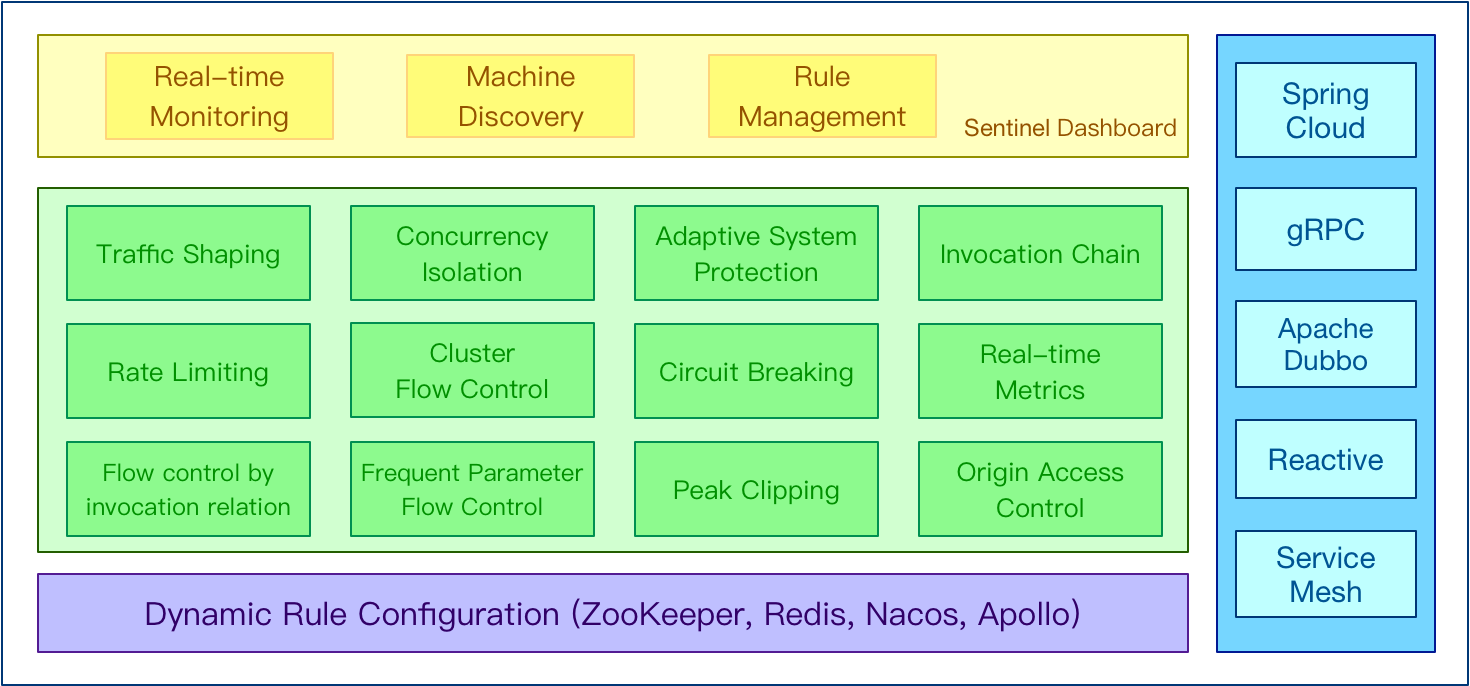
4、生态

Sentinel 分为两个部分:
- 核心库(Java 客户端)不依赖任何框架/库,能够运行于所有 Java 运行时环境,同时对 Dubbo / Spring Cloud 等框架也有较好的支持。
- 控制台(Dashboard)基于 Spring Boot 开发,打包后可以直接运行,不需要额外的 Tomcat 等应用容器。
- Sentinel Dashboard 是一个轻量级的控制台,提供机器发现、单服务器资源监控、集群资源数据概览以及规则管理等功能
5、Sentinel 控制台
官网地址:https://sentinelguard.io/zh-cn/docs/dashboard.html
Sentinel 提供一个轻量级的开源控制台,它提供机器发现以及健康情况管理、监控(单机和集群),规则管理和推送的功能。这里,我们将会详细讲述如何通过简单的步骤就可以使用这些功能。
接下来,我们将会逐一介绍如何整合 Sentinel 核心库和 Dashboard,让它发挥最大的作用。同时我们也在阿里云上提供企业级的 Sentinel 服务:AHAS Sentinel 控制台,您只需要几个简单的步骤,就能最直观地看到控制台如何实现这些功能,并体验多样化的监控及全自动托管的集群流控能力。
Sentinel 控制台包含如下功能:
- 查看机器列表以及健康情况:收集 Sentinel 客户端发送的心跳包,用于判断机器是否在线。
- 监控 (单机和集群聚合):通过 Sentinel 客户端暴露的监控 API,定期拉取并且聚合应用监控信息,最终可以实现秒级的实时监控。
- 规则管理和推送:统一管理推送规则。
- 鉴权:生产环境中鉴权非常重要。这里每个开发者需要根据自己的实际情况进行定制。
2、案例module
1、新建module
xiaobear-cloud-alibaba-sentinel-service8401- 1
2、改pom
<dependencies> <dependency> <groupId>com.alibaba.cloudgroupId> <artifactId>spring-cloud-starter-alibaba-nacos-discoveryartifactId> dependency> <dependency> <groupId>com.alibaba.cspgroupId> <artifactId>sentinel-datasource-nacosartifactId> dependency> <dependency> <groupId>com.alibaba.cloudgroupId> <artifactId>spring-cloud-starter-alibaba-sentinelartifactId> dependency> <dependency> <groupId>org.springframework.cloudgroupId> <artifactId>spring-cloud-starter-openfeignartifactId> dependency> <dependency> <groupId>org.springframework.bootgroupId> <artifactId>spring-boot-starter-webartifactId> dependency> <dependency> <groupId>org.springframework.bootgroupId> <artifactId>spring-boot-starter-actuatorartifactId> dependency> <dependency> <groupId>org.springframework.bootgroupId> <artifactId>spring-boot-devtoolsartifactId> <scope>runtimescope> <optional>trueoptional> dependency> <dependency> <groupId>cn.hutoolgroupId> <artifactId>hutool-allartifactId> <version>4.6.3version> dependency> <dependency> <groupId>org.projectlombokgroupId> <artifactId>lombokartifactId> <optional>trueoptional> dependency> <dependency> <groupId>org.springframework.bootgroupId> <artifactId>spring-boot-starter-testartifactId> <scope>testscope> dependency> dependencies>- 1
- 2
- 3
- 4
- 5
- 6
- 7
- 8
- 9
- 10
- 11
- 12
- 13
- 14
- 15
- 16
- 17
- 18
- 19
- 20
- 21
- 22
- 23
- 24
- 25
- 26
- 27
- 28
- 29
- 30
- 31
- 32
- 33
- 34
- 35
- 36
- 37
- 38
- 39
- 40
- 41
- 42
- 43
- 44
- 45
- 46
- 47
- 48
- 49
- 50
- 51
- 52
- 53
3、写yaml
server: port: 8401 spring: application: name: xiaobear-sentinel-service cloud: #nacos注册服务中心 nacos: discovery: server-addr: localhost:8848 sentinel: transport: #配置Sentinel dashboard地址 dashboard: localhost:8080 #默认8719端口,假如被占用会自动从8719开始依次+1扫描,直至找到未被占用的端口 port: 8719 clientIp: localhost #暴露端点 management: endpoints: web: exposure: include: '*'- 1
- 2
- 3
- 4
- 5
- 6
- 7
- 8
- 9
- 10
- 11
- 12
- 13
- 14
- 15
- 16
- 17
- 18
- 19
- 20
- 21
- 22
- 23
- 24
- 25
4、主启动类
@SpringBootApplication @EnableDiscoveryClient public class SentinelServiceApplication8401 { public static void main(String[] args) { SpringApplication.run(SentinelServiceApplication8401.class, args); } }- 1
- 2
- 3
- 4
- 5
- 6
- 7
- 8
5、业务类
-
controller
@RestController public class FlowLimitController { @GetMapping("/test1") public String test1(){ return "----------test1--------"; } @GetMapping("/test2") public String test2(){ return "----------test2--------"; } }- 1
- 2
- 3
- 4
- 5
- 6
- 7
- 8
- 9
- 10
- 11
- 12
- 13
6、测试
- 启动
Nacos,访问http://localhost:8848/nacos/ - 启动
Sentinel,访问http://localhost:8080/ - 启动工程,访问http://localhost:8401/test1和http://localhost:8401/test2

注意:
Sentinel采用的是懒加载,所以需要访问才会监控到微服务
3、流控规则
1、概述
FlowSlot会根据预设的规则,结合前面NodeSelectorSlot、ClusterNodeBuilderSlot、StatistcSlot统计出来的实时信息进行流量控制。限流的直接表现是在执行
Entry nodeA = SphU.entry(资源名字)的时候抛出FlowException异常。FlowException是BlockException的子类,您可以捕捉BlockException来自定义被限流之后的处理逻辑。同一个资源可以对应多条限流规则。
FlowSlot会对该资源的所有限流规则依次遍历,直到有规则触发限流或者所有规则遍历完毕。一条限流规则主要由下面几个因素组成,我们可以组合这些元素来实现不同的限流效果:
resource:资源名,即限流规则的作用对象count: 限流阈值grade: 限流阈值类型,QPS 或线程数strategy: 根据调用关系选择策略
Field 说明 默认值 resource 资源名,资源名是限流规则的作用对象 count 限流阈值 grade 限流阈值类型,QPS 或线程数模式 QPS 模式 limitApp 流控针对的调用来源 default,代表不区分调用来源strategy 调用关系限流策略:直接、链路、关联 根据资源本身(直接) controlBehavior 流控效果(直接拒绝 / 排队等待 / 慢启动模式),不支持按调用关系限流 直接拒绝 
2、流控模式
1、直接(默认)
直接->快速失败

表示1秒钟内查询1次就是OK,若超过次数1,就直接-快速失败,报默认错误
Blocked by Sentinel (flow limiting)- 1
思考:
直接报默认错误信息,技术上是OK,但是是否应该有后续处理,比如有一个兜底的fallback
2、关联
当关联的资料达到阈值时,就限流自己。当与A关联的资源B达到阈值后,就限流A

当关联资源/test2的qps阀值超过1时,就限流/test1的Rest访问地址,当关联资源到阈值后限制配置好的资源名
用PostMan模拟并发访问/test2,发现Blocked by Sentinel (flow limiting)


3、链路
链路流控模式指的是,当从某个接口过来的资源达到限流条件时,开启限流;它的功能有点类似于针对 来源配置项,区别在于:针对来源是针对上级微服务,而链路流控是针对上级接口,也就是说它的粒度 更细;
增加service
-
service
@Service public class SentinelService { @SentinelResource("hello") public String hello() { return "Hello Sentinel"; } }- 1
- 2
- 3
- 4
- 5
- 6
- 7
- 8
@SentinelResource注释用于识别资源是速率受限还是降级。在上面的示例中,注解的 ‘hello’ 属性指的是资源名称。
-
controller
@RestController public class FlowLimitController { @Resource private SentinelService sentinelService; @GetMapping("/test1") public String test1(){ return "----------test1--------"; } @GetMapping("/test2") public String test2(){ return "----------test2--------"; } @GetMapping("/test3") public String test3(){ return sentinelService.hello(); } }- 1
- 2
- 3
- 4
- 5
- 6
- 7
- 8
- 9
- 10
- 11
- 12
- 13
- 14
- 15
- 16
- 17
- 18
- 19
- 20
- 21
4、流控效果
1、直接(默认的流控处理)
该方式是默认的流量控制方式,当QPS超过任意规则的阈值后,新的请求就会被立即拒绝,拒绝方式为抛出
FlowException。2、预热(Warm Up)
https://github.com/alibaba/Sentinel/wiki/%E6%B5%81%E9%87%8F%E6%8E%A7%E5%88%B6
公式:阈值除以coldFactor(默认为3),经过预热时长后才达到阈值
冷启动(
RuleConstant.CONTROL_BEHAVIOR_WARM_UP)方式。该方式主要用于系统长期处于低水位的情况下,当流量突然增加时,直接把系统拉升到高水位可能瞬间把系统压垮。通过"冷启动",让通过的流量缓慢增加,在一定时间内逐渐增加到阈值上限,给冷系统一个预热的时间,避免冷系统被压垮的情况。1、配置
默认 coldFactor 为 3,即请求QPS从(threshold / 3) 开始,经多少预热时长才逐渐升至设定的 QPS 阈值。 案例,阀值为10+预热时长设置5秒。系统初始化的阀值为10 / 3 约等于3,即阀值刚开始为3;然后过了5秒后阀值才慢慢升高恢复到10 
2、应用场景
如:秒杀系统在开启的瞬间,会有很多流量上来,很有可能把系统打死,预热方式就是把为了保护系统,可慢慢的把流量放进来,慢慢的把阀值增长到设置的阀值。
3、排队等待
匀速器(
RuleConstant.CONTROL_BEHAVIOR_RATE_LIMITER)方式。这种方式严格控制了请求通过的间隔时间,也即是让请求以均匀的速度通过,对应的是漏桶算法。匀速排队,让请求以均匀的速度通过,阀值类型必须设成QPS,否则无效。 设置含义:/test1每秒1次请求,超过的话就排队等待,等待的超时时间为1000毫秒。 
5、降级规则
官网文档地址:https://sentinelguard.io/zh-cn/docs/circuit-breaking.html
Sentinel 提供以下几种熔断策略:
- 慢调用比例 (
SLOW_REQUEST_RATIO):选择以慢调用比例作为阈值,需要设置允许的慢调用 RT(即最大的响应时间),请求的响应时间大于该值则统计为慢调用。当单位统计时长(statIntervalMs)内请求数目大于设置的最小请求数目,并且慢调用的比例大于阈值,则接下来的熔断时长内请求会自动被熔断。经过熔断时长后熔断器会进入探测恢复状态(HALF-OPEN 状态),若接下来的一个请求响应时间小于设置的慢调用 RT 则结束熔断,若大于设置的慢调用 RT 则会再次被熔断。 - 异常比例 (
ERROR_RATIO):当单位统计时长(statIntervalMs)内请求数目大于设置的最小请求数目,并且异常的比例大于阈值,则接下来的熔断时长内请求会自动被熔断。经过熔断时长后熔断器会进入探测恢复状态(HALF-OPEN 状态),若接下来的一个请求成功完成(没有错误)则结束熔断,否则会再次被熔断。异常比率的阈值范围是[0.0, 1.0],代表 0% - 100%。 - 异常数 (
ERROR_COUNT):当单位统计时长内的异常数目超过阈值之后会自动进行熔断。经过熔断时长后熔断器会进入探测恢复状态(HALF-OPEN 状态),若接下来的一个请求成功完成(没有错误)则结束熔断,否则会再次被熔断。
RT(平均响应时间,秒级)
平均响应时间 超出阈值 且 在时间窗口内通过的请求>=5,两个条件同时满足后触发降级
窗口期过后关闭断路器
RT最大4900(更大的需要通过-Dcsp.sentinel.statistic.max.rt=XXXX才能生效)
异常比列(秒级)
QPS >= 5 且异常比例(秒级统计)超过阈值时,触发降级;时间窗口结束后,关闭降级
异常数(分钟级)
异常数(分钟统计)超过阈值时,触发降级;时间窗口结束后,关闭降级
Sentinel 熔断降级会在调用链路中某个资源出现不稳定状态时(例如调用超时或异常比例升高),对这个资源的调用进行限制,让请求快速失败,避免影响到其它的资源而导致级联错误。
当资源被降级后,在接下来的降级时间窗口之内,对该资源的调用都自动熔断(默认行为是抛出 DegradeException)。
Sentinel的断路器是没有半开状态- 半开的状态系统自动检测是否请求有异常,没有异常就关闭断路器恢复使用,有异常则打开断路器不可用
1、慢调用比例
以前的版本是:平均响应时间
选择以慢调用比例作为阈值,需要设置允许的慢调用 RT(即最大的响应时间),请求的响应时间大于该值则统计为慢调用。当单位统计时长(
statIntervalMs)内请求数目大于设置的最小请求数目,并且慢调用的比例大于阈值,则接下来的熔断时长内请求会自动被熔断。经过熔断时长后熔断器会进入探测恢复状态(HALF-OPEN 状态),若接下来的一个请求响应时间小于设置的慢调用 RT 则结束熔断,若大于设置的慢调用 RT 则会再次被熔断。
-
controller
@GetMapping("/test4") public String test4(){ try { Thread.sleep(1000); } catch(InterruptedException e) { e.printStackTrace(); } return "------------test4----------"; }- 1
- 2
- 3
- 4
- 5
- 6
- 7
- 8
- 9

使用jmeter进行压测,一秒钟访问10次
永远一秒钟打进来10个线程(大于5个了)调用testD,我们希望200毫秒处理完本次任务,
如果超过200毫秒还没处理完,在未来1秒钟的时间窗口内,断路器打开(保险丝跳闸)微服务不可用,保险丝跳闸断电了
后续我停止jmeter,没有这么大的访问量了,断路器关闭(保险丝恢复),微服务恢复OK
2、异常比例
当单位统计时长(
statIntervalMs)内请求数目大于设置的最小请求数目,并且异常的比例大于阈值,则接下来的熔断时长内请求会自动被熔断。经过熔断时长后熔断器会进入探测恢复状态(HALF-OPEN 状态),若接下来的一个请求成功完成(没有错误)则结束熔断,否则会再次被熔断。异常比率的阈值范围是[0.0, 1.0],代表 0% - 100%。-
controller
@GetMapping("/test5") public String test5(){ int x = 10/0; return "----------5--------------"; } }- 1
- 2
- 3
- 4
- 5
- 6

单独访问一次,必然来一次报错一次(int x = 10/0),调一次错一次;开启jmeter后,直接高并发发送请求,多次调用达到我们的配置条件了。断路器开启(保险丝跳闸),微服务不可用了,不再报错error而是服务降级了。
3、异常数
当单位统计时长内的异常数目超过阈值之后会自动进行熔断。经过熔断时长后熔断器会进入探测恢复状态(HALF-OPEN 状态),若接下来的一个请求成功完成(没有错误)则结束熔断,否则会再次被熔断。
异常数是按分钟统计的
- controller
@GetMapping("/test5") public String test5(){ int x = 10/0; return "----------5--------------"; }- 1
- 2
- 3
- 4
- 5

http://localhost:8401/test5,第一次访问绝对报错,因为除数不能为零,我们看到error窗口,但是达到5次报错后,进入熔断后降级。
6、热点
Key限流何为热点
热点即经常访问的数据,很多时候我们希望统计或者限制某个热点数据中访问频次最高的TopN数据,并对其访问进行限流或者其它操作
兜底方法分为系统默认和客户自定义,两种
之前的case,限流出问题后,都是用sentinel系统默认的提示:Blocked by Sentinel (flow limiting)
我们能不能自定?类似hystrix,某个方法出问题了,就找对应的兜底降级方法?
结论 从HystrixCommand 到@SentinelResource
1、配置
限流模式只支持QPS模式,固定写死了。(这才叫热点)
@SentinelResource注解的方法参数索引,0代表第一个参数,1代表第二个参数,以此类推
单机阀值以及统计窗口时长表示在此窗口时间超过阀值就限流。
上面的抓图就是第一个参数有值的话,1秒的QPS为1,超过就限流,限流后调用dealHandler_testHotKey支持方法。

@GetMapping("/testHotKey") @SentinelResource(value = "testHotKey",blockHandler = "dealHandler_testHotKey") public String testHotKey(@RequestParam(value = "p1",required = false) String p1, @RequestParam(value = "p2",required = false) String p2){ return "------testHotKey-------------"; } public String dealHandler_testHotKey(String p1, String p2, BlockException exception) { return "-----dealHandler_testHotKey-----------"; }- 1
- 2
- 3
- 4
- 5
- 6
- 7
- 8
- 9
- 10
只要第一参数访问的QPS超过1秒,马上降级处理
blockHandler = "dealHandler_testHotKey"测试:
- http://localhost:8401/testHotKey?p1=abc
- http://localhost:8401/testHotKey?p1=abc&p2=111
- http://localhost:8401/testHotKey?p2=abc
2、特殊情况
我们期望p1的某个值达到限流时,它的限流值跟普通的不一样。
- 例如p1= 10,限流值阈值为200

这里需要先填写参数值跟限流阈值,添加按钮才会有反应
注意:
- 参数类型必须是基本类型,访问地址的类型跟参数类型进行对应
7、系统规则
https://github.com/alibaba/Sentinel/wiki/%E7%B3%BB%E7%BB%9F%E8%87%AA%E9%80%82%E5%BA%94%E9%99%90%E6%B5%81#%E7%B3%BB%E7%BB%9F%E8%A7%84%E5%88%99
系统保护规则是从应用级别的入口流量进行控制,从单台机器的 load、CPU 使用率、平均 RT、入口 QPS 和并发线程数等几个维度监控应用指标,让系统尽可能跑在最大吞吐量的同时保证系统整体的稳定性。
系统保护规则是应用整体维度的,而不是资源维度的,并且仅对入口流量生效。入口流量指的是进入应用的流量(
EntryType.IN),比如 Web 服务或 Dubbo 服务端接收的请求,都属于入口流量。系统规则支持以下的模式:
- Load 自适应(仅对 Linux/Unix-like 机器生效):系统的 load1 作为启发指标,进行自适应系统保护。当系统 load1 超过设定的启发值,且系统当前的并发线程数超过估算的系统容量时才会触发系统保护(BBR 阶段)。系统容量由系统的
maxQps * minRt估算得出。设定参考值一般是CPU cores * 2.5。 - CPU usage(1.5.0+ 版本):当系统 CPU 使用率超过阈值即触发系统保护(取值范围 0.0-1.0),比较灵敏。
- 平均 RT:当单台机器上所有入口流量的平均 RT 达到阈值即触发系统保护,单位是毫秒。
- 并发线程数:当单台机器上所有入口流量的并发线程数达到阈值即触发系统保护。
- 入口 QPS:当单台机器上所有入口流量的 QPS 达到阈值即触发系统保护。
1、原理
先用经典图来镇楼:

我们把系统处理请求的过程想象为一个水管,到来的请求是往这个水管灌水,当系统处理顺畅的时候,请求不需要排队,直接从水管中穿过,这个请求的RT是最短的;反之,当请求堆积的时候,那么处理请求的时间则会变为:排队时间 + 最短处理时间。
- 推论一: 如果我们能够保证水管里的水量,能够让水顺畅的流动,则不会增加排队的请求;也就是说,这个时候的系统负载不会进一步恶化。
我们用 T 来表示(水管内部的水量),用RT来表示请求的处理时间,用P来表示进来的请求数,那么一个请求从进入水管道到从水管出来,这个水管会存在
P * RT个请求。换一句话来说,当T ≈ QPS * Avg(RT)的时候,我们可以认为系统的处理能力和允许进入的请求个数达到了平衡,系统的负载不会进一步恶化。接下来的问题是,水管的水位是可以达到了一个平衡点,但是这个平衡点只能保证水管的水位不再继续增高,但是还面临一个问题,就是在达到平衡点之前,这个水管里已经堆积了多少水。如果之前水管的水已经在一个量级了,那么这个时候系统允许通过的水量可能只能缓慢通过,RT会大,之前堆积在水管里的水会滞留;反之,如果之前的水管水位偏低,那么又会浪费了系统的处理能力。
- 推论二: 当保持入口的流量是水管出来的流量的最大的值的时候,可以最大利用水管的处理能力。
然而,和 TCP BBR 的不一样的地方在于,还需要用一个系统负载的值(load1)来激发这套机制启动。
注:这种系统自适应算法对于低 load 的请求,它的效果是一个“兜底”的角色。对于不是应用本身造成的 load 高的情况(如其它进程导致的不稳定的情况),效果不明显。
8、
@SentinelResourse1、按资源名限流
- 启动
Nacos - 启动
Sentinel
1、修改8401
1、pom文件增加依赖
<dependency> <groupId>com.xiaobeargroupId> <artifactId>xiaobear-common-api-3artifactId> <version>1.0-SNAPSHOTversion> dependency>- 1
- 2
- 3
- 4
- 5
2、增加业务层controller
- 增加兜底方法
handleException
@RestController public class RateLimitController { @GetMapping("/byResource") @SentinelResource(value = "/byResource",blockHandler = "handleException") public CommonResult byResourse(){ return new CommonResult(200,"按资源名称限流测试OK",new Payment(2020L,"serial001")); } public CommonResult handleException(BlockException exception) { return new CommonResult(444,exception.getClass().getCanonicalName()+"\t 服务不可用"); } }- 1
- 2
- 3
- 4
- 5
- 6
- 7
- 8
- 9
- 10
- 11
- 12
- 13
- 14
3、测试
启动8401
-
http://localhost:8401/byResource

-
添加流控规则
表示1秒钟内查询的次数大于1,就会跑到我们自己的限流

- 接着访问

-
额外问题
- 关闭8401,流控规则就消失了,不能够持久化
2、按URL限流
通过访问URL来限流,会返回
Sentinel自带默认的限流处理业务层添加接口
@GetMapping("/rateLimit/byUrl") @SentinelResource(value = "byUrl") public CommonResult byUrl() { return new CommonResult(200,"按url限流测试OK",new Payment(2020L,"serial002")); }- 1
- 2
- 3
- 4
- 5
- 6
测试:http://localhost:8401/rateLimit/byUrl
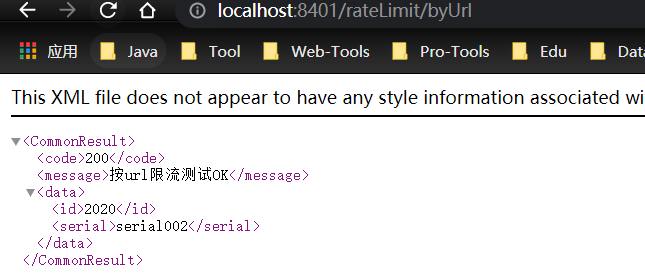
添加流控规则:每秒钟访问一次

然后测试:

1 系统默认的,没有体现我们自己的业务要求。
2 依照现有条件,我们自定义的处理方法又和业务代码耦合在一块,不直观。
3 每个业务方法都添加一个兜底的,那代码膨胀加剧。
4 全局统一的处理方法没有体现。
3、自定义限流处理规则
-
创建CustomerBlockHandler类用于自定义限流处理逻辑
public class CustomerBlockHandler { public static CommonResult handleException(BlockException exception){ return new CommonResult(2020,"自定义的限流处理信息......CustomerBlockHandler"); } }- 1
- 2
- 3
- 4
- 5
- 6
- 7
-
RateLimitController增加接口
@GetMapping("/rateLimit/customerBlockHandler") @SentinelResource(value = "customerBlockHandler", blockHandlerClass = CustomerBlockHandler.class, blockHandler = "handleException") public CommonResult customerBlockHandler() { return new CommonResult(200,"按客户自定义限流处理逻辑"); }- 1
- 2
- 3
- 4
- 5
- 6
- 7

-
测试:http://localhost:8401/rateLimit/customerBlockHandler
-
增加流控规则

4、更多属性
地址:https://sentinelguard.io/zh-cn/docs/annotation-support.html
@SentinelResource 注解
注意:注解方式埋点不支持 private 方法。
@SentinelResource用于定义资源,并提供可选的异常处理和 fallback 配置项。@SentinelResource注解包含以下属性:-
value:资源名称,必需项(不能为空) -
entryType:entry 类型,可选项(默认为EntryType.OUT) -
blockHandler/blockHandlerClass:blockHandler对应处理BlockException的函数名称,可选项。blockHandler 函数访问范围需要是public,返回类型需要与原方法相匹配,参数类型需要和原方法相匹配并且最后加一个额外的参数,类型为BlockException。blockHandler 函数默认需要和原方法在同一个类中。若希望使用其他类的函数,则可以指定blockHandlerClass为对应的类的Class对象,注意对应的函数必需为 static 函数,否则无法解析。 -
fallback- 1
:fallback 函数名称,可选项,用于在抛出异常的时候提供 fallback 处理逻辑。fallback 函数可以针对所有类型的异常(除了
exceptionsToIgnore- 1
里面排除掉的异常类型)进行处理。fallback 函数签名和位置要求:
- 返回值类型必须与原函数返回值类型一致;
- 方法参数列表需要和原函数一致,或者可以额外多一个
Throwable类型的参数用于接收对应的异常。 - fallback 函数默认需要和原方法在同一个类中。若希望使用其他类的函数,则可以指定
fallbackClass为对应的类的Class对象,注意对应的函数必需为 static 函数,否则无法解析。
-
defaultFallback- 1
(since 1.6.0):默认的 fallback 函数名称,可选项,通常用于通用的 fallback 逻辑(即可以用于很多服务或方法)。默认 fallback 函数可以针对所以类型的异常(除了
exceptionsToIgnore- 1
里面排除掉的异常类型)进行处理。若同时配置了 fallback 和 defaultFallback,则只有 fallback 会生效。defaultFallback 函数签名要求:
- 返回值类型必须与原函数返回值类型一致;
- 方法参数列表需要为空,或者可以额外多一个
Throwable类型的参数用于接收对应的异常。 - defaultFallback 函数默认需要和原方法在同一个类中。若希望使用其他类的函数,则可以指定
fallbackClass为对应的类的Class对象,注意对应的函数必需为 static 函数,否则无法解析。
-
exceptionsToIgnore(since 1.6.0):用于指定哪些异常被排除掉,不会计入异常统计中,也不会进入 fallback 逻辑中,而是会原样抛出。
注:1.6.0 之前的版本 fallback 函数只针对降级异常(
DegradeException)进行处理,不能针对业务异常进行处理。特别地,若 blockHandler 和 fallback 都进行了配置,则被限流降级而抛出
BlockException时只会进入blockHandler处理逻辑。若未配置blockHandler、fallback和defaultFallback,则被限流降级时会将BlockException直接抛出。三个核心API
- SphU定义资源
- Tracer定义统计
- ContextUtil定义了上下文
9、服务熔断
sentinel+ribbon+openfeign+fallback的整合1、
Ribbon系列- 新建xiaobear-cloud-alibaba-sentinel-ribbon-provider-payment9003
- 新建xiaobear-cloud-alibaba-sentinel-ribbon-provider-payment9004
- 新建xiaobear-cloud-alibaba-consumer-nacos-order84
1、新建9003 、9004
1、新建module
2、改Pom
<dependencies> <dependency> <groupId>com.alibaba.cloudgroupId> <artifactId>spring-cloud-starter-alibaba-nacos-discoveryartifactId> dependency> <dependency> <groupId>com.xiaobeargroupId> <artifactId>xiaobear-common-api-3artifactId> <version>1.0-SNAPSHOTversion> dependency> <dependency> <groupId>org.springframework.bootgroupId> <artifactId>spring-boot-starter-webartifactId> dependency> <dependency> <groupId>org.springframework.bootgroupId> <artifactId>spring-boot-starter-actuatorartifactId> dependency> <dependency> <groupId>org.springframework.bootgroupId> <artifactId>spring-boot-devtoolsartifactId> <scope>runtimescope> <optional>trueoptional> dependency> <dependency> <groupId>org.projectlombokgroupId> <artifactId>lombokartifactId> <optional>trueoptional> dependency> <dependency> <groupId>org.springframework.bootgroupId> <artifactId>spring-boot-starter-testartifactId> <scope>testscope> dependency> dependencies>- 1
- 2
- 3
- 4
- 5
- 6
- 7
- 8
- 9
- 10
- 11
- 12
- 13
- 14
- 15
- 16
- 17
- 18
- 19
- 20
- 21
- 22
- 23
- 24
- 25
- 26
- 27
- 28
- 29
- 30
- 31
- 32
- 33
- 34
- 35
- 36
- 37
- 38
3、写yaml
端口号是不同的,一个是9003,一个是9004
server: port: 9003 spring: application: name: nacos-payment-provider cloud: nacos: discovery: server-addr: localhost:8848 #配置Nacos地址 management: endpoints: web: exposure: include: '*'- 1
- 2
- 3
- 4
- 5
- 6
- 7
- 8
- 9
- 10
- 11
- 12
- 13
- 14
- 15
- 16
4、主启动类
@SpringBootApplication @EnableDiscoveryClient public class PaymentMain9003 { public static void main(String[] args) { SpringApplication.run(PaymentMain9003.class, args); } }- 1
- 2
- 3
- 4
- 5
- 6
- 7
5、业务层
-
controller
@RestController public class PaymentController { @Value("${server.port}") private String serverPort; public static HashMap<Long, Payment> hashMap = new HashMap<>(); static { hashMap.put(1L,new Payment(1L,"28a8c1e3bc2742d8848569891fb42181")); hashMap.put(2L,new Payment(2L,"bba8c1e3bc2742d8848569891ac32182")); hashMap.put(3L,new Payment(3L,"6ua8c1e3bc2742d8848569891xt92183")); } @GetMapping(value = "/paymentSQL/{id}") public CommonResult<Payment> paymentSQL(@PathVariable("id") Long id) { Payment payment = hashMap.get(id); CommonResult<Payment> result = new CommonResult(200,"from mysql,serverPort: "+serverPort,payment); return result; } }- 1
- 2
- 3
- 4
- 5
- 6
- 7
- 8
- 9
- 10
- 11
- 12
- 13
- 14
- 15
- 16
- 17
- 18
- 19
- 20
- 21
- 22
- 23
6、测试
我们采用的是静态数据,并没有进行数据库查询
测试地址:http://localhost:9003/paymentSQL/1

2、新建xiaobear-cloud-alibaba-consumer-nacos-order84
1、新建
2、改pom
<dependencies> <dependency> <groupId>com.alibaba.cloudgroupId> <artifactId>spring-cloud-starter-alibaba-nacos-discoveryartifactId> dependency> <dependency> <groupId>com.alibaba.cloudgroupId> <artifactId>spring-cloud-starter-alibaba-sentinelartifactId> dependency> <dependency> <groupId>com.xiaobeargroupId> <artifactId>xiaobear-common-api-3artifactId> <version>1.0-SNAPSHOTversion> dependency> <dependency> <groupId>org.springframework.bootgroupId> <artifactId>spring-boot-starter-webartifactId> dependency> <dependency> <groupId>org.springframework.bootgroupId> <artifactId>spring-boot-starter-actuatorartifactId> dependency> <dependency> <groupId>org.springframework.bootgroupId> <artifactId>spring-boot-devtoolsartifactId> <scope>runtimescope> <optional>trueoptional> dependency> <dependency> <groupId>org.projectlombokgroupId> <artifactId>lombokartifactId> <optional>trueoptional> dependency> <dependency> <groupId>org.springframework.bootgroupId> <artifactId>spring-boot-starter-testartifactId> <scope>testscope> dependency> dependencies>- 1
- 2
- 3
- 4
- 5
- 6
- 7
- 8
- 9
- 10
- 11
- 12
- 13
- 14
- 15
- 16
- 17
- 18
- 19
- 20
- 21
- 22
- 23
- 24
- 25
- 26
- 27
- 28
- 29
- 30
- 31
- 32
- 33
- 34
- 35
- 36
- 37
- 38
- 39
- 40
- 41
- 42
- 43
- 44
3、写yaml
server: port: 84 spring: application: name: nacos-order-consumer cloud: nacos: discovery: server-addr: localhost:8848 sentinel: transport: #配置Sentinel dashboard地址 dashboard: localhost:8080 #默认8719端口,假如被占用会自动从8719开始依次+1扫描,直至找到未被占用的端口 port: 8719 #消费者将要去访问的微服务名称(注册成功进nacos的微服务提供者) service-url: nacos-user-service: http://nacos-payment-provider- 1
- 2
- 3
- 4
- 5
- 6
- 7
- 8
- 9
- 10
- 11
- 12
- 13
- 14
- 15
- 16
- 17
- 18
- 19
- 20
- 21
- 22
4、主启动类
@SpringBootApplication @EnableDiscoveryClient public class OrderNacosMain84 { public static void main(String[] args) { SpringApplication.run(OrderNacosMain84.class, args); } }- 1
- 2
- 3
- 4
- 5
- 6
- 7
- 8
5、业务层
-
config,用于负载均衡
@Configuration public class ApplicationContextConfig { @Bean @LoadBalanced public RestTemplate getRestTemplate(){ return new RestTemplate(); } }- 1
- 2
- 3
- 4
- 5
- 6
- 7
- 8
- 9
-
controller
@RestController public class CircleBreakerController { public static final String SERVICE_URL = "http://nacos-payment-provider"; @Resource private RestTemplate restTemplate; @RequestMapping("/consumer/fallback/{id}") @SentinelResource(value = "fallback") //fallback负责业务异常 public CommonResult<Payment> fallback(@PathVariable Long id) { CommonResult<Payment> result = restTemplate.getForObject(SERVICE_URL + "/paymentSQL/"+id, CommonResult.class,id); if (id == 4) { throw new IllegalArgumentException ("IllegalArgumentException,非法参数异常...."); }else if (result.getData() == null) { throw new NullPointerException ("NullPointerException,该ID没有对应记录,空指针异常"); } return result; } }- 1
- 2
- 3
- 4
- 5
- 6
- 7
- 8
- 9
- 10
- 11
- 12
- 13
- 14
- 15
- 16
- 17
- 18
- 19
- 20
- 21
- 22
- 23
- 24
6、测试
- fallback管运行异常
- blockHandler管配置违规
地址:http://localhost:84/consumer/fallback/1
测试结果:直接返回错误页面,不友好
1、只配置fallback
-
controller新增兜底方法
package com.xiaobear.controller; import com.alibaba.csp.sentinel.annotation.SentinelResource; import com.xiaobear.entities.CommonResult; import com.xiaobear.entities.Payment; import org.springframework.web.bind.annotation.PathVariable; import org.springframework.web.bind.annotation.RequestMapping; import org.springframework.web.bind.annotation.RestController; import org.springframework.web.client.RestTemplate; import javax.annotation.Resource; /** * @Author xiaobear * @date 2021年06月08日 21:53 * @Description TODO */ @RestController public class CircleBreakerController { public static final String SERVICE_URL = "http://nacos-payment-provider"; @Resource private RestTemplate restTemplate; @RequestMapping("/consumer/fallback/{id}") @SentinelResource(value = "fallback",fallback = "handlerFallback") //fallback负责业务异常 public CommonResult<Payment> fallback(@PathVariable Long id) { CommonResult<Payment> result = restTemplate.getForObject(SERVICE_URL + "/paymentSQL/"+id, CommonResult.class,id); if (id == 4) { throw new IllegalArgumentException ("IllegalArgumentException,非法参数异常...."); }else if (result.getData() == null) { throw new NullPointerException ("NullPointerException,该ID没有对应记录,空指针异常"); } return result; } public CommonResult handlerFallback(@PathVariable Long id,Throwable e) { Payment payment = new Payment(id,"null"); return new CommonResult<>(444,"兜底异常handlerFallback,exception内容 "+e.getMessage(),payment); } }- 1
- 2
- 3
- 4
- 5
- 6
- 7
- 8
- 9
- 10
- 11
- 12
- 13
- 14
- 15
- 16
- 17
- 18
- 19
- 20
- 21
- 22
- 23
- 24
- 25
- 26
- 27
- 28
- 29
- 30
- 31
- 32
- 33
- 34
- 35
- 36
- 37
- 38
- 39
- 40
- 41
- 42
- 43
- 44
- 45
重启测试:


2、只配置blockHandler
package com.xiaobear.controller; import com.alibaba.csp.sentinel.annotation.SentinelResource; import com.alibaba.csp.sentinel.slots.block.BlockException; import com.xiaobear.entities.CommonResult; import com.xiaobear.entities.Payment; import org.springframework.web.bind.annotation.PathVariable; import org.springframework.web.bind.annotation.RequestMapping; import org.springframework.web.bind.annotation.RestController; import org.springframework.web.client.RestTemplate; import javax.annotation.Resource; /** * @Author xiaobear * @date 2021年06月08日 21:53 * @Description TODO */ @RestController public class CircleBreakerController { public static final String SERVICE_URL = "http://nacos-payment-provider"; @Resource private RestTemplate restTemplate; @RequestMapping("/consumer/fallback/{id}") @SentinelResource(value = "fallback",blockHandler = "blockHandler") //fallback负责业务异常 public CommonResult<Payment> fallback(@PathVariable Long id) { CommonResult<Payment> result = restTemplate.getForObject(SERVICE_URL + "/paymentSQL/"+id, CommonResult.class,id); if (id == 4) { throw new IllegalArgumentException ("IllegalArgumentException,非法参数异常...."); }else if (result.getData() == null) { throw new NullPointerException ("NullPointerException,该ID没有对应记录,空指针异常"); } return result; } public CommonResult handlerFallback(@PathVariable Long id,Throwable e) { Payment payment = new Payment(id,"null"); return new CommonResult<>(444,"兜底异常handlerFallback,exception内容 "+e.getMessage(),payment); } public CommonResult blockHandler(@PathVariable Long id, BlockException blockException) { Payment payment = new Payment(id,"null"); return new CommonResult<>(445,"blockHandler-sentinel限流,无此流水: blockException "+blockException.getMessage(),payment); } }- 1
- 2
- 3
- 4
- 5
- 6
- 7
- 8
- 9
- 10
- 11
- 12
- 13
- 14
- 15
- 16
- 17
- 18
- 19
- 20
- 21
- 22
- 23
- 24
- 25
- 26
- 27
- 28
- 29
- 30
- 31
- 32
- 33
- 34
- 35
- 36
- 37
- 38
- 39
- 40
- 41
- 42
- 43
- 44
- 45
- 46
- 47
- 48
- 49

sentinel配置

结果

3、fallback和blockHandler都配置
@SentinelResource(value = "fallback",fallback = "handlerFallback",blockHandler = "blockHandler")- 1

若 blockHandler 和 fallback 都进行了配置,则被限流降级而抛出 BlockException 时只会进入 blockHandler 处理逻辑。
4、忽略属性…
@SentinelResource(value = "fallback", fallback = "handlerFallback", blockHandler = "blockHandler", exceptionsToIgnore = {IllegalArgumentException.class})- 1

2、Feign系列
1、修改84模块
1、pom文件
<dependency> <groupId>org.springframework.cloudgroupId> <artifactId>spring-cloud-starter-openfeignartifactId> dependency>- 1
- 2
- 3
- 4
- 5
2、yaml
# 激活Sentinel对Feign的支持 feign: sentinel: enabled: true- 1
- 2
- 3
- 4
3、业务层
-
业务接口 带@FeignClient注解的业务接口
@FeignClient(value = "nacos-payment-provider",fallback = PaymentFallbackService.class)//调用中关闭9003服务提供者 public interface PaymentService { @GetMapping(value = "/paymentSQL/{id}") public CommonResult<Payment> paymentSQL(@PathVariable("id") Long id); }- 1
- 2
- 3
- 4
- 5
- 6
-
@Component public class PaymentFallbackService implements PaymentService { @Override public CommonResult<Payment> paymentSQL(Long id) { return new CommonResult<>(444,"服务降级返回,没有该流水信息",new Payment(id, "errorSerial......")); } }- 1
- 2
- 3
- 4
- 5
- 6
- 7
- 8
- 9
-
controller
@Resource private PaymentService paymentService; @GetMapping(value = "/consumer/openfeign/{id}") public CommonResult<Payment> paymentSQL(@PathVariable("id") Long id) { if(id == 4) { throw new RuntimeException("没有该id"); } return paymentService.paymentSQL(id); }- 1
- 2
- 3
- 4
- 5
- 6
- 7
- 8
- 9
- 10
- 11
- 12
4、主启动
添加注解
@EnableFeignClients5、测试
http://localhost:84/consumer/paymentSQL/1
测试84调用9003,此时故意关闭9003微服务提供者,看84消费侧自动降级,不会被耗死

10、规则持久化
一旦我们重启应用,sentinel规则将消失,生产环境需要将配置规则进行持久化
如何使用?
将限流配置规则持久化进Nacos保存,只要刷新8401某个rest地址,sentinel控制台
的流控规则就能看到,只要Nacos里面的配置不删除,针对8401上sentinel上的流控规则持续有效1、修改8401
1、修改pom
<dependency> <groupId>com.alibaba.cspgroupId> <artifactId>sentinel-datasource-nacosartifactId> dependency>- 1
- 2
- 3
- 4
- 5
2、改yaml
server: port: 8401 spring: application: name: xiaobear-sentinel-service cloud: #nacos注册服务中心 nacos: discovery: server-addr: localhost:8848 sentinel: transport: #配置Sentinel dashboard地址 dashboard: localhost:8080 #默认8719端口,假如被占用会自动从8719开始依次+1扫描,直至找到未被占用的端口 port: 8719 clientIp: localhost datasource: ds1: nacos: server-addr: localhost:8848 dataId: cloudalibaba-sentinel-service groupId: DEFAULT_GROUP data-type: json rule-type: flow #暴露端点 management: endpoints: web: exposure: include: '*'- 1
- 2
- 3
- 4
- 5
- 6
- 7
- 8
- 9
- 10
- 11
- 12
- 13
- 14
- 15
- 16
- 17
- 18
- 19
- 20
- 21
- 22
- 23
- 24
- 25
- 26
- 27
- 28
- 29
- 30
- 31
- 32
- 33
- 34
3、添加Nacos业务规则配置
[ { "resource": "/rateLimit/byUrl", "limitApp": "default", "grade": 1, "count": 1, "strategy": 0, "controlBehavior": 0, "clusterMode": false } ]- 1
- 2
- 3
- 4
- 5
- 6
- 7
- 8
- 9
- 10
- 11

4、启动测试
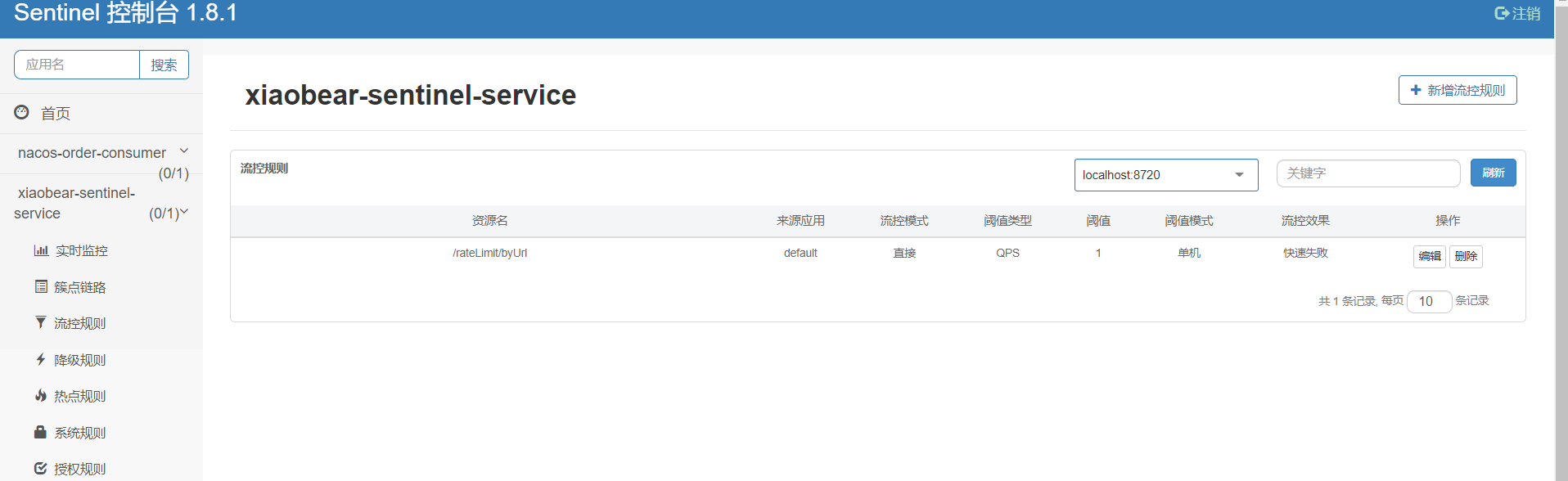
测试地址:http://localhost:8401/rateLimit/byUrl

停掉8401之后,在启动,发现流控规则还存在,重新配置出现了,持久化验证通过
-
相关阅读:
CTF学习路线!最详细没有之一!(建议收藏)
Apache Ranger:(一)安装部署
Linux安装Jenkins详细步骤
SSm+Java+VUE基于微信小程序的学习资料销售平台#毕业设计
类似ps的python工具lama cleaner
组件之前的传值——中央事件总线bus
分布式 | 几步快速拥有读写分离
Scratch 画画的技巧
Candence PCB Si 仿真设计篇2:从PCB文件提取仿真拓扑
汇总selenium利用xpath等找网页节点的方法(二)
- 原文地址:https://blog.csdn.net/Y_hanxiong/article/details/128028818
