-
Ansible Automation Platform - 保护 Playbook 中的敏感内容
《OpenShift / RHEL / DevSecOps / Ansible 汇总目录》
AAP 保护 Playbook 敏感信息的方法
在上一篇《Ansible Automation Platform - 用 Ansible Navigator 开发测试 Playbook》一文中,在 Playbook 中使用明文记录了 AAP Controller 的访问地址,以及用户名和密码。我们可以使用以下几种方法对 Playbook 中的敏感进行保护:

- ansible-vault:可以使用 ansible-vault 对 Playbook 中的特定内容或者整个 Playbook 进行加密。由于 ansible-vault 使用的是对称加密方式,因此加密密码就是运行 Playbook 需要的解密密码。
注意:通过 ansible-navigator 运行加密的 Playbook 需要 - 访问凭证:对于 AAP 中使用的通用访问目标,例如被管主机、VMmware vCenter、OpenStack、AWS、AZure、AAP、Git、Image Registry 、ansible-vault 密码等,可以使用 AAP 中的“凭证”保存访问它们的配置信息。

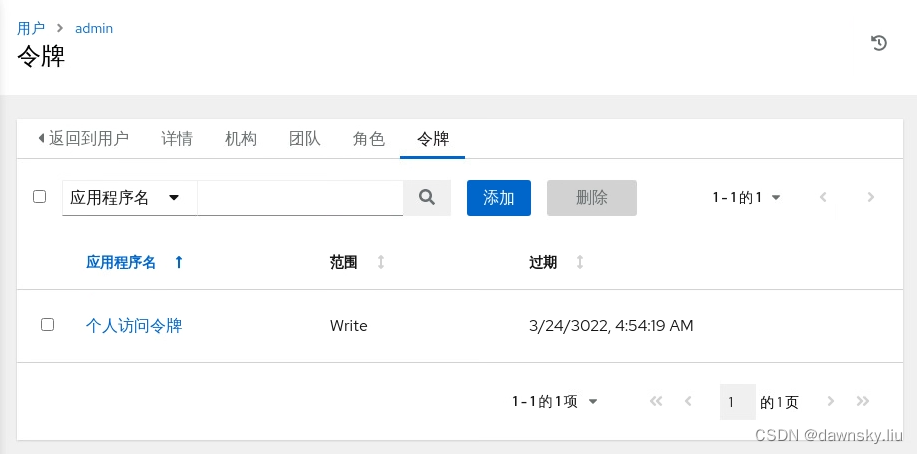
- 访问令牌:为了增加他人临时访问 AAP 的安全性,可以无需向他人分享 AAP 的用户名和密码,而只分享 AAP 的访问令牌。在 AAP 控制台的登录用户中查看 “用户详情” 的 “令牌” 标签,然后可以添加 “读取” 或 “写入” 权限的访问令牌。生成令牌后需要妥善保存,因此关闭令牌窗口后就不能再次看到内容了。

使用 ansible-vault 保护 Playbook 中的敏感信息
- 执行命令将 my-controller-password 字符串加密并对应到 controller_password 变量,界面会提示输入 Vault 加密密码。完成后会显示 my-controller-password 被加密后内容。
$ ansible-navigator exec -- ansible-vault encrypt_string 'my-controller-password' --name 'controller_password' New Vault password: Confirm New Vault password: controller_password: !vault | $ANSIBLE_VAULT;1.1;AES256 66363232313037626332323035363138623131646334363463626331323862313431386138356365 3836663463353164313631326361353730323734626538640a636262303132336165376461323665 33303062393732646364353333303433643863656331363963633763623838343534333930326333 6235653936306233380a333165376364373963393034386230326430363337396238306164623165 36356163303732646162613638383235626339363530376134343236373730303864 Encryption successful- 1
- 2
- 3
- 4
- 5
- 6
- 7
- 8
- 9
- 10
- 11
- 根据以上输出的 controller_password 变量内容创建名为 vault-controller-password.yml 文件,内容如下。其中 “controller_password” 部分是上一步命令的输出结果。
- hosts: localhost vars: controller_password: !vault | $ANSIBLE_VAULT;1.1;AES256 66363232313037626332323035363138623131646334363463626331323862313431386138356365 3836663463353164313631326361353730323734626538640a636262303132336165376461323665 33303062393732646364353333303433643863656331363963633763623838343534333930326333 6235653936306233380a333165376364373963393034386230326430363337396238306164623165 36356163303732646162613638383235626339363530376134343236373730303864 tasks: - name: Print password debug: msg: 'The controller password is {{ controller_password }}'- 1
- 2
- 3
- 4
- 5
- 6
- 7
- 8
- 9
- 10
- 11
- 12
- 13
- 执行命令用 ansible-navigator 或 ansible-playbook 运行 vault-controller-password.yml,在输入Vault 的密码后可以看到被解密的密码内容。
$ ansible-navigator run vault-controller-password.yml -m stdout --playbook-artifact-enable false --ask-vault-pass $ ansible-playbook vault-controller-password.yml --ask-vault-pass- 1
- 2
使用AAP的凭证保护访问通用目标的关键信息
对于一些通用访问目标,例如 VMware、OpenStack 等私有云,AWS、AZure 等公有云、主机操作系统、容器镜像 Registry 等,可以使用 AAP 的凭证记录访问信息。
注意:请参照《Ansible Automation Platform - 在自动化控制台中运行 Playbook》一文了解如何在 AAP 的控制台中通过 “模板” 运行 Playbook、以及如何配置 “凭证”,就不在下文中详细说明每一步的操作步骤了。
场景1
- 在 AAP 控制台上创建一个类型为 Ansible Automation Platform 的 “凭证”,为该凭证提供《Ansible Automation Platform - 在自动化控制台中运行 Playbook》一文中提到的 add-inventory.yml 文件的变量中包含的 Ansible Controller 访问地址、用户名和密码。
- 创建基于以下 Playbook 的模板,并且指定该模板使用上一步创建的 “凭证”,同时指定 “执行环境” 使用 “Control Plane Execution Environment”。
--- - name: Create Inventory once piece at a time hosts: localhost connection: local gather_facts: false collections: - ansible.controller tasks: - name: Add inventory inventory: name: Book Inventory organization: Default state: present - name: Add host host: name: ansible-client01 inventory: Book Inventory variables: hosts_var: 192.168.203.118 state: present - name: Add group group: name: Linux-VM inventory: Book Inventory hosts: - ansible-client01 state: present- 1
- 2
- 3
- 4
- 5
- 6
- 7
- 8
- 9
- 10
- 11
- 12
- 13
- 14
- 15
- 16
- 17
- 18
- 19
- 20
- 21
- 22
- 23
- 24
- 25
- 26
- 27
- 28
- 29
- 在 AAP 控制台中运行上一步创建的 “模板”,成功后确认已经在 “清单” 中创建了名为 “Book Inventory” 的清单。
场景2
- 在 AAP 控制台中创建一个类型为 Vault 的 “凭证”,将 “Vault 密码” 设为在上一节运行 vault-controller-password.yml 时需要输入的密码。
- 在 AAP 控制台中基于上一节 vault-controller-password.yml 创建 “模板”,需要将 “凭证” 设为上一步创建的 Vault 类型凭证,同时将 “执行环境” 设为 “Default execution environment”。
- 运行这个新创建的模板,确认可成功运行并输出被加密的 controller_password 内容。
使用令牌访问 AAP
- 根据本文开始介绍的 “访问令牌” 部分创建一个具备 Write 权限的令牌,记录生成的令牌内容。
- 在 AAP 中创建一个类型为 “Red Hat Ansible Automation Platform” 的 “凭证”,除了需要设置 Ansible Automation Platform 的访问 URL 外,再将上一步获取的令牌内容粘贴到下图 “创建新凭证” 页面的 “OAuth 令牌” 中。

- 使用上一步创建的 “凭证” 再次运行在 “场景 1” 中创建的模板,确认可以成功执行。
- ansible-vault:可以使用 ansible-vault 对 Playbook 中的特定内容或者整个 Playbook 进行加密。由于 ansible-vault 使用的是对称加密方式,因此加密密码就是运行 Playbook 需要的解密密码。
-
相关阅读:
Python(12)进程与线程
数据治理-度量指标
【波形/信号发生器】基于 STC1524K32S4 for C on Keil
python之计算市场技术指标
Nvidia AGX Orin MAX9296 GMSL 载板设计要点
stable diffusion图片转高清前后对比
MySQL中的Join 的算法(NLJ、BNL、BKA)
Tapdata 获阿里云首批产品生态集成认证,携手阿里云共建新合作
23种设计模式(10)——门面模式
rac环境rman备份
- 原文地址:https://blog.csdn.net/weixin_43902588/article/details/127739159
