-
Linux-sed
sed
sed是一种几乎包括所有UNIX平台(包括Linux)的轻量级流编辑器。sed主要用来将数据进行选取、替换、删除、新增的命令
sed [选项] ‘[动作]’ 文件名
选项:
-n:一般sed命令会把所有数据都输出到屏幕,如果加入此选项,则只会把经过sed命令处理的行输出到屏幕
-e:允许对输入数据应用多条sed命令编辑
-i:用sed的修改结果直接修改读取数据的文件,而不是由屏幕输出动作:
a \:追加,在当前行后添加一行或多行,添加多行时,除最后一行外,每行末尾需要用\代表数据未完结
c \:行替换,用c后面的字符串替换原数据行,替换多行时,除最后一行外,每行末尾需用\代表数据未完结
i \:插入,在当前行插入一行或多行,插入一行时,除最后一行外,每行末尾需要用\代表数据未完结
d:删除,删除指定行
p:打印,输出指定的行
s:字串替换,用一个字符串替换另外一个字符串,格式为“行范围s/旧字串/新字串/g”例子
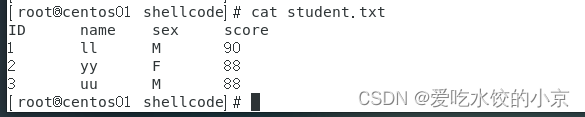
student.txt的内容如下:
查看文件第二行
#查看文件第二行,整个文件输出的同时,再把第二行输出 [root@centos01 shellcode]# sed '2p' student.txt ID name sex score 1 ll M 90 1 ll M 90 2 yy F 88 3 uu M 88 #查看多行 [root@centos01 shellcode]# sed '3,4p' student.txt ID name sex score 1 ll M 90 2 yy F 88 2 yy F 88 3 uu M 88 3 uu M 88- 1
- 2
- 3
- 4
- 5
- 6
- 7
- 8
- 9
- 10
- 11
- 12
- 13
- 14
- 15
只查看文件第几行
[root@centos01 shellcode]# sed -n '3p' student.txt 2 yy F 88 #查看第二行到第四行 [root@centos01 shellcode]# sed -n '2,4p' student.txt 1 ll M 90 2 yy F 88 3 uu M 88- 1
- 2
- 3
- 4
- 5
- 6
- 7
- 8
删除行
#没有使用-i,不会修改文件本身 [root@centos01 shellcode]# sed '2,3d' student.txt ID name sex score 3 uu M 88- 1
- 2
- 3
- 4
- 5
追加
#在第二行后追加hello [root@centos01 shellcode]# sed '2a hello' student.txt ID name sex score 1 ll M 90 hello 2 yy F 88 3 uu M 88- 1
- 2
- 3
- 4
- 5
- 6
- 7
- 8
替换行
#将第二行替换成No data sed '2c No data' student.txt ID name sex score No data 2 yy F 88 3 uu M 88- 1
- 2
- 3
- 4
- 5
- 6
- 7
字符串替换
sed ‘s/旧字符串/新字符串/g’ 文件名
替换全部:#将全部的88都替换成70 sed 's/88/70/g' student.txt ID name sex score 1 ll M 90 2 yy F 70 3 uu M 70- 1
- 2
- 3
- 4
- 5
- 6
替换某一行:
#将第三行的88替换成70 [root@centos01 shellcode]# sed '3s/88/70/g' student.txt ID name sex score 1 ll M 90 2 yy F 70 3 uu M 88- 1
- 2
- 3
- 4
- 5
- 6
- 7
替换多个字符串:
#将第二行的ll替换成hg,将第三行的yy替换成gh sed -e '2s/ll/hg/g;3s/yy/gh/g' student.txt ID name sex score 1 hg M 90 2 gh F 88 3 uu M 88- 1
- 2
- 3
- 4
- 5
- 6
- 7
将数据直接写入文件
#将第三行的88替换成60,并且修改文件 sed -i '3s/88/60/g' student.txt- 1
- 2

-
相关阅读:
用SSH工具XShell连接谷歌云 root用户或普通用户
计算机丢失mfc100.dll如何恢复,详细解析mfc100.dll文件丢失解决方法
(数据科学学习手札137)orjson:Python中最好用的json库
CorelDraw插件开发-文字功能-文本分裂-语言-横排重组-窗口函数-Cdr插件开发(一)
MySQL多表查询综合练习
当前读和快照读
国际阿里云服务器买哪种好用点?
Magic Bullet Suite2024.0.1(ae降噪插件合集)
法院对职业放贷人的认定标准
合并RxJava的Observable数据流
- 原文地址:https://blog.csdn.net/ljsykf/article/details/128009471