-
Spring Boot 自定义配置元数据
Spring Boot 自定义配置元数据
概述
开发Spring Boot应用程序时, 可以把 application.properties文件中的配置属性直接转换为 Java Bean对象。这也是Spring Boot 约定大于配置的理念的体现,通过框架内置的各种属性按照不同的需求进行排列组合,满足特定的业务规则。
server.port=8090- 1
上述配置,相信大家都很熟悉,Spring Boot中默认端口为 8080,可以上面配置将端口更改为 8090. 仔细思考一下,这里有几个细节值得学习:
- 怎么样找到 Spring Boot 中所有的配置元数据
- Spring Boot 中的配置元数据格式是怎么样的
- 如何实现自定义的配置元数据
配置元数据
通常情况下,开发者期望应用程序在一定程度上可以配置,提高程序的灵活性。然而,很少有人能够真正的了解配置参数的作用,是否存在默认值,配置是否过期,属性名是否存在。
为了解决以上问题,Spring Boot 使用JSON文件生成配置元数据,为开发者提供了如何使用配置属性的有用信息。因此,配置元数据是一个描述性文件,其中包含了与配置属性相关的所需信息。
配置格式
使用Spring Boot 开发Web程序时,通常会直接依赖或者间接依赖各种jar文件,Spring Boot 2.7.5 版本为例,配置元数据位于spring-boot-autoconfig-2.7.5.jar里面的 META-INF/spring-configuration-metadata.json,
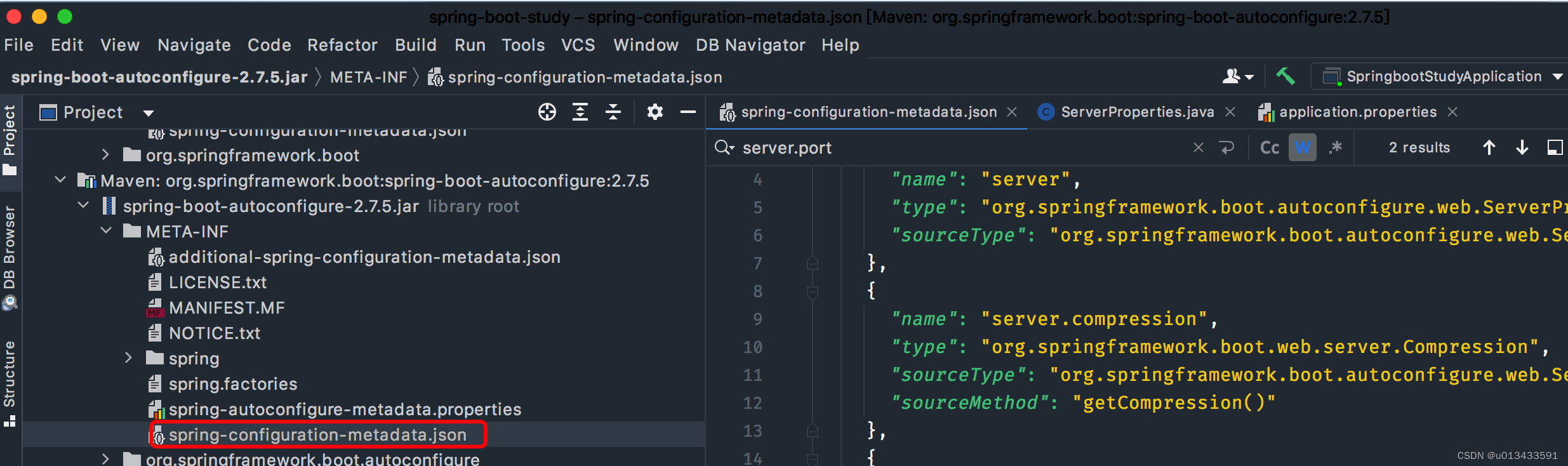
格式如下:
{"groups": [ { "name": "server", "type": "org.springframework.boot.autoconfigure.web.ServerProperties", "sourceType": "org.springframework.boot.autoconfigure.web.ServerProperties" } ... ],"properties": [ { "name": "server.port", "type": "java.lang.Integer", "sourceType": "org.springframework.boot.autoconfigure.web.ServerProperties" } ... ],"hints": [ { "name": "spring.jpa.hibernate.ddl-auto", "values": [ { "value": "none", "description": "Disable DDL handling." } ] } ]}- 1
- 2
- 3
- 4
- 5
- 6
- 7
- 8
- 9
- 10
- 11
- 12
- 13
- 14
- 15
- 16
- 17
- 18
- 19
- 20
- 21
- 22
- 23
- 24
- 25
元数据文件中的每一个 property 可以指定一个默认的配置,如 server.port 的默认值为 8080。因此当开发者不配置 server.port 属性时,应用程序默认占用的端口为8080.
groups 是更高级别的项,它们本身并不指定属性值,而是为属性提供上下文分组。例如,server 分组,server.port 、server.address,端口、地址都是属于server组的一部分。
hints 属性经常用于帮助用户配置属性做出的提示。
Group 分组
Name Type Purpose nameString group分组名称,该属性必填 typeString group的全类名(包含package)。例如,如果组基于用@ConfigurationProperties注释的类,则该属性将包含该类的完全限定名称。如果它基于@Bean方法,那么它将是该方法的返回类型。 descriptionString Group的简短描述。如果没有可用的描述,可以省略。建议说明采用简短的段落,第一行提供简洁的摘要。 sourceTypeString group的全类名(包含package)。例如,如果组基于用@ConfigurationProperties注释的@Bean方法,则该属性将包含包含该方法的@Configuration类的完全限定名称。如果源类型未知,则可以省略该属性。 sourceMethodString 方法全名称(包括括号和参数类型)(例如,@ConfigurationProperties注释@Bean方法的名称)。如果源方法未知,则可以省略。 Property Attributes
Name Type Purpose nameString 属性的全名。名称采用小写句点分隔形式(例如,server.address)。此属性是必需的。 typeString 属性数据类型的完整签名(例如java.lang.String),也可以是完整的泛型类型(例如java.util.Map<java.lang.Sstring,com.example.MyEnum>)。您可以使用此属性指导用户输入的值类型。为了保持一致性,原语的类型通过使用其包装器对应项来指定(例如,布尔值变为java.lang.boolean)。注意,这个类可能是一个复杂类型,在绑定值时从String转换而来。如果类型未知,则可以省略。 descriptionString 可向用户展示的property简短描述。如果没有可用的描述,可以省略。建议说明采用简短的段落,第一行提供简洁的摘要。 sourceTypeString 提供此属性的源的类名。例如,如果属性来自用@ConfigurationProperties注释的类,则该属性将包含该类的完全限定名称。如果源类型未知,则可以省略。 defaultValueObject 默认值,如果未指定属性,则使用该值。如果属性的类型是数组,则它可以是值的数组。如果默认值未知,则可以省略。 deprecationDeprecation 指定该属性是否已弃用。如果该字段未被弃用或该信息未知,则可以省略该字段。 Hint Attributes
Name Type Purpose nameString 提示引用的属性的全名。名称采用小写句点分隔形式(如spring.mvc.servlet.path)。如果属性引用映射(例如system.contexts),则提示应用于映射的键(system.contents.keys)或映射的值(system.coontexts.values)。此属性是必需的。 valuesValueHint[] ValueHint对象定义的有效值列表(在下表中描述)。每个条目都定义了值,并且可能有描述。 providersValueProvider[] ValueProvider对象定义的提供者列表。 每个提示元素的值属性中包含的JSON对象可以包含下表中描述的属性
Name Type Purpose valueObject 提示引用的元素的有效值。如果属性的类型是数组,它也可以是值的数组。此属性是必需的。 descriptionString 可向用户显示的值的简短描述。如果没有可用的描述,可以省略。建议说明采用简短的段落,第一行提供简洁的摘要。说明中的最后一行应以句点(.)结尾。 上面简单的介绍了配置元数据相关信息,一个关键点是JSON 格式的元数据文件是如何生成的?
Maven依赖
为了实现自动生成配置元数据文件,需要添加Maven依赖
<dependency> <groupId>org.springframework.bootgroupId> <artifactId>spring-boot-configuration-processorartifactId> <version>2.7.5version> <optional>trueoptional> dependency>- 1
- 2
- 3
- 4
- 5
- 6
该依赖让开发者在编译项目时,调用 Java 配置注解处理器。
配置元数据-Example
开发一个简单的Java Bean对象,并提供Get/Set方法
@Configuration @ConfigurationProperties(prefix = "database") public class DatabaseProperties { public static class Server { private String ip; private int port; // standard getters and setters } private String username; private String password; private Server server; // standard getters and setters }- 1
- 2
- 3
- 4
- 5
- 6
- 7
- 8
- 9
- 10
- 11
- 12
- 13
- 14
- 15
- 16
- 17
- 18
在类上使用 @ConfigurationProperties 声明,配置处理器会扫描使用该注解的类、方法,获取配置参数并生成配置元数据。
生成配置元数据
使用maven 编译项目(Idea 工具自动生成),在 target/classes/META-INF目录下自动生成 spring-configuration-metadata.json 元数据配置文件
# 1. 删除 target rm -rf target/ # 2. mvn 编译 mvn clean install -Dmaven.test.skip=true- 1
- 2
- 3
- 4
- 5
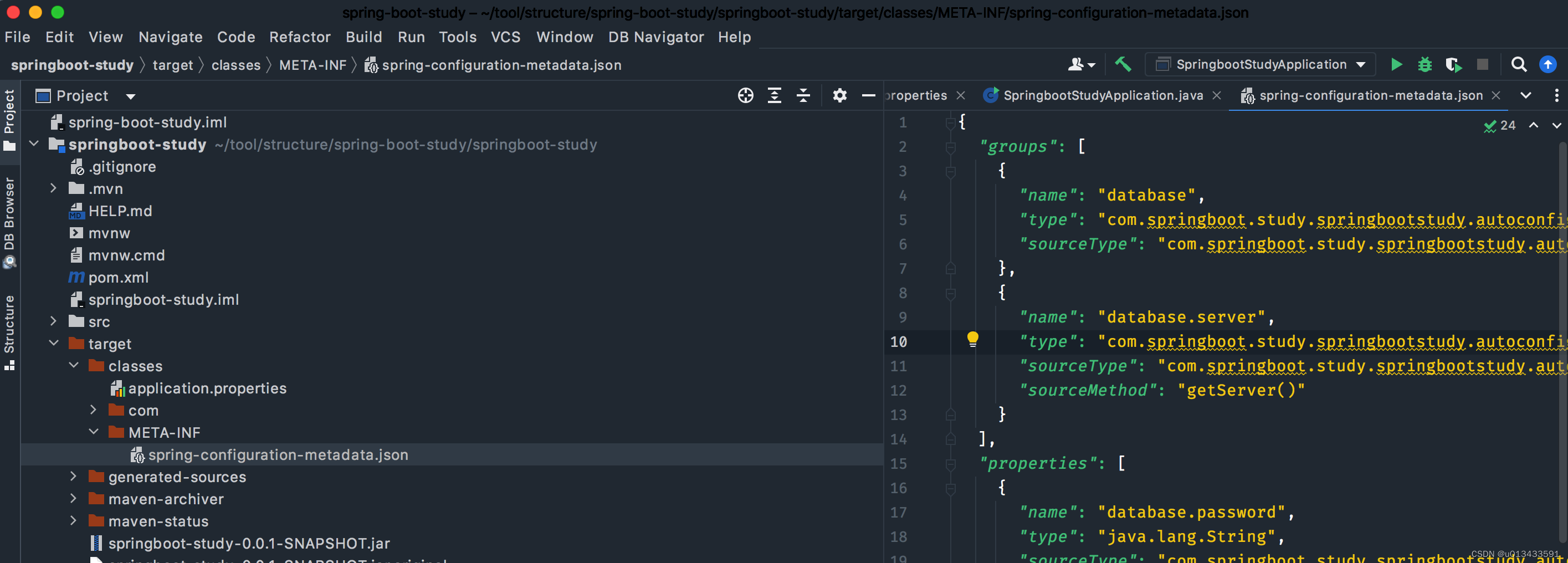
spring-configuration-metadata.json文件内容如下
{ "groups": [ { "name": "database", "type": "com.springboot.study.springbootstudy.autoconfig.DatabaseProperties", "sourceType": "com.springboot.study.springbootstudy.autoconfig.DatabaseProperties" }, { "name": "database.server", "type": "com.springboot.study.springbootstudy.autoconfig.DatabaseProperties$Server", "sourceType": "com.springboot.study.springbootstudy.autoconfig.DatabaseProperties", "sourceMethod": "getServer()" } ], "properties": [ { "name": "database.password", "type": "java.lang.String", "sourceType": "com.springboot.study.springbootstudy.autoconfig.DatabaseProperties" }, { "name": "database.server.ip", "type": "java.lang.String", "sourceType": "com.springboot.study.springbootstudy.autoconfig.DatabaseProperties$Server" }, { "name": "database.server.port", "type": "java.lang.Integer", "sourceType": "com.springboot.study.springbootstudy.autoconfig.DatabaseProperties$Server", "defaultValue": 0 }, { "name": "database.username", "type": "java.lang.String", "sourceType": "com.springboot.study.springbootstudy.autoconfig.DatabaseProperties" } ], "hints": [] }- 1
- 2
- 3
- 4
- 5
- 6
- 7
- 8
- 9
- 10
- 11
- 12
- 13
- 14
- 15
- 16
- 17
- 18
- 19
- 20
- 21
- 22
- 23
- 24
- 25
- 26
- 27
- 28
- 29
- 30
- 31
- 32
- 33
- 34
- 35
- 36
- 37
- 38
- 39
代码验证
-
在application.properties 文件新增配置
server.port=8090 database.username=mysql- 1
- 2
-
Spring Boot 启动类中 输出配置
package com.springboot.study.springbootstudy; import com.springboot.study.springbootstudy.autoconfig.DatabaseProperties; import org.springframework.boot.SpringApplication; import org.springframework.boot.autoconfigure.SpringBootApplication; import org.springframework.boot.autoconfigure.web.ServerProperties; import org.springframework.context.ConfigurableApplicationContext; @SpringBootApplication public class SpringbootStudyApplication { public static void main(String[] args) { ConfigurableApplicationContext app = SpringApplication.run(SpringbootStudyApplication.class, args); DatabaseProperties bean = app.getBean(DatabaseProperties.class); ServerProperties server = app.getBean(ServerProperties.class); System.out.println("通过配置属性获取 =================: " + app.getEnvironment().getProperty("database.username")); System.out.println("通过bean属性获取 =================: " + bean.getUsername()); System.out.println("Spring Boot 内置属性装配 =================: " + server.getPort()); } }- 1
- 2
- 3
- 4
- 5
- 6
- 7
- 8
- 9
- 10
- 11
- 12
- 13
- 14
- 15
- 16
- 17
- 18
- 19
- 20
- 21
-
输出结果
通过配置属性获取 =================: mysql 通过bean属性获取 =================: mysql Spring Boot 内置属性装配 =================: 8090- 1
- 2
- 3
从输出结果可以分析出 无论是通过 Environment 还是通过bean都能够获取配置的值,且跟框架内置的属性配置方式一致,预期输出也一致。
-
项目结构
├── HELP.md ├── mvnw ├── mvnw.cmd ├── pom.xml ├── springboot-study.iml ├── src │ ├── main │ │ ├── java │ │ │ └── com │ │ │ └── springboot │ │ │ └── study │ │ │ └── springbootstudy │ │ │ ├── SpringbootStudyApplication.java │ │ │ └── autoconfig │ │ │ └── DatabaseProperties.java │ │ └── resources │ │ ├── application.properties- 1
- 2
- 3
- 4
- 5
- 6
- 7
- 8
- 9
- 10
- 11
- 12
- 13
- 14
- 15
- 16
- 17
-
相关阅读:
Android热修复(代码修复+资源修复+SO动态链接库修复)
【考研英语词汇训练营】Day 16 —— bankrupt,remain,regulate,construct,reflect
【218】余胜军java课的一些笔记
Java =》 String类
anacoda常用指令教程
Bert基础(十八)--Bert实战:NER命名实体识别
【微软技术栈】C#.NET 内存映射文件
winform中更新UI控件的方案介绍
离线强化学习论文学习 Critic Regularized Regression
openjudge 1.12.5 统计单词数
- 原文地址:https://blog.csdn.net/u013433591/article/details/127989520
