-
正点原子 核心板IMX6ULL IIC RTC驱动 PCF8563
前言
此篇基于学完【正点原子】I.MX6U嵌入式Linux驱动开发指南V1.6 后,使用核心板进行自行设置。
IIC RTC PCF8563硬件使用
Imx6ul内部的RTC时钟不是很准, 而且特别耗电,纽扣电池撑不住,于是外置RTC芯片PCF8563
PCF8563的规格书可以在立创商城上下载。这里截取需要的部分。IIC设备地址
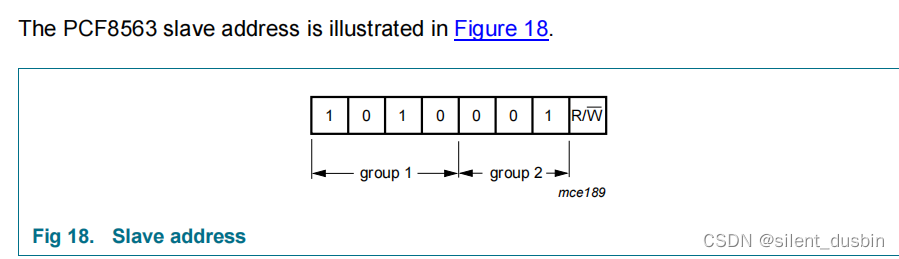
说明了IIC地址是1010001b = 0x51配置 menuconfig 自带PCF8563驱动
Device Drivers —>
[*] Real Time Clock ---> [*] Set system time from RTC on startup and resume (自动同步时间) <*> Philips PCF8563/Epson RTC8564 (CONFIG_RTC_DRV_PCF8563)- 1
- 2
- 3
- 4
- 5

我这里配置成模块,选择M,不配置成Y,也就是不编译进内核,编译成模块。在内核代码里只编译模块,命令
make ARCH=arm CROSS_COMPILE=arm-linux-gnueabihf- modules编译完成后会有一行提示生成了 rtc-pcf8563.ko 这个目录下:

把.ko 放到/lib/modules/4.1.15/目录下,这里正当原子手册上教过怎么操作模块文件的。修改设备树dtb
比如连接的I2C1,把原来的ap3216注释掉,改成新的pcf8563,设备地址是0x51(前面说过的)
&i2c1 { clock-frequency = <100000>; pinctrl-names = "default"; pinctrl-0 = <&pinctrl_i2c1>; status = "okay"; pcf8563@51 { compatible = "nxp,pcf8563"; reg = <0x51>; #clock-cells = <0>; }; /* ap3216c@1e { compatible = "alientek,ap3216c"; reg = <0x1e>; };*/- 1
- 2
- 3
- 4
- 5
- 6
- 7
- 8
- 9
- 10
- 11
- 12
- 13
- 14
- 15
- 16
然后把compatible 改成 “nxp,pcf8563”
因为在menuconfig里配置pcf8563就是启用了rtc-pcf8563.c,这个文件又会被编译成.ko,这里面提到了device id pcf8563 of match, 要求compatible为"nxp,pcf8563"。
#ifdef CONFIG_OF static const struct of_device_id pcf8563_of_match[] = { { .compatible = "nxp,pcf8563" }, {} }; MODULE_DEVICE_TABLE(of, pcf8563_of_match); #endif- 1
- 2
- 3
- 4
- 5
- 6
- 7
编写应用App
正点原子的操作是编写个App来操作RTC,不编写用linux 自带的hwclock 命令也可以(hwclock -r)。
#include "stdio.h" #include "unistd.h" #include "sys/types.h" #include "sys/stat.h" #include "sys/ioctl.h" #include "fcntl.h" #include "stdlib.h" #include "string.h" #include#include #include #include #include #include int main(int argc, char** argv) { int pcf8563, ret; struct rtc_time rtc_tm; int fd, retvalue; char *filename; if(argc != 2){ printf("Error Usage!\r\n"); return -1; } filename = argv[1]; pcf8563 = open(filename, O_RDWR); if(fd < 0){ printf("file %s open failed!\r\n", argv[1]); return -1; } ret = ioctl(pcf8563, RTC_RD_TIME, &rtc_tm); printf("ret:%d\r\n",ret); if(ret == 0) { printf("Time: %04d-%02d-%02d %02d:%02d:%02d\n", rtc_tm.tm_year+1900, rtc_tm.tm_mon+1, rtc_tm.tm_mday, rtc_tm.tm_hour, rtc_tm.tm_min, rtc_tm.tm_sec); } else{ printf("pcf8563 error\n"); } return 0; } - 1
- 2
- 3
- 4
- 5
- 6
- 7
- 8
- 9
- 10
- 11
- 12
- 13
- 14
- 15
- 16
- 17
- 18
- 19
- 20
- 21
- 22
- 23
- 24
- 25
- 26
- 27
- 28
- 29
- 30
- 31
- 32
- 33
- 34
- 35
- 36
- 37
- 38
- 39
- 40
- 41
- 42
- 43
- 44
- 45
- 46
- 47
- 48
- 49
- 50
- 51
按正点原子教的编译成PCF8563App 放到 /lib/modules/4.1.15下
测试
/lib/modules/4.1.15+ # depmod random: nonblocking pool is initialized /lib/modules/4.1.15+ # modprobe rtc-pcf8563.ko rtc-pcf8563 0-0051: chip found, driver version 0.4.3 rtc rtc1: invalid alarm value: 1970-1-10 28:0:0 rtc-pcf8563 0-0051: rtc core: registered rtc-pcf8563 as rtc1- 1
- 2
- 3
- 4
- 5
- 6
出现这段话就是成功了。
然后要先将系统时间写进硬件RTC,hwclock -f /dev/rtc1 -w
就可以直接读取了/lib/modules/4.1.15+ # ./PCF8563App /dev/rtc1 ret:0 Time: 2022-11-22 12:15:40 /lib/modules/4.1.15+ #- 1
- 2
- 3
- 4
(附加)有两个RTC的情况
imx6ull开发板上本身有snvs rtc, 如果把上面的PCF8563编译进内核linux系统中会有两个rtc,分别为/dev/rtc0 和 /dev/rtc1,会出现开机系统时间不是你想要的rtc时间的情况。
有两种办法:1.在设备树中关闭芯片自带的rtc
在imx6ull-alientek-emmc.dts中增加snvs_rtc节点,这个节点在imx6ull.dtsi中被启用了,本着尽量不要动官方文件的原则,我们在dts里把它disable掉。
&snvs_rtc { status = "disabled"; };- 1
- 2
- 3
这样就只剩一个rtc了。
2.手动选中对应的rtc
hwclock [-r|–show] [-s|–hctosys] [-w|–systohc] [-t|–systz] [-l|–localtime] [-u|–utc] [-f|–rtc FILE]
翻译一下就是
hwclock –r 显示硬件时钟与日期
hwclock –s 将系统时钟调整为与目前的硬件时钟一致
hwclock –w 将硬件时钟调整为与目前的系统时钟一致
hwclock –f 后跟rtc文件名称如/dev/rtc1设置好时间后写入rtc1:
hwclock -w -f /dev/rtc1开机后用rtc1的时间同步为系统时间:
hwclock -s -f /dev/rtc1 -
相关阅读:
String.format()的详细用法
时序预测 | MATLAB实现基于ELM-AdaBoost极限学习机结合AdaBoost时间序列预测
php后台接口异步操作的实践
springboot+vue+java药房药店在线销售管理系统
【图形学】13 UnityShader语义(一)
汽车标定技术(五)--基于模型开发如何生成完整的A2L文件(1)
Python中如何将(2023, 9, 8, 17, 46, 40),拼接成时间
vue3 electron 打包后进程通信无效,开发环境正常
(附源码)springboot在线仓库 毕业设计745131
自动驾驶 2D 单目\双目\多目视觉方法 一(Pseudo-LiDAR,Mono3D,FCOS3D,PSMNet)
- 原文地址:https://blog.csdn.net/silent_dusbin/article/details/127979918
