-
模拟实现十字路口交通灯管理系统(Java)
目 录
摘 要 I
ABSTRACT II
前 言 1
第1章 开发语言和开发工具简介 2
1.1 Java技术简介 2
1.1.1 Java语言的特点 2
1.1.2 Java开发工具 3
1.2 GUI技术简介 5
1.2.1 GUI的概述 5
1.2.2 Swing 的概述 5
1.2.3 Swing的特点 6
1.3 JDBC技术简介 6
1.3.1 JDBC概述 6
1.3.2 JDBC的功能 7
1.4 系统的必要性和可行性 7
第2章 系统分析和总体规划 9
2.1需求分析 9
2.2总体设计 9
2.2.1系统功能设计 9
2.2.2运行过程设计 11
2.2.3数据库设计 12
第3章 系统具体设计 13
3.1 数据库表设计 13
3.2 系统界面设计 17
第4章 运行与测试 25
4.1 软件测试的目的和原则 25
4.2 软件的运行与安装 26
4.2.1 J2EE应用程序的构建与部署 26
4.2.2 具体运行过程以及后期维护 26
结 论 28
参考文献 29
致 谢 30
第2章 系统分析和总体规划
2.1需求分析- 数据需求:
此系统主要完成交通路口模拟的功能,因此,需要的数据信息包括:红绿灯的计时时间,各方向的开始车辆,各方向的后来车辆,以及车速等。
2.功能需求:
功能需求分析的任务是弄清用户对目标系统数据处理功能所提出的需求。本系统的功能需求有:
(1)用户可以通过输入红绿灯的数据,看到时间计时。
(2)用户可以通过界面直接看到红绿灯随着时间有规律的转换。
(3)用户可以通过输入车辆的相应数据,看到车辆通行的情况。
(4)用户可以直接查询日志文件。
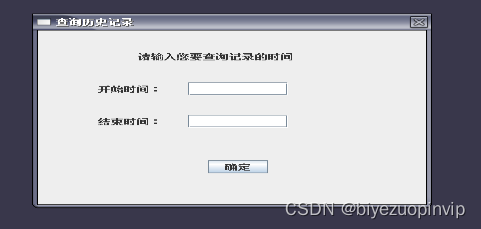
(5)用户可以查询某一时间段的交通情况。
2.2总体设计
2.2.1系统功能设计 - 系统功能:
本模块的主要功能是客户端通过用户输入数据,对交通路口进行一个模拟,并把数据纪录下来,以供研究。
其主要功能如下:
(1)时间的计时
通过用户输入的红绿灯时间进行倒计时。
(2)红绿灯的切换
用户可以观看红绿灯在规定时间自动转换。
(3)车辆的模拟
通过用户输入的数据,实现车辆。
(4)日志查看
用户可以查看某一天的日志情况。
(5)历史查询
用户可以查询某一时间段的交通模拟情况
2 .系统功能结构图:
通过对所做模块的功能需求分析,该模块主要功能可分为五大部分,
系统用例如图2-1所示。

图2-1 系统用例图
2.2.2运行过程设计
本系统使用java语言,在客户端使用GUI Swing编程技术,实现图形化界面和用户进行交互,对于用户的请求由action事件进行处理,转而调用相应的业务逻辑层,随着时间的计时,系统执行相应的功能,对于执行后的结果直接写入到日志中同时也备份到数据库中,供用户查询。
运行步骤:
(1)用户打开图形化界面。
(2)输入相应的数据。
(3)查看红绿灯计时以及车辆通行的情况。
(4)查看日志文件。
(5)用户通过输入时间查询对应的历史纪录。
package GUI; /* * GUI交通模拟的主窗口 * */ import java.awt.BorderLayout; import java.awt.Color; import java.awt.Container; import java.awt.GridLayout; import java.awt.event.ActionEvent; import java.awt.event.ActionListener; import java.awt.event.WindowAdapter; import java.awt.event.WindowEvent; import javax.swing.Box; import javax.swing.BoxLayout; import javax.swing.JButton; import javax.swing.JFrame; import javax.swing.JLabel; import javax.swing.JPanel; import javax.swing.JTextField; import javax.swing.Timer; import Logic.impl.ClockTime; public class MainGUI { static JFrame f; private Container c; private JPanel p1, p2, p3, p5; private Box b; private JButton startjb, endjb, selectjb;// 开始,结束,查询按钮 public static JPanel p4;// 设置主画面 public static Timer timer1, timer2, timer3;// 三种灯的计时 public static JLabel[] jl = new JLabel[21]; public static JTextField[] jt = new JTextField[11];// 标记单行文本框,用于输入初始数据 public static JButton[] jb = new JButton[12];// 标记红绿灯的按钮 public static JButton[] jb1 = new JButton[10];// 标记北方向车辆的按钮 public static JButton[] jb11 = new JButton[30];// 标记北方后来车辆的按钮 public static JButton[] jb2 = new JButton[10];// 标记南方向车辆的按钮 public static JButton[] jb22 = new JButton[30];// 标记南方后来车辆的按钮 public static JButton[] jb3 = new JButton[10];// 标记东方向车辆的按钮 public static JButton[] jb33 = new JButton[30];// 标记东方后来车辆的按钮 public static JButton[] jb4 = new JButton[10];// 标记西方向车辆的按钮 public static JButton[] jb44 = new JButton[30];// 标记西方后来车辆的按钮 // 初始化所有的车辆 static { // 北方开始车辆 for (int i = 0; i < jb1.length; i++) { jb1[i] = new JButton(); } // 北方后来车辆 for (int i = 0; i < jb11.length; i++) { jb11[i] = new JButton(); } // 南方开始车辆 for (int i = 0; i < jb2.length; i++) { jb2[i] = new JButton(); } // 南方后来车辆 for (int i = 0; i < jb22.length; i++) { jb22[i] = new JButton(); } // 东方开始车辆 for (int i = 0; i < jb3.length; i++) { jb3[i] = new JButton(i + ""); } // 东方后来车辆 for (int i = 0; i < jb33.length; i++) { jb33[i] = new JButton(i + ""); } // 西方开始车辆 for (int i = 0; i < jb4.length; i++) { jb4[i] = new JButton(i + ""); } // 西方后来车辆 for (int i = 0; i < jb44.length; i++) { jb44[i] = new JButton(i + ""); } } // frame总窗口 public MainGUI() { f = new JFrame("电子交通模拟系统 "); c = f.getContentPane(); c.setLayout(new BorderLayout(10, 10)); // p1窗口的左半边 p1 = westJPanel(); p1.setBackground(Color.gray); c.add(p1, BorderLayout.WEST); // p2窗口的右半边 p2 = mainJPanel(); c.add(p2); f.setSize(800, 500); f.setVisible(true); f.setResizable(false); f.addWindowListener(new WindowAdapter() { public void windowClosing(WindowEvent e) { System.exit(0); } }); // f.setDefaultCloseOperation(JFrame.EXIT_ON_CLOSE); } // 主窗口中的左半边窗口即p1 public JPanel westJPanel() { p1 = new JPanel(); b = new Box(BoxLayout.Y_AXIS); // 设置开始按钮 startjb = new JButton("开始"); startjb.addActionListener(new MystartActionListener()); startjb.setSize(30, 20); startjb.setBackground(Color.white); b.add(startjb); b.add(Box.createVerticalStrut(30));// 设置中间距离 // 设置结束按钮 endjb = new JButton("结束"); endjb.addActionListener(new MyendActionListener()); endjb.setSize(30, 20); endjb.setBackground(Color.white); b.add(endjb); b.add(Box.createVerticalStrut(50)); jl[0] = new JLabel("设置红灯"); jl[0].setSize(40, 40); jl[0].setBackground(Color.gray); b.add(jl[0]); b.add(Box.createVerticalStrut(10)); jt[0] = new JTextField(); jt[0].setSize(40, 20); b.add(jt[0]); b.add(Box.createVerticalStrut(30)); jl[1] = new JLabel("设置绿灯"); jl[1].setSize(40, 40); jl[1].setBackground(Color.gray); b.add(jl[1]); b.add(Box.createVerticalStrut(10)); jt[1] = new JTextField(); jt[1].setHorizontalAlignment(JTextField.LEFT); jt[1].setSize(40, 20); b.add(jt[1]); b.add(Box.createVerticalStrut(30)); jl[2] = new JLabel("黄灯时间"); jl[2].setSize(40, 40); jl[2].setBackground(Color.gray); b.add(jl[2]); b.add(Box.createVerticalStrut(10)); // 显示黄灯计算后得出的时间 jl[16] = new JLabel(); jl[16].setSize(40, 20); b.add(jl[16]); b.add(Box.createVerticalStrut(30)); selectjb = new JButton("查询"); selectjb.addActionListener(new ActionListener() { public void actionPerformed(ActionEvent e) { new SelectGUI(f); } }); selectjb.setSize(30, 20); selectjb.setBackground(Color.white); b.add(selectjb); b.setBackground(Color.gray); p1.add(b); return p1; } // 主窗口的右半边窗口即p2 public JPanel mainJPanel() { p2 = new JPanel(); p2.setLayout(new BorderLayout(20, 20)); // p2的下边 p3 = dischargeJpanel(); // 车流量 p3.setBackground(Color.lightGray); p2.add(p3, BorderLayout.SOUTH); // p2的中间 p4 = pictureJpanel(); // 交通路口图 p2.add(p4, BorderLayout.CENTER); // p2的上面 p5 = timerJpanel(); // 计时器 p5.setBackground(Color.lightGray); p2.add(p5, BorderLayout.NORTH); return p2; } // p2窗口中下边车流量的窗口设置即p3 public JPanel dischargeJpanel() { p3 = new JPanel(); p3.setLayout(new GridLayout(2, 5)); jl[10] = new JLabel("确定"); jl[10].setVisible(true); p3.add(jl[10]); jl[11] = new JLabel("东", 0); jl[11].setVisible(true); p3.add(jl[11]); jl[12] = new JLabel("南", 0); jl[12].setVisible(true); p3.add(jl[12]); jl[13] = new JLabel("西", 0); jl[13].setVisible(true); p3.add(jl[13]); jl[14] = new JLabel("北", 0); jl[14].setVisible(true); p3.add(jl[14]); jl[15] = new JLabel("开始车辆", 0); jl[15].setVisible(true); p3.add(jl[15]); jt[3] = new JTextField(); jt[3].setVisible(true); p3.add(jt[3]); jt[4] = new JTextField(); jt[4].setVisible(true); p3.add(jt[4]); jt[5] = new JTextField(); jt[5].setVisible(true); p3.add(jt[5]); jt[6] = new JTextField(); jt[6].setVisible(true); p3.add(jt[6]); return p3; } // p2窗口中中间交通模拟的窗口设置即p4 public JPanel pictureJpanel() { JPanel[] jp = new JPanel[4]; p4 = new JPanel(); p4.setLayout(null); jp[0] = new JPanel(); jp[0].setBounds(50, 0, 230, 100); jp[0].setBackground(Color.GRAY); jp[0].setVisible(true); p4.add(jp[0]); jp[1] = new JPanel(); jp[1].setBounds(420, 0, 230, 100); jp[1].setBackground(Color.GRAY); jp[1].setVisible(true); p4.add(jp[1]); jp[2] = new JPanel(); jp[2].setBounds(50, 240, 230, 100); jp[2].setBackground(Color.GRAY); jp[2].setVisible(true); p4.add(jp[2]); jp[3] = new JPanel(); jp[3].setBounds(420, 240, 230, 100); jp[3].setBackground(Color.GRAY); jp[3].setVisible(true); p4.add(jp[3]); // 第一组红绿灯 jb[0] = new JButton(); jb[0].setBounds(400, 70, 20, 10); p4.add(jb[0]); jb[1] = new JButton(); jb[1].setBounds(400, 80, 20, 10); p4.add(jb[1]); jb[2] = new JButton(); jb[2].setBounds(400, 90, 20, 10); p4.add(jb[2]); // 第二组红绿灯 jb[3] = new JButton(); jb[3].setBounds(250, 100, 10, 20); p4.add(jb[3]); jb[4] = new JButton(); jb[4].setBounds(260, 100, 10, 20); p4.add(jb[4]); jb[5] = new JButton(); jb[5].setBounds(270, 100, 10, 20); p4.add(jb[5]); // 第三组红绿灯 jb[6] = new JButton(); jb[6].setBounds(420, 220, 10, 20); // jb[6].setBackground(Color.green); p4.add(jb[6]); jb[7] = new JButton(); jb[7].setBounds(430, 220, 10, 20); p4.add(jb[7]); jb[8] = new JButton(); jb[8].setBounds(440, 220, 10, 20); p4.add(jb[8]); // 第四组红绿灯 jb[9] = new JButton(); jb[9].setBounds(280, 240, 20, 10); p4.add(jb[9]); jb[10] = new JButton(); jb[10].setBounds(280, 250, 20, 10); p4.add(jb[10]); jb[11] = new JButton(); jb[11].setBounds(280, 260, 20, 10); p4.add(jb[11]); // 方向标记 jl[17] = new JLabel("北", 0); jl[17].setSize(20, 15); jl[17].setLocation(340, 0); p4.add(jl[17]); jl[18] = new JLabel("南", 0); jl[18].setSize(20, 15); jl[18].setLocation(340, 340); p4.add(jl[18]); jl[19] = new JLabel("西", 0); jl[19].setSize(20, 15); jl[19].setLocation(10, 160); p4.add(jl[19]); jl[20] = new JLabel("东", 0); jl[20].setSize(20, 15); jl[20].setLocation(670, 160); p4.add(jl[20]); return p4; } // p2窗口中上边时间窗口的设置即p5 public JPanel timerJpanel() { p5 = new JPanel(); p5.setLayout(new GridLayout(1, 7)); jl[3] = new JLabel("时间:", 0); jl[3].setVisible(true); p5.add(jl[3]); jl[4] = new JLabel(" 红灯", 0); jl[4].setVisible(true); p5.add(jl[4]); jl[5] = new JLabel(); jl[5].setVisible(true); p5.add(jl[5]); jl[6] = new JLabel(" 绿灯", 0); jl[6].setVisible(true); p5.add(jl[6]); jl[7] = new JLabel(); jl[7].setVisible(true); p5.add(jl[7]); jl[8] = new JLabel(" 黄灯", 0); jl[8].setVisible(true); p5.add(jl[8]); jl[9] = new JLabel(); jl[9].setVisible(true); p5.add(jl[9]); // 红灯计时事件 timer1 = new Timer(1000, new Mytimer1ActionListener()); // 绿灯计时事件 timer2 = new Timer(1000, new ActionListener() { ClockTime ct = new ClockTime(); public void actionPerformed(ActionEvent e) { ct.setJl2(jl[7]); ct.setJl3(jl[9]); ct.setJl4(jl[16]); ct.setT1(timer2); ct.setT2(timer3); ct.clock2(); } }); // 黄灯计时事件 timer3 = new Timer(1000, new ActionListener() { ClockTime ct = new ClockTime(); public void actionPerformed(ActionEvent e) { ct.setJl2(jl[7]); ct.setJl3(jl[9]); ct.setJt2(jt[1]); ct.setT1(timer2); ct.setT2(timer3); ct.clock3(); } }); return p5; } public static void main(String[] args) { new MainGUI(); } }- 1
- 2
- 3
- 4
- 5
- 6
- 7
- 8
- 9
- 10
- 11
- 12
- 13
- 14
- 15
- 16
- 17
- 18
- 19
- 20
- 21
- 22
- 23
- 24
- 25
- 26
- 27
- 28
- 29
- 30
- 31
- 32
- 33
- 34
- 35
- 36
- 37
- 38
- 39
- 40
- 41
- 42
- 43
- 44
- 45
- 46
- 47
- 48
- 49
- 50
- 51
- 52
- 53
- 54
- 55
- 56
- 57
- 58
- 59
- 60
- 61
- 62
- 63
- 64
- 65
- 66
- 67
- 68
- 69
- 70
- 71
- 72
- 73
- 74
- 75
- 76
- 77
- 78
- 79
- 80
- 81
- 82
- 83
- 84
- 85
- 86
- 87
- 88
- 89
- 90
- 91
- 92
- 93
- 94
- 95
- 96
- 97
- 98
- 99
- 100
- 101
- 102
- 103
- 104
- 105
- 106
- 107
- 108
- 109
- 110
- 111
- 112
- 113
- 114
- 115
- 116
- 117
- 118
- 119
- 120
- 121
- 122
- 123
- 124
- 125
- 126
- 127
- 128
- 129
- 130
- 131
- 132
- 133
- 134
- 135
- 136
- 137
- 138
- 139
- 140
- 141
- 142
- 143
- 144
- 145
- 146
- 147
- 148
- 149
- 150
- 151
- 152
- 153
- 154
- 155
- 156
- 157
- 158
- 159
- 160
- 161
- 162
- 163
- 164
- 165
- 166
- 167
- 168
- 169
- 170
- 171
- 172
- 173
- 174
- 175
- 176
- 177
- 178
- 179
- 180
- 181
- 182
- 183
- 184
- 185
- 186
- 187
- 188
- 189
- 190
- 191
- 192
- 193
- 194
- 195
- 196
- 197
- 198
- 199
- 200
- 201
- 202
- 203
- 204
- 205
- 206
- 207
- 208
- 209
- 210
- 211
- 212
- 213
- 214
- 215
- 216
- 217
- 218
- 219
- 220
- 221
- 222
- 223
- 224
- 225
- 226
- 227
- 228
- 229
- 230
- 231
- 232
- 233
- 234
- 235
- 236
- 237
- 238
- 239
- 240
- 241
- 242
- 243
- 244
- 245
- 246
- 247
- 248
- 249
- 250
- 251
- 252
- 253
- 254
- 255
- 256
- 257
- 258
- 259
- 260
- 261
- 262
- 263
- 264
- 265
- 266
- 267
- 268
- 269
- 270
- 271
- 272
- 273
- 274
- 275
- 276
- 277
- 278
- 279
- 280
- 281
- 282
- 283
- 284
- 285
- 286
- 287
- 288
- 289
- 290
- 291
- 292
- 293
- 294
- 295
- 296
- 297
- 298
- 299
- 300
- 301
- 302
- 303
- 304
- 305
- 306
- 307
- 308
- 309
- 310
- 311
- 312
- 313
- 314
- 315
- 316
- 317
- 318
- 319
- 320
- 321
- 322
- 323
- 324
- 325
- 326
- 327
- 328
- 329
- 330
- 331
- 332
- 333
- 334
- 335
- 336
- 337
- 338
- 339
- 340
- 341
- 342
- 343
- 344
- 345
- 346
- 347
- 348
- 349
- 350
- 351
- 352
- 353
- 354
- 355
- 356
- 357
- 358
- 359
- 360
- 361
- 362
- 363
- 364
- 365
- 366
- 367
- 368
- 369
- 370
- 371
- 372
- 373
- 374
- 375
- 376
- 377
- 378
- 379
- 380
- 381
- 382
- 383
- 384
- 385
- 386
- 387
- 388
- 389
- 390
- 391
- 392
- 393
- 394
- 395
- 396
- 397
- 398
- 399
- 400
- 401
- 402
- 403
- 404
- 405
- 406
- 407
- 408
- 409
- 410
- 411
- 412
- 413
- 414
- 415
- 416
- 417
- 418
- 419
- 420
- 421
- 422
- 423
- 424
- 425
- 426
- 427
- 428
- 429
- 430
- 431
- 432
- 433
- 434
- 435
- 436
- 437
- 438
- 439
- 440
- 441
- 442
- 443
- 444
- 445
- 446
- 447
- 448
- 449
- 450
- 451
- 452
- 453
- 454
- 455




- 数据需求:
-
相关阅读:
蓝桥杯每日一题2023.11.18
各大编程语言的数据结构和算法集锦
HTML学生个人网站作业设计:游戏网站设计——原神首页 1页 带轮播图
LeetCode 高频题目分类列表
个推微服务网关架构实践详解
园区全光技术选型-中篇
node+websocket数据通信(发送和接收数据)
分布式事务解决方案
cmake中的设置目标属性set_target_properties
路由进阶:双点双向路由重发布实验配置
- 原文地址:https://blog.csdn.net/newlw/article/details/127947503
