-
[C++] std::format应用自定义类型
格式化语法
'{' [ \d+ ] [ ':' 格式说明 ] '}'- 1
由各类型自行解析格式说明
内置类型格式说明语法
对于基本类型和字符串类型, 格式说明基于Python
[ 填充 ( '<' | '>' | '^' ) ] [ '+' | '-' | ' ' ] [ '#' ] [ '0' ] [ 宽度 ] [ 精度 ] [ 'L' ] [ 类型 ]- 1
- 填充: 除
'{','}'外任意字符 '<': 左对齐'>': 右对齐'^': 居中对齐'+': 在负数和非负数前显示'+'和'-''-': 只在负数前显示'-'' ': 在非负数前显示一个空格'#': 对整数, 在二进制, 八进制, 十六进制前显示"0b","0B",'0',"0x","0X", 对浮点数, 结果中总是含小数点'0': 用前导零填充- 宽度: 可为以下字符序列
正十进制数[1-9]\d*: 直接指定宽度
替换域'{' [ \d+ ] '}': 用后继一个正整数参数指定宽度 - 精度:
'.' ( \d+ | '{' [ \d+ ] '}'): 对整数无效, 对浮点数, 指定小数精度 'L': 按照本地环境, 插入适合的分隔字符(','等), 对于布尔值, 用std::numpunct::truename和std::numpunct::falsename输出字符串
类型如下:
'b' | 'B': 二进制格式'd' | 'D': 十进制格式(整数默认)'o' | 'O': 八进制格式'x' | 'X': 十六进制格式
对于
char和wchar_t类型, 则特有'c': 按字符输出(默认)
对于字符串类型, 则特有
's': 按字符串输出(默认)
对于
bool类型, 则特有's': 输出"true"或"false"或本地环境形式(默认)
对于浮点数, 则特有
'a' | 'A': 十六进制格式'e' | 'E': 科学计数法格式(精度默认为6)'f' | 'F': 固定小数位数格式(精度默认为6)'g' | 'G'自动浮点数格式(精度默认为6, 默认)
对于地址, 则特有
'p': 十六进制格式(自动添加"0x"前缀, 默认)
自定义类型格式化
struct MyType { int value; }; template<> struct std::formatter<MyType, char> { auto parse(std::format_parse_context& parseContext) { auto symbolsEnd = std::ranges::find(parseContext, '}'); auto symbols = std::string_view(parseContext.begin(), symbolsEnd); std::cout << "parse(" << symbols << ")" << std::endl; return symbolsEnd; } auto format(MyType const& my, std::format_context& formatContext) { return std::format_to(formatContext.out(), "MyType({})", my.value); } }- 1
- 2
- 3
- 4
- 5
- 6
- 7
- 8
- 9
- 10
- 11
- 12
- 13
- 14
- 15
- 16
- 17
对于如下代码
MyType my1{ 123 }, my2{ 234 }; std::cout << std::format("{0:my symbols1}, {1:my symbols2}", my1, my2) << std::endl;- 1
- 2
有如下输出
parse(my symbols1) parse(my symbols2) MyType(123), MyType(234)- 1
- 2
- 3
处理宽字符
当考虑宽字符(
CharT)时, 以下两处的字符类型可以不同- 格式化字符串的字符类型
但只会有char和wchar_t两种, 但依平台不同, 大小可以为1(char), 2(Windows的wchar_t), 4(Linux的wchar_t) - 输出容器的字符类型
如格式化串类型为
wchar_t, 容器类型为char32_tstd::vector<char32_t> wstr; std::format_to(std::back_inserter(wstr), L"...", ...);- 1
- 2
宽字符改造结果如下
template<typename CharT> struct std::formatter<MyType, CharT> { auto parse(std::basic_format_parse_context<CharT>& parseContext) { auto symbolsEnd = std::ranges::find(parseContext, '}'); auto symbols = std::basic_string_view<CharT>(parseContext.begin(), symbolsEnd); if constexpr (std::is_same_v<CharT, char>) { std::cout << "parse(" << symbols << ")" << std::endl; } else if constexpr (std::is_same_v<CharT, wchar_t>) { std::wcout << L"parse(" << symbols << L")" << std::endl; } return symbolsEnd; } template<std::output_iterator<CharT const&> It> auto format(MyType const& t, std::basic_format_context<It, CharT>& formatContext) { ... } };- 1
- 2
- 3
- 4
- 5
- 6
- 7
- 8
- 9
- 10
- 11
- 12
- 13
- 14
- 15
- 16
- 17
- 18
formatter生命周期
给formatter增加构造和析构函数
template<typename CharT> struct std::formatter<MyType, CharT> { formatter() { std::cout << "formatter()" << std::endl; } ~formatter() { std::cout << "~formatter()" << std::endl; } ... };- 1
- 2
- 3
- 4
- 5
- 6
- 7
然后
print("hello: {:sym1}, {:sym2}\n", my1, my2);- 1
得到输出
formatter() parse(sym1) ~formatter() formatter() parse(sym2) ~formatter() hello: MyType(123), MyType(234)- 1
- 2
- 3
- 4
- 5
- 6
- 7
每格式化一个对象均会构造和销毁一个formatter.
如果格式说明中没有
':'及其后的自定义格式, 那么将不会触发parse的调用.
因此, 有必要在formatter的构造函数中就将其所有变量赋予有效的初始值, 因为parse函数有可能不会被调用formatter的复用
struct MyType { int value1; double value2; }; template<> struct std::formatter<MyType, char> { std::formatter<int, char> value1Formatter; std::formatter<double, char> value2Formatter; auto parse(std::format_parse_context& parseContext) { auto symbolsEnd = std::ranges::find(parseContext, '}'); auto symbols = std::string_view(parseContext.begin(), symbolsEnd); auto symbols1 = symbols.substr(0, symbols.find(',')); auto symbols2 = symbols.substr(symbols.find(',') + 1); std::format_parse_context value1Format(symbols1); value1Formatter.parse(value1Format); std::format_parse_context value2Format(symbols2); value2Formatter.parse(value2Format); std::cout << "parse(" << symbols1 << ", " << symbols2 << ")" << std::endl; return symbolsEnd; } auto format(MyType const& t, std::format_context& formatContext) { auto it = formatContext.out(); std::ranges::copy("MyType("sv, it); formatContext.advance_to(std::move(it)); it = value1Formatter.format(t.value1, formatContext); std::ranges::copy(", "sv, it); formatContext.advance_to(std::move(it)); it = value2Formatter.format(t.value2, formatContext); std::ranges::copy(")"sv, it); return it; } };- 1
- 2
- 3
- 4
- 5
- 6
- 7
- 8
- 9
- 10
- 11
- 12
- 13
- 14
- 15
- 16
- 17
- 18
- 19
- 20
- 21
- 22
- 23
- 24
- 25
- 26
- 27
- 28
- 29
- 30
- 31
- 32
- 33
- 34
- 35
- 36
- 37
- 38
- 39
对于以下代码
MyType my1{ 123, 3.14 }, my2{ 234, 6.28 }; std::cout << std::format("hello: {: <6,.4f}, {:06}\n", my1, my2) << std::endl;- 1
- 2
输出
parse( <6, .4f) parse(06, 06) hello: MyType(123 , 3.1400), MyType(000234, 006.28)- 1
- 2
- 3
因为在parse中查找边界时是结尾或
'}'字符均可, 因此容易实现复用处理Iterator的移动
在formatter的parse和format函数中, 为了输出, 需要从
std::format_context::out()中获取一个iterator, 这种获取是移动的.
当使用完iterator后- 需要用
std::format_context::advance_to()将iterator还回context中 - 或者作为返回值返回,
std::basic_format_arg::handle()会调用advance_to将iterator还回context
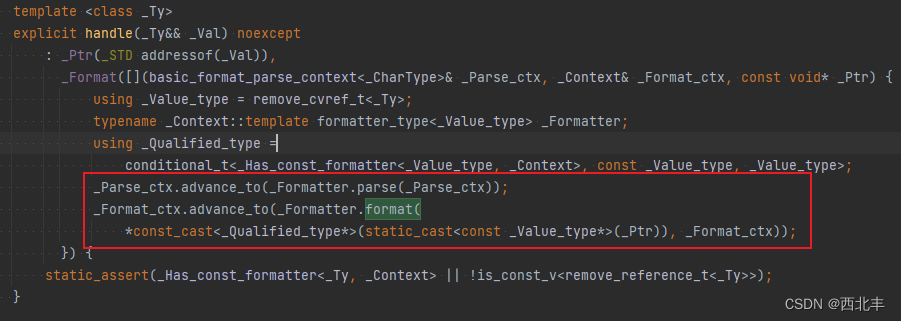
不过在MSVC的当前的iterator的实现中, iterator是可平凡复制的, 因此有没有正确移动iterator对结果并没有什么影响
而且iterator是一个std::back_insert_iterator(++运算符对iterator无效果), 因此前一节"formatter的复用"中format函数也可以简单偷懒实现如下auto format(MyType const& t, std::format_context& formatContext) { auto it = formatContext.out(); std::ranges::copy("MyType("sv, it); value1Formatter.format(t.value1, formatContext); std::ranges::copy(", "sv, it); value2Formatter.format(t.value2, formatContext); std::ranges::copy(")"sv, it); return it; }- 1
- 2
- 3
- 4
- 5
- 6
- 7
- 8
- 9
std::format_to
可以用
std::format_to输出到其他迭代器, 比如直接输出到std::coutstd::format_to(std::ostream_iterator<char>(std::cout), "Hello world!");- 1
可以写一个包装函数, 将其包装为
printtemplate<typename... Args> void print(std::_Fmt_string<Args...> const fmt, Args&&... args) { std::format_to(std::ostream_iterator<char>(std::cout), fmt, std::forward<Args>(args)...); }- 1
- 2
- 3
- 4
于是可以
MyType my{ 123 }; print("hello: {}\n", my);- 1
- 2
另外
std::format_to函数对iterator也是移动的, 需要从其返回值重新接回iteratorauto it = formatContext.out(); it = std::format_to(std::move(it), "my format");- 1
- 2
如果不需要格式化输出, 可以用
std::ranges::copystd::ranges::copy("my format", it);- 1
std::formatted_size
测量输出的大小, 参数同
std::format, 大小在返回值获得size_t size = std::formatted_size("...", ...); std::vector<char> buf(size); std::format_to(buf.begin(), "...", ...);- 1
- 2
- 3
一种比较高效的做法还是事先用数组在栈上分配比较足够的空间, 然后用有计数功能的写定容缓冲的迭代器包装数组, 当format输出内容超出数组容量时再动态分配足够大内存
std::array<char, 256> fixedCapacityBuffer; fixed_capacity_counter_iterator iter(fixedCapacityBuffer); std::format_to(iter, "...", ...); if (iter.count() >= fixedCapacityBuffer.size()) { std::vector<char> dynamicBuffer(); dynamicBuffer.reserve(iter.count()); std::format_to(std::back_inserter(dynamicBufer), "...", ...); handle(dynamicBuffer.begin(), dynamicBuffer.end()); } else { handle(fixedCapacityBuffer.begin(), fixedCapacityBuffer.begin() + iter.count()); }- 1
- 2
- 3
- 4
- 5
- 6
- 7
- 8
- 9
- 10
- 11
std::vformat
前一节中使用了内部类
std::_Fmt_string, 而不是使用std::string_view, 是因为std::_Fmt_string是consteval, 而std::string_view只是constexpr.有时候我们需要包装
std::format, 而由于std::format只接收consteval的字符串, 并且当前公开的字符串包装类中, 没有一个是consteval的, 字符串通过函数参数传递后只能降级为constexpr, 进而导致consteval的字符串字面量无法直接传给std::format.std::vformat放宽了格式化串的限制, 可以包装std::vformat来提供类似std::format的功能, 当然, 也会丢失编译期检查格式化串的能力, 下面是print的另一个实现.template<typename... Args> void print(std::string_view const fmt, Args&&... args) { std::vformat_to(std::ostream_iterator<char>(std::cout), fmt, std::make_format_args(std::forward<Args>(args)...)); }- 1
- 2
- 3
- 4
参数引用
在某些情况下, 一个
{}里面可能会需要两个参数, 如std::format("{:{}}", str, 5);- 1
在parse中可以使用
parseContext.next_arg_id(), 获取下一参数的id, 如果已从从格式说明中解析出id, 也可以用parseContext.check_arg_id(id)检查是否越界
然后在format中通过formatContext.arg(id)获取到参数
最后通过std::visit_format_arg访问参数, 例如template<> struct std::formatter<MyType, char> { size_t nextId; auto parse(std::format_parse_context& parseContext) { nextId = parseContext.next_arg_id(); return std::ranges::find(parseContext, '}'); } auto format(MyType const& t, std::format_context& formatContext) { size_t next; std::visit_format_arg([&](auto const& arg) { if constexpr (std::integral<std::decay_t<decltype(arg)>>) { next = arg; } }, formatContext.arg(nextId)); return std::format_to(formatContext.out(), "MyType(nextId={}, next={})", nextId, next); } };- 1
- 2
- 3
- 4
- 5
- 6
- 7
- 8
- 9
- 10
- 11
- 12
- 13
- 14
- 15
- 16
- 17
- 18
- 19
对于以下代码
MyType my1, my2; std::cout << std::format("hello: {:}, {:}\n", my1, 345, my2, 456) << std::endl;- 1
- 2
输出
hello: MyType(nextId=1, next=345), MyType(nextId=3, next=456)- 1
注意, 在parse中调用了
parseContext.next_arg_id消耗了一个参数, 如果格式化串中使用"{}"来格式化, 那么这个调用不会发生, 进而导致后面format函数中不会取到正确的id编译期检查和static优化
当前MSVC暂不支持对格式化串做编译期检查(正在支持中), 为了支持编译期检查, 尽量给parse和format加上constexpr
如果不需要formatter上下文, 那么可以将parse和format都声明为static.
"空"的formatter
template<> struct std::formatter<MyType, char> { static constexpr auto parse(std::format_parse_context& ctx) { return std::ranges::find(ctx, '}'); } static auto format(MyType const& t, std::format_context& formatContext) { return formatContext.out(); } };- 1
- 2
- 3
- 4
- 5
- 6
- 7
- 8
- 9
- 10
-
相关阅读:
1、什么是ETF?
boost在不同平台下的编译(win、arm)
快鲸智慧楼宇:助力商业地产快速实现数字化转型升级
java计算机毕业设计企业间信息交互系统源码+系统+数据库+lw文档+mybatis+运行部署
写一个宏,计算结构体中某变量相对于首地址的偏移,并给出说明
【LeetCode】【简单】【4】70. 爬楼梯
一道前端面试题:验证回文子串
python绘图matplotlib 图例legend形状和位置设置
UnixBench - Linux性能测试工具
Unity3D 如何用unity引擎然后用c#语言搭建自己的服务器
- 原文地址:https://blog.csdn.net/jkddf9h8xd9j646x798t/article/details/127954236
