-
ZYNQ图像处理项目——线性神经网络识别mnist
一、线性神经网络识别mnist
线性神经网络其实也可以叫做线性分类器,其实就是没有激活函数的神经网络来对目标进行识别,像支持向量机、多元回归等都是线性的。这边我采用了线性神经网络来识别mnist数字。
我这边是看了一本讲神经网络的书籍,然后打算从线性神经网络入手,实现手写数字的识别。这本书真的讲的很通俗易懂,大家可以去看看,书名如下:

二、matlab训练mnist数据集
matlab的主要代码如下图所示,实现了mnist数据的读取、训练、测试和权重保存。这边不展开讲代码,matlab相关的代码我上传到资源了,大家如果想要看的就可以直接下载。
https://download.csdn.net/download/qq_40995480/87098176
clc; % clear all; Images = loadMNISTImages('./MNIST/t10k-images.idx3-ubyte'); Images = reshape(Images, 28, 28, []); for i=1:10000 Images(:,:,i) = Images(:,:,i)'; end Images = reshape(Images, 784, 1, []); Labels = loadMNISTLabels('./MNIST/t10k-labels.idx1-ubyte'); Labels(Labels == 0) = 10; % 0 --> 10 rng(1); W=1e-2*(2*rand(10,784)-1); X = Images(:, :, 1:8000); D = Labels(1:8000); for epoch = 1:50 epoch; [W] = MnistSoftmax(W, X, D); end % Test X = Images(:, :, 8001:10000); D = Labels(8001:10000); acc = 0; N = length(D); for k = 1:N x = X(:, :, k); % Input, 784x1 v=W*x; y=softmax(v); [~, i] = max(y); if i == D(k) acc = acc + 1; end end %real test number = imread('./MNIST/number9.bmp'); number=double(number)/15; number=reshape(number,28,28); number=number'; number=reshape(number,784,1); v=W*number; y=Softmax(v); acc = acc / N; fprintf('Accuracy is %f\n', acc); save the W W=W/max(max(W))*8191; W=round(W); save('weight.mat','W');- 1
- 2
- 3
- 4
- 5
- 6
- 7
- 8
- 9
- 10
- 11
- 12
- 13
- 14
- 15
- 16
- 17
- 18
- 19
- 20
- 21
- 22
- 23
- 24
- 25
- 26
- 27
- 28
- 29
- 30
- 31
- 32
- 33
- 34
- 35
- 36
- 37
- 38
- 39
- 40
- 41
- 42
- 43
- 44
- 45
- 46
- 47
- 48
- 49
- 50
- 51
- 52
- 53
- 54
- 55
- 56
- 57
- 58
- 59
三、matlab实现线性神经网络
用训练好的权重系数进行书写数字识别,下面是matlab实现的代码,主要干的事情就是对图像的预处理、提取28*28的图像矩阵,之后利用权重与数据乘积来判断最大可能的数字。这部分代码大家也可以到我的资源下载。
https://download.csdn.net/download/qq_40995480/87098187
tic clc; clear all; %read picture %height and width img_rgb=imread('./pic/number0.bmp'); h=size(img_rgb,1); w=size(img_rgb,2); %get rgb picture figure(1); subplot(121); imshow(img_rgb); title('rgb picture'); %get gray picture % Relized method:myself Algorithm realized % Y = ( R*77 + G*150 + B*29) >>8 % Cb = (-R*44 - G*84 + B*128) >>8 % Cr = ( R*128 - G*108 - B*20) >>8 img_rgb=double(img_rgb); img_y=zeros(h,w); img_u=zeros(h,w); img_v=zeros(h,w); for i = 1 : h for j = 1 : w img_y(i,j) = bitshift(( img_rgb(i,j,1)*77 + img_rgb(i,j,2)*150 + img_rgb(i,j,3)*29),-8); img_u(i,j) = bitshift((-img_rgb(i,j,1)*44 - img_rgb(i,j,2)*84 + img_rgb(i,j,3)*128 + 32678),-8); img_v(i,j) = bitshift(( img_rgb(i,j,1)*128 - img_rgb(i,j,2)*108 - img_rgb(i,j,3)*20 + 32678),-8); end end img_y = uint8(img_y); img_u = uint8(img_u); img_v = uint8(img_v); img_rgb = uint8(img_rgb); subplot(122); imshow(img_y); title('gray picture'); %get bin picture img_y=double(img_y); img_thresh=zeros(h,w); img_thresh_inverse=zeros(h,w); THRESH_HOLD=150; for i=1:h for j=1:w if(i>=384-56 && i<=384+55 && j>=512-56 && j<=512+55) if(img_y(i,j)>THRESH_HOLD) img_thresh(i,j)=255; img_thresh_inverse(i,j)=0; else img_thresh(i,j)=0; img_thresh_inverse(i,j)=255; end else img_thresh(i,j)=img_y(i,j); img_thresh_inverse(i,j)=img_y(i,j); end end end img_y=uint8(img_y); img_thresh=uint8(img_thresh); img_thresh_inverse=uint8(img_thresh_inverse); figure(2); subplot(121); imshow(img_thresh); title('bin picture'); subplot(122); imshow(img_thresh_inverse); title('bin inverse picture'); %open operation:corrosion and expansion img_corrosion=zeros(h,w); for i=1:h for j=1:w if(i>=384-56 && i<=384+55 && j>=512-56 && j<=512+55) a=img_thresh_inverse(i-1,j-1)&img_thresh_inverse(i-1,j)&img_thresh_inverse(i-1,j+1); b=img_thresh_inverse(i,j-1)&img_thresh_inverse(i,j)&img_thresh_inverse(i,j+1); c=img_thresh_inverse(i+1,j-1)&img_thresh_inverse(i+1,j)&img_thresh_inverse(i+1,j+1); if((a&b&c)==1) img_corrosion(i,j)=255; else img_corrosion(i,j)=0; end else img_corrosion(i,j)=img_thresh_inverse(i,j); end end end img_corrosion=uint8(img_corrosion); figure(3); subplot(121); imshow(img_corrosion); title('corrosion picture'); img_expansion=zeros(h,w); for i=1:h for j=1:w if(i>=384-55 && i<=384+54 && j>=512-55 && j<=512+54) a=img_corrosion(i-1,j-1)|img_corrosion(i-1,j)|img_corrosion(i-1,j+1); b=img_corrosion(i,j-1)|img_corrosion(i,j)|img_corrosion(i,j+1); c=img_corrosion(i+1,j-1)|img_corrosion(i+1,j)|img_corrosion(i+1,j+1); if((a|b|c)==1) img_expansion(i,j)=255; else img_expansion(i,j)=0; end else img_expansion(i,j)=img_corrosion(i,j); end end end img_expansion=uint8(img_expansion); subplot(122); imshow(img_expansion); title('expansion picture'); %get number matrix test=imread('./pic/output_file1.bmp'); number=zeros(28,28); for i=1:28 for j=1:28 number(i,j)=sum(sum(test(384-56+4*(i-1):384-56+4*i-1 , 512-56+4*(j-1):512-56+4*j-1)))/16; end end number=floor(number); number=uint8(number); pic=load('./pic/pic_28x28.txt'); pic=reshape(pic,28,28); pic=pic'; pic=uint8(pic); figure(4); subplot(121); imshow(number) title('matlab number'); subplot(122); imshow(pic) title('vivado number'); %use softmax to recog the number load('weight'); number=double(number); number=number'; number=reshape(number,784,1); v=W*number; v=v/max(v)*10; y=softmax(v); n=0; for i=1:10 if(y(i)>=n) n=y(i); number_recog=i; end if(number_recog==10) number_recog=0; end end fprintf('the probability is %f\n',n*100); fprintf('the number is %d\n',number_recog); toc- 1
- 2
- 3
- 4
- 5
- 6
- 7
- 8
- 9
- 10
- 11
- 12
- 13
- 14
- 15
- 16
- 17
- 18
- 19
- 20
- 21
- 22
- 23
- 24
- 25
- 26
- 27
- 28
- 29
- 30
- 31
- 32
- 33
- 34
- 35
- 36
- 37
- 38
- 39
- 40
- 41
- 42
- 43
- 44
- 45
- 46
- 47
- 48
- 49
- 50
- 51
- 52
- 53
- 54
- 55
- 56
- 57
- 58
- 59
- 60
- 61
- 62
- 63
- 64
- 65
- 66
- 67
- 68
- 69
- 70
- 71
- 72
- 73
- 74
- 75
- 76
- 77
- 78
- 79
- 80
- 81
- 82
- 83
- 84
- 85
- 86
- 87
- 88
- 89
- 90
- 91
- 92
- 93
- 94
- 95
- 96
- 97
- 98
- 99
- 100
- 101
- 102
- 103
- 104
- 105
- 106
- 107
- 108
- 109
- 110
- 111
- 112
- 113
- 114
- 115
- 116
- 117
- 118
- 119
- 120
- 121
- 122
- 123
- 124
- 125
- 126
- 127
- 128
- 129
- 130
- 131
- 132
- 133
- 134
- 135
- 136
- 137
- 138
- 139
- 140
- 141
- 142
- 143
- 144
- 145
- 146
- 147
- 148
- 149
- 150
- 151
- 152
- 153
- 154
- 155
- 156
- 157
- 158
- 159
- 160
下面两张图是我测试的原始图像和转灰度之后的图像。

下图是将灰度图像对想要处理的区域(数字区域)进行二值化,之后在翻转。

下面这两张图分别是我用matlab和vivado仿真提取得到的28*28的数据。

四、ZYNQ实现线性神经网络
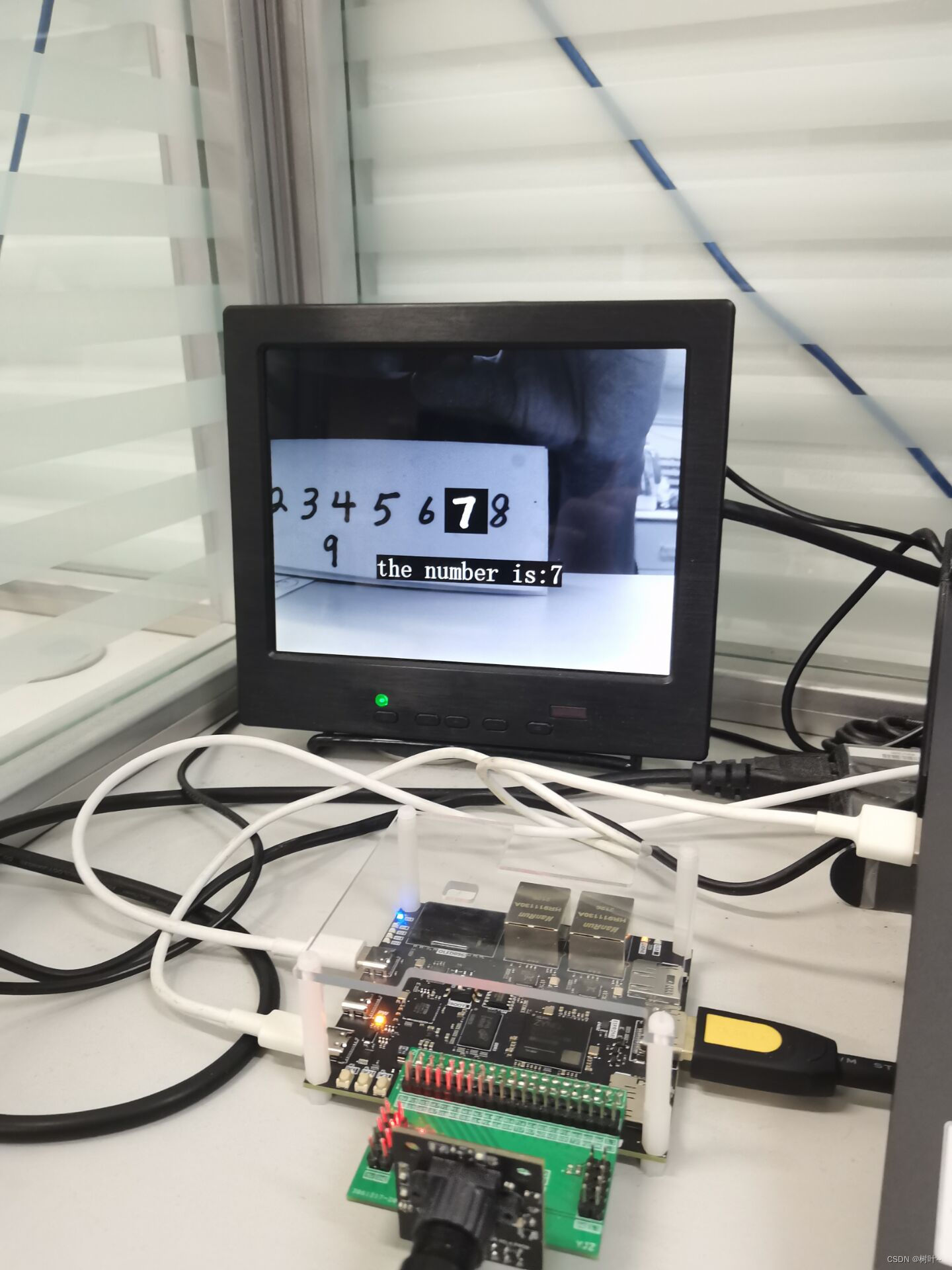
关于ZYNQ实现神经网络的思路其实和matlab写的代码的思路是一样的,就是将其用verilog来实现而已,下图是我将线性神经网络部署到ZYNQ上实现的具体效果。在测试中发现,线性神经网络其实性能相较于卷积神经网络要差一点,下面工作会将激活函数、卷积层、池化层这些内容加进去,用ZYNQ来实现卷积神经网络。



-
相关阅读:
plt画图柱状图解决横坐标字体显示的问题竖体显示
论文阅读(11) 操纵涡环来提高机动性 (2015)
详解 B树
【SQL性能优化】锁:悲观锁和乐观锁是什么?(优)
0601STM32TIM
代码随想录二刷 | 数组 | 总结篇
【算法|动态规划No.19】leetcode413. 等差数列划分
异地寄件教程分析
k8s的接口文档——swagger-ui服务
Samaphore
- 原文地址:https://blog.csdn.net/qq_40995480/article/details/127954117
