• Egg.js初步使用


    Egg.js的简单初步使用

    所使用代码已上传github, 注意数据库配置方面。如有问题可交流。

    简单使用 – 骨架类型

    eggjs 是阿里出品的企业级 node 框架,奉行 约定优于配置 ,一切基于约定开发,减少团队沟通成本,另一个比较重要的点是 egg 拥有完善的日志系统,对于 bug 定位等及其方便。

    骨架类型说明
    simple简单 egg 应用程序骨架
    empty空的 egg 应用程序骨架
    pluginegg plugin 骨架
    frameworkegg framework 骨架

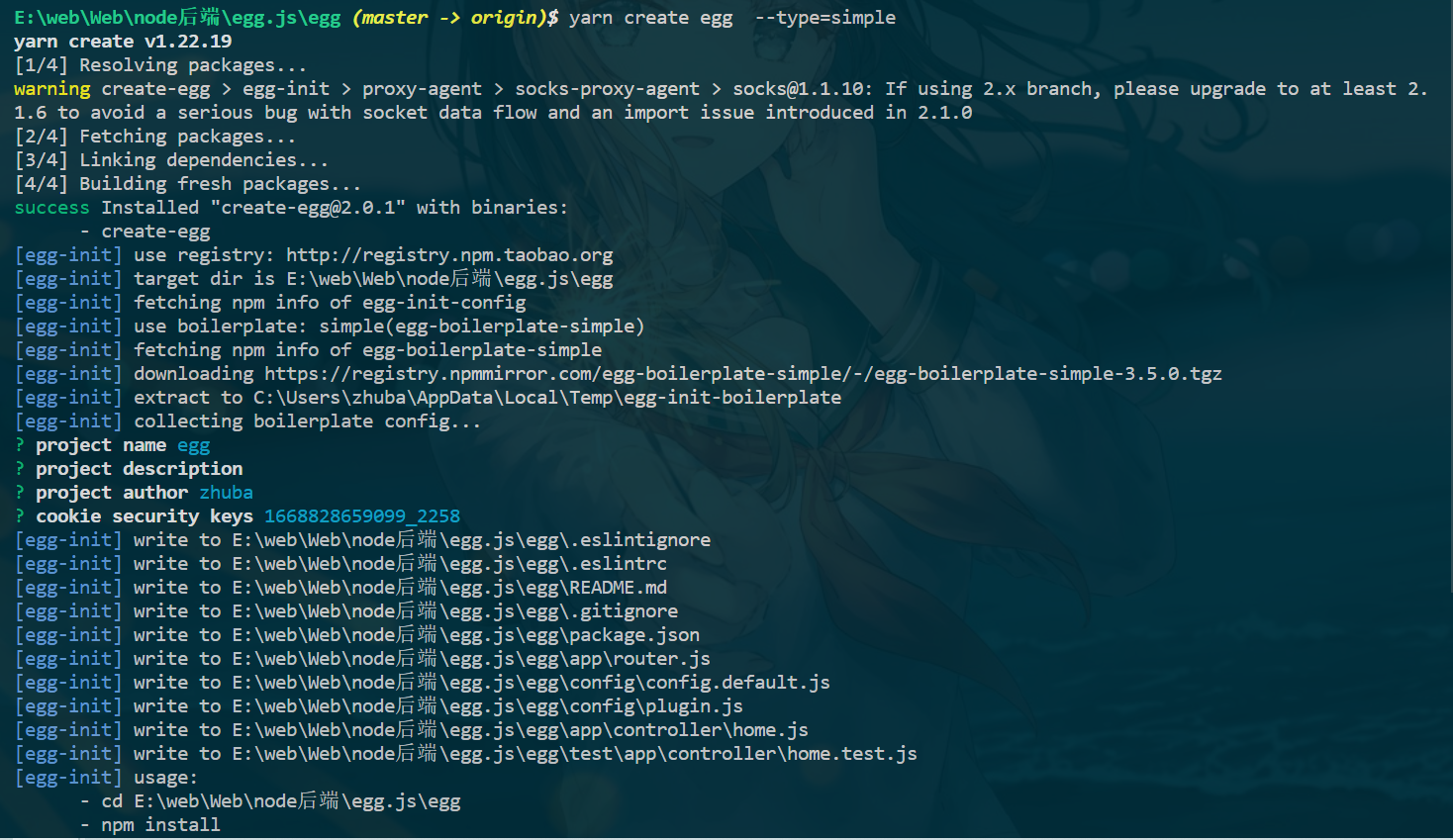
    安装依赖 yarn create egg --type=simple 或者 npm install -g yarn ,然后yarn 或者 npm i安装

    npx egg-init --type=ts showcase
    cd showcase && npm i
    npm run dev
    
    • 1
    • 2
    • 3

    在这里插入图片描述

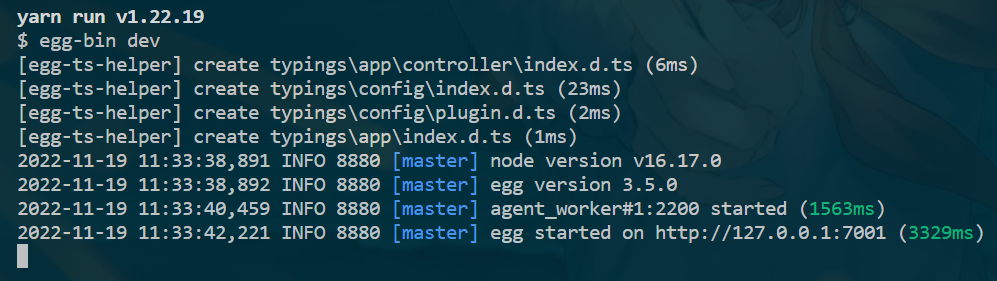
    启动:yarn dev

    • dev : 开发环境中使用,不用重启服务器,只要刷新。修改内容就会更改。
    • start:生产环境中使用,也就是开发完成,正式运营之后。以服务的方式运行。修改后要停止和重启后才会发生改变。
    在这里插入图片描述
    在这里插入图片描述

    - app                        - 项目开发的主目录,工作中的代码几乎都写在这里面
    -- controller                -- 控制器目录,所有的控制器都写在这个里面
    -- router.js                 -- 项目的路由文件
    - config                     - 项目配置目录,比如插件相关的配置
    -- config.default.js         -- 系统默认配置文件
    -- plugin.js                 -- 插件配置文件
    - logs                       -- 项目启动后的日志文件夹
    - node_modules               - 项目的运行/开发依赖包,都会放到这个文件夹下面
    - test                       - 项目测试/单元测试时使用的目录
    - run                        - 项目启动后生成的临时文件,用于保证项目正确运行
    - typings                    - TypeScript配置目录,说明项目可以使用TS开发
    - .eslintignore              - ESLint配置文件
    - .eslintrc                  - ESLint配置文件,语法规则的详细配置文件
    - .gitignore                 - git相关配置文件,比如那些文件归于Git管理,那些不需要
    - jsconfig.js                - js配置文件,可以对所在目录下的所有JS代码个性化支持
    - package.json               - 项目管理文件,包含包管理文件和命令管理文件
    - README.MD                  - 项目描述文件  
    
    • 1
    • 2
    • 3
    • 4
    • 5
    • 6
    • 7
    • 8
    • 9
    • 10
    • 11
    • 12
    • 13
    • 14
    • 15
    • 16
    • 17

    Egg.js与Koa/Express 对比

    框架的设计理念 约定优于配置 .

    在这里插入图片描述

    编写controller 和 单元测试

    同步单元测试 和 异步单元测试

    // zhuba.js
    'use strict';
    
    const Controller = require('egg').Controller;
    
    class zhubaController extends Controller {
      async index() {
        const {
          ctx,
        } = this;
        ctx.body = '

    This is zhuBaController

    '; } } module.exports = zhubaController; // zhuba.test.js 'use strict'; const { app, } = require('egg-mock/bootstrap'); describe('zhuba test', () => { it('zhuba index', () => { return app.httpRequest().get('/zhuba').expect(200) .expect('

    This is zhuBaController

    '); }); }); // describe( )方法有两个参数,第一个是测试的描述(字符串类型),这个描述一般都是用文件的路径。 // 第二个参数是一个回调函数,里边是对这个控制器里边的具体方法的测试用例。 // 官方的 home.test.js 'use strict'; const { app, assert, } = require('egg-mock/bootstrap'); describe('test/app/controller/home.test.js', () => { it('should assert', async () => { const pkg = require('../../../package.json'); assert(app.config.keys.startsWith(pkg.name)); }); it('should GET /', async () => { return app.httpRequest() .get('/') .expect('Hello World! Egg.js') .expect(200); }); });
    • 1
    • 2
    • 3
    • 4
    • 5
    • 6
    • 7
    • 8
    • 9
    • 10
    • 11
    • 12
    • 13
    • 14
    • 15
    • 16
    • 17
    • 18
    • 19
    • 20
    • 21
    • 22
    • 23
    • 24
    • 25
    • 26
    • 27
    • 28
    • 29
    • 30
    • 31
    • 32
    • 33
    • 34
    • 35
    • 36
    • 37
    • 38
    • 39
    • 40
    • 41
    • 42
    • 43
    • 44
    • 45
    • 46
    • 47
    • 48
    • 49
    • 50
    • 51
    • 52
    • 53
    • 54

    在这里插入图片描述

    yarn test 全绿即是没问题

    // zhuba.js
    'use strict';
    
    const Controller = require('egg').Controller;
    
    class zhubaController extends Controller {
      async index() {
        const {
          ctx,
        } = this;
        ctx.body = '

    This is zhuBaController

    '; } async getGirls() { const { ctx, } = this; await new Promise(resolve => { setTimeout(() => { resolve(ctx.body = '

    kunkun,正在向你走来

    '
    ); }, 1000); }); } } module.exports = zhubaController; // zhuba.test.js 'use strict'; const { app, } = require('egg-mock/bootstrap'); describe('zhuba test', () => { it('zhuba index', () => { return app.httpRequest().get('/zhuba').expect(200) .expect('

    This is zhuBaController

    '); }); it('zhuba getGirls', async () => { await app.httpRequest().get('/getGirls').expect(200) .expect('

    kunkun,正在向你走来

    '
    ); }); });
    • 1
    • 2
    • 3
    • 4
    • 5
    • 6
    • 7
    • 8
    • 9
    • 10
    • 11
    • 12
    • 13
    • 14
    • 15
    • 16
    • 17
    • 18
    • 19
    • 20
    • 21
    • 22
    • 23
    • 24
    • 25
    • 26
    • 27
    • 28
    • 29
    • 30
    • 31
    • 32
    • 33
    • 34
    • 35
    • 36
    • 37
    • 38
    • 39
    • 40
    • 41
    • 42
    • 43
    • 44

    Get 请求和参数传递

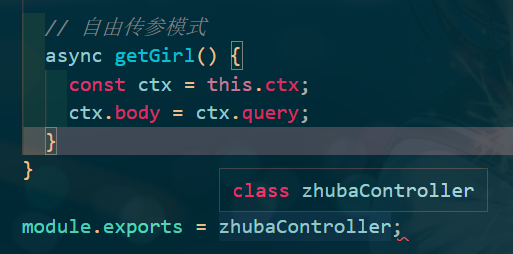
    自由传参

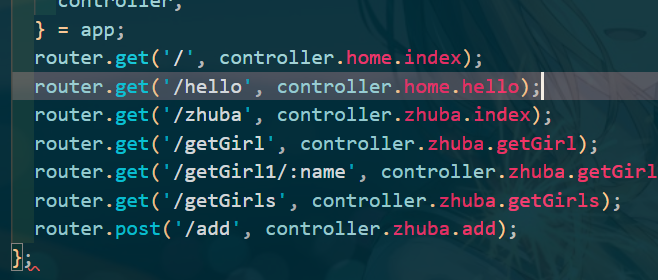
    配置好router后

    在这里插入图片描述

    严格传参

    少参数就会404
    在这里插入图片描述

    在这里插入图片描述
    在这里插入图片描述
    在这里插入图片描述

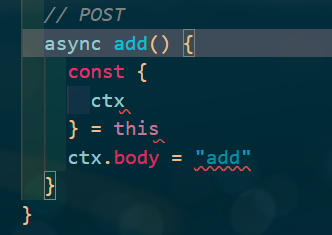
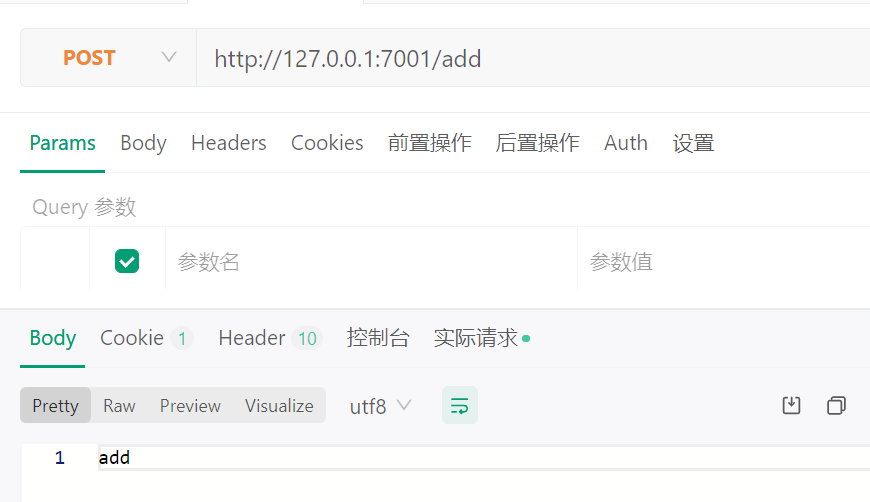
    POST 请求

    在这里插入图片描述
    ![image.png](https://img-blog.csdnimg.cn/img_convert/c2f31af997442718ef6178074e36dd9c.png#averageHue=#153b46&clientId=u1f7a13f2-de01-4&crop=0&crop=0&crop=1&crop=1&from=paste&height=187&id=u6a39d3d4&margin=[object Object]&name=image.png&originHeight=280&originWidth=658&originalType=binary&ratio=1&rotation=0&showTitle=false&size=136647&status=done&style=none&taskId=ub33f554c-543d-4037-9da2-909a25a234f&title=&width=438.6666666666667)
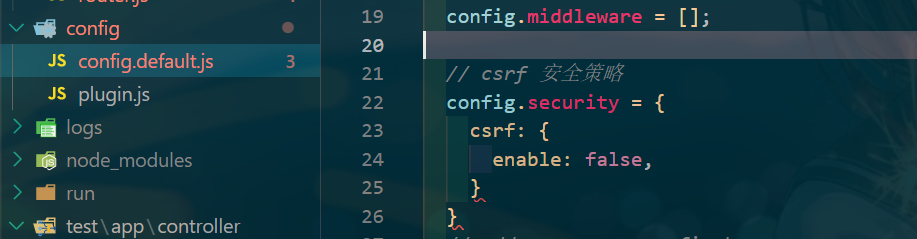
    添加config/config.default.js, 关闭csrf安全策略

    CSRF的全名为 Cross-site request forgery, 它的中文名为 伪造跨站请求。

    // csrf 安全策略
      config.security = {
        csrf: {
          enable: false,
        }
      }
    
    • 1
    • 2
    • 3
    • 4
    • 5
    • 6

    ![image.png](https://img-blog.csdnimg.cn/img_convert/5e89bc6facae37620dede01ced9d13cf.png#averageHue=#0e343f&clientId=u1f7a13f2-de01-4&crop=0&crop=0&crop=1&crop=1&from=paste&height=159&id=u4e2ca469&margin=[object Object]&name=image.png&originHeight=239&originWidth=917&originalType=binary&ratio=1&rotation=0&showTitle=false&size=105620&status=done&style=none&taskId=u39cb3433-ead6-4e4a-96b2-0919fea7997&title=&width=611.3333333333334)
    ![image.png](https://img-blog.csdnimg.cn/img_convert/c3271cb11a64e5ca63a629b98fe010ca.png#averageHue=#fdfbf7&clientId=u1f7a13f2-de01-4&crop=0&crop=0&crop=1&crop=1&from=paste&height=251&id=u2388791f&margin=[object Object]&name=image.png&originHeight=502&originWidth=870&originalType=binary&ratio=1&rotation=0&showTitle=false&size=34611&status=done&style=none&taskId=u7ce19431-5a4f-4ce8-a9ef-d81999dc8ff&title=&width=435)
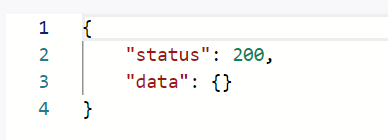
    服务端接受请求:

    async add(){
        const ctx = this.ctx
        ctx.body = {
          status: 200,
          data:ctx.request.body
        }
      }
    
    • 1
    • 2
    • 3
    • 4
    • 5
    • 6
    • 7

    ![image.png](https://img-blog.csdnimg.cn/img_convert/95a0474fb2d51ca8624b20c82b890f42.png#averageHue=#fefefd&clientId=u1f7a13f2-de01-4&crop=0&crop=0&crop=1&crop=1&from=paste&height=93&id=ua55dc232&margin=[object Object]&name=image.png&originHeight=140&originWidth=388&originalType=binary&ratio=1&rotation=0&showTitle=false&size=6080&status=done&style=none&taskId=u13742b66-4a02-4d44-9901-46b63a04add&title=&width=258.6666666666667)

    Service 服务

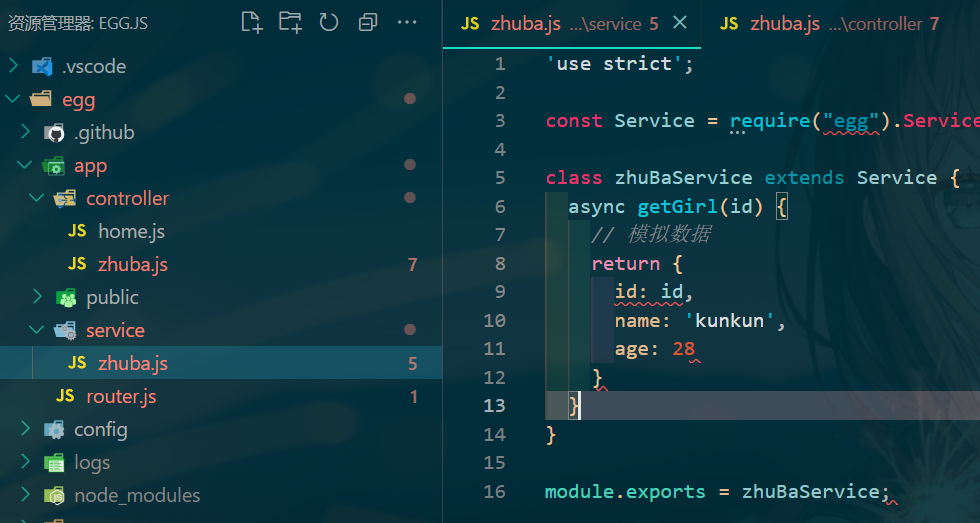
    Service是用来编写和数据库直接交互的业务逻辑代码。Service就是在复杂业务场景下用于做业务逻辑封装的一个抽象层。

    简单来说,就是把业务逻辑代码进一步细化和分类,所以和数据库交互的代码都放到Service中。这样作有三个明显的好处。

    • 保持Controller中的逻辑更加简介,
    • 保持业务逻辑的独立性,抽象出来的Service可以被多个Controller调用。
    • 将逻辑和展现分离,更容易编写测试用例。

    只要是和数据库的交互操作,都写在Service里,用了Egg框架,就要遵守它的约定。

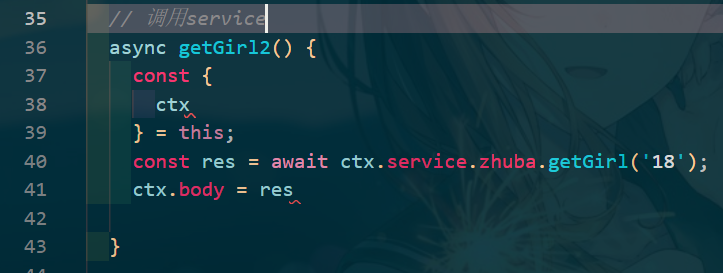
    在/app/service目录下编写自己的服务
    ![image.png](https://img-blog.csdnimg.cn/img_convert/351c7b7dd45cbced3c49b8a797d2b430.png#averageHue=#0c3540&clientId=u6138dc2e-c60d-4&crop=0&crop=0&crop=1&crop=1&from=paste&height=349&id=uee6fb068&margin=[object Object]&name=image.png&originHeight=523&originWidth=980&originalType=binary&ratio=1&rotation=0&showTitle=false&size=231523&status=done&style=none&taskId=u3553ece9-336c-4010-b7f2-bb139e38d08&title=&width=653.3333333333334)![image.png](https://img-blog.csdnimg.cn/img_convert/b599081e153a5bfa43cba71cbf87ad7b.png#averageHue=#123640&clientId=u6138dc2e-c60d-4&crop=0&crop=0&crop=1&crop=1&from=paste&height=182&id=u001c9690&margin=[object Object]&name=image.png&originHeight=273&originWidth=723&originalType=binary&ratio=1&rotation=0&showTitle=false&size=119036&status=done&style=none&taskId=uc77db943-952d-4637-8c83-2ba7064d1f2&title=&width=482)![image.png](https://img-blog.csdnimg.cn/img_convert/dee41f4deae8af88959e0b87106d9679.png#averageHue=#ece465&clientId=u6138dc2e-c60d-4&crop=0&crop=0&crop=1&crop=1&from=paste&height=185&id=u27c8311b&margin=[object Object]&name=image.png&originHeight=277&originWidth=532&originalType=binary&ratio=1&rotation=0&showTitle=false&size=19880&status=done&style=none&taskId=u2af7b149-1988-4adb-b153-9c819c87b53&title=&width=354.6666666666667)
    service方法的可调用性
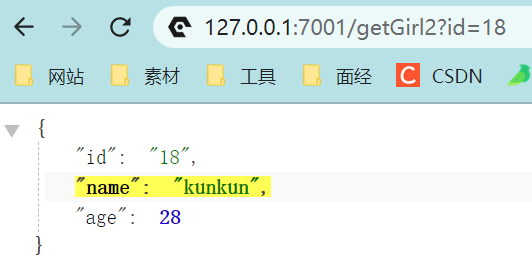
    一个service方法完成后,可以在其它的Controller里进行使用。比如在home.js中进行使用。打开/app/controller/home.js文件下,新建一个testGetGirl( )方法,然后新增好路由,这样id即可被数据库得到![image.png](https://img-blog.csdnimg.cn/img_convert/20d4918732bd514a1f49f5d62dc06cc6.png#averageHue=#133640&clientId=u6138dc2e-c60d-4&crop=0&crop=0&crop=1&crop=1&from=paste&height=150&id=u1963d607&margin=[object Object]&name=image.png&originHeight=225&originWidth=707&originalType=binary&ratio=1&rotation=0&showTitle=false&size=110873&status=done&style=none&taskId=u31efbdb0-c569-46cf-917c-908f8d98cca&title=&width=471.3333333333333)![image.png](https://img-blog.csdnimg.cn/img_convert/e9fd3b4149f8d517a88d3da997cfcdac.png#averageHue=#e1cc82&clientId=u6138dc2e-c60d-4&crop=0&crop=0&crop=1&crop=1&from=paste&height=138&id=u65df74da&margin=[object Object]&name=image.png&originHeight=276&originWidth=580&originalType=binary&ratio=1&rotation=0&showTitle=false&size=19659&status=done&style=none&taskId=ud48e752e-caa3-436c-a9a6-3caae30b540&title=&width=290)
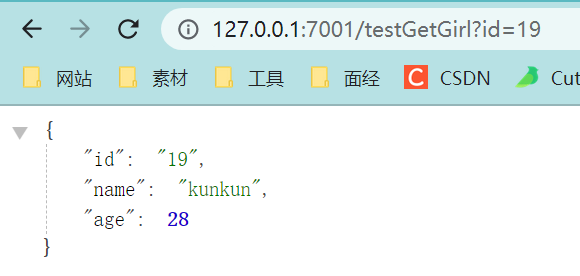
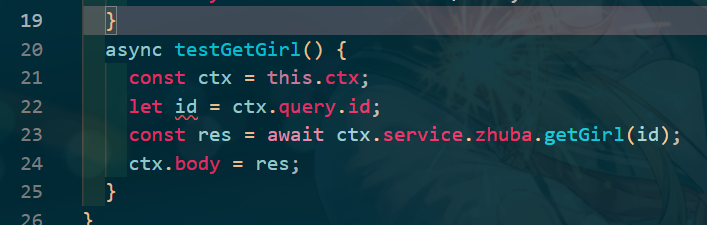
    起名的时候最好和Controller对应起来。写法和Controller类似,并且在任何Controller下都可以得到Service提供的数据。

    View中使用EJS模板引擎

    介绍

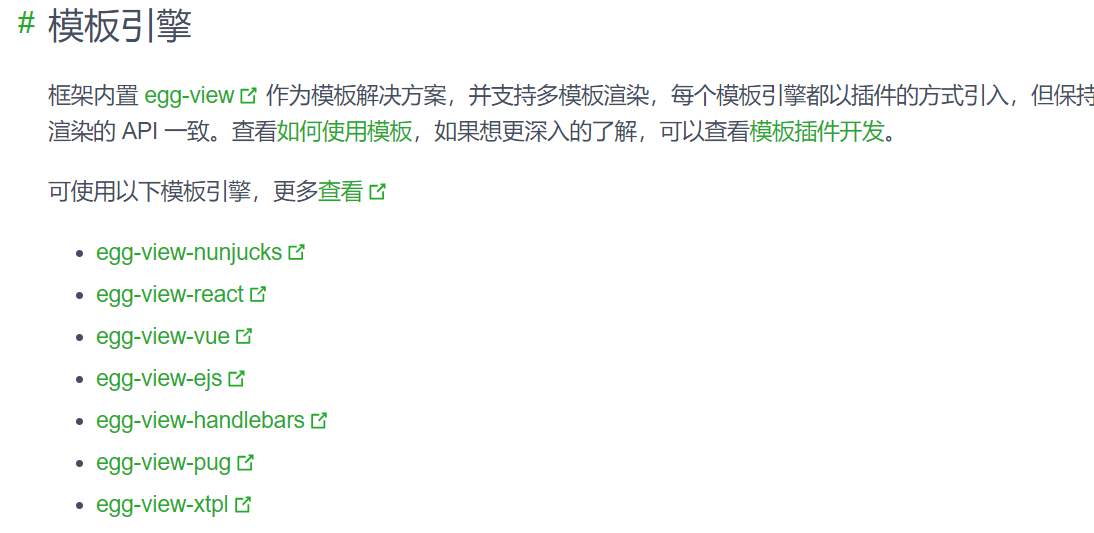
    可选的模板不少,具体参考官方文档。
    ![image.png](https://img-blog.csdnimg.cn/img_convert/39141dc18118be02c79eb832c2864c54.png#averageHue=#fefefd&clientId=u6138dc2e-c60d-4&crop=0&crop=0&crop=1&crop=1&from=paste&height=267&id=u8906ec3e&margin=[object Object]&name=image.png&originHeight=533&originWidth=1094&originalType=binary&ratio=1&rotation=0&showTitle=false&size=86960&status=done&style=none&taskId=ud1f80fa2-50a8-4b27-8f51-4f344a08688&title=&width=547)
    服务端渲染的好处

    • 对SEO非常友好,单页应用,比如Vue是到客户端才生成的。这种应用对于国内的搜索引擎是没办法爬取的,这样SEO就不会有好的结果。所以如果是官网、新闻网站、博客这些展示类、宣传类的网址,必须要使用服务端渲染技术。
    • 后端渲染是老牌开发模式,渲染性能也是得到一致认可的。在PHP时代,这种后端渲染的技术达到了顶峰。
    • 对前后端分离开发模式的补充,并不是所有的功能都可以实现前后端分离的。特别现在流行的中台系统,有很多一次登录,处处可用的原则。这时候就需要服务端渲染来帮忙。

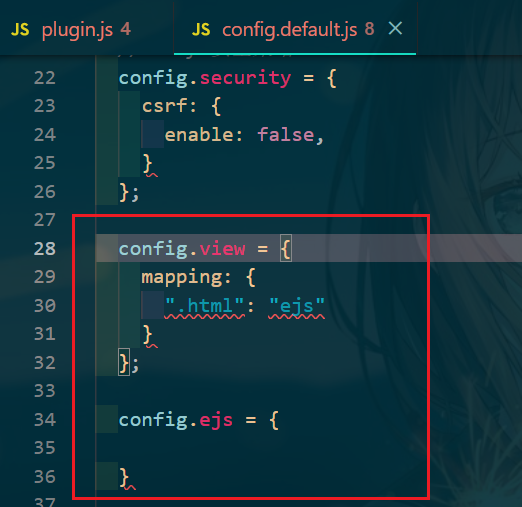
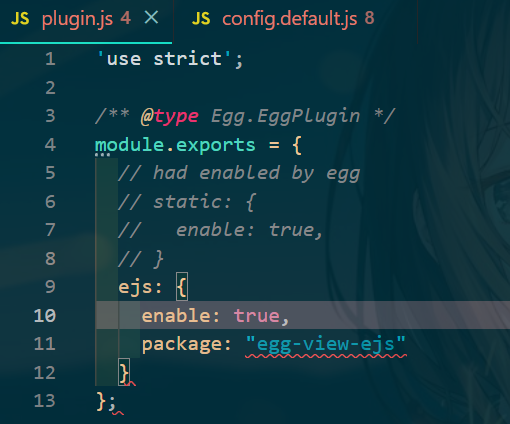
    EJS1

    安装和配置、使用:yarn add egg-view-ejs
    ![image.png](https://img-blog.csdnimg.cn/img_convert/6fd0571967ba7456cddfbbd84feccf7d.png#averageHue=#0c3540&clientId=u6138dc2e-c60d-4&crop=0&crop=0&crop=1&crop=1&from=paste&height=283&id=u6cd94d80&margin=[object Object]&name=image.png&originHeight=424&originWidth=510&originalType=binary&ratio=1&rotation=0&showTitle=false&size=106554&status=done&style=none&taskId=uf70e9b8a-86c8-481c-903a-68cdd7ff8ae&title=&width=340)![image.png](https://img-blog.csdnimg.cn/img_convert/858961f1d6a050690018cf3a26605359.png#averageHue=#0b333e&clientId=u6138dc2e-c60d-4&crop=0&crop=0&crop=1&crop=1&from=paste&height=254&id=ub4ea0a32&margin=[object Object]&name=image.png&originHeight=507&originWidth=522&originalType=binary&ratio=1&rotation=0&showTitle=false&size=118149&status=done&style=none&taskId=u88c32463-76ce-4d03-8fc3-3cce69f29bb&title=&width=261)
    ![image.png](https://img-blog.csdnimg.cn/img_convert/6d64dc473229bdb5daed8e7bd9adabe9.png#averageHue=#133a45&clientId=u6138dc2e-c60d-4&crop=0&crop=0&crop=1&crop=1&from=paste&height=137&id=ueb0661f6&margin=[object Object]&name=image.png&originHeight=205&originWidth=1016&originalType=binary&ratio=1&rotation=0&showTitle=false&size=103912&status=done&style=none&taskId=u216688c9-435c-400f-b88d-c3a073d3391&title=&width=677.3333333333334)
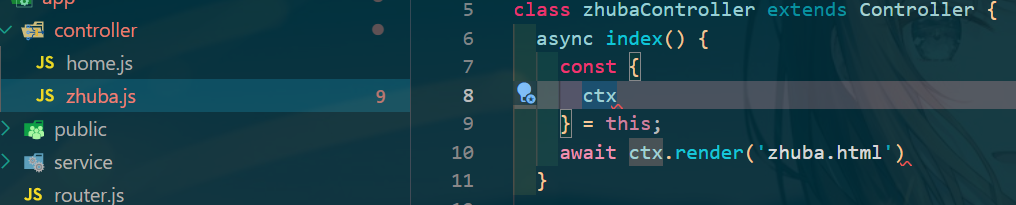
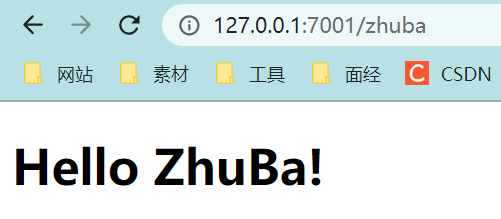
    /app/view/下新建 zhuba.html文件即可被渲染,访问该路由地址即可
    ![image.png](https://img-blog.csdnimg.cn/img_convert/93dc9ce96fdab0a2fcfdcc927d69f274.png#averageHue=#e8d78b&clientId=u6138dc2e-c60d-4&crop=0&crop=0&crop=1&crop=1&from=paste&height=146&id=u3c6060c1&margin=[object Object]&name=image.png&originHeight=219&originWidth=501&originalType=binary&ratio=1&rotation=0&showTitle=false&size=14686&status=done&style=none&taskId=uc87b6d4f-4acd-44d6-9609-e08c3b23dfc&title=&width=334)

    EJS2

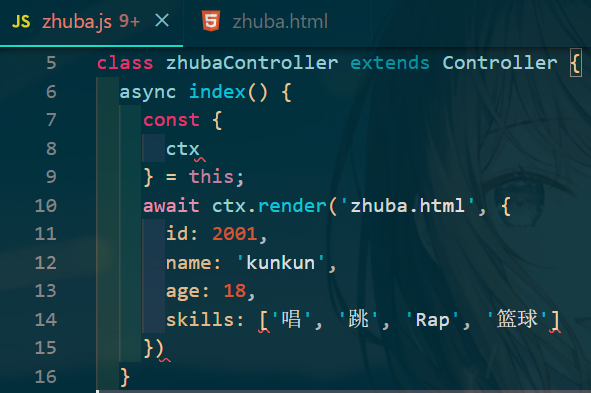
    • 显示controller中数据 (<%= 参数 %>)

    ![image.png](https://img-blog.csdnimg.cn/img_convert/ec70142a90745d4e37a76625834fbbaf.png#averageHue=#0c3540&clientId=u6138dc2e-c60d-4&crop=0&crop=0&crop=1&crop=1&from=paste&height=262&id=u528adb55&margin=[object Object]&name=image.png&originHeight=393&originWidth=591&originalType=binary&ratio=1&rotation=0&showTitle=false&size=127298&status=done&style=none&taskId=u6cb51326-1128-4793-8208-311c9a30ed1&title=&width=394)

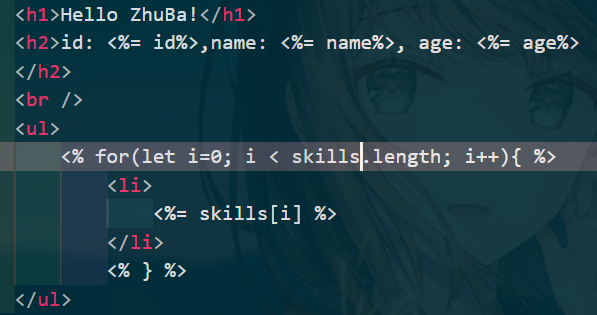
    • 数据的循环显示 (for)

    ![image.png](https://img-blog.csdnimg.cn/img_convert/37e8cce6da604ce1e84c14c8b2524ec4.png#averageHue=#153843&clientId=u6138dc2e-c60d-4&crop=0&crop=0&crop=1&crop=1&from=paste&height=210&id=ua540f322&margin=[object Object]&name=image.png&originHeight=315&originWidth=597&originalType=binary&ratio=1&rotation=0&showTitle=false&size=124323&status=done&style=none&taskId=u0a83753e-a62a-4573-a4c5-794b40e4944&title=&width=398)

    • 修改默认分隔符
    config.ejs={
      delimiter: "$"
    }
    
    • 1
    • 2
    • 3

    EJS3

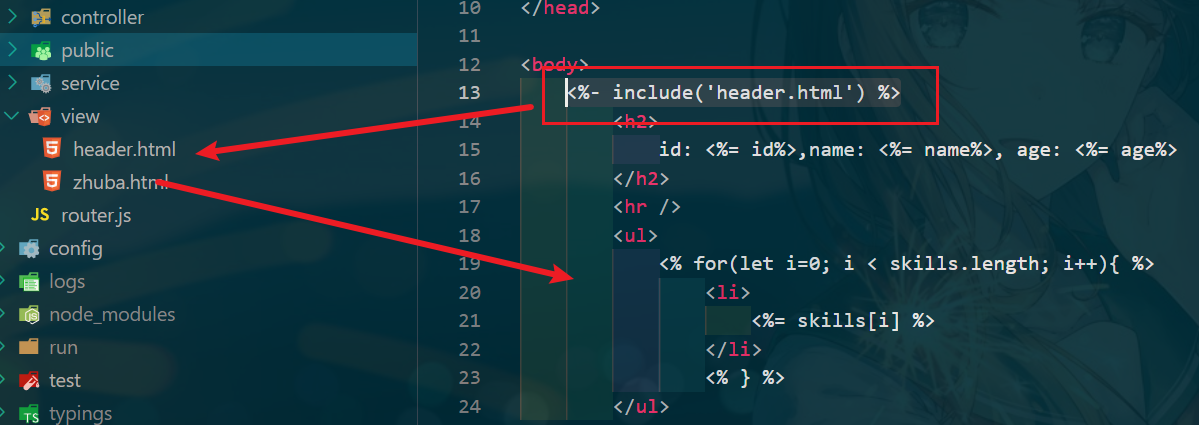
    • 公共代码片段的使用 只需要写一些代码片段,即抽离公共部分(组件思想) **<%- include('header.html') %>**
    ![image.png](https://img-blog.csdnimg.cn/img_convert/55f3c2239e94e1c1dee013344af6670b.png#averageHue=#0f353f&clientId=u975a7b25-27c8-4&crop=0&crop=0&crop=1&crop=1&from=paste&height=283&id=u1df5e82f&margin=[object Object]&name=image.png&originHeight=425&originWidth=1199&originalType=binary&ratio=1&rotation=0&showTitle=false&size=284640&status=done&style=none&taskId=u3ea0f48b-9189-44bb-9c09-9ee81b6d922&title=&width=799.3333333333334)

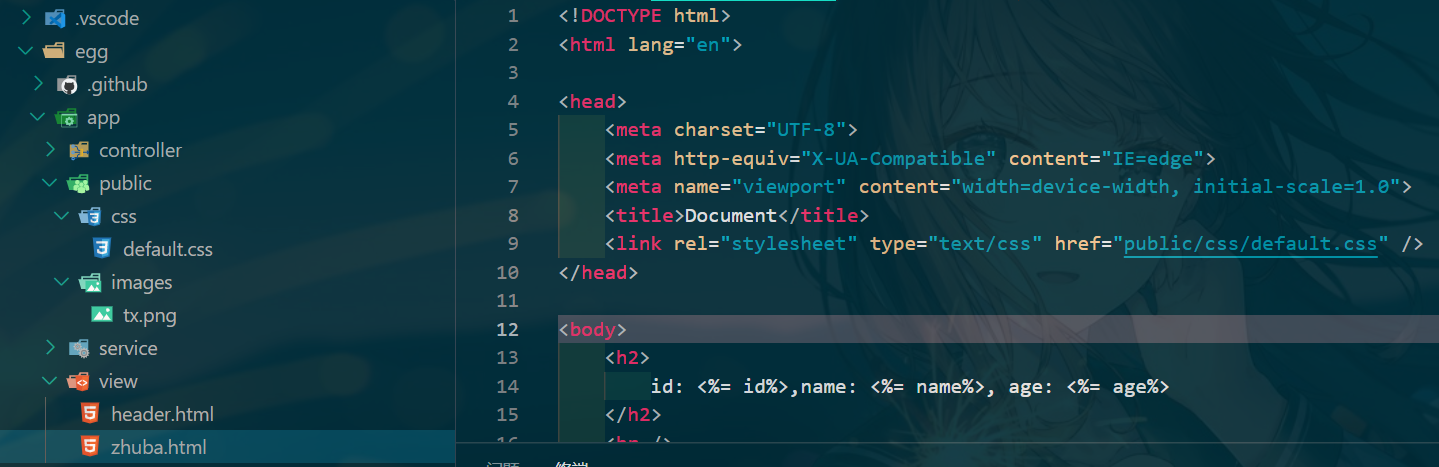
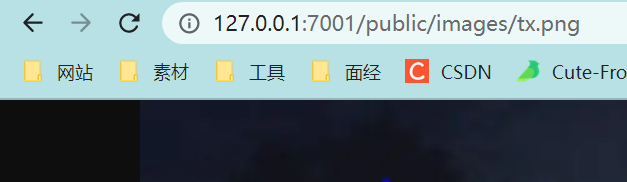
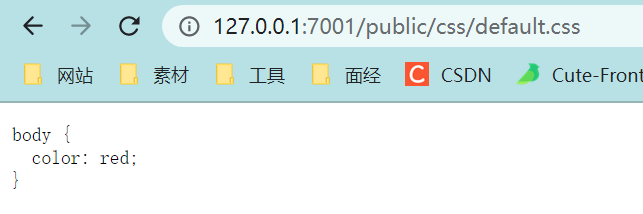
    • 配置静态资源:/app/public目录下,可以直接访问,不需配置路由,直接显示文件内容,因为Egg使用了egg-static插件
    ![image.png](https://img-blog.csdnimg.cn/img_convert/9055bda13906c00a533228f5441e9c5a.png#averageHue=#e0d989&clientId=u6138dc2e-c60d-4&crop=0&crop=0&crop=1&crop=1&from=paste&height=143&id=u412d8ecb&margin=[object Object]&name=image.png&originHeight=214&originWidth=643&originalType=binary&ratio=1&rotation=0&showTitle=false&size=15783&status=done&style=none&taskId=u6e480cf9-b4b5-48ff-aadf-a512b2ee5c4&title=&width=428.6666666666667)![image.png](https://img-blog.csdnimg.cn/img_convert/0e637e5094c7dd0054ede343132a2e31.png#averageHue=#b7d7da&clientId=u6138dc2e-c60d-4&crop=0&crop=0&crop=1&crop=1&from=paste&height=121&id=ue9e5b977&margin=[object Object]&name=image.png&originHeight=182&originWidth=627&originalType=binary&ratio=1&rotation=0&showTitle=false&size=23767&status=done&style=none&taskId=u62c11781-5cd9-4adc-9220-8e79ea27b1c&title=&width=418)
    修改config.default.js可以将访问public变成assets,当然此时使用public会404

    onfig.static = {
      prefix:"/assets/"
    }
    
    • 1
    • 2
    • 3
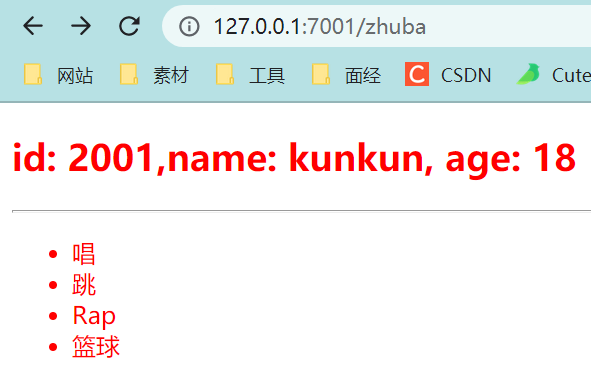
    • 使用静态资源 在.html中

    和正常使用一致
    ![image.png](https://img-blog.csdnimg.cn/img_convert/0311595e1c4187efdc0bf07cc11a1942.png#averageHue=#efb874&clientId=u6138dc2e-c60d-4&crop=0&crop=0&crop=1&crop=1&from=paste&height=249&id=ufe8b3a72&margin=[object Object]&name=image.png&originHeight=373&originWidth=591&originalType=binary&ratio=1&rotation=0&showTitle=false&size=23337&status=done&style=none&taskId=ucc53eea3-df31-4659-b6fa-9a87b79d3c6&title=&width=394)![image.png](https://img-blog.csdnimg.cn/img_convert/54d5fb6446b3c2127b62795923069038.png#averageHue=#0d3641&clientId=u6138dc2e-c60d-4&crop=0&crop=0&crop=1&crop=1&from=paste&height=200&id=u07b83038&margin=[object Object]&name=image.png&originHeight=467&originWidth=1439&originalType=binary&ratio=1&rotation=0&showTitle=false&size=370032&status=done&style=none&taskId=u026c2b7c-3f1a-4f3c-a318-11f56b4afe9&title=&width=616)

    Cookie

    增删改查

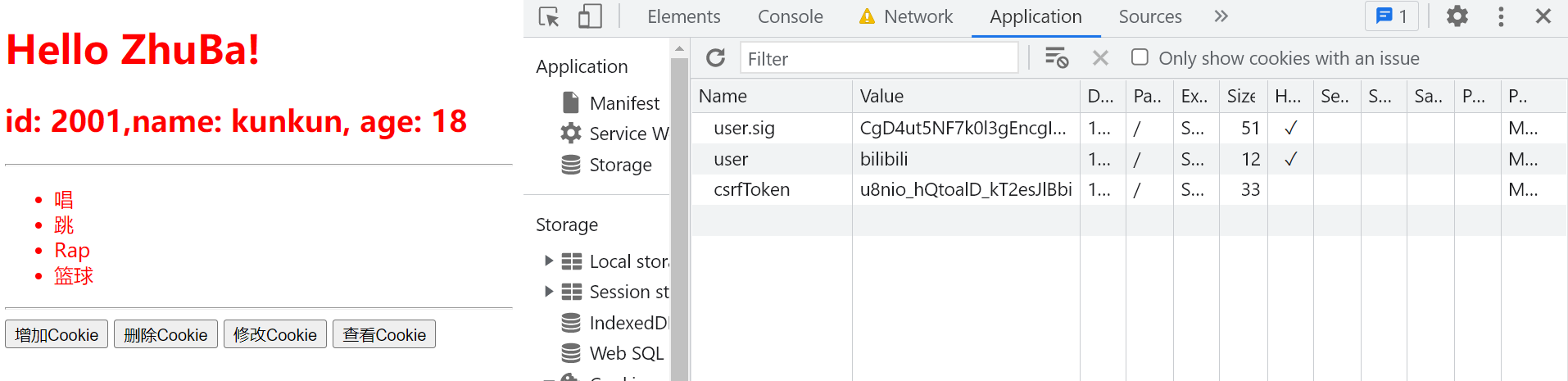
    HTTP请求是无状态的,但是在开发时,有些情况是需要知道请求的人是谁的。为了解决这个问题,HTTP协议设计了一个特殊的请求头:Cookie。服务端可以通过响应头(set-cookie)将少量数据响应给客户端,浏览器会遵循协议将数据保留,并在下一次请求同一个服务的时候带上。

    // html中插入DOM和JS方法
    <div>
        <button onclick="add()">增加Cookie</button>
        <button onclick="del()">删除Cookie</button>
        <button onclick="editor()">修改Cookie</button>
        <button onclick="show()">查看Cookie</button>
    </div>
    <script>
        function add(){
            fetch("/add",{
                method:"post",
                headers:{
                    "Content-type":"application/json"
                }
            });
        }
        function del(){
            fetch("/del",{
                method:"post",
                headers:{
                    "Content-type":"application/json"
                }
            });
        }
        function editor(){
            fetch("/editor",{
                method:"post",
                headers:{
                    "Content-type":"application/json"
                }
            });
        }
        function show(){
            fetch("/show",{
                method:"post",
                headers:{
                    "Content-type":"application/json"
                }
            });
        }
    </script>
    
    • 1
    • 2
    • 3
    • 4
    • 5
    • 6
    • 7
    • 8
    • 9
    • 10
    • 11
    • 12
    • 13
    • 14
    • 15
    • 16
    • 17
    • 18
    • 19
    • 20
    • 21
    • 22
    • 23
    • 24
    • 25
    • 26
    • 27
    • 28
    • 29
    • 30
    • 31
    • 32
    • 33
    • 34
    • 35
    • 36
    • 37
    • 38
    • 39
    • 40
    • 41
    async add() {
      const ctx = this.ctx
      ctx.cookies.set("user", "jspang.com")
      ctx.body = {
        status:200,
        data:'Cookie添加成功'
      }
    }
    async del() {
      const ctx = this.ctx
      ctx.cookies.set("user", null)
      ctx.body = {
        status:200,
        data:'Cookie删除成功'
      }
    }
    async editor() {
      const ctx = this.ctx
      ctx.cookies.set("user",'bilibili')
      ctx.body = {
        status:200,
        data:'Cookie修改成功'
      }
    }
    async show() {
      const ctx = this.ctx
      const user=ctx.cookies.get("user")
      console.log(user)
      ctx.body = {
        status:200,
        data:'Cookie显示成功'
      }
    }
    
    // 配置路由
    router.post('/add', controller.zhuba.add);
    router.post('/del', controller.zhuba.del);
    router.post('/editor', controller.zhuba.editor);
    router.post('/show', controller.zhuba.show);
    
    • 1
    • 2
    • 3
    • 4
    • 5
    • 6
    • 7
    • 8
    • 9
    • 10
    • 11
    • 12
    • 13
    • 14
    • 15
    • 16
    • 17
    • 18
    • 19
    • 20
    • 21
    • 22
    • 23
    • 24
    • 25
    • 26
    • 27
    • 28
    • 29
    • 30
    • 31
    • 32
    • 33
    • 34
    • 35
    • 36
    • 37
    • 38
    • 39

    ![image.png](https://img-blog.csdnimg.cn/img_convert/4927ff7bbe767508694b9ca9d6fc7be1.png#averageHue=#ecb06e&clientId=u975a7b25-27c8-4&crop=0&crop=0&crop=1&crop=1&from=paste&height=310&id=u0a1a3a75&margin=[object Object]&name=image.png&originHeight=465&originWidth=1914&originalType=binary&ratio=1&rotation=0&showTitle=false&size=90167&status=done&style=none&taskId=uc7786c44-0984-42c6-985b-bfc0a17f9c0&title=&width=1276)
    差:
    ![image.png](https://img-blog.csdnimg.cn/img_convert/9e5e42f0cc3e35dc91a750ec5fdb7f09.png#clientId=u975a7b25-27c8-4&crop=0&crop=0&crop=1&crop=1&from=paste&height=93&id=ud68ff80f&margin=[object Object]&name=image.png&originHeight=139&originWidth=1009&originalType=binary&ratio=1&rotation=0&showTitle=false&size=79766&status=done&style=none&taskId=ufab7fb3a-cdfe-491e-820b-fe75a8e1951&title=&width=672.6666666666666)

    配置和加密

    一些配置选项,比如有效时间、服务端操作设置和中文编写加密这些操作。
    ctx.cookies.set( ) 方法是有三个参数的,第一个参数是key,第二个参数是value,第三个参数就可以进行配置。比如你需要配置Cookie的有效时间,可以使用maxAge属性。(这个时间是毫秒。)

    1. maxAge 时效设置

    maxAge: 1000 * 2 (毫秒)

    async add(){
      const ctx = this.ctx
      ctx.cookies.set("user","jspang.com",{
        maxAge:1000*2
      })
      ctx.body = {
        status:200,
        data:'Cookie添加成功'
      }
    }
    
    • 1
    • 2
    • 3
    • 4
    • 5
    • 6
    • 7
    • 8
    • 9
    • 10
    1. HhttpOnly 是否只允许服务端来操作Cookie

    httpOnly:false

    伪造Cookie来绕过登录是黑客经常使用的一种手段,所以为了安全,Egg.js默认设置只允许服务端来操作Cookie。
    比如通过JS的方式document.cookie获取Cookie是不能获取的(需要在浏览器的控制台输入获取)。当我们想通过客户端操作Cookie时,可以通过下面的代码进行设置。

    sync add(){
      const ctx = this.ctx
      ctx.cookies.set("user","jspang.com",{
        maxAge:1000*60,
        httpOnly:false
      })
      ctx.body = {
        status:200,
        data:'Cookie添加成功'
      }
    }
    
    • 1
    • 2
    • 3
    • 4
    • 5
    • 6
    • 7
    • 8
    • 9
    • 10
    • 11
    1. encrypt 设置中文Cookie (set加密 show解密)

    加密只要在第三个参数中,加入encrypt:true,就可以加密成功。

    ctx.cookies.set("user","zhuba",{
      encrypt:true
    })
    
    • 1
    • 2
    • 3

    直接通过ctx.cookies.get( )方法获取,获取的是undefind,也就是无法获取的。这时候需要再次配置解密才可以使用, 在show( )方法里配置代码如下。

    const user=ctx.cookies.get("user",{
      encrypt:true
    })
    
    • 1
    • 2
    • 3

    Session

    Cookie和Session非常类似,Egg中的Session就存储再Cookie中,但是Session比Cookie的安全性更高。所以在开发中经常使用Cookie来保存是否登录,而用Session来保存登录信息和用户信息。

    添加、获取、删除

    添加:在add()方法中 ctx.session.username = 'zhuba'
    获取:直接获取 const username = ctx.session.username
    删除:把值赋为空即可 ctx.session.username = null
    session是支持中文的,不需要加密解密

    配置项

    config.session = {
        key :"PANG_SESS",   // 设置Key的默认值
        httpOnly:true,      // 设置服务端操作
        maxAge:1000*60  ,   // 设置最大有效时间
        renew: true,        // 页面有访问动作自动刷新session 
    }
    
    • 1
    • 2
    • 3
    • 4
    • 5
    • 6

    中间件的编写

    Egg是对Koa的二次封装,所以中间件这部分和Koa框架是一样的,也追寻洋葱圈模型。

    Egg.js约定中间件要写在/app/middleware文件夹下

    module.exports = options => {
      return async (ctx, next) => {
        if (ctx.session.counter) { // 没学数据库先使用session
          ctx.session.counter++;
        } else {
          ctx.session.counter = 1;
        }
        await next();
      }
    };
    
    • 1
    • 2
    • 3
    • 4
    • 5
    • 6
    • 7
    • 8
    • 9
    • 10

    手动挂载:config/config.default.js config.middleware = ['counter'];
    在index()中使用, 可以发现中间件现在的作用域是全局的。

    ![image.png](https://img-blog.csdnimg.cn/img_convert/19883b8923fcb38b8e3824f904f1d04c.png#averageHue=#0e3846&clientId=u975a7b25-27c8-4&crop=0&crop=0&crop=1&crop=1&from=paste&height=115&id=u25a8e104&margin=[object Object]&name=image.png&originHeight=173&originWidth=991&originalType=binary&ratio=1&rotation=0&showTitle=false&size=95136&status=done&style=none&taskId=ud3544952-47c6-4777-9960-69b38eb318f&title=&width=660.6666666666666)
    要想只在某一页面使用需要在router(路由)中配置中间件的使用,并去除全局挂载。

      const counter = app.middleware.counter()
      const {
        router,
        controller,
      } = app;
      router.get('/', counter, controller.home.index);
    
    • 1
    • 2
    • 3
    • 4
    • 5
    • 6

    在实际开发中中间件还是有很多用处的,比如日志的记录、比如所有页面的Gzip压缩展示、比如全局埋点的使用。

    Extend-application 方法扩展

    eggjs的方法的扩展和编写

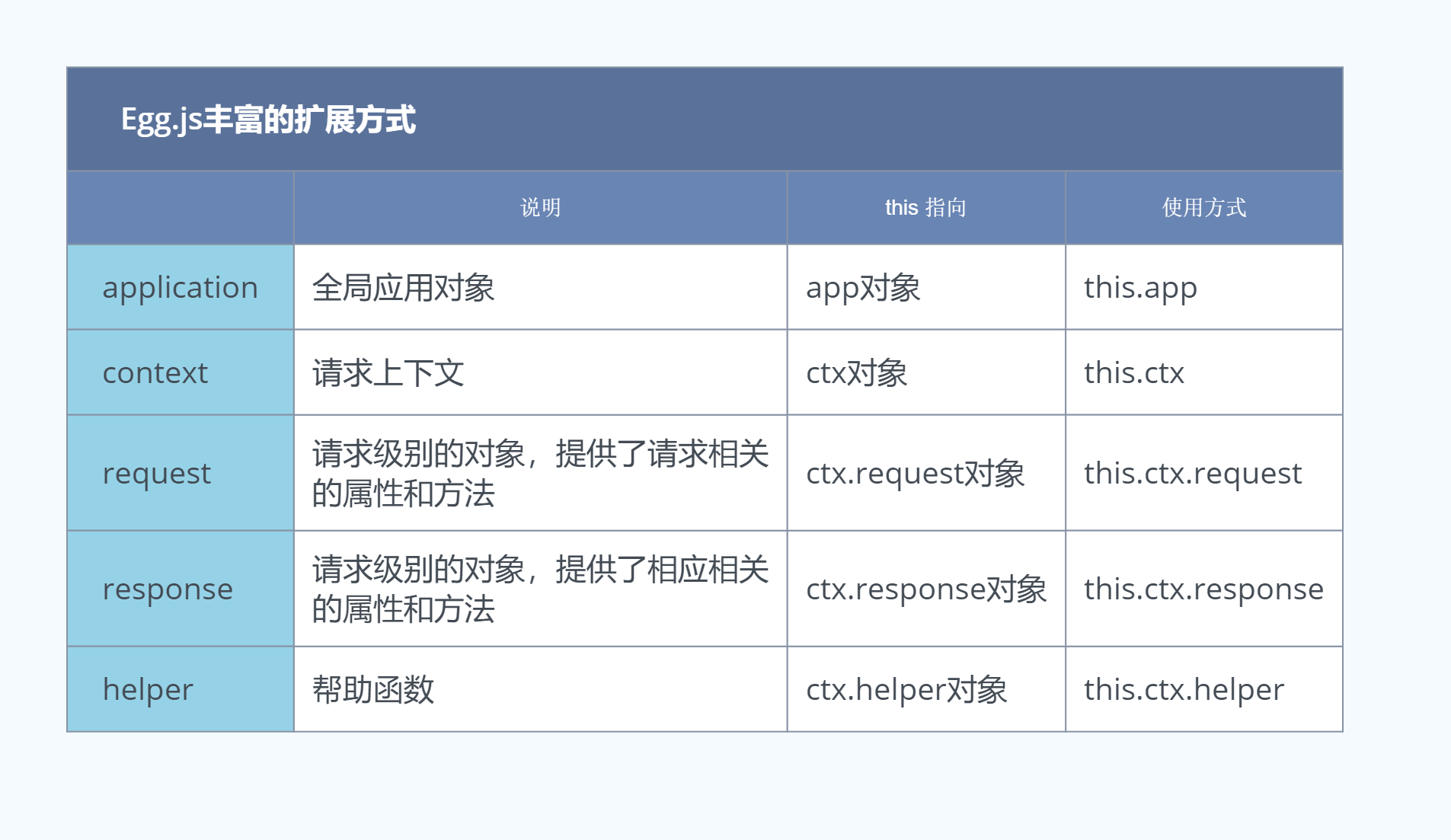
    Egg.js可以对内部的五种对象进行扩展,以下是可扩展的对象、说明、this指向和使用方式。
    ![image.png](https://img-blog.csdnimg.cn/img_convert/2bccbcb21f7f40e1bdb3fa1b67da232d.png#averageHue=#d0dbe7&clientId=u975a7b25-27c8-4&crop=0.0466&crop=0.0825&crop=0.9266&crop=0.8712&from=paste&height=347&id=uc5f3d88c&margin=[object Object]&name=image.png&originHeight=1103&originWidth=1905&originalType=url&ratio=1&rotation=0&showTitle=false&size=195785&status=done&style=none&taskId=ub31fc84e-06aa-437c-9a0b-2e0292502c0&title=&width=600)

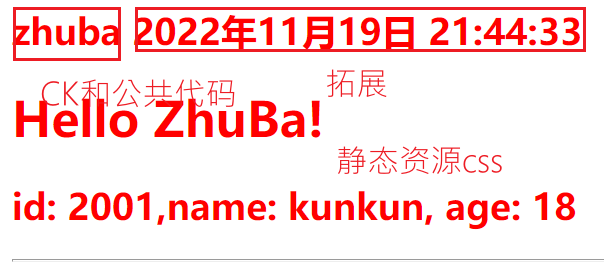
    application对象方法拓展

    按照Egg的约定,扩展的文件夹和文件的名字必须是固定的。比如要对application扩展,要在/app目录下,新建一个/extend文件夹,然后在建立一个application.js文件。

    module.exports = {
      // 方法扩展
      currentTime() {
        const current = getTime();
        return current;
      },
    };
    function getTime() {
      const now = new Date();
      const year = now.getFullYear(); // 得到年份
      const month = now.getMonth() + 1; // 得到月份
      const date = now.getDate(); // 得到日期
      const hour = now.getHours(); // 得到小时数
      const minute = now.getMinutes(); // 得到分钟数
      const second = now.getSeconds(); // 得到秒数
      const nowTime = year + '年' + month + '月' + date + '日 ' + hour + ':' + minute + ':' + second;
      return nowTime;
    }
    
    • 1
    • 2
    • 3
    • 4
    • 5
    • 6
    • 7
    • 8
    • 9
    • 10
    • 11
    • 12
    • 13
    • 14
    • 15
    • 16
    • 17
    • 18

    使用:

    // .js
    async index() {
      const { ctx ,app } = this;
      await ctx.render(
        'zhuba.html',{
          nowTime: app.currentTime()
        })
    }
    // .html 模板
    <%= nowTime %>
    
    • 1
    • 2
    • 3
    • 4
    • 5
    • 6
    • 7
    • 8
    • 9
    • 10

    ![image.png](https://img-blog.csdnimg.cn/img_convert/7284e4ed758c33988b0c973c35f000ad.png#averageHue=#fee4e3&clientId=u975a7b25-27c8-4&crop=0&crop=0&crop=1&crop=1&from=paste&height=175&id=u38584f50&margin=[object Object]&name=image.png&originHeight=262&originWidth=604&originalType=binary&ratio=1&rotation=0&showTitle=false&size=31145&status=done&style=none&taskId=ub2800a60-b356-436d-b7c3-78aa044cde1&title=&width=402.6666666666667)

    application对象属性拓展

    对属性( property) 的扩展的关键字是get,也需要写在application.js文件里。

    module.exports = {
        //方法扩展
        currentTime(){
            const current = getTime();
            return current;
        },
        //属性扩展
        get timeProp(){
            return getTime();
        }
    };
    
    • 1
    • 2
    • 3
    • 4
    • 5
    • 6
    • 7
    • 8
    • 9
    • 10
    • 11

    加入get,就会默认是一个属性,可以直接以属性的形式在controller方法里进行调用。

    Extend-context 上下文对象的方法拓展

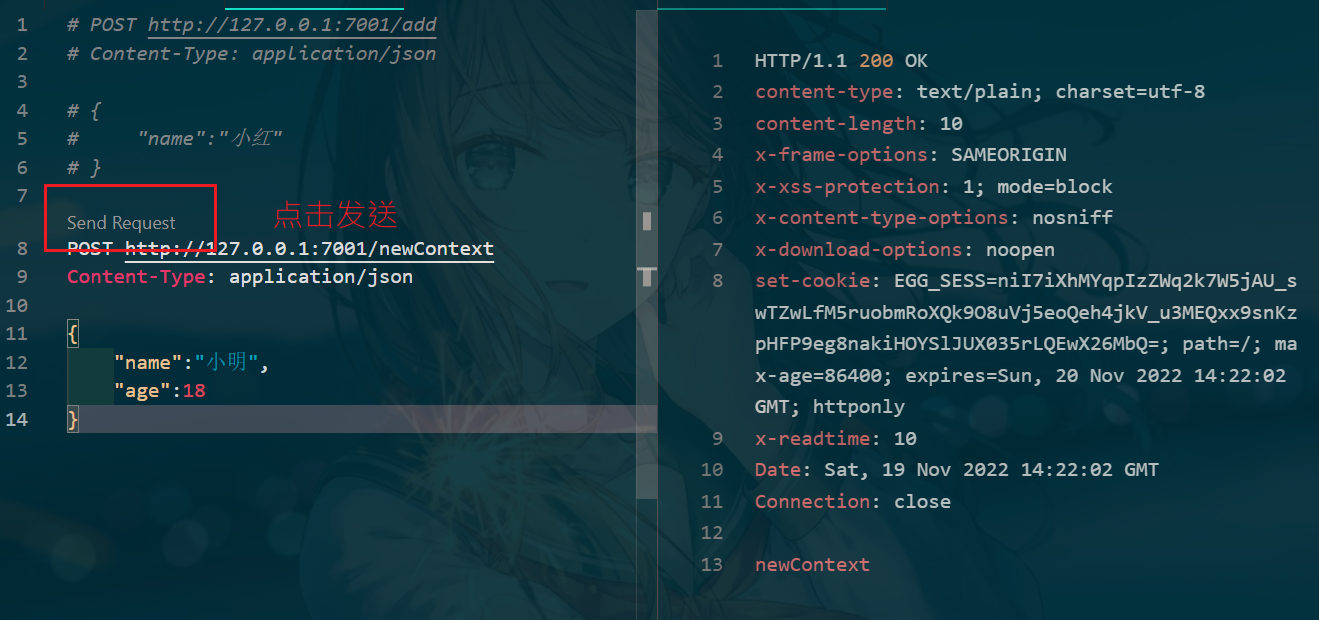
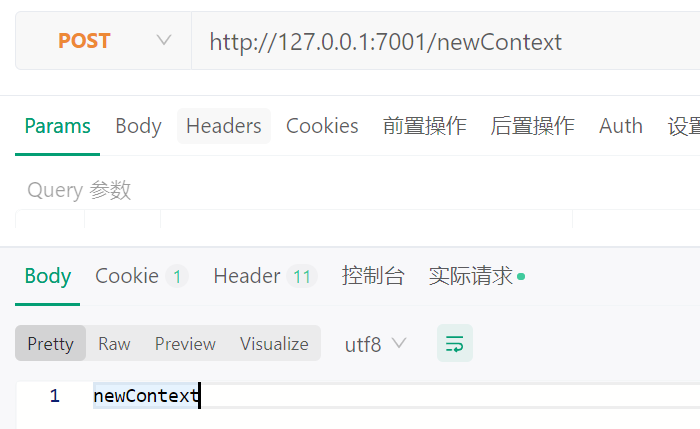
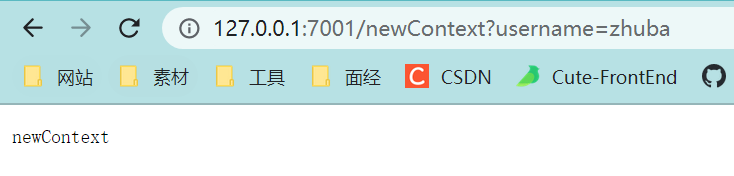
    之前通过上下文来获取传递参数时,get方法请求和post方法请求的获取方式是不同的,我们编写的方法可以让这两个请求获取参数的方法统一化,都用params( )方法。新建context.js,配置好页面和路由后使用

    // context.js
    module.exports = {
      params(key) {
        const method = this.request.method
        if (method === 'GET') {
          return key ? this.query[key] : this.query;
        }
        return key ? this.request.body[key] : this.request.body;
      },
    };
    
    // newContext zhuba.js
    async newContext() {
      const {
        ctx,
      } = this;
      const params = ctx.params();
      console.log(params);
      ctx.body = 'newContext';
    }
    // router.js
    router.get('/newContext', controller.zhuba.newContext);
    router.post('/newContext', controller.zhuba.newContext);
    
    • 1
    • 2
    • 3
    • 4
    • 5
    • 6
    • 7
    • 8
    • 9
    • 10
    • 11
    • 12
    • 13
    • 14
    • 15
    • 16
    • 17
    • 18
    • 19
    • 20
    • 21
    • 22
    • 23

    ![image.png](https://img-blog.csdnimg.cn/img_convert/c2d1c1c972ba443255eb736f5ab3a1c9.png#averageHue=#acdd9d&clientId=u975a7b25-27c8-4&crop=0&crop=0&crop=1&crop=1&from=paste&height=117&id=u9c78c3d0&margin=[object Object]&name=image.png&originHeight=176&originWidth=734&originalType=binary&ratio=1&rotation=0&showTitle=false&size=18046&status=done&style=none&taskId=u9d536e7f-6060-4e82-a3d1-54bee14adcf&title=&width=489.3333333333333)![image.png](https://img-blog.csdnimg.cn/img_convert/7e23bc369b2294d16017e71b4d17ea4d.png#averageHue=#fdfefb&clientId=u975a7b25-27c8-4&crop=0&crop=0&crop=1&crop=1&from=paste&height=286&id=ue2bed7cc&margin=[object Object]&name=image.png&originHeight=429&originWidth=700&originalType=binary&ratio=1&rotation=0&showTitle=false&size=33430&status=done&style=none&taskId=ud79b4ba8-9528-4674-8e9c-e1ca3ea9997&title=&width=466.6666666666667)![image.png](https://img-blog.csdnimg.cn/img_convert/ba068bf85be40ef61c037435effe10ac.png#averageHue=#0f3540&clientId=u975a7b25-27c8-4&crop=0&crop=0&crop=1&crop=1&from=paste&height=310&id=ue36c9d07&margin=[object Object]&name=image.png&originHeight=620&originWidth=1319&originalType=binary&ratio=1&rotation=0&showTitle=false&size=510231&status=done&style=none&taskId=u367f49f2-933a-4385-883b-856890bdf7b&title=&width=660)

    Extend-request

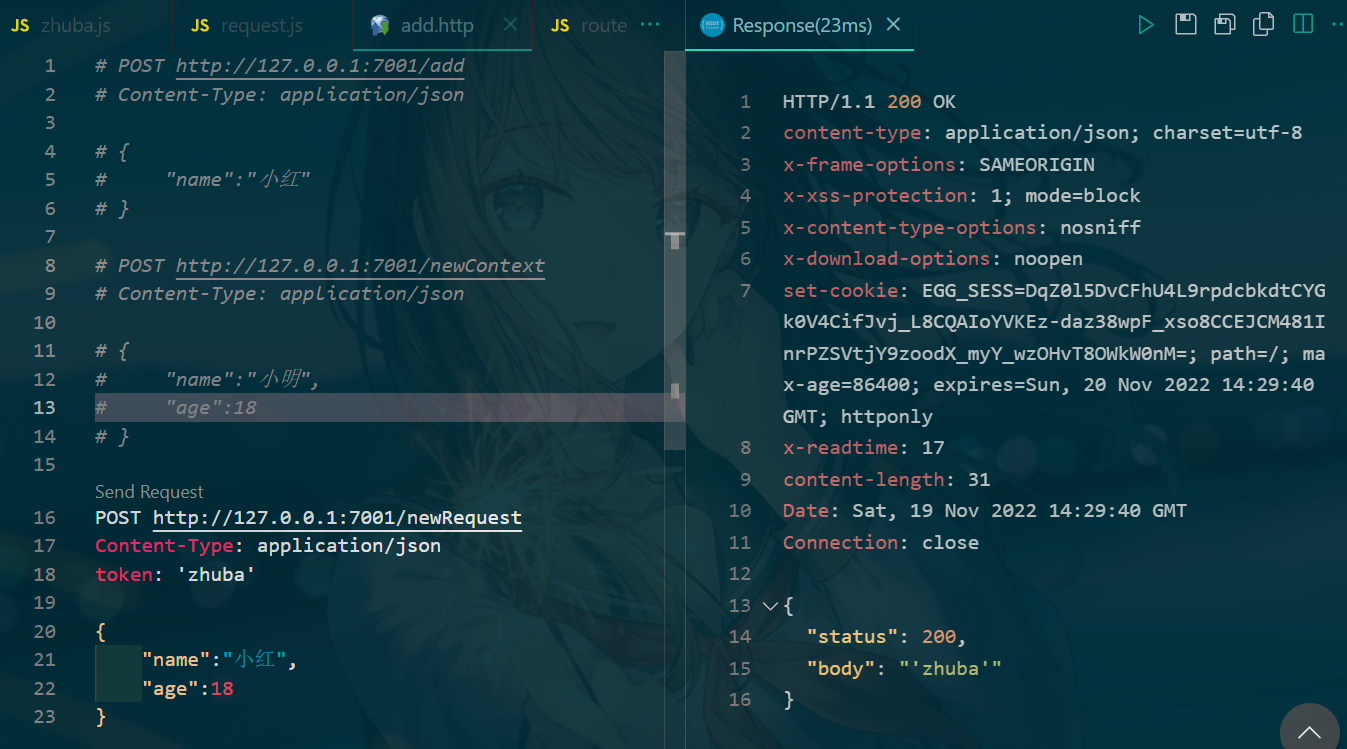
    Request 中的扩展一般是扩展的属性。比如扩展 Request 中的一个属性,通过属性直接得到请求头中的 token 属性。

    // Extend-request
      async newRequest() {
        const {
          ctx,
        } = this;
        const token = ctx.request.token;
        ctx.body = {
          status: 200,
          body: token,
        };
      }
    
    • 1
    • 2
    • 3
    • 4
    • 5
    • 6
    • 7
    • 8
    • 9
    • 10
    • 11

    Egg.js 对 Request 的扩展也需要在/app/extend文件夹下,新建一个request.js文件,然后在这个文件里写扩展属性。

    module.exports = {
      get token() {
        console.log('token', this.get('token'));
        return this.get('token');
      },
    };
    // http测试
    POST http://127.0.0.1:7001/newRequest
    Content-Type: application/json
    token: 'zhuba'
    
    {
        "name":"小红",
        "age":18
    }
    
    • 1
    • 2
    • 3
    • 4
    • 5
    • 6
    • 7
    • 8
    • 9
    • 10
    • 11
    • 12
    • 13
    • 14
    • 15

    ![image.png](https://img-blog.csdnimg.cn/img_convert/b996fd03e0de205771671d6f10b8dd4e.png#averageHue=#0e3540&clientId=u975a7b25-27c8-4&crop=0&crop=0&crop=1&crop=1&from=paste&height=499&id=u5d6a6ed8&margin=[object Object]&name=image.png&originHeight=749&originWidth=1347&originalType=binary&ratio=1&rotation=0&showTitle=false&size=618431&status=done&style=none&taskId=uc7ad11a6-2792-4057-88dd-242ecce08ee&title=&width=898)

    Extend-response、helper

    response

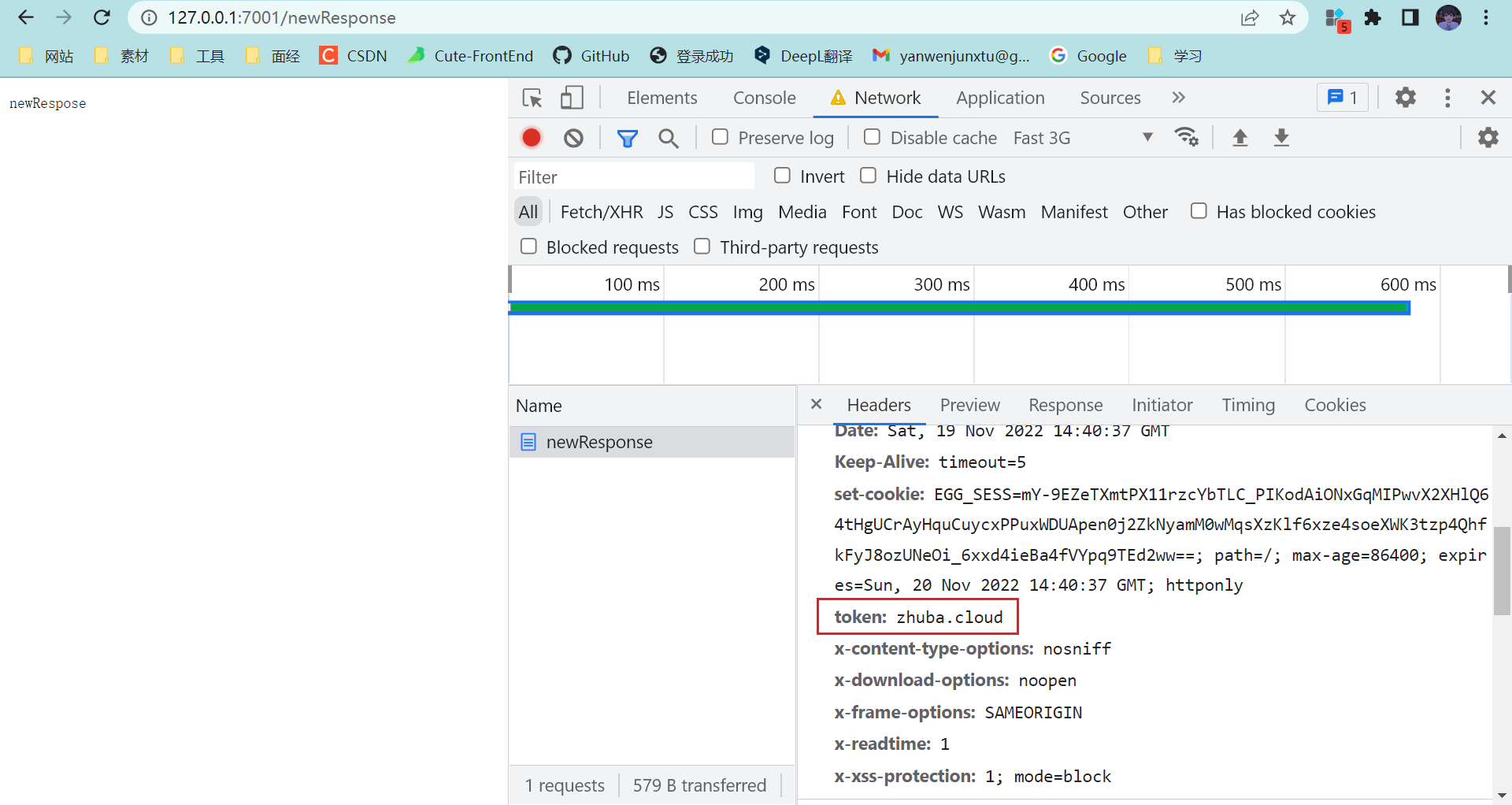
    和上一个是差不多的, 需要设置的方法以set关键字开头,然后用this.set( )就可以设置返回的token了。

    module.exports = {
      set token(token) {
        this.set('token', token);
      },
    };
    
    // zhuba.js
    // newRespose
    async newResponse() {
      const {
        ctx,
      } = this;
      ctx.response.token = 'zhuba.cloud';
      ctx.body = 'newRespose';
    }
    // router.js
    router.get('/newResponse', controller.zhuba.newResponse);
    
    • 1
    • 2
    • 3
    • 4
    • 5
    • 6
    • 7
    • 8
    • 9
    • 10
    • 11
    • 12
    • 13
    • 14
    • 15
    • 16
    • 17

    ![image.png](https://img-blog.csdnimg.cn/img_convert/39e3ead55fd6638d689057d8fa745f1d.png#averageHue=#debe84&clientId=u975a7b25-27c8-4&crop=0&crop=0&crop=1&crop=1&from=paste&height=511&id=u7dc956bb&margin=[object Object]&name=image.png&originHeight=1022&originWidth=1920&originalType=binary&ratio=1&rotation=0&showTitle=false&size=187541&status=done&style=none&taskId=u7964c0f8-5e80-4036-abd5-edaf0822659&title=&width=960)

    helper

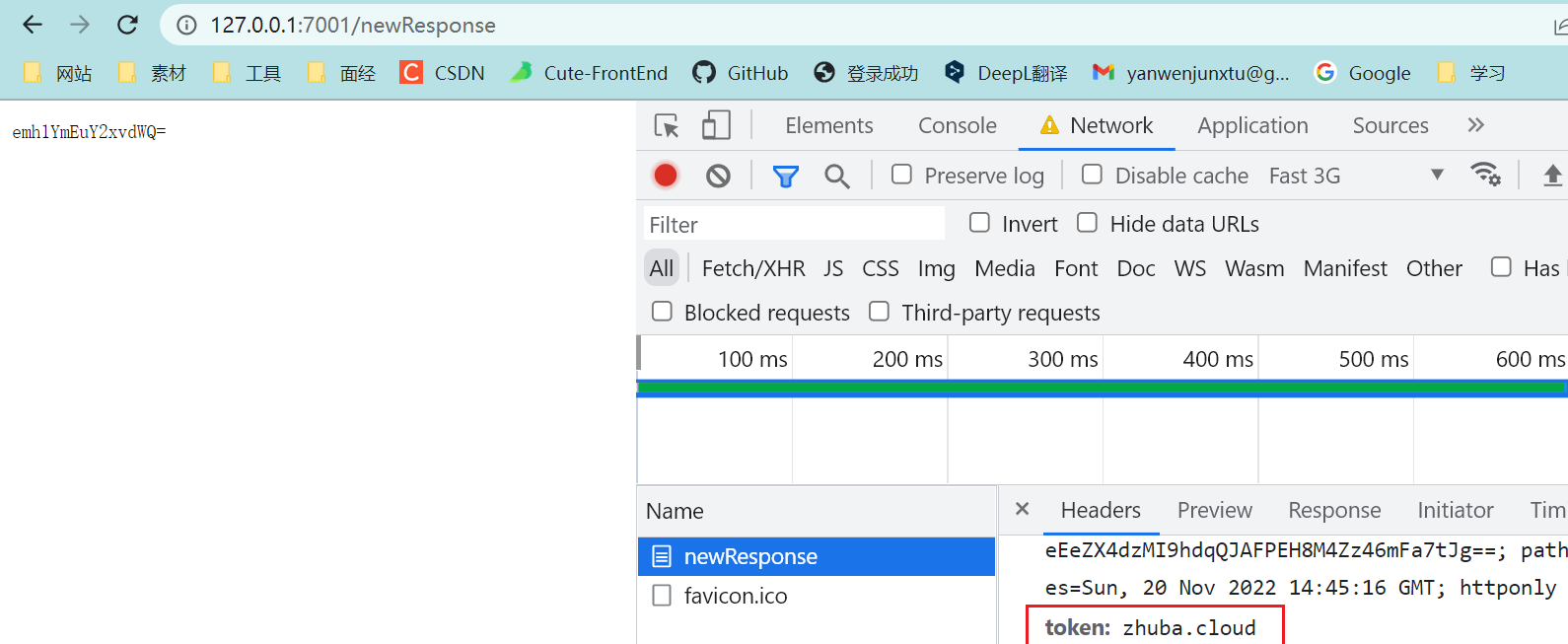
    demo是编写一个字符串进行base64加密的方法。

    module.exports = {
      base64Encode(str = '') {
        return new Buffer(str).toString('base64');
      },
    };
    
    // 重新利用一下原本的 newRespose
    // newRespose
    async newResponse() {
      const {
        ctx,
      } = this;
      ctx.response.token = 'zhuba.cloud';
      // ctx.body = 'newRespose';
      const testBase64 = ctx.helper.base64Encode('zhuba.cloud');
      ctx.body = testBase64;
    }
    
    • 1
    • 2
    • 3
    • 4
    • 5
    • 6
    • 7
    • 8
    • 9
    • 10
    • 11
    • 12
    • 13
    • 14
    • 15
    • 16
    • 17

    ![image.png](https://img-blog.csdnimg.cn/img_convert/9c70cd5a54465d8596104da345020754.png#averageHue=#ded58b&clientId=u975a7b25-27c8-4&crop=0&crop=0&crop=1&crop=1&from=paste&height=435&id=ufb3f41b7&margin=[object Object]&name=image.png&originHeight=653&originWidth=1590&originalType=binary&ratio=1&rotation=0&showTitle=false&size=104194&status=done&style=none&taskId=ub246fa63-608e-4e15-ae92-0f0c3c93535&title=&width=1060)

    定时任务编写

    定时任务需要按照Egg的约定,/app目录下,新建shedule文件夹。然后在shedule文件夹下,新建一个get_time.js文件。设置每3秒钟,在控制台输出当前时间戳。

    const Subscription = require('egg').Subscription;
    
    class GetTime extends Subscription {
      static get schedule() {
        return {
          interval: '10s',
          type: 'worker',
        };
      }
    
      async subscribe() {
        console.log(Date.now());
      }
    }
    
    module.exports = GetTime;
    
    
    • 1
    • 2
    • 3
    • 4
    • 5
    • 6
    • 7
    • 8
    • 9
    • 10
    • 11
    • 12
    • 13
    • 14
    • 15
    • 16
    • 17

    也可以使用更复杂的cron属性进行定时。cron属性有6个参数。

    *    *    *    *    *    *
    ┬    ┬    ┬    ┬    ┬    ┬
    │    │    │    │    │    |
    │    │    │    │    │    └ day of week (0 - 7) (0 or 7 is Sun)
    │    │    │    │    └───── month (1 - 12)
    │    │    │    └────────── day of month (1 - 31)
    │    │    └─────────────── hour (0 - 23)
    │    └──────────────────── minute (0 - 59)
    └───────────────────────── second (0 - 59, optional)
    
    比如设置每3秒钟,返回时间戳,可以写成下面的样子。
    
    static get schedule(){
      return {
        cron: '*/3 * * * * *',
        type:'worker'
      };
    }
    
    • 1
    • 2
    • 3
    • 4
    • 5
    • 6
    • 7
    • 8
    • 9
    • 10
    • 11
    • 12
    • 13
    • 14
    • 15
    • 16
    • 17
    • 18

    配置连接MySql数据库

    安装依赖和配置:yarn add egg-mysql -S

    // /config/plugin.js
    'use strict';
    
    /** @type Egg.EggPlugin */
    module.exports = {
      // had enabled by egg
      // static: {
      //   enable: true,
      // }
      ejs: {
        enable: true,
        package: 'egg-view-ejs',
      },
      mysql: {
        enable: true,
        package: 'egg-mysql',
      },
    };
    
    // /config/config.default.js
      // // ejs egg-mysql
      config.mysql = {
        app: true, // 是否挂载到app下面
        agent: false, // 是否挂载到代理下面
        client: {
          host: 'localhost', // 数据库地址
          port: '3306', // 端口
          user: 'root', // 用户名
          password: '12345', // 密码
          database: 'egg', // 连接的数据库名称
        },
      };
    
    • 1
    • 2
    • 3
    • 4
    • 5
    • 6
    • 7
    • 8
    • 9
    • 10
    • 11
    • 12
    • 13
    • 14
    • 15
    • 16
    • 17
    • 18
    • 19
    • 20
    • 21
    • 22
    • 23
    • 24
    • 25
    • 26
    • 27
    • 28
    • 29
    • 30
    • 31
    • 32

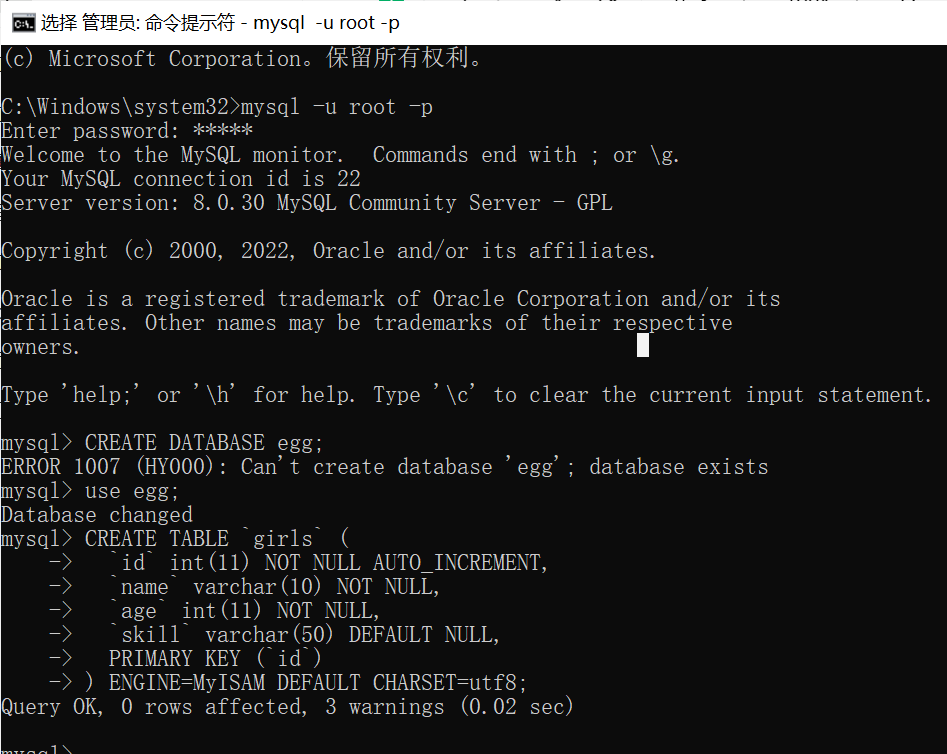
    创建数据库和表

    # 切换数据库
    use egg
    
    # 创建表
    CREATE TABLE `girls` (
      `id` int(11) NOT NULL AUTO_INCREMENT,
      `name` varchar(10) NOT NULL,
      `age` int(11) NOT NULL,
      `skill` varchar(50) DEFAULT NULL,
      PRIMARY KEY (`id`)
    ) ENGINE=MyISAM DEFAULT CHARSET=utf8;
    
    • 1
    • 2
    • 3
    • 4
    • 5
    • 6
    • 7
    • 8
    • 9
    • 10
    • 11

    ![image.png](https://img-blog.csdnimg.cn/img_convert/ea5191a48920b81c5fbaa7216c896da8.png#averageHue=#1f1e1d&clientId=u975a7b25-27c8-4&crop=0&crop=0&crop=1&crop=1&from=paste&height=503&id=u63627aab&margin=[object Object]&name=image.png&originHeight=754&originWidth=947&originalType=binary&ratio=1&rotation=0&showTitle=false&size=84827&status=done&style=none&taskId=ucefc3108-2f98-45ab-a887-fd1db86f111&title=&width=631.3333333333334)

    // router.js
    // 操作数据库
    router.get('/addGirl', controller.girlsManage.addGirl);
    router.get('/delGirl', controller.girlsManage.delGirl);
    router.get('/updateGirl', controller.girlsManage.updateGirl);
    router.get('/getGirls', controller.girlsManage.getGirls);
    
    // controller.girlsManage.js
    'use strict';
    
    const Controller = require('egg').Controller;
    
    class GirlManage extends Controller {
      async addG() {
        const {
          ctx,
        } = this;
        const params = {
          name: '小白',
          age: 18,
          skill: '头疗',
        };
        const res = await ctx.service.testdb.addG(params);
        ctx.body = '添加女孩-成功!' + res;
      }
    
      async delG() {
        const {
          ctx,
        } = this;
        const id = {
          id: 3,
        };
        const res = await ctx.service.testdb.delG(id);
        console.log(res);
        if (res) {
          ctx.body = '删除女孩-成功';
        } else {
          ctx.body = '删除失败';
        }
    
      }
    
      async updateG() {
        const {
          ctx,
        } = this;
        const params = {
          id: 3,
          name: '小白',
          age: 20,
          skill: '头疗',
        };
        const res = await ctx.service.testdb.updateG(params);
        if (res) {
          ctx.body = '修改女孩-成功';
        } else {
          ctx.body = '修改失败';
        }
      }
    
      async getG() {
        const {
          ctx,
        } = this;
        const res = await ctx.service.testdb.getG(10);
        ctx.body = '查询女孩:' + JSON.stringify(res);
      }
    }
    
    module.exports = GirlManage;
    
    // server/testdb.js
    'use strict';
    
    const Service = require('egg').Service;
    
    class testdbService extends Service {
      // // 添加数据库
      async addG(params) {
        try {
          const {
            app,
          } = this;
          const res = await app.mysql.insert('girls', params);
          return res;
        } catch (error) {
          console.log(error);
          return null;
        }
      }
    
      // // 删除数据库
      async delG(id) {
        try {
          const {
            app,
          } = this;
          const res = await app.mysql.delete('girls', id);
          return res;
        } catch (error) {
          console.log(error);
          return null;
        }
    
      }
    
      // // 修改数据库
      async updateG(params) {
        try {
          const {
            app,
          } = this;
          const res = await app.mysql.update('girls', params);
          return res;
        } catch (error) {
          console.log(error);
          return null;
        }
      }
    
      // // 查询数据库
      async getG(id = 10) {
        console.log(id); // 没有数据意思一下
        try {
          const app = this.app;
          const res = await app.mysql.select('girls');
          return res;
        } catch (error) {
          console.log(error);
          return null;
        }
      }
    }
    
    module.exports = testdbService;
    
    
    • 1
    • 2
    • 3
    • 4
    • 5
    • 6
    • 7
    • 8
    • 9
    • 10
    • 11
    • 12
    • 13
    • 14
    • 15
    • 16
    • 17
    • 18
    • 19
    • 20
    • 21
    • 22
    • 23
    • 24
    • 25
    • 26
    • 27
    • 28
    • 29
    • 30
    • 31
    • 32
    • 33
    • 34
    • 35
    • 36
    • 37
    • 38
    • 39
    • 40
    • 41
    • 42
    • 43
    • 44
    • 45
    • 46
    • 47
    • 48
    • 49
    • 50
    • 51
    • 52
    • 53
    • 54
    • 55
    • 56
    • 57
    • 58
    • 59
    • 60
    • 61
    • 62
    • 63
    • 64
    • 65
    • 66
    • 67
    • 68
    • 69
    • 70
    • 71
    • 72
    • 73
    • 74
    • 75
    • 76
    • 77
    • 78
    • 79
    • 80
    • 81
    • 82
    • 83
    • 84
    • 85
    • 86
    • 87
    • 88
    • 89
    • 90
    • 91
    • 92
    • 93
    • 94
    • 95
    • 96
    • 97
    • 98
    • 99
    • 100
    • 101
    • 102
    • 103
    • 104
    • 105
    • 106
    • 107
    • 108
    • 109
    • 110
    • 111
    • 112
    • 113
    • 114
    • 115
    • 116
    • 117
    • 118
    • 119
    • 120
    • 121
    • 122
    • 123
    • 124
    • 125
    • 126
    • 127
    • 128
    • 129
    • 130
    • 131
    • 132
    • 133
    • 134
    • 135
    • 136
    • 137

    TS版体验

    安装依赖和配置

    npm init egg --type=ts
    npm i
    
    // egg-cors 跨域包 egg-jwt token生成以及验证包
    npm install egg-cors egg-jwt --save 
    
    
    // config/plugin.ts
    import { EggPlugin } from 'egg';
    
    const plugin: EggPlugin = {
      jwt: {
        enable: true,
        package: "egg-jwt"
      },
      cors: {
        enable: true,
        package: 'egg-cors',
      }
    };
    
    export default plugin;
    
    // config/config.default.ts
    config.jwt = {
      secret: "123456"//自定义 token 的加密条件字符串
    };
    config.security = {
      csrf: {
        enable: false,
        ignoreJSON: true
      },
      domainWhiteList: ['http://localhost:8080'],//允许访问接口的白名单
    };
    config.cors = {
      origin:'*',
      allowMethods: 'GET,HEAD,PUT,POST,DELETE,PATCH'
    };
    
    
    // typings/index.d.ts
    import 'egg';
    declare module 'egg' {
        interface Application {
            jwt: any;
        }
    }
    
    • 1
    • 2
    • 3
    • 4
    • 5
    • 6
    • 7
    • 8
    • 9
    • 10
    • 11
    • 12
    • 13
    • 14
    • 15
    • 16
    • 17
    • 18
    • 19
    • 20
    • 21
    • 22
    • 23
    • 24
    • 25
    • 26
    • 27
    • 28
    • 29
    • 30
    • 31
    • 32
    • 33
    • 34
    • 35
    • 36
    • 37
    • 38
    • 39
    • 40
    • 41
    • 42
    • 43
    • 44
    • 45
    • 46
    • 47

    创建路由、编写控制器

    // router.js
    import { Application } from "egg";
    
    export default (app: Application) => {
      const { controller, router, jwt } = app;
    
      router.get("/", controller.home.index);
    
      // ----- //
      //正常路由
      router.post("/admin/login", controller.home.login);
    
      /*
       * 这里的第二个对象不再是控制器,而是 jwt 验证对象,第三个地方才是控制器
       * 只有在需要验证 token 的路由才需要第二个 是 jwt 否则第二个对象为控制器
       **/
      router.post("/admin", jwt, controller.home.index);
      // ----- //
    };


    // home.ts
    import { Controller } from "egg";
    
    export default class HomeController extends Controller {
      // public async index() {
      //   const { ctx } = this;
      //   ctx.body = await ctx.service.test.sayHi("egg");
      // }
    
      // ----- //
      // 验证登录并且生成 token
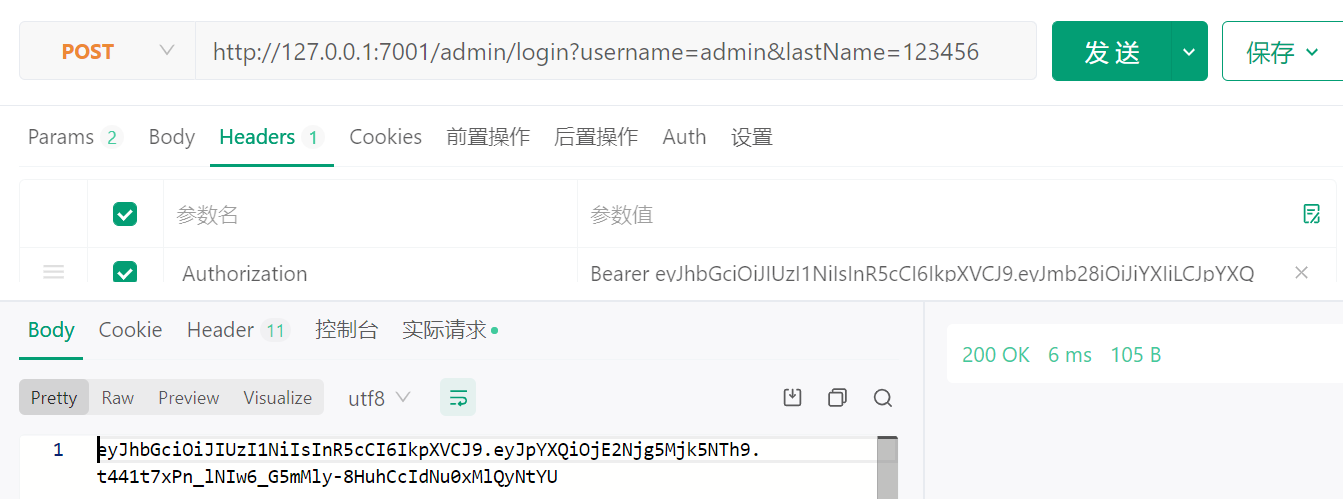
      public async login() {
        const { ctx, app } = this;
        //获取用户端传递过来的参数
        const data = ctx.request.body;
        // 进行验证 data 数据 登录是否成功
        // .........
        //成功过后进行一下操作
        //生成 token 的方式
        const token = app.jwt.sign(
          {
            username: data.username, //需要存储的 token 数据
            //......
          },
          app.config.jwt.secret
        );
        // 生成的token = eyJhbGciOiJIUzI1NiIsInR5cCI6IkpXVCJ9.eyJmb28iOiJiYXIiLCJpYXQiOjE1NjAzNDY5MDN9.B95GqH-fdRpyZIE5g_T0l8RgzNyWOyXepkLiynWqrJg
        // 返回 token 到前端
        ctx.body = token;
      }
      //访问admin数据时进行验证token,并且解析 token 的数据
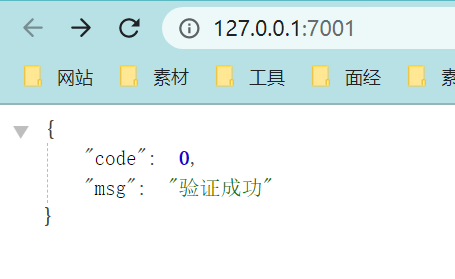
      public async index() {
        const { ctx } = this;
        console.log(ctx.state.user);
        /*
         * 打印内容为:{ username : 'admin', iat: 1560346903 }
         * iat 为过期时间,可以单独写中间件验证,这里不做细究
         * 除了 iat 之后,其余的为当时存储的数据
         **/
        ctx.body = { code: 0, msg: "验证成功" };
      }
      // ----- //
    }
    
    • 1
    • 2
    • 3
    • 4
    • 5
    • 6
    • 7
    • 8
    • 9
    • 10
    • 11
    • 12
    • 13
    • 14
    • 15
    • 16
    • 17
    • 18
    • 19
    • 20
    • 21
    • 22
    • 23
    • 24
    • 25
    • 26
    • 27
    • 28
    • 29
    • 30
    • 31
    • 32
    • 33
    • 34
    • 35
    • 36
    • 37
    • 38
    • 39
    • 40
    • 41
    • 42
    • 43
    • 44
    • 45
    • 46
    • 47
    • 48
    • 49
    • 50
    • 51
    • 52
    • 53
    • 54
    • 55
    • 56
    • 57
    • 58
    • 59
    • 60
    • 61
    • 62
    • 63
    • 64
    • 65

    axios测试 /admi/login

    axios({
      method: 'post',
      url: 'http://127.0.0.1:7001/admin',
      data: {
        username: 'admin',
        lastName: '123456'
      },
      headers:{
        // 切记 token 不要直接发送,要在前面加上 Bearer 字符串和一个空格
        'Authorization':`Bearer ${token}`
      }
    }).then(res=>{
      console.log(res.data)})
    
    • 1
    • 2
    • 3
    • 4
    • 5
    • 6
    • 7
    • 8
    • 9
    • 10
    • 11
    • 12
    • 13

    ![image.png](https://img-blog.csdnimg.cn/img_convert/1aba18ed726df958c987ba89f5397766.png#averageHue=#e5d081&clientId=u10c23fe1-01de-4&crop=0&crop=0&crop=1&crop=1&from=paste&height=186&id=u99a1c225&margin=[object Object]&name=image.png&originHeight=279&originWidth=455&originalType=binary&ratio=1&rotation=0&showTitle=false&size=14577&status=done&style=none&taskId=u136306d5-0ceb-4611-beb5-5c20a2a7d0a&title=&width=303.3333333333333)![image.png](https://img-blog.csdnimg.cn/img_convert/89b4168e521debef8c12e1fb9194e947.png#averageHue=#fbfaf5&clientId=u10c23fe1-01de-4&crop=0&crop=0&crop=1&crop=1&from=paste&height=250&id=u5d7534d5&margin=[object Object]&name=image.png&originHeight=499&originWidth=1343&originalType=binary&ratio=1&rotation=0&showTitle=false&size=77866&status=done&style=none&taskId=ua8eb430c-f9f2-42bb-9877-58fd9c432c8&title=&width=672)

    汇总

    egg-project
    ├── package.json
    ├── app.js (可选)
    ├── agent.js (可选)
    ├── app/ # 一定要按约定写
    |   ├── router.js # 用于配置 URL 路由规则
    │   ├── controller/ # 用于存放控制器(解析用户的输入、加工处理、返回结果)
    │   ├── model/ (可选) # 用于存放数据库模型
    │   ├── service/ (可选) # 用于编写业务逻辑层
    │   ├── middleware/ (可选) # 用于编写中间件
    │   ├── schedule/ (可选) # 用于设置定时任务
    │   ├── public/ (可选) # 用于放置静态资源
    │   ├── view/ (可选) # 用于放置模板文件
    │   └── extend/ (可选) # 用于框架的扩展
    │       ├── helper.js (可选)
    │       ├── request.js (可选)
    │       ├── response.js (可选)
    │       ├── context.js (可选)
    │       ├── application.js (可选)
    │       └── agent.js (可选)
    ├── config/
    |   ├── plugin.js # 用于配置需要加载的插件
    |   ├── config.{env}.js # 用于编写配置文件(env 可以是 default,prod,test,local,unittest)
    
    • 1
    • 2
    • 3
    • 4
    • 5
    • 6
    • 7
    • 8
    • 9
    • 10
    • 11
    • 12
    • 13
    • 14
    • 15
    • 16
    • 17
    • 18
    • 19
    • 20
    • 21
    • 22
    • 23
  • 相关阅读:
    Arrays 中的 asList()方法
    Windows使用模拟器启动AOSP源码编译的镜像
    使用Idea简单搭建springcloud项目
    北大肖臻老师《区块链技术与应用》系列课程学习笔记[6]比特币脚本
    《Redis设计与实现》阅读总结-4
    【嵌入式项目应用】__cJSON在单片机的使用
    ThreadLocal 源码浅析
    CoDeSys系列-1、CoDeSys了解及资料收集
    菜单子节点的写法
    Nacos安装指南
  • 原文地址:https://blog.csdn.net/qq_53904578/article/details/127949892