-
可解释的AI:用LIME解释扑克游戏
可解释的AI(XAI)一直是人们研究的一个方向,在这篇文章中,我们将看到如何使用LIME来解释一个模型是如何学习扑克规则的。在这个过程中,我们将介绍:
- 如何将LIME应用到扑克游戏中;
- LIME如何工作;
- LIME 的优点和缺点是什么。

将LIME应用到扑克游戏中
目标
我们的目标是建立一个可以预测扑克牌的模型。“五张”使一种扑克牌的游戏规则,其中的组合决定了你是否赢得了这一轮的比赛。
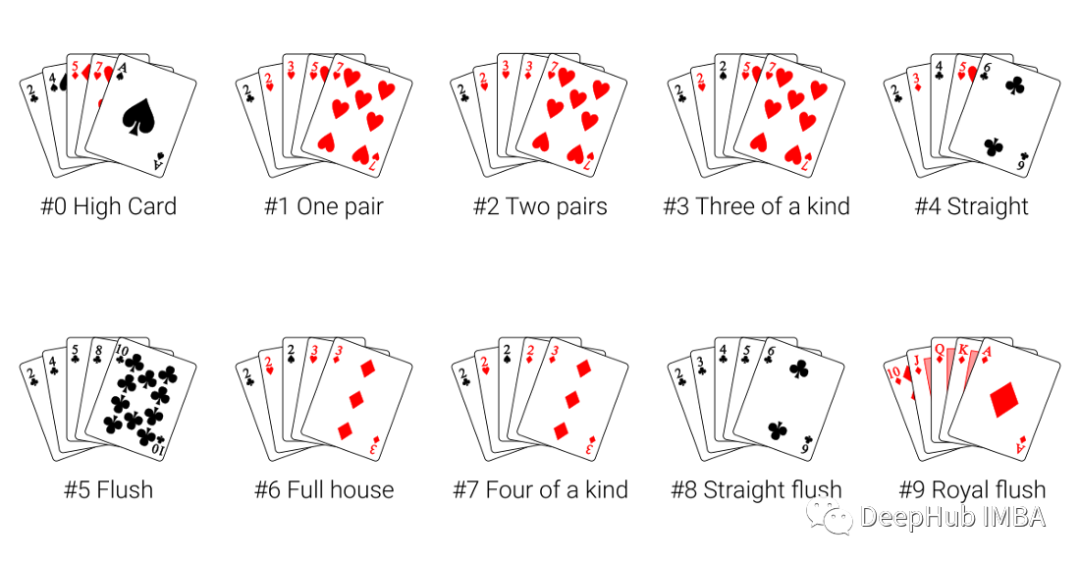
我们手里有五张牌,这里我们的目标是希望模型能预测手里有哪一手牌。
数据集
我们的数据来自UCI机器学习库(https://archive.ics.uci.edu/ml/datasets/Poker+Hand)。在数据集中,牌是通过从花色中分离出秩(卡片的值)进行编码的。

为了确保有足够的数据来训练模型,我们使用了一百万行的数据集用于训练,在下面的图片中展示了一些例子:

模型
使用硬编码决定你哪一手牌的规则是很容易的。从顺子到四张,根据规则排序即可。但是当我们想要通过一个模型来学习规则时,就比较复杂了,但是如果我们成功的训练好了这个模型,我们就可以将这种方法应用于任何扑克游戏中,不需要管理分类的基本规则是什么。
对于模型,我们选择了一个随机森林分类器。使用hyperopt对模型的超参数进行了调优。加权f1得分为0.75,可以合理预测给定5张牌作为输入的扑克牌。在本文末尾会有完整的代码
LIME
使用LIME来确定为什么我们的模型会做出这样的预测。哪些牌以及为什么主导了这次预测结果?这就是可以利用LIME的地方。
LIME通过在原始模型之上训练一个可解释模型来工作。这样,即使原始模型不能告诉你它为什么预测结果,你也可以使用LIME来确定是什么影响了它的决策。我们将使用这个逻辑来确定为什么这个随机森林分类器预测某些结果。
现在让我们看看他是如何工作的:
[外链图片转存中…(img-37HFwcEo-1668915800064)]
上面的分类器预测我们的牌是”一对“。为什么会这样预测呢?看看LIME解释:

LIME构建了一个可视化的图。在垂直轴上是特征值:显示手中的牌的数字和花色。在横轴上是各种特征值对分类的贡献。这些贡献值被缩放为相同的维度,并显示一个特征是有利于预测(绿色),还是不利于预测(红色)。
我们的第一手牌是一对,你可能会认为两个a的贡献最大。但是LIME告诉我们情况并非如此。在上面的图表中,LIME认为第3张牌对分类的贡献最大(尽管是负贡献)。如果不使用可解释的AI,我们根本没法想到这是为什么。研究为什么这个确切的特征触发了LIME模型是做进一步探索性数据分析的一个极好的切入点。
我们再继续研究另外一套:

使用LIME解释

可以看到牌的数字比花色对同花顺的分类贡献更大。对于我们的理解这简直是不可能的,因为同花顺就是要有相同的花色。但是通过使用LIME,我们可以看到实际上是卡片数字被赋予了分类更多的权重。如果不使用可解释的AI,我们很容易忽略这一点,但通过使用LIME,我们可以确保自己的假设得到验证。
LIME帮助解释为什么模型会做出这样的预测。无论使用它来确认模型是否触发了我们所期望的功能,还是作为探索性分析的一部分,LIME都是都是一个强大的方法。
通过上面的两个例子,我们可以看到LIME通过在原始模型之上训练一个可解释模型来工作。即使原始模型不能告诉你它为什么预测结果,你也可以使用LIME来确定是什么影响了它的决策。
LIME是如何工作的
为什么要使用黑盒模型呢?就模型性能而言,黑盒模型通常比白盒模型具有优势。但是它们的缺点就是可解释性较低。2016年引入了LIME作为解决黑箱模型不透明问题的方法。为了理解LIME在后台做了什么,让我们来看看LIME是如何工作的:

上图解释了LIME的概念,在使用LIME时需要考虑以下因素。
优点:
- LIME可以在广泛的数据集上很好地工作
- LIME比数学上更完整的方法(如SHAP值)要快得多
- 解释特定结果的LIME方法不会改变,即使底层黑盒模型改变了
缺点:
- LIME模型不能保证揭示所有的潜在决策
- LIME模型只能局部应用,而不能全局应用
本文代码
最后就是本文的代码了
from ctypes import alignment from functools import partial import matplotlib.pyplot as plt import numpy as np import pandas as pd from hyperopt import STATUS_OK, Trials, fmin, hp, space_eval, tpe from hyperopt.pyll import scope from lime import lime_tabular from sklearn.ensemble import RandomForestClassifier from sklearn.model_selection import train_test_split from sklearn.metrics import f1_score def objective(params:dict, X_train:pd.DataFrame, y_train:pd.DataFrame, X_val:pd.DataFrame, y_val:pd.DataFrame)->dict: """This function is used as objecive for the hyperparameter tuning Parameters ---------- params : dict parameters for the model X_train : pd.Dataframe Feature dataset for training y_train : pd.DataFrame Target variable for training X_val : pd.DataFrame Feature dataset for validation y_val : pd.DataFrame Target variable for validation Returns ------- dict loss and status for hyperopt """ # define the model model = RandomForestClassifier(random_state=1, **params) # train the model model.fit(X_train,y_train) # validate and get the score score = model.score(X_val, y_val) return {"loss": -score, "status": STATUS_OK} def find_best_parameters(seed:int=2, **kwargs)->dict: """In this function hpo is performed Parameters ---------- seed : int, optional random seed, by default 2 Returns ------- dict best paramers found by hyperopt """ # initialize trials trial = Trials() # initialize the objetve function partial_objective = partial( objective, X_train=kwargs['X_train'], y_train=kwargs['y_train'], X_val=kwargs['X_val'], y_val=kwargs['y_val'] ) # initialize the search space for hyperopt params = {'n_estimators': scope.int(hp.quniform('n_estimators', 100, 500, 10)), 'max_depth': scope.int(hp.quniform('max_depth', 5, 60, 2)), 'min_samples_leaf': scope.int(hp.quniform('min_samples_leaf', 1, 10, 1)), 'min_samples_split': scope.int(hp.quniform('min_samples_split', 2, 10, 1))} # find best params best_argmin = fmin( fn=partial_objective, space=params, algo=tpe.suggest, max_evals=50, trials=trial, rstate=np.random.default_rng(seed), ) best_params = space_eval(params, best_argmin) return best_params # Tweak the output to make it look nicer def as_pyplot_figure( exp, classif, classes_names, instance_to_explain, label:int=1, figsize=(4, 4) ): """This function has been taked from the lime package and tweaked for this particular use case Parameters ---------- exp : _type_ lime explanation of the instance to explain classif : _type_ clssification type classes_names : _type_ names of the classrs instance_to_explain : _type_ the instance of the data which should be explained label : int, optional label for protting - of the explanation instance, by default 1 figsize : tuple, optional desired size of pyplot in tuple format, defaults to (4,4). Returns ------- _type_ figure with the explanations """ # find the explanation for a particular label exp_list = exp.as_list(label=label) fig, ax = plt.subplots(figsize=figsize) vals = [x[1] for x in exp_list] names = [x[0] for x in exp_list] # plot the contributions vals.reverse() names.reverse() colors = ["green" if x > 0 else "red" for x in vals] pos = np.arange(len(exp_list)) + 0.5 ax.barh(pos, vals, align="center", color=colors) ax.set_yticks(pos, labels=names) limit = max(abs(min(vals)), abs(max(vals))) ax.set_xlim(left=-limit, right=limit) ax.set_xticks([]) ax.set_xlabel("Contribution") # Add second axis with the values of the cards suits = {1: "\u2661", 2: "\u2660", 3: "\u2662", 4: "\u2663"} ranks = { 1: "Ace", 2: "Two", 3: "Three", 4: "Four", 5: "Five", 6: "Six", 7: "Seven", 8: "Eight", 9: "Nine", 10: "Ten", 11: "Jack", 12: "Queen", 13: "King", } # etract the data from the explanation list_figures = [] for i in exp_list: if "S" in i[0]: if '=' in i[0]: # logic for categorical new_string = i[0][i[0].index("S") :] extract = int(new_string[ new_string.index("=")+1:]) list_figures.append(suits[extract]) else: # logic for continuous variables new_string = i[0][i[0].index("S") :] extract = new_string[: new_string.index(" ")] list_figures.append(suits[instance_to_explain.loc[extract]]) elif "R" in i[0]: if '=' in i[0]: # logic for categorical new_string = i[0][i[0].index("R") :] extract = int(new_string[ new_string.index("=")+1:]) list_figures.append(ranks[extract]) else: # logic for continous variables new_string = i[0][i[0].index("R") :] extract = new_string[: new_string.index(" ")] list_figures.append(ranks[instance_to_explain.loc[extract]]) # create second axis ax2 = ax.twinx() ax2.set_yticks(ticks=np.arange(len(exp_list)) + 0.5, labels=list_figures[::-1]) ax2.barh(pos, vals, align="center", color=colors) # add title if classif == "classification": title = f"Why {classes_names[label][4:]}?" else: title = "Local explanation" plt.title(title) plt.tight_layout() return fig # Read dataset df_test = pd.read_csv("./data/df_test.csv") df_train = pd.read_csv("./data/df_train.csv") # Let's take the suit and the rank (value) of each card col_names = ["S1", "R1", "S2", "R2", "S3", "R3", "S4", "R4", "S5", "R5", "y"] df_train.columns = col_names df_test.columns = col_names # Define our hand combinations target_labels = [ "0 - High card", "1 - One pair", "2 - Two pairs", "3 - Three of a kind", "4 - Straight", "5 - Flush", "6 - Full house", "7 - Four of a kind", "8 - Straight flush", "9 - Royal flush", ] # get the training and validation sets y = df_train["y"] X = df_train.drop(columns="y") X_train, X_val, y_train, y_val = train_test_split( X, y, test_size=0.3, random_state=1 ) # find best parameters best = find_best_parameters(X_train=X_train, X_val=X_val, y_train=y_train, y_val=y_val) # Get test data y_test = df_test["y"] X_test = df_test.drop(columns="y") # Get train data y_train = df_train["y"] X_train = df_train.drop(columns="y") # Fit with a black-box model on full train dataset model = RandomForestClassifier(random_state=42, **best) model.fit(X_train, y_train) # get the F1-score of the model on the test set y_pred = model.predict(X_test) f1score = f1_score(y_test, y_pred, average='weighted') # define instances to explain (any instance from train / test can be taken here) instance_1 = pd.Series({'S1': 2, 'R1': 2, 'S2': 4, 'R2': 3, 'S3': 4, 'R3': 7, 'S4': 4, 'R4': 1, 'S5': 2, 'R5': 1}) instance_2 = pd.Series({'S1': 4, 'R1': 2, 'S2': 4, 'R2': 3, 'S3': 4, 'R3': 4, 'S4': 4, 'R4': 5, 'S5': 4, 'R5': 10}) # initialise LIME explainer = lime_tabular.LimeTabularExplainer( training_data=np.array(X_train), feature_names=X_train.columns, class_names=target_labels, mode="classification", categorical_features= [i for i in range(10)] ) for instance_to_explain, label in zip([instance_1, instance_2], [1, 5]): # create explanation exp = explainer.explain_instance( data_row=instance_to_explain, predict_fn=model.predict_proba, num_features=10, labels=[label] ) # visualize: using lime show_in_noteboook() exp.show_in_notebook(show_table=True) # visualize using the custom visualization as_pyplot_figure(exp=exp, classif="classification", classes_names=target_labels, instance_to_explain=instance_to_explain, label=label);- 1
- 2
- 3
- 4
- 5
- 6
- 7
- 8
- 9
- 10
- 11
- 12
- 13
- 14
- 15
- 16
- 17
- 18
- 19
- 20
- 21
- 22
- 23
- 24
- 25
- 26
- 27
- 28
- 29
- 30
- 31
- 32
- 33
- 34
- 35
- 36
- 37
- 38
- 39
- 40
- 41
- 42
- 43
- 44
- 45
- 46
- 47
- 48
- 49
- 50
- 51
- 52
- 53
- 54
- 55
- 56
- 57
- 58
- 59
- 60
- 61
- 62
- 63
- 64
- 65
- 66
- 67
- 68
- 69
- 70
- 71
- 72
- 73
- 74
- 75
- 76
- 77
- 78
- 79
- 80
- 81
- 82
- 83
- 84
- 85
- 86
- 87
- 88
- 89
- 90
- 91
- 92
- 93
- 94
- 95
- 96
- 97
- 98
- 99
- 100
- 101
- 102
- 103
- 104
- 105
- 106
- 107
- 108
- 109
- 110
- 111
- 112
- 113
- 114
- 115
- 116
- 117
- 118
- 119
- 120
- 121
- 122
- 123
- 124
- 125
- 126
- 127
- 128
- 129
- 130
- 131
- 132
- 133
- 134
- 135
- 136
- 137
- 138
- 139
- 140
- 141
- 142
- 143
- 144
- 145
- 146
- 147
- 148
- 149
- 150
- 151
- 152
- 153
- 154
- 155
- 156
- 157
- 158
- 159
- 160
- 161
- 162
- 163
- 164
- 165
- 166
- 167
- 168
- 169
- 170
- 171
- 172
- 173
- 174
- 175
- 176
- 177
- 178
- 179
- 180
- 181
- 182
- 183
- 184
- 185
- 186
- 187
- 188
- 189
- 190
- 191
- 192
- 193
- 194
- 195
- 196
- 197
- 198
- 199
- 200
- 201
- 202
- 203
- 204
- 205
- 206
- 207
- 208
- 209
- 210
- 211
- 212
- 213
- 214
- 215
- 216
- 217
- 218
- 219
- 220
- 221
- 222
- 223
- 224
- 225
- 226
- 227
- 228
- 229
- 230
- 231
- 232
- 233
- 234
- 235
- 236
- 237
- 238
- 239
- 240
- 241
- 242
- 243
- 244
- 245
- 246
- 247
- 248
- 249
- 250
- 251
- 252
- 253
- 254
- 255
- 256
- 257
- 258
- 259
- 260
- 261
- 262
- 263
- 264
- 265
- 266
- 267
- 268
- 269
- 270
- 271
- 272
- 273
- 274
- 275
- 276
- 277
- 278
- 279
- 280
- 281
- 282
- 283
- 284
- 285
- 286
如果你需要你也可以在这里找到它
https://avoid.overfit.cn/post/ede90a9bd23441df902af055b1858353
作者:Olga Konstantinova
-
相关阅读:
jinja2.exceptions.UndefinedError: ‘None‘ has no attribute ‘id‘
K_A08_001 基于 STM32等单片机驱动L298N模块按键控制直流电机启停正反转加减速
初识网络编程
Github 2024-04-24 C开源项目日报 Top9
dpdk环境搭建
基于python的图像识别
UI设计师的发展前景是否超越了平面设计?
(附源码)计算机毕业设计SSM基于的社区疫情管理系统
【设计模式】单例模式 Singleton Pattern
Mindspore多机多卡AI分布式训练RuntimeError 1456
- 原文地址:https://blog.csdn.net/m0_46510245/article/details/127947157
