-
黑*头条_第6章_admin端功能开发&通用后端封装
黑*头条_第6章_admin端功能开发&通用后端封装
文章目录
admin端功能开发&通用后端封装
今日目标
目标一:能够完成admin端的登录功能
目标二:能够清晰通用后端的好处
目标三:能够完成通用后端的代码开发
目标四:熟悉前端的开发流程
1 admin端的登录功能实现
1.1 admin项目搭建
在父工程下创建模块heima-leadnews-admin
(1)拷贝多环境配置文件:
maven_dev.properties
maven_prod.properties
maven_test.properties(2)从其他微服务中靠谱pom文件中的依赖信息
(3)拷贝配置文件
application.properties
server.port=${port.admin} spring.application.name=${sn.admin}- 1
- 2
log4j2.xml
(4)创建包结构com.heima.admin 并在当前包下创建引导类
(5)在包com.heima.admin.config中引入配置:jackson、security、mysql
1.2 登录接口-后端
1.2.1接口定义
参考标准 请参考通用接口规范 接口名称 /login/in 请求DTO com.heima.model.admin.pojos.AdUser 响应DTO 返回map{token:xxx,user:{…}} 1.2.2mapper定义
(1)admin用户实体类com.heima.model.admin.pojos.AdUser
@Data public class AdUser { private Long id; private String name; private String password; private String salt; private String nickname; private String image; private String phone; private Short status; private String email; private Date loginTime; private Date createdTime; }- 1
- 2
- 3
- 4
- 5
- 6
- 7
- 8
- 9
- 10
- 11
- 12
- 13
- 14
- 15
(2)创建com.heima.model.mappers.admin.AdUserMapper接口
public interface AdUserMapper { AdUser selectByName(String name); }- 1
- 2
- 3
- 4
(3)AdUserMapper.xml
<mapper namespace="com.heima.model.mappers.admin.AdUserMapper"> <resultMap id="BaseResultMap" type="com.heima.model.admin.pojos.AdUser" > <id column="id" /> <result column="name"/> <result column="password"/> <result column="salt"/> <result column="nickname"/> <result column="image"/> <result column="phone"/> <result column="status"/> <result column="email"/> <result column="login_time" /> <result column="created_time" /> resultMap> <sql id="Base_Column_List" > id, name, password, salt, nickname, image, phone, status, email, login_time, created_time sql> <select id="selectByName" resultType="com.heima.model.admin.pojos.AdUser"> select <include refid="Base_Column_List" /> from ad_user where name = #{name} limit 1 select> mapper>- 1
- 2
- 3
- 4
- 5
- 6
- 7
- 8
- 9
- 10
- 11
- 12
- 13
- 14
- 15
- 16
- 17
- 18
- 19
- 20
- 21
- 22
- 23
- 24
1.2.3 代码编写
(1)定义com.heima.admin.service.UserLoginService
public interface UserLoginService { ResponseResult login(AdUser user); }- 1
- 2
- 3
- 4
(2)实现类UserLoginServiceImpl实现类
@Service @SuppressWarnings("all") public class UserLoginServiceImpl implements UserLoginService { @Autowired private AdUserMapper adUserMapper; @Override public ResponseResult login(AdUser user) { if (StringUtils.isEmpty(user.getName())&&StringUtils.isEmpty(user.getPassword())) { return ResponseResult.errorResult(AppHttpCodeEnum.PARAM_REQUIRE,"用户名和密码不能为空"); } AdUser adUser = adUserMapper.selectByName(user.getName()); if(adUser==null){ return ResponseResult.errorResult(AppHttpCodeEnum.DATA_NOT_EXIST,"用户不存在"); }else{ if(user.getPassword().equalsIgnoreCase(adUser.getPassword())){ Map<String,Object> map = new HashMap<>(); adUser.setPassword(""); adUser.setSalt(""); map.put("token", AppJwtUtil.getToken(adUser)); map.put("user",adUser); return ResponseResult.okResult(map); }else{ return ResponseResult.errorResult(AppHttpCodeEnum.LOGIN_PASSWORD_ERROR); } } } }- 1
- 2
- 3
- 4
- 5
- 6
- 7
- 8
- 9
- 10
- 11
- 12
- 13
- 14
- 15
- 16
- 17
- 18
- 19
- 20
- 21
- 22
- 23
- 24
- 25
- 26
- 27
- 28
- 29
(3)定义接口api : com.heima.admin.apis.LoginControllerApi
public interface LoginControllerApi{ public ResponseResult login(AdUser user); }- 1
- 2
- 3
(4)定义controller:com.heima.admin.controller.v1.LoginController
@RestController @RequestMapping("/login") public class LoginController{ @Autowired private UserLoginService userLoginService ; @RequestMapping("/in") public ResponseResult login(@RequestBody AdUser user){ return userLoginService.login(user); } }- 1
- 2
- 3
- 4
- 5
- 6
- 7
- 8
- 9
- 10
- 11
- 12
- 13
1.3 前端项目导入
导入当天资料文件中的前端项目

1.4 登录功能-前端
1.4.1 定义api
在src/constants/api.js中定义常量映射到后端请求地址
export const API_USERAUTH = '/login/in' //用户认证- 1
在src/api/login.js中定义请求方法,在请求成功之后,需要把后台返回的token数据写入本地缓存
import request from '@/utils/request' import {setUser} from '@/utils/store' import { API_GETPHONECODE , API_USERAUTH , API_CAPTCHAS } from '@/constants/api' export function loginByUsername(name,password) { const data = { name,password } return request({ url: API_USERAUTH, method: 'post', data }).then(result => { if(result['code']==0){ let temp = result.data setUser({name:temp.user.name,photo:null,token:temp.token}) //设置用户的个人数据 } return result }) }- 1
- 2
- 3
- 4
- 5
- 6
- 7
- 8
- 9
- 10
- 11
- 12
- 13
- 14
- 15
- 16
- 17
- 18
- 19
- 20
1.4.2 路由调整
在src/router.js中asyncRouterMap对象的children数组中增加以下改动,以满足全局自动记录路由的功能:
设置登录为起始路由
export const asyncRouterMap = [ { path: "/", component: Layout, redirect:'/login', //默认子路由 name:'mainIndex', children:[ { path:'/index', component: () => import('@/views/dashboard/index.vue'), } ] }, { path: '/login', component: () => import('@/views/login/index.vue'), }, { path: '*', component: () => import('@/views/404.vue'), } ] var myRouter = new Router({ routes: asyncRouterMap }) export default myRouter- 1
- 2
- 3
- 4
- 5
- 6
- 7
- 8
- 9
- 10
- 11
- 12
- 13
- 14
- 15
- 16
- 17
- 18
- 19
- 20
- 21
- 22
- 23
- 24
- 25
- 26
1.4.3 实现登录功能
<template> <div class="login"> <div class="container"> <img src="@/assets/logo_index.png" class="user-avatar"> <el-form :model="ruleForm" status-icon :rules="rules" ref="ruleForm" class="login-ruleForm"> <el-form-item prop="name"> <el-input type="text" v-model="ruleForm.name" autocomplete="off" placeholder="请输入账户名"></el-input> </el-form-item> <el-form-item prop="password"> <el-input type="password" v-model="ruleForm.password" autocomplete="off" placeholder="请输入密码"></el-input> </el-form-item> <div class="allow"> <div id="myCode"></div> <el-checkbox v-model="checked"></el-checkbox>我已阅读并同意<a href="">用户协议</a>和<a href="">隐私条款</a> </div> <el-form-item class="loginBtn"> <el-button type="primary" @click="submitForm('ruleForm')">登录</el-button> </el-form-item> </el-form> </div> </div> </template> <script> import gt from '@/components/gt' //人机交互验证码 import { loginByUsername , getMobileCode , getCaptchas } from '@/api/login' export default { data() { var validateName = (rule, value, callback) => { if (value === '') { callback(new Error('请输入登录用户名')); } else { callback(); } }; var validatePass = (rule, value, callback) => { if (value === '') { callback(new Error('请输入密码')); } else { callback(); } }; return { checked: true, ruleForm: { name: '', password: '', }, rules: { name: [ { validator: validateName, trigger: 'blur' } ], password: [ { validator: validatePass, trigger: 'blur' } ], } }; }, components: { }, computed: { }, methods: { async submitForm () { let {password , name} = this.ruleForm; if(!name || !password){ this.$message({ message:'用户名和密码不能为空', type:'warning' }) return } //登录 let result = await loginByUsername(name,password) //登录 if(result.code==0){ this.$router.replace({path:'/index'}) //跳转 }else{ this.$message({ message:result.errorMessage, type:'error' }) } } } } </script> <style rel="stylesheet/scss" lang="scss" scoped> .login { background-image: url('../../assets/login_bg.jpg'); background-size: cover; height: 100vh; display: flex; justify-content: center; align-items: center; .container { background-color: #ffffff; width: 30%; padding: 30px 0; img { width: 40%; } } .login-ruleForm { padding: 25px 40px 0; .allow { text-align: left; font-size: 14px; margin-bottom: 20px; color: #999999; a { color: #3296fa; } .el-checkbox { margin-right: 10px; } } .el-form-item { margin-bottom: 20px; } .checkCode { .el-input { width: 60%; float: left; } .el-button { width: 35%; float: right; span{ width: 100%; display: inline-block; } } } .loginBtn { .el-button { width: 100%; } } } } </style>- 1
- 2
- 3
- 4
- 5
- 6
- 7
- 8
- 9
- 10
- 11
- 12
- 13
- 14
- 15
- 16
- 17
- 18
- 19
- 20
- 21
- 22
- 23
- 24
- 25
- 26
- 27
- 28
- 29
- 30
- 31
- 32
- 33
- 34
- 35
- 36
- 37
- 38
- 39
- 40
- 41
- 42
- 43
- 44
- 45
- 46
- 47
- 48
- 49
- 50
- 51
- 52
- 53
- 54
- 55
- 56
- 57
- 58
- 59
- 60
- 61
- 62
- 63
- 64
- 65
- 66
- 67
- 68
- 69
- 70
- 71
- 72
- 73
- 74
- 75
- 76
- 77
- 78
- 79
- 80
- 81
- 82
- 83
- 84
- 85
- 86
- 87
- 88
- 89
- 90
- 91
- 92
- 93
- 94
- 95
- 96
- 97
- 98
- 99
- 100
- 101
- 102
- 103
- 104
- 105
- 106
- 107
- 108
- 109
- 110
- 111
- 112
- 113
- 114
- 115
- 116
- 117
- 118
- 119
- 120
- 121
- 122
- 123
- 124
- 125
- 126
- 127
- 128
- 129
- 130
- 131
- 132
- 133
- 134
- 135
- 136
- 137
- 138
- 139
- 140
- 141
- 142
2 通用封装-后端需求分析
2.1 功能需求
后台管理系统大部分功能都是对数据进行查改删,少部分功能还有增加功能。在企业开发过程中,常常封装通用的接口来处理此类功能,以提高开发效率,但其封装过程会涉及以下几个关键点需要注意处理:
-
权限的控制(访问、数据、操作)
-
信息安全控制(SQL注入的问题)
对于部分功能需求归纳总结为以下功能点:
-
新增:能够通用插入授权的数据表数据
-
修改:能够通用修改指定的字段数据
-
删除:能够通用删除指定条件的数据
-
列表:能够通用加载不同数据表的数据,并支持条件查询、分页等
-
在通用功能中,对于以上功能可做前后置增强业务处理
-
在通用功能中,可控制不同数据表的操作权限
2.2 实现思路
【持久层】
- 通过动态SQL或者SQL拼接方式,实现通用的持久层
【业务层】
-
定义操作权限类,控制数据表的基本操作权限(是否允许CRUD),每次操作之前需要检查此表
-
每次操作之前检查当前登录人员是否有此功能操作权限(此步要与RBAC进行基础,此例不做实现)
-
参数校验(比如更新时需要查询条件)
-
参数合法性校验(放置SQL注入)
-
前置处理逻辑调用(前置结果可影响程序的继续执行,此例作为练习内容,在此步实现)
-
数据持久化操作
-
后置处理逻辑调用(后置结果可影响返回结果)
-
返回结果
3 通用封装-定义
3.1 接口定义
通用操作功能,主要实现CRUD的功能:
-
列表接口:用户加载数据表分页数据,并提供字段搜索功能
-
删除接口:用于删除满足条件的某行数据(考虑安全,每次操作只能删除一条数据)
-
修改和新增接口:用于新增和修改数据表数据
4 通用封装-后端开发
4.1 类图说明

-
CommonTableEnum:类用于定义哪些数据表可支持通用操作,及其开发的CRUD功能
-
CommonWhereDto:类用于接收前端传入的修改字段或者查询条件参数
-
CommonDto:类用于接收前端传入的接口参数(包括CRUD接口的参数)
-
CommonDao:持久层动态SQL拼接实现
-
CommonServiceimpl:类用于实现CRUD的通用逻辑处理
-
CommonController:实现通用接口的控制层定义
-
BaseCommonFilter:定义后置处理的接口方法(后置增加类的BeanName定义为CommonTableEnum名称即可)
4.2 CommonTableEnum
创建com.heima.model.admin.enums.CommonTableEnum类,基本权限的控制定义为枚举类,在后台管理系统中,涉及以下几个功能,要使用到相关数据表,可用通过操作接口实现:
-
频道/敏感词管理:对平台上的频道进行CRUD操作,因此需要对AD_CHANNEL/
AD_SENSITIVE表允许CRUD操作 -
爬虫文章审核和自媒体文章审核功能:需要加载人工审核的列表数据,并修改审核状态,所以需要开通CL_NEWS/WM_NEWS的list和修改权限
@Getter public enum CommonTableEnum { AD_CHANNEL("*",true,true,true,true), AD_SENSITIVE("*",true,true,true,true), // APP用户端 AP_ARTICLE("*",true,false,false,false), AP_ARTICLE_CONFIG("*",true,false,true,false), AP_USER("*",true,false,true,false), CL_NEWS("*",true,false,true,false), WM_NEWS("*",true,false,true,false); String filed; boolean list;//开启列表权限? boolean add;//开启增加权限? boolean update;//开启修改权限? boolean delete;//开启删除权限? CommonTableEnum(String filed,boolean list,boolean add,boolean update,boolean delete){ this.filed = filed; this.list = list; this.add = add; this.update = update; this.delete = delete; } }- 1
- 2
- 3
- 4
- 5
- 6
- 7
- 8
- 9
- 10
- 11
- 12
- 13
- 14
- 15
- 16
- 17
- 18
- 19
- 20
- 21
- 22
- 23
- 24
- 25
4.3 CommonWhereDto
创建com.heima.model.admin.dtos.CommonWhereDto类,条件封装了操作的字段filed、条件的操作类型(eq、like)、字段值value。
@Data public class CommonWhereDto { private String filed; private String type="eq"; private String value; }- 1
- 2
- 3
- 4
- 5
- 6
- 7
- 8
4.4 CommonDto
创建com.heima.model.admin.dtos.CommonDto类,封装分页、操作模式、操作对象、查询条件、修改字段等参数信息。
@Data public class CommonDto { private Integer size; private Integer page; // 操作模式add 新增,edit编辑 private String model; // 操作的对象 private CommonTableEnum name; // 查询的条件 private List<CommonWhereDto> where; // 修改的字段 private List<CommonWhereDto> sets; }- 1
- 2
- 3
- 4
- 5
- 6
- 7
- 8
- 9
- 10
- 11
- 12
- 13
- 14
- 15
4.5 BaseCommonFilter
创建com.heima.admin.service.impl.commfilter.BaseCommonFilter接口,用于定义后置处理的接口约束和公用默认方法。此定义可增加和扩展通用操作不用数据表的业务功能。
/** * 通用过滤器的过滤类 */ public interface BaseCommonFilter { void doListAfter(AdUser user,CommonDto dto); void doUpdateAfter(AdUser user,CommonDto dto); void doInsertAfter(AdUser user, CommonDto dto); void doDeleteAfter(AdUser user, CommonDto dto); /** * 获取更新字段里面的值 * @param field * @param dto * @return */ default CommonWhereDto findUpdateValue(String field,CommonDto dto){ if(dto!=null){ for (CommonWhereDto cw : dto.getSets()){ if(field.equals(cw.getFiled())){ return cw; } } } return null; } /** * 获取查询字段里面的值 * @param field * @param dto * @return */ default CommonWhereDto findWhereValue(String field,CommonDto dto){ if(dto!=null){ for (CommonWhereDto cw : dto.getWhere()){ if(field.equals(cw.getFiled())){ return cw; } } } return null; } }- 1
- 2
- 3
- 4
- 5
- 6
- 7
- 8
- 9
- 10
- 11
- 12
- 13
- 14
- 15
- 16
- 17
- 18
- 19
- 20
- 21
- 22
- 23
- 24
- 25
- 26
- 27
- 28
- 29
- 30
- 31
- 32
- 33
- 34
- 35
- 36
- 37
- 38
- 39
- 40
- 41
- 42
- 43
- 44
- 45
4.6 CommonDao
创建com.heima.admin.dao.CommonDao类,使用注解方式提供通用的列表查询方法和增删改功能,并使用$拼接字符串方式,生成动态的SQL语句。
/** * 如果在mycat分库分表的情况下,可以提供多个方法支持不同分片算法的数据CRUD,这里演示较为常用的查询,既非复合分片的CRUD实现 */ @Mapper public interface CommonDao { @Select("select * from ${tableName} limit #{start},#{size}") @ResultType(HashMap.class) List<HashMap> list(@Param("tableName") String tableName,@Param("start") int start,@Param("size") int size); @Select("select count(*) from ${tableName} ") @ResultType(Integer.class) int listCount(@Param("tableName") String tableName); @Select("select * from ${tableName} where 1=1 ${where} limit #{start},#{size}") @ResultType(HashMap.class) List<HashMap> listForWhere(@Param("tableName") String tableName,@Param("where") String where,@Param("start") int start, @Param("size") int size); @Select("select count(*) from ${tableName} where 1=1 ${where}") @ResultType(Integer.class) int listCountForWhere(@Param("tableName") String tableName,@Param("where") String where); @Update("update ${tableName} set ${sets} where 1=1 ${where}") @ResultType(Integer.class) int update(@Param("tableName") String tableName,@Param("where") String where,@Param("sets") String sets); @Insert("insert into ${tableName} (${fileds}) values (${values})") @ResultType(Integer.class) int insert(@Param("tableName") String tableName,@Param("fileds") String fileds,@Param("values") String values); @Delete("delete from ${tableName} where 1=1 ${where} limit 1") @ResultType(Integer.class) int delete(@Param("tableName") String tableName,@Param("where") String where); }- 1
- 2
- 3
- 4
- 5
- 6
- 7
- 8
- 9
- 10
- 11
- 12
- 13
- 14
- 15
- 16
- 17
- 18
- 19
- 20
- 21
- 22
- 23
- 24
- 25
- 26
- 27
- 28
- 29
- 30
- 31
- 32
- 33
- 34
4.7 通用的service
创建通用的service接口
public interface CommonService { /** * 加载通用的数据列表 * @param dto * @return */ ResponseResult list(CommonDto dto); /** * 修改通用的数据列表 * @param dto * @return */ ResponseResult update(CommonDto dto); /** * 删除通用的数据列表 * @param dto * @return */ ResponseResult delete(CommonDto dto); }- 1
- 2
- 3
- 4
- 5
- 6
- 7
- 8
- 9
- 10
- 11
- 12
- 13
- 14
- 15
- 16
- 17
- 18
- 19
- 20
- 21
- 22
- 23
- 24
创建com.heima.admin.service.impl.CommonServiceImpl 类,实现通用CRUD的业务处理。
【辅助方法】
-
parseValue:方法过滤和替换引起SQL注入的关键字符;注filed和value都需要过滤
-
doFilter:用于依据name查找对应后置增加Bean,如果查得,则执行对应增强的后置处理
-
getWhere:拼接where条件字符串,支持like、between、=等条件查询
-
getSets:拼接修改的set语句的值
-
getInsertSql:拼接新增Sql的字段和值得字符串
【接口方法】
-
delete:方法必须有查询条件,删除成功之后执行doFilter方法后置处理
-
update:方法通过mode参数判别是新增还是修改,并检查对应的必要参数后调用对应方法
-
addData:判断权限后,调用数据插入方法,插入成功之后再调用后置处理
-
updateData:判断权限后,调用更新方法,修改成功后,再调用后置处理方法
-
-
list:方法判断权限后,计算分页参数和查询条件,并获取列表和总的及数,最后调用后置方法
/** * 通用操作类 */ @Service public class CommonServiceImpl implements CommonService { @Autowired CommonDao commonDao; @Autowired ApplicationContext context; /** * 删除通用的数据列表 * @param dto * @return */ public ResponseResult delete(CommonDto dto){ String where = getWhere(dto); String tableName =dto.getName().name().toLowerCase(); if(!dto.getName().isDelete()){ return ResponseResult.errorResult(AppHttpCodeEnum.NO_OPERATOR_AUTH); } if(StringUtils.isEmpty(where)){ return ResponseResult.errorResult(AppHttpCodeEnum.PARAM_INVALID,"删除条件不合法"); } int temp = commonDao.delete(tableName,where); if(temp>0){ doFilter(dto,"delete"); } return ResponseResult.okResult(temp); } /** * 修改通用的数据列表 * @param dto * @return */ public ResponseResult update(CommonDto dto){ String model = dto.getModel(); String where = getWhere(dto); String tableName =dto.getName().name().toLowerCase(); if("add".equals(model)){ if(StringUtils.isNotEmpty(where)){ return ResponseResult.errorResult(AppHttpCodeEnum.PARAM_INVALID,"新增数据不能设置条件"); }else { return addData(dto, tableName); } }else { if(StringUtils.isEmpty(where)){ return ResponseResult.errorResult(AppHttpCodeEnum.PARAM_INVALID,"修改条件不能为空"); }else { return updateData(dto, tableName, where); } } } /** * 插入一条数据 * @param dto * @return */ private ResponseResult addData(CommonDto dto,String tableName){ String[] sql = getInsertSql(dto); if(!dto.getName().isAdd()){ return ResponseResult.errorResult(AppHttpCodeEnum.NO_OPERATOR_AUTH); } if(sql==null){ return ResponseResult.errorResult(AppHttpCodeEnum.PARAM_INVALID,"传入的参数值不能为空"); } int temp =commonDao.insert(tableName,sql[0],sql[1]); if(temp>0){ doFilter(dto,"add"); } return ResponseResult.okResult(temp); } /** * 更新一条数据 * @param dto * @return */ private ResponseResult updateData(CommonDto dto,String tableName,String where){ String sets = getSets(dto); if(!dto.getName().isUpdate()){ return ResponseResult.errorResult(AppHttpCodeEnum.NO_OPERATOR_AUTH); } if(StringUtils.isEmpty(sets)){ return ResponseResult.errorResult(AppHttpCodeEnum.PARAM_INVALID,"修改的参数值不能为空"); } int temp = commonDao.update(tableName,where,sets); if(temp>0){ doFilter(dto,"update"); } return ResponseResult.okResult(temp); } /** * 通用列表加载方法 * @param dto * @return */ public ResponseResult list(CommonDto dto){ if(!dto.getName().isList()){ return ResponseResult.errorResult(AppHttpCodeEnum.NO_OPERATOR_AUTH); } String where = getWhere(dto); String tableName =dto.getName().name().toLowerCase(); List<?> list = null; int total = 0; int start = (dto.getPage()-1)*dto.getSize(); if(start<-1)start=0; if(StringUtils.isEmpty(where)){ list = commonDao.list(tableName,start,dto.getSize()); total = commonDao.listCount(tableName); }else{ list = commonDao.listForWhere(tableName,where,start,dto.getSize()); total = commonDao.listCountForWhere(tableName,where); } Map map = Maps.newHashMap(); map.put("list",list); map.put("total",total); doFilter(dto,"list"); return ResponseResult.okResult(map); } /** * 拼接查询条件 * @param dto * @return */ private String getWhere(CommonDto dto){ StringBuffer where = new StringBuffer(); if(dto.getWhere()!=null){ dto.getWhere().stream().forEach(w->{ // 字段不为空,并且字段和值不能相等(防止凭借真条件) if(StringUtils.isNotEmpty(w.getFiled())&&StringUtils.isNotEmpty(w.getValue())&&!w.getFiled().equalsIgnoreCase(w.getValue())) { String tempF = parseValue(w.getFiled()); String tempV = parseValue(w.getValue()); if(!tempF.matches("\\d*")&&!tempF.equalsIgnoreCase(tempV)) { if ("eq".equals(w.getType())) { where.append(" and ").append(tempF).append("=\'").append(tempV).append("\'"); } if ("like".equals(w.getType())) { where.append(" and ").append(tempF).append(" like \'%").append(tempV).append("%\'"); } if ("between".equals(w.getType())) { String temp[] = tempV.split(","); where.append(" and ").append(tempF).append(temp[0]).append(" and ").append(temp[1]); } } } }); } return where.toString(); } /** * 拼接修改条件 * @param dto * @return */ private String getSets(CommonDto dto){ StringBuffer sets = new StringBuffer(); AtomicInteger count = new AtomicInteger(); if(dto.getSets()!=null){ dto.getSets().stream().forEach(w->{ if(StringUtils.isEmpty(w.getValue())){ count.incrementAndGet(); }else { String tempF = parseValue(w.getFiled()); String tempV = parseValue(w.getValue()); if(!tempF.matches("\\d*")&&!tempF.equalsIgnoreCase(tempV)) { if (sets.length() > 0) { sets.append(","); } sets.append(tempF).append("=\'").append(tempV).append("\'"); } } }); } if(count.get()>0){ return null; } return sets.toString(); } /** * 拼接插入字符串 * @param dto * @return */ private String[] getInsertSql(CommonDto dto){ StringBuffer fileds = new StringBuffer(); StringBuffer values = new StringBuffer(); AtomicInteger count = new AtomicInteger(); if(dto.getSets()!=null){ dto.getSets().stream().forEach(w->{ if(StringUtils.isEmpty(w.getValue())){ count.incrementAndGet(); }else { String tempF = parseValue(w.getFiled()); String tempV = parseValue(w.getValue()); if(!tempF.matches("\\d*")&&!tempF.equalsIgnoreCase(tempV)) { if (fileds.length() > 0) { fileds.append(","); values.append(","); } fileds.append(tempF); values.append("\'").append(tempV).append("\'"); } } }); } if(count.get()>0){ return null; } return new String[]{fileds.toString(),values.toString()}; } /** * SQL 单引号('),分号(;) 和 注释符号(--) * @param value * @return */ public String parseValue(String value){ if(StringUtils.isNotEmpty(value)){ return value.replaceAll(".*([';#%]+|(--)+).*", ""); } return value; } private void doFilter(CommonDto dto,String name){ try{ BaseCommonFilter baseCommonFilter = findFilter(dto); if(baseCommonFilter!=null){ AdUser adUser = AdminThreadLocalUtils.getUser(); if("insert".equals(name)){ baseCommonFilter.doInsertAfter(adUser,dto); } if("update".equals(name)){ baseCommonFilter.doUpdateAfter(adUser,dto); } if("list".equals(name)){ baseCommonFilter.doListAfter(adUser,dto); } if("delete".equals(name)){ baseCommonFilter.doDeleteAfter(adUser,dto); } } }catch (Exception e){ e.printStackTrace(); } } private BaseCommonFilter findFilter(CommonDto dto){ String name = dto.getName().name(); if(context.containsBean(name)) { return context.getBean(name, BaseCommonFilter.class); } return null; } }- 1
- 2
- 3
- 4
- 5
- 6
- 7
- 8
- 9
- 10
- 11
- 12
- 13
- 14
- 15
- 16
- 17
- 18
- 19
- 20
- 21
- 22
- 23
- 24
- 25
- 26
- 27
- 28
- 29
- 30
- 31
- 32
- 33
- 34
- 35
- 36
- 37
- 38
- 39
- 40
- 41
- 42
- 43
- 44
- 45
- 46
- 47
- 48
- 49
- 50
- 51
- 52
- 53
- 54
- 55
- 56
- 57
- 58
- 59
- 60
- 61
- 62
- 63
- 64
- 65
- 66
- 67
- 68
- 69
- 70
- 71
- 72
- 73
- 74
- 75
- 76
- 77
- 78
- 79
- 80
- 81
- 82
- 83
- 84
- 85
- 86
- 87
- 88
- 89
- 90
- 91
- 92
- 93
- 94
- 95
- 96
- 97
- 98
- 99
- 100
- 101
- 102
- 103
- 104
- 105
- 106
- 107
- 108
- 109
- 110
- 111
- 112
- 113
- 114
- 115
- 116
- 117
- 118
- 119
- 120
- 121
- 122
- 123
- 124
- 125
- 126
- 127
- 128
- 129
- 130
- 131
- 132
- 133
- 134
- 135
- 136
- 137
- 138
- 139
- 140
- 141
- 142
- 143
- 144
- 145
- 146
- 147
- 148
- 149
- 150
- 151
- 152
- 153
- 154
- 155
- 156
- 157
- 158
- 159
- 160
- 161
- 162
- 163
- 164
- 165
- 166
- 167
- 168
- 169
- 170
- 171
- 172
- 173
- 174
- 175
- 176
- 177
- 178
- 179
- 180
- 181
- 182
- 183
- 184
- 185
- 186
- 187
- 188
- 189
- 190
- 191
- 192
- 193
- 194
- 195
- 196
- 197
- 198
- 199
- 200
- 201
- 202
- 203
- 204
- 205
- 206
- 207
- 208
- 209
- 210
- 211
- 212
- 213
- 214
- 215
- 216
- 217
- 218
- 219
- 220
- 221
- 222
- 223
- 224
- 225
- 226
- 227
- 228
- 229
- 230
- 231
- 232
- 233
- 234
- 235
- 236
- 237
- 238
- 239
- 240
- 241
- 242
- 243
- 244
- 245
- 246
- 247
- 248
- 249
- 250
- 251
- 252
- 253
- 254
- 255
- 256
- 257
- 258
- 259
- 260
- 261
- 262
4.8 CommonController
创建com.heima.admin.controller.v1.CommonController类,实现Service的调用。
@RestController @RequestMapping("/api/v1/admin/common") public class CommonController{ @Autowired private CommonService commonService; @PostMapping("/list") public ResponseResult list(@RequestBody CommonDto dto) { return commonService.list(dto); } @PostMapping("/update") public ResponseResult update(@RequestBody CommonDto dto) { return commonService.update(dto); } @PostMapping("/delete") public ResponseResult delete(@RequestBody CommonDto dto) { return commonService.delete(dto); } }- 1
- 2
- 3
- 4
- 5
- 6
- 7
- 8
- 9
- 10
- 11
- 12
- 13
- 14
- 15
- 16
- 17
- 18
- 19
- 20
- 21
- 22
- 23
5 通用封装-前端需求分析
5.1 功能需求
后端已经有通用的接口了,前端相关功能页面也可提供通用的页面与对应页面进行对接,达到前后端通用性,都能提升开发效率的目的。
管理系统的页面布局和内容都较为单一和重复,基本可抽象为以下部分:
-
搜索栏:一个或多个输入搜索框,用于过滤列表中的数据
-
插入栏:是新增数据的操作入口
-
编辑窗:对数据的编辑和新增内容提供操作窗口(一般由新增、编辑等功能触发弹出)
-
列表列:控制重要信息的输出
-
行操作:不同列表数据行操作是不同的,比如有的编辑,有的数据则无编辑功能按钮
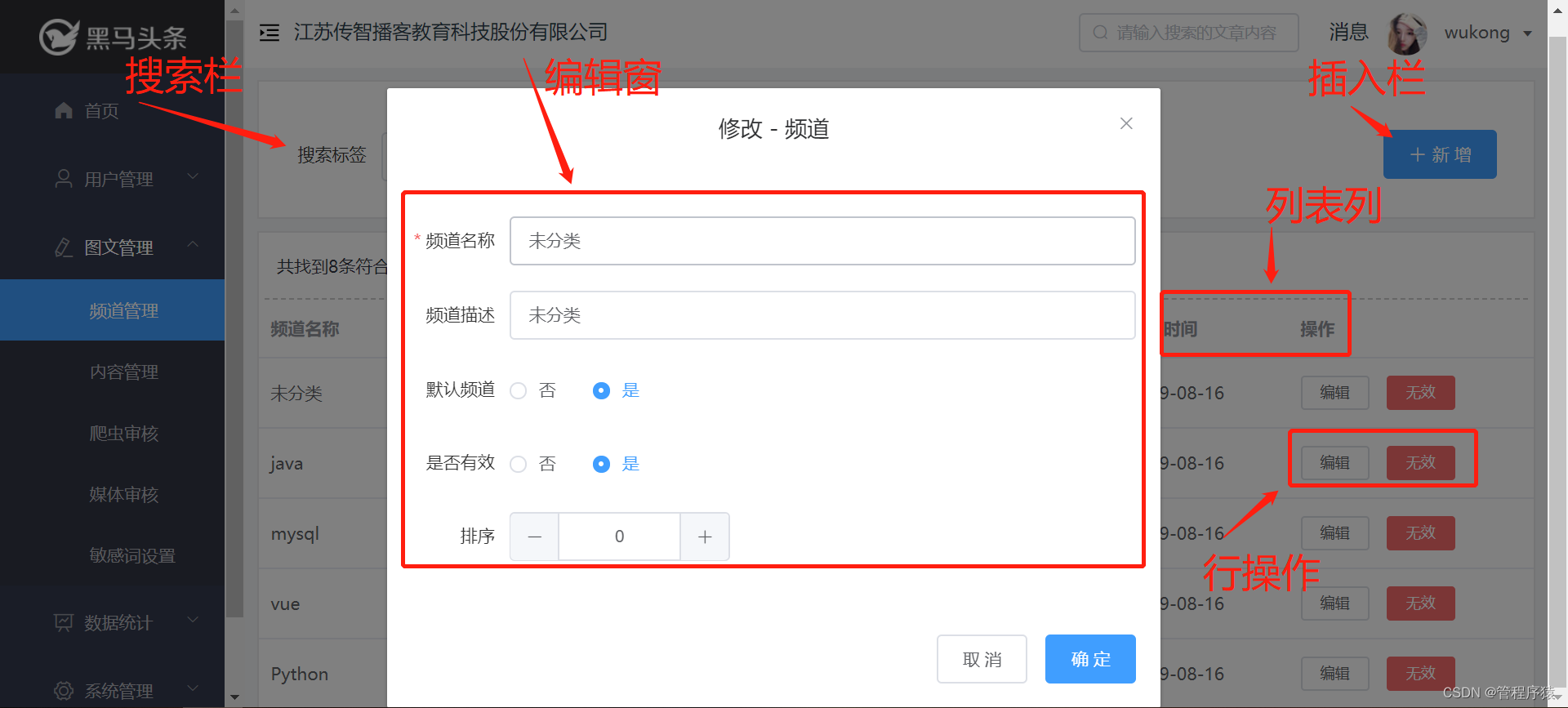
5.2 实现思路
前端实现的难点在于模型的定义,通过模型可控制编辑窗的项和值、列表列的显示、搜索栏的输入项和值。行操作通用性不强,一般作为不同页面的特殊内容定义。在本案例中通过定义一个fileds模型来同时控制列表项的显示和编辑框的项和输入值。控制搜索栏的功能感兴趣的同学可自行实现。
-
定义fileds数组模型,包括是否在列表中显示、是否在编辑中显示、其值方法、值条件范围
-
在列表显示时,检查此模型是否设置对应列的显示
-
在编辑框显示时,检查此模型是否设置对应的字段开启了编辑功能
-
-
定义params模式,用于组装请求到后端接口的列表数据
-
定义Editor组件用于处理数据新增或编辑的处理
-
定义SearchTool组件用于处理搜索栏的渲染
-
定义SearchResult组件用于处理列表数据的渲染
6 通用封装-前端开发
6.1 通用编辑框开发
创建文件srccomponents/CommEditor.vue
6.1.1 MODEL实现
外部传入的参数项:
-
title:编辑框的名称
-
fileds:通用字段列表模型
-
table:操作的数据表代表字符
-
submitSuccess:新增或修改操作成功后回调上层的方法
属性项:
-
dialogFormVisible:用于控制dialog的显示
-
model:用户标识当前的操作是新增还是修改
-
disable:控制按钮的差异显示
-
formLabelWidth:控制表单label的宽度
-
entry:数据对应,用于初始化表单数据
-
form:用于生成表单字段的绑定值
-
rules:用于生成表单的验证规则
props: ['title', 'fileds','table','submitSuccess'], data() { return { disable:false, model:'add', dialogFormVisible:false, formLabelWidth: '80px', entry:{}, form: {}, rules:{} } }- 1
- 2
- 3
- 4
- 5
- 6
- 7
- 8
- 9
- 10
- 11
- 12
6.1.2 VIEW实现
VIEW实现了input、number、select、radio四种输入类型定义,其中select、radio的可选值从fileds的options、radios字段中定义。
<template> <el-dialog ref="dialog" :title="getTitle()" :visible.sync="dialogFormVisible"> <el-form :model="form" :rules="rules" ref="commForm"> <template v-for="item in fileds"> <el-form-item v-if="item.type=='input'" :label="item.label" :label-width="formLabelWidth" :prop="item.name"> <el-input v-model="form[item.name]" :disabled="disable" :value="item.value" autocomplete="off" :placeholder="item.placeholder">el-input> el-form-item> <el-form-item v-if="item.type=='number'" :label="item.label" :label-width="formLabelWidth" :prop="item.name"> <el-input-number v-model="form[item.name]" :disabled="disable" :step="1" :value="item.value">el-input-number> el-form-item> <el-form-item v-if="item.type=='select'" :label="item.label" :label-width="formLabelWidth" :prop="item.name"> <el-select v-model="form[item.name]" :disabled="disable" :placeholder="item.placeholder" :value="item.value"> <el-option v-for="opt in item.options" :key="opt.value" :label="opt.label" :value="opt.value">el-option> el-select> el-form-item> <el-form-item v-if="item.type=='radio'" :label="item.label" :label-width="formLabelWidth" :prop="item.name"> <el-radio-group v-model="form[item.name]" :disabled="disable" :value="item.value"> <el-radio v-for="opt in item.radios" :key="opt.value" :label="opt.value">{{opt.label}}el-radio> el-radio-group> el-form-item> template> el-form> <div slot="footer" class="dialog-footer"> <el-button v-if="disable" @click="dialogFormVisible = false">关 闭el-button> <el-button v-if="!disable" @click="dialogFormVisible = false">取 消el-button> <el-button type="primary" v-if="!disable" @click="submit">确 定el-button> div> el-dialog> template>- 1
- 2
- 3
- 4
- 5
- 6
- 7
- 8
- 9
- 10
- 11
- 12
- 13
- 14
- 15
- 16
- 17
- 18
- 19
- 20
- 21
- 22
- 23
- 24
- 25
- 26
- 27
- 28
- 29
6.1.3 VM实现
通用编辑框有三种态:新增、修改、查看,因此有三个入口方法与此对应,另外除此之后,还有对传入参数解析、表单数据提交验证、数据接口提交等方法。
-
add:新增接口
-
edit:编辑数据
-
view:查看入口
-
refresh:依据当前参数,计算出rules、form
-
submit:验证表单数据,并组装接口参数
-
submitToBack:提交接口数据,并依据返回接口回调submitSuccess方法
methods:{ add : function(){ this.dialogFormVisible=true this.entry = {} this.model = 'add' this.refresh() }, edit : function(item){ this.dialogFormVisible=true this.entry = item this.model = 'edit' this.refresh() }, view : function(item){ this.disable=true this.dialogFormVisible=true this.entry = item this.model = 'view' this.refresh() }, getTitle : function(){ return (this.model=='add'?'新增':(this.model=='view'?'查看':'修改'))+' - '+this.title }, refresh : function(){ // 初始化数据 for(let i=0;i<this.fileds.length;i++){ let tmp = this.fileds[i] if(tmp.rule){ this.rules[tmp.name]=tmp.rule } // 是否有修改值entry,否则使用默认值 let val = tmp.value if(this.entry&&this.entry[tmp.name]!=undefined){ val = this.entry[tmp.name] } if(typeof val == 'boolean'){ if(val) val =1; else val = 0; } this.$set(this.form,tmp.name,val) } }, submit : function(){ this.$refs['commForm'].validate((valid) => { if (valid) { let sets = [] for(let k in this.form){ if(this.form[k]){ // 排除时间的修改 if(this.model=='add'||(this.model=='edit'&&k.indexOf("_time")==-1)){ sets.push({filed:k,value:this.form[k]}) } } } let param = { model:this.model, name:this.table, where:[{filed:'id',type:'eq',value:this.entry.id}], sets:sets } this.submitToBack(param) } else { return false; } }); }, async submitToBack(param){ let res = await updateData(param) if(res.code==0){ this.dialogFormVisible=false this.submitSuccess() this.$message({type:'success',message:this.getTitle()+'操作成功!'}); }else{ this.$message({type:'error',message:res.error_message}); } } }- 1
- 2
- 3
- 4
- 5
- 6
- 7
- 8
- 9
- 10
- 11
- 12
- 13
- 14
- 15
- 16
- 17
- 18
- 19
- 20
- 21
- 22
- 23
- 24
- 25
- 26
- 27
- 28
- 29
- 30
- 31
- 32
- 33
- 34
- 35
- 36
- 37
- 38
- 39
- 40
- 41
- 42
- 43
- 44
- 45
- 46
- 47
- 48
- 49
- 50
- 51
- 52
- 53
- 54
- 55
- 56
- 57
- 58
- 59
- 60
- 61
- 62
- 63
- 64
- 65
- 66
- 67
- 68
- 69
- 70
- 71
- 72
- 73
- 74
- 75
- 76
- 77
6.2 搜索栏开发
创建文件src/views/content_media/components/SearchTool.vue
6.2.1 MODEL实现
外部传入参数:
-
changeParam:点击搜索按钮时调用的参数搜索方法
-
addData:新增按钮点击时调用的方法
Model属性:(依据不同功能可实现多个属性字段扩展)
- name:搜索内容项
props:["changeParam","addData"], data() { return { name: '' } }- 1
- 2
- 3
- 4
- 5
- 6
6.2.2 VIEW实现
<template> <section class="filter"> <div class="filter-container"> <el-form ref="form"> <el-form-item label-width="100px" label="搜索内容"> <el-input v-model="name" placeholder="请输入内容标题" style="width: 400px;" class="filter-item" /> <el-button type="primary" @click="queryData">搜 索el-button> el-form-item> el-form> div> section> template>- 1
- 2
- 3
- 4
- 5
- 6
- 7
- 8
- 9
- 10
- 11
- 12
- 13
- 14
- 15
- 16
- 17
6.2.3 VM实现
VM较为简单,拼接好对应参数之后调用changeParam方法即可。
queryData() { let params = { filed:'title', type:'like', value: this.name } this.changeParam(params) }- 1
- 2
- 3
- 4
- 5
- 6
- 7
- 8
6.3 通用列表开发
创建文件src/views/content_media/components/SearchTool.vue
6.3.1 MODEL实现
外部传入参数较多,核心的参数如下:
-
list:列表的数据
-
fileds:列表项定义
内部属性:
-
listPage:定义分页
-
id:定义id查询条件
props: ['host','list','fileds','table','pageSize','total','changePage','changeStatus','editData','viewData'], data() { return { listPage:{ currentPage:1 }, id: { filed: 'id', type:'eq', value:'' } } }- 1
- 2
- 3
- 4
- 5
- 6
- 7
- 8
- 9
- 10
- 11
- 12
- 13
6.3.2 VIEW实现
VIEW包括分页条、数据项、操作按钮等内容。实现的思路是通过两次循环实现页面渲染,先循环list,再循环fileds渲染出每行的数据输出,并依据fileds.type进行输出值转换,比如转化成radio的lable值、时间则格式化等细节。
<template> <section class="result"> <header>{{`共找到${total}条符合条件的内容`}}header> <el-table :data="list" style="width: 100%"> <template v-for="item in fileds"> <template v-if="item.list"> <el-table-column :label="item.label" v-if="item.type=='radio'"> <template slot-scope="scope"> <template v-for="rs in item.radios"> <template v-if="rs.value==scope.row[item.name]"> <el-tag effect="plain" type="info" v-if="scope.row[item.name]==false">{{rs.label}}el-tag> <el-tag effect="plain" type="success" v-else-if="scope.row[item.name]==true">{{rs.label}}el-tag> <el-tag effect="plain" type="info" v-else-if="scope.row[item.name]==0">{{rs.label}}el-tag> <el-tag effect="plain" type="success" v-else-if="scope.row[item.name]==1">{{rs.label}}el-tag> <el-tag effect="plain" type="warning" v-else-if="scope.row[item.name]==2">{{rs.label}}el-tag> <el-tag effect="plain" type="danger" v-else-if="scope.row[item.name]==3">{{rs.label}}el-tag> <el-tag effect="plain" type="" v-else-if="scope.row[item.name]==4">{{rs.label}}el-tag> <el-tag effect="plain" type="info" v-else-if="scope.row[item.name]==rs.value">{{rs.label}}el-tag> template> template> template> el-table-column> <el-table-column :label="item.label" v-else-if="item.name.indexOf('_time')>-1"> <template slot-scope="scope"> <span>{{ dateFormat(scope.row[item.name]) }}span> template> el-table-column> <el-table-column :label="item.label" v-else> <template slot-scope="scope"> <span>{{ scope.row[item.name] }}span> template> el-table-column> template> template> <el-table-column label="操作" width="200" > <template slot-scope="scope"> <el-button size="mini" type="text" @click="operateForView(scope.row)">查看el-button> <el-button size="mini" type="text" @click="operateForDisable(scope.row.id,2,scope.$index )">拒绝el-button> <el-button size="mini" type="text" @click="operateForDisable(scope.row.id,4,scope.$index )">通过el-button> template> el-table-column> el-table> <div class="pagination"> <el-pagination layout="total,prev, pager, next" @current-change='pageChange' :current-page.sync='listPage.currentPage' :page-size="pageSize" :total="total"> el-pagination> div> section> template>- 1
- 2
- 3
- 4
- 5
- 6
- 7
- 8
- 9
- 10
- 11
- 12
- 13
- 14
- 15
- 16
- 17
- 18
- 19
- 20
- 21
- 22
- 23
- 24
- 25
- 26
- 27
- 28
- 29
- 30
- 31
- 32
- 33
- 34
- 35
- 36
- 37
- 38
- 39
- 40
- 41
- 42
- 43
- 44
- 45
- 46
- 47
- 48
- 49
- 50
- 51
- 52
- 53
- 54
- 55
- 56
- 57
- 58
- 59
- 60
- 61
- 62
- 63
- 64
- 65
6.3.3 VM实现
此组件VM中主要实现行操作的功能,因此此部分实现通用性要依据不同功能而定,但思路可借鉴如下:自媒体人工审核操作,行操作有通过、拒绝、查看三个操作按钮
-
通过或拒绝:operateForDisable组装请求参数,然后调用后台通用修改接口,操作成功之后调用changeStatus上层通知方法
-
operateForView:方法则是查看数据方法,直接通过父组件传递调用通用编辑框中的view方法
async operateForDisable(id,status,index) { this.id.value = id; let params = { name:this.table, where:[this.id], sets:[{filed:'status',value:status}] } let res = await updateData(params) if(res.code==0){ this.changeStatus(index,status); this.$message({type:'success',message:'操作成功!'}); }else{ this.$message({type:'error',message:res.errorMessage}); } }, operateForView(item) { this.viewData(item) }- 1
- 2
- 3
- 4
- 5
- 6
- 7
- 8
- 9
- 10
- 11
- 12
- 13
- 14
- 15
- 16
- 17
- 18
6.4 自媒体审核开发
创建文件src/views/content_media/index.vue
6.4.1 MODEL实现
-
params:用于定义列表数据加载的参数,where用于设置查询条件,base定义不可更改的基本条件
-
list:用于存储后端返回的列表数据
-
fileds:用于定义功能操作表的字段信息,主要属性如下:
-
list:定义是否在列表中显示
-
label:定义字段中文名称
-
name:定义字段物理表名称
-
type:定义字段值的输入类型
-
placeholder:定义字段默认输入提示
-
value:定义字段默认值
-
radios:定义字段选项值
-
data() { return { params:{ name:'WM_NEWS', page:1, size:10, base:[{type:'eq',filed:'status',value:'3'}], where:[] }, total:0, host:'', list:[], fileds:[ {list:true,label:'标题',name:'title',type:'input',placeholder:'请输入标题',rule:[ { required: true, message: '请输入标题', trigger: 'blur' }, { min: 10, max:20,message: '标题在10~50个字符', trigger: 'blur' } ]}, {list:true,label:'作者',name:'author_name',type:'input'}, {list:true,label:'类型',name:'type',type:'radio',value:0,radios:[{value:0,label:'无图'},{value:1,label:'单图'},{value:2,label:'多图'}]}, {list:true,label:'标签',name:'label',type:'input'}, {list:true,label:'定时时间',name:'publish_time',type:'input'}, {list:true,label:'创建时间',name:'created_time',type:'hidden',value:DateUtil.format13HH(new Date().getTime())}, {list:true,label:'提交时间',name:'submited_time',type:'hidden',value:DateUtil.format13HH(new Date().getTime())} ] } }- 1
- 2
- 3
- 4
- 5
- 6
- 7
- 8
- 9
- 10
- 11
- 12
- 13
- 14
- 15
- 16
- 17
- 18
- 19
- 20
- 21
- 22
- 23
- 24
- 25
- 26
6.4.2 VIEW实现
VIEW实现既是引入三个组件,并传入对应参数即可。
<template> <div> <Editor ref="editor" :fileds="fileds" title="内容" :table="this.params.name" :submitSuccess="submitSuccess"/> <search-tool :changeParam="changeParam" :addData="addData" /> <search-result ref='mySearchResult' :list="list" :host="host" :total="total" :table="this.params.name" :viewData="viewData" :changePage="changePage" :changeStatus="changeStatus" :fileds="fileds" :pageSize="params.size"/> div> template>- 1
- 2
- 3
- 4
- 5
- 6
- 7
- 8
- 9
- 10
- 11
- 12
- 13
- 14
- 15
- 16
- 17
6.4.3 VM实现
在VM中,主要实现以下方法,以串联几个组件之后的调用:
-
viewData:方法提供查看数据的串联调用
-
addData:提供新增按钮的串联调用
-
submitSuccess:提供保存和修改之后数据重新加载
-
changeParam:提供搜索条件变化后搜索功能的串联调用
-
changePage:提供分页按钮点击之后串联调用
-
loadData:加载数据列表数据
methods: { // 编辑数据 viewData : function(item){ this.$refs['editor'].view(item) }, // 新增数据 addData : function(item){ this.$refs['editor'].add() }, // 新增或者修改后的操作方法 submitSuccess:function(){ this.loadData() }, changeStatus:function(index,status){ this.loadData() }, changeParam :function(e){ this.params.page=1 this.params.where=e this.loadData() }, changePage :function(e){ this.params.page=e.page this.loadData() }, async loadData() { this.params.where=this.params.base.concat(this.params.where) let res = await loadList({...this.params}); if (res.code == 0) { this.list = res.data.list this.host = res.host this.total = res.data.total //总记录数 } else { this.$message({type: 'error', message: res.error_message}) } } }- 1
- 2
- 3
- 4
- 5
- 6
- 7
- 8
- 9
- 10
- 11
- 12
- 13
- 14
- 15
- 16
- 17
- 18
- 19
- 20
- 21
- 22
- 23
- 24
- 25
- 26
- 27
- 28
- 29
- 30
- 31
- 32
- 33
- 34
- 35
- 36
- 37
7 总结与优化
通用功能在企业实际开发中,基本良好的通用性以及扩展性,且能提高开发效率。因此是比较常见的玩法。但由于通用操作存在一定的风险,因此在使用时建议做好操作日志以及数据日志的备份处理。
在本案例中实现了核心流程功能实现,但在企业中还需要实现更多的细节处理,感兴趣的同学可抽实现进行优化,并在之后企业中应用。
【后端优化】
-
集成RBAC权限的进一步权限操作检查
-
集成行数据权限检查,进一步防范数据操作
-
设置前置处理接口,并可依据前置处理结果影响后续执行和返回结果
-
返回后置处理结果,并可返回结果
-
如果使用了Mycat,则需要优化动态SQL的节点选择注解,以提升性能
-
操作日志记录(建议必须加上)
【前端优化】
-
定义的fileds项能支持更多的表单类型,以及表单选择项可远程动态加载
-
通过fileds可自动控制搜索栏输出
-
通过fileds可控制行操作内容输出
-
提供一套通用页面可完成支持不同功能的自动渲染
-
后台需提供配置获取接口
-
对于差异化的功能可归纳前端定义,或者配置中支持动态脚本
-
-
submitSuccess:提供保存和修改之后数据重新加载
-
changeParam:提供搜索条件变化后搜索功能的串联调用
-
changePage:提供分页按钮点击之后串联调用
-
loadData:加载数据列表数据
methods: { // 编辑数据 viewData : function(item){ this.$refs['editor'].view(item) }, // 新增数据 addData : function(item){ this.$refs['editor'].add() }, // 新增或者修改后的操作方法 submitSuccess:function(){ this.loadData() }, changeStatus:function(index,status){ this.loadData() }, changeParam :function(e){ this.params.page=1 this.params.where=e this.loadData() }, changePage :function(e){ this.params.page=e.page this.loadData() }, async loadData() { this.params.where=this.params.base.concat(this.params.where) let res = await loadList({...this.params}); if (res.code == 0) { this.list = res.data.list this.host = res.host this.total = res.data.total //总记录数 } else { this.$message({type: 'error', message: res.error_message}) } } }- 1
- 2
- 3
- 4
- 5
- 6
- 7
- 8
- 9
- 10
- 11
- 12
- 13
- 14
- 15
- 16
- 17
- 18
- 19
- 20
- 21
- 22
- 23
- 24
- 25
- 26
- 27
- 28
- 29
- 30
- 31
- 32
- 33
- 34
- 35
- 36
- 37
7 总结与优化
通用功能在企业实际开发中,基本良好的通用性以及扩展性,且能提高开发效率。因此是比较常见的玩法。但由于通用操作存在一定的风险,因此在使用时建议做好操作日志以及数据日志的备份处理。
在本案例中实现了核心流程功能实现,但在企业中还需要实现更多的细节处理,感兴趣的同学可抽实现进行优化,并在之后企业中应用。
【后端优化】
-
集成RBAC权限的进一步权限操作检查
-
集成行数据权限检查,进一步防范数据操作
-
设置前置处理接口,并可依据前置处理结果影响后续执行和返回结果
-
返回后置处理结果,并可返回结果
-
如果使用了Mycat,则需要优化动态SQL的节点选择注解,以提升性能
-
操作日志记录(建议必须加上)
【前端优化】
-
定义的fileds项能支持更多的表单类型,以及表单选择项可远程动态加载
-
通过fileds可自动控制搜索栏输出
-
通过fileds可控制行操作内容输出
-
提供一套通用页面可完成支持不同功能的自动渲染
-
后台需提供配置获取接口
-
对于差异化的功能可归纳前端定义,或者配置中支持动态脚本
-
-
相关阅读:
web前端网页设计期末课程大作业:关于城市旅游的HTML网页设计 ——北京
这部分查找用的是哈希表吗?
[数据库]知识点备忘录
搜索引擎分布式系统思考实践
新生报到小程序毕业设计,新生报到管理系统设计与实现,毕设作品参考
python数据分析小案例:把招聘数据做可视化处理~
【深度学习21天学习挑战赛】2、复杂样本分类识别——卷积神经网络(CNN)服装图像分类
LuatOS-SOC接口文档(air780E)--pack - 打包和解包格式串
[附源码]SSM计算机毕业设计校园新闻管理系统JAVA
【前端】调试技巧
- 原文地址:https://blog.csdn.net/guan1843036360/article/details/127943092
