-
黑*头条_第2章_文章列表前端成形与后端变身
黑*头条_第2章_文章列表前端成形与后端变身
文章列表前端成形与后端变身
学习目标
熟悉项目前端工程结构
熟悉Weex的在移动端的好处
熟悉移动端列表页面的结构与开发过程
熟悉生产与测试环境的数据库差异
熟悉Mycat技术的开发与实战技巧
掌握分库分表的设计技巧
掌握Mycat自定义分表算法开发
1.前端工程结构
前端工程基于VUE技术,分为3个独立的项目:

- heima-leadnews-app:移动端的功能实现;
- heima-leadnews-wemedia:自媒体系统的前端实现;
- heima-leadnews-admin:管理系统的前端实现;
1.1 环境准备
-
Nodejs已安装
安装资料文件夹下的node即可
-
Cnpm、Nrm、Webpack
安装完nodejs以后会自动安装npm,但是npm的镜像源是国外的站点,所以建议使用cnpm,或者把npm的镜像源设置为taobao镜像源也是可以的
需要安装webpack 全局安装
-
Weex Toolkit
安装weex的toolkit
npm i -g weex-toolkit weex -v // 查看当前weex工具版本- 1
- 2
-
WebStorm
1.1.1 导入工程
导入资料文件夹下的原始项目heima-leadnews-app这个客户端项目即可,后续的项目随着课程的深入会依次导入其他项目,在当天资料中解压heima-leadnews-app.zip文件,拷贝到一个没有中文和空格的目录,使用web storm工具打开即可
1.1.2 测试运行
执行命令

运行效果

在命令行运行 npm run serve 默认浏览器便会到开对应网页。
也可使用Playground扫描页面上的二维码,在手机上体验网页。
注意:项目默认选用无线网络运行,如需修改,可以修改config/config.js和webpack.dev.conf.js文件中的下列代码:

注:手机扫描时,手机和电脑应该在同一局域网内。
1.2 weex 跨终端前端框架
https://weex.apache.org/zh/guide/introduction.html
Weex 致力于使开发者能基于通用跨平台的 Web 开发语言和开发经验,来构建 Android、iOS 和 Web 应用。简单来说,在集成了 WeexSDK 之后,你可以使用 JavaScript 语言和前端开发经验来开发移动应用。
1.3 工程结构说明

1.4 源码结构

-
apis :按页面存放各个页面的api文件
-
common :存放公共配置和api
-
compoents :存放公用组件
-
langs :存放国际化语言包
-
mock :存放单元测试数据
-
pages :存放页面源码
-
routers :存放路由配置源码
-
stores : 存放本地缓存源码
-
styles :存放样式源码
-
utils :存放通用工具类
1.5 WEEX UI
一个基于 Weex 的富交互、轻量级、高性能的 UI 组件库
官方文档:https://alibaba.github.io/weex-ui/#/cn/
2.文章列表前端开发
为提高开发效率,项目可使用weex-ui快速开发,选用的列表样式参考:
https://alibaba.github.io/weex-ui/#/cn/packages/wxc-tab-page/
2.1 创建文件
创建src/apis/home/api.js文件,用于封装Home页面文章数据请求
function Api(){ var vue; } Api.prototype = { setVue : function(vue){ this.vue = vue; }, // 加载数据 loaddata : function(params){ let dir = params.loaddir let url = this.getLoadUrl(dir) return new Promise((resolve, reject) => { this.vue.$request.get(url,params).then((d)=>{ resolve(d); }).catch((e)=>{ reject(e); }) }) }, // 保存展现行为数据 saveShowBehavior : function(params){ let ids = []; for(let k in params){ if(params[k]){ ids.push({id:k}); } } console.log(params) if(ids.length>0){ let url = this.vue.$config.urls.get('show_behavior') return new Promise((resolve, reject) => { this.vue.$request.post(url,JSON.stringify({equipmentId:1,articleIds:ids})).then((d)=>{ d.data=ids resolve(d); }).catch((e)=>{ reject(e); }) }) } }, // 区别请求那个URL getLoadUrl : function(dir){ let url = this.vue.$config.urls.get('load') if(dir==0) url = this.vue.$config.urls.get('loadnew') else if(dir==2) url = this.vue.$config.urls.get('loadmore') return url; } } export default new Api()- 1
- 2
- 3
- 4
- 5
- 6
- 7
- 8
- 9
- 10
- 11
- 12
- 13
- 14
- 15
- 16
- 17
- 18
- 19
- 20
- 21
- 22
- 23
- 24
- 25
- 26
- 27
- 28
- 29
- 30
- 31
- 32
- 33
- 34
- 35
- 36
- 37
- 38
- 39
- 40
- 41
- 42
- 43
- 44
- 45
- 46
- 47
- 48
- 49
- 50
- 51
- 52
创建src/pages/home/config.js文件,用于封装频道Tab页名称和样式
export default { tabTitles: [{title: '动态',id:'__dyna__'}, {title: '推荐',id:'__all__'}, { title: 'JAVA',id:1}, { title: 'Python',id:2}, {title: 'VUE',id:3}, {title: 'WEEX',id:4}, {title: '大数据',id:5}, {title: 'Docker',id:6}, {title: '其它',id:0} ], tabStyles: { bgColor: '#FFFFFF', titleColor: '#9b9b9b', activeTitleColor: '#3D3D3D', activeBgColor: '#FFFFFF', isActiveTitleBold: true, iconWidth: 70, iconHeight: 70, width: 120, height: 80, fontSize: 24, hasActiveBottom: true, activeBottomColor: '#3194ff', activeBottomHeight: 6, activeBottomWidth: 36, textPaddingLeft: 10, textPaddingRight: 10, normalBottomColor: 'rgba(0,0,0,0.4)', normalBottomHeight: 2, hasRightIcon: false, rightOffset: 100 } }- 1
- 2
- 3
- 4
- 5
- 6
- 7
- 8
- 9
- 10
- 11
- 12
- 13
- 14
- 15
- 16
- 17
- 18
- 19
- 20
- 21
- 22
- 23
- 24
- 25
- 26
- 27
- 28
- 29
- 30
- 31
- 32
- 33
- 34
2.2 Model定义
2.2.1 在src/pages/home/index.vue中定义列表Model
data: () => ({ api: null,// API shownew: false,//是否显示loadnew动画 showmore: false,//是否显示loadmore动画 tabTitles: Config.tabTitles,//频道配置 tabStyles: Config.tabStyles,//频道样式 tabList: [],//列表数据集合 tabPageHeight: 1334,//列表总高度 params: { loaddir: 1, index: 0, tag: "__all__", size: 20, max_behot_time: 1559789043, min_behot_time: 1559789043 },//列表数据请求参数 ashow: {}//列表展示行为记录表 }),- 1
- 2
- 3
- 4
- 5
- 6
- 7
- 8
- 9
- 10
- 11
- 12
- 13
- 14
- 15
- 16
- 17
- 18
2.3 实现Api
在src/apis/home/api.js中实现Api
首页API需实现load、loadnew、loadmore、show_behavior等后端接口的调用,其实现代码如下
function Api(){ var vue; } Api.prototype = { setVue : function(vue){ this.vue = vue; }, // 加载数据 loaddata : function(params){ let dir = params.loaddir let url = this.getLoadUrl(dir) return new Promise((resolve, reject) => { this.vue.$request.get(url,params).then((d)=>{ resolve(d); }).catch((e)=>{ reject(e); }) }) }, // 保存展现行为数据 saveShowBehavior : function(params){ let ids = []; for(let k in params){ if(params[k]){ ids.push({id:k}); } } console.log(params) if(ids.length>0){ let url = this.vue.$config.urls.get('show_behavior') return new Promise((resolve, reject) => { this.vue.$request.post(url,JSON.stringify({equipmentId:1,articleIds:ids})).then((d)=>{ d.data=ids resolve(d); }).catch((e)=>{ reject(e); }) }) } }, // 区别请求那个URL getLoadUrl : function(dir){ let url = this.vue.$config.urls.get('load') if(dir==0) url = this.vue.$config.urls.get('loadnew') else if(dir==2) url = this.vue.$config.urls.get('loadmore') return url; } } export default new Api()- 1
- 2
- 3
- 4
- 5
- 6
- 7
- 8
- 9
- 10
- 11
- 12
- 13
- 14
- 15
- 16
- 17
- 18
- 19
- 20
- 21
- 22
- 23
- 24
- 25
- 26
- 27
- 28
- 29
- 30
- 31
- 32
- 33
- 34
- 35
- 36
- 37
- 38
- 39
- 40
- 41
- 42
- 43
- 44
- 45
- 46
- 47
- 48
- 49
- 50
- 51
- 52
定义通用的url路径处理,common/conf.js中处理url
const config = { urls:{ baseUrl:'/toutiao', load:'api/v1/article/load', loadmore:'api/v1/article/loadmore', loadnew:'api/v1/article/loadnew', // 解决多平台问题 getBase : function(){ if(weex.config.env.platform=='Web'){ return config.urls.baseUrl; }else{ return "http://m.toutiao.com" } }, get:function(name){ let tmp = config.urls[name]; if(tmp) return config.urls.getBase()+"/"+tmp; else return config.urls.getBase()+"/"+name; } },style:{ main_bg:'#3296fa' } } export default config- 1
- 2
- 3
- 4
- 5
- 6
- 7
- 8
- 9
- 10
- 11
- 12
- 13
- 14
- 15
- 16
- 17
- 18
- 19
- 20
- 21
- 22
- 23
- 24
- 25
- 26
- 27
- 28
2.4 实现VIEW
Index.vue中template部分
VIEW包含头部功能条和文章列表组件,这两个组件采用column布局,其代码如下:
<template> <div class="wrapper"> <div class="top-body"> <Home_Bar/> div> <div class="content-body"> <wxc-tab-page ref="wxc-tab-page" :tab-titles="tabTitles" :tab-styles="tabStyles" title-type="text" :tab-page-height="tabPageHeight" @wxcTabPageCurrentTabSelected="wxcTabPageCurrentTabSelected"> <list v-for="(v,index) in tabList" :key="index" class="item-container" :style="{ height: (tabPageHeight - tabStyles.height) + 'px' }"> <refresh @refresh='loadnew' :display="shownew?'show':'hide'" class="loading"> <loading-indicator class="loading-icon">loading-indicator> <text class="loading-text">{{load_new_text}}text> refresh> <cell v-for="(item,key) in v" class="cell" @appear="show(item.id)" :key="key"> <wxc-pan-item :ext-id="'1-' + (v) + '-' + (key)" :url="item.id" @wxcPanItemClicked="wxcPanItemClicked(item.id)" @wxcPanItemPan="wxcPanItemPan"> <Item0 v-if="item.type==0" :data="item"/> <Item1 v-if="item.type==1" :data="item"/> <Item3 v-if="item.type==3" :data="item"/> wxc-pan-item> cell> <loading @loading="load" :display="showmore?'show':'hide'" class="loading"> <loading-indicator class="loading-icon">loading-indicator> <text class="loading-text">{{load_more_text}}text> loading> list> wxc-tab-page> div> div> template>- 1
- 2
- 3
- 4
- 5
- 6
- 7
- 8
- 9
- 10
- 11
- 12
- 13
- 14
- 15
- 16
- 17
- 18
- 19
- 20
- 21
- 22
- 23
- 24
- 25
- 26
- 27
- 28
- 29
- 30
- 31
- 32
- 33
- 34
样式style
- 1
- 2
- 3
- 4
- 5
- 6
- 7
- 8
- 9
- 10
- 11
- 12
- 13
- 14
- 15
- 16
- 17
- 18
- 19
- 20
- 21
- 22
- 23
- 24
- 25
- 26
- 27
2.5 实现VM
核心方法
// 缓存国际化数据 computed:{ }, // 初始化变量和页面样式 created () {}, methods: { // 列表项在可见区域展示后的事件处理 show:function(id){ }, // 上拉加载更多 loadmore:function(){}, // 下来刷新数据 loadnew:function(){}, // 正常加载数据 load : function(){}, // 列表数据转换成View需要的Model对象 tanfer : function(data){ }, // 频道页切换事件 wxcTabPageCurrentTabSelected (e) {}, // 兼容回调 wxcPanItemPan (e) {}, // 列表项点击事件 wxcPanItemClicked(id){} }- 1
- 2
- 3
- 4
- 5
- 6
- 7
- 8
- 9
- 10
- 11
- 12
- 13
- 14
- 15
- 16
- 17
- 18
- 19
- 20
- 21
- 22
- 23
实现代码
<script> import Home_Bar from "@/compoents/bars/home_bar" import {WxcTabPage, Utils, BindEnv, WxcPanItem} from 'weex-ui' import Item0 from '../../compoents/cells/article_0.vue' import Item1 from '../../compoents/cells/article_1.vue' import Item3 from '../../compoents/cells/article_3.vue' import Config from './config' import Api from '@/apis/home/api' export default { name: 'HeiMa-Home', components: {Home_Bar, WxcTabPage, Item0, Item1, Item3, WxcPanItem}, data: () => ({ api: null,// API shownew: false,//是否显示loadnew动画 showmore: false,//是否显示loadmore动画 tabTitles: Config.tabTitles,//频道配置 tabStyles: Config.tabStyles,//频道样式 tabList: [],//列表数据集合 tabPageHeight: 1334,//列表总高度 params: { loaddir: 1, index: 0, tag: "__all__", size: 20, max_behot_time: 1559789043, min_behot_time: 1559789043 },//列表数据请求参数 ashow: {}//列表展示行为记录表 }), computed: { // 渲染加载最新和更多的国际化语言 load_new_text: function () { return this.$lang.load_new_text }, load_more_text: function () { return this.$lang.load_more_text } }, mounted() { // 激活推荐按钮 this.$refs['wxc-tab-page'].setPage(1, null, false); }, created() { // 初始化高度,顶部菜单高度120+顶部bar 90 this.tabPageHeight = Utils.env.getPageHeight() - 210; this.tabList = [...Array(this.tabTitles.length).keys()].map(i => []); Api.setVue(this); let _this = this; // 每隔5秒提交一次数据 setInterval(function () { let result = Api.saveShowBehavior(_this.ashow); if (result) { result.then((d) => { console.log(d) // 标记已经处理完成 let ids = d.data; for (let i = 0; i < ids.length; i++) { _this.ashow[ids[i].id] = false; } }); } }, 5000); }, methods: { // 列表项在可见区域展示后的事件处理 show: function (id) { if (this.ashow[id] == undefined) { this.ashow[id] = true; } }, // 上拉加载更多 loadmore: function () { this.showmore = true; this.params.loaddir = 2 this.load(); }, // 下来刷新数据 loadnew: function () { this.shownew = true; this.params.loaddir = 0 this.load(); }, // 正常加载数据 load: function () { Api.loaddata(this.params).then((d) => { this.tanfer(d.data); }).catch((e) => { console.log(e) }) }, // 列表数据转换成View需要的Model对象 tanfer: function (data) { let arr = [] for (let i = 0; i < data.length; i++) { let tmp = { id: data[i].id, title: data[i].title, comment: data[i].comment, source: data[i].authorName, date: data[i].publishTime, type: data[i].layout, image: data[i].images == null ? [] : data[i].images.split(','), icon: '\uf06d' } let time = data[i].publishTime; if (this.params.max_behot_time < time) { this.params.max_behot_time = time; } if (this.params.min_behot_time > time) { this.params.min_behot_time = time; } arr.push(tmp); } let newList = [...Array(this.tabTitles.length).keys()].map(i => []); if (this.params.loaddir == 0) { arr = this.tabList[this.params.index].concat(arr); } else { arr = arr.concat(this.tabList[this.params.index]); } newList[this.params.index] = arr; this.tabList = newList; this.showmore = false; this.shownew = false; }, // 频道页切换事件 wxcTabPageCurrentTabSelected(e) { this.params.loaddir = 1 this.params.index = e.page this.params.tag = Config.tabTitles[e.page]['id']; this.load(); }, // 兼容回调 wxcPanItemPan(e) { if (BindEnv.supportsEBForAndroid()) { this.$refs['wxc-tab-page'].bindExp(e.element); } }, // 列表项点击事件 wxcPanItemClicked(id) { } } }; </script>- 1
- 2
- 3
- 4
- 5
- 6
- 7
- 8
- 9
- 10
- 11
- 12
- 13
- 14
- 15
- 16
- 17
- 18
- 19
- 20
- 21
- 22
- 23
- 24
- 25
- 26
- 27
- 28
- 29
- 30
- 31
- 32
- 33
- 34
- 35
- 36
- 37
- 38
- 39
- 40
- 41
- 42
- 43
- 44
- 45
- 46
- 47
- 48
- 49
- 50
- 51
- 52
- 53
- 54
- 55
- 56
- 57
- 58
- 59
- 60
- 61
- 62
- 63
- 64
- 65
- 66
- 67
- 68
- 69
- 70
- 71
- 72
- 73
- 74
- 75
- 76
- 77
- 78
- 79
- 80
- 81
- 82
- 83
- 84
- 85
- 86
- 87
- 88
- 89
- 90
- 91
- 92
- 93
- 94
- 95
- 96
- 97
- 98
- 99
- 100
- 101
- 102
- 103
- 104
- 105
- 106
- 107
- 108
- 109
- 110
- 111
- 112
- 113
- 114
- 115
- 116
- 117
- 118
- 119
- 120
- 121
- 122
- 123
- 124
- 125
- 126
- 127
- 128
- 129
- 130
- 131
- 132
- 133
- 134
- 135
- 136
- 137
- 138
- 139
- 140
- 141
- 142
- 143
- 144
完整的代码:
<template> <div class="wrapper"> <div class="top-body"><Home_Bar/>div> <div class="content-body"> <wxc-tab-page ref="wxc-tab-page" :tab-titles="tabTitles" :tab-styles="tabStyles" title-type="text" :tab-page-height="tabPageHeight" @wxcTabPageCurrentTabSelected="wxcTabPageCurrentTabSelected"> <list v-for="(v,index) in tabList" :key="index" class="item-container" :style="{ height: (tabPageHeight - tabStyles.height) + 'px' }"> <refresh @refresh='loadnew' :display="shownew?'show':'hide'" class="loading"> <loading-indicator class="loading-icon">loading-indicator> <text class="loading-text">{{load_new_text}}text> refresh> <cell v-for="(item,key) in v" class="cell" @appear="show(item.id)" :key="key"> <wxc-pan-item :ext-id="'1-' + (v) + '-' + (key)" @wxcPanItemClicked="wxcPanItemClicked(item)" @wxcPanItemPan="wxcPanItemPan"> <Item0 v-if="item.type==0" :data="item"/> <Item1 v-if="item.type==1" :data="item"/> <Item3 v-if="item.type==2" :data="item"/> <Item3 v-if="item.type==3" :data="item"/> wxc-pan-item> cell> <loading @loading="loadmore" :display="showmore?'show':'hide'" class="loading"> <loading-indicator class="loading-icon">loading-indicator> <text class="loading-text">{{load_more_text}}text> loading> list> <text slot="rightIcon">1212text> wxc-tab-page> div> div> template> <script> import Home_Bar from "@/compoents/bars/home_bar" import WxcTabPage from "@/compoents/tabs/home_tabs" import {Utils, BindEnv,WxcPanItem } from 'weex-ui' import Item0 from '../../compoents/cells/article_0.vue' import Item1 from '../../compoents/cells/article_1.vue' import Item3 from '../../compoents/cells/article_3.vue' import Config from './config' import Api from '@/apis/home/api' const modal = weex.requireModule("modal") export default { name: 'HeiMa-Home', components: {Home_Bar,WxcTabPage, Item0,Item1,Item3,WxcPanItem}, data: () => ({ api:null,// API shownew:true,//是否显示loadnew动画 showmore:false,//是否显示loadmore动画 tabTitles: Config.tabTitles,//频道配置 tabStyles: Config.tabStyles,//频道样式 tabList: [...Array(Config.tabTitles.length).keys()].map(i => []),//列表数据集合 tabPageHeight: 1334,//列表总高度 params:{ loaddir:1, index:0, tag:"__all__", size:10, max_behot_time:0, min_behot_time:20000000000000 },//列表数据请求参数 ashow : {},//列表展示行为记录表 timer : null//定时函数 }), computed:{ // 渲染加载最新和更多的国际化语言 load_new_text:function(){return this.$lang.load_new_text}, load_more_text:function(){return this.$lang.load_more_text} }, mounted(){ // 激活推荐按钮 this.$refs['wxc-tab-page'].setPage(1,null,true); }, destroyed(){ clearInterval(this.timer) }, created () { // 初始化高度,顶部菜单高度120+顶部bar 90 this.tabPageHeight = Utils.env.getPageHeight()-222; Api.setVue(this); let _this = this; // 每隔5秒提交一次数据 this.timer = setInterval(function(){ let result = Api.saveShowBehavior(_this.ashow); if(result){ result.then((d)=>{ // 标记已经处理完成 let ids=d.data; for(let i=0;i<ids.length;i++){ _this.ashow[ids[i].id]=false; } }); } },5000); }, methods: { // 列表项在可见区域展示后的事件处理 show:function(id){ if(this.ashow[id]==undefined){ this.ashow[id]=true; } }, // 上拉加载更多 loadmore:function(){ this.showmore=true; this.params.loaddir=2 this.load(); }, // 下来刷新数据 loadnew:function(){ this.shownew=true; this.params.loaddir=0 this.load(); }, // 正常加载数据 load : function(){ Api.loaddata(this.params).then((d)=>{ this.tanfer(d.data); }).catch((e)=>{ console.log(e) }) }, // 列表数据转换成View需要的Model对象 tanfer : function(data){ if(data.length==0){ this.showmore=false; this.shownew=false; modal.toast({message:'没有数据了...',duration:3}) return ; } let arr = [] for(let i=0;i<data.length;i++){ let ims = [] if(data[i].images){ ims = data[i].images.replace(/[\[\]]/ig,'').split(',') } let tmp = { id:data[i].id, title:data[i].title, comment:data[i].comment, authorId:data[i].author_id, source:data[i].author_name, date:data[i].publish_time, type:ims.length==2?1:ims.length, image:ims, icon:'\uf06d' } let time = data[i].publish_time; if(this.params.max_behot_time<time){ this.params.max_behot_time=time; } if(this.params.min_behot_time>time){ this.params.min_behot_time=time; } arr.push(tmp); } let newList = [...Array(this.tabTitles.length).keys()].map(i => []); if(this.params.loaddir!=0){ arr = this.tabList[this.params.index].concat(arr); }else{ arr=arr.concat(this.tabList[this.params.index]); } newList[this.params.index] = arr; this.tabList = newList; this.showmore=false; this.shownew=false; }, // 频道页切换事件 wxcTabPageCurrentTabSelected (e) { this.params.loaddir=1 this.params.index=e.page this.params.tag = Config.tabTitles[e.page]['id']; this.params.max_behot_time=0 this.params.min_behot_time=20000000000000 this.shownew=true this.load(); }, // 兼容回调 wxcPanItemPan (e) { if (BindEnv.supportsEBForAndroid()) { this.$refs['wxc-tab-page'].bindExp(e.element); } }, // 列表项点击事件 wxcPanItemClicked(item){ this.$router.push({ name:'article-info', params:item }) } } }; script> <style lang="less" scoped> @import '../../styles/article'; .wrapper{ background-color: @body-background; font-size: @font-size; font-family: @font-family; flex-direction : column; flex-wrap:wrap; } .top-body{ position: fixed; left: 0; top: 0; } .content-body{ flex: 1; flex-direction : column; margin-top: 90px; } .item-container { width: 750px; background-color: #ffffff; } .cell { background-color: #ffffff; } style>- 1
- 2
- 3
- 4
- 5
- 6
- 7
- 8
- 9
- 10
- 11
- 12
- 13
- 14
- 15
- 16
- 17
- 18
- 19
- 20
- 21
- 22
- 23
- 24
- 25
- 26
- 27
- 28
- 29
- 30
- 31
- 32
- 33
- 34
- 35
- 36
- 37
- 38
- 39
- 40
- 41
- 42
- 43
- 44
- 45
- 46
- 47
- 48
- 49
- 50
- 51
- 52
- 53
- 54
- 55
- 56
- 57
- 58
- 59
- 60
- 61
- 62
- 63
- 64
- 65
- 66
- 67
- 68
- 69
- 70
- 71
- 72
- 73
- 74
- 75
- 76
- 77
- 78
- 79
- 80
- 81
- 82
- 83
- 84
- 85
- 86
- 87
- 88
- 89
- 90
- 91
- 92
- 93
- 94
- 95
- 96
- 97
- 98
- 99
- 100
- 101
- 102
- 103
- 104
- 105
- 106
- 107
- 108
- 109
- 110
- 111
- 112
- 113
- 114
- 115
- 116
- 117
- 118
- 119
- 120
- 121
- 122
- 123
- 124
- 125
- 126
- 127
- 128
- 129
- 130
- 131
- 132
- 133
- 134
- 135
- 136
- 137
- 138
- 139
- 140
- 141
- 142
- 143
- 144
- 145
- 146
- 147
- 148
- 149
- 150
- 151
- 152
- 153
- 154
- 155
- 156
- 157
- 158
- 159
- 160
- 161
- 162
- 163
- 164
- 165
- 166
- 167
- 168
- 169
- 170
- 171
- 172
- 173
- 174
- 175
- 176
- 177
- 178
- 179
- 180
- 181
- 182
- 183
- 184
- 185
- 186
- 187
- 188
- 189
- 190
- 191
- 192
- 193
- 194
- 195
- 196
- 197
- 198
- 199
- 200
- 201
- 202
- 203
- 204
- 205
- 206
- 207
- 208
- 209
- 210
- 211
- 212
- 213
- 214
- 215
- 216
- 217
- 218
- 219
- 220
- 221
- 222
- 223
2.6 效果演示
3.Mycat集成
3.1 为什么使用Mycat
我们的项目设计目标如下图:
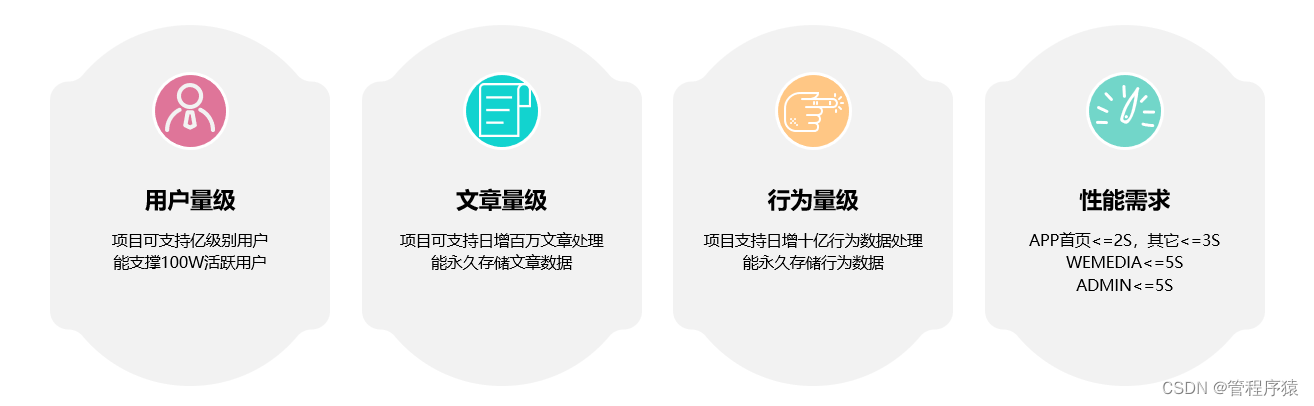
从中可以看出,有上亿级别的用户,单表存储已超出Mysql最优性能数据量区间,因此会导致数据库各种操作效率会非常低下,此时可以通过分库分表的方案来解决。Mycat是一款非常优秀的分布式数据库中间件。对读写分离和分库分表都有支持,而且比较易用,对原有的应用系统侵入比较小,系统改造比较易于实现。黑马头条项目将以此作为分库分表的中间拆分数据表,以实现设计目标。
3.2 Mycat概念
mycat相关介绍,请参考资料文件夹/Mycat权威指南.pdf
数据节点: DataNode:存储数据的节点,每个节点可以分配一个或多个数据表。
主机节点:Datahost:主机节点,每个主机可以分配一个或多个数据节点。
分表策略:根据分表策略决定数据写入到哪个节点。
管理信息:管理MYCAT连接和配置信息。3.3 数据节点需求
按照黑马头条项目数据量需求,如何设计分库分表可参考以下示例:
- 用户数据表 ap_user
- 数据量1亿条
- 每日新增用户100万
- 一年大概会产生4亿条数据
一般情况下,一个优化后的MySQL单表可以存储1000万条数据。也是我们分表的基准。所以一年后约为4亿条数据,根据我们单表的1000万基准,划分40个节点。
以此类推,可规划出项目中每个数据库的DN节点数需求如下:
- app_info,需40个
- app_behavior,需50个
- wemedia,需6个
- crawlers,需6个
- admin,需4个
3.4 分库分表设计
除了节点需求之外,还需要设计每张表的分表数量,计算的方法类似节点的计算,但存在一些细节地方,详见以下说明:
- 需要考虑表是否扩容,数据量存表之后,如何扩容?
- 需要考虑分表的关键字段,是一个字段分表,还是复合字段分表?
- 需要考虑主键生成方式,托管方式还是编程式?
- 需要考虑分表数量
- 需要考虑分表存放的DN位置,如何均匀的分配节点上表数据存储,已达数据均匀的目的?
- 需要考虑是否进行读写分离(本例中不涉及,可线下探讨拓展)
- 需要考虑是否进行热备数据源(本例中不涉及,可线下探讨拓展)
如app_info分库分表设计输出的信息如下(其它库表详见资料下《数据库路由设计.xlsx》):

3.5 Mycat配置详解
MYCAT常用配置文件为一下4个:
server.xml
- 配置mycat连接信息
- 一些性能优化等管理信息
这里我们主要配置了连接信息:
<user name="root"> <property name="password">123456property> <property name="schemas">itheima-newsproperty> user>- 1
- 2
- 3
- 4
schema.xml
- 配置Mycat节点信息
- 配置Mycat主机信息
- 配置分表策略
- 一些连接信息或者读写分离主机配置
定义数据节点:
<dataNode name="DNAP_0" dataHost="HOST0" database="app_info_0" />- 1
- name:数据节点名称
- dataHost:主机名称 跟dataHost name="HOST0"标签 name值对应
- database:节点的数据库名
定义主机节点:
<dataHost name="HOST0" maxCon="600" minCon="200" balance="0" writeType="0" dbType="mysql" dbDriver="native" switchType="1" slaveThreshold="100"> <heartbeat>select user()heartbeat> <writeHost host="HOST0_M" url="47.94.7.85:3306" user="root" password="root"/> dataHost>- 1
- 2
- 3
- 4
- 5
- name:主机节点名称
- minCon:最小连接线程
- maxCon:最大连接线程
- balance:负载均衡策略
- writeHost 该标签配置节点对应的mysql主机
定义表信息:
<table name="ap_article" dataNode="DNAP_$0-39" autoIncrement="true" primaryKey="id" rule="mod-long40"/>- 1
- name:数据库表名
- dataNode:该表在那些数据节点设置了分片
- autoIncrement:是否自增,如果设置为true,需要在sequence_db_conf.properties文件配置自增相关数据。
- rule:分片策略 mod-long40表示 主键求余40
rule.xml
该文件主要定义分表策略:
示例:
主键求余策略:- 配置 function class指定分片算法 本例为求余算法
- 配置 tableRule 设置对那个字段执行分片操作 本例为id对40求余
<function name="mod-long40" class="io.mycat.route.function.PartitionByMod"> <property name="count">40property> function> <tableRule name="mod-long40"> <rule> <columns>idcolumns> <algorithm>mod-long40algorithm> rule> tableRule>- 1
- 2
- 3
- 4
- 5
- 6
- 7
- 8
- 9
- 10
- 11
sequence_db_conf.properties
该文件为全局自增主键配置对于table定义了autoIncrement=“true” primaryKey="id"的表,需要配置全局自增序号(注意全大写)。
AP_ARTICLE=DNSQ- 1
同时在DNSQ也就是app_seq表里插入一条记录:
INSERT INTO `app_seq`.`MYCAT_SEQUENCE` (`name`, `current_value`, `increment`) VALUES ('ap_article', '1000', '1000');- 1
- current_value:为初始值
- increment:为每次获取序列的自增值,该值的数据根据对应表的数据新增速率设置。
3.6 Mycat项目集成
mycat的连接使用跟MySQL类似:只需要配置文件配置即可
# 数据库配置 mysql.core.jdbc.url=jdbc:mysql://localhost:8066/itheima-news?autoReconnect=true&useUnicode=true&characterEncoding=utf8&serverTimezone=Asia/Shanghai mysql.core.jdbc.username=root mysql.core.jdbc.password=654321- 1
- 2
- 3
- 4
注意:这里密码做了反转处理,具体的情参考项目配置。本文使用的配置文件的全部内容在本文档所在文件下对应的名称。
4.路由开发
为便于管理维护Mycat的路由配置和自定分片算法的源码,在工程下创建service-mycat模块。
4.1 工程创建
- 在根项目下创建Maven module项目,项目名称为service-mycat,groupId:com.heima。创建后在根pom.xml中module元素中增加以下代码:
<module>service-mycatmodule>- 1
- 在service-mycat pom.xml中增加父项目信息:
<parent> <artifactId>heima-leadnewsartifactId> <groupId>com.heimagroupId> <version>1.0-SNAPSHOTversion> parent>- 1
- 2
- 3
- 4
- 5
-
在service-mycat路径下拷贝dev、test、prod三个环境配置文件
-
service-mycat根路径下创建config文件夹(用于存放mycat的路由配置,便于持续部署),并拷贝‘资料/ mycat初始配置文件’下文件到config下
4.2 依赖导入
开发Mycat的分片策略,需要依赖Mycat-server-1.6.7.1-release.jar文件。在项目中以本地文件方式进行导入,操作步骤如下:
-
在service-mycat下新建文件夹libs
-
拷贝讲义资料下面的Mycat-server-1.6.7.1-release.jar到libs中
-
在service-mycat/pom.xml中做以下依赖配置
<dependencies> <dependency> <groupId>com.mycatgroupId> <artifactId>mycat-serverartifactId> <version>1.0.0version> <scope>systemscope> <systemPath>${basedir}/libs/Mycat-server-1.6-release.jarsystemPath> dependency> dependencies>- 1
- 2
- 3
- 4
- 5
- 6
- 7
- 8
- 9
4.3 算法设计
在项目中分片字段规范命名为burst,类型为String,值格式为dataId-分表ID,dataId用于分组ID计算,为数据量提供扩展性;分表ID用于组内表的分配,其分片公式如下:
分片ID = *(dataId/volume) step +分表ID/mod **
-
Volume是每组分片的数据容量
-
Step是每组分片的DateNode数量
-
Mode是表在每组分片中的节点数量
4.4 算法实现
实现步骤如下:
-
创建类文件:com.heima.HeiMaBurstRuleAlgorithm
-
修改类继承AbstractPartitionAlgorithm 和实现RuleAlgorithm接口
-
在类中定义volume、step、mod三个变量,并提供set方法
-
实现calculate 等值分片DN计算方法(参数是burst值)
-
实现calculateRange范围分片DN计算方法(参数是burst值)
完整代码如下:
/** * 自定义多字段算法计算 */ public class HeiMaBurstRuleAlgorithm extends AbstractPartitionAlgorithm implements RuleAlgorithm { // 单组数据容量 Long volume; // 单组DN节点数量 Integer step; // 分片模 Integer mod; public void init(){} /** * * @param columnValue 数据ID-桶ID * @return */ public Integer calculate(String columnValue){ if(columnValue!=null){ String[] temp = columnValue.split("-"); if(temp.length==2){ try { Long dataId = Long.valueOf(temp[0]); Long burstId = Long.valueOf(temp[1]); int group = (int)(dataId/volume)*step; int pos = group + (int)(burstId%mod); System.out.println("HEIMA RULE INFO ["+columnValue+"]-[{"+pos+"}]"); return pos; }catch (Exception e){ System.out.println("HEIMA RULE INFO ["+columnValue+"]-[{"+e.getMessage()+"}]"); } } } return 0; } /** * 范围计算 * @param beginValue * @param endValue * @return */ public Integer[] calculateRange(String beginValue, String endValue){ if(beginValue!=null&&endValue!=null){ Integer begin = calculate(beginValue); Integer end = calculate(endValue); if(begin == null || end == null){ return new Integer[0]; } if (end >= begin) { int len = end - begin + 1; Integer[] re = new Integer[len]; for (int i = 0; i < len; i++) { re[i] = begin + i; } return re; } } return new Integer[0]; } public void setVolume(Long volume) { this.volume = volume; } public void setStep(Integer step) { this.step = step; } public void setMod(Integer mod) { this.mod = mod; } }- 1
- 2
- 3
- 4
- 5
- 6
- 7
- 8
- 9
- 10
- 11
- 12
- 13
- 14
- 15
- 16
- 17
- 18
- 19
- 20
- 21
- 22
- 23
- 24
- 25
- 26
- 27
- 28
- 29
- 30
- 31
- 32
- 33
- 34
- 35
- 36
- 37
- 38
- 39
- 40
- 41
- 42
- 43
- 44
- 45
- 46
- 47
- 48
- 49
- 50
- 51
- 52
- 53
- 54
- 55
- 56
- 57
- 58
- 59
- 60
- 61
- 62
- 63
- 64
- 65
- 66
- 67
- 68
- 69
- 70
- 71
- 72
- 73
- 74
- 75
4.5 算法应用
在项目中主要用到50DN、40DN的可扩展分片算法,可定义成两个tableRule.
4.5.1 Burst5050
Burst5050单组有50个DN,单组容量为5亿,分50张表,每个DN上存储一张对应表;其定义在service-mycat/config/rule.xml中,定义代码为:
<tableRule name="burst5050"> <rule> <columns>burstcolumns> <algorithm>burst5050algorithm> rule> tableRule> <function name="burst5050" class="com.heima.HeiMaBurstRuleAlgorithm"> <property name="volume">500000000property> <property name="step">50property> <property name="mod">50property> function>- 1
- 2
- 3
- 4
- 5
- 6
- 7
- 8
- 9
- 10
- 11
- 12
4.5.2 Burst4040
Burst4040单组有40个DN,单组容量为4亿,分40张表,每个DN上存储一张对应表;其定义在service-mycat/config/rule.xml中,定义代码为:
<tableRule name="burst4040"> <rule> <columns>burstcolumns> <algorithm>burst4040algorithm> rule> tableRule> <function name="burst5050" class="com.heima.HeiMaBurstRuleAlgorithm"> <property name="volume">400000000property> <property name="step">40property> <property name="mod">40property> function>- 1
- 2
- 3
- 4
- 5
- 6
- 7
- 8
- 9
- 10
- 11
- 12
4.5.3 规则使用
在service-mycat/config/schema.xml中,可使用以上定义的规则,示例如下:
<table name="ap_behavior_entry" dataNode="DNBE_$0-49" rule="burst5050"/> <table name="ap_collection" dataNode="DNBE_$0-40" rule="burst4040"/>- 1
- 2
在service-mycat/config/sequence_db_conf.properties中去掉对应表的sequence配置:
AP_BEHAVIOR_ENTRY=... AP_COLLECTION=...- 1
- 2
4.6 算法部署
-
进入到项目service-mycat项目根路径,运行mvn clean package打包命令打包项目
-
拷贝service-mycat/config下的文件到mycat安装目录下的config文件夹下
-
拷贝service-mycat/config下的文件到mycat安装目录下的config文件夹下
-
拷贝service-mycat/target/ service-mycat-1.0-SNAPSHOT.jar文件到mycat安装目录lib文件夹下
-
重启mycat服务
4.7 算法测试
算法测试分为工具测试和程序应用测试,工具测试用于开发过程中辅助开发人员,程序应用测试在此会说明项目中用到的方式,具体测试在后面的功能中进行演示。
注意:以下测试说明只针对带有burst复合字段分库分表的物理表。
4.7.1 工具测试
在mysql客户端工具中我们可以通过explain关键字查看sql会在哪些DN节点上执行。例:

4.7.2 BurstUtils类
此工具类用于拼接处理burst,定义在utils工程下com.heima.common.BurstUtils,其实现代码如下:
/** * 分片桶字段算法 */ public class BurstUtils { public final static String SPLIT_CHAR = "-"; /** * 用-符号链接 * @param fileds * @return */ public static String encrypt(Object... fileds){ StringBuffer sb = new StringBuffer(); if(fileds!=null&&fileds.length>0) { sb.append(fileds[0]); for (int i = 1; i < fileds.length; i++) { sb.append(SPLIT_CHAR).append(fileds[i]); } } return sb.toString(); } /** * 默认第一组 * @param fileds * @return */ public static String groudOne(Object... fileds){ StringBuffer sb = new StringBuffer(); if(fileds!=null&&fileds.length>0) { sb.append("0"); for (int i = 0; i < fileds.length; i++) { sb.append(SPLIT_CHAR).append(fileds[i]); } } return sb.toString(); } }- 1
- 2
- 3
- 4
- 5
- 6
- 7
- 8
- 9
- 10
- 11
- 12
- 13
- 14
- 15
- 16
- 17
- 18
- 19
- 20
- 21
- 22
- 23
- 24
- 25
- 26
- 27
- 28
- 29
- 30
- 31
- 32
- 33
- 34
- 35
- 36
- 37
- 38
- 39
4.7.3 程序-数据插入
在程序中要正确的插入数据,需要给对应表增加burst字段,并在程序中拼接字段值,同时数据主键id的值需要在程序中生成(既项目中使用ZKSEQUENCE方式生成),例:
程序中拼接字段值:
alb.setId(sequences.sequenceApLikes());//设置主键 alb.setBurst(BurstUtils.encrypt(alb.getId(),alb.getBehaviorEntryId()));//设置分片- 1
- 2
Mapper.xml中正常插入:
<insert id="insert" parameterType="com.heima.article.mysql.core.model.pojos.app.ApLikesBehavior" > insert into ap_likes_behavior (id, behavior_entry_id, entry_id, type, operation, created_time,burst) values (#{id}, #{behaviorEntryId}, #{entryId}, #{type}, #{operation}, #{createdTime},#{burst}) </insert>- 1
- 2
- 3
- 4
- 5
4.7.4 程序-数据查询
- 【问题】
数据查询的问题有两点:
1、不能明确数据id,所以无法直接拼接burst
2、 burst字段用于分片,写在where条件之后不够优雅
- 【解决方案】
第一个问题查询时可假定id为0,既默认为在第一组中查询,以后有多组时可以默认每组第一个数据id;这样设计的原因是只要组容量内的id和第一个数据id计算出的结果一致。
第二个问题可以通过Mycat提供的注解语法优雅的编写我们的SQL。
- 【示例】
综合以上解决思路,代码实现的示例如下:
<select id="selectLastLike" resultMap="BaseResultMap"> /*!mycat:sql=select id from ap_likes_behavior where burst='${burst}'*/ select * from ap_likes_behavior where behavior_entry_id=#{objectId} and entry_id=#{entryId} and type=#{type} order by created_time desc limit 1 </select>- 1
- 2
- 3
- 4
以上代码在Mycat中执行,首先会执行注解代码确定SQL路由的指定节点,然后再分发SQL具体执行。其中注解中的burst有多个可以使用in,其值需用$连接(由于burst字段完全有后端程序控制值,所以这里不存在外部安全问题),否则会抛出预编译参数不匹配的问题。
4.7.5 程序-数据更新
数据更新请参考《数据查询》
4.7.6 程序-数据删除
数据删除请参考《数据查询》
5.后端程序改造
5.1 ap_article
已实现的文章列表查询功能,分了40个表,对于查询功能暂无需调整。
5.2 ap_show_behavior
ap_show_behavior数据是通过批量方式插入的,集成Mycat之后,需要使用注解,以便实现注解的托管生成。
<insert id="saveBehaviors"> /*!mycat:catlet=io.mycat.route.sequence.BatchInsertSequence */ insert into ap_show_behavior ( entry_id, article_id,is_click, show_time, created_time) values <foreach item="item" collection="articleIds" separator=","> (#{entryId}, #{item},0, now(),now()) foreach> insert> ation}, #{createdTime},#{burst}) insert>- 1
- 2
- 3
- 4
- 5
- 6
- 7
- 8
- 9
- 10
4.7.4 程序-数据查询
- 【问题】
数据查询的问题有两点:
1、不能明确数据id,所以无法直接拼接burst
2、 burst字段用于分片,写在where条件之后不够优雅
- 【解决方案】
第一个问题查询时可假定id为0,既默认为在第一组中查询,以后有多组时可以默认每组第一个数据id;这样设计的原因是只要组容量内的id和第一个数据id计算出的结果一致。
第二个问题可以通过Mycat提供的注解语法优雅的编写我们的SQL。
- 【示例】
综合以上解决思路,代码实现的示例如下:
<select id="selectLastLike" resultMap="BaseResultMap"> /*!mycat:sql=select id from ap_likes_behavior where burst='${burst}'*/ select * from ap_likes_behavior where behavior_entry_id=#{objectId} and entry_id=#{entryId} and type=#{type} order by created_time desc limit 1 </select>- 1
- 2
- 3
- 4
以上代码在Mycat中执行,首先会执行注解代码确定SQL路由的指定节点,然后再分发SQL具体执行。其中注解中的burst有多个可以使用in,其值需用$连接(由于burst字段完全有后端程序控制值,所以这里不存在外部安全问题),否则会抛出预编译参数不匹配的问题。
4.7.5 程序-数据更新
数据更新请参考《数据查询》
4.7.6 程序-数据删除
数据删除请参考《数据查询》
5.后端程序改造
5.1 ap_article
已实现的文章列表查询功能,分了40个表,对于查询功能暂无需调整。
5.2 ap_show_behavior
ap_show_behavior数据是通过批量方式插入的,集成Mycat之后,需要使用注解,以便实现注解的托管生成。
<insert id="saveBehaviors"> /*!mycat:catlet=io.mycat.route.sequence.BatchInsertSequence */ insert into ap_show_behavior ( entry_id, article_id,is_click, show_time, created_time) values <foreach item="item" collection="articleIds" separator=","> (#{entryId}, #{item},0, now(),now()) foreach> insert>- 1
- 2
- 3
- 4
- 5
- 6
- 7
-
相关阅读:
网络安全(黑客)自学
Maven
Postgresql中,计算两个日期月份差值,实现ORACLE中MONTHS_BETWEEN的效果
今年这300道Java岗面试真题,闷头硬背
一篇文章教你搞懂生鲜电商模式
C#里创建配置文件并保存
阿里云无影升级2.0 云电脑解决方案时代到来
工业制造体系模型(闻)
-角谷猜想-
Vue3+elementplus搭建通用管理系统实例十:动态表单及详情页实现上
- 原文地址:https://blog.csdn.net/guan1843036360/article/details/127942678
