-
haproxy软件的日志输出到指定文件
默认haproxy的日志是输出到系统syslog中,查看起来不是非常方便,为了更好的管理haproxy的日志,我们在生产环境中一般单独定义出来。需要将haproxy的info及notice日志分别记录到不同的日志文件中。
需要修改rsyslog配置,为了便于管理。将haproxy相关的配置独立定义到haproxy.conf,并放到/etc/rsyslog.d/下,rsyslog启动时会自动加载此目录下的所有配置文件。
默认的haproxy的配置文件如下
- #---------------------------------------------------------------------
- # Example configuration for a possible web application. See the
- # full configuration options online.
- #
- # http://haproxy.1wt.eu/download/1.4/doc/configuration.txt
- #
- #---------------------------------------------------------------------
- #---------------------------------------------------------------------
- # Global settings
- #---------------------------------------------------------------------
- global
- # to have these messages end up in /var/log/haproxy.log you will
- # need to:
- #
- # 1) configure syslog to accept network log events. This is done
- # by adding the '-r' option to the SYSLOGD_OPTIONS in
- # /etc/sysconfig/syslog
- #
- # 2) configure local2 events to go to the /var/log/haproxy.log
- # file. A line like the following can be added to
- # /etc/sysconfig/syslog
- #
- # local2.* /var/log/haproxy.log
- #
- log 127.0.0.1 local2 info
- chroot /var/lib/haproxy
- pidfile /var/run/haproxy.pid
- maxconn 40000
- user haproxy
- group haproxy
- daemon
- # turn on stats unix socket
- stats socket /var/lib/haproxy/stats
- #---------------------------------------------------------------------
- # common defaults that all the 'listen' and 'backend' sections will
- # use if not designated in their block
- #---------------------------------------------------------------------
- defaults
- mode http
- log global
- option httplog
- option dontlognull
- option http-server-close
- option forwardfor except 127.0.0.0/8
- option redispatch
- retries 3
- timeout http-request 10s
- timeout queue 1m
- timeout connect 10s
- timeout client 1m
- timeout server 1m
- timeout http-keep-alive 10s
- timeout check 10s
- maxconn 3000
- #---------------------------------------------------------------------
- # main frontend which proxys to the backends
- #---------------------------------------------------------------------
- #frontend main *:5000
- # acl url_static path_beg -i /static /images /javascript /stylesheets
- # acl url_static path_end -i .jpg .gif .png .css .js
- #
- # use_backend static if url_static
- # default_backend app
- #---------------------------------------------------------------------
- # static backend for serving up images, stylesheets and such
- #---------------------------------------------------------------------
- #backend static
- # balance roundrobin
- # server static 127.0.0.1:4331 check
- #---------------------------------------------------------------------
- # round robin balancing between the various backends
- #---------------------------------------------------------------------
- #backend app
- # balance roundrobin
- # server app1 127.0.0.1:5001 check
- # server app2 127.0.0.1:5002 check
- # server app3 127.0.0.1:5003 check
- # server app4 127.0.0.1:5004 check
其中日志的配置文件有关日志的配置是 log 127.0.0.1 local2 info
为了便于管理将haproxy相关的配置独立定义到haproxy.conf
配置方式
1.编辑“/etc/sysconfig/rsyslog”文件,将如下配置增加 -r 参数:
SYSLOGD_OPTIONS=""
改成
SYSLOGD_OPTIONS="-r"
2.编辑“/etc/rsyslog.conf”取消红框部分内容的注释,并在“local7.*”前面插入一行:
local2.* /var/log/haproxy/haproxy.log
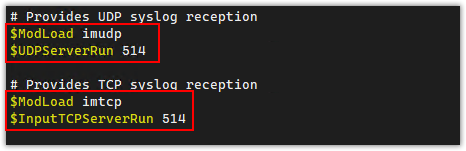
3.重启服务
重启 rsyslog
systemctl restart rsyslog
-
相关阅读:
JVM运行流程
[ruby on rails]rails6.0升级6.1
linux5-make、库文件(静态库和共享库)
IOC理解
水仙花数的判断C语言,+最终代码优化
【 React 】对React refs的理解?应用场景?
okhttp关于header修改
路由器二次开发一步一步把工业路由器变成一个高端的可指定出网、节点和链路的路由器,包含详细过程及快捷脚本(二)
【Linux】——select详解
JS中的事件循环eventloop
- 原文地址:https://blog.csdn.net/rendongxingzhe/article/details/127941288
