-
表白墙网站练习【前端+后端+数据库】
表白墙网站练习【前端+后端+数据库】
开发该表白墙(简单网站)的基本步骤:
1.约定前后端交互接口
2.开发服务器代码- 编写Servlet能够处理前端发来的请求
- 编写数据库代码,来获取/存储关键数据
3.开发客户端代码
- 基于ajax能够构造请求以解析响应
- 能够响应用户的操作(点击提交按钮之后,触发服务器发送请求的行为)
MVC
Model(操作数据存取的逻辑) View(给用户展示的界面) Controller(控制器,处理请求之后的关键逻辑)
【view->controller->model】
具体效果
由于主要代码是控制后端,前端界面美化就没有很详细的搞。

通过输入三条信息,然后展示在当前界面,通过后端连接数据库实现刷新该页面,或者重启服务器,用户之前输入的内容不消失的功能。

刷新、重启服务器刷新之后

可以通过MySQL查询存入数据库的信息

具体代码实现
项目目录结构【Maven】

源代码
DBUtil

import com.mysql.jdbc.jdbc2.optional.MysqlDataSource; import javax.sql.DataSource; import java.sql.Connection; import java.sql.PreparedStatement; import java.sql.ResultSet; import java.sql.SQLException; public class DBUtil { private static final String URL="jdbc:mysql://127.0.0.1:3306/sunyuhang?characterEncoding=utf8&useSSL=false"; private static final String USERNAME = "root"; private static final String PASSWORD ="111111"; private volatile static DataSource dataSource = null; private static DataSource getDataSource(){ if (dataSource == null){ synchronized (DBUtil.class) { if (dataSource == null) { dataSource = new MysqlDataSource(); ((MysqlDataSource) dataSource).setUrl(URL); ((MysqlDataSource) dataSource).setUser(USERNAME); ((MysqlDataSource) dataSource).setPassword(PASSWORD); } } } return dataSource; } public static Connection getConnection() throws SQLException{ return getDataSource().getConnection(); } public static void close(Connection connection, PreparedStatement statement, ResultSet resultSet){ if (resultSet != null){ try { resultSet.close(); } catch (SQLException e) { e.printStackTrace(); } } if (statement !=null){ try { statement.close(); } catch (SQLException e) { e.printStackTrace(); } } if (connection!=null){ try { connection.close(); } catch (SQLException e) { e.printStackTrace(); } } } }- 1
- 2
- 3
- 4
- 5
- 6
- 7
- 8
- 9
- 10
- 11
- 12
- 13
- 14
- 15
- 16
- 17
- 18
- 19
- 20
- 21
- 22
- 23
- 24
- 25
- 26
- 27
- 28
- 29
- 30
- 31
- 32
- 33
- 34
- 35
- 36
- 37
- 38
- 39
- 40
- 41
- 42
- 43
- 44
- 45
- 46
- 47
- 48
- 49
- 50
- 51
- 52
- 53
- 54
- 55
- 56
massageServlet
import com.fasterxml.jackson.databind.ObjectMapper; import javax.servlet.ServletException; import javax.servlet.annotation.WebServlet; import javax.servlet.http.HttpServlet; import javax.servlet.http.HttpServletRequest; import javax.servlet.http.HttpServletResponse; import java.io.IOException; import java.sql.Connection; import java.sql.PreparedStatement; import java.sql.ResultSet; import java.sql.SQLException; import java.util.ArrayList; import java.util.List; class Message{ public String from; public String to; public String message; } @WebServlet("/message") public class massageServlet extends HttpServlet { private ObjectMapper objectMapper = new ObjectMapper(); //改成数据库就不需要这个变量了 // private Listmessages = new ArrayList<>(); @Override protected void doPost(HttpServletRequest req, HttpServletResponse resp) throws ServletException, IOException { //处理提交消息请求 Message message = objectMapper.readValue(req.getInputStream(),Message.class); //最简单的方法就是保存到内存中 //messages.add(message); //告知页面 返回的数据是 json 格式 //有了这样的声明 jQuery Ajax 就会自动帮我们把字符串转换成 js 对象 //没有的话 jQuery ajax 就会当成普通字符串来处理 save(message); resp.setContentType("application/json;charset=utf8"); resp.getWriter().write("{\"ok\":true}"); } @Override protected void doGet(HttpServletRequest req, HttpServletResponse resp) throws ServletException, IOException { //获取消息列表 只要把消息列表中的内容整个返回给客户端即可 List<Message> messages = load(); String jsonString = objectMapper.writeValueAsString(messages); System.out.println("jsonString:"+jsonString); resp.setContentType("application/json;charset=utf8"); resp.getWriter().write(jsonString); } private void save(Message message){ //把一条消息保存到数据库中 Connection connection= null; PreparedStatement statement = null; try { //1.和数据库建立连接 connection = DBUtil.getConnection(); //2.构造 SQL String sql = "insert into message values(?,?,?)"; statement = connection.prepareStatement(sql); statement.setString(1,message.from); statement.setString(2,message.to); statement.setString(3,message.message); //3.执行SQL statement.executeUpdate(); } catch (SQLException e) { e.printStackTrace(); }finally { DBUtil.close(connection, statement,null); } } private List<Message> load(){ //从数据库中获取到所有的消息 List<Message> messages = new ArrayList<>(); Connection connection = null; PreparedStatement statement = null; ResultSet resultSet = null; try { connection = DBUtil.getConnection(); String sql = "select * from message"; statement = connection.prepareStatement(sql); resultSet = statement.executeQuery(); while (resultSet.next()){ Message message = new Message(); message.from = resultSet.getString("from"); message.to = resultSet.getString("to"); message.message = resultSet.getString("message"); messages.add(message); } } catch (SQLException e) { e.printStackTrace(); }finally { DBUtil.close(connection,statement,resultSet); } return messages; } }- 1
- 2
- 3
- 4
- 5
- 6
- 7
- 8
- 9
- 10
- 11
- 12
- 13
- 14
- 15
- 16
- 17
- 18
- 19
- 20
- 21
- 22
- 23
- 24
- 25
- 26
- 27
- 28
- 29
- 30
- 31
- 32
- 33
- 34
- 35
- 36
- 37
- 38
- 39
- 40
- 41
- 42
- 43
- 44
- 45
- 46
- 47
- 48
- 49
- 50
- 51
- 52
- 53
- 54
- 55
- 56
- 57
- 58
- 59
- 60
- 61
- 62
- 63
- 64
- 65
- 66
- 67
- 68
- 69
- 70
- 71
- 72
- 73
- 74
- 75
- 76
- 77
- 78
- 79
- 80
- 81
- 82
- 83
- 84
- 85
- 86
- 87
- 88
- 89
- 90
- 91
- 92
- 93
- 94
- 95
- 96
- 97
- 98
- 99
- 100
- 101
- 102
- 103
- 104
- 105
- 106
- 107
- 108
- 109
- 110
- 111
- 112
message_wall.html
将输入的数据按照json格式构造post请求
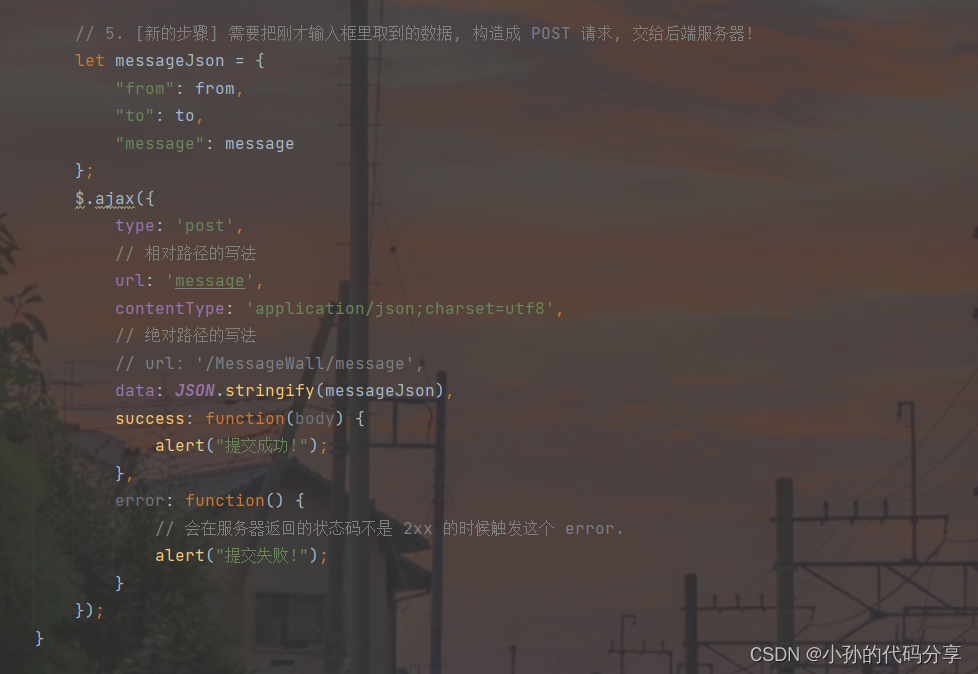

<!DOCTYPE html> <html lang="en"> <head> <meta charset="UTF-8"> <meta http-equiv="X-UA-Compatible" content="IE=edge"> <meta name="viewport" content="width=device-width, initial-scale=1.0"> <title>表白墙</title> <style> * { padding: 0; margin: 0; box-sizing: border-box; } .container { width: 800px; margin: 10px auto; } .container h2 { text-align: center; margin: 30px 0px; } .row { height: 50px; display: flex; justify-content: center; margin-top: 5px; line-height: 50px; } .row span { height: 50px; width: 100px; line-height: 50px; } .row input { height: 50px; width: 300px; line-height: 50px; } .row button { width: 400px; height: 50px; color: white; background-color: orange; border: none; border-radius: 10px; } .row button:active { background-color: grey; } </style> </head> <body> <!-- 这是一个顶层容器, 放其他元素 --> <div class="container"> <h2>表白墙</h2> <div class="row"> <span>谁</span> <input type="text" id="from"> </div> <div class="row"> <span>对谁</span> <input type="text" id="to"> </div> <div class="row"> <span>说什么</span> <input type="text" id="message"> </div> <div class="row"> <button>提交</button> </div> </div> <script src="https://code.jquery.com/jquery-3.6.1.min.js"></script> <script> let container = document.querySelector('.container'); let fromInput = document.querySelector('#from'); let toInput = document.querySelector('#to'); let messageInput = document.querySelector('#message'); let button = document.querySelector('button'); button.onclick = function() { // 1. 把用户输入的内容获取到. let from = fromInput.value; let to = toInput.value; let message = messageInput.value; if (from == '' || to == '' || message == '') { return; } // 2. 构造一个 div, 把这个 div 插入到 .container 的末尾 let newDiv = document.createElement('div'); newDiv.className = 'row'; newDiv.innerHTML = from + " 对 " + to + " 说: " + message; // 3. 把 div 挂在 container 里面 container.appendChild(newDiv); // 4. 把之前的输入框内容进行清空 fromInput.value = ''; toInput.value = ''; messageInput.value = ''; // 5. [新的步骤] 需要把刚才输入框里取到的数据, 构造成 POST 请求, 交给后端服务器! let messageJson = { "from": from, "to": to, "message": message }; $.ajax({ type: 'post', // 相对路径的写法 url: 'message', contentType: 'application/json;charset=utf8', // 绝对路径的写法 // url: '/MessageWall/message', data: JSON.stringify(messageJson), success: function(body) { alert("提交成功!"); }, error: function() { // 会在服务器返回的状态码不是 2xx 的时候触发这个 error. alert("提交失败!"); } }); } // 这个函数在页面加载的时候调用. 通过这个函数从服务器获取到当前的消息列表. // 并且显示到页面上. function load() { $.ajax({ type: 'get', url: 'message', success: function(body) { // 此处得到的 body 已经是一个 js 对象的数组了. // ajax 自动帮我们进行类型转换了. // 本来服务器返回的是 JSON 格式的字符串, ajax 会自动的根据 Content-Type 为 application/json // 对响应的 body 进行解析, 解析成 js 对象. // 遍历数组的元素, 把内容构造到页面上. let container = document.querySelector('.container'); for (let message of body) { let newDiv = document.createElement('div'); newDiv.className = 'row'; newDiv.innerHTML = message.from + " 对 " + message.to + " 说 " + message.message; container.appendChild(newDiv); } } }) } // 函数调用写在这里, 就表示在页面加载的时候来进行执行. load(); </script> </body> </html>- 1
- 2
- 3
- 4
- 5
- 6
- 7
- 8
- 9
- 10
- 11
- 12
- 13
- 14
- 15
- 16
- 17
- 18
- 19
- 20
- 21
- 22
- 23
- 24
- 25
- 26
- 27
- 28
- 29
- 30
- 31
- 32
- 33
- 34
- 35
- 36
- 37
- 38
- 39
- 40
- 41
- 42
- 43
- 44
- 45
- 46
- 47
- 48
- 49
- 50
- 51
- 52
- 53
- 54
- 55
- 56
- 57
- 58
- 59
- 60
- 61
- 62
- 63
- 64
- 65
- 66
- 67
- 68
- 69
- 70
- 71
- 72
- 73
- 74
- 75
- 76
- 77
- 78
- 79
- 80
- 81
- 82
- 83
- 84
- 85
- 86
- 87
- 88
- 89
- 90
- 91
- 92
- 93
- 94
- 95
- 96
- 97
- 98
- 99
- 100
- 101
- 102
- 103
- 104
- 105
- 106
- 107
- 108
- 109
- 110
- 111
- 112
- 113
- 114
- 115
- 116
- 117
- 118
- 119
- 120
- 121
- 122
- 123
- 124
- 125
- 126
- 127
- 128
- 129
- 130
- 131
- 132
- 133
- 134
- 135
- 136
- 137
- 138
- 139
- 140
- 141
- 142
- 143
- 144
- 145
- 146
- 147
- 148
- 149
- 150
- 151
- 152
- 153
- 154
- 155
- 156
- 157
- 158
- 159
- 160
- 161
web.xml【固定格式不必细究】
<!DOCTYPE web-app PUBLIC "-//Sun Microsystems, Inc.//DTD Web Application 2.3//EN" "http://java.sun.com/dtd/web-app_2_3.dtd" > <web-app> <display-name>Archetype Created Web Application</display-name> </web-app>- 1
- 2
- 3
- 4
- 5
- 6
- 7
pom.xml【通过maven中央仓库依赖导入】
<?xml version="1.0" encoding="UTF-8"?> <project xmlns="http://maven.apache.org/POM/4.0.0" xmlns:xsi="http://www.w3.org/2001/XMLSchema-instance" xsi:schemaLocation="http://maven.apache.org/POM/4.0.0 http://maven.apache.org/xsd/maven-4.0.0.xsd"> <modelVersion>4.0.0</modelVersion> <groupId>org.example</groupId> <artifactId>20221116Message_wall</artifactId> <version>1.0-SNAPSHOT</version> <properties> <maven.compiler.source>8</maven.compiler.source> <maven.compiler.target>8</maven.compiler.target> </properties> <!-- 借助maven引入tomcat--> <!-- jdk8--> <!-- tomcat 8.5--> <!-- servlet 3.1--> <dependencies> <!-- https://mvnrepository.com/artifact/mysql/mysql-connector-java --> <dependency> <groupId>mysql</groupId> <artifactId>mysql-connector-java</artifactId> <version>5.1.47</version> </dependency> <!-- https://mvnrepository.com/artifact/com.fasterxml.jackson.core/jackson-databind --> <dependency> <groupId>com.fasterxml.jackson.core</groupId> <artifactId>jackson-databind</artifactId> <version>2.12.6.1</version> </dependency> <!-- https://mvnrepository.com/artifact/javax.servlet/javax.servlet-api --> <dependency> <groupId>javax.servlet</groupId> <artifactId>javax.servlet-api</artifactId> <version>3.1.0</version> <scope>provided</scope> </dependency> </dependencies> </project>- 1
- 2
- 3
- 4
- 5
- 6
- 7
- 8
- 9
- 10
- 11
- 12
- 13
- 14
- 15
- 16
- 17
- 18
- 19
- 20
- 21
- 22
- 23
- 24
- 25
- 26
- 27
- 28
- 29
- 30
- 31
- 32
- 33
- 34
- 35
- 36
- 37
- 38
- 39
- 40
- 41
- 42
- 43
-
相关阅读:
[HDLBits] Exams/m2014 q4k
Cadence OrCAD Capture 如何批量替换元器件
vue 关闭当前tab页,并更新父组件数据
排序算法——直接插入排序
如何实现服务器时间同步
ヾ(⌐ ■_■)— HTML-CSS选择器
分布式一致性协议
java面试题
Spring之@Qualifier注解简介及示例
springboot集成swagger3.0
- 原文地址:https://blog.csdn.net/weixin_53939785/article/details/127885707
