-
【pac文件】win10自动配置代理
目的
手动代理:所有地址经过代理,指定ip不经过代理
现在需求:实现指定ip范围才使用该代理
可以通过“自动设置代理”的方式实现准备
- 已有代理地址,如:192.168.18.101:808
- 有python环境
自动代理配置
- 编写sxProxy.pac脚本
function FindProxyForURL(url, host) { if (shExpMatch(url, "*172.16.0.*")){ return "PROXY 192.168.18.101:808; DIRECT"; }else{ return "DIRECT"; } }- 1
- 2
- 3
- 4
- 5
- 6
- 7
上述脚本实现:当地址中含有172.16.0…时,使用代理192.168.18.101:808访问,否则不使用代理
在脚本同级目录执行:python -m http.server
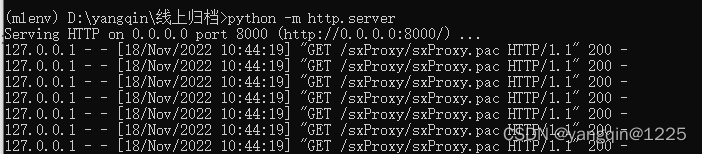
就可以通过http的形式访问pac文件

在win代理配置中填写代理地址:http://localhost:8000/sxProxy/sxProxy.pac。点击保存

- 编写sxProxy.bat脚本,双击执行
@echo off color 0a title Use autoconfig script echo Starting...... reg add "HKCU\Software\Microsoft\Windows\CurrentVersion\Internet Settings" /v ProxyEnable /t REG_DWORD /d 0 /f reg add "HKCU\Software\Microsoft\Windows\CurrentVersion\Internet Settings\Connections" /v DefaultConnectionSettings /t REG_BINARY /d 46000000020000000900 /f reg add "HKCU\Software\Microsoft\Windows\CurrentVersion\Internet Settings\Connections" /v SavedLegacySettings /t REG_BINARY /d 46000000020000000900 /f reg add "HKCU\Software\Microsoft\Windows\CurrentVersion\Internet Settings" /v AutoConfigURL /d "http://localhost:8000/sxProxy/sxProxy.pac" /f echo End @echo off- 1
- 2
- 3
- 4
- 5
- 6
- 7
- 8
- 9
- 10
- 编写reg注册表,右键合并(新建文件:pac.reg,输入以下内容)
Windows Registry Editor Version 5.00 [HKEY_LOCAL_MACHINE\SOFTWARE\Policies\Microsoft\Windows\CurrentVersion\Internet Settings] "EnableLegacyAutoProxyFeatures"=dword:00000001 [HKEY_LOCAL_MACHINE\SOFTWARE\Policies\Microsoft\Windows\CurrentVersion\Internet Settings] "EnableAutoproxyResultCache"=0- 1
- 2
- 3
- 4
- 5
- 6
效果
此时即可实现: 指定ip才通过代理访问
pac脚本官方资料参考
https://developer.mozilla.org/zh-CN/docs/Web/HTTP/Proxy_servers_and_tunneling/Proxy_Auto-Configuration_PAC_file
-
相关阅读:
jsencrypt 公私钥解加密
maven学习笔记——感谢尚硅谷官方文档
Spring框架两大核心模块(8月5号)
lv5 嵌入式开发-7 有名管道和无名管道
【Django】执行查询——比较、删除、复制、批量修改对象
使用makecert.exe创建数字证书
80、【backtrader基金策略】实现上证50ETF和创业板ETF轮动交易策略(2022-07-17更新)
[附源码]java毕业设计公务员报名
使用开源软件Inno Setup制作软件安装包
android源码设计模式学习之单列模式
- 原文地址:https://blog.csdn.net/qq_31076523/article/details/127917892