-
Css定位
定位
为什么需要定位?
提问:以下情况使用标准流或者浮动能实现吗?
- 某个元素可以自由的在一个盒子内移动位置,并且压住其他盒子。
- 当我们滚动窗口的时候,盒子是固定在屏幕的某个位置的
所以:
- 浮动可以让多个块级盒子一行没有缝隙排列显示,经常用于横向排列盒子
- 定位则是可以让盒子自由的在某个盒子内移动位置或者固定屏幕中某个位置,并且可以压住其他盒子。
定位组成:将盒子定在某一个位置,所以定位也是在摆放盒子,按照定位的方式移动盒子。
定位=定位模式+边偏移。
定位模式用于指定一个元素在文档中的定位方式,边偏移则决定了该元素的最终位置。
定位模式:通过position属性来设置:
值
语义
Static
静态定位
Relative
相对定位
Absolute
Fixed
固定定位
边偏移:就是定位盒子移动到最终位置,有top、bottom、left、right4个属性
边偏移属性
示例
描述
Top
Top:80px
顶端偏移量,定义元素相对于其父元素上边线的距离
Bottom
Bottom:80px
底部偏移量,定义元素相对于其父元素下边线的距离
Left
Left:80px
左侧偏移量,定义元素相对于其父元素左边线的距离
Right
Right:80px
右侧偏移量,定义元素相对于其父元素右边线的距离
静态定位:static 是元素默认的定位方式,无定位的意思
语法:
选择器{position:static;}
静态定位按照标准流特性摆放位置,它没有边偏移
静态定位在布局时很少用到
相对定位:relative(重要)
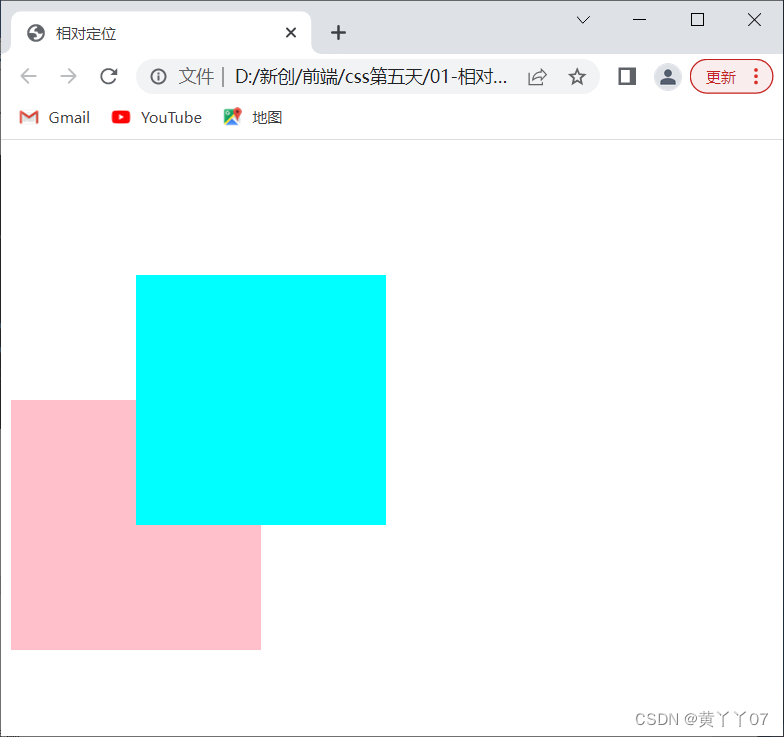
相对定位时元素在移动位置的时候,是相对于它原来位置来说的(自恋型)
语法:
选择器{position:relative;}
相对定位的特点:
- 它是相对于自己原来的位置来移动的(移动位置的时候参照点是自己原来的位置)
- 原来在标准流的位置继续占有,后面的盒子仍然以标准流的方式对待它(不托标,继续保留原来位置)
因此,相对定位并没有脱标,它最典型的应用是给绝对定位当爹的
- html>
- <html lang="en">
- <head>
- <meta charset="UTF-8">
- <meta http-equiv="X-UA-Compatible" content="IE=edge">
- <meta name="viewport" content="width=device-width, initial-scale=1.0">
- <title>相对定位title>
- <style>
- .box1 {
- position: relative;
- top: 100px;
- left: 100px;
- width: 200px;
- height: 200px;
- background-color: aqua;
- }
- .box2 {
- width: 200px;
- height: 200px;
- background-color: pink;
- }
- style>
- head>
- <body>
- <div class="box1">div>
- <div class="box2">div>
- body>
- html>
绝对定位:absolute(重要)
绝对定位是元素在移动位置的时候,是相对于它祖先元素来说的(拼爹型)
语法:
选择器{position:absolute ;}
绝对定位的特点:
1.如果没有祖先元素或者祖先元素没有定位,则以浏览器为准定位(document)
2.如果祖先元素有定位(相对、绝对、固定定位),则以最近一级的有定位祖先元素为参考点移动位置。
3.绝对定位不再占有原先的位置(脱标)
- html>
- <html lang="en">
- <head>
- <meta charset="UTF-8">
- <meta http-equiv="X-UA-Compatible" content="IE=edge">
- <meta name="viewport" content="width=device-width, initial-scale=1.0">
- <title>绝对定位title>
- <style>
- .father {
- /* position: relative; */
- width: 400px;
- height: 400px;
- background-color: pink;
- }
- .son {
- position: absolute;
- top: 100px;
- right: 100px;
- width: 200px;
- height: 200px;
- background-color: aqua;
- }
- .son2 {
- width: 200px;
- height: 200px;
- background-color: aquamarine;
- }
- style>
- head>
- <body>
- <div class="father">
- <div class="son">div>
- <div class="son2">div>
- div>
- body>
- html>

相对定位和绝对定位使用场景?
为什么说相对定位给绝对定位当爹的呢?
答:“子绝父相”是定位中最常用的一种方式:子级是绝对定位的话父级要用相对定位。
-
- 子级绝对定位,不会占有位置,可以放在父盒子里面的任何一个地方,不会影响其他的兄弟盒子。
- 父盒子需要加定位限制子盒子在父盒子内显示。
- 父盒子布局时,需要占有位置,因此父亲只能是相对定位。
这就是子绝父相的由来,所以相对定位经常用来作为绝对定位的父级。
总结:因为父级需要占有位置,因此是相对定位,子盒子不需要占有位置,则是绝对定位。
当然,子绝父相不是永远不变的,如果父元素不需要占有位置,子绝父绝也会遇到。
固定定位:fixed(重要)
固定定位是元素固定于浏览器可视区的位置。主要使用场景:可以在浏览器页面滚动时元素的位置不会改变。
语法:
选择器{position:fixed;}
固定定位的特点:
- 以浏览器的可视窗口为参照点移动元素。
跟父元素没有任何关系。
不随滚动条滚动。
- 固定定位不再占有原先的位置。
固定定位小技巧:固定在版心右侧位置。
小算法:
1让固定定位的盒子left:50% 走到浏览器可视区(也可以看做版心)的一半位置
2让固定定位的盒子margin-left:版心宽度的一半距离,多走版心宽度的一半位置
就可以让固定定位的盒子贴着版心右侧对齐了。
- html>
- <html lang="en">
- <head>
- <meta charset="UTF-8">
- <meta http-equiv="X-UA-Compatible" content="IE=edge">
- <meta name="viewport" content="width=device-width, initial-scale=1.0">
- <title>固定定位小技巧title>
- <style>
- .w {
- width: 800px;
- height: 1400px;
- background-color: pink;
- margin: 0 auto;
- }
- .fixed {
- position: fixed;
- /* 1走浏览器宽度的一半 */
- left: 50%;
- /* 2利用margin走版心的一半 */
- margin-left: 405px;
- width: 50px;
- height: 150px;
- background-color: aquamarine;
- }
- style>
- head>
- <body>
- <div class="fixed">div>
- <div class="w">版心盒子 800pxdiv>
- body>
- html>

粘性定位sticky:(刚开始随着滚动条滚动,之后不会随着滚动条滚动,固定在屏幕的固定位置)
粘性定位可以被认为是相对定位和固定定位的混合。Sticky粘性的
语法:
选择器{position:sticky;top:10px;}
粘性定位的特点:
1以浏览器的可视窗口为参照点移动元素(固定定位特点)
2粘性定位占有原先的位置(相对定位特点)
3必须添加top、left、right、bottom其中一个才有效
跟页面滚动搭配使用。兼容性较差,IE不支持。
-
相关阅读:
棉花叶病害数据集
安全与加密常识(5)自签名证书
pytorch MNIST 手写数字识别 + 使用自己的测试集 + 数据增强后再训练
H01-基于深度学习的物体检测-概述
R语言ggplot2可视化:使用ggpubr包的ggline函数可视化分组折线图(点线图、line plot)、palette参数自定义不同分组折线图的颜色
Mac“其他文件”存放着什么?“其他文件”的清理方法
网络安全(黑客技术)——如何高效自学
使用Tesseract-OCR对PDF等图片文件进行文字识别
C# 逻辑位运符及运算原理 按位操作二进制
MMSegmentation训练自己的语义分割数据集
- 原文地址:https://blog.csdn.net/m0_51495354/article/details/127913015
