-
(表格固定尾列)bower安装的相关问题
目录
TableFreeze.js(基于JQuery的表格冻结插件)
遇到需求固定表格尾列,尾列是操作(查看,删除)这些
尝试了css,js,jquery,插件,layui,elementui各种都没用
freeze-table
freeze-table(一个固定表格插件)
npm install -g bower
bower -v
有版本显示就成功
①在用bower install /update xxx 时出现 “EINVALID Name must be lowercase, can contain digits, dots, dashes, "@" or spaces”问题。
这个是说目录的名字有问题,我起的名字目录名html&css,中间&触发了这个报错,删掉就没了
②

卡这两行不动了
ctrl+c强制停止运行,再运行一遍试试

使用
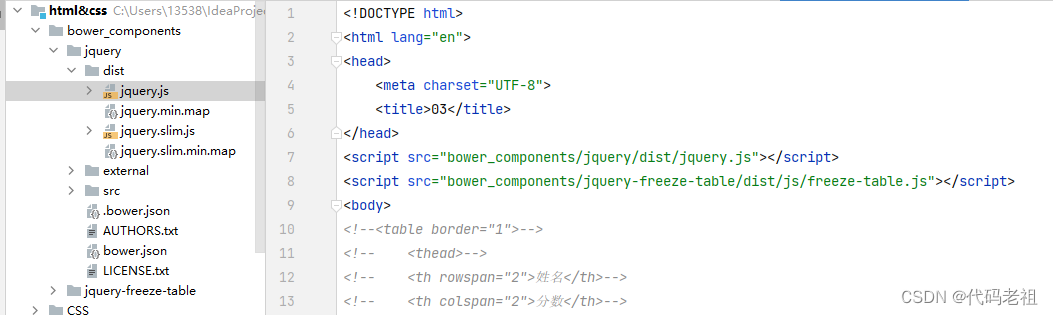
别忘了先导jQuery的js


具体使用
yidas/jquery-freeze-table Demo
Options
Options could be passed via JavaScript with object.
Name Type Default Description freezeHead boolean true Enable to freeze freezeColumn boolean true Enable to freeze column(s) freezeColumnHead boolean true Enable to freeze column(s) head (Entire column) scrollBar boolean false Enable fixed scrollBar for X axis fixedNavbar string|jQuery|Element '.navbar-fixed-top' Fixed navbar deviation consideration. Example: '#navbar'scrollable boolean false Enable Scrollable mode for inner scroll Y axis fastMode boolean false Enable Fast mode for better performance but less accuracy namespace string 'freeze-table' Table namespace for unbind container string|jQuery|Element false Specify a document role element that contains the table. Default container is window. This option is particularly useful in that it allows you to position the table in the flow of the document near the triggering element - which will make the freeze table support in containers such as Bootstrap Modal. Example:'#myModal'columnNum integer 1 The number of column(s) for freeze columnKeep boolean false Freeze column(s) will always be displayed to support interactive table columnBorderWidth interger 1 The addon border width for freeze column(s) columnWrapStyles object null Customized CSS styles for freeze column(s) wrap. {'style': 'value'}headWrapStyles object null Customized CSS styles for freeze head(s) wrap. {'style': 'value'}columnHeadWrapStyles object null Customized CSS styles for freeze column-head wrap. {'style': 'value'}callback function null Plugin after initialization callback function shadow boolean false Enable default box-shadowUIbackgroundColor string|boolean 'white' Default table background color for Boostrap transparent UI. white,#FFFFFF,rgb(255,255,255,1), orfalseto skip.TableFreeze.js
上面这玩意不太行,下面这个厉害,
FrozenTable(上,下,左,右)可以填数字固定任意地方多少行、列
(题外话,要是有插件还能在此基础固定任意行任意列就好了)0。0
TableFreeze.js(基于JQuery的表格冻结插件)
这个好用
看效果
TableFreeze表格冻结 (christopherkeith.github.io)
源代码
GitHub - CHristopherkeith/TableFreeze
结局 :还是没用,但是上面这个插件功能确实强大,原因是表格的内容是对接后端动态生成的,
而且渲染优先级高,也就是是相当于在原来表格上面贴图了,加载有问题时页面只有表格第一行表头,过长滑动时第一行也定死不动,只能从js动态加载的代码处想办法了。
11月24日
datatable
今天解决了,原来项目早预留了插件dataTable.fixedColumns.js
先聊一下datatable
dataTableId(表格的id),项目中是<table class="display my-table dataTable" width="100%" id="dataTable">
dom(定义DataTables的组件元素的显示和显示顺序)
项目中是domStr var domStr = "rt<'row'<'col-sm-3'l><'col-sm-3'i><'col-sm-6'p>>";
sort(是否排序)定义的是sortflag,项目中false
lengthMenu(定义每页显示记录数select中显示的选项)项目中是[15, 30, 50]
实际展示:

pagingType(分页风格)参数:

项目中是full_numbers
lengthChange(是否允许用户改变表格每页显示的记录数)
项目中是true
language.url(从远程文件读取国际化信息)
项目中是language: {
url: "../static/dataTables/resources/zh_ZH.txt"//
},发现是一个分页的txt文件:
{
"processing": " 加载中,请稍候……",
"lengthMenu": "每页显示 _MENU_ 条记录",
"zeroRecords": "没有吻合的记录!",
"info": "当前显示 _START_ 到 _END_ 条,共 _TOTAL_ 条记录",
"infoEmpty": "显示0到0条记录",
"emptyTable": "暂无数据存在!",
"infoFiltered": "数据表中共为 _MAX_ 条记录",
"infoPostFix": "",
"search": "搜索",
"url": "",
"paginate": {
"first": "首页",
"previous": "上一页",
"next": "下一页",
"last": "末页"
}
}ajax(从一个ajax数据源读取数据给表格内容)
项目中是ajax: {
url: dataUrl,
type: "post",
data: dataCallback
},dataUrl:'../datasource/initDatasource.action?ran=' + Math.random()
dataCallback:
function dataCallback(d) {
d.dsName = $("#dsName").val();
d.dsIP = $("#dsIP").val();
d.dsType = $("#dsType").val();
d.systemName = $("#systemName").val();
d.sysNum = $("#sysNum").val();
d.operationDepartment = $("#operationDepartment").val();
d.port = $("#port").val();
d.databaseName = $("#databaseName").val();
}这函数应该是做查询的,绑定input的id返回数据给后端查询


columns(设定列的所有属性)
注意,如果是使用 columns来定义列,那么你的th有多少,就要定义多个个(如果你不指定任何选项可以为null)
项目中定义的dataColumns

columnDefs(这个参数是一个列定义对象数组,和 columns 参数很像,这个参数允许你给指定列设置选项,应用到一个或多个列。而不像 columns 需要每列都要定义)
项目中是columnSortDefs var columnSortDefs = []; 好像什么都没设置
createdRow(当tr元素被创建(所有的td元素已经插入进去),或者给tr绑定事件,该回调函数被执行,允许操作tr元素)
项目中定义的是createdRowCallback

这里对回调函数做了双重保险
这个回调函数是在表格数据都导入后,在最后一列生成操作的相关按钮

DataTables是一个可高度配置化的类库,可以在生成HTML tables过程中的所有方面实现定制。所有特性可以通过打开、关闭或者定制来满足你对表格所有的要求。 定制要先定义一个options,然后传入$().DataTable()构造函数,通过定制options的内容来实现定制。
生成表格的关键代码

fixedColumns.js


- 相关阅读:
Shell各种排序方式
java 3年经验面试题
DockerFile发布Java微服务并部署到Docker容器
React 全栈体系(十六)
网络安全https
ISIS 协议常用基本配置总结
JUC并发编程系列详解篇六(死锁的基本概念)
记研二首次组会汇报暨进组后第三次组会汇报
java冒泡排序-正序排列、倒序排列(逻辑思维)《软件编程 从0基础到入门<全民编程系列>》
【数据结构之栈、队列、数组】
- 原文地址:https://blog.csdn.net/qq_57420582/article/details/127897377
- 相关阅读: