RHCE认证
重要配置信息
在考试期间,除了您就坐位置的台式机之外,还将使用多个虚拟系统。您不具有台式机系统的 root 访问权,但具有对虚拟系统的完整 root 访问权。
系统信息
在本考试期间,您将操作下列虚拟系统:
| 系统 | IP 地址 | Ansible 角色 |
|---|---|---|
| control | 172.25.250.254 | ansible control node |
| node1 | 172.25.250.9 | ansible managed node |
| node2 | 172.25.250.10 | ansible managed node |
| node3 | 172.25.250.11 | ansible managed node |
| node4 | 172.25.250.12 | ansible managed node |
| node5 | 172.25.250.13 | ansible managed node |
这些系统的 IP 地址采用静态设置。请勿更改这些设置。
主机名称解析已配置为解析上方列出的完全限定主机名,同时也解析主机短名称。
帐户信息
所有系统的 root 密码是 flectrag。
请勿更改 root 密码。除非另有指定,否则这将是用于访问其他系统和服务的密码。此外,除非另有指定,否则此密码也应用于您创建的所有帐户,或者任何需要设置密码的服务。
为方便起见,所有系统上已预装了 SSH 密钥,允许在不输入密码的前提下通过 SSH 进行 root 访问。请勿对系统上的 root SSH 配置文件进行任何修改。
Ansible 控制节点上已创建了用户帐户 greg。此帐户预装了 SSH 密钥,允许在 Ansible 控制节点和各个 Ansible 受管节点之间进行 SSH 登录。请勿对系统上的 greg SSH 配置文件进行任何修改。您可以从 root 帐户使用 su 访问此用户帐户。
重要信息
除非另有指定,否则您的所有工作(包括 Ansible playbook、配置文件和主机清单等)应当保存在控制节点上的目录 /home/greg/ansible 中,并且应当归 greg 用户所有。所有 Ansible 相关的命令应当由 greg 用户从 Ansible 控制节点上的这个目录运行。
其他信息
一些考试项目可能需要修改 Ansible 主机清单。您要负责确保所有以前的清单组和项目保留下来,与任何其他更改共存。您还要有确保清单中所有默认的组和主机保留您进行的任何更改。
考试系统上的防火墙默认为不启用,SELinux则处于强制模式。
如果需要安装其他软件,您的物理系统和 Ansible 控制节点可能已设置为指向 content 上的下述存储库:
一些项目需要额外的文件,这些文件已在以下位置提供:
产品文档可从以下位置找到:
其他资源也进行了配置,供您在考试期间使用。关于这些资源的具体信息将在需要这些资源的项目中提供。
重要信息
请注意,在评分之前,您的 Ansible 受管节点系统将重置为考试开始时的初始状态,您编写的 Ansible playbook 将通过以 greg 用户身份从控制节点上的目录 /home/greg/ansible 目录运行来应用。在 playbook 运行后,系统会对您的受管节点进行评估,以判断它们是否按照规定进行了配置。
第一题:安装和配置 Ansible
安装和配置Ansible
按照下方所述,在控制节点 control 上安装和配置 Ansible:
第一步
# 通过远程连接greg用户进入控制节点control
[kiosk@foundation0 ~]$ ssh greg@control
greg@control's password:
Activate the web console with: systemctl enable --now cockpit.socket

Last login: Fri Nov 11 15:11:37 2022 from 172.25.250.250
[greg@control ~]$
第二步
# 安装ansible软件包
[greg@control ~]$ sudo yum -y install ansible

# 检查软件是否安装成功
[greg@control ~]$ ansible --version
ansible 2.8.0
  config file = /etc/ansible/ansible.cfg
  configured module search path = ['/home/greg/.ansible/plugins/modules', '/usr/share/ansible/plugins/modules']
  ansible python module location = /usr/lib/python3.6/site-packages/ansible
  executable location = /usr/bin/ansible
  python version = 3.6.8 (default, Apr  3 2019, 17:26:03) [GCC 8.2.1 20180905 (Red Hat 8.2.1-3)]
第三步
# 创建角色路径,并进入ansible目录
[greg@control ~]$ mkdir -p /home/greg/ansible/roles
[greg@control ~]$ cd ansible/
[greg@control ansible]$

# 编辑清单文件
[greg@control ~]$ vim /home/greg/ansible/inventory
[dev]
node1

[test]
node2

[prod]
node3
node4

[balancers]
node5

[webservers:children]
prod
第四步
# 安装完ansible会有一个默认的配置文件,拷贝到题中指定目录进行修改
[greg@control ~]$ cp /etc/ansible/ansible.cfg /home/greg/ansible/ansible.cfg
[greg@control ~]$ vim /home/greg/ansible/ansible.cfg
[defaults]
inventory = /home/greg/ansible/inventory ## 首先找到inventory,改成题中指定的目录
roles_path = /home/greg/ansible/roles ## 修改角色目录为指定目录
host_key_checking = False  ## 关掉主机key检查
remote_user = greg  ## 更改远端执行用户为题目中指定的用户,这里时greg,考试时随机应变
## 找到[privilege_escalation]标签和这些become,把下面四行注释去掉
[privilege_escalation]
become = True
become_method = sudo
become_user = root
become_ask_pass = False
第五步
# 检查
[greg@control ansible]$ ansible-inventory --graph
@all:
  |--@balancers:
  |  |--node5
  |--@dev:
  |  |--node1
  |--@test:
  |  |--node2
  |--@ungrouped:
  |--@webservers:
  |  |--@prod:
  |  |  |--node3
  |  |  |--node4
[greg@control ansible]$ ansible all -m ping -o
node3 | SUCCESS => {"ansible_facts": {"discovered_interpreter_python": "/usr/libexec/platform-python"},"changed": false,"ping": "pong"}
node2 | SUCCESS => {"ansible_facts": {"discovered_interpreter_python": "/usr/libexec/platform-python"},"changed": false,"ping": "pong"}
node5 | SUCCESS => {"ansible_facts": {"discovered_interpreter_python": "/usr/libexec/platform-python"},"changed": false,"ping": "pong"}
node4 | SUCCESS => {"ansible_facts": {"discovered_interpreter_python": "/usr/libexec/platform-python"},"changed": false,"ping": "pong"}
node1 | SUCCESS => {"ansible_facts": {"discovered_interpreter_python": "/usr/libexec/platform-python"},"changed": false,"ping": "pong"}
第二题:创建和运行 Ansible 临时命令
创建和运行 Ansible 临时命令
作为系统管理员,您需要在受管节点上安装软件。
请按照正文所述,创建一个名为 /home/greg/ansible/adhoc.sh 的 shell 脚本,该脚本将使用 Ansible 临时命令在各个受管节点上安装 yum 存储库:
存储库1:
存储库2:
第一步
# ansible-doc查询文档
[greg@control ansible]$ ansible-doc -l | grep yum
yum                                                    Manages packages with the `yum' package manager
yum_repository                                         Add or remove YUM repositories
第二步
# 创建shell脚本文件
[greg@control ansible]$ vim /home/greg/ansible/adhoc.sh

#!/bin/bash
ansible all -m yum_repository -a "name=EX294_BASE description='EX294 base software' baseurl=http://content/rhel8.0/x86_64/dvd/BaseOS gpgcheck=yes gpgkey=http://content/rhel8.0/x86_64/dvd/RPM-GPG-KEY-redhat-release enabled=yes"
ansible all -m yum_repository -a "name=EX294_STREAM description='EX294 stream software' baseurl=http://content/rhel8.0/x86_64/dvd/AppStream gpgcheck=yes gpgkey=http://content/rhel8.0/x86_64/dvd/RPM-GPG-KEY-redhat-release enabled=yes"
第三步
# shell脚本文件添加执行权限,并运行
[greg@control ansible]$ chmod +x /home/greg/ansible/adhoc.sh
[greg@control ansible]$ /home/greg/ansible/adhoc.sh
第四步
# 测试,验证
[greg@control ansible]$ ansible all -a 'yum repolist'
...
第三题:安装软件包
安装软件包
创建一个名为 /home/greg/ansible/packages.yml 的 playbook :
第一步
# 设置行号显示,设置Tab格式
[greg@control ansible]$ vim ~/.vimrc
set number ts=2 sw=2 et
第二步
# 创建playbook,编写playbook
[greg@control ansible]$ vim /home/greg/ansible/packages.yml
---
- name: 安装软件包1
  hosts: dev,test,prod
  tasks:
  - name: ensure a list of packages installed
    yum:
      name: "{{ packages }}"
    vars:
      packages:
      - php
      - mariadb

- name: 安装软件包2
  hosts: dev,test,prod
  tasks:
  - name: install the package group
    yum:
      name: "@RPM Development Tools"
      state: present
  - name: upgrade all packages
    yum:
      name: '*'
      state: latest
第四步
# 执行playbook
[greg@control ansible]$ ansible-playbook /home/greg/ansible/packages.yml
第五步
# 验证
[greg@control ansible]$ ansible dev,test,prod -a "rpm -q php mariadb"
[greg@control ansible]$ ansible dev -a "yum grouplist"
[greg@control ansible]$ ansible dev -a "yum update"
第四题:使用 RHEL 系统角色(NEW)
使用 RHEL 系统角色
安装 RHEL 系统角色软件包,并创建符合以下条件的 playbook /home/greg/ansible/selinux.yml :
第一步
# 搜索软件包
[greg@control ansible]$ yum search role
Last metadata expiration check: 1:39:45 ago on Tue 15 Nov 2022 10:03:09 AM GMT.
============================================ Name & Summary Matched: role ============================================
policycoreutils-newrole.x86_64 : The newrole application for RBAC/MLS
================================================= Name Matched: role =================================================
rhel-system-roles.noarch : Set of interfaces for unified system management
=============================================== Summary Matched: role ================================================
ansible-freeipa.noarch : Roles and playbooks to deploy FreeIPA servers, replicas and clients
第二步
# 安装角色软件包
[greg@control ansible]$ sudo yum -y install rhel-system-roles.noarch
第三步
# 查看角色路径,角色路径放到配置文件
[greg@control ansible]$ rpm -ql rhel-system-roles.noarch
/usr/share/ansible/roles
...

[greg@control ansible]$ vim ansible.cfg
roles_path    = /home/greg/ansible/roles:/usr/share/ansible/roles
第四步
# 查找配置文件样例,复制样例到playbook,修改playbook
[greg@control ansible]$ rpm -ql rhel-system-roles.noarch | grep example
/usr/share/doc/rhel-system-roles/selinux/example-selinux-playbook.yml

[greg@control ansible]$ cp /usr/share/doc/rhel-system-roles/selinux/example-selinux-playbook.yml /home/greg/ansible/selinux.yml
[greg@control ansible]$ vim /home/greg/ansible/selinux.yml
---
- hosts: all
  vars:
    selinux_policy: targeted
    selinux_state: enforcing

  # prepare prerequisites which are used in this playbook
  tasks:
    - name: execute the role and catch errors
      block:
        - include_role:
            name: rhel-system-roles.selinux
      rescue:
        # Fail if failed for a different reason than selinux_reboot_required.
        - name: handle errors
          fail:
            msg: "role failed"
          when: not selinux_reboot_required

        - name: restart managed host
          shell: sleep 2 && shutdown -r now "Ansible updates triggered"
          async: 1
          poll: 0
          ignore_errors: true

        - name: wait for managed host to come back
          wait_for_connection:
            delay: 10
            timeout: 300

        - name: reapply the role
          include_role:
            name: rhel-system-roles.selinux
第五步
# 执行playbook
[greg@control ansible]$ ansible-playbook selinux.yml
第六步
# 验证
[greg@control ansible]$ ansible all -a "grep ^SELINUX /etc/selinux/config"
node4 | CHANGED | rc=0 >>
SELINUX=enforcing
SELINUXTYPE=targeted
...
第四题:使用 RHEL 系统角色(OLD)
使用 RHEL 系统角色
安装 RHEL 系统角色软件包,并创建符合以下条件的 playbook /home/greg/ansible/timesync.yml :
第一步
# 搜索软件包
[greg@control ansible]$ yum search role
Last metadata expiration check: 1:39:45 ago on Tue 15 Nov 2022 10:03:09 AM GMT.
============================================ Name & Summary Matched: role ============================================
policycoreutils-newrole.x86_64 : The newrole application for RBAC/MLS
================================================= Name Matched: role =================================================
rhel-system-roles.noarch : Set of interfaces for unified system management
=============================================== Summary Matched: role ================================================
ansible-freeipa.noarch : Roles and playbooks to deploy FreeIPA servers, replicas and clients
第二步
# 安装角色软件包
[greg@control ansible]$ sudo yum -y install rhel-system-roles.noarch
第三步
# 查看角色路径,角色路径放到配置文件
[greg@control ansible]$ rpm -ql rhel-system-roles.noarch
/usr/share/ansible/roles
...

[greg@control ansible]$ vim ansible.cfg
roles_path    = /home/greg/ansible/roles:/usr/share/ansible/roles
第四步
# 查找配置文件样例,复制样例到playbook,并修改playbook
[greg@control ansible]$ rpm -ql rhel-system-roles.noarch
/usr/share/doc/rhel-system-roles/timesync/example-timesync-playbook.yml

[greg@control ansible]$ cp /usr/share/doc/rhel-system-roles/timesync/example-timesync-playbook.yml /home/greg/ansible/timesync.yml
[greg@control ansible]$ vim /home/greg/ansible/timesync.yml
---
- hosts: all
  vars:
    timesync_ntp_servers:
      - hostname: 172.25.254.254
        iburst: yes
  roles:
    - rhel-system-roles.timesync
第五步
# 运行playbook
[greg@control ansible]$ ansible-playbook timesync.yml
第六步
# 验证
[greg@control ansible]$ ansible all -m shell -a 'chronyc sources'
第五题:使用 Ansible Galaxy 安装角色
使用 Ansible Galaxy 安装角色
使用 Ansible Galaxy 和要求文件 /home/greg/ansible/roles/requirements.yml 。从以下 URL 下载角色并安装到 /home/greg/ansible/roles :
第一步
# 编写playbook文件
[greg@control ansible]$ vim /home/greg/ansible/roles/requirements.yml
---
- src: http://materials/haproxy.tar
  name: balancer
- src: http://materials/phpinfo.tar
  name: phpinfo
第二步
# 安装角色
[greg@control ansible]$ ansible-galaxy role install -r  /home/greg/ansible/roles/requirements.yml
第三步
# 验证
[greg@control ansible]$ ansible-galaxy list
# /home/greg/ansible/roles
- balancer, (unknown version)
- phpinfo, (unknown version)
第六题:创建和使用角色
创建和使用角色
根据下列要求,在 /home/greg/ansible/roles 中创建名为 apache 的角色:
Welcome to HOSTNAME on IPADDRESS其中,HOSTNAME 是受管节点的完全限定域名,IPADDRESS 则是受管节点的 IP 地址。
创建一个名为 /home/greg/ansible/apache.yml 的 playbook:
第一步
# 进入角色路径,创建名为 apache 的角色
[greg@control ansible]$ cd roles/
[greg@control roles]$ ansible-galaxy init apache
- Role apache was created successfully
第二步
# 编写任务tasks文件
[greg@control roles]$ vim apache/tasks/main.yml
---
# tasks file for apache
- name: ensure a list of packages installed
  yum:
    name: "{{ packages }}"
  vars:
    packages:
    - httpd
    - firewalld

- name: Start service httpd, if not started
  service:
    name: httpd
    state: started
    enabled: yes

- name: Start service firewalld, if not started
  service:
    name: firewalld
    state: started
    enabled: yes

- firewalld:
    service: http
    permanent: yes
    state: enabled
    immediate: yes

- name: Template a file
  template:
    src: index.html.j2
    dest: /var/www/html/index.html
第三步
# 编写模板文件
[greg@control roles]$ vim apache/templates/index.html.j2
Welcome to {{ ansible_fqdn }} on {{ ansible_default_ipv4.address }}
第四步
# 回到ansible路径,编写playbook文件
[greg@control roles]$ cd ..
[greg@control ansible]$ vim /home/greg/ansible/apache.yml
 ---
- name: 创建和使用角色
  hosts: webservers
  roles:
  - apache
第五步
# 执行playbook文件
[greg@control ansible]$ ansible-playbook /home/greg/ansible/apache.yml
第六步
# 验证
[greg@control ansible]$ curl node3
Welcome to node3.lab.example.com on 172.25.250.11
[greg@control ansible]$ curl node4
Welcome to node4.lab.example.com on 172.25.250.12
第七题:从 Ansible Galaxy 使用角色
从 Ansible Galaxy 使用角色
根据下列要求,创建一个名为 /home/greg/ansible/roles.yml 的 playbook :
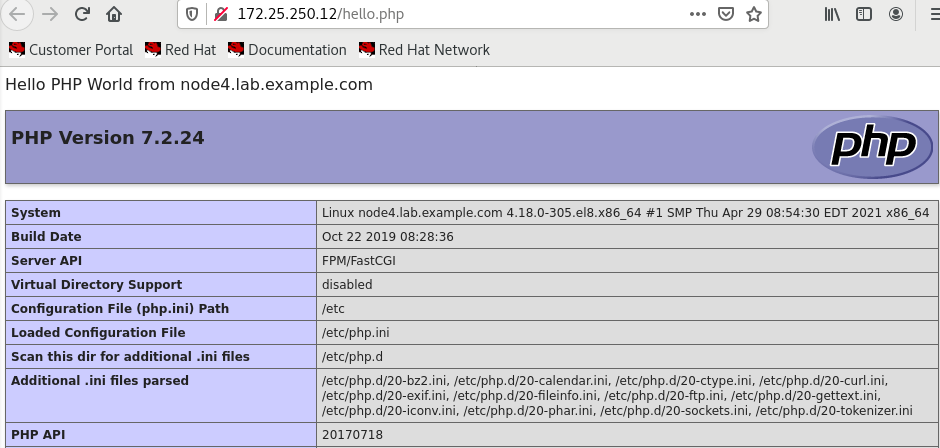
Welcome to node3.lab.example.com on 172.25.250.11Welcome to node4.lab.example.com on 172.25.250.12Hello PHP World from FQDNHello PHP World from node3.lab.example.com另外还有 PHP 配置的各种详细信息,如安装的 PHP 版本等。
Hello PHP World from node4.lab.example.com另外还有 PHP 配置的各种详细信息,如安装的 PHP 版本等。
第一步
# 编写playbook
[greg@control ansible]$ vim /home/greg/ansible/roles.yml
第二步
# 执行playbook
---
- name: 从 Ansible Galaxy 使用角色1
  hosts: webservers
  roles:
  - phpinfo
  -
- name: 从 Ansible Galaxy 使用角色2
  hosts: balancers
  roles:
  - balancer
第三步
验证
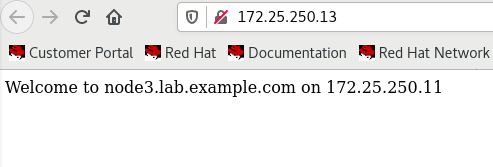
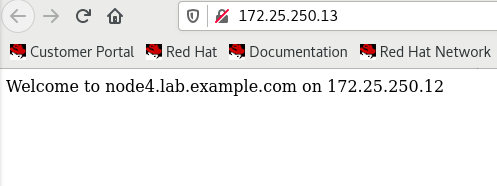
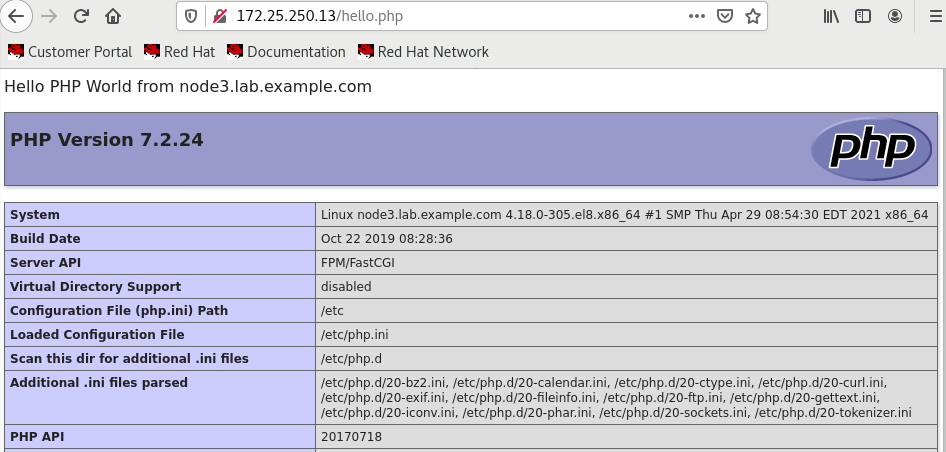
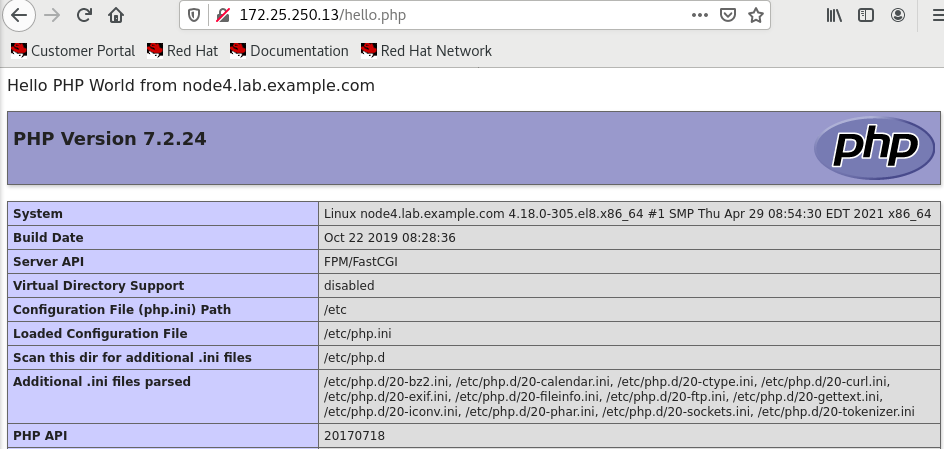
第八题:创建和使用分区(NEW)
创建和使用分区
创建一个名为 /home/greg/ansible/partition.yml 的 playbook ,它将在所有受管节点上创建分区:
第一步
# 创建playbook
[greg@control ansible]$ vim /home/greg/ansible/partition.yml
---
- name: 创建和使用分区
  hosts: all
  tasks:
  - name: Handle the error
    block:
    - name: Create a new primary partition
      parted:
        device: /dev/vdb
        number: 1
        state: present
        part_end: 1500MiB
    - name: Create a ext4 filesystem
      filesystem:
        fstype: ext4
        dev: /dev/vdb1
    - name: Mount
      mount:
        path: /data
        src: /dev/vdb1
        fstype: ext4
        state: mounted
      when: inventory_hostname in groups.prod
    rescue:
    - debug:
        msg: Could not create partition of that size
    - name: Create a new primary partition
      parted:
        device: /dev/vdb
        number: 1
        state: present
        part_end: 800MiB
    when: ansible_devices.vdb is defined
  - debug:
      msg: this disk is not exist
    when: ansible_devices.vdb is undefined
第二步
# 执行playbook
[greg@control ansible]$ ansible-playbook partition.yml
第三步
# 验证
[greg@control ansible]$ ansible all -a 'lsblk'
第八题:创建和使用逻辑卷(OLD)
创建和使用逻辑卷
创建一个名为 /home/greg/ansible/lv.yml 的 playbook ,它将在所有受管节点上运行以执行下列任务:
Could not create logical volume of that size,并且应改为使用大小 800 MiB。
Volume group done not exist
第一步
# 创建playbook
[greg@control ansible]$ vim /home/greg/ansible/lv.yml
---
- name: 创建和使用逻辑卷
  hosts: all
  tasks:
  - block:
    - name: Create a logical volume
      lvol:
        vg: research
        lv: data
        size: 1500
    - name: Create a ext4 filesystem
      filesystem:
        fstype: ext4
        dev: /dev/research/data
    rescue:
    - debug:
        msg: Could not create logical volume of that size
    - name: Create a logical volume
      lvol:
        vg: research
        lv: data
        size: 800
    when: ansible_lvm.vgs.research is defined
  - debug:
      msg: Volume group done not exist
    when: ansible_lvm.vgs.research is not defined
第二步
# 执行playbook
[greg@control ansible]$ ansible-playbook lv.yml
第三步
# 验证
[greg@control ansible]$ ansible all -a "lvs"
第九题:生成主机文件
生成主机文件
该 playbook 运行后, dev 主机组中主机上的文件 /etc/myhosts 应针对每个受管主机包含一行内容:
127.0.0.1 localhost localhost.localdomain localhost4 localhost4.localdomain4

::1 localhost localhost.localdomain localhost6 localhost6.localdomain6


172.25.250.9    node1.lab.example.com node1

172.25.250.10   node2.lab.example.com node2

172.25.250.11   node3.lab.example.com node3

172.25.250.12   node4.lab.example.com node4

172.25.250.13   node5.lab.example.com node5
注:清单主机名称的显示顺序不重要。
第一步
# 下载初始模板文件
[greg@control ansible]$ wget http://materials/hosts.j2
第二步
# 创建playbook
[greg@control ansible]$ vim /home/greg/ansible/hosts.yml
---
- name: 生成主机文件
  hosts: all
  tasks:
  - name: Template a file to /etc/myhosts
    template:
      src: /home/greg/ansible/hosts.j2
      dest: /etc/myhosts
    when: inventory_hostname in groups.dev
第三步
# 编写hosts.j2文件
[greg@control ansible]$ vim hosts.j2
127.0.0.1 localhost localhost.localdomain localhost4 localhost4.localdomain4
::1 localhost localhost.localdomain localhost6 localhost6.localdomain6
{% for host in groups['all'] %}
{{ hostvars[host]['ansible_facts']['default_ipv4']['address'] }} {{ hostvars[host]['ansible_facts']['nodename'] }} {{ hostvars[host]['ansible_facts']['hostname'] }}
{% endfor %}
第四步
# 执行playbook
[greg@control ansible]$ ansible-playbook hosts.yml
第五步
# 验证
[greg@control ansible]$ ansible dev -a "cat /etc/myhosts"
第十题:修改文件内容
修改文件内容
按照下方所述,创建一个名为 /home/greg/ansible/issue.yml 的 playbook :
第一步
# 创建playbook,并编写playbook
[greg@control ansible]$ vim /home/greg/ansible/issue.yml
---
- name: 修改文件内容
  hosts: all
  tasks:
  - name: Copy using inline content 1
    copy:
      content: 'Development'
      dest: /etc/issue
    when: inventory_hostname in groups.dev
  - name: Copy using inline content 2
    copy:
      content: 'Test'
      dest: /etc/issue
    when: inventory_hostname in groups.test
  - name: Copy using inline content 3
    copy:
      content: 'Production'
      dest: /etc/issue
    when: inventory_hostname in groups.prod
第二步
# 执行playbook
[greg@control ansible]$ ansible-playbook issue.yml
第三步
# 验证
[greg@control ansible]$ ansible all -a "cat  /etc/issue"
第十一题:创建 Web 内容目录
创建 Web 内容目录
按照下方所述,创建一个名为 /home/greg/ansible/webcontent.yml 的 playbook :
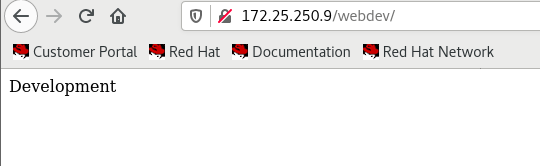
Development
第一步
# 检查webdev 组是否存在
[greg@control ansible]$ ansible dev -a "grep webdev /etc/group"
node1 | CHANGED | rc=0 >>
webdev:x:1003:
第二步
# 创建playbook
[greg@control ansible]$ vim /home/greg/ansible/webcontent.yml
---
- name: 创建 Web 内容目录
  hosts: dev
  tasks:
  - name: Create a directory if it does not exist
    file:
      path: /webdev
      state: directory
      group: webdev
      mode: u=rwx,g=rwxs,o=rx
  - name: Create a symbolic link
    file:
      src: /webdev
      dest: /var/www/html/webdev
      state: link
  - name: Copy using inline content
    copy:
      content: 'Development'
      dest: /webdev/index.html
      setype: httpd_sys_content_t
  - name: Start service httpd, if not started
    service:
      name: httpd
      state: started
      enabled: yes
第三步
# 执行playbook
[greg@control ansible]$ ansible-playbook webcontent.yml
第四步
验证
第十二题:生成硬件报告
生成硬件报告
创建一个名为 /home/greg/ansible/hwreport.yml 的 playbook ,它将在所有受管节点上生成含有以下信息的输出文件 /root/hwreport.txt :
您的 playbook 应当:
第一步
# 创建playbook
[greg@control ansible]$ vim /home/greg/ansible/hwreport.yml
第二步
# 执行playbook
[greg@control ansible]$ ansible-playbook hwreport.yml
---
- name: 生成硬件报告
  hosts: all
  tasks:
  - name: Download foo.conf
    get_url:
      url: http://materials/hwreport.empty
      dest: /root/hwreport.txt
  - name: Ensure 1
    lineinfile:
      path: /root/hwreport.txt
      regexp: '^HOST='
      line: HOST={{ inventory_hostname }}
  - name: Ensure 2
    lineinfile:
      path: /root/hwreport.txt
      regexp: '^MEMORY='
      line: MEMORY={{ ansible_memtotal_mb }}
  - name: Ensure 3
    lineinfile:
      path: /root/hwreport.txt
      regexp: '^BIOS='
      line: BIOS={{ ansible_bios_version }}
  - name: Ensure 4
    lineinfile:
      path: /root/hwreport.txt
      regexp: '^DISK_SIZE_VDA='
      line: DISK_SIZE_VDA={{ ansible_devices.vda.size }}
  - name: Ensure 5
    lineinfile:
      path: /root/hwreport.txt
      regexp: '^DISK_SIZE_VDB='
      line: DISK_SIZE_VDB={{ ansible_devices.vdb.size | default('NONE', true) }}
第三步
# 验证
[greg@control ansible]$ ansible all -a 'cat /root/hwreport.txt'
第十三题:创建密码库
创建密码库
按照下方所述,创建一个 Ansible 库来存储用户密码:
第一步
# 密码导入密码存储文件
[greg@control ansible]$ echo "whenyouwishuponastar" > /home/greg/ansible/secret.txt
第二步
# 修改配置文件存储路径
[greg@control ansible]$ vim ansible.cfg
vault_password_file = /home/greg/ansible/secret.txt
第三步
# 创建Ansible 库,存储用户密码
[greg@control ansible]$ ansible-vault create /home/greg/ansible/locker.yml
pw_developer: Imadev
pw_manager: Imamgr
第四步
# 验证
[greg@control ansible]$ ansible-vault view /home/greg/ansible/locker.yml

---
pw_developer: Imadev
pw_manager: Imamgr
第十四题:创建用户帐户
创建用户帐户
第一步
# 查看组是否存在
[greg@control ansible]$ ansible dev,test -a "grep devops /etc/group"
第二步
# 下载要创建的用户的列表
[greg@control ansible]$ wget http://materials/user_list.yml
第三步
# 创建playbook,并编写
[greg@control ansible]$ vim /home/greg/ansible/users.yml
---
- name: 创建用户帐户 1
  hosts: dev,test
  vars_files:
  - /home/greg/ansible/locker.yml
  - /home/greg/ansible/user_list.yml
  tasks:
  - name: Ensure group 1
    group:
      name: devops
      state: present
  - name: Add the user 1
    user:
      name: "{{ item.name }}"
      groups: devops
      password: "{{ pw_developer | password_hash('sha512') }}"
      append: yes
    loop: "{{ users }}"
    when: item.job == 'developer'

- name: 创建用户帐户 2
  hosts: prod
  vars_files:
  - /home/greg/ansible/locker.yml
  - /home/greg/ansible/user_list.yml
  tasks:
  - name: Ensure group 2
    group:
      name: opsmgr
      state: present
  - name: Add the user 2
    user:
      name: "{{ item.name }}"
      groups: opsmgr
      password: "{{ pw_manager | password_hash('sha512') }}"
      append: yes
    loop: "{{ users }}"
    when: item.job == 'manager'
第四步
# 执行playbook
[greg@control ansible]$ ansible-playbook users.yml
第五步
# 验证
[greg@control ansible]$ ansible dev,test -m shell -a "id bob; id sally; id fred"
第十五题:更新 Ansible 库的密钥
更新 Ansible 库的密钥
按照下方所述,更新现有 Ansible 库的密钥:
第一步
# 下载Ansible 库
[greg@control ansible]$ wget http://materials/salaries.yml
第二步
# 重设密码
[greg@control ansible]$ ansible-vault rekey  /home/greg/ansible/salaries.yml
Vault password: 'insecure8sure'
New Vault password: 'bbs2you9527'
Confirm New Vault password: 'bbs2you9527'
Rekey successful
第三步
# 验证
[greg@control ansible]$ ansible-vault view  /home/greg/ansible/salaries.yml
Vault password: 'bbs2you9527'
haha
第十六题:配置 cron 作业(增加)
配置 cron 作业
创建一个名为 /home/greg/ansible/cron.yml 的 playbook :
第一步
# 创建playbook
[greg@control ansible]$ vim /home/greg/ansible/cron.yml
---
- name: cron
  hosts: test
  tasks:
  - name: Ensure a job
    cron:
      name: "check dirs"
      minute: "*/2"
      job: 'logger "EX200 in progress"'
      user: bob
第二步
# 执行playbook
[greg@control ansible]$ ansible-playbook cron.yml
第三步
# 验证
[greg@control ansible]$ ansible test -a "grep EX200 /var/log/cron"
ontrol ansible]$ ansible-vault rekey /home/greg/ansible/salaries.yml
Vault password: 'insecure8sure'
New Vault password: 'bbs2you9527'
Confirm New Vault password: 'bbs2you9527'
Rekey successful
==第三步==

~~~sh
# 验证
[greg@control ansible]$ ansible-vault view  /home/greg/ansible/salaries.yml
Vault password: 'bbs2you9527'
haha
第十六题:配置 cron 作业(增加)
配置 cron 作业
创建一个名为 /home/greg/ansible/cron.yml 的 playbook :
第一步
# 创建playbook
[greg@control ansible]$ vim /home/greg/ansible/cron.yml
---
- name: cron
  hosts: test
  tasks:
  - name: Ensure a job
    cron:
      name: "check dirs"
      minute: "*/2"
      job: 'logger "EX200 in progress"'
      user: bob
第二步
# 执行playbook
[greg@control ansible]$ ansible-playbook cron.yml
第三步
# 验证
[greg@control ansible]$ ansible test -a "grep EX200 /var/log/cron"
__EOF__