-
SpringBoot 下载 docx 文档
功能需求很简单:我想实现一个在线下载简历docx文档的功能
实现效果如下:点击下载后,就出现下载的文档
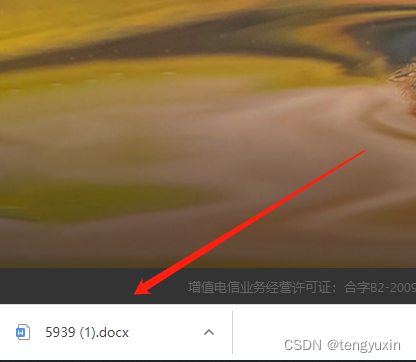
目前该方式有局限性只能下载微软的word文档,而wps的会下载失败
一、具体代码
使用的库为
org.apache.poi 专门处理Microsoft 的文档- <dependency>
- <groupId>org.apache.poi</groupId>
- <artifactId>poi-scratchpad</artifactId>
- <version>5.2.2</version>
- </dependency>
- <dependency>
- <groupId>org.apache.poi</groupId>
- <artifactId>poi-ooxml</artifactId>
- <version>5.2.2</version>
- </dependency>
实现思路:
(1)读取简历文件进入输入流 (输入流读取文件)(2)利用 XWPFDocument 装载 读取的数据流,将其写入 响应里面
- public void downloadDoc(HttpServletResponse response) throws UnsupportedEncodingException {
- String baseUrl = "D:\\testDownload\\";
- String temp = "5939.docx";
- File file = new File(baseUrl + temp);
- //获取文件名
- String filename = file.getName();
- //获取后缀名
- int i = filename.lastIndexOf(".");
- String extension = filename.substring(i+1);
- //设置响应的信息
- response.reset();
- response.setCharacterEncoding("UTF-8");
- response.setHeader("Content-Disposition", "attachment;filename=" + URLEncoder.encode(filename, "utf8"));
- response.setHeader("Pragma", "no-cache");
- response.setHeader("Cache-Control", "no-cache");
- //设置浏览器接受类型为流
- response.setContentType("application/octet-stream;charset=UTF-8");
- try {
- InputStream in = new FileInputStream(file);
- // 将文件写入输入流
- OutputStream out = response.getOutputStream();
- if("docx".equals(extension) || "doc".equals(extension)) {
- //docx文件就以XWPFDocument创建
- XWPFDocument docx = new XWPFDocument(in);
- docx.write(out);
- docx.close();
- } else {
- //其他类型的文件,按照普通文件传输 如(zip、rar等压缩包)
- int len;
- //一次传输1M大小字节
- byte[] bytes = new byte[1024];
- while ((len = in.read(bytes)) != -1) {
- out.write(bytes , 0 , len);
- }
- }
- } catch (Exception e) {
- e.printStackTrace();
- }
- }
二、前端如何下载
我使用最简单的方式:window.open(ulr)
-
相关阅读:
数据库列的字段类型和属性
SpringBoot配置文件及相关配置
python常见的异常处理函数
stm32f10系列--管脚被设置为输入模式时,对其进行输出操作将影响其输入功能
Docker的网络模式
UG\NX二次开发 计算一个向量的反向向量UF_VEC3_negate
LeetCode160:相交链表
什么是RabbitMQ
算法----组合总和(Kotlin)-面试真题
丰田工厂停产竟然因为磁盘...
- 原文地址:https://blog.csdn.net/tengyuxin/article/details/127880342
