版本3.6.1
先创建节点 master

添加组件 RigidBody2D、BoxCollider2D、自定义脚本、
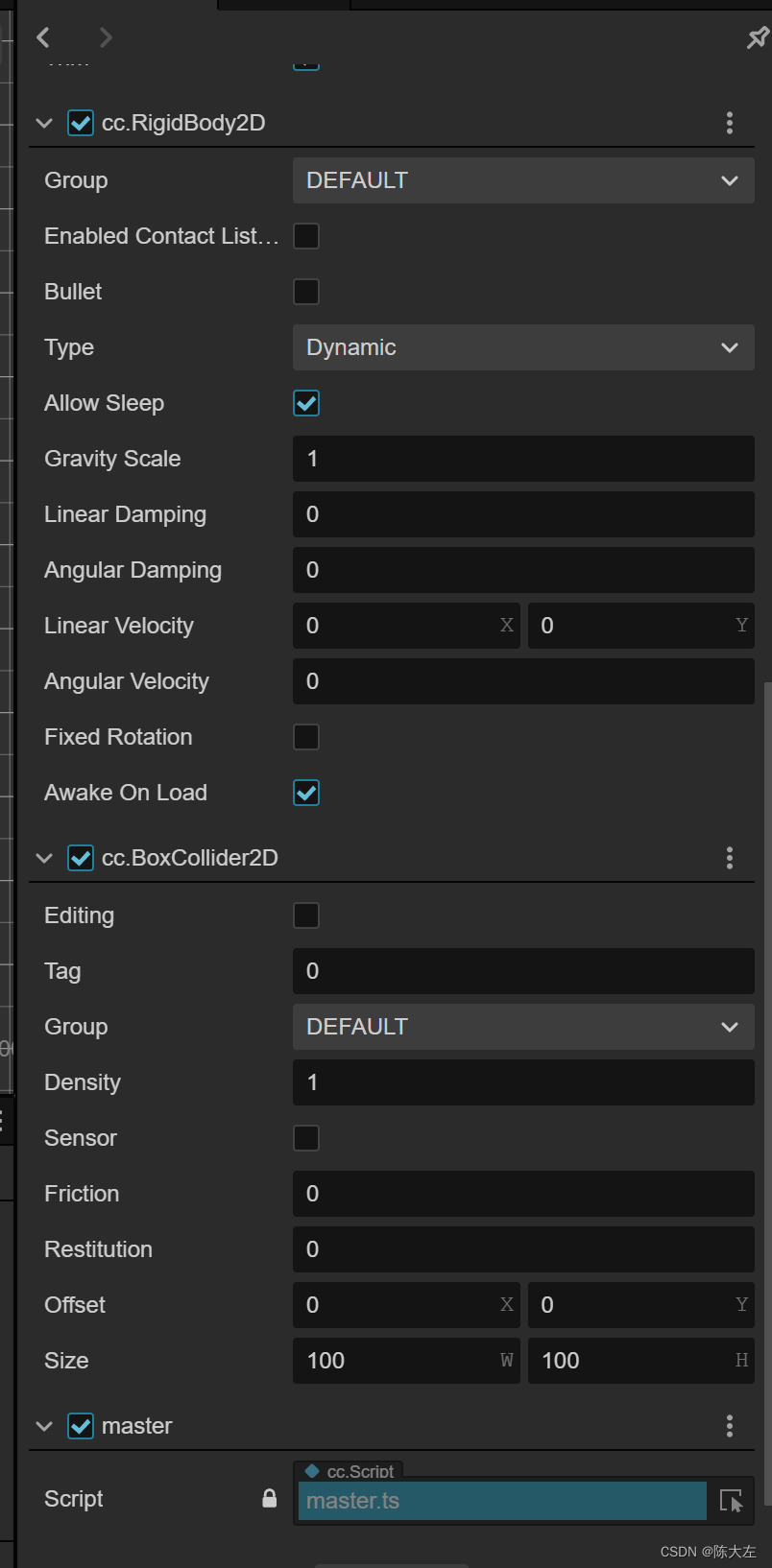
简单的封装下移动事件
import { _decorator, input, Input } from 'cc';
let instance: AxInput = null!;
export class AxInput {
private _pressd_map: any = {};
private _just_pressd_map: any = {};
private _just_released_map: any = {};
private set_pressed_status(k: number, status: boolean) {
if (status != false && !!this._pressd_map[k]) {
return;
}
this._pressd_map[k] = status;
this._just_pressd_map[k] = status;
}
private set_released_status(k: number, status: boolean) {
this._just_released_map[k] = status;
}
is_action_pressed(k: number) {
return !!this._pressd_map[k];
}
is_action_just_pressed(k: number) {
let pressed_status = this._just_pressd_map[k];
this._just_pressd_map[k] = false;
return !!pressed_status;
}
is_action_just_released(k: number) {
let released_status = this._just_released_map[k];
this._just_released_map[k] = false;
return !!released_status;
}
constructor() {
input.on(Input.EventType.KEY_DOWN, (e)=>{
this.set_pressed_status(e.keyCode, true);
this.set_released_status(e.keyCode, false);
}, this);
input.on(Input.EventType.KEY_UP, (e)=>{
this.set_pressed_status(e.keyCode, false);
this.set_released_status(e.keyCode, true);
}, this);
}
static get instance() {
if (!instance) {
instance = new AxInput();
}
return instance;
}
}

- 1
- 2
- 3
- 4
- 5
- 6
- 7
- 8
- 9
- 10
- 11
- 12
- 13
- 14
- 15
- 16
- 17
- 18
- 19
- 20
- 21
- 22
- 23
- 24
- 25
- 26
- 27
- 28
- 29
- 30
- 31
- 32
- 33
- 34
- 35
- 36
- 37
- 38
- 39
- 40
- 41
- 42
- 43
- 44
- 45
- 46
- 47
- 48
- 49
- 50
- 51
- 52
- 53
- 54
- 55
- 56
- 57
- 58
- 59
- 60
- 61
- 62
- 63
- 64
- 65
然后在角色的脚本里添加
	import { _decorator, Component,tween,Vec2, input, Input, EventKeyboard, KeyCode,TiledMap,Node,RigidBody2D,macro,PhysicsSystem2D,v2,instantiate,Prefab,Label,Vec3,PHYSICS_2D_PTM_RATIO,EPhysics2DDrawFlags } from 'cc';
const { ccclass, property } = _decorator;

import { AxInput } from './AxInput';
const EventKey = AxInput.instance;

@ccclass('master')
export class master extends Component {

    onLoad(){
        PhysicsSystem2D.instance.enable = true
        PhysicsSystem2D.instance.gravity = v2();

    }
    start() {

    }
    update(deltaTime: number) {

        let speed = 8;
        let rb = this.node.getComponent(RigidBody2D);
        let lv = rb!.linearVelocity;
        if (EventKey.is_action_pressed(KeyCode.KEY_W)) {
            lv.y = speed;
        } else if (EventKey.is_action_pressed(KeyCode.KEY_S)) {
            lv.y = -speed;
        } else if (EventKey.is_action_pressed(KeyCode.KEY_A)) {
            lv.x = -speed;
        } else if (EventKey.is_action_pressed(KeyCode.KEY_D)) {
            lv.x = speed;
        }else {
            lv = new Vec2(0, 0);
        }

        rb!.linearVelocity = lv;
    }
}
- 1
- 2
- 3
- 4
- 5
- 6
- 7
- 8
- 9
- 10
- 11
- 12
- 13
- 14
- 15
- 16
- 17
- 18
- 19
- 20
- 21
- 22
- 23
- 24
- 25
- 26
- 27
- 28
- 29
- 30
- 31
- 32
- 33
- 34
- 35
- 36
- 37
- 38