-
(五)Spring之Bean的作用域
Spring学习目录环境
spring6里程碑版本的仓库
依赖:spring context依赖、junit依赖、log4j2依赖
log4j2.xml文件放到类路径下。单例的(singleton)
Spring默认情况下是Bean是单例的,在Spring上下文初始化的时候实例化,每次调用getBean方法的时候,都返回那个单例的对象。我们可以测试一下:
创建SpringBean类,提供无参构造方法:public class SpringBean { public SpringBean() { System.out.println("SpringBean构造方法执行了"); } }- 1
- 2
- 3
- 4
- 5
- 6
创建spring-scope.xml配置:
<bean id="springBean" class="com.scope.bean.SpringBean" scope="myThreadScope"/>- 1
@Test public void testBeanScope(){ ApplicationContext applicationContext = new ClassPathXmlApplicationContext("spring-scope.xml"); SpringBean springBean = applicationContext.getBean("springBean", SpringBean.class); System.out.println(springBean); SpringBean springBean2 = applicationContext.getBean("springBean", SpringBean.class); System.out.println(springBean2); SpringBean springBean3 = applicationContext.getBean("springBean", SpringBean.class); System.out.println(springBean3); }- 1
- 2
- 3
- 4
- 5
- 6
- 7
- 8
- 9
- 10
- 11
- 12

通过测试得知:Spring的IoC容器中,默认情况下,Bean对象是单例的。
怎么测试Spring上下文初始化的时候实例化呢?
我们可以把测试程序中getBean()所在行代码注释掉:@Test public void testBeanScope(){ ApplicationContext applicationContext = new ClassPathXmlApplicationContext("spring-scope.xml"); /*SpringBean springBean = applicationContext.getBean("springBean", SpringBean.class); System.out.println(springBean); SpringBean springBean2 = applicationContext.getBean("springBean", SpringBean.class); System.out.println(springBean2); SpringBean springBean3 = applicationContext.getBean("springBean", SpringBean.class); System.out.println(springBean3);*/ }- 1
- 2
- 3
- 4
- 5
- 6
- 7
- 8
- 9
- 10
- 11
- 12
再次执行:

通过测试得知,默认情况下,Bean对象的创建是在初始化Spring上下文的时候就完成的。多例的(prototype)
如果想让Spring的Bean对象以多例的形式存在,将bean设置的scope属性为prototype(翻译为原型)的时候,bean是多例的。
scope属性的值默认为singleton,翻译为单例
在Spring上下文初始化的时候就不会实例化这个bean。
每次调用getBean方法的时候,都实例化一次bean的对象。修改spring-scope.xml
<bean id="springBean" class="com.scope.bean.SpringBean" scope="prototype"/>- 1
测试程序:
松开注释即可@Test public void testBeanScope(){ ApplicationContext applicationContext = new ClassPathXmlApplicationContext("spring-scope.xml"); SpringBean springBean = applicationContext.getBean("springBean", SpringBean.class); System.out.println(springBean); SpringBean springBean2 = applicationContext.getBean("springBean", SpringBean.class); System.out.println(springBean2); SpringBean springBean3 = applicationContext.getBean("springBean", SpringBean.class); System.out.println(springBean3); }- 1
- 2
- 3
- 4
- 5
- 6
- 7
- 8
- 9
- 10
- 11
- 12
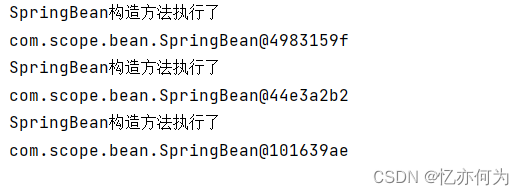
把测试代码中的getBean()方法所在行代码注释掉:

在初始化Spring上下文的时候,并没有创建Bean对象。其它scope
scope属性的值不止两个,它一共包括8个选项:
- singleton:默认的,单例。
- prototype:原型。每调用一次getBean()方法则获取一个新的Bean对象。或每次注入的时候都是新对象。
- request:一个请求对应一个Bean。仅限于在WEB应用中使用。
- session:一个会话对应一个Bean。仅限于在WEB应用中使用。
这两个值是在web项目应用的,需要引入web(例如springmvc)框架,才可以使用
- global session:portlet应用中专用的。如果在Servlet的WEB应用中使用global
session的话,和session一个效果。(portlet和servlet都是规范。servlet运行在servlet容器中,例如Tomcat。portlet运行在portlet容器中。) - application:一个应用对应一个Bean。仅限于在WEB应用中使用。
- websocket:一个websocket生命周期对应一个Bean。仅限于在WEB应用中使用。
- 自定义scope:很少使用。
自定义scope
接下来自定义一个Scope,线程级别的Scope,在同一个线程中,获取的Bean都是同一个。跨线程则是不同的对象:(以下内容作为了解)
第一步:自定义Scope。(实现Scope接口)
spring内置了线程范围的类:org.springframework.context.support.SimpleThreadScope,可以直接用。
注意:如果自己实现这个类的话就需要实现Scope接口第二步:将自定义的Scope注册到Spring容器中。
spring-scope.xml文件进行修改:<bean class="org.springframework.beans.factory.config.CustomScopeConfigurer"> <property name="scopes"> <map> <entry key="myThreadScope"> <bean class="org.springframework.context.support.SimpleThreadScope"/> </entry> </map> </property> </bean>- 1
- 2
- 3
- 4
- 5
- 6
- 7
- 8
- 9
第三步:在对应bean中使用Scope。
spring-scope.xml文件对bean进行修改:<bean id="springBean" class="com.scope.bean.SpringBean" scope="myThreadScope"/>- 1
测试程序:
@Test public void testThread(){ ApplicationContext applicationContext = new ClassPathXmlApplicationContext("spring-scope.xml"); SpringBean springBean = applicationContext.getBean("springBean", SpringBean.class); System.out.println(springBean); SpringBean springBean2 = applicationContext.getBean("springBean", SpringBean.class); System.out.println(springBean2); //启动一个新的线程 new Thread(new Runnable() { @Override public void run() { SpringBean springBean3 = applicationContext.getBean("springBean", SpringBean.class); System.out.println(springBean3); SpringBean springBean4 = applicationContext.getBean("springBean", SpringBean.class); System.out.println(springBean4); } }).start(); }- 1
- 2
- 3
- 4
- 5
- 6
- 7
- 8
- 9
- 10
- 11
- 12
- 13
- 14
- 15
- 16
- 17
- 18

-
相关阅读:
数据分析基础之《jupyter notebook工具》
Java面向对象三大基本特征之继承
支付宝小程序 alipays协议链接跳转
jQuery|jQuery的基本使用
js:react使用zustand实现状态管理
最重要的传输层
Python基础语法:数据分析利器
【学习笔记】CF1610F Mashtali: a Space Oddysey
力扣题解(54. 螺旋矩阵),带注释
Mac | Vmware Fusion | 分辨率自动还原问题解决
- 原文地址:https://blog.csdn.net/weixin_45832694/article/details/127864536