-
使用 Spring Cloud Loadbalancer 实现客户端负载均衡
使用 Spring Cloud Loadbalancer 实现客户端负载均衡
作者:Grey
原文地址:
博客园:使用 Spring Cloud Loadbalancer 实现客户端负载均衡
CSDN:使用 Spring Cloud Loadbalancer 实现客户端负载均衡
背景
在Spring Cloud G 版发布时提到,
Spring Cloud Netflix 那套组件很多都进入了维护期,如下表所示
同时,针对一些组件,Spring 官方给出了一些替代方案
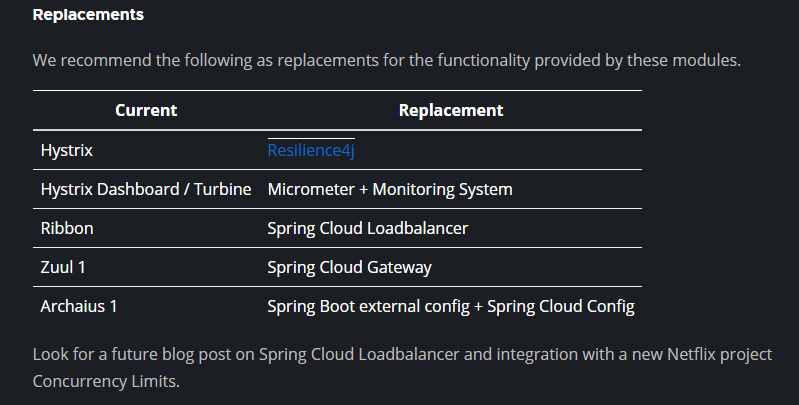
针对 spring-cloud-ribbon 这个负载均衡组件,Spring 官方提出的替换解决方案是 Spring Cloud Loadbalancer。本文主要通过一个示例介绍了 Spring Cloud Loadbalancer 的基础使用。
环境
-
JDK 1.8+
-
Maven 3.5+
-
Spring Boot 版本:2.7.5
-
Spring Cloud 版本:2021.0.5
项目结构和说明
- spring-cloud-loadbalanced-usage:父项目名称
- server : 服务端端模块
- src/
- pom.xml
- client : 客户端模块
- src/
- pom.xml
- pom.xml:父项目 pom 配置
- server : 服务端端模块
流程
整个过程如下示例图

注:Spring Cloud Loadbalancer 是在客户端实现负载均衡策略。
代码说明
服务端主要暴露一个服务,未做特殊配置
@GetMapping("/greeting") public String greet() { log.info("Access /greeting"); int randomNum = rand.nextInt(greetings.size()); return greetings.get(randomNum); }- 1
- 2
- 3
- 4
- 5
- 6
客户端的核心配置如下,主要是针对负载均衡配置:
package git.snippet.client.config; import org.springframework.cloud.client.DefaultServiceInstance; import org.springframework.cloud.client.ServiceInstance; import org.springframework.cloud.client.loadbalancer.LoadBalanced; import org.springframework.cloud.loadbalancer.annotation.LoadBalancerClient; import org.springframework.cloud.loadbalancer.core.ServiceInstanceListSupplier; import org.springframework.context.annotation.Bean; import org.springframework.context.annotation.Configuration; import org.springframework.context.annotation.Primary; import org.springframework.web.reactive.function.client.WebClient; import reactor.core.publisher.Flux; import java.util.Arrays; import java.util.List; @Configuration @LoadBalancerClient(name = "server") public class WebClientConfig { @LoadBalanced @Bean WebClient.Builder webClientBuilder() { return WebClient.builder(); } @Bean @Primary ServiceInstanceListSupplier serviceInstanceListSupplier() { return new ServiceInstanceListSupplier() { @Override public String getServiceId() { return "server"; } @Override public Flux<List<ServiceInstance>> get() { return Flux.just(Arrays.asList( new DefaultServiceInstance(getServiceId() + "1", getServiceId(), "localhost", 8090, false), new DefaultServiceInstance(getServiceId() + "2", getServiceId(), "localhost", 9092, false), new DefaultServiceInstance(getServiceId() + "3", getServiceId(), "localhost", 9999, false))); } }; } }- 1
- 2
- 3
- 4
- 5
- 6
- 7
- 8
- 9
- 10
- 11
- 12
- 13
- 14
- 15
- 16
- 17
- 18
- 19
- 20
- 21
- 22
- 23
- 24
- 25
- 26
- 27
- 28
- 29
- 30
- 31
- 32
- 33
- 34
- 35
- 36
- 37
- 38
- 39
- 40
- 41
- 42
- 43
- 44
- 45
- 46
- 47
其中
@LoadBalancerClient(name = "server")指定了 服务端的名称;getServiceId()指定了服务端的服务 ID;serviceInstanceListSupplier()方法中列出了三个服务端实例的地址;new DefaultServiceInstance(getServiceId() + "1", getServiceId(), "localhost", 8090, false) new DefaultServiceInstance(getServiceId() + "2", getServiceId(), "localhost", 9092, false) new DefaultServiceInstance(getServiceId() + "3", getServiceId(), "localhost", 9999, false)- 1
- 2
- 3
有了这个配置,在客户端的 Controller 中,做如下注入即可
package git.snippet.client.controller; import org.springframework.cloud.client.loadbalancer.reactive.ReactorLoadBalancerExchangeFilterFunction; import org.springframework.web.bind.annotation.RequestMapping; import org.springframework.web.bind.annotation.RequestParam; import org.springframework.web.bind.annotation.RestController; import org.springframework.web.reactive.function.client.WebClient; import reactor.core.publisher.Mono; @RestController public class HiController { private final WebClient.Builder loadBalancedWebClientBuilder; private final ReactorLoadBalancerExchangeFilterFunction lbFunction; public HiController(WebClient.Builder loadBalancedWebClientBuilder, ReactorLoadBalancerExchangeFilterFunction lbFunction) { this.loadBalancedWebClientBuilder = loadBalancedWebClientBuilder; this.lbFunction = lbFunction; } @RequestMapping("/hi") public Mono<String> hi(@RequestParam(value = "name", defaultValue = "Mary") String name) { return loadBalancedWebClientBuilder.build().get().uri("http://server/greeting").retrieve().bodyToMono(String.class).map(greeting -> String.format("%s, %s!", greeting, name)); } @RequestMapping("/hello") public Mono<String> hello(@RequestParam(value = "name", defaultValue = "John") String name) { return WebClient.builder().filter(lbFunction).build().get().uri("http://server/greeting").retrieve().bodyToMono(String.class).map(greeting -> String.format("%s, %s!", greeting, name)); } }- 1
- 2
- 3
- 4
- 5
- 6
- 7
- 8
- 9
- 10
- 11
- 12
- 13
- 14
- 15
- 16
- 17
- 18
- 19
- 20
- 21
- 22
- 23
- 24
- 25
- 26
- 27
- 28
- 29
- 30
- 31
启动并测试
首先启动 server,注意:
启动 server 的时候,需要启动多实例,且每个实例要定义 VM options
实例一定义 VM options 为
-Dserver.port=8090;实例二定义 VM options 为
-Dserver.port=9092;实例三定义 VM options 为
-Dserver.port=9999。如果使用 IDEA Intellij,配置方式如下

三个 Server 启动后,接下来启动 client,运行 ClientApplication,启动完毕后,多次访问: http://localhost:8888/hi
可以通过每个 server 实例的运行日志,查看到每个实例都轮流获取到了请求,实现了负载均衡。
完整代码
见:spring-cloud-loadbalancer-usage
参考文档
Spring Tips: Spring Cloud Loadbalancer
-
-
相关阅读:
python数据分析——聚类
“酷暑”结束,程序员待在大型互联网公司能一直安逸下去?
华为机试真题 C++ 实现【用连续自然数之和来表达整数】
Vulnhub系列靶机-The Planets Earth
[数据结构]——单链表超详细总结
【整理扑克牌】python实现-附ChatGPT解析
wordpress全站开发指南-面向开发者及深度用户(全中文实操)--wordpress是什么
【无标题】
pytorch-10.卷积神经网络
重点用能单位能耗在线监测接入端系统
- 原文地址:https://blog.csdn.net/hotonyhui/article/details/127863834
