-
SpringBoot和Vue集成Markdown和多级评论——基于SpringBoot和Vue的后台管理系统项目系列博客(二十三)
系列文章目录
- 系统功能演示——基于SpringBoot和Vue的后台管理系统项目系列博客(一)
- Vue2安装并集成ElementUI——基于SpringBoot和Vue的后台管理系统项目系列博客(二)
- Vue2前端主体框架搭建——基于SpringBoot和Vue的后台管理系统项目系列博客(三)
- SpringBoot后端初始框架搭建——基于SpringBoot和Vue的后台管理系统项目系列博客(四)
- SpringBoot集成Mybatis——基于SpringBoot和Vue的后台管理系统项目系列博客(五)
- SpringBoot实现增删改查——基于SpringBoot和Vue的后台管理系统项目系列博客(六)
- SpringBoot实现分页查询——基于SpringBoot和Vue的后台管理系统项目系列博客(七)
- SpringBoot实现集成Mybatis-Plus和SwaggerUI——基于SpringBoot和Vue的后台管理系统项目系列博客(八)
- Vue实现增删改查——基于SpringBoot和Vue的后台管理系统项目系列博客(九)
- SpringBoot实现代码生成器——基于SpringBoot和Vue的后台管理系统项目系列博客(十)
- Vue使用路由——基于SpringBoot和Vue的后台管理系统项目系列博客(十一)
- SpringBoot和Vue实现导入导出——基于SpringBoot和Vue的后台管理系统项目系列博客(十二)
- SpringBoot和Vue实现用户登录注册与异常处理——基于SpringBoot和Vue的后台管理系统项目系列博客(十三)
- SpringBoot和Vue实现用户个人信息展示与保存与集成JWT——基于SpringBoot和Vue的后台管理系统项目系列博客(十四)
- SpringBoot和Vue实现文件上传与下载——基于SpringBoot和Vue的后台管理系统项目系列博客(十五)
- SpringBoot和Vue整合ECharts——基于SpringBoot和Vue的后台管理系统项目系列博客(十六)
- SpringBoot和Vue实现权限菜单功能——基于SpringBoot和Vue的后台管理系统项目系列博客(十七)
- SpringBoot实现1对1、1对多、多对多关联查询——基于SpringBoot和Vue的后台管理系统项目系列博客(十八)
- 用户前台页面设计与实现——基于SpringBoot和Vue的后台管理系统项目系列博客(十九)
- SpringBoot集成Redis实现缓存——基于SpringBoot和Vue的后台管理系统项目系列博客(二十)
- SpringBoot和Vue集成高德地图——基于SpringBoot和Vue的后台管理系统项目系列博客(二十一)
- SpringBoot和Vue集成视频播放组件——基于SpringBoot和Vue的后台管理系统项目系列博客(二十二)
- SpringBoot和Vue集成Markdown和多级评论——基于SpringBoot和Vue的后台管理系统项目系列博客(二十三)
项目资源下载
前言
今天的主要内容包括:后端基础内容的创建、前端基础内容的创建、Vue后台集成Markdown组件、Vue前台集成Markdown组件、实现前台文章评论显示功能、实现前台文章评论保存功能、实现前台文章评论删除功能、实现前台文章多级评论功能等,今天的学习内容也比较多,但都是非常实用的功能,这也是本系列博文的最后一篇了,加油!下面就开始今天的学习!
一、后端基础内容的创建
- 首先在数据库中新建表,按照如下内容创建

- 输入表名为article,然后保存

- 然后使用代码生成器,生成关于article的代码

- 可以看到已经成功生成了

- 为了后面可以实现条件查询,所以我们修改ArticleController.java中的如下内容

二、前端基础内容的创建
- 首先在views下新建Article.vue

- 然后将Article.vue中的全部内容替换为如下内容
<template> <div> <div style="margin: 10px 0"> <el-input style="width: 200px" placeholder="请输入名称" suffix-icon="el-icon-search" v-model="name">el-input> <el-button class="ml-5" type="primary" @click="load">搜索el-button> <el-button type="warning" @click="reset">重置el-button> div> <div style="margin: 10px 0"> <el-button type="primary" @click="handleAdd" v-if="user.role === 'ROLE_ADMIN'">新增 <i class="el-icon-circle-plus-outline">i>el-button> <el-popconfirm class="ml-5" confirm-button-text='确定' cancel-button-text='我再想想' icon="el-icon-info" icon-color="red" title="您确定批量删除这些数据吗?" @confirm="delBatch" > <el-button type="danger" slot="reference">批量删除 <i class="el-icon-remove-outline">i>el-button> el-popconfirm> div> <el-table :data="tableData" border stripe :header-cell-class-name="'headerBg'" @selection-change="handleSelectionChange"> <el-table-column type="selection" width="55">el-table-column> <el-table-column prop="id" label="ID" width="80">el-table-column> <el-table-column prop="name" label="文章标题">el-table-column> <el-table-column prop="content" label="文章内容">el-table-column> <el-table-column prop="user" label="发布人">el-table-column> <el-table-column prop="time" label="发布时间">el-table-column> <el-table-column label="操作" width="280" align="center"> <template slot-scope="scope"> <el-button type="success" @click="handleEdit(scope.row)" v-if="user.role === 'ROLE_ADMIN'">编辑 <i class="el-icon-edit">i>el-button> <el-popconfirm class="ml-5" confirm-button-text='确定' cancel-button-text='我再想想' icon="el-icon-info" icon-color="red" title="您确定删除吗?" @confirm="del(scope.row.id)"> <el-button type="danger" slot="reference" v-if="user.role === 'ROLE_ADMIN'">删除 <i class="el-icon-remove-outline">i>el-button> el-popconfirm> template> el-table-column> el-table> <div style="padding: 10px 0"> <el-pagination @size-change="handleSizeChange" @current-change="handleCurrentChange" :current-page="pageNum" :page-sizes="[2, 5, 10, 20]" :page-size="pageSize" layout="total, sizes, prev, pager, next, jumper" :total="total"> el-pagination> div> <el-dialog title="文章信息" :visible.sync="dialogFormVisible" width="60%"> <el-form label-width="80px" size="small"> <el-form-item label="标题"> <el-input v-model="form.name" autocomplete="off">el-input> el-form-item> <el-form-item label="内容"> <el-input v-model="form.content" autocomplete="off">el-input> el-form-item> el-form> <div slot="footer" class="dialog-footer"> <el-button @click="dialogFormVisible = false">取 消el-button> <el-button type="primary" @click="save">确 定el-button> div> el-dialog> div> template> <script> export default { name: "Article", data() { return { form: {}, tableData: [], name: '', multipleSelection: [], pageNum: 1, pageSize: 10, total: 0, dialogFormVisible: false, teachers: [], user: localStorage.getItem("user") ? JSON.parse(localStorage.getItem("user")) : {}, } }, created() { this.load() }, methods: { load() { this.request.get("/article/page", { params: { pageNum: this.pageNum, pageSize: this.pageSize, name: this.name, } }).then(res => { this.tableData = res.data.records this.total = res.data.total }); }, changeEnable(row) { this.request.post("/article/update", row).then(res => { if (res.code === '200') { this.$message.success("操作成功") } }) }, del(id) { this.request.delete("/article/" + id).then(res => { if (res.code === '200') { this.$message.success("删除成功") this.load() } else { this.$message.error("删除失败") } }) }, handleSelectionChange(val) { console.log(val) this.multipleSelection = val }, delBatch() { let ids = this.multipleSelection.map(v => v.id) // [{}, {}, {}] => [1,2,3] this.request.post("/article/del/batch", ids).then(res => { if (res.code === '200') { this.$message.success("批量删除成功") this.load() } else { this.$message.error("批量删除失败") } }) }, save() { this.request.post("/article", this.form).then(res => { if (res) { this.$message.success("保存成功") this.dialogFormVisible = false this.load() } else { this.$message.error("保存失败") } }) }, reset() { this.name = "" this.load() }, handleAdd() { this.dialogFormVisible = true this.form = {} }, handleEdit(row) { this.form = row this.dialogFormVisible = true }, handleSizeChange(pageSize) { console.log(pageSize) this.pageSize = pageSize this.load() }, handleCurrentChange(pageNum) { console.log(pageNum) this.pageNum = pageNum this.load() }, download(url) { window.open(url) } } } script> <style scoped> style>- 1
- 2
- 3
- 4
- 5
- 6
- 7
- 8
- 9
- 10
- 11
- 12
- 13
- 14
- 15
- 16
- 17
- 18
- 19
- 20
- 21
- 22
- 23
- 24
- 25
- 26
- 27
- 28
- 29
- 30
- 31
- 32
- 33
- 34
- 35
- 36
- 37
- 38
- 39
- 40
- 41
- 42
- 43
- 44
- 45
- 46
- 47
- 48
- 49
- 50
- 51
- 52
- 53
- 54
- 55
- 56
- 57
- 58
- 59
- 60
- 61
- 62
- 63
- 64
- 65
- 66
- 67
- 68
- 69
- 70
- 71
- 72
- 73
- 74
- 75
- 76
- 77
- 78
- 79
- 80
- 81
- 82
- 83
- 84
- 85
- 86
- 87
- 88
- 89
- 90
- 91
- 92
- 93
- 94
- 95
- 96
- 97
- 98
- 99
- 100
- 101
- 102
- 103
- 104
- 105
- 106
- 107
- 108
- 109
- 110
- 111
- 112
- 113
- 114
- 115
- 116
- 117
- 118
- 119
- 120
- 121
- 122
- 123
- 124
- 125
- 126
- 127
- 128
- 129
- 130
- 131
- 132
- 133
- 134
- 135
- 136
- 137
- 138
- 139
- 140
- 141
- 142
- 143
- 144
- 145
- 146
- 147
- 148
- 149
- 150
- 151
- 152
- 153
- 154
- 155
- 156
- 157
- 158
- 159
- 160
- 161
- 162
- 163
- 164
- 165
- 166
- 167
- 168
- 169
- 170
- 171
- 172
- 173
- 174
- 175
- 176
- 177
- 178
- 179
- 180
- 181
- 182
- 183
- 184
- 185
- 186
- 187
- 188
- 然后在菜单管理中新增文章管理的路由

- 然后给管理员分配文章管理页面的权限

- 重新登陆之后发现已经出现了文章管理页面了

三、Vue后台集成Markdown组件
- 首先在控制台输入npm install mavon-editor@2.10.4 -S,安装Markdown组件

- 安装完此组件后需要在main.js中进行全局注册

- 然后在Article.vue中如下几处中新增代码
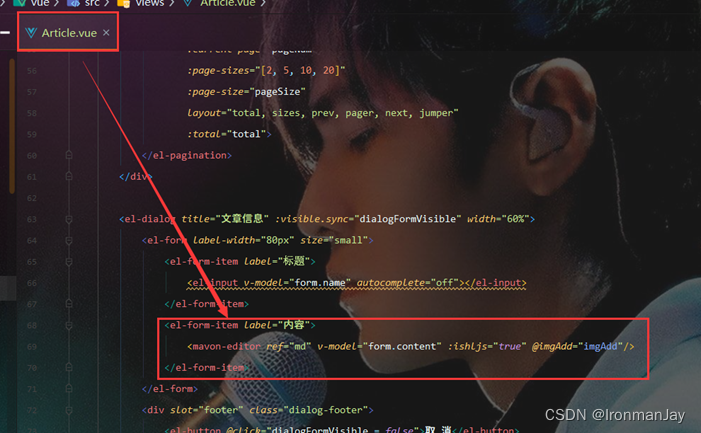


- 然后来到前端的文章管理页面,发现Markdown功能都可以使用

- 但是现在有一个问题,当我们保存的时候,效果并不好,所以我们要对此部分内容进行优化

- 为了解决这个问题,我们在ArticleController.java中加入如下代码

- 此时再来到前台测试,发现所有信息都已经成功显示了。但是文章内容部分不太好看,我们要进行一些优化

- 为了解决这个问题,我们要修改Article.vue中如下几处内容


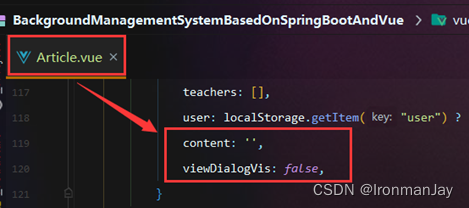

- 此时来到前端测试,发现当我们点击查看内容按钮时

- 可以成功显示出Markdown格式的文章了

四、Vue前台集成Markdown组件
- 首先在front中新建Article.vue

- 然后为其配置路由

- 然后在Front.vue中为文章列表新增路由链接

- 然后将Article.vue中的全部内容替换为如下内容
<template> <div> <div style="margin: 10px 0"> <el-input size="small" style="width: 300px" placeholder="请输入名称" suffix-icon="el-icon-search" v-model="name">el-input> <el-button class="ml-5" type="primary" @click="load" size="small">搜索el-button> <el-button type="warning" @click="reset" size="small">重置el-button> div> <div style="margin: 10px 0"> <div style="padding: 10px 0; border-bottom: 1px dashed #ccc" v-for="item in tableData" :key="item.id"> <div class="pd-10" style="font-size: 20px; color: #3F5EFB; cursor: pointer" @click="$router.push('/front/articleDetail?id=' + item.id)">{{ item.name }} div> <div style="font-size: 14px; margin-top: 10px"> <i class="el-icon-user-solid">i> <span>{{ item.user }}span> <i class="el-icon-time" style="margin-left: 10px">i> <span>{{ item.time }}span> div> div> div> <div style="padding: 10px 0"> <el-pagination @size-change="handleSizeChange" @current-change="handleCurrentChange" :current-page="pageNum" :page-sizes="[2, 5, 10, 20]" :page-size="pageSize" layout="total, prev, pager, next" :total="total"> el-pagination> div> div> template> <script> import axios from "axios"; export default { name: "Article", data() { return { form: {}, tableData: [], name: '', multipleSelection: [], pageNum: 1, pageSize: 10, total: 0, dialogFormVisible: false, teachers: [], user: localStorage.getItem("user") ? JSON.parse(localStorage.getItem("user")) : {}, content: '', viewDialogVis: false, } }, created() { this.load() }, methods: { view(content) { this.content = content this.viewDialogVis = true }, // 绑定@imgAdd event imgAdd(pos, $file) { let $vm = this.$refs.md // 第一步.将图片上传到服务器. const formData = new FormData(); formData.append('file', $file); axios({ url: 'http://localhost:9090/file/upload', method: 'post', data: formData, headers: {'Content-Type': 'multipart/form-data'}, }).then((res) => { // 第二步.将返回的url替换到文本原位置 ->  $vm.$img2Url(pos, res.data); }) }, load() { this.request.get("/article/page", { params: { pageNum: this.pageNum, pageSize: this.pageSize, name: this.name, } }).then(res => { this.tableData = res.data.records this.total = res.data.total }); }, changeEnable(row) { this.request.post("/article/update", row).then(res => { if (res.code === '200') { this.$message.success("操作成功") } }) }, del(id) { this.request.delete("/article/" + id).then(res => { if (res.code === '200') { this.$message.success("删除成功") this.load() } else { this.$message.error("删除失败") } }) }, handleSelectionChange(val) { console.log(val) this.multipleSelection = val }, delBatch() { let ids = this.multipleSelection.map(v => v.id) // [{}, {}, {}] => [1,2,3] this.request.post("/article/del/batch", ids).then(res => { if (res.code === '200') { this.$message.success("批量删除成功") this.load() } else { this.$message.error("批量删除失败") } }) }, save() { this.request.post("/article", this.form).then(res => { if (res) { this.$message.success("保存成功") this.dialogFormVisible = false this.load() } else { this.$message.error("保存失败") } }) }, reset() { this.name = "" this.load() }, handleAdd() { this.dialogFormVisible = true this.form = {} }, handleEdit(row) { this.form = row this.dialogFormVisible = true }, handleSizeChange(pageSize) { console.log(pageSize) this.pageSize = pageSize this.load() }, handleCurrentChange(pageNum) { console.log(pageNum) this.pageNum = pageNum this.load() }, download(url) { window.open(url) } } } script> <style scoped> style>- 1
- 2
- 3
- 4
- 5
- 6
- 7
- 8
- 9
- 10
- 11
- 12
- 13
- 14
- 15
- 16
- 17
- 18
- 19
- 20
- 21
- 22
- 23
- 24
- 25
- 26
- 27
- 28
- 29
- 30
- 31
- 32
- 33
- 34
- 35
- 36
- 37
- 38
- 39
- 40
- 41
- 42
- 43
- 44
- 45
- 46
- 47
- 48
- 49
- 50
- 51
- 52
- 53
- 54
- 55
- 56
- 57
- 58
- 59
- 60
- 61
- 62
- 63
- 64
- 65
- 66
- 67
- 68
- 69
- 70
- 71
- 72
- 73
- 74
- 75
- 76
- 77
- 78
- 79
- 80
- 81
- 82
- 83
- 84
- 85
- 86
- 87
- 88
- 89
- 90
- 91
- 92
- 93
- 94
- 95
- 96
- 97
- 98
- 99
- 100
- 101
- 102
- 103
- 104
- 105
- 106
- 107
- 108
- 109
- 110
- 111
- 112
- 113
- 114
- 115
- 116
- 117
- 118
- 119
- 120
- 121
- 122
- 123
- 124
- 125
- 126
- 127
- 128
- 129
- 130
- 131
- 132
- 133
- 134
- 135
- 136
- 137
- 138
- 139
- 140
- 141
- 142
- 143
- 144
- 145
- 146
- 147
- 148
- 149
- 150
- 151
- 152
- 153
- 154
- 155
- 156
- 157
- 158
- 159
- 160
- 161
- 162
- 163
- 164
- 165
- 166
- 167
- 168
- 此时当我们在网站前台点击文章列表时

- 就可以显示文章信息了。但是我们现在还不能点击去看文章的具体信息,所以我们下面就要完成显示文章具体信息的功能了

- 在views/front下面新建ArticleDetail.vue

- 然后我们为ArticleDetail.vue配一个路由

- 然后将ArticleDetail.vue中的全部内容替换为如下内容
<template> <div style="color: #666"> <div style="margin: 20px 0; "> <div class="pd-10" style="font-size: 20px; color: #3F5EFB; cursor: pointer">{{ article.name }}div> <div style="font-size: 14px; margin-top: 10px"> <i class="el-icon-user-solid">i> <span>{{ article.user }}span> <i class="el-icon-time" style="margin-left: 10px">i> <span>{{ article.time }}span> div> div> <div style="margin: 20px 0"> <mavon-editor class="md" :value="article.content" :subfield="false" :defaultOpen="'preview'" :toolbarsFlag="false" :editable="false" :scrollStyle="true" :ishljs="true" /> div> div> template> <script> export default { name: "ArticleDetail", data() { return { article: {}, user: localStorage.getItem("user") ? JSON.parse(localStorage.getItem("user")) : {}, } }, created() { this.load() }, methods: { load() { const id = this.$route.query.id this.request.get("/article/" + id).then(res => { this.article = res.data }); }, } } script> <style scoped> style>- 1
- 2
- 3
- 4
- 5
- 6
- 7
- 8
- 9
- 10
- 11
- 12
- 13
- 14
- 15
- 16
- 17
- 18
- 19
- 20
- 21
- 22
- 23
- 24
- 25
- 26
- 27
- 28
- 29
- 30
- 31
- 32
- 33
- 34
- 35
- 36
- 37
- 38
- 39
- 40
- 41
- 42
- 43
- 44
- 45
- 46
- 47
- 48
- 49
- 50
- 51
- 52
- 53
- 54
- 此时在来到我们的文章列表中,点击文章标题

- 发现已经可以成功显示我们的文章内容了

五、实现前台文章评论显示功能
- 首先在数据库中新建文章评论的数据库,其中字段如下设置

- 将其命名为t_comment

- 然后使用代码生成器生成关于刚才创建的数据库的一些功能

- 可以看到运行之后,已经成功生成了

- 成功生成之后首先在Comment.java中新增两个字段,为了查询出评论人的昵称和头像

- 然后在CommentMapper.java中写我们的查询

- 然后在CommentServiceImpl.java中新增如下内容

- 在ICommentService.java中新增如下内容

- 最后在CommentController.java中返回我们查询到的结果

- 然后在数据表中输入一些测试内容

- 最后使用PostMan测试,发现已经可以成功获取到数据了。这里测试的时候需要注意,要带着用户的token进行测试,否则会被拦截从而测试失败

- 然后将ArticleDetail.vue中的内容全部替换为如下内容
<template> <div style="color: #666"> <div style="margin: 20px 0; "> <div class="pd-10" style="font-size: 20px; color: #3F5EFB; cursor: pointer">{{ article.name }}div> <div style="font-size: 14px; margin-top: 10px"> <i class="el-icon-user-solid">i> <span>{{ article.user }}span> <i class="el-icon-time" style="margin-left: 10px">i> <span>{{ article.time }}span> div> div> <div style="margin: 20px 0"> <mavon-editor class="md" :value="article.content" :subfield="false" :defaultOpen="'preview'" :toolbarsFlag="false" :editable="false" :scrollStyle="true" :ishljs="true" /> div> <div style="margin: 30px 0"> <div style="margin: 10px 0"> <div style="border-bottom: 1px solid orangered; padding: 10px 0; font-size: 20px">评论div> <div style="padding: 10px 0"> <el-input size="small" type="textarea" v-model="commentForm.content">el-input> div> <div class="pd-10" style="text-align: right"> <el-button type="primary" size="small" @click="">评论el-button> div> div> div> <div> <div v-for="item in comments" :key="item.id" style="border-bottom: 1px solid #ccc; padding: 10px 0; "> <div style="display: flex"> <div style="width: 100px; text-align: center"> <el-image :src="item.avatar" style="width: 50px; height: 50px; border-radius: 50%">el-image> div> <div style="flex: 1; font-size: 14px; padding: 5px 0; line-height: 25px"> <b>{{ item.nickname }}:b> <span>{{ item.content }}span> <div style="display: flex; line-height: 20px; margin-top: 5px"> <div style="width: 200px;"> <i class="el-icon-time">i><span style="margin-left: 5px">{{ item.time }}span> div> <div style="text-align: right; flex: 1"> <el-button style="margin-left: 5px" type="text" @click="">回复 el-button> <el-button type="text" style="color: red" @click="" v-if="user.id === item.userId">删除 el-button> div> div> div> div> div> div> div> template> <script> export default { name: "ArticleDetail", data() { return { article: {}, user: localStorage.getItem("user") ? JSON.parse(localStorage.getItem("user")) : {}, comments: [], commentForm: {}, id: this.$route.query.id, } }, created() { this.load() this.loadComment() }, methods: { load() { const id = this.$route.query.id this.request.get("/article/" + id).then(res => { this.article = res.data }); }, loadComment() { this.request.get("/comment/tree/" + this.id).then(res => { this.comments = res.data }) }, } } script> <style scoped> style>- 1
- 2
- 3
- 4
- 5
- 6
- 7
- 8
- 9
- 10
- 11
- 12
- 13
- 14
- 15
- 16
- 17
- 18
- 19
- 20
- 21
- 22
- 23
- 24
- 25
- 26
- 27
- 28
- 29
- 30
- 31
- 32
- 33
- 34
- 35
- 36
- 37
- 38
- 39
- 40
- 41
- 42
- 43
- 44
- 45
- 46
- 47
- 48
- 49
- 50
- 51
- 52
- 53
- 54
- 55
- 56
- 57
- 58
- 59
- 60
- 61
- 62
- 63
- 64
- 65
- 66
- 67
- 68
- 69
- 70
- 71
- 72
- 73
- 74
- 75
- 76
- 77
- 78
- 79
- 80
- 81
- 82
- 83
- 84
- 85
- 86
- 87
- 88
- 89
- 90
- 91
- 92
- 93
- 94
- 95
- 96
- 97
- 98
- 99
- 100
- 101
- 102
- 103
- 104
- 然后来到前台可以看到,已经可以成功显示用户的评论了

六、实现前台文章评论保存功能
- 首先在CommentController.java中新增如下内容

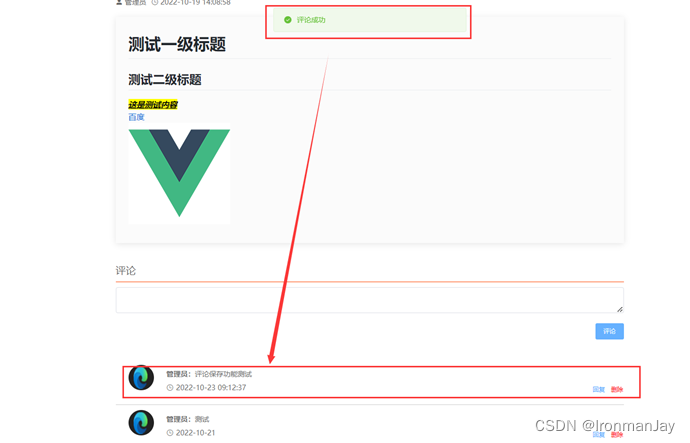
- 然后在ArticleDetail.vue中修改如下两处代码


- 然后来到前台测试,发现已经成功保存我们的用户评论了
七、实现前台文章评论删除功能
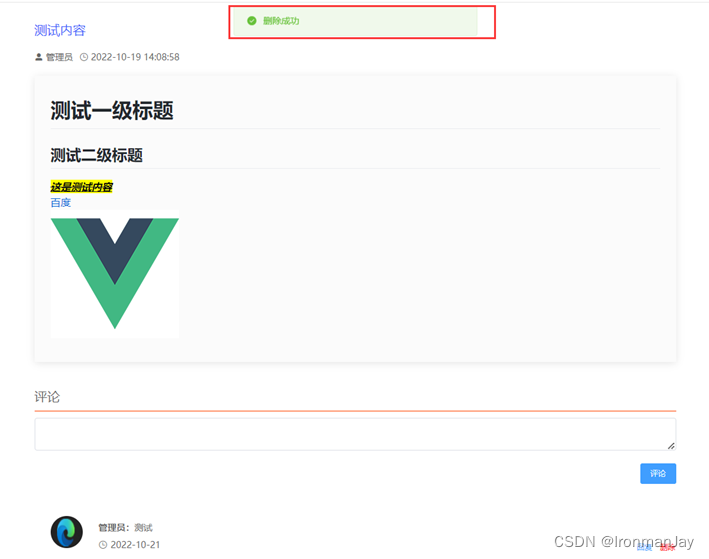
- 因为后台代码都已经生成好了,所以我们只需要修改ArticleDetail.vue中如下两处代码即可


- 然后来到前台测试,发现已经成功实现文章评论删除功能了
八、实现前台文章多级评论功能
- 首先在Comment.java中新增三个字段

- 然后修改CommentController.java中如下内容

- 然后将ArticleDetail.vue中的内容全部替换为如下内容
<template> <div style="color: #666"> <div style="margin: 20px 0; "> <div class="pd-10" style="font-size: 20px; color: #3F5EFB; cursor: pointer">{{ article.name }}div> <div style="font-size: 14px; margin-top: 10px"> <i class="el-icon-user-solid">i> <span>{{ article.user }}span> <i class="el-icon-time" style="margin-left: 10px">i> <span>{{ article.time }}span> div> div> <div style="margin: 20px 0"> <mavon-editor class="md" :value="article.content" :subfield="false" :defaultOpen="'preview'" :toolbarsFlag="false" :editable="false" :scrollStyle="true" :ishljs="true" /> div> <div style="margin: 30px 0"> <div style="margin: 10px 0"> <div style="border-bottom: 1px solid orangered; padding: 10px 0; font-size: 20px">评论div> <div style="padding: 10px 0"> <el-input size="small" type="textarea" v-model="commentForm.content">el-input> div> <div class="pd-10" style="text-align: right"> <el-button type="primary" size="small" @click="save">评论el-button> div> div> div> <div> <div v-for="item in comments" :key="item.id" style="border-bottom: 1px solid #ccc; padding: 10px 0; "> <div style="display: flex"> <div style="width: 100px; text-align: center"> <el-image :src="item.avatar" style="width: 50px; height: 50px; border-radius: 50%">el-image> div> <div style="flex: 1; font-size: 14px; padding: 5px 0; line-height: 25px"> <b>{{ item.nickname }}:b> <span>{{ item.content }}span> <div style="display: flex; line-height: 20px; margin-top: 5px"> <div style="width: 200px;"> <i class="el-icon-time">i><span style="margin-left: 5px">{{ item.time }}span> div> <div style="text-align: right; flex: 1"> <el-button style="margin-left: 5px" type="text" @click="handleReply(item.id)">回复 el-button> <el-button type="text" style="color: red" @click="del(item.id)" v-if="user.id === item.userId">删除 el-button> div> div> div> <div v-if="item.children.length" style="padding-left: 200px;"> <div v-for="subItem in item.children" :key="subItem.id" style="background-color: #f0f0f0; padding: 5px 20px"> <div style="font-size: 14px; padding: 5px 0; line-height: 25px"> <div> <b style="color: #3a8ee6" v-if="subItem.pnickname">@{{ subItem.pnickname }}b> div> <div style="padding-left: 5px"> <b>{{ subItem.nickname }}:b> <span>{{ subItem.content }}span> div> <div style="display: flex; line-height: 20px; margin-top: 5px; padding-left: 5px"> <div style="width: 200px;"> <i class="el-icon-time">i><span style="margin-left: 5px">{{ subItem.time }}span> div> <div style="text-align: right; flex: 1"> <el-button style="margin-left: 5px" type="text" @click="handleReply(subItem.id)">回复 el-button> <el-button type="text" style="color: red" @click="del(subItem.id)" v-if="user.id === subItem.userId">删除 el-button> div> div> div> div> div> div> div> div> <el-dialog title="回复" :visible.sync="dialogFormVisible" width="50%"> <el-form label-width="80px" size="small"> <el-form-item label="回复内容"> <el-input type="textarea" v-model="commentForm.contentReply" autocomplete="off">el-input> el-form-item> el-form> <div slot="footer" class="dialog-footer"> <el-button @click="dialogFormVisible = false" size="small">取 消el-button> <el-button type="primary" @click="save" size="small">确 定el-button> div> el-dialog> div> template> <script> export default { name: "ArticleDetail", data() { return { article: {}, user: localStorage.getItem("user") ? JSON.parse(localStorage.getItem("user")) : {}, comments: [], commentForm: {}, id: this.$route.query.id, dialogFormVisible: false, } }, created() { this.load() this.loadComment() }, methods: { load() { const id = this.$route.query.id this.request.get("/article/" + id).then(res => { this.article = res.data }); }, loadComment() { this.request.get("/comment/tree/" + this.id).then(res => { this.comments = res.data }) }, save() { if (!this.user.id) { this.$message.warning("请登录后操作") return } this.commentForm.articleId = this.id if (this.commentForm.contentReply) { this.commentForm.content = this.commentForm.contentReply } this.request.post("/comment", this.commentForm).then(res => { if (res.code === '200') { this.$message.success("评论成功") this.commentForm = {} // 初始化评论对象内容 this.loadComment() this.dialogFormVisible = false } else { this.$message.error(res.msg) } }) }, del(id) { this.request.delete("/comment/" + id).then(res => { if (res.code === '200') { this.$message.success("删除成功") this.loadComment() } else { this.$message.error("删除失败") } }) }, handleReply(pid) { this.commentForm = {pid: pid} this.dialogFormVisible = true }, } } script> <style scoped> style>- 1
- 2
- 3
- 4
- 5
- 6
- 7
- 8
- 9
- 10
- 11
- 12
- 13
- 14
- 15
- 16
- 17
- 18
- 19
- 20
- 21
- 22
- 23
- 24
- 25
- 26
- 27
- 28
- 29
- 30
- 31
- 32
- 33
- 34
- 35
- 36
- 37
- 38
- 39
- 40
- 41
- 42
- 43
- 44
- 45
- 46
- 47
- 48
- 49
- 50
- 51
- 52
- 53
- 54
- 55
- 56
- 57
- 58
- 59
- 60
- 61
- 62
- 63
- 64
- 65
- 66
- 67
- 68
- 69
- 70
- 71
- 72
- 73
- 74
- 75
- 76
- 77
- 78
- 79
- 80
- 81
- 82
- 83
- 84
- 85
- 86
- 87
- 88
- 89
- 90
- 91
- 92
- 93
- 94
- 95
- 96
- 97
- 98
- 99
- 100
- 101
- 102
- 103
- 104
- 105
- 106
- 107
- 108
- 109
- 110
- 111
- 112
- 113
- 114
- 115
- 116
- 117
- 118
- 119
- 120
- 121
- 122
- 123
- 124
- 125
- 126
- 127
- 128
- 129
- 130
- 131
- 132
- 133
- 134
- 135
- 136
- 137
- 138
- 139
- 140
- 141
- 142
- 143
- 144
- 145
- 146
- 147
- 148
- 149
- 150
- 151
- 152
- 153
- 154
- 155
- 156
- 157
- 158
- 159
- 160
- 161
- 162
- 163
- 164
- 165
- 166
- 167
- 168
- 169
- 170
- 171
- 172
- 173
- 174
- 175
- 176
- 177
- 178
- 179
- 180
- 181
- 182
- 183
- 184
- 然后来到前端测试,发现可以实现多级评论的保存和删除功能了

总结
这就是本系列博文的全部内容了,一共23篇博文,跟着做下来肯定能把这个系统做好,当作毕设什么的都没问题。整个系列结束了,Web的学习也结束了,以后的内容应该和深度学习和源码漏洞检测相关,还请感兴趣的读者持续关注,谢谢大家!
-
相关阅读:
CocosCreator3.8神秘面纱 CocosCreator 项目结构说明及编辑器的简单使用
智能仪器仪表行业数字化供应链管理系统:加速企业智慧供应链平台转型
使用树莓派搭建文件共享服务器-samba服务器
(实践)一文搞定synchronized锁升级过程
vue指令 (侦听器)
CHAPTER 8: DESIGN A URL SHORTENER
“双新”背景下需家校社协同培养孩子核心素养
磁盘分区和加载
视频监控/安防监控/AI视频分析/边缘计算EasyCVR平台如何调取登录接口获取token?
王者荣耀S29赛季是什么时候开始更新及王者荣耀S29赛季幻海映的新英雄皮肤是谁?
- 原文地址:https://blog.csdn.net/IronmanJay/article/details/127860163
