1、进入阿里云官网
https://www.aliyun.com/
2、搜索短信服务

3、进入短信控制台

4、选择国内消息

5、点击添加签名

6、输入相关信息,点击提交


7、点击模块管理,选择添加模块

8、输入相关信息,点击提交


9、鼠标放在头像上,点击下拉框中的AccessKey管理

10、点击创建AccessKey

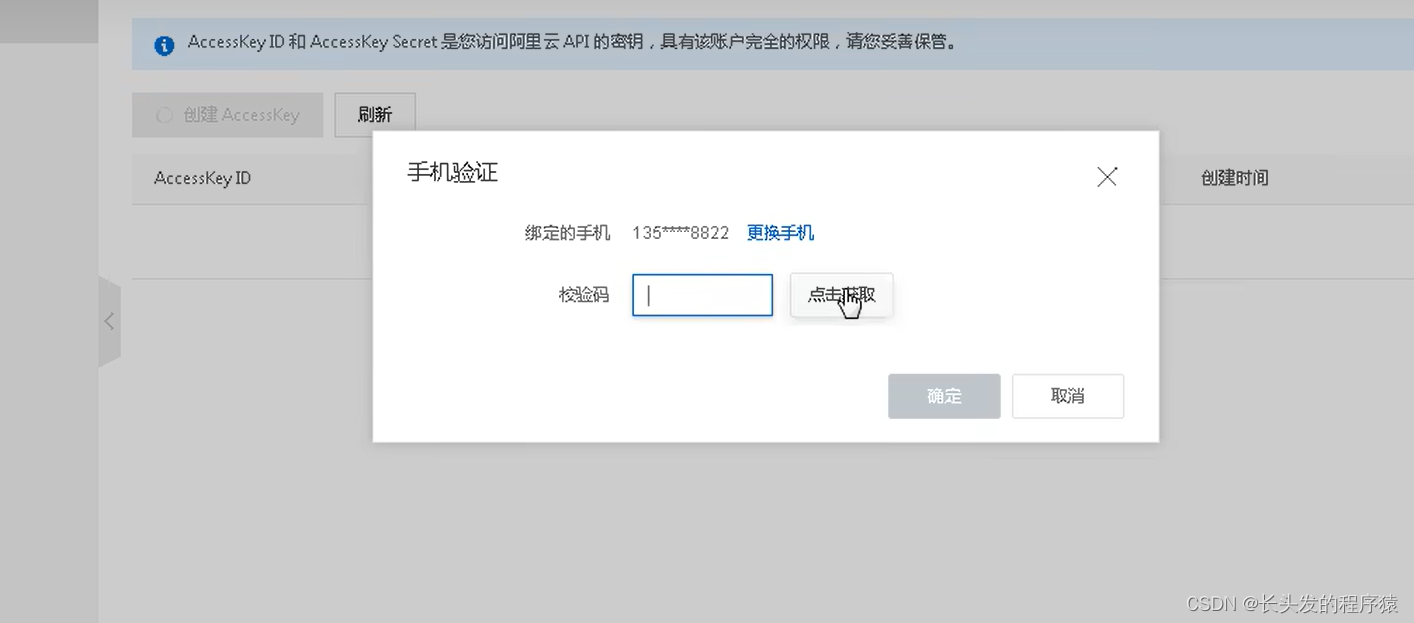
11、输入验证码
12、创建成功,两串字符串复制一下

13、pom.xml中引入阿里云相关依赖,还有redis的依赖
<groupId>com.aliyungroupId>
<artifactId>aliyun-java-sdk-coreartifactId>
<groupId>org.springframework.bootgroupId>
<artifactId>spring-boot-starter-data-redisartifactId>
14、配置application.properties(不是微服务项目就不要加nacos了)
spring.application.name=service-msm
spring.jackson.date-format=yyyy-MM-dd HH:mm:ss
spring.jackson.time-zone=GMT+8
spring.redis.host=192.168.44.165
spring.redis.timeout=1800000
spring.redis.lettuce.pool.max-active=20
spring.redis.lettuce.pool.max-wait=-1
spring.redis.lettuce.pool.max-idle=5
spring.redis.lettuce.pool.min-idle=0
spring.cloud.nacos.discovery.server-addr=127.0.0.1:8848
aliyun.sms.regionId=default
aliyun.sms.accessKeyId=LT6I0Y5633pX89qC
aliyun.sms.secret=jX8D04Dm12I3gGKj345FYSzu0fq8mT

15、添加启动类
@SpringBootApplication(exclude = DataSourceAutoConfiguration.class)
public class ServiceMsmApplication {
public static void main(String[] args) {
SpringApplication.run(ServiceMsmApplication.class, args);
16、配置网关(不是微服务项目就不用写这一步)
spring.cloud.gateway.routes[3].id=service-msm
spring.cloud.gateway.routes[3].uri=lb://service-msm
#设置路由断言,代理servicerId为auth-service的/auth/路径
spring.cloud.gateway.routes[3].predicates= Path=/*/msm/**
17、添加阿里云短信服务配置类
import org.springframework.beans.factory.InitializingBean;
import org.springframework.beans.factory.annotation.Value;
import org.springframework.stereotype.Component;
public class ConstantPropertiesUtils implements InitializingBean {
@Value("${aliyun.sms.regionId}")
@Value("${aliyun.sms.accessKeyId}")
private String accessKeyId;
@Value("${aliyun.sms.secret}")
public static String REGION_Id;
public static String ACCESS_KEY_ID;
public static String SECRECT;
public void afterPropertiesSet() throws Exception {
ACCESS_KEY_ID=accessKeyId;
18、添加redis配置类(如果项目中redis已经有配置类了,就不用再添加了)
import com.fasterxml.jackson.annotation.JsonAutoDetect;
import com.fasterxml.jackson.annotation.PropertyAccessor;
import com.fasterxml.jackson.databind.ObjectMapper;
import org.springframework.cache.CacheManager;
import org.springframework.cache.annotation.EnableCaching;
import org.springframework.cache.interceptor.KeyGenerator;
import org.springframework.context.annotation.Bean;
import org.springframework.context.annotation.Configuration;
import org.springframework.data.redis.cache.RedisCacheConfiguration;
import org.springframework.data.redis.cache.RedisCacheManager;
import org.springframework.data.redis.connection.RedisConnectionFactory;
import org.springframework.data.redis.core.RedisTemplate;
import org.springframework.data.redis.serializer.Jackson2JsonRedisSerializer;
import org.springframework.data.redis.serializer.RedisSerializationContext;
import org.springframework.data.redis.serializer.RedisSerializer;
import org.springframework.data.redis.serializer.StringRedisSerializer;
import java.lang.reflect.Method;
import java.time.Duration;
public class RedisConfig {
public KeyGenerator keyGenerator() {
return new KeyGenerator() {
public Object generate(Object target, Method method, Object... params) {
StringBuilder sb = new StringBuilder();
sb.append(target.getClass().getName());
sb.append(method.getName());
for (Object obj : params) {
sb.append(obj.toString());
public RedisTemplate redisTemplate(RedisConnectionFactory redisConnectionFactory) {
RedisTemplate redisTemplate = new RedisTemplate<>();
redisTemplate.setConnectionFactory(redisConnectionFactory);
Jackson2JsonRedisSerializer jackson2JsonRedisSerializer = new Jackson2JsonRedisSerializer(Object.class);
ObjectMapper om = new ObjectMapper();
om.setVisibility(PropertyAccessor.ALL, JsonAutoDetect.Visibility.ANY);
om.enableDefaultTyping(ObjectMapper.DefaultTyping.NON_FINAL);
jackson2JsonRedisSerializer.setObjectMapper(om);
redisTemplate.setKeySerializer(new StringRedisSerializer());
redisTemplate.setValueSerializer(jackson2JsonRedisSerializer);
redisTemplate.setHashKeySerializer(new StringRedisSerializer());
redisTemplate.setHashValueSerializer(jackson2JsonRedisSerializer);
redisTemplate.afterPropertiesSet();
public CacheManager cacheManager(RedisConnectionFactory factory) {
RedisSerializer redisSerializer = new StringRedisSerializer();
Jackson2JsonRedisSerializer jackson2JsonRedisSerializer = new Jackson2JsonRedisSerializer(Object.class);
ObjectMapper om = new ObjectMapper();
om.setVisibility(PropertyAccessor.ALL, JsonAutoDetect.Visibility.ANY);
om.enableDefaultTyping(ObjectMapper.DefaultTyping.NON_FINAL);
jackson2JsonRedisSerializer.setObjectMapper(om);
RedisCacheConfiguration config = RedisCacheConfiguration.defaultCacheConfig()
.entryTtl(Duration.ofSeconds(600))
.serializeKeysWith(RedisSerializationContext.SerializationPair.fromSerializer(redisSerializer))
.serializeValuesWith(RedisSerializationContext.SerializationPair.fromSerializer(jackson2JsonRedisSerializer))
.disableCachingNullValues();
RedisCacheManager cacheManager = RedisCacheManager.builder(factory)

19、添加验证码自动生成工具类
import java.text.DecimalFormat;
import java.util.ArrayList;
import java.util.HashMap;
public class RandomUtil {
private static final Random random = new Random();
private static final DecimalFormat fourdf = new DecimalFormat("0000");
private static final DecimalFormat sixdf = new DecimalFormat("000000");
public static String getFourBitRandom() {
return fourdf.format(random.nextInt(10000));
public static String getSixBitRandom() {
return sixdf.format(random.nextInt(1000000));
public static ArrayList getRandom(List list, int n) {
Random random = new Random();
HashMap hashMap = new HashMap();
for (int i = 0; i < list.size(); i++) {
int number = random.nextInt(100) + 1;
Object[] robjs = hashMap.values().toArray();
ArrayList r = new ArrayList();
for (int i = 0; i < n; i++) {
r.add(list.get((int) robjs[i]));
System.out.print(list.get((int) robjs[i]) + "\t");
20、开发阿里云发送短信接口
20.1、Controller层:
import com.hospital.common.result.Result;
import com.hospital.msm.service.MsmService;
import com.hospital.msm.utils.RandomUtil;
import org.apache.commons.lang.StringUtils;
import org.springframework.beans.factory.annotation.Autowired;
import org.springframework.data.redis.core.RedisTemplate;
import org.springframework.web.bind.annotation.GetMapping;
import org.springframework.web.bind.annotation.PathVariable;
import org.springframework.web.bind.annotation.RequestMapping;
import org.springframework.web.bind.annotation.RestController;
import java.util.concurrent.TimeUnit;
@RequestMapping("/api/msm")
public class MsmApiController {
private MsmService msmService;
private RedisTemplate redisTemplate;
@GetMapping("/send/{phone}")
public Result sendCode(@PathVariable String phone){
String code = redisTemplate.opsForValue().get(phone);
if (!StringUtils.isEmpty(code)){
code = RandomUtil.getSixBitRandom();
boolean isSend = msmService.send(phone,code);
redisTemplate.opsForValue().set(phone,code,2, TimeUnit.MINUTES);
return Result.fail().message("发送短信失败!!!");
20.2、Service层:
public interface MsmService {
boolean send(String phone, String code);
20.3、Service实现层:
import com.alibaba.fastjson.JSONObject;
import com.aliyuncs.CommonRequest;
import com.aliyuncs.CommonResponse;
import com.aliyuncs.DefaultAcsClient;
import com.aliyuncs.IAcsClient;
import com.aliyuncs.exceptions.ClientException;
import com.aliyuncs.exceptions.ServerException;
import com.aliyuncs.http.MethodType;
import com.aliyuncs.profile.DefaultProfile;
import com.hospital.msm.service.MsmService;
import com.hospital.msm.utils.ConstantPropertiesUtils;
import org.apache.commons.lang.StringUtils;
import org.springframework.stereotype.Service;
import java.util.HashMap;
public class MsmServiceImpl implements MsmService {
public boolean send(String phone, String code) {
if (StringUtils.isEmpty(phone)){
DefaultProfile profile = DefaultProfile.
getProfile(ConstantPropertiesUtils.REGION_Id,
ConstantPropertiesUtils.ACCESS_KEY_ID,
ConstantPropertiesUtils.SECRECT);
IAcsClient client = new DefaultAcsClient(profile);
CommonRequest request = new CommonRequest();
request.setMethod(MethodType.POST);
request.setDomain("dysmsapi.aliyuncs.com");
request.setVersion("2017-05-25");
request.setAction("SendSms");
request.putQueryParameter("PhoneNumbers", phone);
request.putQueryParameter("SignName", "我的谷粒在线教育网站");
request.putQueryParameter("TemplateCode", "SMS_257677932");
Map param = new HashMap();
request.putQueryParameter("TemplateParam", JSONObject.toJSONString(param));
CommonResponse response = client.getCommonResponse(request);
System.out.println(response.getData());
return response.getHttpResponse().isSuccess();
} catch (ServerException e) {
} catch (ClientException e) {
21、登录接口判断用户输入的验证码和阿里云服务发送的验证码是否相同
