-
vsftp文件服务器的搭建与使用案例
一、Linux 云服务器搭建 FTP 服务
1.执行以下命令,安装 vsftpd。
yum install -y vsftpd2.执行以下命令,设置 vsftpd 开机自启动。
systemctl enable vsftpd3.执行以下命令,启动 FTP 服务
systemctl start vsftpd4.执行以下命令,确认服务是否启动
netstat -antup | grep ftp
5.配置 vsftpd
5.1.执行以下命令,为 FTP 服务创建一个 Linux 用户,本文以 ftpuser 为例。
useradd ftpuser5.2.执行以下命令,设置 ftpuser 用户的密码
passwd ftpuser5.3.执行以下命令,创建 FTP 服务使用的文件目录,本文以
/var/ftp/test为例。mkdir /var/ftp/test5.4.执行以下命令,修改目录权限
chown -R ftpuser:ftpuser /var/ftp/test5.6.执行以下命令,打开
vsftpd.conf文件vim /etc/vsftpd/vsftpd.conf5.7.修改以下配置参数
主动模式配置:
- anonymous_enable=NO
- local_enable=YES
- write_enable=YES
- chroot_local_user=YES
- chroot_list_enable=YES
- chroot_list_file=/etc/vsftpd/chroot_list
- listen=YES
- #listen_ipv6=YES
被动模式配置:
- local_root=/var/ftp/test
- allow_writeable_chroot=YES
- pasv_enable=YES
- pasv_address=xxx.xx.xxx.xx #请修改为您的 Linux 云服务器公网 IP
- pasv_min_port=40000
- pasv_max_port=45000
按Esc 后输入 :wq 保存后退出.
5.8.执行以下命令,重启 FTP 服务。
systemctl restart vsftpd安装教程参考如下地址:云服务器 Linux 云服务器搭建 FTP 服务-最佳实践-文档中心-腾讯云
FTP客户端下载:FileZilla中文网 - 免费开源的FTP解决方案
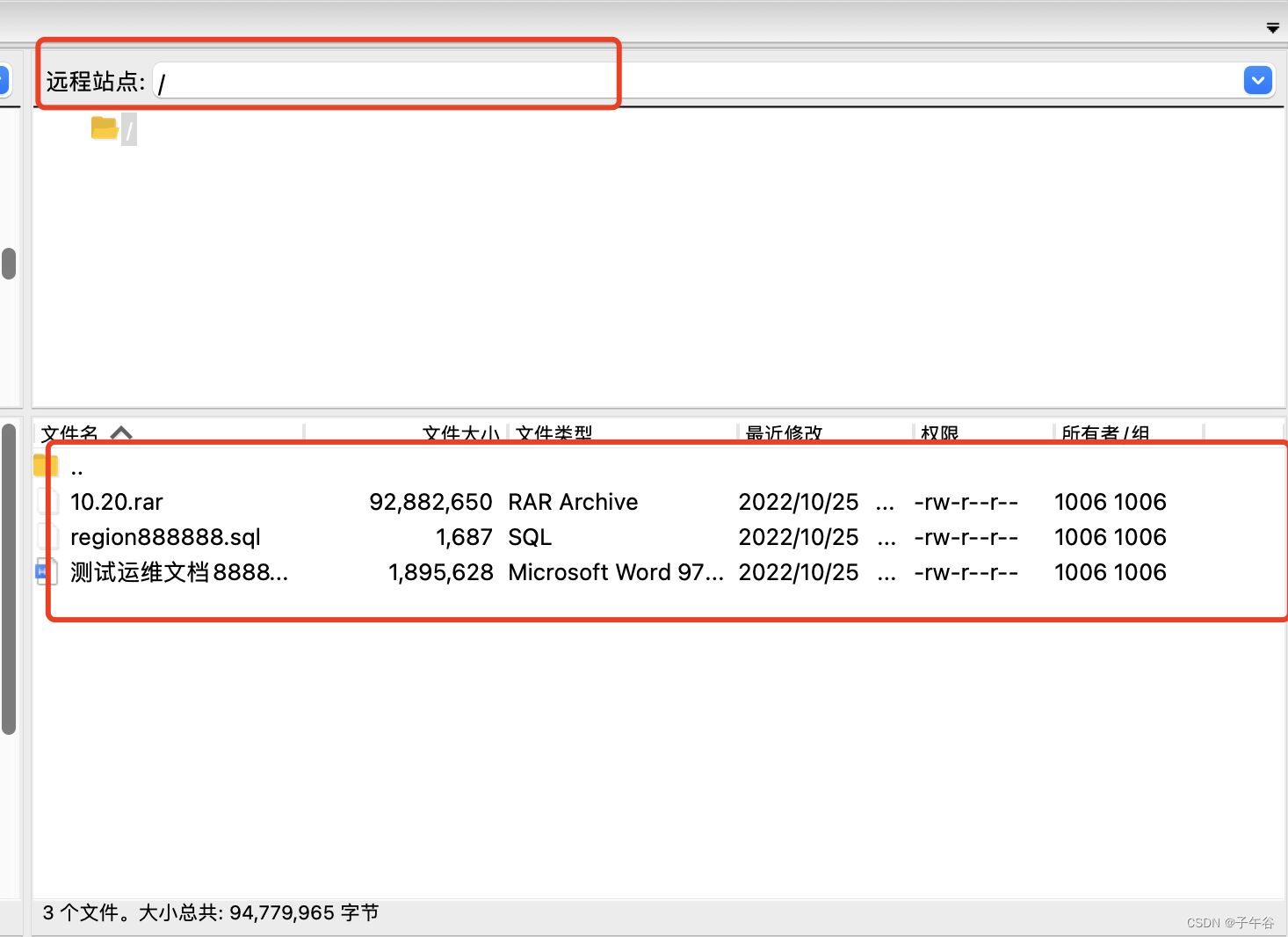
二、使用教程
建立连接:
- //需要连接到的ftp端的ip
- @Value(value = "${ftp.ip}")
- private String ip;
- //连接端口,默认21
- @Value(value = "${ftp.prot}")
- private int port;
- //要连接到的ftp端的名字
- @Value(value = "${ftp.username}")
- private String name;
- //要连接到的ftp端的对应得密码
- @Value(value = "${ftp.password}")
- private String pwd;
- @Value(value = "${ftp.ftpUrl}")
- private String ftpUrl;
- //ftp对象
- private FTPClient ftp;
- /**
- * 1.连接ftp
- * 调用此方法,输入对应得ip,端口,要连接到的ftp端的名字,要连接到的ftp端的对应得密码。连接到ftp对象,并验证登录进入fto
- */
- public boolean ftp1() {
- ftp = new FTPClient();
- try {
- if (!ftp.isConnected()) {
- ftp.connect(ip, port);
- }
- log.info("连接状态:" + ftp.login(name, pwd));
- ftp.setCharset(Charset.forName("UTF-8"));
- ftp.setControlEncoding("UTF-8");
- // ftp.enterLocalActiveMode(); //主动模式
- ftp.enterLocalPassiveMode(); // 被动模式
- return true;
- } catch (IOException e) {
- e.printStackTrace();
- }
- return false;
- }
- public CommonResultVo threeDAndEightDReports() {
- //抱怨单号、FTP地址、3D/8D文件类型
- log.info("-------------ftpUrl地址:" + ip);
- boolean flag = this.ftp1(); //1.连接FTP
- if (flag) {
- try {
- this.gmRead(ftpUrl); //2.获取文件、解析文件内容,进库操作
- this.disconnect(); //3. 关闭连接
- return CommonResultVo.failed("FTP数据发送MQ完成");
- } catch (Exception e) {
- e.printStackTrace();
- }
- }
- return CommonResultVo.failed("连接FTP失败");
- }
- /**
- * 2.获取文件、解析文件内容,进库操作
- */
- public void gmRead(String ftpUrl) throws IOException {
- boolean downloadResult = false;
- try {
- ftp.changeWorkingDirectory(ftpUrl);
- log.info("远程路径为*************************" + ftpUrl);
- FTPFile[] files = ftp.listFiles(ftpUrl); // 通过路径得到文件
- log.info("文件数量为*************************" + files.length);
- for (int i = 0; i < files.length; i++) {
- FTPFile file = files[i];
- if (file.isFile()) {
- // downloadResult = this.download(file);// 下载文件 到本地读取路径
- // this.downloadFtpFile(file);
- new FTPDownload().downloadToFileAll(ftp, ftpUrl);
- } else {
- log.info("************* 文件不存在 ************");
- }
- }
- } catch (Exception e) {
- e.printStackTrace();
- }
- }
文件下载:
- import static com.cetc.service.impl.MessageServicesImpl.pathStr;
- /**
- * @author :jerry
- * @date :Created in 2022/10/25 11:04
- * @description:FTP文件下载
- * @version: V1.1
- */
- @Slf4j
- public class FTPDownload {
- //下载存放路径
- public static final String pathStr = Paths.get("upload").toAbsolutePath().toString();
- private FTPClient ftp;
- /**
- * 1.普通下载
- */
- public synchronized void downloadToFile(FTPClient ftp, String pathname, String filename) throws IOException {
- //删除文件
- File directory = new File(pathStr);
- Files.walk(directory.toPath()).filter(Files::isRegularFile).map(Path::toFile).forEach(File::delete);
- log.info("删除"+pathStr+"目录下的所有历史文件成功");
- try {
- this.ftp = ftp;
- //切换FTP目录
- ftp.setFileType(FTP.BINARY_FILE_TYPE);
- ftp.changeWorkingDirectory(pathname);
- FTPFile[] ftpFiles = ftp.listFiles();
- for (FTPFile file : ftpFiles) {
- if (filename.equalsIgnoreCase(file.getName())) {
- File localFile = new File(pathStr + "/" + filename);
- OutputStream is = new FileOutputStream(localFile);
- ftp.retrieveFile(file.getName(), is);
- is.close();
- break;
- }
- }
- ftp.logout();
- log.info("下载文件成功");
- } catch (Exception e) {
- log.error("下载文件失败");
- e.printStackTrace();
- } finally {
- if (ftp.isConnected()) {
- try {
- ftp.disconnect();
- } catch (IOException e) {
- e.printStackTrace();
- }
- }
- }
- }
- /**
- * 2.字节流的形式下载文件
- */
- public ByteArrayOutputStream byteDownloadZip(FTPClient ftp, FTPFile filePath) {
- this.ftp = ftp;
- ByteArrayOutputStream bos = null;
- try {
- //切换FTP目录
- ftp.setFileType(FTP.BINARY_FILE_TYPE);
- ftp.changeWorkingDirectory(pathStr);
- FTPFile[] ftpFiles = ftp.listFiles();
- String filename = filePath.getName();
- for (FTPFile file : ftpFiles) {
- if (filename.equalsIgnoreCase(file.getName())) {
- InputStream is = ftp.retrieveFileStream(filename);
- bos = new ByteArrayOutputStream();
- int len = 0;
- byte[] buffer = new byte[1024];
- while ((len = is.read(buffer)) > 0) {
- bos.write(buffer, 0, len);
- }
- bos.flush();
- bos.close();
- is.close();
- ftp.completePendingCommand();
- break;
- }
- }
- ftp.logout();
- log.info("下载文件成功");
- } catch (Exception e) {
- log.error("下载文件失败");
- e.printStackTrace();
- } finally {
- if (ftp.isConnected()) {
- try {
- ftp.disconnect();
- } catch (IOException e) {
- e.printStackTrace();
- }
- }
- }
- System.out.println(bos);
- return bos;
- }
- /**
- * 下载全部FTP文件目录文件
- * */
- public synchronized void downloadToFileAll(FTPClient ftp, String pathname) {
- try {
- this.ftp = ftp;
- //切换FTP目录
- ftp.setFileType(FTP.BINARY_FILE_TYPE);
- ftp.changeWorkingDirectory(pathname);
- FTPFile[] ftpFiles = ftp.listFiles();
- for (FTPFile file : ftpFiles) {
- String filename = file.getName();
- log.info("filename:"+filename);
- File localFile = new File(pathStr + "/" + filename);
- OutputStream is = new FileOutputStream(localFile);
- ftp.retrieveFile(file.getName(), is);
- is.close();
- }
- ftp.logout();
- log.info("下载文件成功");
- } catch (Exception e) {
- log.error("下载文件失败");
- e.printStackTrace();
- } finally {
- if (ftp.isConnected()) {
- try {
- ftp.disconnect();
- } catch (IOException e) {
- e.printStackTrace();
- }
- }
- }
- }
- }
- import lombok.Builder;
- import lombok.Getter;
- import lombok.Setter;
- @Getter
- @Setter
- @Builder
- public class CommonResultVo
{ - private int code;
- private String message;
- private T data;
- protected CommonResultVo() {
- }
- protected CommonResultVo(int code, String message, T data) {
- this.code = code;
- this.message = message;
- this.data = data;
- }
- /**
- * 成功返回结果
- *
- */
- public static
CommonResultVo success() { - return new CommonResultVo
(ResultCode.SUCCESS.getCode(), ResultCode.SUCCESS.getMessage(), null); - }
- /**
- * 成功返回结果
- *
- * @param data 获取的数据
- */
- public static
CommonResultVo success(T data) { - return new CommonResultVo
(ResultCode.SUCCESS.getCode(), ResultCode.SUCCESS.getMessage(), data); - }
- /**
- * 成功返回结果
- *
- * @param data 获取的数据
- * @param message 提示信息
- */
- public static
CommonResultVo success(T data, String message) { - return new CommonResultVo
(ResultCode.SUCCESS.getCode(), message, data); - }
- /**
- * 失败返回结果
- * @param resultCode 错误码
- */
- public static
CommonResultVo failed(ResultCode resultCode) { - return new CommonResultVo
(resultCode.getCode(), resultCode.getMessage(), null); - }
- /**
- * 失败返回结果
- * @param resultCode 错误码
- * @param message 错误信息
- */
- public static
CommonResultVo failed(ResultCode resultCode, String message) { - return new CommonResultVo
(resultCode.getCode(), message, null); - }
- /**
- * 失败返回结果
- * @param message 提示信息
- */
- public static
CommonResultVo failed(String message) { - return new CommonResultVo
(ResultCode.FAILED.getCode(), message, null); - }
- /**
- * 失败返回结果
- */
- public static
CommonResultVo failed() { - return failed(ResultCode.FAILED);
- }
- }
- import lombok.Getter;
- import lombok.Setter;
- public enum ResultCode {
- SUCCESS(0, "操作成功"),
- FAILED(-1, "操作失败"),
- VALIDATE_FAILED(404, "参数检验失败"),
- UNAUTHORIZED(401, "暂未登录或token已经过期"),
- FORBIDDEN(403, "没有相关权限");
- @Setter
- @Getter
- private int code;
- @Setter
- @Getter
- private String message;
- private ResultCode(int code, String message) {
- this.code = code;
- this.message = message;
- }
- }
yml配置如下:
- #个人测试
- ftp:
- ip: 10.10.10.121 #IP
- prot: 21 #端口
- ftpUrl: / #文件路径
- username: ftpuser #用户名
- password: 123456 #密码
注意:
ftp.changeWorkingDirectory(pathname); //是切换到你的文件所在的目录,如果文件不在根目录,下载下来可能为0kb -
相关阅读:
android 如何确定MediaCodec输出的确切YUV格式
Centos7通过SSH使用密钥实现免密登录
R语言在vector向量数据末尾追加新的元素(在已知向量末尾添加单个标量数据形成新的向量)
基于JavaWeb的失物招领平台设计与实现
MFC耗时操作增加模态旋转等待对话框
【0267】pg内核初始化 process table(ProcGlobal、PROC_HDR、PGPROC)
Unreal打包摄像机画面
JMeter 4.0 如何获取cookie
栈的计算(入栈出栈顺序是否合法)-代码
二手安捷伦E9323A射频传感器
- 原文地址:https://blog.csdn.net/qq_40068304/article/details/127846100
