-
html清楚浮动
为什么要清除浮动?
我们前面浮动元素有一个标准流的父元素,他们有一个共同点特点,都是有高度的。
但是,不是所有的父盒子都必须有高度。
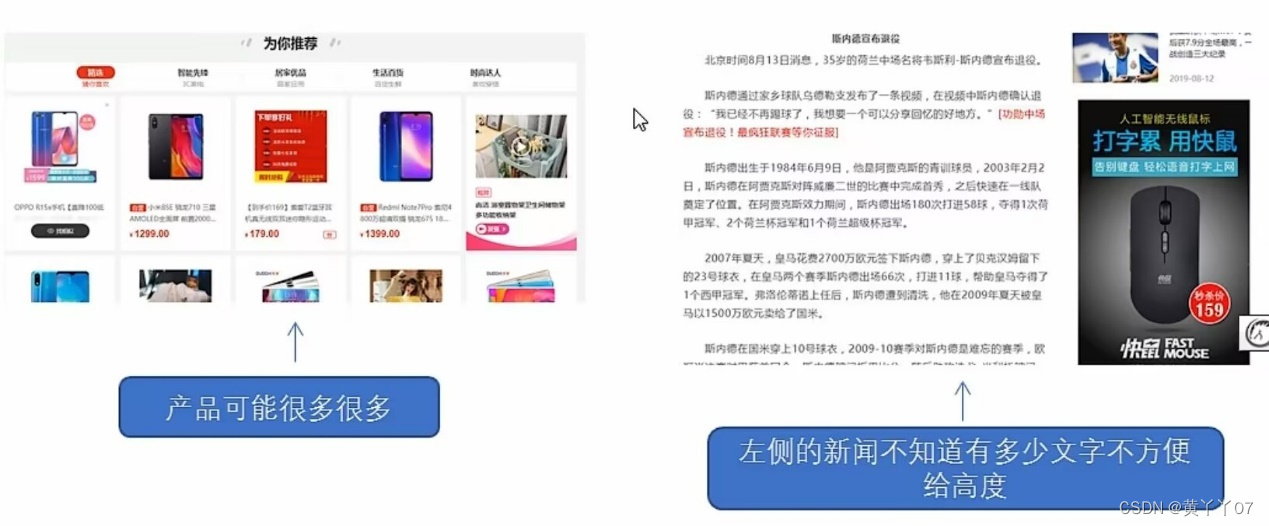
理想中的状态,让子盒子撑开父亲,有多少孩子,父盒子就有多高。
由于父级盒子很多情况下,不方便给高度,但是子盒子浮动又不占有位置,最后父级盒子高度为0时,就会影响下面的标准流盒子。

(由于浮动元素不再占用原文档流的位置,所以它会对后面的元素排版产生影响。)
清楚浮动的本质?
- 就是清楚浮动元素造成的影响。
- 如果父亲本身有高度,则不需要清楚浮动
- 清除浮动之后,父级就会根据浮动的子盒子自动检测高度,父级有了高度,就不会影响下面的标准流了。
语法:
选择器{clear:属性值;}
属性值
描述
Left
不允许左侧有浮动元素(清除左侧浮动的影响)
right
不允许右侧有浮动元素(清楚右侧浮动的影响)
Both
同时清楚左右两侧浮动的影响
我们实际工作中,几乎只用clear:both;
清楚浮动的策略时:闭合浮动(只让浮动在父盒子内部影响,不影响父盒子外面的其他的盒子)
清楚浮动的方法:
- 额外标签法,也成为隔墙法,是w3c推荐的做法
额外标签法会在浮动元素末尾添加一个空的标签,例如
,或者其他标签
。- html>
- <html lang="en">
- <head>
- <meta charset="UTF-8">
- <meta http-equiv="X-UA-Compatible" content="IE=edge">
- <meta name="viewport" content="width=device-width, initial-scale=1.0">
- <title>为什么需要清楚浮动title>
- <style>
- .box {
- width: 800px;
- border: 1px solid blue;
- margin: 0 auto;
- }
- .damao {
- float: left;
- width: 300px;
- height: 200px;
- background-color: purple;
- }
- .ermao {
- float: left;
- width: 200px;
- height: 200px;
- background-color: pink;
- }
- .footer {
- height: 100px;
- background-color: aquamarine;
- }
- .clear {
- clear: both;
- }
- style>
- head>
- <body>
- <div class="box">
- <div class="damao">大毛div>
- <div class="ermao">二毛div>
- <div class="clear">div>
- div>
- <div class="footer">div>
- body>
- html>

优点:通俗易懂,书写方便
缺点:添加许多无意义的标签,结构化比较差。
注意:要求这个新的空标签必须是块级元素。
- 父级添加overflow属性
可以给父级添加overflow属性,将其属性值设置为hidden,auto或scroll。
子不教,父之过,注意是给父元素添加代码。
优点:代码简洁
缺点:无法显示溢出的部分
- 父级添加after属性
:after方式是额外标签法的升级版,也是给父元素添加
- .clearfix:after {
- content: "";
- display: block;
- height: 0;
- clear: both;
- visibility: hidden;
- }
- .clearfix {
- /* ie 6、7专有 */
- *zoom: 1;
- }
优点:没有增加标签,结构更简单
缺点:照顾低版本浏览器
代表网站:百度、淘宝网、网易等
- html>
- <html lang="en">
- <head>
- <meta charset="UTF-8">
- <meta http-equiv="X-UA-Compatible" content="IE=edge">
- <meta name="viewport" content="width=device-width, initial-scale=1.0">
- <title>为什么需要清楚浮动title>
- <style>
- .clearfix:after {
- content: "";
- display: block;
- height: 0;
- clear: both;
- visibility: hidden;
- }
- .clearfix {
- /* ie 6、7专有 */
- *zoom: 1;
- }
- .box {
- width: 800px;
- border: 1px solid blue;
- margin: 0 auto;
- /* 清楚浮动 */
- /* overflow: auto; */
- }
- .damao {
- float: left;
- width: 300px;
- height: 200px;
- background-color: purple;
- }
- .ermao {
- float: left;
- width: 200px;
- height: 200px;
- background-color: pink;
- }
- .footer {
- height: 100px;
- background-color: aquamarine;
- }
- .clear {
- clear: both;
- }
- style>
- head>
- <body>
- <div class="box clearfix">
- <div class="damao">大毛div>
- <div class="ermao">二毛div>
- div>
- <div class="footer">div>
- body>
- html>

- 父级添加双伪元素
也是给父元素添加。
- .clearfix:before,
- .clearfix:after {
- content: "";
- display: table;
- }
- .clearfix:after {
- clear: both;
- }
- .clearfix {
- *zoom: 1;
- }
优点:代码更简洁
缺点:照顾低版本浏览器
代表网站:小米、腾讯等等
- html>
- <html lang="en">
- <head>
- <meta charset="UTF-8">
- <meta http-equiv="X-UA-Compatible" content="IE=edge">
- <meta name="viewport" content="width=device-width, initial-scale=1.0">
- <title>为什么需要清楚浮动title>
- <style>
- .clearfix:before,
- .clearfix:after {
- content: "";
- display: table;
- }
- .clearfix:after {
- clear: both;
- }
- .clearfix {
- *zoom: 1;
- }
- .box {
- width: 800px;
- border: 1px solid blue;
- margin: 0 auto;
- /* 清楚浮动 */
- /* overflow: auto; */
- }
- .damao {
- float: left;
- width: 300px;
- height: 200px;
- background-color: purple;
- }
- .ermao {
- float: left;
- width: 200px;
- height: 200px;
- background-color: pink;
- }
- .footer {
- height: 100px;
- background-color: aquamarine;
- }
- .clear {
- clear: both;
- }
- style>
- head>
- <body>
- <div class="box clearfix">
- <div class="damao">大毛div>
- <div class="ermao">二毛div>
- div>
- <div class="footer">div>
- body>
- html>

清除浮动总结:
为什么需要浮动?
- 父级没高度
- 子盒子浮动了
- 影响下面布局了,我们就应该清除浮动了
清除浮动的方式
优点
缺点
额外标签法(隔墙法)
通俗易懂,书写方便
添加许多无意义标签,结构化较差
父级overflow:hidden;
书写简单
溢出隐藏
父级after伪元素
结构语义化正确
由于ie6-7不支持:after
兼容性问题
父级双伪元素
结构语义化正确
由于ie6-7不支持:after
兼容性问题
-
相关阅读:
学生环境保护绿色家园 WEB静态网页作业模板 大学生环境保护网页代码 dreamweaver网页设计作业制作 dw个人网页作业成品
15.RedHat认证-Ansible自动化运维(上)
个人实现在线支付,一种另类的在线支付解决方案
批量发送邮件时怎么使用蜂邮EDM与Outlook?
mac(M1)卸载miniconda3
PyCharm中常用插件推荐
【深入理解java虚拟机】 - JVM垃圾回收器
《前端》JavaScript--常用库API
55_Pandas.DataFrame 转换为 JSON 字符串/文件并保存 (to_json)
前端框架海洋:如何破浪前行,寻找你的“黄金舟”
- 原文地址:https://blog.csdn.net/m0_51495354/article/details/127836655
