-
尚医通_第9章_部署医院模拟系统和搭建环境
尚医通_第9章_部署医院模拟系统和搭建环境
一、部署医院模拟系统
1、参考《医院接口模拟系统.docx》进行接口测试与数据上传
2、参考《尚医通API接口文档.docx》业务接口进行接口开发

二、搭建接口环境
1、集成MongoDB
1.1 引入依赖
<dependencies> <dependency> <groupId>org.springframework.bootgroupId> <artifactId>spring-boot-starter-data-mongodbartifactId> dependency> dependencies>- 1
- 2
- 3
- 4
- 5
- 6
1.2 添加配置
spring.data.mongodb.uri=mongodb://192.168.44.165:27017/test- 1
2、添加医院基础类
2.1 添加model
@Data @ApiModel(description = "Hospital") @Document("Hospital") public class Hospital extends BaseMongoEntity { private static final long serialVersionUID = 1L; @ApiModelProperty(value = "医院编号") @Indexed(unique = true) //唯一索引 private String hoscode; @ApiModelProperty(value = "医院名称") @Indexed //普通索引 private String hosname; @ApiModelProperty(value = "医院类型") private String hostype; @ApiModelProperty(value = "省code") private String provinceCode; @ApiModelProperty(value = "市code") private String cityCode; @ApiModelProperty(value = "区code") private String districtCode; @ApiModelProperty(value = "详情地址") private String address; @ApiModelProperty(value = "医院logo") private String logoData; @ApiModelProperty(value = "医院简介") private String intro; @ApiModelProperty(value = "坐车路线") private String route; @ApiModelProperty(value = "状态 0:未上线 1:已上线") private Integer status; //预约规则 @ApiModelProperty(value = "预约规则") private BookingRule bookingRule; public void setBookingRule(String bookingRule) { this.bookingRule = JSONObject.parseObject(bookingRule, BookingRule.class); } }- 1
- 2
- 3
- 4
- 5
- 6
- 7
- 8
- 9
- 10
- 11
- 12
- 13
- 14
- 15
- 16
- 17
- 18
- 19
- 20
- 21
- 22
- 23
- 24
- 25
- 26
- 27
- 28
- 29
- 30
- 31
- 32
- 33
- 34
- 35
- 36
- 37
2.2 添加Repository
@Repository public interface HospitalRepository extends MongoRepository<Hospital,String> { }- 1
- 2
- 3
- 4
2.3 添加service
public interface HospitalService { } @Service public class HospitalServiceImpl implements HospitalService { @Autowired private HospitalRepository hospitalRepository; }- 1
- 2
- 3
- 4
- 5
- 6
- 7
2.4 添加controller
@Api(tags = "医院管理API接口") @RestController @RequestMapping("/api/hosp") public class ApiController { @Autowired private HospitalService hospitalService; }- 1
- 2
- 3
- 4
- 5
- 6
- 7
说明:平台对外开发的接口都写在该Controller类
02-上传医院接口
三、上传医院接口
参考《尚医通API接口文档.doc》业务接口4.1上传医院
医院编号是平台分配的,全局唯一,上传医院接口可以多次调用,如果存在相同编号的为更新操作
1、数据分析
{ "hoscode": "1000_0", "hosname": "北京协和医院", "hostype": "1", "provinceCode": "110000", "cityCode": "110100", "districtCode": "110102", "address": "大望路", "intro": "北京协和医院是集医疗、教学、科研于一体的大型三级甲等综合医院,是国家卫生计生委...目标而继续努力。", "route": "东院区乘车路线:106、...更多乘车路线详见须知。", "logoData": "iVBORw0KGgoAAAA...NSUhEUg==", "bookingRule": { "cycle": "1", "releaseTime": "08:30", "stopTime": "11:30", "quitDay": "-1", "quitTime": "15:30", "rule": [ "西院区预约号取号地点:西院区门诊楼一层大厅挂号窗口取号", "东院区预约号取号地点:东院区老门诊楼一层大厅挂号窗口或新门诊楼各楼层挂号/收费窗口取号" ] } }- 1
- 2
- 3
- 4
- 5
- 6
- 7
- 8
- 9
- 10
- 11
- 12
- 13
- 14
- 15
- 16
- 17
- 18
- 19
- 20
- 21
- 22
- 23
说明:
1,数据分为医院基本信息与预约规则信息
2,医院logo转换为base64字符串
3,预约规则信息属于医院基本信息的一个属性
4,预约规则rule,以数组形式传递
5,数据传递过来我们还要验证签名,只允许平台开通的医院可以上传数据,保证数据安全性
2、添加service接口
在HospService添加
/** * 上传医院信息 * @param paramMap */ void save(Map<String, Object> paramMap);- 1
- 2
- 3
- 4
- 5
在HospitalServiceImpl类添加实现
@Override public void save(Map<String, Object> paramMap) { Hospital hospital = JSONObject.parseObject(JSONObject.toJSONString(paramMap),Hospital.class); //判断是否存在 Hospital targetHospital = hospitalRepository.getHospitalByHoscode(hospital.getHoscode()); if(null != targetHospital) { hospital.setStatus(targetHospital.getStatus()); hospital.setCreateTime(targetHospital.getCreateTime()); hospital.setUpdateTime(new Date()); hospital.setIsDeleted(0); hospital.setId(targetHospital.getId()); //根据id更新 hospitalRepository.save(hospital); } else { //0:未上线 1:已上线 hospital.setStatus(0); hospital.setCreateTime(new Date()); hospital.setUpdateTime(new Date()); hospital.setIsDeleted(0); hospitalRepository.save(hospital); } }- 1
- 2
- 3
- 4
- 5
- 6
- 7
- 8
- 9
- 10
- 11
- 12
- 13
- 14
- 15
- 16
- 17
- 18
- 19
- 20
- 21
3、添加repository接口
在HospitalRepository类添加接口
Hospital getHospitalByHoscode(String hoscode);- 1
4、添加controller接口
@ApiOperation(value = "上传医院") @PostMapping("saveHospital") public Result saveHospital(HttpServletRequest request) { Map<String, Object> paramMap = HttpRequestHelper.switchMap(request.getParameterMap()); hospitalService.save(paramMap); return Result.ok(); }- 1
- 2
- 3
- 4
- 5
- 6
- 7
5、添加帮助类
public class HttpRequestHelper { public static Map<String, Object> switchMap(Map<String, String[]> paramMap) { Map<String, Object> resultMap = new HashMap<>(); for (Map.Entry<String, String[]> param : paramMap.entrySet()) { resultMap.put(param.getKey(), param.getValue()[0]); } return resultMap; } }- 1
- 2
- 3
- 4
- 5
- 6
- 7
- 8
- 9
6、参数签名
添加工具类MD5
public final class MD5 { public static String encrypt(String strSrc) { try { char hexChars[] = { '0', '1', '2', '3', '4', '5', '6', '7', '8', '9', 'a', 'b', 'c', 'd', 'e', 'f' }; byte[] bytes = strSrc.getBytes(); MessageDigest md = MessageDigest.getInstance("MD5"); md.update(bytes); bytes = md.digest(); int j = bytes.length; char[] chars = new char[j * 2]; int k = 0; for (int i = 0; i < bytes.length; i++) { byte b = bytes[i]; chars[k++] = hexChars[b >>> 4 & 0xf]; chars[k++] = hexChars[b & 0xf]; } return new String(chars); } catch (NoSuchAlgorithmException e) { e.printStackTrace(); throw new RuntimeException("MD5加密出错!!+" + e); } } }- 1
- 2
- 3
- 4
- 5
- 6
- 7
- 8
- 9
- 10
- 11
- 12
- 13
- 14
- 15
- 16
- 17
- 18
- 19
- 20
- 21
- 22
- 23
- 24
7、在HospitalSetService类添加方法
/** * 获取签名key * @param hoscode * @return */ String getSignKey(String hoscode); @Override public String getSignKey(String hoscode) { HospitalSet hospitalSet = this.getByHoscode(hoscode); if(null == hospitalSet) { throw new YyghException(20001,"失败"); } return hospitalSet.getSignKey(); } /** * 根据hoscode获取医院设置 * @param hoscode * @return */ private HospitalSet getByHoscode(String hoscode) { return baseMapper.selectOne(new QueryWrapper<HospitalSet>().eq("hoscode", hoscode)); }- 1
- 2
- 3
- 4
- 5
- 6
- 7
- 8
- 9
- 10
- 11
- 12
- 13
- 14
- 15
- 16
- 17
- 18
- 19
- 20
- 21
- 22
8、修改ApiController代码
package com.atguigu.yygh.hosp.controller.api; import com.atguigu.common.exception.YyghException; import com.atguigu.common.utils.R; import com.atguigu.common.utils.Result; import com.atguigu.yygh.hosp.service.HospitalService; import com.atguigu.yygh.hosp.service.HospitalSetService; import com.atguigu.yygh.hosp.utils.HttpRequestHelper; import com.atguigu.yygh.hosp.utils.MD5; import com.atguigu.yygh.model.hosp.Hospital; import io.swagger.annotations.Api; import io.swagger.annotations.ApiOperation; import org.springframework.beans.factory.annotation.Autowired; import org.springframework.util.StringUtils; import org.springframework.web.bind.annotation.PostMapping; import org.springframework.web.bind.annotation.RequestMapping; import org.springframework.web.bind.annotation.RestController; import javax.servlet.http.HttpServletRequest; import java.util.Map; @Api(tags = "医院管理API接口") @RestController @RequestMapping("/api/hosp") public class ApiController { @Autowired private HospitalService hospitalService; @Autowired private HospitalSetService hospitalSetService; @ApiOperation(value = "上传医院") @PostMapping("saveHospital") public Result saveHospital(HttpServletRequest request) { Map<String, Object> paramMap = HttpRequestHelper.switchMap(request.getParameterMap()); //必须参数校验 略 String hoscode = (String)paramMap.get("hoscode"); if(StringUtils.isEmpty(hoscode)) { throw new YyghException(20001,"失败"); } //签名校验 //1 获取医院系统传递过来的签名,签名进行MD5加密 String hospSign = (String)paramMap.get("sign"); //2 根据传递过来医院编码,查询数据库,查询签名 String signKey = hospitalSetService.getSignKey(hoscode); //3 把数据库查询签名进行MD5加密 String signKeyMd5 = MD5.encrypt(signKey); //4 判断签名是否一致 if(!hospSign.equals(signKeyMd5)) { throw new YyghException(20001,"校验失败"); } //传输过程中“+”转换为了“ ”,因此我们要转换回来 String logoData = (String)paramMap.get("logoData"); logoData = logoData.replaceAll(" ","+"); paramMap.put("logoData",logoData); hospitalService.save(paramMap); return Result.ok(); } }- 1
- 2
- 3
- 4
- 5
- 6
- 7
- 8
- 9
- 10
- 11
- 12
- 13
- 14
- 15
- 16
- 17
- 18
- 19
- 20
- 21
- 22
- 23
- 24
- 25
- 26
- 27
- 28
- 29
- 30
- 31
- 32
- 33
- 34
- 35
- 36
- 37
- 38
- 39
- 40
- 41
- 42
- 43
- 44
- 45
- 46
- 47
- 48
- 49
- 50
- 51
- 52
- 53
- 54
03-查询医院接口
四、查询医院接口
参考《尚医通API接口文档.docx》业务接口4.4查询医院
1、复制Result返回结果类
复制到common_utils

2、添加service方法
/** * 查询医院 * @param hoscode * @return */ Hospital getByHoscode(String hoscode); @Override public Hospital getByHoscode(String hoscode) { return hospitalRepository.getHospitalByHoscode(hoscode); }- 1
- 2
- 3
- 4
- 5
- 6
- 7
- 8
- 9
- 10
3、添加controller
@ApiOperation(value = "获取医院信息") @PostMapping("hospital/show") public Result hospital(HttpServletRequest request) { Map<String, Object> paramMap = HttpRequestHelper.switchMap(request.getParameterMap()); //必须参数校验 String hoscode = (String)paramMap.get("hoscode"); if(StringUtils.isEmpty(hoscode)) { throw new YyghException(20001,"失败"); } //签名校验 略 Hospital hospital = hospitalService.getByHoscode(hoscode); return Result.ok(hospital); }- 1
- 2
- 3
- 4
- 5
- 6
- 7
- 8
- 9
- 10
- 11
- 12
- 13
五、上传科室接口
参考《尚医通API接口文档.docx》业务接口4.2上传科室
1、添加科室基础类
1.1 添加model
说明:由于实体对象没有逻辑,我们已经统一导入
com.atguigu.yygh.model.hosp.Department

1.2 添加repository
@Repository public interface DepartmentRepository extends MongoRepository<Department,String> { }- 1
- 2
- 3
1.3 添加service接口和实现类
public interface DepartmentService { } @Service public class DepartmentServiceImpl implements DepartmentService { @Autowired private DepartmentRepository departmentRepository; }- 1
- 2
- 3
- 4
- 5
- 6
- 7
2、上传科室实现
2.1 接口数据分析
{ "hoscode": "1000_0", "depcode": "200050923", "depname": "门诊部核酸检测门诊(东院)", "intro": "门诊部核酸检测门诊(东院)", "bigcode": "44f162029abb45f9ff0a5f743da0650d", "bigname": "体检科" }- 1
- 2
- 3
- 4
- 5
- 6
- 7
- 8
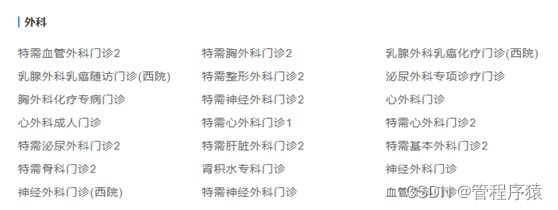
说明:一个大科室下可以有多个小科室,如图:
2.2 添加service方法和实现
/** * 上传科室信息 * @param paramMap */ void save(Map<String, Object> paramMap); //实现方法 @Service public class DepartmentServiceImpl implements DepartmentService { @Autowired private DepartmentRepository departmentRepository; @Override public void save(Map<String, Object> paramMap) { //paramMap 转换department对象 String paramMapString = JSONObject.toJSONString(paramMap); Department department = JSONObject.parseObject(paramMapString,Department.class); //根据医院编号 和 科室编号查询 Department departmentExist = departmentRepository. getDepartmentByHoscodeAndDepcode(department.getHoscode(),department.getDepcode()); //判断 if(departmentExist!=null) { department.setCreateTime(departmentExist.getCreateTime()); department.setUpdateTime(new Date()); department.setIsDeleted(0); department.setId(departmentExist.getId()); departmentRepository.save(department); } else { department.setCreateTime(new Date()); department.setUpdateTime(new Date()); department.setIsDeleted(0); departmentRepository.save(department); } } }- 1
- 2
- 3
- 4
- 5
- 6
- 7
- 8
- 9
- 10
- 11
- 12
- 13
- 14
- 15
- 16
- 17
- 18
- 19
- 20
- 21
- 22
- 23
- 24
- 25
- 26
- 27
- 28
- 29
- 30
- 31
- 32
- 33
2.3 添加repository方法
@Repository public interface DepartmentRepository extends MongoRepository<Department,String> { Department getDepartmentByHoscodeAndDepcode(String hoscode, String depcode); }- 1
- 2
- 3
- 4
2.4 添加controller
@Autowired private DepartmentService departmentService; @ApiOperation(value = "上传科室") @PostMapping("saveDepartment") public Result saveDepartment(HttpServletRequest request) { Map<String, Object> paramMap = HttpRequestHelper.switchMap(request.getParameterMap()); //必须参数校验 略 //签名校验 departmentService.save(paramMap); return Result.ok(); }- 1
- 2
- 3
- 4
- 5
- 6
- 7
- 8
- 9
- 10
- 11
六、查询科室接口
参考《尚医通API接口文档.docx》业务接口4.5查询医院
一个医院有多个科室,因此我们采取分页查询方式
1、添加service接口和实现
/** * 分页查询 * @param page 当前页码 * @param limit 每页记录数 * @param departmentQueryVo 查询条件 * @return */ Page<Department> selectPage(Integer page, Integer limit, DepartmentQueryVo departmentQueryVo) //分页实现 @Override public Page<Department> selectPage(Integer page, Integer limit, DepartmentQueryVo departmentQueryVo) { Sort sort = Sort.by(Sort.Direction.DESC, "createTime"); //0为第一页 Pageable pageable = PageRequest.of(page-1, limit, sort); Department department = new Department(); BeanUtils.copyProperties(departmentQueryVo, department); department.setIsDeleted(0); //创建匹配器,即如何使用查询条件 ExampleMatcher matcher = ExampleMatcher.matching() //构建对象 .withStringMatcher(ExampleMatcher.StringMatcher.CONTAINING) //改变默认字符串匹配方式:模糊查询 .withIgnoreCase(true); //改变默认大小写忽略方式:忽略大小写 //创建实例 Example<Department> example = Example.of(department, matcher); Page<Department> pages = departmentRepository.findAll(example, pageable); return pages; }- 1
- 2
- 3
- 4
- 5
- 6
- 7
- 8
- 9
- 10
- 11
- 12
- 13
- 14
- 15
- 16
- 17
- 18
- 19
- 20
- 21
- 22
- 23
- 24
- 25
- 26
2、添加controller接口
@ApiOperation(value = "获取分页列表") @PostMapping("department/list") public Result department(HttpServletRequest request) { Map<String, Object> paramMap = HttpRequestHelper.switchMap(request.getParameterMap()); //必须参数校验 略 String hoscode = (String)paramMap.get("hoscode"); //非必填 String depcode = (String)paramMap.get("depcode"); int page = StringUtils.isEmpty(paramMap.get("page")) ? 1 : Integer.parseInt((String)paramMap.get("page")); int limit = StringUtils.isEmpty(paramMap.get("limit")) ? 10 : Integer.parseInt((String)paramMap.get("limit")); //签名校验 DepartmentQueryVo departmentQueryVo = new DepartmentQueryVo(); departmentQueryVo.setHoscode(hoscode); departmentQueryVo.setDepcode(depcode); Page<Department> pageModel = departmentService.selectPage(page, limit, departmentQueryVo); return Result.ok(pageModel); }- 1
- 2
- 3
- 4
- 5
- 6
- 7
- 8
- 9
- 10
- 11
- 12
- 13
- 14
- 15
- 16
- 17
七、删除科室
参考《尚医通API接口文档.docx》业务接口4.7删除科室
根据医院编号与科室编号删除科室
1、添加service方法和实现
/** * 删除科室 * @param hoscode * @param depcode */ void remove(String hoscode, String depcode); //实现方法 @Override public void remove(String hoscode, String depcode) { Department department = departmentRepository.getDepartmentByHoscodeAndDepcode(hoscode, depcode); if(null != department) { departmentRepository.deleteById(department.getId()); } }- 1
- 2
- 3
- 4
- 5
- 6
- 7
- 8
- 9
- 10
- 11
- 12
- 13
- 14
2、添加controller接口
@ApiOperation(value = "删除科室") @PostMapping("department/remove") public Result removeDepartment(HttpServletRequest request) { Map<String, Object> paramMap = HttpRequestHelper.switchMap(request.getParameterMap()); //必须参数校验 略 String hoscode = (String)paramMap.get("hoscode"); String depcode = (String)paramMap.get("depcode"); departmentService.remove(hoscode, depcode); return Result.ok(); }- 1
- 2
- 3
- 4
- 5
- 6
- 7
- 8
- 9
- 10
07-上传排班接口
八、上传排班接口
参考《尚医通API接口文档.docx》业务接口4.3上传排班
1、添加排班基础类
1.1 添加model
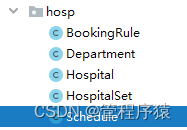
说明:由于实体对象没有逻辑,我们已经统一导入
com.atguigu.yygh.model.hosp.Schedule
1.2 添加repository
@Repository public interface ScheduleRepository extends MongoRepository<Schedule,String> { }- 1
- 2
- 3
1.3 添加service接口和实现类
public interface ScheduleService { } @Service public class ScheduleServiceImpl implements ScheduleService { @Autowired private ScheduleRepository scheduleRepository; }- 1
- 2
- 3
- 4
- 5
- 6
- 7
- 8
2、上传排班实现
2.1 接口数据分析
{ "hoscode": "1000_0", "depcode": "200040878", "title": "医师", "docname": "", "skill": "内分泌科常见病。", "workDate": "2020-06-22", "workTime": 0, "reservedNumber": 33, "availableNumber": 22, "amount": "100", "status": 1, "hosScheduleId": "1" }- 1
- 2
- 3
- 4
- 5
- 6
- 7
- 8
- 9
- 10
- 11
- 12
- 13
- 14
2.2 添加service方法和实现
public interface ScheduleService { /** * 上传排班信息 * @param paramMap */ void save(Map<String, Object> paramMap); } @Service public class ScheduleServiceImpl implements ScheduleService { @Autowired private ScheduleRepository scheduleRepository; @Override public void save(Map<String, Object> paramMap) { //paramMap 转换department对象 String paramMapString = JSONObject.toJSONString(paramMap); Schedule schedule = JSONObject.parseObject(paramMapString, Schedule.class); //根据医院编号 和 排班编号查询 Schedule scheduleExist = scheduleRepository. getScheduleByHoscodeAndHosScheduleId(schedule.getHoscode(),schedule.getHosScheduleId()); //判断 if(scheduleExist!=null) { scheduleExist.setUpdateTime(new Date());//这里感觉有一点问题,应该是schedule对象 scheduleExist.setIsDeleted(0);//这里感觉有一点问题,应该是schedule对象 scheduleExist.setStatus(1);//这里感觉有一点问题,应该是schedule对象 scheduleRepository.save(scheduleExist);//这里感觉有一点问题,应该是schedule对象, } else { schedule.setCreateTime(new Date()); schedule.setUpdateTime(new Date()); schedule.setIsDeleted(0); schedule.setStatus(1); scheduleRepository.save(schedule); } } }- 1
- 2
- 3
- 4
- 5
- 6
- 7
- 8
- 9
- 10
- 11
- 12
- 13
- 14
- 15
- 16
- 17
- 18
- 19
- 20
- 21
- 22
- 23
- 24
- 25
- 26
- 27
- 28
- 29
- 30
- 31
- 32
- 33
- 34
2.3 添加repository方法
@Repository public interface ScheduleRepository extends MongoRepository<Schedule,String> { Schedule getScheduleByHoscodeAndHosScheduleId(String hoscode, String hosScheduleId); }- 1
- 2
- 3
- 4
2.4 添加controller
@Autowired private ScheduleService scheduleService; @ApiOperation(value = "上传排班") @PostMapping("saveSchedule") public Result saveSchedule(HttpServletRequest request) { Map<String, Object> paramMap = HttpRequestHelper.switchMap(request.getParameterMap()); //必须参数校验 略 String hoscode = (String)paramMap.get("hoscode"); scheduleService.save(paramMap); return Result.ok(); }- 1
- 2
- 3
- 4
- 5
- 6
- 7
- 8
- 9
- 10
- 11
九、查询排班接口
参考《尚医通API接口文档.docx》业务接口4.6查询医院
一个科室有多个科室,因此我们采取分页查询方式
1、添加service接口和实现
/** * 分页查询 * @param page 当前页码 * @param limit 每页记录数 * @param scheduleQueryVo 查询条件 * @return */ Page<Schedule> selectPage(Integer page, Integer limit, ScheduleQueryVo scheduleQueryVo); @Override public Page<Schedule> selectPage(Integer page, Integer limit, ScheduleQueryVo scheduleQueryVo) { Sort sort = Sort.by(Sort.Direction.DESC, "createTime"); //0为第一页 Pageable pageable = PageRequest.of(page-1, limit, sort); Schedule schedule = new Schedule(); BeanUtils.copyProperties(scheduleQueryVo, schedule); schedule.setIsDeleted(0); //创建匹配器,即如何使用查询条件 ExampleMatcher matcher = ExampleMatcher.matching() //构建对象 .withStringMatcher(ExampleMatcher.StringMatcher.CONTAINING) //改变默认字符串匹配方式:模糊查询 .withIgnoreCase(true); //改变默认大小写忽略方式:忽略大小写 //创建实例 Example<Schedule> example = Example.of(schedule, matcher); Page<Schedule> pages = scheduleRepository.findAll(example, pageable); return pages; }- 1
- 2
- 3
- 4
- 5
- 6
- 7
- 8
- 9
- 10
- 11
- 12
- 13
- 14
- 15
- 16
- 17
- 18
- 19
- 20
- 21
- 22
- 23
- 24
- 25
2、添加controller接口
@ApiOperation(value = "获取排班分页列表") @PostMapping("schedule/list") public Result schedule(HttpServletRequest request) { Map<String, Object> paramMap = HttpRequestHelper.switchMap(request.getParameterMap()); //必须参数校验 略 String hoscode = (String)paramMap.get("hoscode"); //非必填 String depcode = (String)paramMap.get("depcode"); int page = StringUtils.isEmpty(paramMap.get("page")) ? 1 : Integer.parseInt((String)paramMap.get("page")); int limit = StringUtils.isEmpty(paramMap.get("limit")) ? 10 : Integer.parseInt((String)paramMap.get("limit")); ScheduleQueryVo scheduleQueryVo = new ScheduleQueryVo(); scheduleQueryVo.setHoscode(hoscode); scheduleQueryVo.setDepcode(depcode); Page<Schedule> pageModel = scheduleService.selectPage(page , limit, scheduleQueryVo); return Result.ok(pageModel); }- 1
- 2
- 3
- 4
- 5
- 6
- 7
- 8
- 9
- 10
- 11
- 12
- 13
- 14
- 15
- 16
十、删除排班
参考《尚医通API接口文档.docx》业务接口4.8删除科室
根据医院编号与排班编号删除科室
1、添加service方法和实现
/** * 删除排班 * @param hoscode * @param hosScheduleId */ void remove(String hoscode, String hosScheduleId); //实现方法 @Override public void remove(String hoscode, String hosScheduleId) { Schedule schedule = scheduleRepository.getScheduleByHoscodeAndHosScheduleId(hoscode, hosScheduleId); if(null != schedule) { scheduleRepository.deleteById(schedule.getId()); } }- 1
- 2
- 3
- 4
- 5
- 6
- 7
- 8
- 9
- 10
- 11
- 12
- 13
- 14
2、添加 controller
@ApiOperation(value = "删除排班") @PostMapping("schedule/remove") public Result removeSchedule(HttpServletRequest request) { Map<String, Object> paramMap = HttpRequestHelper.switchMap(request.getParameterMap()); //必须参数校验 略 String hoscode = (String)paramMap.get("hoscode"); //必填 String hosScheduleId = (String)paramMap.get("hosScheduleId"); scheduleService.remove(hoscode, hosScheduleId); return Result.ok(); }- 1
- 2
- 3
- 4
- 5
- 6
- 7
- 8
- 9
- 10
- 11
/** * 删除排班 * @param hoscode * @param hosScheduleId */ void remove(String hoscode, String hosScheduleId); //实现方法 @Override public void remove(String hoscode, String hosScheduleId) { Schedule schedule = scheduleRepository.getScheduleByHoscodeAndHosScheduleId(hoscode, hosScheduleId); if(null != schedule) { scheduleRepository.deleteById(schedule.getId()); } }- 1
- 2
- 3
- 4
- 5
- 6
- 7
- 8
- 9
- 10
- 11
- 12
- 13
- 14
2、添加 controller
@ApiOperation(value = "删除排班") @PostMapping("schedule/remove") public Result removeSchedule(HttpServletRequest request) { Map<String, Object> paramMap = HttpRequestHelper.switchMap(request.getParameterMap()); //必须参数校验 略 String hoscode = (String)paramMap.get("hoscode"); //必填 String hosScheduleId = (String)paramMap.get("hosScheduleId"); scheduleService.remove(hoscode, hosScheduleId); return Result.ok(); }- 1
- 2
- 3
- 4
- 5
- 6
- 7
- 8
- 9
- 10
- 11
-
相关阅读:
Writesonic:博客和内容创作者的终极写作助手
【GA-ACO-BP预测】基于混合遗传算法-蚁群算法优化BP神经网络回归预测研究(Matlab代码实现)
Netty简介
2023年13个最适合销售电子书的WordPress主题
SLAM从入门到精通(用python实现机器人运动控制)
Zstack ZCCC学习笔记
2024.4.24
c++ isalpha isalnum isdigit islower isupper tolower toupper
gorm的增删改查
【一知半解】synchronied
- 原文地址:https://blog.csdn.net/guan1843036360/article/details/127838892
