码农知识堂 - 1000bd
  •   Python
  •   PHP
  •   JS/TS
  •   JAVA
  •   C/C++
  •   C#
  •   GO
  •   Kotlin
  •   Swift
  • Vue项目实战——【基于 Vue3.x + NodeJS】实现的课程表排课系统四(MyMessageBox)动态组件的编写


    文章目录

    • Vue项目实战——【基于 Vue3.x + NodeJS】实现的课程表排课系统四(MyMessageBox)
      • MessageBox
      • MyButton
      • 实现点击功能

    Vue项目实战——【基于 Vue3.x + NodeJS】实现的课程表排课系统四(MyMessageBox)


    MessageBox

    ⭐️本节重点:动态组件的编写

    接着上一节,点击叉号 要弹出一个提示框 如下图:
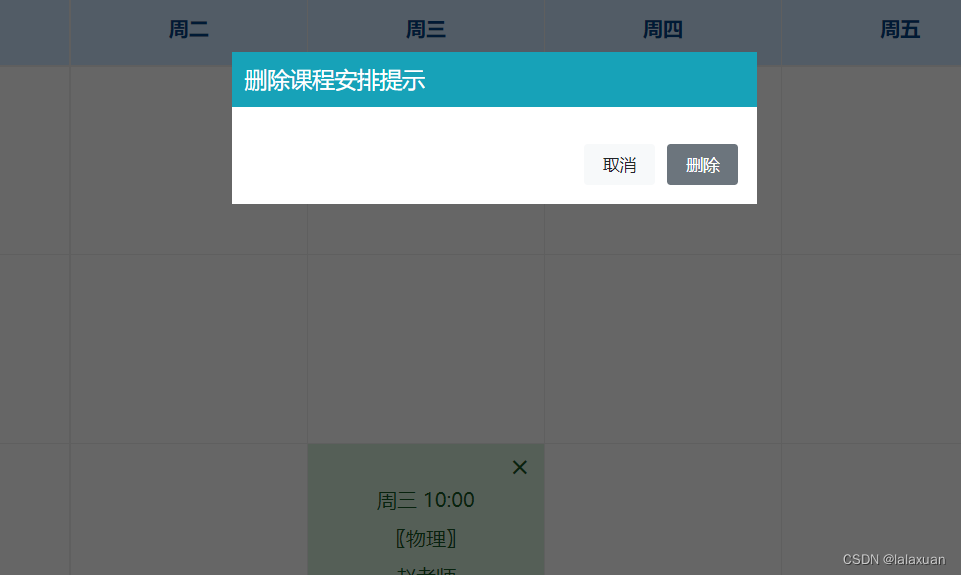
    在这里插入图片描述

    src/components/MyMessageBox/MyMessageBox.vue

    <template>
      <div class="message-box" v-if="state.visible">
        <div class="wrapper">
          <header class="box-hd">
            <h1>{
      { title }}h1>
          header>
          <div class="box-board">
            
            <component :is="insert">component>
            <div class="btn-group">
              <my-button type="default" @click="handleCancelClick">{
      {
                btnCancelText
              }}my-button>
              <my-button type="primary" @click="handleConfirmClick">{
      {
                btnConfirmText
              }}my-button>
            div>
          div>
        div>
      div>
    template>
    
    <script setup>
    /**
             MyMessageBox({
                title: "删除课程安排提示",
                btnCancelText: "取消",
                btnConfirmText: "删除",
                insert: h("p", "确定要删除此课程安排吗?"), // h函数动态组件
                confirm() {
                console.log("confirm");
                },
                cancel() {
                console.log("cancel");
            },
        });
    */
    import MyButton from "../MyButton/MyButton.vue";
    import "./index.scss";
    import {
          reactive } from "vue";
    
    const props = defineProps({
         
      title: {
         
        type: String,
        default: "MessageBox",
      },
      btnCancelText: {
         
        type: String,
        default: "Cancel",
      },
      btnConfirmText: {
         
        type: String,
        default: "Confirm",
      },
      insert: Object,
    }
    • 1
    • 2
    • 3
    • 4
    • 5
    • 6
    • 7
    • 8
    • 9
    • 10
    • 11
    • 12
    • 13
    • 14
    • 15
    • 16
    • 17
    • 18
    • 19
    • 20
    • 21
    • 22
    • 23
    • 24
    • 25
    • 26
    • 27
    • 28
    • 29
    • 30
    • 31
    • 32
    • 33
    • 34
    • 35
    • 36
    • 37
    • 38
    • 39
    • 40
    • 41
    • 42
    • 43
    • 44
    • 45
    • 46
    • 47
    • 48
    • 49
    • 50
    • 51
    • 52
    • 53
    • 54
    • 55
    • 56
    • 57
    • 58
    • 59
    • 60
    • 61
    • 62
    • 63
  • 相关阅读:
    多维数据可视化技术,Radviz可视化原理,向量化的 Radviz(vectorized Radviz,简称 VRV)
    废品回收功能文档
    跳槽!阿里工作100+天,菜鸡职业生涯的一点记录
    七日算法先导(签到)
    记Halo1.5版本迁移Halo2.10.0版本
    微信小程序上传图片到服务端,springboot项目。避免踩坑保姆教程
    【C++从0到王者】第三十六站:哈希
    详细设计结构化程序和人机界面设计
    WinFrom、C# 学习记录四 WebView2使用记录
    SSM框架的基本整合
  • 原文地址:https://blog.csdn.net/weixin_45732235/article/details/127827464
  • 最新文章
  • 攻防演习之三天拿下官网站群
    数据安全治理学习——前期安全规划和安全管理体系建设
    企业安全 | 企业内一次钓鱼演练准备过程
    内网渗透测试 | Kerberos协议及其部分攻击手法
    0day的产生 | 不懂代码的"代码审计"
    安装scrcpy-client模块av模块异常,环境问题解决方案
    leetcode hot100【LeetCode 279. 完全平方数】java实现
    OpenWrt下安装Mosquitto
    AnatoMask论文汇总
    【AI日记】24.11.01 LangChain、openai api和github copilot
  • 热门文章
  • 十款代码表白小特效 一个比一个浪漫 赶紧收藏起来吧!!!
    奉劝各位学弟学妹们,该打造你的技术影响力了!
    五年了,我在 CSDN 的两个一百万。
    Java俄罗斯方块,老程序员花了一个周末,连接中学年代!
    面试官都震惊,你这网络基础可以啊!
    你真的会用百度吗?我不信 — 那些不为人知的搜索引擎语法
    心情不好的时候,用 Python 画棵樱花树送给自己吧
    通宵一晚做出来的一款类似CS的第一人称射击游戏Demo!原来做游戏也不是很难,连憨憨学妹都学会了!
    13 万字 C 语言从入门到精通保姆级教程2021 年版
    10行代码集2000张美女图,Python爬虫120例,再上征途
Copyright © 2022 侵权请联系2656653265@qq.com    京ICP备2022015340号-1
正则表达式工具 cron表达式工具 密码生成工具

京公网安备 11010502049817号