-
SpringBoot SpringBoot 基础篇 4 基于 SpringBoot 的SSMP 整合案例 4.18 分页
SpringBoot
【黑马程序员SpringBoot2全套视频教程,springboot零基础到项目实战(spring boot2完整版)】
SpringBoot 基础篇
4 基于 SpringBoot 的SSMP 整合案例
4.18 分页
4.18.1 实现分页功能

现在的页面中已经有这个组件了,但是功能还没实现
直接开干【其实逻辑很简单,之前我们是展示全部,现在改为展示分页查出来的数据就行了,所以我们可以直接修改getAll() 方法,因为我们最终就是要分页【别钻牛角尖】】
先看看分页插件

对应的数据

//列表 getAll() { // console.log("run"); //发送异步请求 axios.get('/books/' + this.pagination.currentPage + "/" + this.pagination.pageSize).then((res) => { console.log(res.data); // this.dataList = res.data.data; }) },- 1
- 2
- 3
- 4
- 5
- 6
- 7
- 8
- 9
重启服务器,看看是否可以拿到分页后的数据

没毛病,而且请求

就是第一页,每页10条

response 也没有问题,OK
getAll() { // console.log("run"); //发送异步请求 axios.get('/books/' + this.pagination.currentPage + "/" + this.pagination.pageSize).then((res) => { console.log(res.data); this.dataList = res.data.data.records; }) },- 1
- 2
- 3
- 4
- 5
- 6
- 7
- 8
重启服务器,测试
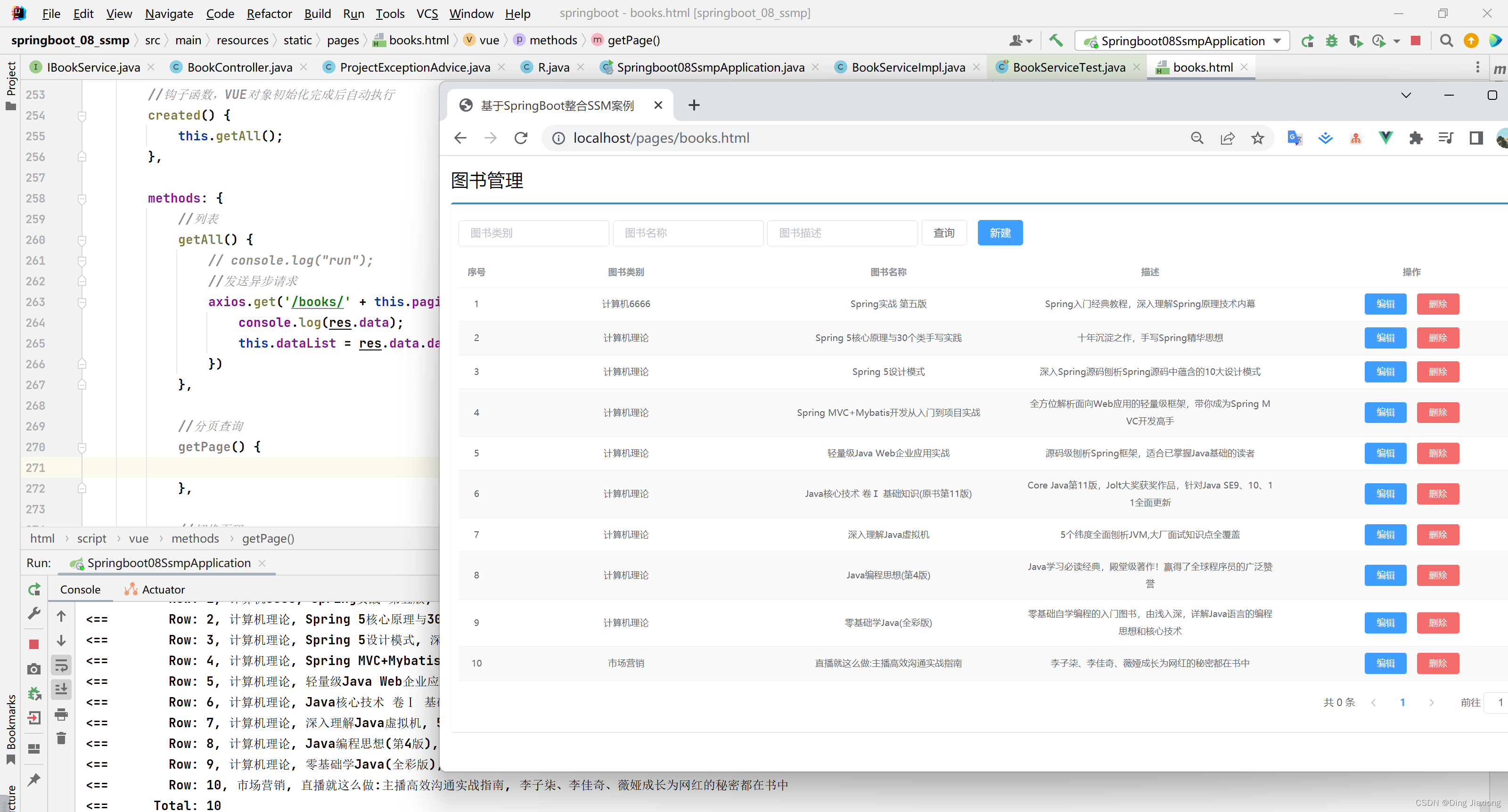
没毛病,现在还要把一些信息装入页面
getAll() { // console.log("run"); //发送异步请求 axios.get('/books/' + this.pagination.currentPage + "/" + this.pagination.pageSize).then((res) => { console.log(res.data); this.pagination.pageSize = res.data.data.size; this.pagination.currentPage = res.data.data.current; this.pagination.total = res.data.data.total; this.dataList = res.data.data.records; }) },- 1
- 2
- 3
- 4
- 5
- 6
- 7
- 8
- 9
- 10
- 11
再次测试

可以看到,这样数据就上来了
完成修改页码值的操作
//切换页码 handleCurrentChange(currentPage) { //1. 修改页码值为当前选中的页码值 this.pagination.currentPage = currentPage; //2. 执行查询 this.getAll(); },- 1
- 2
- 3
- 4
- 5
- 6
- 7
再次重启

就是这样
回顾一下
-
页面使用el分页组件添加分页功能
<div class="pagination-container"> <el-pagination class="pagiantion" @current-change="handleCurrentChange" :current-page="pagination.currentPage" :page-size="pagination.pageSize" layout="total, prev, pager, next, jumper" :total="pagination.total"> el-pagination> div>- 1
- 2
- 3
- 4
- 5
- 6
- 7
- 8
- 9
- 10
- 11
-
定义分页组件需要使用的数据并将数据绑定到分页组件
data:{ pagination: { //分页相关模型数据 currentPage: 1, //当前页码 pageSize:10, //每页显示的记录数 total:0, //总记录数 } },- 1
- 2
- 3
- 4
- 5
- 6
- 7
-
替换查询全部功能为分页功能
getAll() { axios.get("/books/"+this.pagination.currentPage+"/"+this.pagination.pageSize).then((res) => { }); },- 1
- 2
- 3
- 4
-
分页查询【我们直接写的接口】【使用路径参数传递分页数据或封装对象传递数据】
-
加载分页数据
getAll() { axios.get("/books/"+this.pagination.currentPage+"/"+this.pagination.pageSize).then((res) => { this.pagination.total = res.data.data.total; this.pagination.currentPage = res.data.data.current; this.pagination.pagesize = res.data.data.size; this.dataList = res.data.data.records; }); },- 1
- 2
- 3
- 4
- 5
- 6
- 7
- 8
-
分页页码值切换
//切换页码 handleCurrentChange(currentPage) { this.pagination.currentPage = currentPage; this.getAll(); },- 1
- 2
- 3
- 4
- 5
4.18.2 小结
- 使用el分页组件
- 定义分页组件绑定的数据模型
- 异步调用获取分页数据
- 分页数据页面回显
4.18.3 bug 解决

我现在有三页的数据,且第三页上只有一条数据
当我把它删掉

看到了吧
【解决】
仔细观察一下,我们最后一步拿到的数据


问题就是,数据一共只有两页,但是你要查询第三页,这就是问题
处理一下
@GetMapping("/{currentPage}/{pageSize}") public R getPage(@PathVariable int currentPage, @PathVariable int pageSize) { IPage<Book> page = bookService.getPage(currentPage, pageSize); //如果当前页码值大于了总页码值,那么重新执行查询操作,使用最大页码值作为当前页码值 if (currentPage > page.getPages()){ page = bookService.getPage((int) page.getPages(),pageSize); } return new R(true, page); }- 1
- 2
- 3
- 4
- 5
- 6
- 7
- 8
- 9
- 10
- 11
重启服务器

OK,问题解决
【解决方法:对查询结果进行校验,如果当前页码值大于最大页码值,使用最大页码值作为当前页码值重新查询】
- 小结
- 基于业务需求维护删除功能
-
相关阅读:
Filebeat+Kafka+ELK
探索有趣的微观世界:微生物的种类、生存、应用
计算机网络的分层体系结构
栈(Stack) · 队列(Queue) · 循环队列 · 双端队列
linux的锁
【web-避开客户端控件】(2.3.1)收集使用数据:浏览器扩展技术、攻击浏览器扩展的方法
商务呈现之危机公关处理
从BeanFactory源码看Bean的生命周期
Git分支管理
全球公链进展| Metis 将成为完全去中心化的 L 2 网络;Circle在NEAR和Noble上推出原生 USDC
- 原文地址:https://blog.csdn.net/weixin_44226181/article/details/127828271