-
xv6源码解析(二)——系统调用
01 系统调用
系统调用:提供了用户态陷入内核态的软中断,设置中断号为64,实现了自定义系统调用myalloc、myfree等
02 系统调用过程
03 常见命令系统调用解析
cat源码解析
//cat.c #include "types.h" #include "stat.h" #include "user.h" char buf[512]; void cat(int fd) { int n; while((n = read(fd, buf, sizeof(buf))) > 0) write(1, buf, n); if(n < 0){ printf(1, "cat: read error\n"); exit(); } } int main(int argc, char *argv[]) { int fd, i; if(argc <= 1){ cat(0); exit(); } for(i = 1; i < argc; i++){ if((fd = open(argv[i], 0)) < 0){ printf(1, "cat: cannot open %s\n", argv[i]); exit(); } cat(fd); close(fd); } exit(); }- 1
- 2
- 3
- 4
- 5
- 6
- 7
- 8
- 9
- 10
- 11
- 12
- 13
- 14
- 15
- 16
- 17
- 18
- 19
- 20
- 21
- 22
- 23
- 24
- 25
- 26
- 27
- 28
- 29
- 30
- 31
- 32
- 33
- 34
- 35
- 36
- 37
- 38
- 39
- 40
- 41
(1)open系统调用根据传入的参数创建文件描述符
(2)调用底层的read和write系统调用
(3)最后 close系统调用关闭文件描述符
补充
open系统调用 创建新的文件描述符
read系统调用 传入 fd、buf、buf的大小 返回read成功的字节数 read到最后一行 返回0
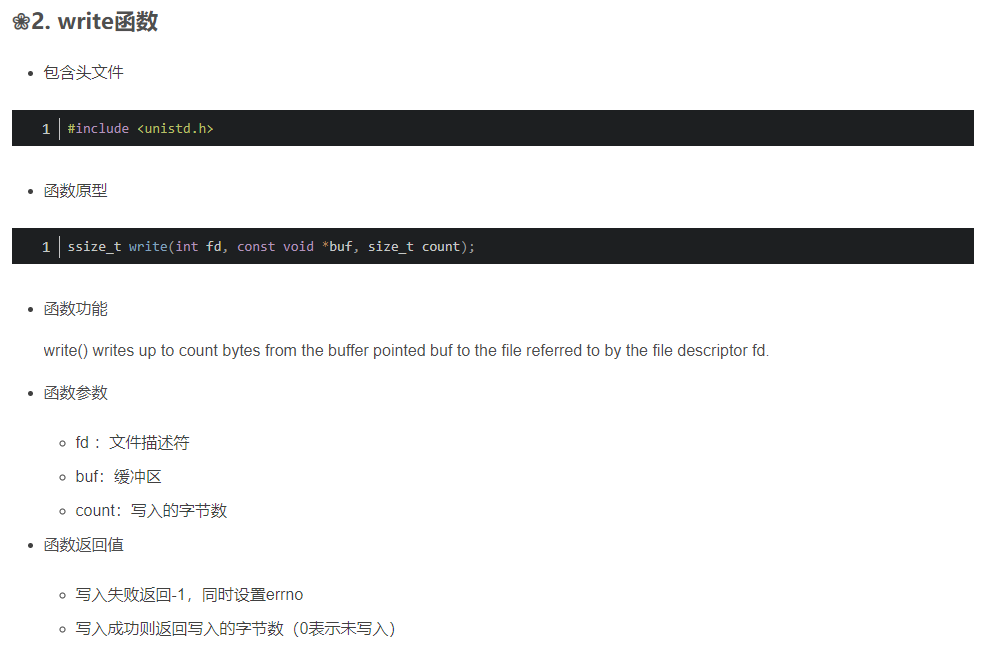
write系统调用 传入fd、buf、count(写入的字节数) 返回write的字节数
close系统调用 关闭文件描述符

fork源码解析
一次调用,两次返回真的太牛逼了!!!!
fork函数是用于进程的创建,是linux编程中常用的一个系统调用类函数。fork会复制当前进程的几乎所有信息,包括可访问的内存资源。
fork调用一次,返回两次,这两个返回分别带回它们各自的返回值,其中在父进程中的返回值是子进程的PID,而子进程中的返回值则返回 0。因此,可以通过返回值来判定该进程是父进程还是子进程。还有一个很奇妙的是:fork函数将运行着的程序分成2个(几乎)完全一样的进程,每个进程都启动一个从代码的同一位置开始执行的线程。这两个进程中的线程继续执行,就像是两个用户同时启动了该应用程序的两个副本。
[外链图片转存失败,源站可能有防盗链机制,建议将图片保存下来直接上传(img-20RoYJcV-1668171510504)(https://image-1312312327.cos.ap-shanghai.myqcloud.com/20150412162157016)]
#include#include #include #include int main(int argc, char* argv[]) { printf("=== process begin ===\n"); pid_t pid = fork(); if(pid == -1) { perror("fork err"); return -1; } if(pid == 0) /*子进程*/ { printf("i am child: %d, may parent: %d\n", getpid(), getppid()); /* test2 while(1) { printf("fork process\n"); sleep(1); } */ } if(pid > 0) { printf("i am call: %d, child: %d, parent: %d\n", getpid(), pid, getppid()); /* test1 sleep(1); */ /* test2 while(1) { sleep(1); } */ } printf("=== process end ===\n"); return 0; } - 1
- 2
- 3
- 4
- 5
- 6
- 7
- 8
- 9
- 10
- 11
- 12
- 13
- 14
- 15
- 16
- 17
- 18
- 19
- 20
- 21
- 22
- 23
- 24
- 25
- 26
- 27
- 28
- 29
- 30
- 31
- 32
- 33
- 34
- 35
- 36
- 37
- 38
- 39
- 40
- 41
- 42
fork的整体流程


mkdir源码解析
#include "types.h" #include "stat.h" #include "user.h" int main(int argc, char *argv[]) { int i; if(argc < 2){ printf(2, "Usage: mkdir files...\n"); exit(); } for(i = 1; i < argc; i++){ if(mkdir(argv[i]) < 0){ printf(2, "mkdir: %s failed to create\n", argv[i]); break; } } exit(); }- 1
- 2
- 3
- 4
- 5
- 6
- 7
- 8
- 9
- 10
- 11
- 12
- 13
- 14
- 15
- 16
- 17
- 18
- 19
- 20
- 21
- 22
- 23
- 24
sleep源码解析
可以让进程阻塞、睡眠、等待
#include "kernel/types.h" #include "kernel/stat.h" #include "user/user.h" int main(int argc, char **argv) { if (argc < 2) { printf("usage: sleep\n" ); } sleep(atoi(argv[1])); exit(0); }- 1
- 2
- 3
- 4
- 5
- 6
- 7
- 8
- 9
- 10
- 11
pingpong源码解析
// pingpong.c #include "kernel/types.h" #include "kernel/stat.h" #include "user/user.h" int main(int argc, char **argv) { // 创建管道会得到一个长度为 2 的 int 数组 // 其中 0 为用于从管道读取数据的文件描述符,1 为用于向管道写入数据的文件描述符 int pp2c[2], pc2p[2]; pipe(pp2c); // 创建用于 父进程 -> 子进程 的管道 parent->child pipe(pc2p); // 创建用于 子进程 -> 父进程 的管道 if(fork() != 0) { // parent process write(pp2c[1], "!", 1); // 1. 父进程首先向发出该字节 char buf; read(pc2p[0], &buf, 1); // 2. 父进程发送完成后,开始等待子进程的回复 printf("%d: received pong\n", getpid()); // 5. 子进程收到数据,read 返回,输出 pong wait(0); } else { // child process fork()返回0时 启动子进程 char buf; read(pp2c[0], &buf, 1); // 3. 子进程读取管道,收到父进程发送的字节数据 printf("%d: received ping\n", getpid()); write(pc2p[1], &buf, 1); // 4. 子进程通过 子->父 管道,将字节送回父进程 } exit(0); }- 1
- 2
- 3
- 4
- 5
- 6
- 7
- 8
- 9
- 10
- 11
- 12
- 13
- 14
- 15
- 16
- 17
- 18
- 19
- 20
- 21
- 22
- 23
- 24
- 25
- 26
-
相关阅读:
javascript流程控制(2)
关于QTableWidget的it所占内存的释放问题
RabbitMQ消息的可靠性
Python【查重】
谈谈 JVM 垃圾回收机制
MySQL 篇-深入了解事务四大特性及原理
Java面向对象——多态
StudioOne升级6.5版本,最新功能测评
数字孪生推动军营智慧化管理,军事化应用战场空间可视化解决方案
Mongodb索引的创建与命名
- 原文地址:https://blog.csdn.net/qq_41945053/article/details/127813087
