-
Avalonia 部署到麒麟信安操作系统
1.项目打包
1.添加一个.desktop文件和快捷方式图标(png)
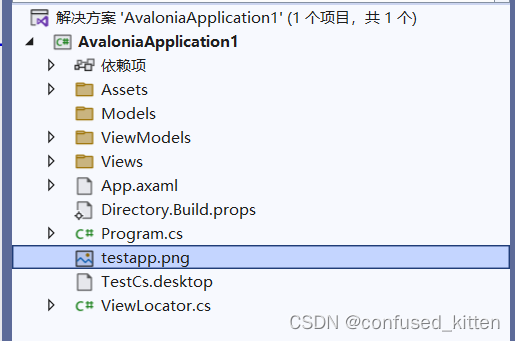
.desktop文件内容参考下方:
- [Desktop Entry]
- Name=AvaloniaApplication1
- Type=Application
- Exec=/usr/share/AvaloniaApplication1/AvaloniaApplication1
- Icon=/usr/share/icons/testapp.png
2.打开项目文件,添加.desktop和.png
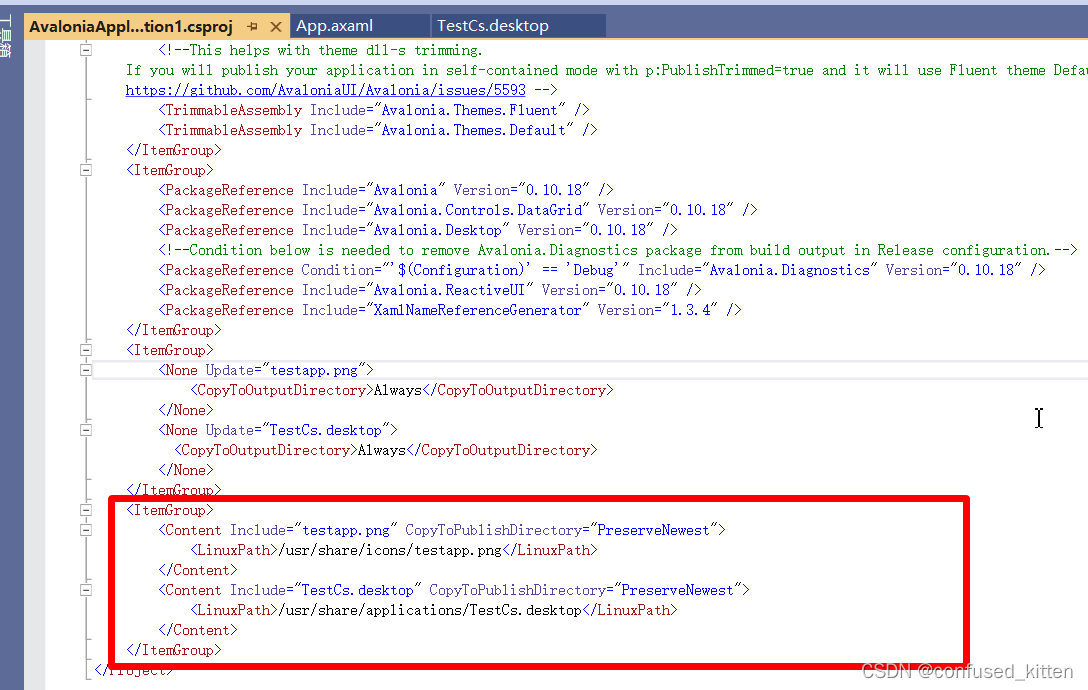
- <ItemGroup>
- <Content Include="testapp.png" CopyToPublishDirectory="PreserveNewest">
- <LinuxPath>/usr/share/icons/testapp.png</LinuxPath>
- </Content>
- <Content Include="TestCs.desktop" CopyToPublishDirectory="PreserveNewest">
- <LinuxPath>/usr/share/applications/TestCs.desktop</LinuxPath>
- </Content>
- </ItemGroup>
PS:第1,2步是为了安装完成后能生成一个快捷方式,然而屡次安装成功,从未生成过快捷方式,原因未知。
3. 安装 .net打包rpm工具:打开cmd 执行 dotnet tool install --global dotnet-rpm

4.cd到进入项目文件夹
依次执行
- dotnet restore -r linux-arm64
- dotnet rpm install
- dotnet msbuild AvaloniaApplication1.csproj /t:CreateRpm /p:TargetFramework=net6.0 /p:RuntimeIdentifier=linux-arm64 /p:Configuration=Release
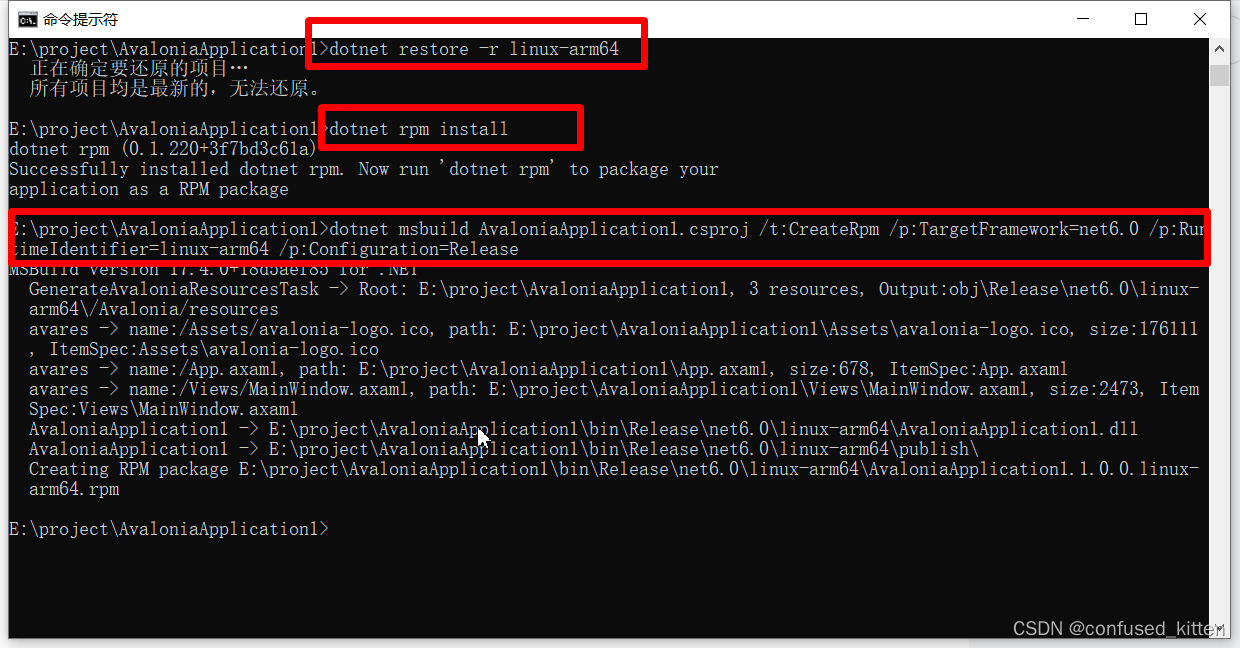
4.打包文件路径 E:\project\AvaloniaApplication1\bin\Release\net6.0\linux-arm64,里边会生成一个AvaloniaApplication1.1.0.0.linux-arm64.rpm
2.项目部署
1.将发布好的文件夹复制到信安麒麟系统
2.安装rpm
rpm –ivh 你打包出来的报名.rpm附赠一个删除包指令,以备反复安装,反复报错,反复尝试时使用。
rpm –e 你打包出来的报名.rpm3.由于一直未生成快捷方式,搜索也搜索不到,所以只能到安装目录/usr/share/AvaloniaApplication1/下,执行AvaloniaApplication1,成功了大概就是酱婶儿滴。

3.运行报错
1./lib64/libstdc++.so.6: version `GLIBCXX_3.4.20' not found
此问题解决参考升级libstdc++.so
(其中,至少需要1.5小时那部,我大概用了100-110分钟左右)
2.Default font family name can't be null or empty.巴拉巴拉的
如果你是11.0以上,建议升级框架至11.0.7以上,框架已经修复该问题!
如果你是11.0以下:解决方案:
此时,我滴建议是你先看看你本身有啥字体,然后再去抄百度!!!!!!!
1.查看系统安装了啥字体
#fc-list :lang=zh2. 然后从你安装的字体里边找一个你心仪的,比如我的字体里有一个KaiTi。

3.然后新建一个CustomFontManagerImpl.cs 如下:你要修改两处:
3.1. private readonly Typeface _defaultTypeface =
new Typeface("resm:AvaloniaApplication1.Assets.Fonts.msyh#微软雅黑");这个换成你自己的namespace。
3.2. //如果是centos7之类的使用linux里面的字体
if (skTypeface == null)
{
skTypeface = SKTypeface.FromFamilyName("KaiTi");
}KaiTi换成你刚刚查出来的自己心仪的字体名。
- public class CustomFontManagerImpl : IFontManagerImpl
- {
- private readonly Typeface[] _customTypefaces;
- private readonly string _defaultFamilyName;
- //Load font resources in the project, you can load multiple font resources
- private readonly Typeface _defaultTypeface =
- new Typeface("resm:AvaloniaApplication1.Assets.Fonts.msyh#微软雅黑");
- public CustomFontManagerImpl()
- {
- _customTypefaces = new[] { _defaultTypeface };
- _defaultFamilyName = _defaultTypeface.FontFamily.FamilyNames.PrimaryFamilyName;
- }
- public string GetDefaultFontFamilyName()
- {
- return _defaultFamilyName;
- }
- public IEnumerable<string> GetInstalledFontFamilyNames(bool checkForUpdates = false)
- {
- return _customTypefaces.Select(x => x.FontFamily.Name);
- }
- private readonly string[] _bcp47 = { CultureInfo.CurrentCulture.ThreeLetterISOLanguageName, CultureInfo.CurrentCulture.TwoLetterISOLanguageName };
- public bool TryMatchCharacter(int codepoint, FontStyle fontStyle, FontWeight fontWeight, FontFamily fontFamily,
- CultureInfo culture, out Typeface typeface)
- {
- foreach (var customTypeface in _customTypefaces)
- {
- if (customTypeface.GlyphTypeface.GetGlyph((uint)codepoint) == 0)
- {
- continue;
- }
- typeface = new Typeface(customTypeface.FontFamily.Name, fontStyle, fontWeight);
- return true;
- }
- var fallback = SKFontManager.Default.MatchCharacter(fontFamily?.Name, (SKFontStyleWeight)fontWeight,
- SKFontStyleWidth.Normal, (SKFontStyleSlant)fontStyle, _bcp47, codepoint);
- typeface = new Typeface(fallback?.FamilyName ?? _defaultFamilyName, fontStyle, fontWeight);
- return true;
- }
- public IGlyphTypefaceImpl CreateGlyphTypeface(Typeface typeface)
- {
- SKTypeface skTypeface;
- switch (typeface.FontFamily.Name)
- {
- case FontFamily.DefaultFontFamilyName:
- case "微软雅黑": //font family name
- skTypeface = SKTypeface.FromFamilyName(_defaultTypeface.FontFamily.Name); break;
- default:
- skTypeface = SKTypeface.FromFamilyName(typeface.FontFamily.Name,
- (SKFontStyleWeight)typeface.Weight, SKFontStyleWidth.Normal, (SKFontStyleSlant)typeface.Style);
- break;
- }
- // 解决linux系统下skTypeface是null
- if (skTypeface == null)
- {
- skTypeface = SKTypeface.FromFamilyName(_defaultTypeface.FontFamily.Name);
- }
- //如果是centos7之类的使用linux里面的字体
- if (skTypeface == null)
- {
- skTypeface = SKTypeface.FromFamilyName("KaiTi");
- }
- return new GlyphTypefaceImpl(skTypeface);
- }
- }
然后修改App.axaml.cs
///
/// override RegisterServices register custom service
///
public override void RegisterServices()
{
AvaloniaLocator.CurrentMutable.Bind().ToConstant(new CustomFontManagerImpl());
base.RegisterServices();
}参考资料
-
相关阅读:
【SpringCloud】OpenFeign高级特性
socks5代理解析:解决在线问题的利器
NXP i.MX 8M Mini开发板(4核 ARM Cortex-A53)硬件原理图规格说明书
lv11 嵌入式开发 ARM指令集中(伪操作与混合编程) 7
【Android】画面卡顿优化列表流畅度三之RecyclerView刷新机制notifyItemRangeInserted
【算法训练-字符串 三】最长公共子串、最长公共子序列
HashMap如何确定数组位置
RFID数字图书馆管理系统
macOS 12 Monterey 支持电脑型号macOS Monterey 12新功能
ElasticSearch 实现 全文检索 支持(PDF、TXT、Word、HTML等文件)通过 ingest-attachment 插件实现 文档的检索
- 原文地址:https://blog.csdn.net/confused_kitten/article/details/127808061
