-
R语言聚类分析
本文首发于公众号:医学和生信笔记,完美观看体验请至公众号查看本文。
主要介绍使用R语言进行层次聚类、划分聚类(K均值聚类和PAM)。系统聚类(层次聚类,Hierarchical clustering)
使用
nutrient数据集进行演示,这个数据集包含不同食物中的营养物质含量。# 没安装flexclust包的需要先安装 data(nutrient, package = "flexclust") row.names(nutrient) <- tolower(row.names(nutrient)) dim(nutrient) # 27行5列 ## [1] 27 5 psych::headTail(nutrient) ## energy protein fat calcium iron ## beef braised 340 20 28 9 2.6 ## hamburger 245 21 17 9 2.7 ## beef roast 420 15 39 7 2 ## beef steak 375 19 32 9 2.6 ## ... ... ... ... ... ... ## salmon canned 120 17 5 159 0.7 ## sardines canned 180 22 9 367 2.5 ## tuna canned 170 25 7 7 1.2 ## shrimp canned 110 23 1 98 2.6- 1
- 2
- 3
- 4
- 5
- 6
- 7
- 8
- 9
- 10
- 11
- 12
- 13
- 14
- 15
- 16
- 17
- 18
层次聚类在R语言中非常简单,通过
hclust实现。# 聚类前先进行标准化 nutrient.scaled <- scale(nutrient) h.clust <- hclust(dist(nutrient.scaled,method = "euclidean"), # 计算距离有不同方法 method = "average" # 层次聚类有不同方法 )- 1
- 2
- 3
- 4
- 5
下面就是画图,简单点可以直接用
plot()。plot(h.clust,hang = -1,main = "层次聚类", sub="", xlab="", cex.lab = 1.0, cex.axis = 1.0, cex.main = 2)- 1
- 2

关于更加精细化的细节修改,下次再介绍。或者可以借助其他R包快速绘制好看的聚类分析图形。
xxxxxxx
xxxxxxx
xxxxxxxx
xxxxxxxx如何选择聚类的个数呢?
可以通过R包
NbClust实现。library(NbClust) nc <- NbClust(nutrient.scaled, distance = "euclidean", min.nc = 2, # 最小聚类数 max.nc = 10, # 最大聚类树 method = "average" )- 1
- 2
- 3
- 4
- 5
- 6
- 7

## *** : The Hubert index is a graphical method of determining the number of clusters. ## In the plot of Hubert index, we seek a significant knee that corresponds to a ## significant increase of the value of the measure i.e the significant peak in Hubert ## index second differences plot. ##- 1
- 2
- 3
- 4
- 5

## *** : The D index is a graphical method of determining the number of clusters. ## In the plot of D index, we seek a significant knee (the significant peak in Dindex ## second differences plot) that corresponds to a significant increase of the value of ## the measure. ## ## ******************************************************************* ## * Among all indices: ## * 5 proposed 2 as the best number of clusters ## * 5 proposed 3 as the best number of clusters ## * 2 proposed 4 as the best number of clusters ## * 4 proposed 5 as the best number of clusters ## * 1 proposed 8 as the best number of clusters ## * 1 proposed 9 as the best number of clusters ## * 5 proposed 10 as the best number of clusters ## ## ***** Conclusion ***** ## ## * According to the majority rule, the best number of clusters is 2 ## ## ## *******************************************************************- 1
- 2
- 3
- 4
- 5
- 6
- 7
- 8
- 9
- 10
- 11
- 12
- 13
- 14
- 15
- 16
- 17
- 18
- 19
- 20
- 21
输出日志里给出了评判准则以及最终结果:Hubert index和D index使用图形的方式判断最佳聚类个数,拐点明显的可视作最佳聚类个数。
它给出的结论是最佳聚类数是2。我们也可以通过条形图查看这些评判准则的具体数量。
barplot(table(nc$Best.nc[1,]), xlab = "聚类数目", ylab = "评判准则个数" )- 1
- 2
- 3
- 4

从条形图中可以看出,聚类数目为2,3,5,10时,评判准则个数最多,为5个,这里我们可以选择5个。
# 把聚类树划分为5类 cluster <- cutree(h.clust, k=5) # 查看每一类有多少例 table(cluster) ## cluster ## 1 2 3 4 5 ## 7 16 1 2 1- 1
- 2
- 3
- 4
- 5
- 6
- 7
- 8
把最终结果画出来:
plot(h.clust, hang = -1,main = "",xlab = "") rect.hclust(h.clust, k=5) # 添加矩形,方便观察- 1
- 2

快速聚类(划分聚类,partitioning clustering)
K-means聚类
K-means聚类,K均值聚类,是快速聚类的一种。比层次聚类更适合大样本的数据。在R语言中可以通过
kmeans()实现K均值聚类。使用K均值聚类处理178种葡萄酒中13种化学成分的数据集。
data(wine, package = "rattle") df <- scale(wine[,-1]) psych::headTail(df) ## Alcohol Malic Ash Alcalinity Magnesium Phenols Flavanoids Nonflavanoids ## 1 1.51 -0.56 0.23 -1.17 1.91 0.81 1.03 -0.66 ## 2 0.25 -0.5 -0.83 -2.48 0.02 0.57 0.73 -0.82 ## 3 0.2 0.02 1.11 -0.27 0.09 0.81 1.21 -0.5 ## 4 1.69 -0.35 0.49 -0.81 0.93 2.48 1.46 -0.98 ## ... ... ... ... ... ... ... ... ... ## 175 0.49 1.41 0.41 1.05 0.16 -0.79 -1.28 0.55 ## 176 0.33 1.74 -0.39 0.15 1.42 -1.13 -1.34 0.55 ## 177 0.21 0.23 0.01 0.15 1.42 -1.03 -1.35 1.35 ## 178 1.39 1.58 1.36 1.5 -0.26 -0.39 -1.27 1.59 ## Proanthocyanins Color Hue Dilution Proline ## 1 1.22 0.25 0.36 1.84 1.01 ## 2 -0.54 -0.29 0.4 1.11 0.96 ## 3 2.13 0.27 0.32 0.79 1.39 ## 4 1.03 1.18 -0.43 1.18 2.33 ## ... ... ... ... ... ... ## 175 -0.32 0.97 -1.13 -1.48 0.01 ## 176 -0.42 2.22 -1.61 -1.48 0.28 ## 177 -0.23 1.83 -1.56 -1.4 0.3 ## 178 -0.42 1.79 -1.52 -1.42 -0.59- 1
- 2
- 3
- 4
- 5
- 6
- 7
- 8
- 9
- 10
- 11
- 12
- 13
- 14
- 15
- 16
- 17
- 18
- 19
- 20
- 21
- 22
- 23
- 24
进行K均值聚类时,需要在一开始就指定聚类的个数,我们也可以通过
NbClust包实现这个过程。library(NbClust) set.seed(123) nc <- NbClust(df, min.nc = 2, max.nc = 15, method = "kmeans")# 方法选择kmeans- 1
- 2
- 3
- 4

## *** : The Hubert index is a graphical method of determining the number of clusters. ## In the plot of Hubert index, we seek a significant knee that corresponds to a ## significant increase of the value of the measure i.e the significant peak in Hubert ## index second differences plot. ##- 1
- 2
- 3
- 4
- 5

## *** : The D index is a graphical method of determining the number of clusters. ## In the plot of D index, we seek a significant knee (the significant peak in Dindex ## second differences plot) that corresponds to a significant increase of the value of ## the measure. ## ## ******************************************************************* ## * Among all indices: ## * 2 proposed 2 as the best number of clusters ## * 19 proposed 3 as the best number of clusters ## * 1 proposed 14 as the best number of clusters ## * 1 proposed 15 as the best number of clusters ## ## ***** Conclusion ***** ## ## * According to the majority rule, the best number of clusters is 3 ## ## ## *******************************************************************- 1
- 2
- 3
- 4
- 5
- 6
- 7
- 8
- 9
- 10
- 11
- 12
- 13
- 14
- 15
- 16
- 17
- 18
结果中给出了划分依据以及最佳的聚类数目为3个,可以画图查看结果:
table(nc$Best.nc[1,]) ## ## 0 1 2 3 14 15 ## 2 1 2 19 1 1 barplot(table(nc$Best.nc[1,]), xlab = "聚类数目", ylab = "评判准则个数" )- 1
- 2
- 3
- 4
- 5
- 6
- 7
- 8
- 9

可以看到聚类数目为3是最佳的选择。
确定最佳聚类个数过程也可以通过非常好用的R包
factoextra实现。library(factoextra) ## Loading required package: ggplot2 ## Welcome! Want to learn more? See two factoextra-related books at https://goo.gl/ve3WBa set.seed(123) fviz_nbclust(df, kmeans, k.max = 15)- 1
- 2
- 3
- 4
- 5
- 6
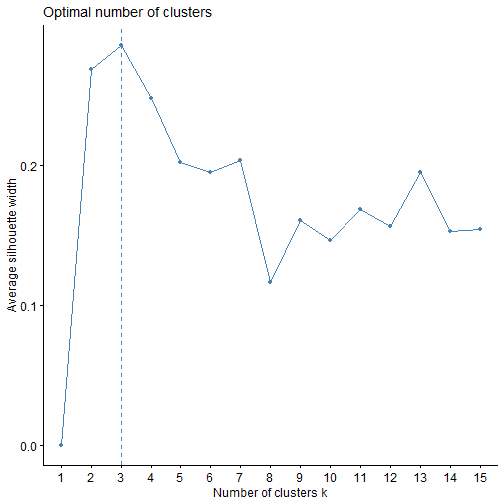
这个结果给出的最佳聚类个数也是3个。
下面进行K均值聚类,聚类数目设为3.
set.seed(123) fit.km <- kmeans(df, centers = 3, nstart = 25) fit.km ## K-means clustering with 3 clusters of sizes 51, 62, 65 ## ## Cluster means: ## Alcohol Malic Ash Alcalinity Magnesium Phenols ## 1 0.1644436 0.8690954 0.1863726 0.5228924 -0.07526047 -0.97657548 ## 2 0.8328826 -0.3029551 0.3636801 -0.6084749 0.57596208 0.88274724 ## 3 -0.9234669 -0.3929331 -0.4931257 0.1701220 -0.49032869 -0.07576891 ## Flavanoids Nonflavanoids Proanthocyanins Color Hue Dilution ## 1 -1.21182921 0.72402116 -0.77751312 0.9388902 -1.1615122 -1.2887761 ## 2 0.97506900 -0.56050853 0.57865427 0.1705823 0.4726504 0.7770551 ## 3 0.02075402 -0.03343924 0.05810161 -0.8993770 0.4605046 0.2700025 ## Proline ## 1 -0.4059428 ## 2 1.1220202 ## 3 -0.7517257 ## ## Clustering vector: ## [1] 2 2 2 2 2 2 2 2 2 2 2 2 2 2 2 2 2 2 2 2 2 2 2 2 2 2 2 2 2 2 2 2 2 2 2 2 2 ## [38] 2 2 2 2 2 2 2 2 2 2 2 2 2 2 2 2 2 2 2 2 2 2 3 3 1 3 3 3 3 3 3 3 3 3 3 3 2 ## [75] 3 3 3 3 3 3 3 3 3 1 3 3 3 3 3 3 3 3 3 3 3 2 3 3 3 3 3 3 3 3 3 3 3 3 3 3 3 ## [112] 3 3 3 3 3 3 3 1 3 3 2 3 3 3 3 3 3 3 3 1 1 1 1 1 1 1 1 1 1 1 1 1 1 1 1 1 1 ## [149] 1 1 1 1 1 1 1 1 1 1 1 1 1 1 1 1 1 1 1 1 1 1 1 1 1 1 1 1 1 1 ## ## Within cluster sum of squares by cluster: ## [1] 326.3537 385.6983 558.6971 ## (between_SS / total_SS = 44.8 %) ## ## Available components: ## ## [1] "cluster" "centers" "totss" "withinss" "tot.withinss" ## [6] "betweenss" "size" "iter" "ifault"- 1
- 2
- 3
- 4
- 5
- 6
- 7
- 8
- 9
- 10
- 11
- 12
- 13
- 14
- 15
- 16
- 17
- 18
- 19
- 20
- 21
- 22
- 23
- 24
- 25
- 26
- 27
- 28
- 29
- 30
- 31
- 32
- 33
- 34
结果很详细,K均值聚类聚为3类,每一类数量分别是51,62,65。然后还给出了聚类中心,每一个观测分别属于哪一个类。
不管是哪一种聚类方法,
factoextra配合factomineR都可以给出非常好看的可视化结果。fviz_cluster(fit.km, data = df)- 1

有非常多的细节可以调整,大家在使用的时候可以自己尝试,和之前推文中介绍的PCA美化一样,也是支持
ggplot2语法的。fviz_cluster(fit.km, data = df, ellipse = T, # 增加椭圆 ellipse.type = "t", # 椭圆类型 geom = "point", # 只显示点不要文字 palette = "lancet", # 支持超多配色方案 ggtheme = theme_bw() # 支持更换主题 )- 1
- 2
- 3
- 4
- 5
- 6
- 7

围绕中心点的划分PAM
K均值聚类是基于均值的,所以对异常值很敏感。一个更稳健的方法是围绕中心点的划分(PAM)。用一个最有代表性的观测值代表这一类(有点类似于主成分)。K均值聚类一般使用欧几里得距离,而PAM可以使用任意的距离来计算。因此,PAM可以容纳混合数据类型,并且不仅限于连续变量。
我们还是用葡萄酒数据进行演示。PAM聚类可以通过
cluster包中的pam()实现。library(cluster) set.seed(123) fit.pam <- pam(wine[-1,], k=3 # 聚为3类 , stand = T # 聚类前进行标准化 ) fit.pam ## Medoids: ## ID Type Alcohol Malic Ash Alcalinity Magnesium Phenols Flavanoids ## 36 35 1 13.48 1.81 2.41 20.5 100 2.70 2.98 ## 107 106 2 12.25 1.73 2.12 19.0 80 1.65 2.03 ## 149 148 3 13.32 3.24 2.38 21.5 92 1.93 0.76 ## Nonflavanoids Proanthocyanins Color Hue Dilution Proline ## 36 0.26 1.86 5.10 1.04 3.47 920 ## 107 0.37 1.63 3.40 1.00 3.17 510 ## 149 0.45 1.25 8.42 0.55 1.62 650 ## Clustering vector: ## 2 3 4 5 6 7 8 9 10 11 12 13 14 15 16 17 18 19 20 21 ## 1 1 1 1 1 1 1 1 1 1 1 1 1 1 1 1 1 1 1 1 ## 22 23 24 25 26 27 28 29 30 31 32 33 34 35 36 37 38 39 40 41 ## 1 1 1 1 1 1 1 1 1 1 1 1 1 1 1 1 1 1 1 1 ## 42 43 44 45 46 47 48 49 50 51 52 53 54 55 56 57 58 59 60 61 ## 1 1 1 1 1 1 1 1 1 1 1 1 1 1 1 1 1 1 2 2 ## 62 63 64 65 66 67 68 69 70 71 72 73 74 75 76 77 78 79 80 81 ## 2 2 1 2 1 2 2 2 1 2 1 2 1 1 2 2 2 2 1 2 ## 82 83 84 85 86 87 88 89 90 91 92 93 94 95 96 97 98 99 100 101 ## 2 2 3 2 2 2 2 2 2 2 2 2 2 2 1 1 2 1 2 2 ## 102 103 104 105 106 107 108 109 110 111 112 113 114 115 116 117 118 119 120 121 ## 2 2 2 2 2 2 2 2 1 2 2 2 2 2 2 2 2 2 2 2 ## 122 123 124 125 126 127 128 129 130 131 132 133 134 135 136 137 138 139 140 141 ## 1 2 2 2 2 2 2 2 2 3 3 3 3 3 3 3 3 3 3 3 ## 142 143 144 145 146 147 148 149 150 151 152 153 154 155 156 157 158 159 160 161 ## 3 3 3 3 3 3 3 3 3 3 3 3 3 3 3 3 3 3 3 3 ## 162 163 164 165 166 167 168 169 170 171 172 173 174 175 176 177 178 ## 3 3 3 3 3 3 3 3 3 3 3 3 3 3 3 3 3 ## Objective function: ## build swap ## 3.537365 3.504175 ## ## Available components: ## [1] "medoids" "id.med" "clustering" "objective" "isolation" ## [6] "clusinfo" "silinfo" "diss" "call" "data"- 1
- 2
- 3
- 4
- 5
- 6
- 7
- 8
- 9
- 10
- 11
- 12
- 13
- 14
- 15
- 16
- 17
- 18
- 19
- 20
- 21
- 22
- 23
- 24
- 25
- 26
- 27
- 28
- 29
- 30
- 31
- 32
- 33
- 34
- 35
- 36
- 37
- 38
- 39
- 40
- 41
- 42
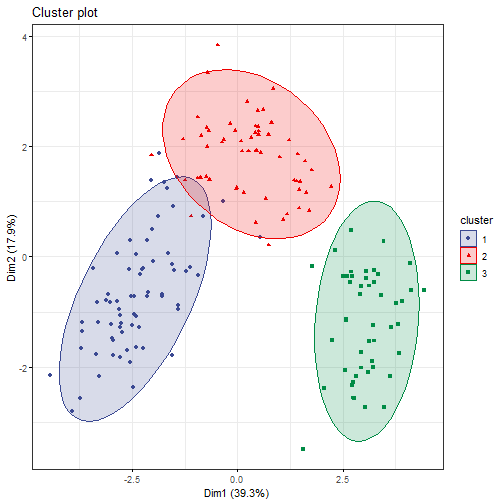
Medoids给出了中心点,用第35个观测代表第1类,第107个观测代表第2类,第149个观测代表第3类。Clustering vector给出了每一个观测分别属于哪一个类。结果可以画出来:clusplot(fit.pam, main = "PAM cluster")- 1

同样也可以用
factoextra包实现可视化。fviz_cluster(fit.pam, ellipse = T, # 增加椭圆 ellipse.type = "t", # 椭圆类型 geom = "point", # 只显示点不要文字 palette = "aaas", # 支持超多配色方案 ggtheme = theme_bw() # 支持更换主题 )- 1
- 2
- 3
- 4
- 5
- 6
- 7
以后会给大家带来
factoextra和factomineR包的详细介绍。
本文首发于公众号:医学和生信笔记,完美观看体验请至公众号查看本文。
-
相关阅读:
Java 入门练习(26 - 30)
centos安装mysql8.0.20、tar包安装方式
行情订阅&分钟合成
[附源码]计算机毕业设计面包连锁店管理系统Springboot程序
35了,我该何去何从
技术分享| 应急指挥调度平台需要这些技术支撑
Java数据结构—队列
在Linux上安装Percona Toolkit工具
煤矿安全大模型:微调internlm2模型实现针对煤矿事故和煤矿安全知识的智能问答
btstack协议栈实战篇--Performance - Stream Data over SPP (Server)
- 原文地址:https://blog.csdn.net/Ayue0616/article/details/127613301
