-
SpringBoot-基础篇复习(全)
本文包含SpringBoot基础篇的所有知识点,大家一起来学习吧,开启一段新的旅程,加油吧。springboot是由Picotal团队提供的全新框架,用来简化spring的搭建和开发过程的配置,因为spring的配置比较繁琐,故引入了springboot。
目录
一、springboot入门案例
1.1、入门案例之IDEA联网版
直接创建一个控制器,响应浏览器的请求,并在控制台打印,如下:
- import org.springframework.web.bind.annotation.GetMapping;
- import org.springframework.web.bind.annotation.RequestMapping;
- import org.springframework.web.bind.annotation.RestController;
- @RestController
- @RequestMapping("/books")
- public class BookController {
- @GetMapping
- public String getById(){
- System.out.println("Springboot is running ...");
- return "springboot is running ..." ;
- }
- }
启动Application:
- import org.springframework.boot.SpringApplication;
- import org.springframework.boot.autoconfigure.SpringBootApplication;
- @SpringBootApplication
- public class DemoApplication {
- public static void main(String[] args) {
- SpringApplication.run(DemoApplication.class, args);
- }
- }
1.2、入门案例解析-parent
使用parent可以更好地管理依赖,快速引入依赖,防止 依赖冲突等。

1.3、入门案例解析-starter
使用starter一般可以包含多个多个依赖坐标,可以简化配置。

1.4、引导类
springboot的引导类是boot工程的执行入口,运行main方法就可以启动程序。springboot运行后初始化spring容器,扫描类所在的包和加载bean。

1.5、内嵌Tomcat
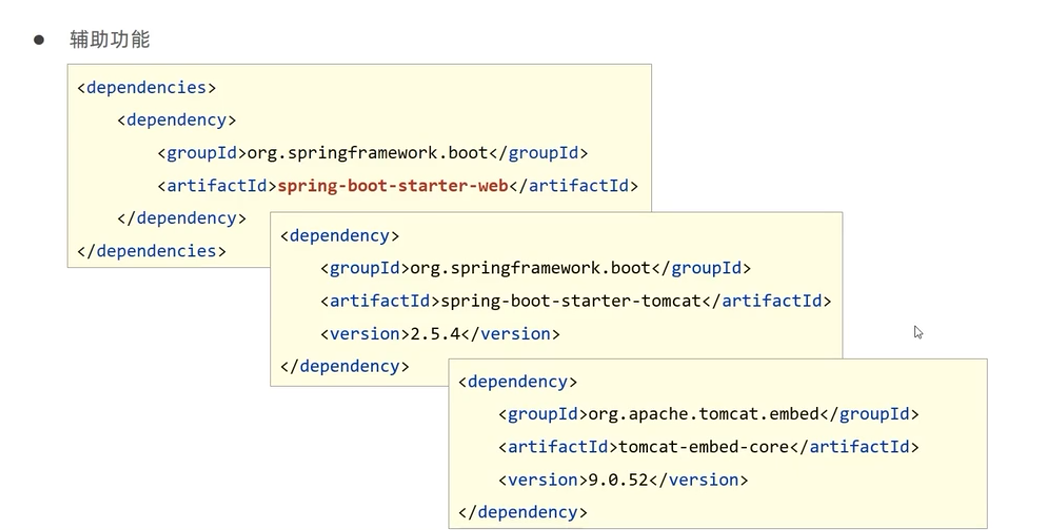
内嵌Tomcat,将Tomcat容器以对象的形式在SpringBoot容器中运行,如果不想用这个服务器,可以用exclusion排除掉,再添加新的服务器即可。
二、REST风格补充
2.1、REST风格简介
REST全称是表现形式状态转换,其实就是设置访问资源的描述形式。

REST风格是隐藏资源的访问行为的,一般的使用如下动作行为区分对资源做了何种操作。

2.2、Restful风格入门案例
请求就是隐藏了访问路径的具体动作,使用method指定访问动作即可。

对于又请求参数的,需要设置路劲参数,具体如下:

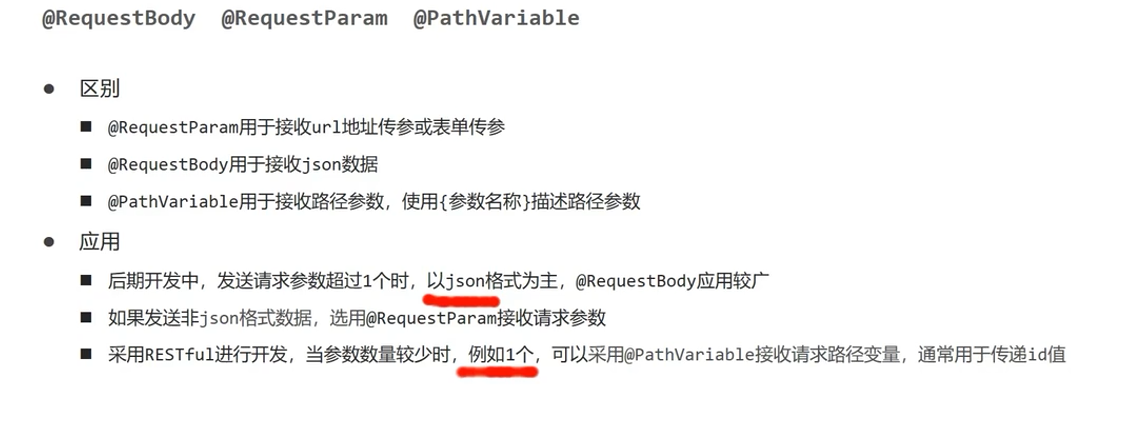
三种接收参数传递的注解,@PathVariable一般用于接收单个路径参数,@RequetBody一般用于接收封装好的json数据,最后一种用于接收非json数据,用的较少。
使用Restful进行增删改查的代码如下:
- import com.domain.User;
- import org.springframework.stereotype.Controller;
- import org.springframework.web.bind.annotation.*;
- @Controller
- public class UserController {
- //保存用户信息
- @RequestMapping(value = "/users",method = RequestMethod.POST)
- @ResponseBody
- public String save(){
- System.out.println("user save ...");
- return "{'module':'user save'}" ;
- }
- //删除指定id的用户信息
- @RequestMapping(value = "/users/{id}",method = RequestMethod.DELETE)
- @ResponseBody
- public String delete(@PathVariable Integer id){
- System.out.println("user delete ...");
- return "{'module':'user delete'}" ;
- }
- //添加用户数据
- @RequestMapping(value = "/users", method = RequestMethod.PUT)
- @ResponseBody
- public String update(@RequestBody User user){
- System.out.println("user update ...");
- return "{'module':'user update'}" ;
- }
- //查询指定id的用户
- @RequestMapping(value = "/users/{id}", method = RequestMethod.GET)
- @ResponseBody
- public String getById(@PathVariable Integer id){
- System.out.println("user getById ...");
- return "{'module':'user getById'}" ;
- }
- //查询所有用户的信息
- @RequestMapping(value = "/users", method = RequestMethod.GET)
- @ResponseBody
- public String getAll(){
- System.out.println("user getAll");
- return "{'module':'user getAll'}" ;
- }
- }
2.3、Restful快速开发
两个注解,如下,是两个注解的组合。

两外是请求映射注解的四个,如下:

简化后的增删改查如下:
- import com.domain.User;
- import org.springframework.web.bind.annotation.*;
- @RequestMapping("/users")
- @RestController //该注解是Controller和ResponseBody注解的组合
- public class UserController {
- //保存用户信息
- //@RequestMapping(method = RequestMethod.POST)
- @PostMapping
- public String save(){
- System.out.println("user save ...");
- return "{'module':'user save'}" ;
- }
- //删除指定id的用户信息
- //@RequestMapping(value = "/{id}",method = RequestMethod.DELETE)
- @DeleteMapping("/{id}")
- public String delete(@PathVariable Integer id){
- System.out.println("user delete ...");
- return "{'module':'user delete'}" ;
- }
- //添加用户数据
- //@RequestMapping( method = RequestMethod.PUT)
- @PutMapping
- public String update(@RequestBody User user){
- System.out.println("user update ...");
- return "{'module':'user update'}" ;
- }
- //查询指定id的用户
- //@RequestMapping(value = "/{id}", method = RequestMethod.GET)
- @GetMapping("/{id}")
- public String getById(@PathVariable Integer id){
- System.out.println("user getById ...");
- return "{'module':'user getById'}" ;
- }
- //查询所有用户的信息
- // @RequestMapping(method = RequestMethod.GET)
- @GetMapping
- public String getAll(){
- System.out.println("user getAll");
- return "{'module':'user getAll'}" ;
- }
- }
三、配置修改
3.1、属性配置方式
直接在application.properties中修改就可以,比如修改服务器端口号,如下:
- #修改服务器端口号
- server.port=80
3.2、文件配置格式及优先级
springboot中有三种文件配置格式,三种都可以用,优先级properties>yml>yaml

3.3、yaml基本语法规则
就是简单的层级关系,注意冒号后面与数据之间需要一个空格即可。
另外,在yaml中表示数组,可以使用减号作为开始,也可以直接用中括号,如下:

3.4、yaml读取单一属性数据
就是使用@Value进行读取单个数据,里面用$符号,遇到数组用中括号读取即可。

演示代码如下:
- server:
- port: 8080
- lesson:
- springboot
- subject:
- s1: English
- s2: math
- hobby:
- - running
- - basketball
- - volleyball
- - reading
- movies: ['西红柿首富','你好李焕英']
- import org.springframework.beans.factory.annotation.Value;
- import org.springframework.web.bind.annotation.GetMapping;
- import org.springframework.web.bind.annotation.RequestMapping;
- import org.springframework.web.bind.annotation.RestController;
- @RestController
- @RequestMapping("/books")
- public class BookController {
- @Value("${lesson}")
- private String lessonName ;
- @Value("${hobby[2]}")
- private String hobby ;
- @Value("${subject.s2}")
- private String subject ;
- @Value("${movies[1]}")
- private String movies ;
- @GetMapping("/print")
- public String print(){
- System.out.println(lessonName);
- System.out.println(hobby);
- System.out.println(subject);
- System.out.println(movies);
- return "success !!!" ;
- }
- }
3.5、读取yaml全部属性数据
使用Enviroment对象封装全部配置信息,使用@Autowired注解自动装配数据到Enviroment对象中。
- import org.springframework.beans.factory.annotation.Autowired;
- import org.springframework.core.env.Environment;
- import org.springframework.web.bind.annotation.GetMapping;
- import org.springframework.web.bind.annotation.RequestMapping;
- import org.springframework.web.bind.annotation.RestController;
- @RestController
- @RequestMapping("/books")
- public class BookController {
- //封装全部数据到Enviroment对象中
- @Autowired
- private Environment environment ;
- @GetMapping("/print")
- public String print(){
- System.out.println(environment.getProperty("lesson"));
- System.out.println(environment.getProperty("hobby[1]"));
- return "success !!!" ;
- }
- }
3.6、读取yaml引用类型数据
使用注解绑定配置信息到封装类,另外需要将封装类定义为bean,然后将bean注入。

yaml文件的配置如下:
- datasource:
- driver: com.mysql.jdbc.Driver
- username: root
- password: 123456
将配置信息封装到类中,再将类变成bean,交给Spring管理。
- import org.springframework.boot.context.properties.ConfigurationProperties;
- import org.springframework.stereotype.Component;
- @Component //将该类变成bean,可以进行依赖注入
- @ConfigurationProperties(prefix = "datasource") //绑定yaml文件中的datasource配置到该类中
- public class MyDataSource {
- private String driver ;
- private String username ;
- private String password ;
- public String getDriver() {
- return driver;
- }
- public void setDriver(String driver) {
- this.driver = driver;
- }
- public String getUsername() {
- return username;
- }
- public void setUsername(String username) {
- this.username = username;
- }
- public String getPassword() {
- return password;
- }
- public void setPassword(String password) {
- this.password = password;
- }
- @Override
- public String toString() {
- return "MyDataSource{" +
- "driver='" + driver + '\'' +
- ", username='" + username + '\'' +
- ", password='" + password + '\'' +
- '}';
- }
- }
四、SpringBoot整合第三方技术
4.1、整合junit
springboot整合junit主要包含下面三个步骤,具体如下,其实第一步都是自动生成的。

创建接口和实现类,并进行测试。
- public interface BookDao {
- public void save() ;
- }
- import org.springframework.stereotype.Repository;
- @Repository
- public class BookImpl implements BookDao {
- @Override
- public void save() {
- System.out.println("save ...");
- }
- }
注入测试对象,调用测方法。
- import com.dao.BookDao;
- import org.junit.jupiter.api.Test;
- import org.springframework.beans.factory.annotation.Autowired;
- import org.springframework.boot.test.context.SpringBootTest;
- @SpringBootTest
- class DemoApplicationTests {
- //注入要测试的对象
- @Autowired
- private BookDao bookDao ;
- @Test
- void contextLoads() {
- //执行测试对象相应的方法
- bookDao.save();
- }
- }
注:若测试类如果存在于引导类的包或者子包中无需指定引导类。
测试类不存在于引导类的包或者子包中需要使用classes属性执行引导类。
4.2、整合MyBatis
创建mybatis所需环境,在application.yml文件配置数据源,用于连接数据库。
- spring:
- datasource:
- driver-class-name: com.mysql.cj.jdbc.Driver
- url: jdbc:mysql://localhost:3306/test
- username: root
- password: 123456
创建一个Goods实体类,如下:
- public class Goods {
- private Integer id ;
- private String name ;
- private Integer count ;
- private Double price ;
- public Integer getId() {
- return id;
- }
- public void setId(Integer id) {
- this.id = id;
- }
- public String getName() {
- return name;
- }
- public void setName(String name) {
- this.name = name;
- }
- public Integer getCount() {
- return count;
- }
- public void setCount(Integer count) {
- this.count = count;
- }
- public Double getPrice() {
- return price;
- }
- public void setPrice(Double price) {
- this.price = price;
- }
- @Override
- public String toString() {
- return "Goods{" +
- "id=" + id +
- ", name='" + name + '\'' +
- ", count=" + count +
- ", price=" + price +
- '}';
- }
- }
写个接口,添加Mapper注解映射,并标记为Bean对象。
- import com.mybatis02.domain.Goods;
- import org.apache.ibatis.annotations.Mapper;
- import org.apache.ibatis.annotations.Select;
- import org.springframework.stereotype.Repository;
- import java.util.List;
- @Repository
- @Mapper
- public interface BookDao {
- @Select("select * from product")
- public List
getAll() ; - }
在测试类中中注入bean,调用方法完成测试。
- import com.mybatis02.dao.BookDao;
- import com.mybatis02.dao.BookDaoImpl;
- import org.junit.jupiter.api.Test;
- import org.springframework.beans.factory.annotation.Autowired;
- import org.springframework.boot.test.context.SpringBootTest;
- @SpringBootTest
- class Mybatis02ApplicationTests {
- @Autowired
- private BookDao bookDao ;
- @Test
- void contextLoads() {
- System.out.println(bookDao.getAll());
- }
- }
4.3、整合MyBatis-Plus
创建mybatis-Plus所需环境,在application.yml文件中进行配置数据源。
- spring:
- datasource:
- driver-class-name: com.mysql.cj.jdbc.Driver
- url: jdbc:mysql://localhost:3306/test
- username: root
- password: 123456
创建实体类,如下:
- public class Product {
- private Integer id ;
- private String name ;
- private Integer count ;
- private Double price ;
- public Integer getId() {
- return id;
- }
- public void setId(Integer id) {
- this.id = id;
- }
- public String getName() {
- return name;
- }
- public void setName(String name) {
- this.name = name;
- }
- public Integer getCount() {
- return count;
- }
- public void setCount(Integer count) {
- this.count = count;
- }
- public Double getPrice() {
- return price;
- }
- public void setPrice(Double price) {
- this.price = price;
- }
- @Override
- public String toString() {
- return "Goods{" +
- "id=" + id +
- ", name='" + name + '\'' +
- ", count=" + count +
- ", price=" + price +
- '}';
- }
- }
定义数据层的接口和映射配置,直接继承BaseMapper类,就可以直接使用增删改查方法
- import com.baomidou.mybatisplus.core.mapper.BaseMapper;
- import com.mybatisplus.domain.Product;
- import org.apache.ibatis.annotations.Mapper;
- import org.springframework.stereotype.Repository;
- @Mapper
- @Repository
- public interface BookDao extends BaseMapper
{ - }
将bean注入,完成测试。
- import com.mybatisplus.dao.BookDao;
- import org.junit.jupiter.api.Test;
- import org.springframework.beans.factory.annotation.Autowired;
- import org.springframework.boot.test.context.SpringBootTest;
- @SpringBootTest
- class MybatisplusApplicationTests {
- @Autowired
- private BookDao bookDao ;
- @Test
- void contextLoads() {
- System.out.println(bookDao.selectById(1));
- }
- }
4.4、整合Druid
导入Druid对应的starter坐标,配置数据源,写个接口完成增删改查,最后测试。
先导入druid的坐标,直接从该网站复制过来,放到pom.xml文件中。
- "1.0" encoding="UTF-8"?>
- <project xmlns="http://maven.apache.org/POM/4.0.0" xmlns:xsi="http://www.w3.org/2001/XMLSchema-instance"
- xsi:schemaLocation="http://maven.apache.org/POM/4.0.0 https://maven.apache.org/xsd/maven-4.0.0.xsd">
- <modelVersion>4.0.0modelVersion>
- <parent>
- <groupId>org.springframework.bootgroupId>
- <artifactId>spring-boot-starter-parentartifactId>
- <version>2.7.5version>
- <relativePath/>
- parent>
- <groupId>com.druidgroupId>
- <artifactId>demoartifactId>
- <version>0.0.1-SNAPSHOTversion>
- <name>druidname>
- <description>Demo project for Spring Bootdescription>
- <properties>
- <java.version>1.8java.version>
- properties>
- <dependencies>
- <dependency>
- <groupId>org.mybatis.spring.bootgroupId>
- <artifactId>mybatis-spring-boot-starterartifactId>
- <version>2.2.2version>
- dependency>
- <dependency>
- <groupId>com.alibabagroupId>
- <artifactId>druid-spring-boot-starterartifactId>
- <version>1.2.14version>
- dependency>
- <dependency>
- <groupId>com.mysqlgroupId>
- <artifactId>mysql-connector-jartifactId>
- <scope>runtimescope>
- dependency>
- <dependency>
- <groupId>org.springframework.bootgroupId>
- <artifactId>spring-boot-starter-testartifactId>
- <scope>testscope>
- dependency>
- dependencies>
- <build>
- <plugins>
- <plugin>
- <groupId>org.springframework.bootgroupId>
- <artifactId>spring-boot-maven-pluginartifactId>
- plugin>
- plugins>
- build>
- project>
配置数据源,如下:
- spring:
- datasource:
- druid:
- driver-class-name: com.mysql.cj.jdbc.Driver
- url: jdbc:mysql://localhost:3306/test?serverTimezone=UTC
- username: root
- password: 123456
写个接口完成查找功能,然后测试即可。
- import com.druid.domain.Goods;
- import org.apache.ibatis.annotations.Mapper;
- import org.apache.ibatis.annotations.Select;
- import org.springframework.stereotype.Repository;
- import java.util.List;
- @Repository
- @Mapper
- public interface BookDao {
- @Select("select * from product")
- public List
getAll() ; - }
- import com.druid.dao.BookDao;
- import org.junit.jupiter.api.Test;
- import org.springframework.beans.factory.annotation.Autowired;
- import org.springframework.boot.test.context.SpringBootTest;
- @SpringBootTest
- class DruidApplicationTests {
- @Autowired
- private BookDao bookDao ;
- @Test
- void contextLoads() {
- System.out.println(bookDao.getAll()) ;
- }
- }
五、基于SpringBoot的SSMP案例整合
5.1、案例实现方案分析

5.2、模块创建
主要包含以下三步,在第1步是在创建springboot项目的时候导入相应的坐标,然后修改配置文件,我们不使用.properties的配置文件,我们使用.yml配置文件,同时我们修改端口号为80.

5.3、快速创建实体类
使用lombok可以简化开发,在pom.xml中加入lombok依赖,使用@Data注解就可以了,里面自动封装了setter和getter方法等,但是没有构造方法,如果需要还要自己写。
- import lombok.Data;
- @Data
- public class Product {
- private Integer id ;
- private String name ;
- private Integer count ;
- private Double price ;
- public Product() {
- }
- public Product(Integer id, String name, Integer count, Double price) {
- this.id = id;
- this.name = name;
- this.count = count;
- this.price = price;
- }
- }
5.4、数据层快速开发
首先导入mybatis-plus和druid坐标依赖,配置数据源,开发dao接口(直接继承BaseMapper),最后在测试类进行测试增删改查的api。
1)配置依赖坐标。
- "1.0" encoding="UTF-8"?>
- <project xmlns="http://maven.apache.org/POM/4.0.0" xmlns:xsi="http://www.w3.org/2001/XMLSchema-instance"
- xsi:schemaLocation="http://maven.apache.org/POM/4.0.0 https://maven.apache.org/xsd/maven-4.0.0.xsd">
- <modelVersion>4.0.0modelVersion>
- <parent>
- <groupId>org.springframework.bootgroupId>
- <artifactId>spring-boot-starter-parentartifactId>
- <version>2.7.5version>
- <relativePath/>
- parent>
- <groupId>com.itemsgroupId>
- <artifactId>itemartifactId>
- <version>0.0.1-SNAPSHOTversion>
- <name>itemname>
- <description>Demo project for Spring Bootdescription>
- <properties>
- <java.version>1.8java.version>
- properties>
- <dependencies>
- <dependency>
- <groupId>org.springframework.bootgroupId>
- <artifactId>spring-boot-starter-webartifactId>
- dependency>
- <dependency>
- <groupId>com.baomidougroupId>
- <artifactId>mybatis-plus-boot-starterartifactId>
- <version>3.5.2version>
- dependency>
- <dependency>
- <groupId>com.alibabagroupId>
- <artifactId>druid-spring-boot-starterartifactId>
- <version>1.2.14version>
- dependency>
- <dependency>
- <groupId>org.projectlombokgroupId>
- <artifactId>lombokartifactId>
- dependency>
- <dependency>
- <groupId>com.mysqlgroupId>
- <artifactId>mysql-connector-jartifactId>
- <scope>runtimescope>
- dependency>
- <dependency>
- <groupId>org.springframework.bootgroupId>
- <artifactId>spring-boot-starter-testartifactId>
- <scope>testscope>
- dependency>
- dependencies>
- <build>
- <plugins>
- <plugin>
- <groupId>org.springframework.bootgroupId>
- <artifactId>spring-boot-maven-pluginartifactId>
- plugin>
- plugins>
- build>
- project>
2)配置数据源。
- server:
- port: 80
- spring:
- datasource:
- druid:
- driver-class-name: com.mysql.cj.jdbc.Driver
- url: jdbc:mysql://localhost:3306/test?serverTimezone=UTC
- username: root
- password: 123456
- #设置id默认自动递增
- mybatis-plus:
- global-config:
- db-config:
- id-type: auto
3)开发Dao接口
- import com.baomidou.mybatisplus.core.mapper.BaseMapper;
- import com.items.domain.Product;
- import org.apache.ibatis.annotations.Mapper;
- import org.springframework.stereotype.Repository;
- @Mapper
- @Repository
- public interface ProductDao extends BaseMapper
{ - }
4)编写测试类,对Dao接口的增删改查方法进行测试。
- import com.items.domain.Product;
- import org.junit.jupiter.api.Test;
- import org.springframework.beans.factory.annotation.Autowired;
- import org.springframework.boot.test.context.SpringBootTest;
- @SpringBootTest
- class DaoApplicationTests {
- @Autowired
- private ProductDao productDao ;
- @Test
- void testGetById() { //按照id查询
- System.out.println(productDao.selectById(2)) ;
- }
- @Test
- void testGetAll() { //查询所有
- System.out.println(productDao.selectList(null)) ;
- }
- @Test
- void testSave(){ //添加
- //如果setter和getter方法不能用,需要在设置->插件中下载lombok的差件,重启IDE就可以劣
- Product product = new Product() ;
- product.setName("测试案例1");
- product.setCount(1234);
- product.setPrice(1234.0);
- productDao.insert(product) ;
- }
- @Test
- void testUpdate(){ //修改
- Product product = new Product() ;
- product.setId(1);
- product.setName("修改id=1的案例");
- product.setCount(10000);
- product.setPrice(12000.00);
- productDao.updateById(product) ;
- }
- @Test
- void testDelete(){ //删除指定数据行
- productDao.deleteById(11) ;
- }
- }
5.5、分页查询
使用Ipage封装分页数据,分页操作依赖MyBatis-Plus的拦截器实现。
设置拦截器,内部是动态拼接SQL语句。
- import com.baomidou.mybatisplus.extension.plugins.MybatisPlusInterceptor;
- import com.baomidou.mybatisplus.extension.plugins.inner.PaginationInnerInterceptor;
- import org.springframework.context.annotation.Bean;
- import org.springframework.context.annotation.Configuration;
- @Configuration
- public class MPConfig {
- @Bean //将拦截器交给Spring管理
- public MybatisPlusInterceptor mybatisPlusInterceptor(){
- MybatisPlusInterceptor mybatisPlusInterceptor = new MybatisPlusInterceptor() ;
- mybatisPlusInterceptor.addInnerInterceptor(new PaginationInnerInterceptor());
- return mybatisPlusInterceptor ;
- }
- }
使用Ipage封装分页数据,并进行查询,如下:
- @Test
- void testGetPage(){ //分页查询
- IPage page = new Page(1,5) ;
- productDao.selectPage(page,null) ;
- }
5.6、数据层的按条件查询
可以使用Querywrapper和LambdaQuerywrapper完成条件查询,所有查询封装成方法调用。
- @Test
- void testGetBy1(){ //按条件查询方式1
- String name = "洗衣机" ;
- QueryWrapper
queryWrapper = new QueryWrapper<>() ; - queryWrapper.like(name!=null,"name","洗衣机") ;
- productDao.selectList(queryWrapper) ;
- }
- @Test
- void testGetBy2(){ //按条件查询方式2
- String name = "洗衣机" ;
- LambdaQueryWrapper
queryWrapper = new LambdaQueryWrapper<>() ; - queryWrapper.like(name!=null,Product::getName,name) ;
- productDao.selectList(queryWrapper) ;
- }
5.7、业务层的开发(crud)
首先写业务层的接口,如下:
- import com.baomidou.mybatisplus.core.metadata.IPage;
- import com.items.domain.Product;
- import java.util.List;
- public interface ProductService {
- Boolean save(Product product) ;
- Boolean update(Product product) ;
- Boolean delete(Integer id) ;
- Product getById(Integer id) ;
- List
getAll() ; - IPage
getPage(Integer currentPage, Integer pageSize) ; - }
将bean注入,根据接口,写具体的实现类,如下:
- import com.baomidou.mybatisplus.core.metadata.IPage;
- import com.baomidou.mybatisplus.extension.plugins.pagination.Page;
- import com.items.dao.ProductDao;
- import com.items.domain.Product;
- import com.items.service.ProductService;
- import org.springframework.beans.factory.annotation.Autowired;
- import org.springframework.stereotype.Service;
- import java.util.List;
- @Service
- public class ProductServiceImpl implements ProductService {
- @Autowired
- private ProductDao productDao ;
- @Override
- public Boolean save(Product product) {
- return productDao.insert(product) > 0 ;
- }
- @Override
- public Boolean update(Product product) {
- return productDao.updateById(product) > 0 ;
- }
- @Override
- public Boolean delete(Integer id) {
- return productDao.deleteById(id) > 0 ;
- }
- @Override
- public Product getById(Integer id) {
- return productDao.selectById(id) ;
- }
- @Override
- public List
getAll() { - return productDao.selectList(null) ;
- }
- @Override
- public IPage
getPage(Integer currentPage, Integer pageSize) { - IPage page = new Page(currentPage,pageSize) ;
- productDao.selectPage(page,null) ;
- return page;
- }
- }
最后,编写测试类完成业务层的测试,如下:
- import com.baomidou.mybatisplus.core.conditions.query.LambdaQueryWrapper;
- import com.baomidou.mybatisplus.core.conditions.query.QueryWrapper;
- import com.baomidou.mybatisplus.core.metadata.IPage;
- import com.baomidou.mybatisplus.extension.plugins.pagination.Page;
- import com.items.dao.ProductDao;
- import com.items.domain.Product;
- import org.junit.jupiter.api.Test;
- import org.springframework.beans.factory.annotation.Autowired;
- import org.springframework.boot.test.context.SpringBootTest;
- @SpringBootTest
- class ServiceApplicationTests {
- @Autowired
- private ProductService productService ;
- @Test
- void testGetById() { //按照id查询
- System.out.println(productService.getById(1)) ;
- }
- @Test
- void testGetAll() { //查询所有
- System.out.println(productService.getAll()) ;
- }
- @Test
- void testSave(){ //添加
- //如果setter和getter方法不能用,需要在设置->插件中下载lombok的差件,重启IDE就可以劣
- Product product = new Product() ;
- product.setName("测试案例1");
- product.setCount(1234);
- product.setPrice(1234.0);
- productService.save(product) ;
- }
- @Test
- void testUpdate(){ //修改
- Product product = new Product() ;
- product.setId(1);
- product.setName("修改id=1的案例");
- product.setCount(10000);
- product.setPrice(12000.00);
- productService.update(product) ;
- }
- @Test
- void testDelete(){ //删除指定数据行
- productService.delete(10) ;
- }
- @Test
- void testGetPage(){ //分页查询
- productService.getPage(1,5) ;
- }
- }
5.8、业务层的开发(基于MyBatis-Plus构建)
使用MP进行业务层的开发有业务层通用接口Iservice和业务层通用实现类ServiceImpl,可以帮助完成业务层的快速开发,可以在其继续添加方法,注意不要覆盖方法即可。
1)继承Iservice接口就可以实现增删改查,内部不需要再写具体接口方法
- import com.baomidou.mybatisplus.extension.service.IService;
- import com.items.domain.Product;
- public interface IProductService extends IService
{ - //这是追加的方法,原始的方法直接继承了,不用再写
- Boolean insert(Product product) ;
- Boolean modify(Product product) ;
- Boolean delete(Integer id) ;
- Product get(Integer id) ;
- }
2)接口实现类,为了不重写所有的方法,可以直接继承ServiceImpl即可
- import com.baomidou.mybatisplus.extension.service.impl.ServiceImpl;
- import com.items.dao.ProductDao;
- import com.items.domain.Product;
- import com.items.service.IProductService;
- import org.springframework.beans.factory.annotation.Autowired;
- import org.springframework.stereotype.Service;
- @Service
- public class ProductServiceImpl extends ServiceImpl
- //里面是追加方法的实现
- @Autowired
- private ProductDao productDao ;
- @Override
- public Boolean insert(Product product) {
- return productDao.insert(product) > 0 ;
- }
- @Override
- public Boolean modify(Product product) {
- return productDao.updateById(product) > 0 ;
- }
- @Override
- public Boolean delete(Integer id) {
- return productDao.deleteById(id) > 0 ;
- }
- @Override
- public Product get(Integer id) {
- return productDao.selectById(id) ;
- }
- }
3)最后创建一个测试类进行测试,如下:
- import com.baomidou.mybatisplus.core.metadata.IPage;
- import com.baomidou.mybatisplus.extension.plugins.pagination.Page;
- import com.items.domain.Product;
- import org.junit.jupiter.api.Test;
- import org.springframework.beans.factory.annotation.Autowired;
- import org.springframework.boot.test.context.SpringBootTest;
- @SpringBootTest
- class Service1ApplicationTests {
- @Autowired
- private IProductService iProductService ;
- @Test
- void testGetById() { //按照id查询
- System.out.println(iProductService.getById(1)) ;
- }
- @Test
- void testGetAll() { //查询所有
- System.out.println(iProductService.list()) ;
- }
- @Test
- void testSave(){ //添加
- //如果setter和getter方法不能用,需要在设置->插件中下载lombok的差件,重启IDE就可以劣
- Product product = new Product() ;
- product.setName("测试案例1");
- product.setCount(1234);
- product.setPrice(1234.0);
- iProductService.save(product) ;
- }
- @Test
- void testUpdate(){ //修改
- Product product = new Product() ;
- product.setId(1);
- product.setName("修改id=1的案例");
- product.setCount(10000);
- product.setPrice(12000.00);
- iProductService.updateById(product) ;
- }
- @Test
- void testDelete(){ //删除指定数据行
- iProductService.removeById(15) ;
- }
- @Test
- void testGetPage(){ //分页查询
- IPage
page = new Page<>(1,5) ; - iProductService.page(page) ;
- System.out.println(page.getCurrent());
- System.out.println(page.getSize());
- System.out.println(page.getTotal());
- System.out.println(page.getPages());
- System.out.println(page.getRecords());
- }
- }
5.9、表现层标准开发
基于Restful风格的变现层开发,新增POST,删除DELETE,修改PUT,查询GET,接收实体参数使用@RequestBody注解,接收路径变量参数使用@PathVariable注解。
- import com.baomidou.mybatisplus.core.metadata.IPage;
- import com.items.domain.Product;
- import com.items.service.IProductService;
- import org.springframework.beans.factory.annotation.Autowired;
- import org.springframework.web.bind.annotation.*;
- import java.util.List;
- @RestController
- @RequestMapping("/products")
- public class ProductController {
- @Autowired
- private IProductService productService ;
- @GetMapping
- public List
getAll() { - return productService.list() ;
- }
- @PostMapping
- public Boolean save(@RequestBody Product product){
- return productService.save(product) ;
- }
- @PutMapping
- public Boolean update(@RequestBody Product product){
- return productService.updateById(product) ;
- }
- @DeleteMapping("/{id}")
- public Boolean delete(@PathVariable Integer id){
- return productService.removeById(id) ;
- }
- @GetMapping("/{id}")
- public Product getById(@PathVariable Integer id){
- return productService.getById(id) ;
- }
- //按条件查询页面数据
- @GetMapping("/{currentPage}/{pageSize}")
- public IPage
getPage(@PathVariable Integer currentPage, @PathVariable Integer pageSize){ - return productService.getPage(currentPage, pageSize) ;
- }
- }
下面对表现层进行数据一致化处理,把所有的格式统一为一样的。我们需要设计表现层返回结果的模型类,用于前后端数据格式统一,也叫做前后端数据协议。
将数据都返回成flag标记是否操作成功,object标记操作结果。
- import lombok.Data;
- @Data //可以不用写setter和getter方法之类的
- public class R {
- private Boolean flag ;
- private Object data ;
- public R() {
- }
- public R(Boolean flag) {
- this.flag = flag;
- }
- public R(Boolean flag, Object data) {
- this.flag = flag;
- this.data = data ;
- }
- }
- import com.baomidou.mybatisplus.core.metadata.IPage;
- import com.items.domain.Product;
- import com.items.service.IProductService;
- import com.items.utils.R;
- import org.springframework.beans.factory.annotation.Autowired;
- import org.springframework.web.bind.annotation.*;
- import java.util.List;
- @RestController
- @RequestMapping("/products")
- public class ProductController {
- @Autowired
- private IProductService productService ;
- @GetMapping
- public R getAll() {
- return new R(true,productService.list()) ;
- }
- @PostMapping
- public R save(@RequestBody Product product){
- return new R(productService.save(product)) ;
- }
- @PutMapping
- public R update(@RequestBody Product product){
- return new R(productService.updateById(product)) ;
- }
- @DeleteMapping("/{id}")
- public R delete(@PathVariable Integer id){
- return new R(productService.removeById(id)) ;
- }
- @GetMapping("/{id}")
- public R getById(@PathVariable Integer id){
- return new R(true , productService.getById(id)) ;
- }
- //按条件查询页面数据
- @GetMapping("/{currentPage}/{pageSize}")
- public R getPage(@PathVariable Integer currentPage, @PathVariable Integer pageSize){
- return new R(true, productService.getPage(currentPage, pageSize)) ;
- }
- }
5.10、前后端协议联调
前端发送异步请求,调用后端接口。前端页面代码如下:
- html>
- <html>
- <head>
- <meta charset="utf-8">
- <meta http-equiv="X-UA-Compatible" content="IE=edge">
- <title>基于SpringBoot整合SSM案例title>
- <meta content="width=device-width,initial-scale=1,maximum-scale=1,user-scalable=no" name="viewport">
- <link rel="stylesheet" href="../plugins/elementui/index.css">
- <link rel="stylesheet" href="../plugins/font-awesome/css/font-awesome.min.css">
- <link rel="stylesheet" href="../css/style.css">
- head>
- <body class="hold-transition">
- <div id="app">
- <div class="content-header">
- <h1>仓库管理系统h1>
- div>
- <div class="app-container">
- <div class="box">
- <div class="filter-container">
- <el-input v-model="pagination.count" placeholder="数量" style="width: 200px;" class="filter-item">el-input>
- <el-input v-model="pagination.name" placeholder="名称" style="width: 200px;" class="filter-item">el-input>
- <el-input v-model="pagination.price" placeholder="价格" style="width: 200px;" class="filter-item">el-input>
- <el-button @click="getAll()" class="dalfBut">查询el-button>
- <el-button type="primary" class="butT" @click="handleCreate()">新建el-button>
- div>
- <el-table size="small" current-row-key="id" :data="dataList" stripe highlight-current-row>
- <el-table-column type="index" align="center" label="序号">el-table-column>
- <el-table-column prop="count" label="数量" align="center">el-table-column>
- <el-table-column prop="name" label="名称" align="center">el-table-column>
- <el-table-column prop="price" label="价格" align="center">el-table-column>
- <el-table-column label="操作" align="center">
- <template slot-scope="scope">
- <el-button type="primary" size="mini" @click="handleUpdate(scope.row)">编辑el-button>
- <el-button type="danger" size="mini" @click="handleDelete(scope.row)">删除el-button>
- template>
- el-table-column>
- el-table>
- <div class="pagination-container">
- <el-pagination
- class="pagiantion"
- @current-change="handleCurrentChange"
- :current-page="pagination.currentPage"
- :page-size="pagination.pageSize"
- layout="total, prev, pager, next, jumper"
- :total="pagination.total">
- el-pagination>
- div>
- <div class="add-form">
- <el-dialog title="新增商品" :visible.sync="dialogFormVisible">
- <el-form ref="dataAddForm" :model="formData" :rules="rules" label-position="right" label-width="100px">
- <el-row>
- <el-col :span="12">
- <el-form-item label="数量" prop="count">
- <el-input v-model="formData.count"/>
- el-form-item>
- el-col>
- <el-col :span="12">
- <el-form-item label="名称" prop="name">
- <el-input v-model="formData.name"/>
- el-form-item>
- el-col>
- el-row>
- <el-row>
- <el-col :span="24">
- <el-form-item label="价格">
- <el-input v-model="formData.price" type="textarea">el-input>
- el-form-item>
- el-col>
- el-row>
- el-form>
- <div slot="footer" class="dialog-footer">
- <el-button @click="cancel()">取消el-button>
- <el-button type ="primary" @click="handleAdd()">确定el-button>
- div>
- el-dialog>
- div>
- <div class="add-form">
- <el-dialog title="编辑检查项" :visible.sync="dialogFormVisible4Edit">
- <el-form ref="dataEditForm" :model="formData" :rules="rules" label-position="right" label-width="100px">
- <el-row>
- <el-col :span="12">
- <el-form-item label="数量" prop="count">
- <el-input v-model="formData.count"/>
- el-form-item>
- el-col>
- <el-col :span="12">
- <el-form-item label="名称" prop="name">
- <el-input v-model="formData.name"/>
- el-form-item>
- el-col>
- el-row>
- <el-row>
- <el-col :span="24">
- <el-form-item label="价格">
- <el-input v-model="formData.price" type="textarea">el-input>
- el-form-item>
- el-col>
- el-row>
- el-form>
- <div slot="footer" class="dialog-footer">
- <el-button @click="cancel()">取消el-button>
- <el-button type="primary" @click="handleEdit()">确定el-button>
- div>
- el-dialog>
- div>
- div>
- div>
- div>
- body>
- <script src="../js/vue.js">script>
- <script src="../plugins/elementui/index.js">script>
- <script type ="text/javascript" src="../js/jquery.min.js">script>
- <script src="../js/axios-0.18.0.js">script>
- <script>
- var vue = new Vue({
- el: '#app',
- data:{
- dataList: [],//当前页要展示的列表数据
- dialogFormVisible: false,//添加表单是否可见
- dialogFormVisible4Edit:false,//编辑表单是否可见
- formData: {},//表单数据
- rules: {//校验规则
- count: [{ required: true, message: '必填项', trigger: 'blur' }],
- name: [{ required: true, message: '必填项', trigger: 'blur' }]
- },
- pagination: {//分页相关模型数据
- currentPage: 1,//当前页码
- pageSize:10,//每页显示的记录数
- total:0,//总记录数
- count: "",
- name: "",
- price: ""
- }
- },
- //钩子函数,VUE对象初始化完成后自动执行
- created() {
- this.getAll();
- },
- methods: {
- //分页查询
- getAll() {
- // 组织参数,拼接url请求地址
- var paramStr = "?name=" + this.pagination.name
- + "&count=" + this.pagination.count
- + "&price=" + this.pagination.price;
- console.log(paramStr);
- axios.get("/products/" + this.pagination.currentPage + "/" + this.pagination.pageSize + paramStr).then(res => {
- // console.log(res.data);
- this.pagination.currentPage = res.data.data.current;
- this.pagination.pageSize = res.data.data.size;
- this.pagination.total = res.data.data.total;
- this.dataList = res.data.data.records;
- });
- },
- //切换页码
- handleCurrentChange(currentPage) {
- // 修改页码值为当前选中的页码值
- this.pagination.currentPage = currentPage;
- // 执行查询
- this.getAll();
- },
- //弹出添加窗口
- handleCreate() {
- this.dialogFormVisible = true;
- this.resetForm();
- },
- //重置表单
- resetForm() {
- this.formData = {};
- },
- //添加
- handleAdd () {
- axios.post("/products", this.formData).then(res => {
- // 判断当前操作是否成功
- if(res.data.flag) {
- // 1.关闭弹层
- this.dialogFormVisible = false;
- this.$message.success(res.data.msg);
- } else {
- this.$message.error(res.data.msg);
- }
- }).finally(() => {
- // 2.重新加载数据
- this.getAll();
- });
- },
- //取消
- cancel(){
- this.dialogFormVisible = false;
- this.dialogFormVisible4Edit = false;
- this.$message.info("当前操作取消!");
- },
- // 删除
- handleDelete(row) {
- // console.log(row);
- this.$confirm("删除的数据将不可恢复,是否继续?", "提示", {type : "info"}).then(() => {
- axios.delete("/products/" + row.id).then(res => {
- if (res.data.flag) {
- this.$message.success(res.data.msg);
- } else {
- this.$message.error(res.data.msg);
- }
- }).finally(() => {
- this.getAll();
- });
- }).catch(() => {
- this.$message.info("取消操作");
- });
- },
- //弹出编辑窗口,以便于修改操作
- handleUpdate(row) {
- // 发送异步请求
- axios.get("/products/" + row.id).then(res => {
- // console.log(res.data);
- if (res.data.flag && res.data.data != null) {
- this.dialogFormVisible4Edit = true;
- this.formData = res.data.data;
- } else {
- this.$message.error(res.data.msg);
- }
- }).finally(() => { //不管弹出与否,自动刷新
- this.getAll();
- });
- },
- //修改
- handleEdit() {
- axios.put("/products", this.formData).then(res => {
- // 判断当前操作是否成功
- if(res.data.flag) {
- // 1.关闭弹层
- this.dialogFormVisible4Edit = false;
- this.$message.success(res.data.msg);
- } else {
- this.$message.error(res.data.msg);
- }
- }).finally(() => {
- // 2.重新加载数据
- this.getAll();
- });
- },
- //条件查询
- }
- })
- script>
- html>
后端的代码做了修改,加了异常处理:
- import org.springframework.web.bind.annotation.ExceptionHandler;
- import org.springframework.web.bind.annotation.RestControllerAdvice;
- //作为SpringMVC的异常处理
- @RestControllerAdvice
- public class ExceptionAdvice {
- @ExceptionHandler //拦截异常信息
- public R doException(Exception e){
- e.printStackTrace();
- return new R(false, "服务器故障,请您稍后再试!") ;
- }
- }
对于业务层的添加功能,增加了添加成功和添加失败的提示信息msg,直接在前端获取。
- @PostMapping
- public R save(@RequestBody Product product){
- Boolean flag = productService.save(product) ;
- return new R(flag, flag ? "添加成功" : "添加失败") ;
- }
- public R(Boolean flag, String msg){
- this.flag = flag ;
- this.msg = msg ;
- }
对于按条件查询问题,在控制层引入了实体类product,并覆盖业务层的方法和实现类。
- //按条件查询页面数据
- @GetMapping("/{currentPage}/{pageSize}")
- public R getPage(@PathVariable Integer currentPage, @PathVariable Integer pageSize, Product product){
- return new R(true, productService.getPage(currentPage, pageSize,product)) ;
- }
IPagegetPage(Integer currentPage, Integer pageSize, Product product); - @Override
- public IPage
getPage(Integer currentPage, Integer pageSize, Product product) { - IPage iPage = new Page (currentPage,pageSize) ;
- LambdaQueryWrapper
lambdaQueryWrapper = new LambdaQueryWrapper<>() ; - lambdaQueryWrapper.like(Strings.isNotEmpty(product.getName()),Product::getName,product.getName()) ;
- lambdaQueryWrapper.like(!(product.getCount() == null), Product::getCount, product.getCount()) ;
- lambdaQueryWrapper.eq(!(product.getPrice() == null), Product::getPrice, product.getPrice()) ;
- return productDao.selectPage(iPage, lambdaQueryWrapper) ;
- }
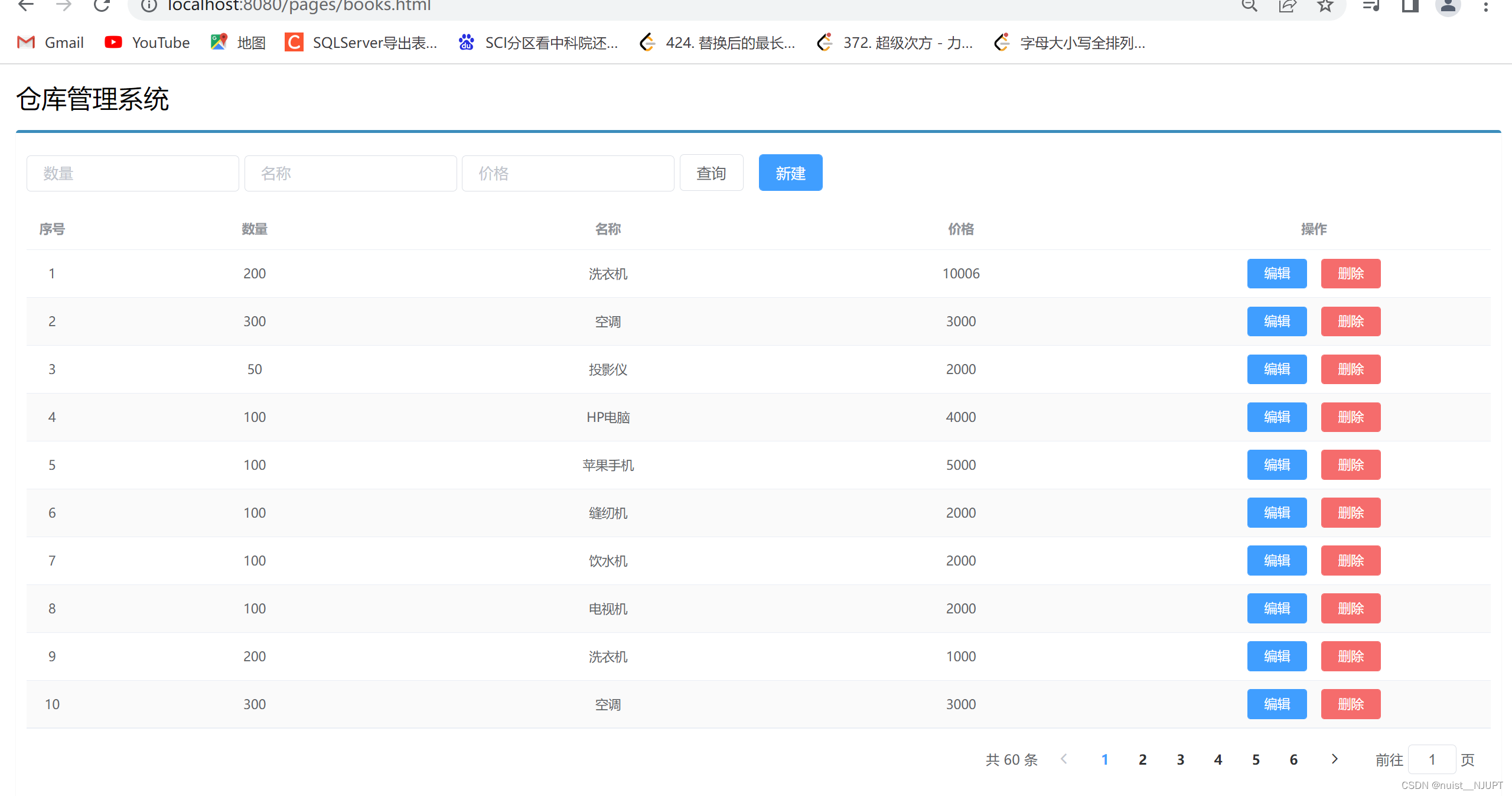
查询全部的数据页面如下:
按数量查询如下:

按名称查询如下:

按价格查询如下:

修改功能如下:

删除功能如下:

添加功能如下:

最后的总结如下:

-
相关阅读:
状态管理Pinia
财报解读:抢滩“睡眠经济”,麒盛科技如何制胜市场?
原型-设计模式
【Linux03-基本工具之VIM】Linux下的强大编辑器(附软件生态与yum)
Python 例题(10)
雷军的开源情怀
实现打包后暴露可修改接口地址文件
Python+Selenium做自动化测试
SpringBoot+Jwt+Redis
springboot+jsp+ssm助农系统农产品宣传网站设计
- 原文地址:https://blog.csdn.net/nuist_NJUPT/article/details/127726184